Google Enables Simpler SearchWiki Notes Sharing
Brian Ussery noticed Google has changed the way you can share your SearchWiki notes in the search results. If you are logged in to Google and you have notes on search results, you can share those notes with friends. Here is how: (1) Search on the query at Google and the results should show up […]
Barry Schwartz on May 22, 2009 at 8:23 am | Reading time: 1 minute
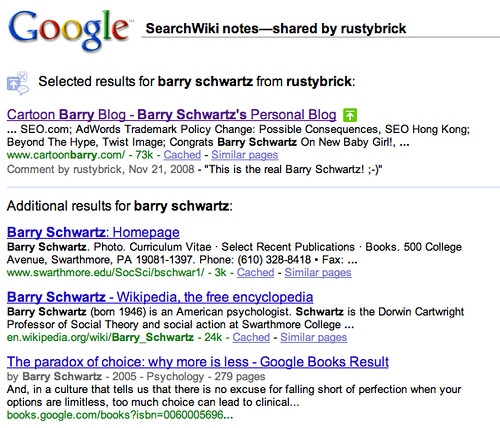
Brian Ussery noticed Google has changed the way you can share your SearchWiki notes in the search results. If you are logged in to Google and you have notes on search results, you can share those notes with friends. Here is how:
(1) Search on the query at Google and the results should show up with a link at the top to “share these notes”:

(2) Click the link and a URL will show up in a text box, copy and paste the link and send it to a friend:

(3) Here is a preview of that result for you to see:

Related stories
About the author

Staff
Barry Schwartz is a Contributing Editor to Search Engine Land and a member of the programming team for SMX events. He owns RustyBrick, a NY based web consulting firm. He also runs Search Engine Roundtable, a popular search blog on very advanced SEM topics. Barry can be followed on Twitter here.