Google Image Search Makes SafeSearch Toggle Switch Quicker
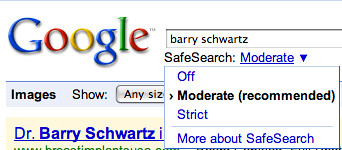
Google Image Search has made it a bit easier to toggle between the three levels of SafeSearch. SafeSearch is the adult image filter Google uses to help prevent adult content from showing up in the image search results. The new toggle switch allows you to click on the filter type and then select from a […]
Barry Schwartz on July 6, 2009 at 9:26 am | Reading time: 1 minute
Google Image Search has made it a bit easier to toggle between the three levels of SafeSearch. SafeSearch is the adult image filter Google uses to help prevent adult content from showing up in the image search results. The new toggle switch allows you to click on the filter type and then select from a contextual drop down menu to make the filter moderate, strict or turn it off. Here is a picture:
I believe the first to write about this was Google Blogoscoped, yesterday at about 3:30 pm (EST).

Related stories
About the author

Staff
Barry Schwartz is a Contributing Editor to Search Engine Land and a member of the programming team for SMX events. He owns RustyBrick, a NY based web consulting firm. He also runs Search Engine Roundtable, a popular search blog on very advanced SEM topics. Barry can be followed on Twitter here.