Google Tweaks Interface For “Keyword Ideas” In AdWords Keyword Tool

Google has changed the way it’s displaying “Keyword Ideas” in its AdWords Keyword Tool, breaking them into a separate tab so advertisers can more easily view both keywords and ideas.

The keyword ideas are suggestions that are somehow related to the keywords or URL input at the top of the tool, and, like keywords, they show the number of global and local monthly queries and the competition.
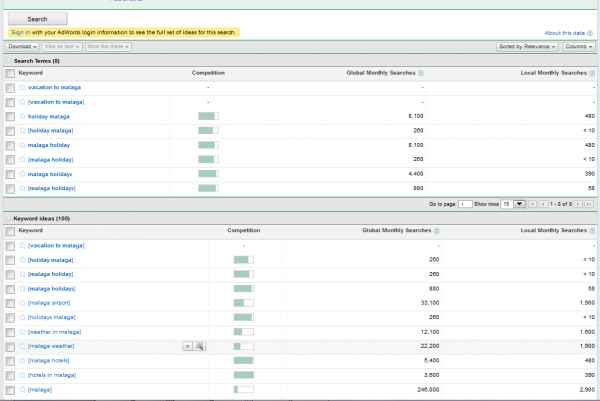
The change went into effect on Monday. Hat tip to SEO consultant Mags Sikora for pointing this out and providing a screenshot.

Related Topics: Channel: SEM | Google: AdWords


About The Author: is a contributing editor for Search Engine Land and Executive Features Editor at Marketing Land. She’s a well-respected authority on digital marketing, having reported and written on the subject since 1998, including a stint as managing editor of ClickZ. She’s also worked to help monetize independent publishers’ sites at Federated Media Publishing. She blogs about media and marketing at The River and about cooking, gardening and parenthood at Free Range. She can be found on Twitter as @pamelaparker.

Connect with the author via: Email | Twitter | Google+ | LinkedIn


SMX - Search Marketing Expo

SearchCap:

Get all the top search stories emailed daily!  

Like This Story? Please Share!

Other ways to share:

Like Our Site? Follow Us!

Subscribe to Our Feed! Join our LinkedIn Group Check out our Tumblr! See us on Pinterest Get Search Engine Land on your mobile device!
 

Read before commenting! We welcome constructive comments and allow any that meet our common sense criteria. This means being respectful and polite to others. It means providing helpful information that contributes to a story or discussion. It means leaving links only that substantially add further to a discussion. Comments using foul language, being disrespectful to others or otherwise violating what we believe are common sense standards of discussion will be deleted. Comments may also be removed if they are posted from anonymous accounts. You can read more about our comments policy here.
  • http://www.erocket.co.uk Dave Fowler

    This is a step in the right direction, but currently, despite selecting Exact match and deselecting Broad, figures for both get displayed in the Search Terms box. This requires exporting all the search terms to Excel, ordering the keywords alphabetically, then deleting the rows containing broad match volumes (i.e. leaving the block of keywords contained in [ ]. This should not be necessary and represents pretty poor usability; if we wanted broad match results we’d leave the radio button selected. Frustrating.

  • http://www.BlueHorseradish.com Larry

    I see the same thing as Dave comments about below. Yes, it is odd that even if you un-check the Broad match box and check the Exact match box, the data shown (and exported) has both.

    The quick and dirty solution for the Excel export problem is rather easy though – just sort them A to Z. Because exact match data is square bracketed, the exact match data is easily sorted from the unbracketed broad match data.

  • http://www.BlueHorseradish.com Larry

    Using this again today and the results now do show just the Exact Match words when Broad Match is unchecked. Nice to see this improvement!

Get Our News, Everywhere!

 
  • Advertise With Us
 

Click to watch SMX conference video

Join us at an upcoming SMX event:

North America

EMEA

APAC

Search Engine Land produces SMX, the Search Marketing Expo conference series. SMX events deliver the most comprehensive educational and networking experiences - whether you're just starting in search marketing or you're a seasoned expert.

SMX Site » | SMX Difference » | SMX News »


Search Engine Land Periodic Table of SEO Ranking Factors

Get Your Copy
Read The Full SEO Guide