Google’s New Report Offensive Images Feature
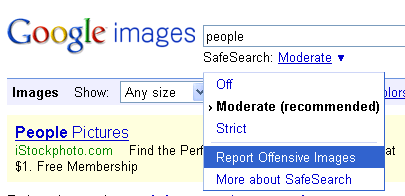
If you go to Google Images and search on a keyword, and then click on new SafeSearch filter drop down (might only work on a PC), you will see a new way of reporting offensive images. A drop down lets you select, “report offensive images.” Here is a picture: When you click it, the page […]
Barry Schwartz on July 10, 2009 at 10:04 am | Reading time: 1 minute
If you go to Google Images and search on a keyword, and then click on new SafeSearch filter drop down (might only work on a PC), you will see a new way of reporting offensive images. A drop down lets you select, “report offensive images.” Here is a picture:
When you click it, the page changes, to give you check boxes and a way to report several images as offensive. Here is a picture of that page:
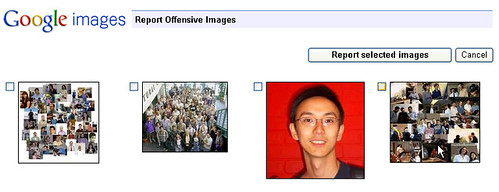
This does help people report several images at once. It does not seem to work for me on any Mac browser.

Related stories
About the author

Staff
Barry Schwartz is a Contributing Editor to Search Engine Land and a member of the programming team for SMX events. He owns RustyBrick, a NY based web consulting firm. He also runs Search Engine Roundtable, a popular search blog on very advanced SEM topics. Barry can be followed on Twitter here.