Let Google Know The Geographic Location of Your Site
For years, webmasters have wished for a way to tell search engines the country that should be associated with their sites. Starting today, Google Webmaster Central is offering a solution for those geographic woes. Country association is used both in overall ranking (for instance, searchers in Canada will see a greater number of Canadian sites […]
For years, webmasters have wished for a way to tell search engines the country that should be associated with their sites. Starting today, Google Webmaster Central is offering a solution for those geographic woes.
Country association is used both in overall ranking (for instance, searchers in Canada will see a greater number of Canadian sites than searchers in the United States will) and in country-restricted searches (for instance, searchers on google.co.uk can choose to see only “pages from the UK”).
Historically, search engines use the top level domain of a site to determine location. For instance, search engines flag www.example.fr as a French domain, because the .fr part means it is supposed to be French-based.
If the TLD isn’t location-specific (such as .com), then search engines may use the location of the site’s IP address. This generally works pretty well, but sites that are hosted in a location other than their primary country can run into problems. In addition, large companies may have subfolders or subdomains for each country-specific site, rather than separate domains, and it may be problematic for those companies to secure each country-specific domain.
Now there’s a way to help avoid this type of guesswork, at least with Google. If you want to let Google know the location of your site, simply log in to the Google Webmaster Tools component of Google Webmaster Central.
Access the Tools tab, then choose Set Geographic Target. From there, you can provide information about where the site is located, and Google will use this information as a signal in ranking.
If your domain is a location-specific TLD (such as the .fr example above), Google will show you the country that your site is associated with but won’t let you specify something different. However, if your domain is not country specific (such as a .com or .net), you can indicate the location of the site:
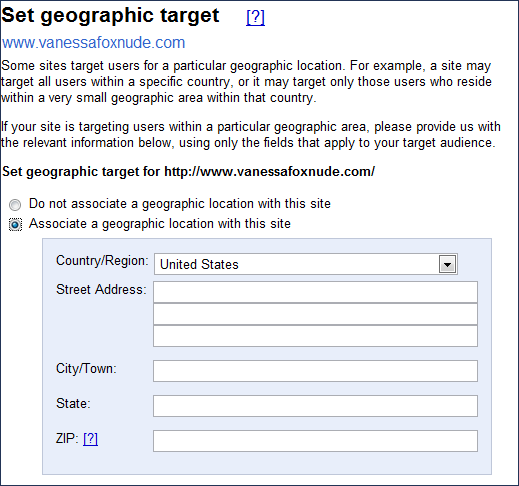
At this point, you can’t specify multiple countries for a site, but you can specify a different country for each site within a domain. If you use subfolders or subdomains for country-specific sites, simply add each to your Webmaster Tools account and specify the location for each one. For example, you might have a structure such as:
www.example.com/ (U.S. site)
france.example.com/ (French site)
russia.example.com/ (Russian site)
You can provide information at a more granular level than country. For example, if your site is for a pizza restaurant in Seattle, you can specify up to the street address (although you can input any granularity that makes sense for your business such as city or state). Remember that if you want to be found for local searches, you should also add your business information to Google Local.
If your site is hosted in the same country you want associated with your site, you don’t need to specify the location in Webmaster Tools. It’s probably worthwhile to do so though, particularly since you never know when a host might move servers or if Google’s database has the IP address listed incorrectly.
Why this new tool? Says Google:
“Google has been listening to the concerns of the webmaster community and knows that they sometimes have problems with the geographic location of their sites. We do our best to determine the location of sites and rank them appropriately but are excited to provide webmasters new ways to give us additional input,” said Amanda Camp engineer with Webmaster Tools. “At SES San Jose last year, we heard from many webmasters that this was one of the most important issues for them, so we’ve been working hard to come up with a solution that would be easy for them and would benefit searchers as well.”
Postscript: Speak French? Check out Google permet d’associer un site à une zone géographique for a look at the feature written in French.
Opinions expressed in this article are those of the guest author and not necessarily Search Engine Land. Staff authors are listed here.

Related stories
About the author