Official: Google Analytics Gets Social Engagement Reporting

Google Analytics has just announced a new set of reports (and functionality) that will enable websites to track social interaction with their content. This comes as a welcomed addition to the new Google+1 button, as it now enables one to measure the impact of social interactions in and outside websites (either through a Facebook like, +1 or LinkedIn share inside the website or +1 on search results).

The new reports can be found in the Visitor section (make sure you are using the new Google Analytics) and are seeing the following:

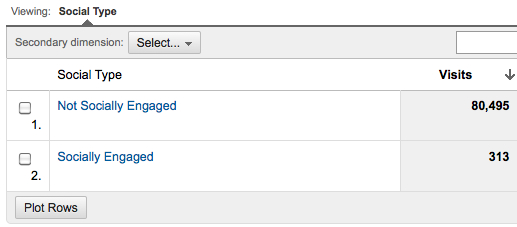
  • The Social Engagement report shows site behavior changes for visits that include clicks on any social sharing actions. +1 is added automatically, but other sharing buttons should be added through coding, see below how to define them. This allows website owners to understand whether there is a different behavior between visitors that share and visitors that do not share or between different types of “sharers”.
  • Social Engagement Report

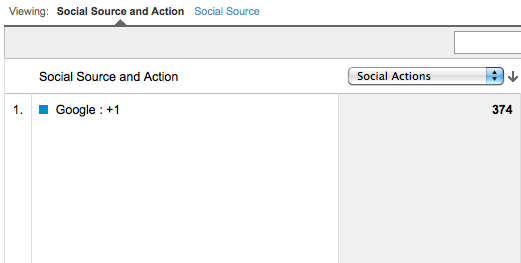
  • The Social Actions report shows the number of social actions (+1 clicks, Tweets, etc) taken on the site. This can be helpful to prioritize which share buttons should be in the header of an article, for example:
  • Social Action Report

The Social Pages report shows the pages on the site driving the highest the number of social actions. This is very useful to learn which content is viral and what your visitors really like to read to the point of sharing it with their friends.

Social Entity Report

This change is so meaningful that Google went the extra mile to create the Social Interaction Tracking, a new tracking function that will be used for social tracking only. Basically, the syntax is as follows:

    _trackSocial(network, socialAction, opt_target, opt_pagePath)
  1. Network: Name of the social network (google, facebook, twitter, digg, etc)
  2. SocialAction: Type of action (like, tweet, send, stumble)
  3. opt_target: Subject of the action being taken. Optional, defaults to the URL being shared (document.location.href). Can be manually set to anything: a different URL (if they’re sharing content that “points” to another URL), an entity (e.g, product name, article name), or content ID
  4. opt_pagePath: The page on which the action occurred. Optional, defaults to the URI where the sharing took place (document.location.pathname). Can be manually set (like a virtual pagename).

For a more technical overview on how to implement this tag for facebook and Twitter visit the code site article.

As concluded on the Google Analytics launch post (link above):

Social reporting is just getting started. As people continue to find new ways to interact across the Web, we look forward to new reports that help business owners understand the value that social actions are providing to their business. So +1 to data!

Related Topics: Channel: Analytics | Google: Analytics | Top News


About The Author: is the Founder of Conversion Journey, a Google Analytics Certified Partner. He is also the founder of Online Behavior, a Marketing Measurement & Optimization website. You can follow him on Google+ or Twitter.

Connect with the author via: Email | Twitter | Google+ | LinkedIn


SMX - Search Marketing Expo

SearchCap:

Get all the top search stories emailed daily!  

Like This Story? Please Share!

Other ways to share:

Like Our Site? Follow Us!

Subscribe to Our Feed! Join our LinkedIn Group Check out our Tumblr! See us on Pinterest Get Search Engine Land on your mobile device!
 

Read before commenting! We welcome constructive comments and allow any that meet our common sense criteria. This means being respectful and polite to others. It means providing helpful information that contributes to a story or discussion. It means leaving links only that substantially add further to a discussion. Comments using foul language, being disrespectful to others or otherwise violating what we believe are common sense standards of discussion will be deleted. Comments may also be removed if they are posted from anonymous accounts. You can read more about our comments policy here.
  • http://michaelsilverwood.ca Michael Silverwood

    Great news, I was just trying to get better metrics on my social media accounts in Google Analytics today.

    I also found it helpful that HootSuite lets you add custom URL parameters to your shortened links so that you can track them in Google Analytics. This way, when someone clicks your link you’ll know they got the link from social media (otherwise they show up as direct traffic). You can set all sorts of different sources if you like to find out if the link was clicked in an email newsletter etc. (links clicked in emails would also show up as direct traffic unless you have a source added).

    You can do it without HootSuite too I believe, just by adding “?utm_source=socialmedia” to the end of your URLs if you wanted to know when someone clicked it in a Tweet etc.

  • A.L.

    This is just another further indication that Google is going to start using these social signals as an additional to their ranking algorithm.

    Michael, good call on the Hootsuite parameter! I am going to implement that immediately.

  • http://online-behavior.com/author/daniel-waisberg Daniel Waisberg

    Michael, that is really interesting. But just to differentiate, this feature is about measuring how and what people share on your website, while your example shows how to measure people coming from those sources. If you have both set up you will get tons of valuable insights.

  • http://www.GrowTraffic.co.uk Simon Dalley

    finally something we can get our teeth into – everyone know that social media marketing is important – but with no data to back it up it’s always been diffituclt to justify it and virtually impossible to seriously talk about ROI

  • http://twitter.com/aprilewilson April Wilson

    Daniel, I’m probably a big dumb dummy about this, but the tracking tag for social that you outline (the _trackSocial) – how do you implement that on your other social sites (i.e. Facebook)? Is it something you have to manually add to anything you post?

    Maybe I just need more coffee.

  • http://profile.yahoo.com/MPBQOBX3FMBLJLKCZOULYS6OJY Muhammad

    thanks daniel . its great sharing. http://classifiedsinn.net

  • panya26

    http://donungonlineclub.blogspot.com/  do nung onlines club – คลับของคนรักการดูหนังออนไลน์

Get Our News, Everywhere!

 
  • Advertise With Us
 

Click to watch SMX conference video

Join us at an upcoming SMX event:

North America

EMEA

APAC

Search Engine Land produces SMX, the Search Marketing Expo conference series. SMX events deliver the most comprehensive educational and networking experiences - whether you're just starting in search marketing or you're a seasoned expert.

SMX Site » | SMX Difference » | SMX News »


Search Engine Land Periodic Table of SEO Ranking Factors

Get Your Copy
Read The Full SEO Guide