Google & Firefox 2 Anti-Phishing Warning In Action
Last month, I covered a number of ways that browsers and search engines are working together to protect surfers from phishing sites. These are sites pretending to be run by someone else, such as bank, in hopes of catching your personal log-in information. This week while doing my banking, I got to see a phishing […]
Last month, I covered a number of ways
that browsers and search engines are working
together to protect surfers from phishing sites. These are sites pretending to
be run by someone else, such as bank, in hopes of catching your personal log-in
information.
This week while doing my banking, I got
to see a phishing warning actually happen through the
Google – Firefox 2 partnership. It
was also an incorrect warning, which made the experience even more interesting.
Below, a look at what happened when I visited Citibank.
I went to the CitiCards site, which
I’ve long used. I typed in the URL, rather than doing a search for it. That
meant I was pretty sure I’d hit the right site. Still, watching my browser
screen go dark and this message was kind of scary:
 I double-checked everything to make sure I hadn’t gone to the wrong place. I
hadn’t. So, I tried the “This isn’t a web forgery” option to see what would
happen. That got me to this page:
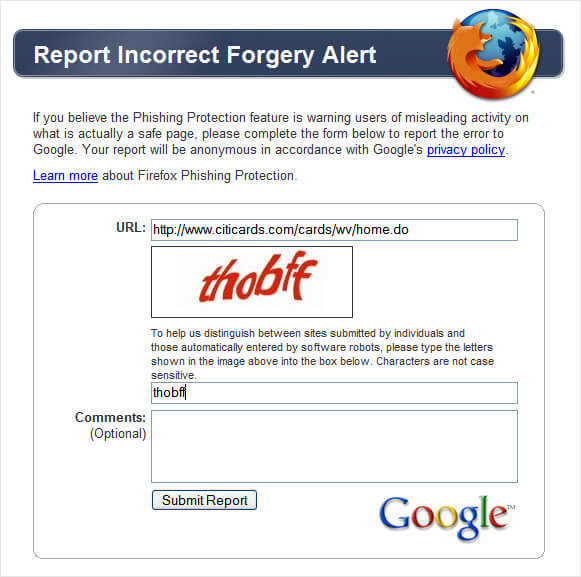
I submitted the information, then got a
confirmation page telling me that I’d done my good deed for the day.
What if you were like Citibank, tagged as a phishing site by mistake? There’s
a generic report page
here that says:
If you believe Google Safe Browsing is warning users of misleading activity
on what is actually a safe page, please complete the form below to report the
error to our Google Safe Browsing team. They’ll act quickly to address any
possible errors.
Learn more
Sadly, the “Learn more” link generates an error in Google’s help area. There
is a general section on safe browsing
here,
but I didn’t spot any topics specifically for site owners. If anyone has advice
they know of, drop it in the comments below. I’ll also check with Google on
this.
Google maintains the master blacklist used by its own toolbar and Firefox.
Michael Sutton has a recent and interesting look at it
here.
Also see my AOL Has
“Safest” Results & Free Results Safer Than Paid article from last
month. It covers a recent survey on the safety of search results plus provides a
long list of tools you can try to protect yourself from the major search engines
and others.
Opinions expressed in this article are those of the guest author and not necessarily Search Engine Land. Staff authors are listed here.

Related stories
About the author
