Google Experimental: Opt-In To Google User Interface Experiments

Google is constantly testing new user interface layouts that are presented
to a randomly selected group of searchers. Each experiment sparks off a round of
screenshots and sometimes hacks on how others can try out what’s new. Now Google
is making it easy for those who want to live their search lives on the edge.
Google Experimental is a new
service that allows you to opt-in to interface tests. Excellent. I’d
wished for
this back when doing a rant about all the testing last year. Thanks, Google!
Postscript By Barry Schwartz: Here’s a closer look at the user interface experiments being offered:
You can now test two different navigational elements, including left-hand search navigation and right-hand contextual search navigation. Let me demonstrate both for you now.
Left-hand search navigation can be accessed by searching on basketball via the Google Experimental Search page. Here is a screen capture of that in action.
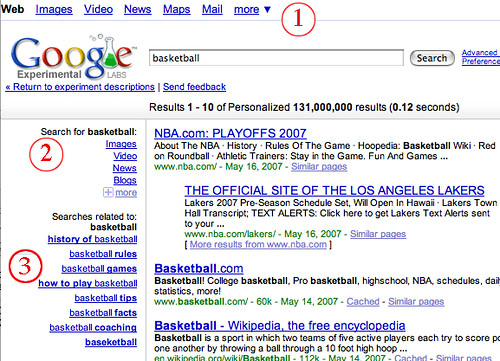
(1) Circle number one shows us the movement of the main Google tabs to the top of the page.
(2) Circle number two shows us those same tabs, but tailored to this specific search. This way if you want to refine your search, you can do so quickly. Google will change those “tabs” in circle number two based on your search query. So for basketball, someone may be interested in images, videos, news and blogs. Of course, if you are not interested in those, you can click on the more tab for more options.
(3) Circle number three shows “related” searched to basketball. There are times when Google shows related searches in the main results as well. Typically they are seen at the bottom of the search results. Here, they are shown on the left hand side.
Right-hand contextual search navigation can be accessed by searching on basketball via the Google Experimental Search page. Here is a screen capture of that in action.
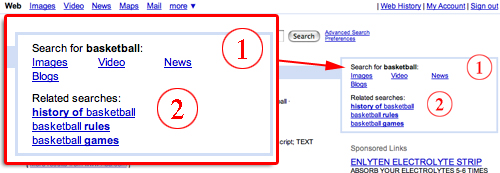
(1) Circle number one shows those same tabs, as you have seen in the left-hand navigation, but at the top right portion of the results. The main difference here is that you do not have the more tab and the sponsored listings are pushed down to make room for this contextual box.
(2) Circle number two shows the related searches, as you have seen in the left-hand navigation, but at the top right portion of the results. The main difference here is that you do not have as many related searches given to you and the sponsored listings are pushed down to make room for this contextual box.
Explore more on
Add Search Engine Land as a preferred source on GoogleEditorial disclosure
Contributing authors are chosen for their expertise and work under the oversight of the editorial staff. Search Engine Land is owned by Semrush. The contributor was not asked to mention Semrush; the opinions expressed are their own.
About the author