Content pruning: Boost SEO by removing underperformers


Content pruning is a digital spring cleaning. By removing or editing redundant or duplicate content, you tidy up your web architecture and give your best content the space to flourish.
There’s an art to content pruning. It can be tempting to remove anything and everything that you consider redundant, but sometimes even redundant content is doing more for your site while it’s live than if it were deleted.
The key is knowing what to remove and redirect, what to edit, when to consolidate content, and what you might keep. You must be able to discern between high-quality content and potentially low-performing content.
In this comprehensive guide, we cover your options for content pruning, including how to identify underperforming or low-value content, what happens if you don’t prune content, how to execute a content pruning strategy with prioritization, and common mistakes to avoid.
What is content pruning and why it matters

Content pruning is a process where content managers strategically review or audit content, often in large quantities or across an entire site, and make decisions about how to optimize it.
The goal of content pruning is to remove or improve (through editing or consolidation) content that no longer meets business and marketing objectives. Examples of content that should be pruned include content that no longer represents what you do, content that fails to drive goals such as traffic or conversions, and content that may no longer be the most effective for SEO and ranking.
Content strategists may also be driven to prune content as a result of algorithm updates or core changes. The biggest recent shake-up regarding content and SEO was the evolution of E-E-A-T and the Helpful Content System, which asked content managers to self-assess their content with a number of questions in mind to evaluate how helpful and reliable it was.
An example question challenging content strategists in the post-E-E-A-T era is, “Does the content provide a substantial, complete, or comprehensive description of the topic?” This added scrutiny has forced content specialists to review content with a fresh set of eyes and a new perspective, reconsidering how to optimize content to improve or maintain rankings.
Core updates also significantly impact content. It’s possible that Google once prioritized a specific type of content for a top ranking result, but after an update, it switched to another. When this happens, you may need to reassess your content strategy to enhance your site’s ranking following the update.
It’s no small task, but content pruning clears the path to stronger SEO.
Pruning content can impact the overall quality of a site. By removing or improving obsolete content that’s weighing down your site, you allow your most effective pieces to flourish. The result is that sites feature only the very best content, all with specific purposes and working toward a common goal of ranking for specific topics or keywords and growing topical authority.
When a site consistently publishes high-quality, relevant, and comprehensive content around a particular topic, it begins to “own” that subject in the eyes of search engines. Moreover, a site left with only the best URLs means that the content crawled is all highly relevant and important.
The SEO toolkit you know, plus the AI visibility data you need.

What happens when you don’t prune your content
Failing to prune your content results in long-term decay in ranking, impressions, and, inevitably, traffic and sales.
Sites, especially enterprise sites, that neglect content pruning will likely find that the best content never reaches the top ranking positions. When you don’t prune content, you can experience difficulty surfacing high-performing content for many reasons.
Here’s why:
Index bloat and crawl budget inefficiency
Index bloat occurs when Google indexes content that doesn’t provide value to users in search results. These pages bring down a website’s quality because they’re not helpful. If a site isn’t providing value to search, you don’t want Google crawling it.
Why?
Because every site has a unique crawl budget (the number of pages Google can, or will, crawl).
With your budget in mind, you want Google to focus on the best pieces of content—those that are most important to search and that help your users. Anything else does not require crawlers.

Here’s an example:
Sales teams created a landing page to quickly convert users. The page targets specific audiences and has a proven track record of success in conversions.
The issue?
The page doesn’t meet the requirements to rank well and causes all sorts of inefficiencies, such as:
- The page sits on page three of SERPs for keywords that are better satisfied through an alternative page
- Google crawls the page anyway, but few people actually find it
- Alternative pages are not ranking as well as they could because of keyword cannibalization
The alternative page would perform better if the sales page weren’t there.
Do you remove the sales page? No.
Instead, you deindex it. Read more about deindexation in the “Failure to use deindex tags” in the common mistakes section of this guide.
Further reading: Crawl budget: What you need to know in 2025
Declining content quality signals
If you have too many pages on your site that are trying to accomplish the same goal (resulting in keyword cannibalization), too many pages that aren’t in alignment with your topical clusters, or low-quality content (think: low word counts, inaccurate information), you’re going to have a content quality issue.
Your topical clusters are content topics that make sense for you to cover. For example, a dog grooming business that also sells products might have pages about:
- How to groom a nervous dog
- The 10 best dog shampoos for short-haired breeds
- Dog grooming services
Problems with content arise when the content strategy becomes too broad.
For example:
- How to introduce a dog into a cat’s home (it’s not relevant to the service or the products)
- 10 tips to groom a nervous dog (it’s too similar to the other article and will result in keyword cannibalization)
These types of issues are very common and occur for several reasons, but the biggest culprit is losing track of what content exists on the site, its purpose in terms of objectives (such as traffic, awareness, or conversions), and the search terms pages are targeting. This occurs when businesses grow, content operations scale, and content managers come and go.
Sound familiar? See the “Failing to create a content database” section of this guide for tips on how to remedy this.
What’s surprising is that content pruning doesn’t just impact the piece of content you’re editing or removing, nor does it only affect the cluster it’s related to—it can impact the entire site.
Internal link dilution
Internal link dilution happens when links are inserted in many low-value pages or if anchor text is overused and the same text links to multiple pages.
Your anchor text must be clear. For example, if you have a page covering the best running shoes, links containing the text “best running shoes” must link to that page and only that page.
A common issue is that well-intentioned content teams create the same page twice. As a website grows and more pages are created, content teams may inadvertently create a new page that’s too similar to existing content. The team links to the new page, not realizing that another one already exists.
This results in the link value being split across two pages instead of being directed to one page, which increases the risk of cannibalization.
In this situation, pages need to be consolidated (more on that later).
Keyword cannibalization
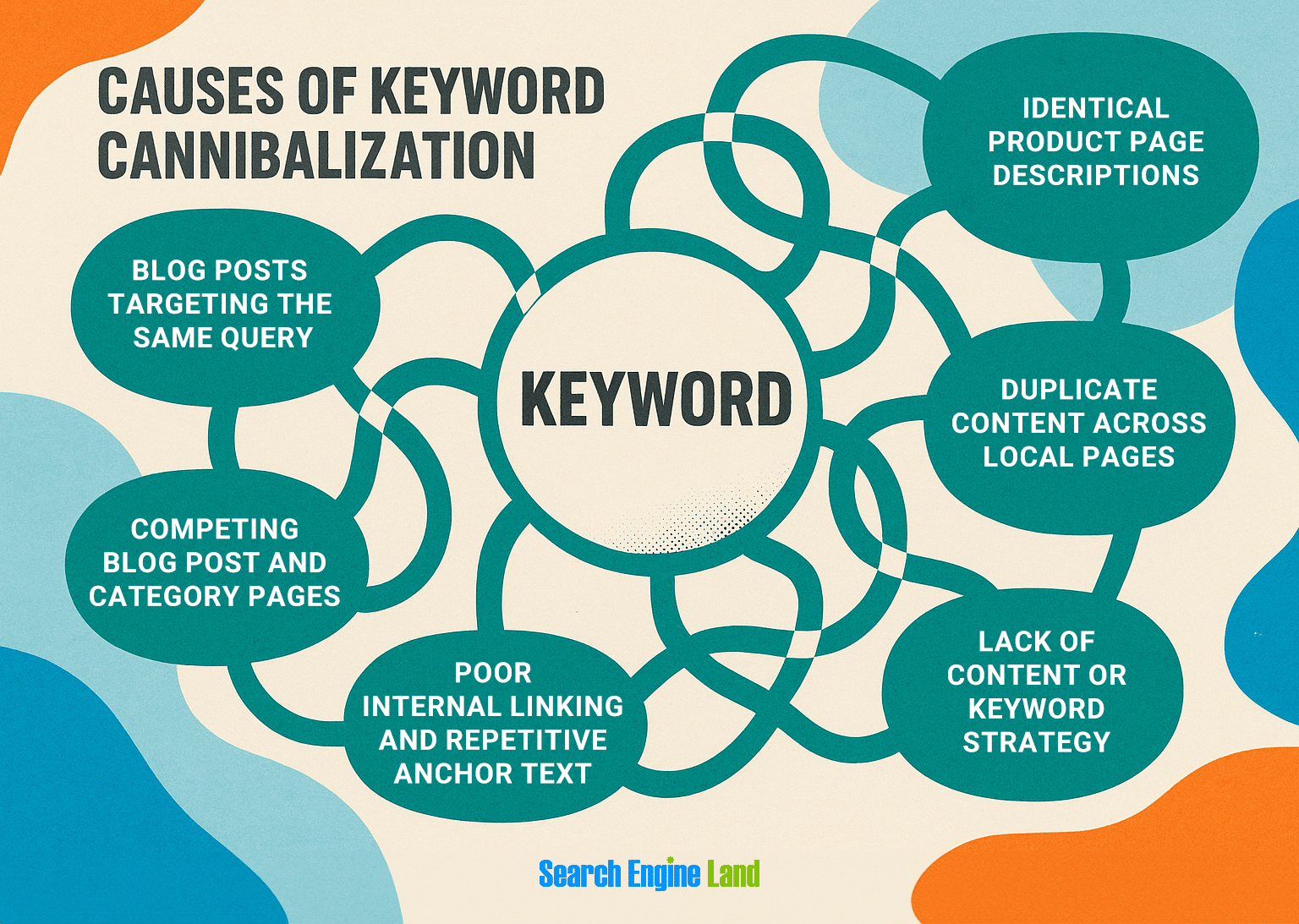
Keyword cannibalization occurs when multiple pages on your site compete for the same or very similar keywords. Instead of helping your site rank better, these pages confuse search engines about which one should appear in the search results.
As a consequence, neither page ranks particularly well (or at all) because they’re competing for attention, or the wrong page ranks for your target keywords.
Thin or outdated pages
Thin or outdated pages are those that don’t provide sufficient value to the reader, either because they don’t cover a topic thoroughly enough or because the content is outdated.
It’s common to mistake thin content as a low word count, but a set word count isn’t something you should fixate on when creating new content for your site. A page needs to be long enough to fulfill the searcher’s intent. If it isn’t long enough to fulfill search intent, it’s thin.
For example, an 800-word article on “The Comprehensive Guide to Content Pruning” probably isn’t going to cut it given how dense the subject matter is. But, for step-by-step instructions on “How to Clean Suede Shoes,” 800 words might be ample.
Additionally, keep in mind that the days of a “set it and forget it” content strategy to rank competitively are long gone. A modern-day content strategy looks different today compared to what it did 10 years ago—content needs to be updated regularly as times move on.
If your website content is outdated, you’ll start to appear less experienced or informed to Google. Your content won’t be the most helpful on the internet. As a result, you can expect to lose rankings to content that is updated and covers a topic in full. The natural consequence of declining traffic will be fewer visits and sales.
How to identify underperforming or low-value content
You can look at tools and metrics to identify potentially underperforming and low-value content.
Metrics
Here are some of the most important metrics that help determine underperforming or low-value content:
Organic traffic
Content with low numbers of organic traffic is an indicator that the content could perform better. However, some queries simply have low search volumes.
Consider organic traffic numbers in line with key metrics, such as conversions. A page with low clicks but high conversions is still working for the business and should stay.
What low numbers look like to you depends on your industry and the search intent. You can create a rule to filter out the lowest-performing pages quickly. For example, any page with fewer than 100 clicks in six months needs a human review to determine if it’s low quality or not.
Use Google Search Console to review organic traffic to pages.
No conversions, goals, or engagement
If a page isn’t performing as intended, you may need to take action. Remember to judge pages based on their objective. You wouldn’t expect a blog to convert people very often, if at all; however, a service page or a landing page should.
Overall traffic
Not every page is created with SEO in mind, so you must check overall traffic. It may be that a page that doesn’t rank or isn’t meant to rank is receiving high traffic from sales teams sending the link to prospects. Or perhaps other marketing efforts, such as email campaigns sharing the link, are driving traffic to the page.
A low number of overall traffic is an indicator that the page isn’t being used at all within marketing, or that no one is sending it to audiences (or if they are, the audiences aren’t engaging with it). It might be time to delete or improve the page.
Check overall visits to the page using Google Analytics (GA4) to see if other marketing teams are using it in their marketing efforts. This data can be very helpful for well-intentioned team members who are adamant that a page is really important.
Impressions vs. clicks in Google Search Console (GSC)
Use Google Search Console to identify pages with high impressions compared to the number of clicks. High impressions indicate opportunities because your site is gaining visibility. However, poor SEO or failure to fulfill search intent may be preventing you from ranking well and generating clicks.
You can use the click-through metric to find the worst performers. The lower the CTR, the worse the performance.
Pro tip: Be conscious of AI and zero-click search. In modern-day SEO, it’s more common to rank well and get a lot of impressions but no clicks due to AI overviews. If the AI overview SERP feature is present but you’re not ranking, there’s not much you can do, as AI overviews fulfill user search. Consider keeping the content for brand visibility. It’s still working for you!
Backlinks (or lack thereof)
Sometimes, it’s worth keeping a page because it has links from highly credible sources. If the reverse is true—that there are no backlinks or the backlinks are spammy—you might be better off removing the content.
Use a backlink analysis tool to see what the authority score is for sites linking to you. In theory, the higher the authority, the better the link. Be careful, though: it’s not a hard and fast rule!
As long as the linking page is relevant and looks credible to you, it probably is. If the site looks good, or you’re familiar with the website/business, there’s nothing wrong with the link.
Low word count
If pages have a low word count, it can be an indicator that they need improvement and updating (though some pages simply don’t need lots of text).
You can only deal with word count on an ad hoc basis through human review. However, you could set some rules. For example, review all blogs with less than 1,500 words to help you get started.
Outdated information
Sometimes you can tell a page has outdated information from the URL. Look for years in the URL, or trends and topics that have been and gone.
Tools
Many tools help make content pruning a breeze. Here are some favorites:
Semrush
Semrush is a comprehensive tool with many useful reports, such as backlink analysis, keyword research, and position tracking (so you can monitor how successful your content pruning was). There’s also an AI brief generator and a content optimizer.
Screaming Frog
Screaming Frog is a crawling tool that connects to Google Search Console and Google Analytics’ AI. With it, you can crawl your site and identify key metrics, such as clicks, impressions, overall traffic, and word count.
Sitebulb
Another excellent crawling tool is Sitebulb. It stands out from Screaming Frog because it offers a better user experience for some, including easy-to-digest reports. If you’re crawling sites for the first time, you might prefer Sitebulb.
Google Search Console
Google Search Console (GSC) should be the go-to tool for SEO data. Don’t be tempted to use Google Analytics for organic traffic because, unlike GSC, it uses cookies, which means it doesn’t have all the traffic data. If someone comes to the website and declines the cookie policy, GA4 won’t register the visit. GSC, on the other hand, will register the click. Plus, GSC provides you with keyword data.
Google Analytics
Google Analytics helps you understand how users engage with your content. It’s especially useful for metrics such as time on page, bounce rate, engagement rate, and, most importantly, conversions.
Pro tip: Be careful with your analysis. You must examine metrics in tandem and consider a range of factors, including the age of the content, content type, search intent, and historical performance. For example, you don’t want to remove a piece of content that has low clicks, only to find it was published a week ago. Nor do you want to delete content with low clicks without realizing that it has converted extremely well.
Your options for pruning: leave, improve, consolidate, deindex, delete, and redirect
Once you’ve identified your underperforming content, you’ve got decisions to make. How will you prune the content?

1. Leave
When a piece of content performs well, meaning it’s ranking as high as it possibly can, you can leave it alone.
2. Improve the content through editing
When content is topically relevant but outdated or fails to fulfill search intent, it can greatly benefit from editing.
Content can be edited to:
- Add depth, ensuring the topic is fully covered
- Include new media, such as a relevant video, to help content stay competitive and maintain or increase rankings
- Incorporate E-E-A-T by interviewing subject matter experts, getting an expert to edit the piece or weigh in, or including your direct experience
- Ensure all links, including research and studies, are current
3. Consolidate the content
When you’ve got two or more pages serving the same objective, you might be better off combining them. This is the antidote to keyword cannibalization.
Consolidate pages, incorporating the best sections or information from both, and edit them thoroughly to maintain a logical narrative flow.
Choose the highest-performing URL based on clicks and/or backlink profile, and redirect the other to it.
4. Deindex the content
Sometimes, you have two pages that fulfill the same objective but one is better for search, while the other is a helpful page for sales teams to send to prospective customers.
For example, you might have a sales landing page offering a discount on one of your services. This is a special discount reserved for select audiences or by invitation only. You do not want this page indexed for two reasons:
- Too many people will take advantage of the special discount
- The page will compete with the standard service page
You don’t want to delete this page because it serves teams outside of search and SEO.
Instead, deindex.
Deindexing a page is simple. Add a noindex meta tag to the page’s HTML (<meta name=”robots” content=”noindex”>). A developer can easily add the noindex tag, but failing that, if you’re using something like WordPress, plugins like Yoast can handle it for you.
Next time the page is crawled, it’ll drop out of the index.
Pro tip: To accelerate Google crawling and deindexing your page, go to Google Search Console, paste your URL in the search bar, and click “Request Indexing.” This sounds counterintuitive, but it’s just a request for Google to crawl the page; once done, it will see the noindex tag and deindex the page.
5. Delete and redirect
Delete content when it’s irrelevant, outdated, and lacks strategic value (e.g., it has no high-quality backlinks; it doesn’t serve other teams, such as a sales landing page).
In cases where others are using the content, consider deindexing. If the page has other strategic value, such as high-quality backlinks pointing to it, you might choose to keep the URL in place to reap the benefits of the backlink.
Always use a 301 for deleted content. Point the link to the most relevant page that is remaining.
How to prioritize pruning across large or enterprise sites
On any site, prioritizing content pruning is overwhelming. There’s nearly always a lot that can be done. With large enterprise sites especially, the issues of content pruning overwhelm and compound.
How you prioritize pruning will depend on your goals, but here are some ideas.
Create a pruning matrix that helps you gauge forecasted effort versus potential impact
Your matrix might include the following combinations:
- High impact/low effort, such as deleting pages that are irrelevant
- High impact/high effort, like auditing and updating all content relating to a certain topic for accuracy and SEO
- Low impact/low effort, e.g., optimizing meta descriptions, which are not considered a ranking factor
- Low impact/high effort, like editing content that isn’t intended to rank on Google
These are just example tasks; remember, the tasks that matter for you and their impact are highly variable depending on your website and goals. Start with any content that requires low effort but has high impact.
Here are some tips for prioritizing your content pruning:
Segment content by topic
Instead of tackling an entire site (talk about overwhelming!), work in site segments. The best way to do this is to split the content by topic. Working on one section of the site at a time is particularly impactful if you have a specific goal, such as increasing sales for a particular service.
If you wanted to work on “SEO services,” for example, you would segment the service page and its supporting content, such as case studies, articles, and how-to guides, and work on this content topic to completion, then move on to the next one.
Segment by content type
Alternatively, you can start work from your most important (money-generating) pages. For example, start with service pages, then case studies, help documents, location pages, and then blogs.
Use traffic-weighted scoring models
Turn your content pruning task into a data-driven exercise with traffic-weighted scoring models.
You can assign a score to each URL based on metrics such as clicks, visits, and conversions. Assign a number to more quantitative data, too, such as backlink quality and content freshness. Weight the metrics based on what matters most to your goals.
For example, if lead generation is key, give the conversion rate more weight.
If you had two URLs with equal scores (both have similar amounts of traffic and backlinks), but one made more conversions, you’d know to start on the page that converts, since it would score higher as lead generation is weighted more generously.
Pro tip: Coordinate with stakeholders before deleting anything mission-critical. You might be surprised at how other teams are using content. This is especially true for those working in large, enterprise organizations with multiple large departments.
How content pruning affects crawlability and indexation
When done well, content pruning has a positive impact on crawlability and indexation.
How?
- Reduces wasted bot activity on zero-click pages: If a piece of content isn’t ranking well, or can’t rank because it doesn’t meet search intent, you don’t need search engines crawling it. Reducing wasted bot activity provides time and budget for more important pages to get attention.
- Accelerates the discovery of your new and high-performing content: Search engines crawl the right pages and avoid wasting time on low-quality content
- Reclaims internal link equity and strengthens contextual signals: Your content strategy is more focused, succinct, and targeted. Internal linking helps demonstrate topical authority and contributes to an organized content hierarchy and crawl depth.
- Improves crawl depth and recency prioritization: Search engines can dig deeper into your site and crawl the best pages so they get prioritized and ranked.
Important note: The above results can only come into fruition if internal linking is done strategically.
The role of internal linking in successful content pruning

Internal linking plays a critical role in content pruning for two reasons.
First, when you prune content, you may influence the internal linking across the site, either for better or for worse.
For example, deleting pages with internal links also removes the links. This strategy can be good or bad. If the content was of poor quality, the deleted internal link might work in your favor because it wasn’t adding much value to the linked-to page.
However, if the content was actually quite good, the link could have benefited the linked-to page because links send authority. If you’re deleting a page or consolidating a page that had value, you might want to add links elsewhere to make up for those that were lost.
Second, during the content pruning process, consider internal linking and how you can improve it as you proceed.
Here are some ways to improve internal linking when pruning:
- If you consolidate a piece of content and redirect it, all inlinks will be redirected to the new page. It’s best practice to identify all redirects and update them so they point to a live page.
- Consolidated content may have a URL change. If this happens, ensure that canonical links are also updated.
- Remove links pointing to deleted pages and, if relevant, link them to the live page instead
- As you’re pruning content, use it as an opportunity to reinforce topic clusters and hub pages. This is especially crucial when you’re improving content, as you should be doing so with an objective and topical cluster in mind.
- Rebuild the linking logic if major consolidations occur, which includes updating the URLs (as mentioned above) and altering the anchor text (the text used to link) to include a useful keyword (a keyword you want the linked-to page to rank for)
Common mistakes to avoid when pruning content
Before you set off on your content pruning venture, here are some common mistakes and how to avoid them.
Deleting content with backlinks or branded queries
It’s easy to look at a piece of content and assume it’s obsolete, but if that content has high-authority, relevant backlinks, it might be worth keeping the page live to hold onto those backlink benefits, such as authority (or “link juice”) passed from the linking site to yours.
You can identify backlinks pointing to your site using a backlink analysis tool.
The screenshot below is an example of a tool that lists backlinks with a filterable column for “Authority Score.” In theory, the higher the Authority Score, the better the link, and the higher the likelihood you should keep it.
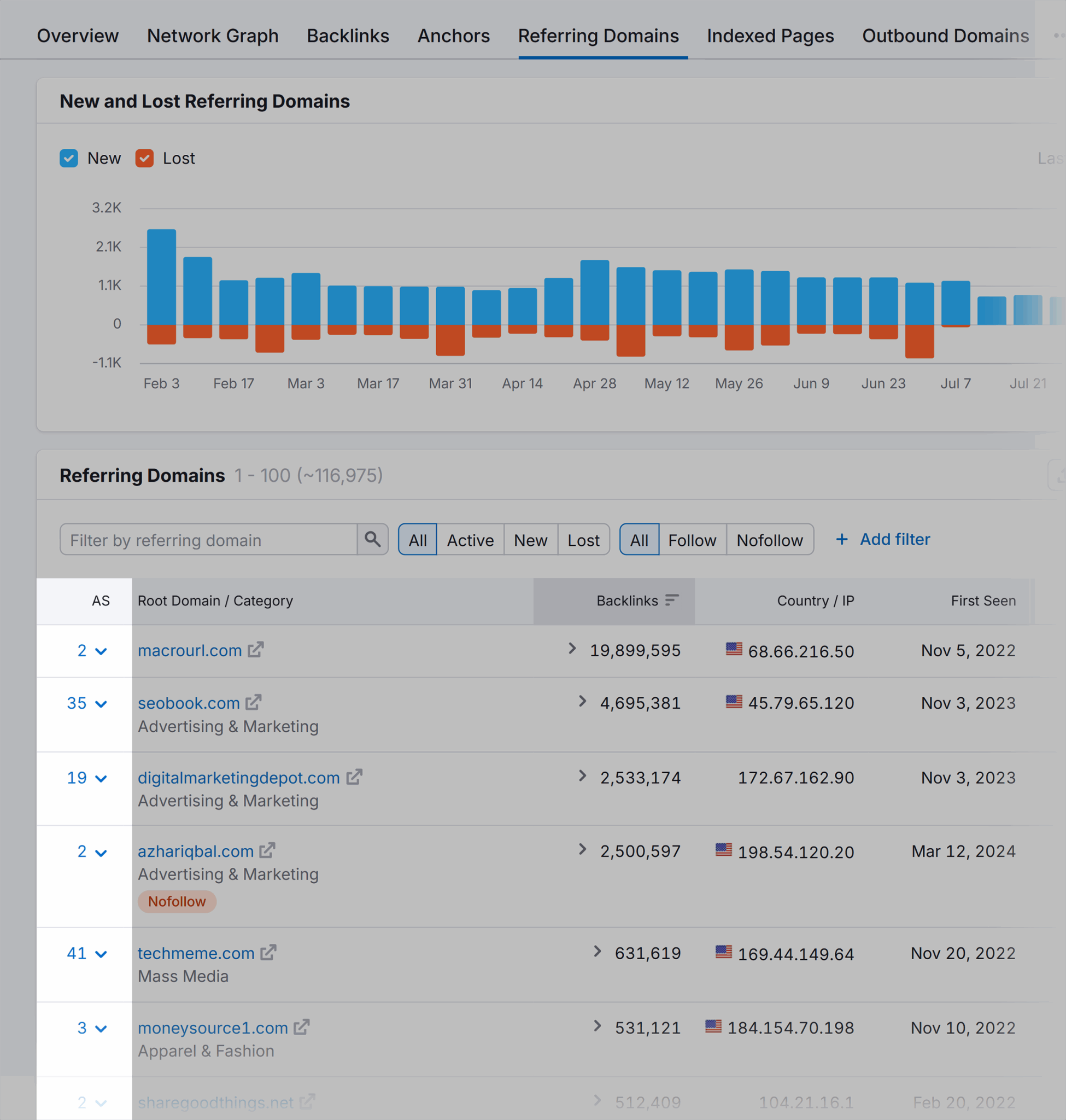
Your options for handling backlinks include:
- Keep the linked-to page as it is
- Edit the page content to retain the URL but update the information to ensure it remains current and accurate
- Change the URL but redirect the content to the new location
Pro tip: Use this option to change the URL sparingly; it’s not as strong as the other two options because the link is direct to them, but if you really need to remove or change the URL, it’s fine.
Failing to redirect pruned URLs
It’s very easy to mess up your on-site links when you prune content. There are two common mistakes:
Mistake #1: You don’t redirect deleted URLs, resulting in 404s. You must add a 404, even if the page barely received visits, as it could still be indexed or linked to from another page on your site.
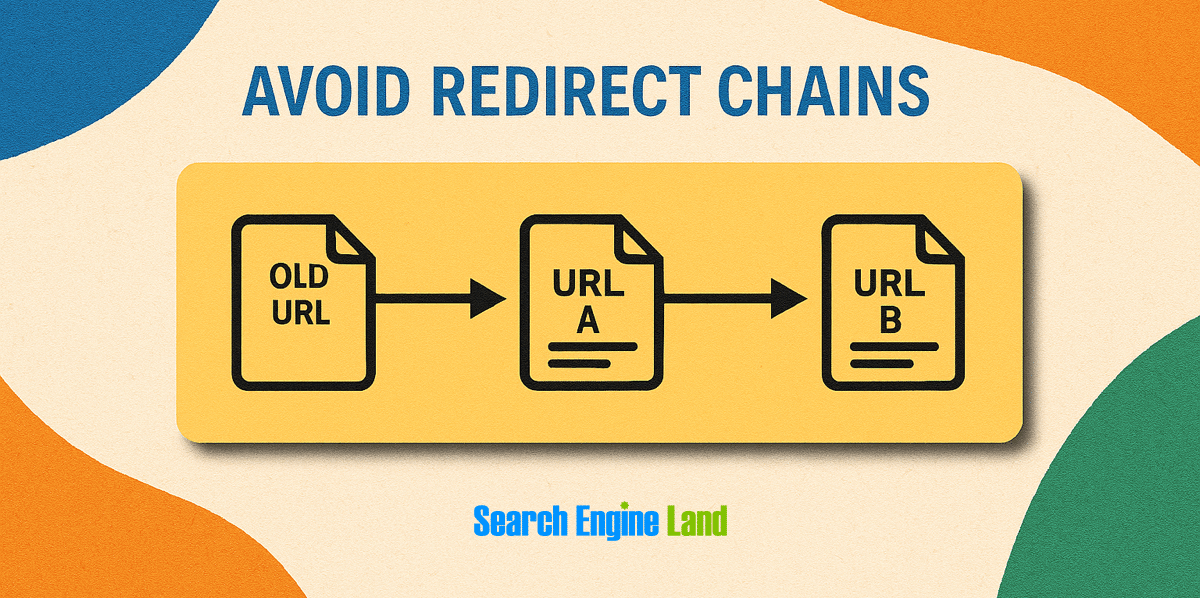
Mistake #2: You don’t update internal links, so links end up pointing to 301 (redirected) links instead of directly to the live page (status 200). When this happens, you get redirect chains, which slow down page speed and dilute internal linking.
Failure to use deindex tags
Deindex tags are extremely useful for keeping useful content live without indexing them. This means search engines won’t include the site in their search results, but the page remains live for you to use as needed.
For any content that serves any purpose other than search results, add the deindex tag.
Add a noindex meta tag to the page’s HTML (<meta name=”robots” content=”noindex”>). A developer can easily add the noindex tag, but if that’s not possible, use a plugin like Yoast in WordPress to handle it for you.
Over-relying on word count or traffic alone
It’s essential to consider content and performance holistically. Sometimes, content is better short. Remember our previous example: an 800-word article on “The Comprehensive Guide to Content Pruning” won’t suffice. But, for “How to Clean Suede Shoes,” 800 words might be ample!
It’s about meeting search intent.
The same applies to traffic metrics. It’s easy to look at a page that gets loads of clicks, but if the content is irrelevant or brings in the wrong audience, you might be better without it.
When it comes to clicks and traffic, change your mindset: if all you’ve lost is clicks, then you’ve not lost anything at all.
You need clicks that bring revenue, either within a session or later. You don’t need clicks for the sake of clicks.
Pruning without tracking baseline performance
One of the biggest mistakes in content pruning is making changes without first understanding how a page is currently performing.
If you don’t benchmark key metrics—such as traffic, rankings, conversions, backlinks, and engagement—you won’t know whether pruning has helped or hurt.
You also lose the ability to measure impact or roll back changes if something goes wrong.
Before pruning any content, record its baseline performance to ensure accurate evaluation.
This could include:
- Organic traffic
- Most-clicked keywords
- Keyword rankings
- Backlink data
- Conversion or goal completions
- Internal links pointing to and from the page
Record the benchmark, then assess content performance after the pruning.
Important note: As you make significant changes to your site, metrics can become quite volatile. Give everything a bit of time, maybe a month to settle and get a good idea of how pruning has affected your site.
Failing to create a content database
A content database is key. It’s something every content management team should use.
Why?
A database prevents the same content from being created multiple times, and it keeps SEO efforts succinct.
Create your database in a spreadsheet and include:
- Page title
- Target keywords
- Objective
- Audience
This way, you can remember what you’ve created and why. As the content grows, you can refer back to the database and search for keywords to see if you’re using them already.
Here’s what your database might look like:

Not aligning with product/brand/content stakeholders
You might be surprised how people are using content. Before taking action on your content pruning, share your planned actions with the broader team to ensure they’re satisfied with your decisions.
Be sure to share relevant data (or check its accuracy) if you get pushback so you can justify your plan to stakeholders. It’s not uncommon to receive feedback like, “We always send that page to prospects,” only to find that the data reports three visits in a year.
Track, optimize, and win in Google and AI search from one platform.
Make content pruning part of your content management strategies
To get the most out of content pruning, start with a plan. We’ve already shared prioritization tips within this guide, but to bolster your content pruning efforts, tie everything back to your broader content strategy.
Consider how each piece of content supports your business goals, user needs, and topical authority.
Here are some resources to help you:
Explore more on
Editorial disclosure
Search Engine Land is owned by Semrush. We remain committed to providing high-quality coverage of marketing topics. Unless otherwise noted, this page’s content was written by either an employee or a paid contractor of Semrush Inc.
About the author


