Index bloat in SEO: What it is & how to fix it


When optimizing your website for search rankings, you may think that the end game is to get all of your pages ranking highly in Google’s search results. But actually, not every page on your website needs to be in Google’s index.
If you have too much content available, your site can suffer from index bloat, which causes significant SEO challenges, including cannibalization, crawl budget issues, and reduced SEO performance.
This guide covers index bloat in full, including what it is, how to spot it, what causes it, and, most importantly, what you can do about it so your site stays lean without sacrificing great content.
What is index bloat?
Index bloat occurs when a website has too many low-value or irrelevant URLs available in search results.
Notably, index bloat isn’t about how many pages are indexed. Rather, it’s about quality.
For example, you may think that a large site with 10,000 pages is bringing in a huge amount of search traffic. But if those 10,000 indexed pages are of low quality and don’t serve a searcher, they’re an example of wasteful indexation.
Meanwhile, a much smaller site with 500 indexed pages can still be driving traffic and conversions if the pages consist of high-quality content that serves a searcher.
Many websites and SEO professionals want their pages in Google’s index because indexable pages can appear for relevant searches. Any page that serves a user searching on Google should be indexed.
What counts as unnecessary indexation depends on your SEO strategy, but to provide guidance, unnecessary indexation refers to pages in a search engine’s index that do not serve search.
For example:
- Tag pages are commonly used to organize blog content for improved user experience (UX) and are rarely optimized for search engines. Often, indexed tag pages compete with blog category pages, which are typically indexed and useful for search because they’re optimized. In this case, you’d index the blog category and deindex the tags.
- Faceted navigation URLs are created when people filter and sort information, such as products. These filters create new URLs, also called parameter URLs, which are duplicates or near-duplicates of the sorted page. Large e-commerce sites can have thousands of faceted navigation URLs. Unless these URLs are all optimized, they don’t serve search. It’s better to deindex them, keeping one master URL (called the canonical URL) indexed and the rest deindexed.
- Session ID URLs are dynamically generated URLs for each user. It’s a type of parameter URL. These URLs duplicate entire pages per user and create endless variations of the same page.
- Printer-friendly pages are stripped-down pages (essentially duplicates) that offer no unique value to search. Generally, you want the original page indexed since it looks better than a printer-friendly page.
Index bloat can go unnoticed, but an excessive number of indexed pages causes many problems for websites and SEO.
The SEO toolkit you know, plus the AI visibility data you need.

Why index bloat is a problem
If you think you have an indexation bloat issue on your site, you’ll want to resolve it because of the problems that it can cause.
Here are some common issues caused by index bloat.
Dilution of crawl budget (Googlebot wastes time on non-priority URLs)
Dilution of crawl budget is the main issue cited as a result of index bloat.

Every site has a crawl budget. Your crawl budget is the limit of pages Google will crawl within a timeframe.
If you have a lot of junk pages, you might end up with Google crawlers on these pages, as opposed to your new or edited ones.
Deindex any pages that don’t serve search so Google won’t crawl them. For every page that isn’t in the index, there’s an increased chance that crawlers will get to your best content.
Reduced SEO performance (important pages compete with junk pages)
If multiple pages target the same keyword, your best pages compete with weaker ones, resulting in cannibalization.
Instead of one authoritative page ranking well, Google has to choose between multiple.
The result?
Neither page ranks, pages rank inconsistently, or a low-quality page ranks better than the intended authoritative page.

A good content strategy assigns keywords to pages. Generally, a specific keyword or phrase is assigned to a single page. Once a page is created that targets a specific keyword, you wouldn’t optimize other pages for that keyword.
You must be mindful of where your keywords are assigned to avoid accidentally using the same keyword in the same place twice.
For example, if you create a page titled “Index Bloat: A Guide” and then include “index bloat” in a glossary with the intention of that entry ranking, you might be disappointed.
Why?
Because a glossary is highly unlikely to rank for the keyword “index bloat.” Glossary entries are brief definitions of terms. They typically don’t go into the amount of detail that a standalone guide would cover, so the guide would be more likely to rank for the keyword.
We can test this by searching for the keyword and seeing what ranks.

This doesn’t mean you shouldn’t have a glossary on your site. If it’s truly helpful for your audience, add one, but be mindful that these pages are often thin and include keywords that might be better placed elsewhere if SEO is your goal.
You could use internal linking to your advantage and link these glossary pages to more robust, optimized pages for those keywords. This is useful for two reasons:
- Internal linking serves as a hint to Google, indicating that the linked-to page should be ranked for the specified keyword
- Linking to the more robust page will help readers access more information and keep them on your site
Further reading: What is keyword cannibalization and how to fix it
Risk of thin content/duplicate content signals
Thin pages refer to pages that lack:
- Original content
- Useful content
- Depth
Don’t mistake thin pages for low word counts. Sometimes a low word count is what’s required. Thin pages are a problem when the content of the page doesn’t fulfill search intent.
For instance, a 500-word article on “how to make a coffee” is ample, but 500 words on “index bloat” won’t be in-depth enough to cover the topic.
Pages that have the same or very similar content can be interpreted as duplicate content, confusing both visitors and crawlers. When multiple pages cover the same topic, search engines struggle to determine which version to prioritize, resulting in split ranking signals and, most likely, weakened visibility.
Duplicate content can occur when content is created without consideration for what already exists, or it can result from parameter URLs creating clones of the same page.
If your site has a lot of thin or duplicate content indexed, search engines are spending more time on poor-quality pages, which dilutes the overall quality signal of your site.
We know that Google’s helpful content system applies sitewide. This means that Google is no longer just looking at pages in isolation to verify quality; it analyzes signals across the entire website.
If page signals impact a site, indexed thin pages can have a bigger impact than you might think and reflect badly across your website. Perhaps even your best content is dragged down by too many low-quality pages.
Negative impact on site authority, Helpful Content signals, and AI-generated SERP summaries
Google’s Helpful Content system applies sitewide classifiers as a signal of quality, so index bloat matters. You don’t want Google (or other search engines) crawling an overwhelming amount of low-quality content that will bring your overall quality signals down.
Instead, you want to keep Google focused on the high-quality content so your site’s authority is perceived as high.
On top of this, AI-generated search engine results page (SERP) summaries are often generated from the content that’s ranking well.
Take a look at the example below:

Search Engine Land is the website first cited by the AI overview. It’s also the website with the first organic ranking.
If your content is of poor quality, you’re unlikely to appear in AI overviews. Instead, it’ll get overlooked entirely, which is a missed opportunity for added visibility in SERPs.
Causes of index bloat
Common causes of index bloat include:
Poorly managed faceted navigation and filters
If your site is set up to generate new URLs from filters and faceted navigation, and all of these URLs are automatically indexed, you likely have an index bloat problem. In many cases, deindexing these URLs is best.
Faceted navigation is very common for filtering e-commerce categories. Gymshark, for example, uses them in categories.
https://uk.gymshark.com/collections/t-shirts-tops/womens?canonicalColour=pink
The parameter canonicalColour=pink in the Gymshark URL filters the page to show only the women’s T-shirts and tops available in pink.
To its credit, Gym Shark has correctly handled the faceted navigation with canonical tags. (More on this later.)
Parameterized URLs (UTMs, session IDs)
Parameter URLs are generated for several reasons, including ecommerce filters, session IDs, marketing tracking, and more. If these parameter URLs are mismanaged, you have many duplicate pages indexed in SERPs.
HubSpot often uses parameter URLs for marketing tracking.
Here’s an example:
https://www.hubspot.com/products/marketing/forms?hubs_content=www.hubspot.com/&hubs_content-cta=free-online-form-builder
HubSpot will have an internal guide on how they use URL parameters and what the parameters mean, but it’s possible that:
- ?hubs_content relates to the source. The content visited was clicked on from HubSpot’s owned content, as opposed to a third-party source.
- hubs_content-cta=free-online-form-builder could relate to the form, so the HubSpot marketing team knows what was clicked to access the page
Out-of-the-box CMS templates (e.g., WordPress tags, Shopify collections)
Many content management systems (CMS) have features that may not be useful for your SEO strategy and index bloat.
Two known default settings that SEO’s generally don’t love are:
- WordPress’ tag pages
- Shopify’s products and collections pages, which benefit from canonicalization
Important note: Officially, there are no set rules on how you handle pages like tags and canonicals. It depends on your SEO strategy. In this section, we’ve provided what’s generally true for most sites, but there are always exceptions to the rule. You must consider the SEO strategy that’s best for your website before making decisions about things like tag pages and canonicalization.
WordPress tags
Often, WordPress blogs end up with blog categories and blog tags. It’s tempting to both tag blog posts and add them to categories for usability benefits. However, if you overuse tags and categories, or if you don’t manage tag pages as part of your keyword strategy, it results in tag pages and category pages listing the same (or similar) content, creating a cannibalization issue.
As mentioned earlier in the “Reduced SEO performance” section of this guide, you must always have one keyword assigned to one page. If you have a category for “SEO strategy guides” and also create a tag for “SEO strategy,” these pages will compete with each other.
A common solution is to deindex tags. This prevents Google from indexing them at all, so you can create any tags you like without any concern for the SEO implications. Dexindexing them can be desirable since you can still keep the tag available for usability, which allows visitors to navigate to specific tags once they’re on your site.
Neil Patel is an example of a website that’s built on WordPress and deindexes tags.
You can see the tag deindex in their robots.txt:

The easiest way to deindex pages on WordPress is through your SEO plugin. There are many available, but Yoast and AIOSEO are popular choices.
Further reading: This guide from Yoast explains how to deindex pages with a section on tags specifically. And here’s the guide from AIOSEO.
Shopify’s products and collections
By default, Shopify creates duplicate pages of products and collections based on how users navigate through products.
For example, if you’ve got a product like a white T-shirt listed in two categories, “white clothing” and “T-shirts,” by default, the one product has three URLs.
The URLs might look like this:
- www.example.com/products/white-t-shirt
- www.example.com/collections/white-clothing/products/white-t-shirt
- www.example.com/collections/t-shirts/products/white-t-shirt
The contents of the page would be identical: it’s three versions of the white T-shirt product page.
For large sites, this duplication can span thousands of URLs.
The solutions?
- Use canonical tags
- From collections and across the site, link directly to the master URL as part of your internal linking strategy.
Further reading: For more support with canonical URLs, read Canonicalization and SEO: A guide for 2025
Programmatic SEO at scale without safeguards
Programmatic SEO refers to a process where landing pages are generated automatically.
A good example of programmatic SEO is Zapier, which has thousands of integrations. Zapier is likely creating these pages automatically.
Searching for something like “Slack and Asana integration” will bring up Zapier’s programmatically created landing pages.
Here’s what a page looks like:

Poorly managed automated content generation without safeguards can be a one-way ticket to index bloat.
Why?
Because programmatic SEO often:
- Generates near-duplicate pages because only certain parameters change. Sticking with the example above, it may be that “Asana” is replaced with “ClickUp,” “Motion,” or another project management tool, and the rest of the content stays the same.
- Automates the creation of large volumes of URLs, which, if not helpful, overwhelm the index and consume crawl budget
Providing you have a plan for your automation and apply safeguards, you can scale content programmatically.
For example:
- Add unique content on every page so the page isn’t a complete duplicate with only a parameter or two changed. Unique content might be a paragraph, even a few sentences, or it could be internal links to relevant content, like blog posts on your website.
- Internally link to relevant content to build programmatic pages into your content hierarchy.
- Create pages where there’s demand and avoid creating content for everything just because you can. Ask customers what they want or analyze what they search for.
Auto-generated or duplicate pages (search results pages, archives)
Search pages or archives often create thin pages.
For example, a search result often doesn’t result in any new content, and it could end up duplicating a useful page or trying to compete with it.
Using HubSpot as an example, searching for “social media marketing” in their search bar returns a page with little SEO value. The page is useful for UX because it brings all of HubSpot’s social media content into one place and includes filters to further refine results.
The page helps a user navigate the site and find the content they want.

However, this page isn’t indexed, and for good reason.
HubSpot is managing its SEO strategy, and a search for the term “social media marketing” in Google brings HubSpot to the top of page one with this page that’s useful for search engines and users: https://blog.hubspot.com/marketing/social-media-marketing
By keeping search parameters out of the index, HubSpot is able to control (to some level) which of its pages take the rank for which queries. And Google isn’t crawling every URL generated from a user search.
How to fix index bloat
How you fix index bloat will depend on your site, how you want it to function, and how your site or its content is creating bloated pages.
Below, we detail some common solutions to fix index bloat. Keep in mind that you need to deploy multiple solutions.
Technical solutions
Robots.txt exclusions for faceted/parameter URLs
Use your robots.txt file to tell search engines which parts of the site they should not crawl by disallowing them. If a page isn’t crawled, it can’t be indexed and therefore won’t appear in search engine results pages.
Here’s a screenshot of Search Engine Land’s robots.txt file:

In this example, pages containing “/tag/” and ? are disallowed. The * symbol is called a wildcard and represents anything, meaning anything can come before or after the ?, and the URL will still be disallowed.
Disallowing through robots.txt is ideal if you’re deindexing pages that follow a set of rules, such as all parameter URLs or all tag pages.
Pro tip: You can find most robot.txt files at www.example.com/robots.txt
Canonicalization of duplicates to primary URLs
When you want to keep a feature, such as filters and a faceted navigation, on an ecommerce website, you can canonicalize duplicate URLs to a primary URL.
A canonical URL signals to search engines which version of a URL should be indexed.
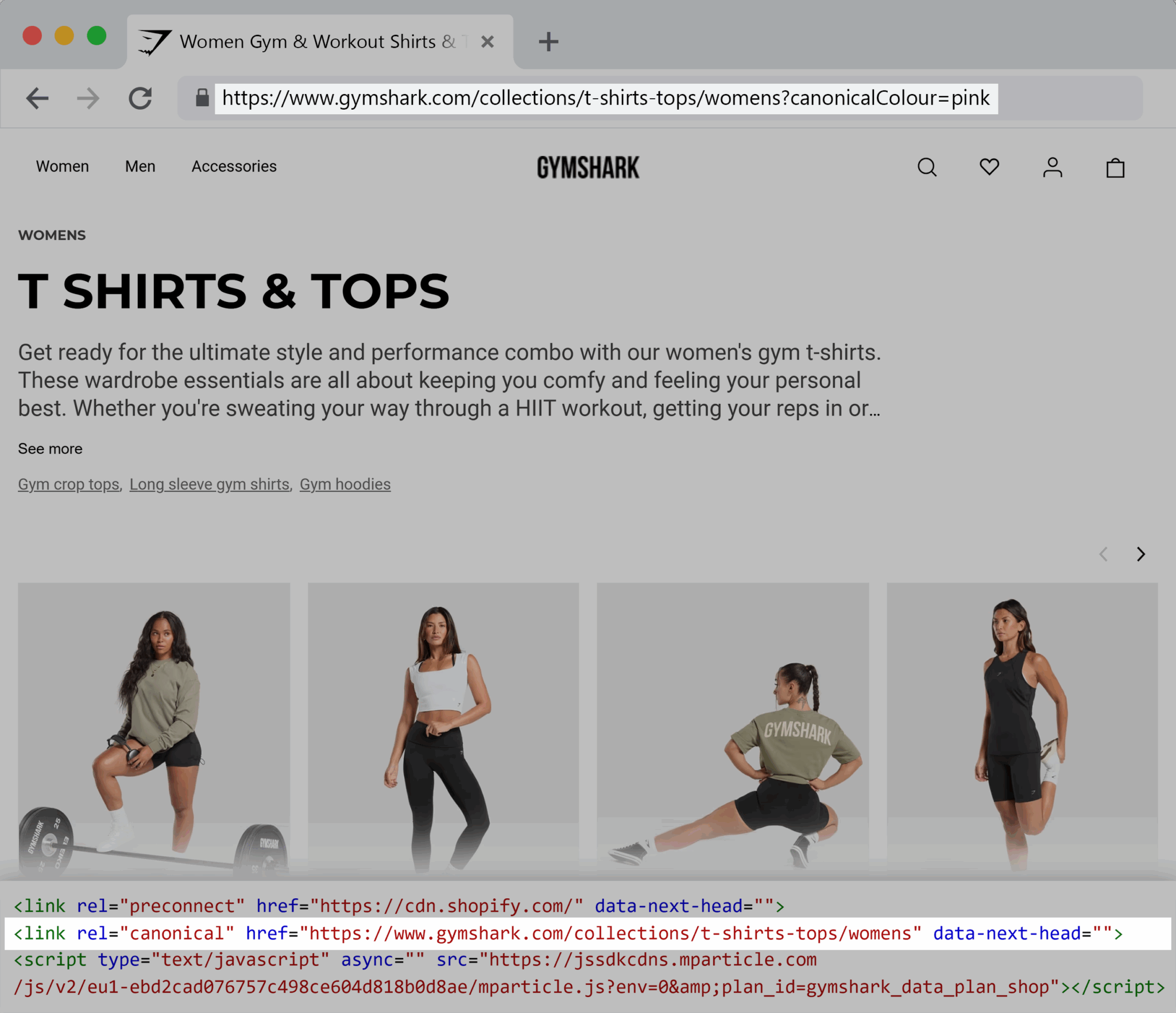
For example, Gymshark, built on Shopify, doesn’t index its faceted navigation.
As seen below, the URL https://gymshark.com/collections/t-shirts-tops/womens?canonicalColour=pink is not indexed.
Its canonical URL is https://gymshark.com/collections/t-shirts-tops/womens.
Noindexing low-value pages (search results, archives)
The noindex meta tag allows you to keep pages on your site that are useful to users while stopping search engines from indexing them. This is useful for pages that don’t add any search value.
A noindex is commonly used to remove pages like search pages and archives. It’s also useful if you’re testing things or building new pages.
If you’re testing your homepage and have two versions live to see which one is best, keep one in the index and hide one with noindex so that you don’t confuse Google with two homepages.
Proper use of hreflang and pagination (use parameters wisely)
Managing large or international sites may create issues with index bloat because of international pages and pagination.
To solve these issues, consider using hreflang tags and pagination strategically.
Hreflang tags tell search engines which language or regional version of a page should appear for users in different countries.
Implementing hreflang tags correctly avoids duplicate content issues between similar pages. For example, a UK page uses the same language as a page designed for a US market, but there may be some nuances that cause variations, such as marketing messaging.
Sometimes, hreflang is handled with URL parameters (such as ?lang=en-gb vs ?lang=en-us). Generally speaking, this is the easiest way to do it, but not always the best, as it’s more prone to errors.
Further reading: For support handling international sites, indexation, and hreflang tags, read our comprehensive guide, International SEO basics: structure, hreflang, and common mistakes
Pagination is generally used in lists, such as product listings or blog content.
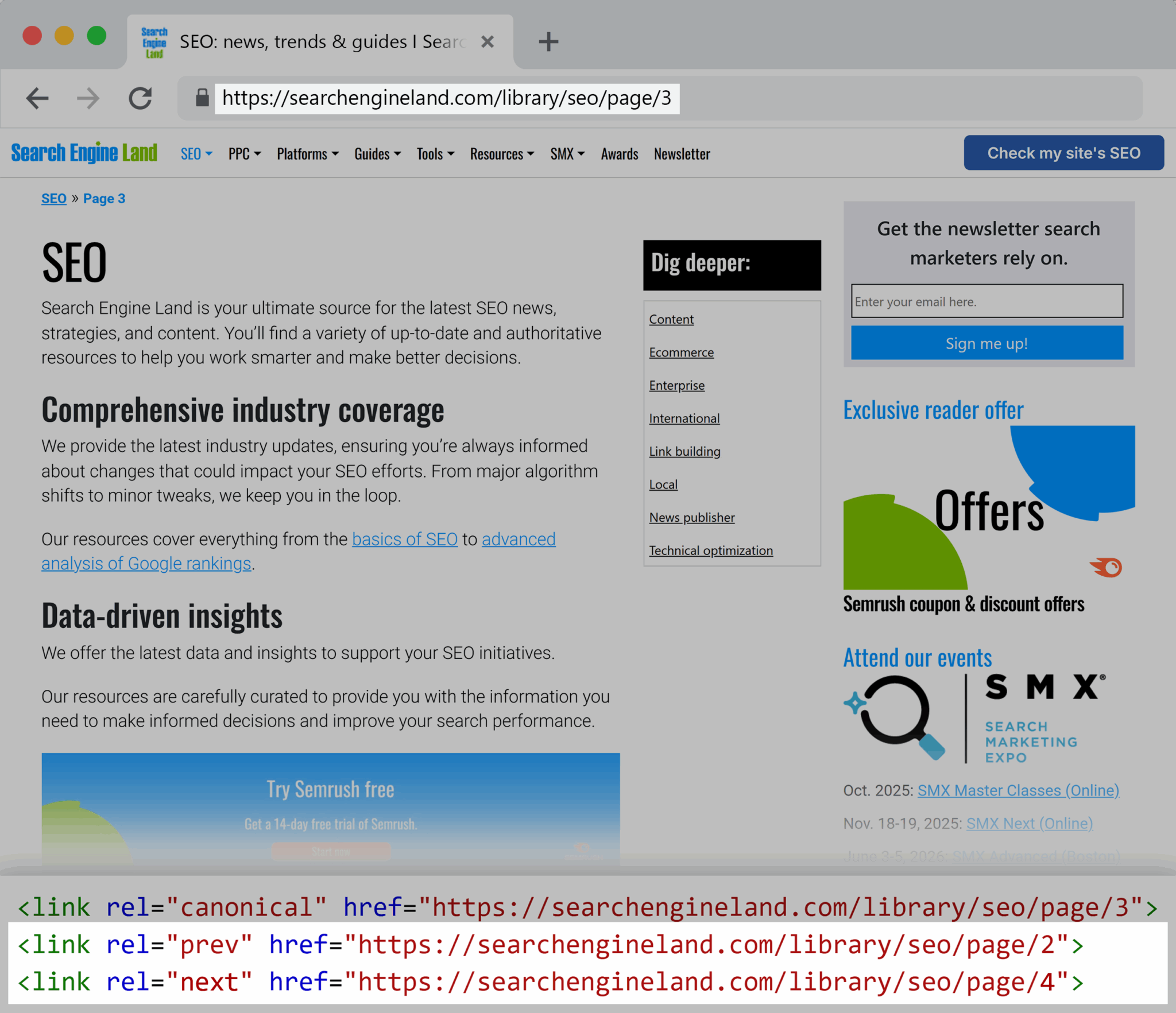
To use pagination correctly, use rel=”prev” and rel=”next” (or ensure proper linking between pages) so search engines understand the sequence. This prevents each paginated page from competing as a standalone thin page.
Here’s an example of rel=”prev” and rel=”next” on Search Engine Land’s site. Page three of the SEO category links to pages two and four.
Strategic content pruning
Content pruning refers to the process of tidying up your content architecture.
Generally, content pruning requires action like:
- Choosing to leave content as-is
- Improving content with updates
- Consolidating near-duplicate pages into higher-value resources
- Deindexing content (like tag pages)
- Redirecting redundant or obsolete pages

Further reading: Not sure how to handle content pruning? Read our comprehensive content pruning guide.
Automation guardrails
The best way to prevent index bloat is with automation guardrails. Ideally, you and your web team will think about guardrails ahead of time, usually as a new site is being scoped, but if you skipped that step, it’s not too late to implement them now.
Guardrails include:
- Noindexing page templates you don’t want indexed. For example, add tag pages to the disallow in robots.txt so any new tags are automatically excluded from search engine crawlers.
- Canonicalization is coded into Shopify templates, so new collections automatically add canonicalization to the product and don’t index duplicate pages.
- Manage sitemap generation at the CMS level so sitemaps only ever include pages that you want indexed.
With the above automations, you can create new pages as you like, knowing they won’t interfere with your indexation plan and cause index bloat.
Best practices for managing index bloat
With automations, index bloat management is made easy, but it’s rarely a one-time fix. Be sure to monitor what’s indexed and check that you’re not indexing pages that should be unavailable to search engines.
Here are some best practices to manage the process.
Align content publishing with crawl budget management
Ensure you’re creating strategic content that makes sense for your users, and avoid creating new content that already exists. Creating new content is very easily done. It often happens when a content strategy isn’t in place, or when a content manager leaves and a new one joins.
It’s easy to create content that makes sense without realizing it’s been done before.
Instead of just creating, search for the content on your website first. Look for opportunities to edit or consolidate existing content so it remains relevant and valuable.
By editing content where it makes sense, you prevent index bloat because you add value to one URL/page rather than creating new pages.
Monitor the Pages report in Google Search Console (GSC) to catch early signs
Google Search Console’s Pages tells you exactly how many pages are indexed, how many aren’t indexed, and, crucially, why they aren’t indexed.
Over the years, the indexation report has gone through changes. It was called the Index Coverage report, but is now just known as “Pages.”
Before, it included the following statuses:
- “Submitted and indexed”
- “Indexed, not submitted in sitemap”
The new Pages report is simplified with:
- Not indexed
- Indexed
When checking index bloat with the original Index Coverage report, you’d probably beeline to “Indexed, not submitted in sitemap.”
Now, however, in Pages, you want to:
- Check that your “indexed pages” are the pages you want indexed
- Check that your “not indexed pages” are pages that you don’t want indexed or available in search engines
To navigate to the report, go to Google Search Console > left-hand menu “Indexing” > “Pages”
Here’s what the report looks like:

Within the “not indexed” section, GSC provides reasons why pages aren’t indexed.
For example:
- Page with redirect: The URL redirects to another page, so Google doesn’t index it separately. In many cases, with a redirect, the URL redirected to is the one you want indexed. You could go through and replace links to redirect URLs to the indexed link as an ultimate best practice.
- Alternative page with proper canonical tag: You’ve specified another URL as the primary/canonical; likely, this page is the one you want indexed. Usually, there’s no action here, but it can be worth reviewing that the pages are meant to have an alternative page assigned as the canonical.
- Excluded by “noindex” tag: You’ve set up a noindex tag. Usually, this is intentional, but it’s worth checking just in case a noindex is in place where it shouldn’t be.
- Not found (404): The page doesn’t exist. Generally, you need to remove all 404 pages. Check your links and see if you’re linking to a page that doesn’t exist.
- Duplicate without a user-selected canonical: This occurs when no canonical tag is set, so Google finds one.
- Discovered – currently not indexed: Google knows the page exists but hasn’t crawled or indexed it yet. You can try improving links to the page, ensuring the page is in your sitemap, and submitting a sitemap.
- Crawled – currently not indexed: Google knows the page exists, but hasn’t crawled or indexed it yet. It’s essential to check these pages, as you probably do want them indexed.
Use programmatic SEO frameworks with indexation control baked in
If you’re using programmatic SEO, set yourself up for success by:
- Setting rules for which parameters change (and matter): For example, “women’s running shoes size six” might have enough search volume to justify a programmatic page. However, every single color variation might not. “Turquoise women’s running shoes size six” might be an unnecessary page.
- Applying canonicals or noindex directives if needed: Automate these if you can, so you’re not retrospectively solving them later
- Setting up internal linking logic so pages link to relevant content: Internally linking relevant content helps distribute authority and helps develop a content hierarchy that looks genuinely useful, and not set up to manipulate search engine rankings
Conduct quarterly index audits
Having automations set up is great, but a quarterly audit is best practice.
Why?
Because automations and AI need to be set up in the first place, meaning you need to be aware of the problem to set up the right alerts.
A quarterly audit of your site helps you process site performance and take action against index bloat if you need to.
In the next section, we provide a detailed overview of auditing tactics.
Index audits have significant benefits for your site overall because you can look for things like:
- Indexed pages report in Google Search Console (mentioned above). This report shows you precisely which URLs are indexed and which aren’t.
- Content that performs well, content that doesn’t, and content opportunities. Indexing audits uncover insightful content opportunities. Take note of the content’s overall progress and how you can support it. For example, if a service page appears on page two of Google, you may need to create and index more content surrounding it.
- Check alignment with strategy. While reviewing all your URLs, be mindful of business and marketing goals. Consider removing or optimizing good content that doesn’t really represent the business now or drive business goals.
You can use tools like Google Search Console (mentioned above) to review your site manually as part of your audit—and refer to the Pages report shared above.
You can also use tools like Semrush.
How to use Semrush to stay on top of index bloat
Semrush has a range of reports that can help any site stay on top of index bloat. Its automated alerts make it exceptionally helpful for large enterprise sites.
Here are some ways you can use this tool to manage index bloat.
1. Crawl your site with Site Audit
The site audit will crawl your entire website and give you a full inventory of indexable URLs.
To set it up:
Log in to Semrush > Left navigation bar > “SEO” > “Site Audit” > “Create project”
You’ll find a pop-up where you can adjust your audit to suit your needs.

Further reading: For a full guide on setting up a site audit, read the configuration guide.
Once your audit is set up and the first crawl is completed, you can view it within the site audit report.
2. Analyze crawl budget & internal linking
From the site audit report, you can review all crawled pages by clicking “Crawled Pages.” You’ll get a full list of pages, including:
- Page URLs
- AI tools blocked by robots.txt
- Page title
- Page description
- Status code
- Click depth (if connected with Google Analytics)
- Page views
- Structured data items

Pro tip: Use the “Manage Columns” button to add the columns you’re most interested in and remove the ones you don’t want to see.
Use this report to analyze crawl budget.
Crawl depth is the number of links a crawler had to follow before it crawled the particular page. The higher the number, the deeper the page.
Notably, crawled pages buried deep are strong indicators of bloat candidates.
Why?
Because pages that have a high click depth are considered your least important pages. You’re not linking to them, which suggests they’re not important enough, are forgotten, and/or could be duplicates of other pieces that have superseded them.
Filter the report by highest click depth first.
Review all pages listed and ask yourself: Does this need to be in Google’s index?
If the page is unimportant and doesn’t help search engines, consider your next action. You might want to remove it or deindex it, or loop the piece into a content pruning strategy.
However, if the page is important, strategize to improve the crawl depth. Think about where you can link to it so crawlers can easily find it. Consider your internal linking strategy.
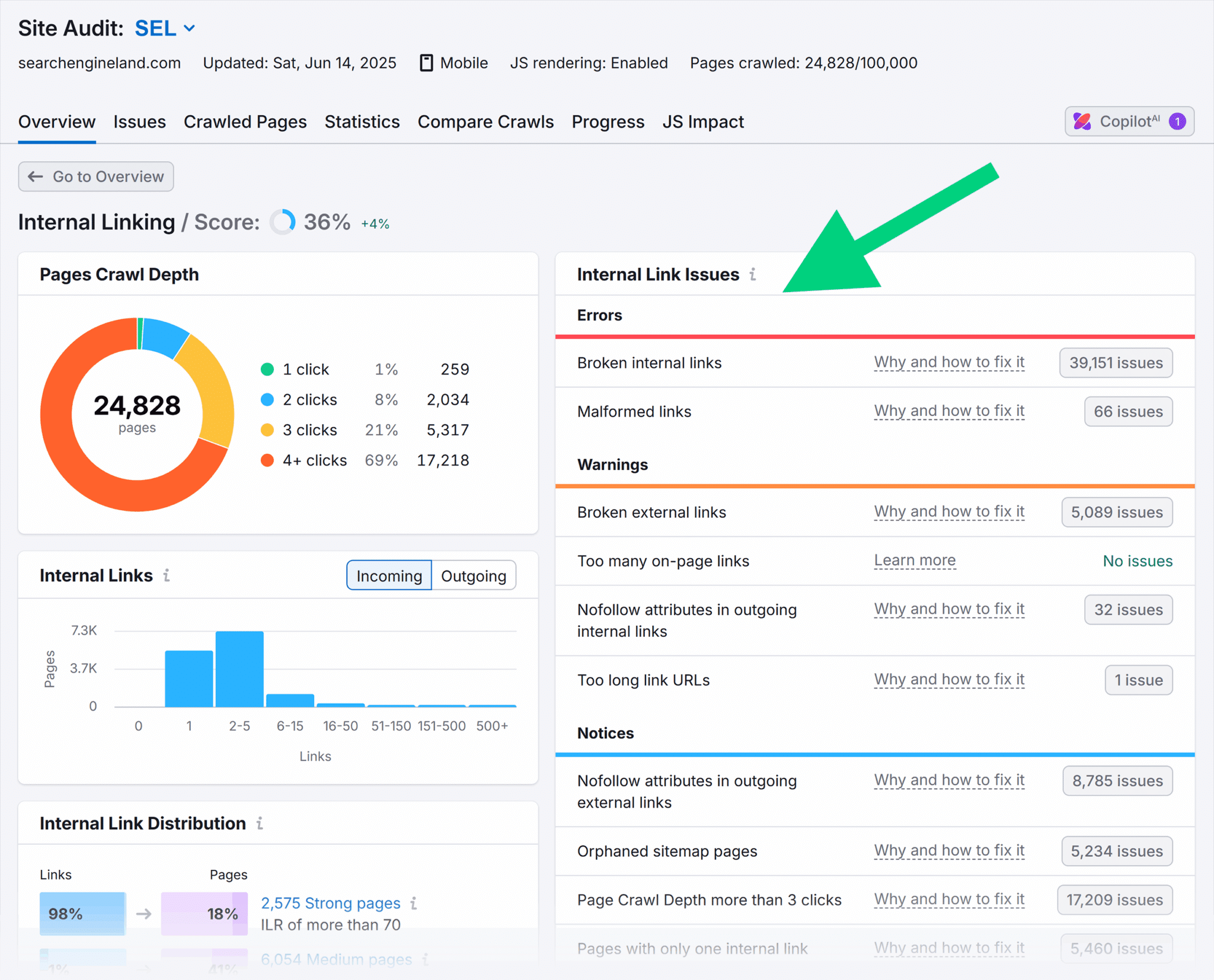
Combine this analysis with the Internal Linking report.
To navigate to this report, go to “Site Audit” > Internal Linking > “View details”

Within the Internal Linking report, you can look for:
- “Errors,” “Warnings,” and “Notices” related to internal links that need to be resolved. Use the “Errors,” “Warnings,” and “Notices” categories to work through issues.
- “Weak” internal links to unimportant URLs. Use the internal link distribution to work on the weak pages first.
- Important pages that could benefit from more links. Double down when you see an important page in the “weak” or “medium” pages link distribution categories. Add more relevant and natural inlinks to these pages.
The goal is to:
- Strengthen links to core pages
- Add pages to noindex if it makes sense to do so
- Prune pages that aren’t useful or can be improved
- Disallow weak/utility pages
3. Surface duplicate/thin/parameterized pages
Cross-check your audit with indexed traffic data and prioritize which URLs to prune, consolidate, or block.
Once you’ve crawled your site, reports present a comprehensive technical audit.
Here’s how you find it:
Go to Semrush > “SEO” > “Site Audit” > Choose your project
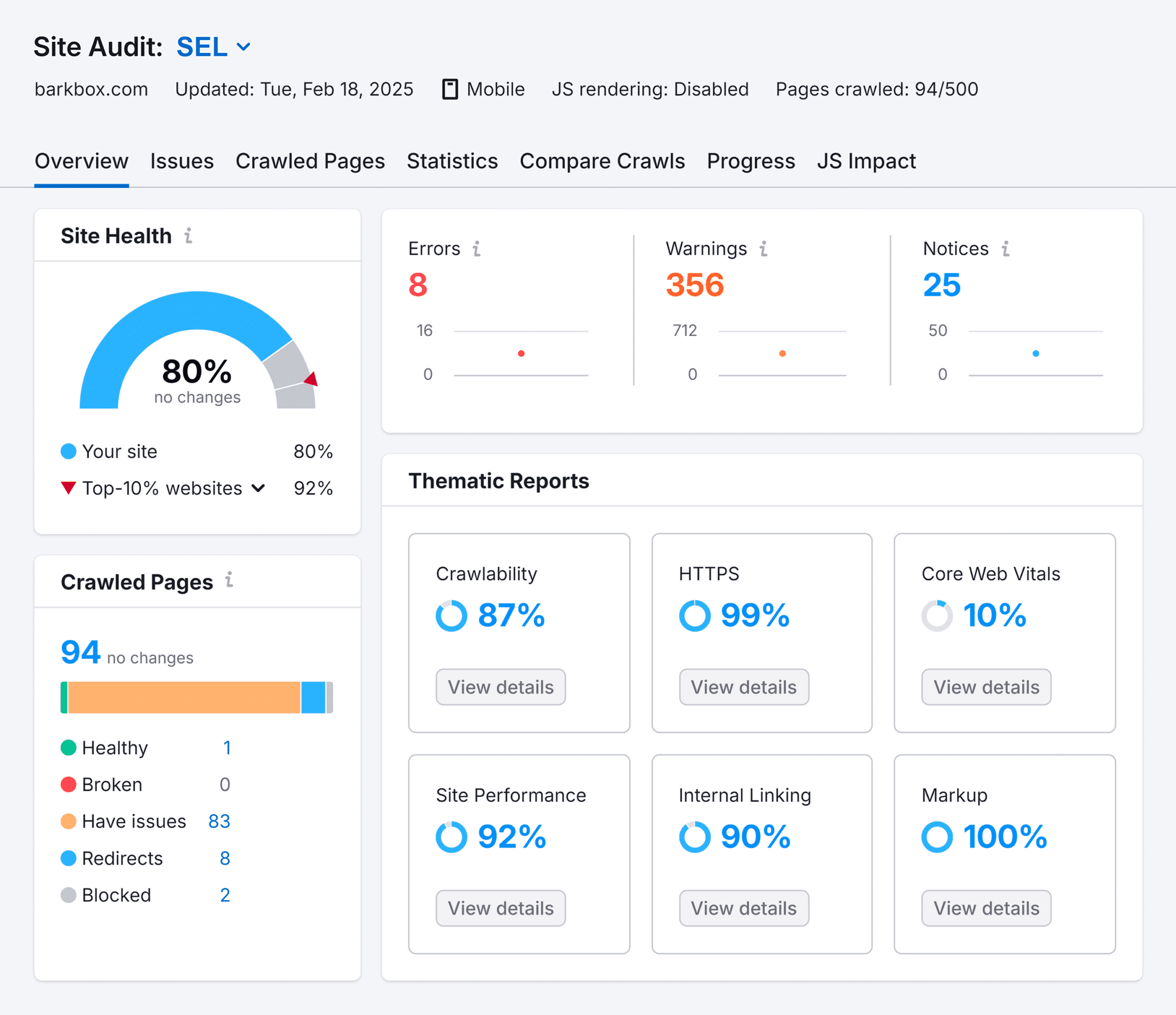
This is the site audit dashboard, and it presents your technical audit, including:
- Site health, with a score and comparison to competitors
- Technical issues that are prioritized into “Errors,” “Warnings,” and “Notices” categories
- Thematic reports, including “Crawlability,” “HTTPs,” “Site Performance,” and more
Improve your site health by resolving technical issues.
Within the technical issues, you’ll see a range of issues, some of which help with index bloat. Focus on key index bloat issues such as:
- Duplicate content (near-duplicates, parameterized URLs, printer-friendly versions), because duplicate content shouldn’t be indexed.
- Thin pages with little word count are an indicator that a page might be low quality.
- Orphan pages (not linked internally but still crawlable) may be unimportant since linked-to pages are generally important and part of the content strategy. Orphan pages are an indicator that a page needs work (deindexation, removal, or perhaps improvement of internal linking).
- Pages with canonical tag issues (missing, self-referential, or conflicting), which should be reviewed and fixed.
All of the above issues tend to create index bloat and dilute your crawl budget. A human review is necessary to determine whether the issues are impacting index bloat.
For example, a page with a low word count is an issue if the page doesn’t satisfy the user. A contact form might flag due to low word counts, but if there’s enough content to encourage contact, it’s sufficient and serves a purpose so it’s not an index bloat problem.
Pro tip: Start with “Errors,” as these are considered the highest priority, then move onto ”Warnings” and “Notices.”
4. Incorporate AI and automation-based anomaly detection for large enterprise sites
On very large websites, chasing down index bloat can be a lot of manual work. Where possible, set up AI and automation to help you detect issues.
You can set up AI to flag issues like:
- An increase in parameterized URLs being crawled
- A rise in thin or duplicate pages being indexed
- Canonical tag issues
- Shifts in crawl distribution away from priority sections of the site
You can easily automate any of the reports mentioned above. First, navigate to the report you want to automate.
Here’s how you’d navigate to a report showing thin content:
From “Site Audit” > Choose your project > Click “Issues”
The report shows a complete list of issues, including those that are present on your site and those that aren’t.
Remember, just because an issue isn’t present now doesn’t mean you shouldn’t set up automation. Take proactive measures and find the issue you want to automate.
Pictured below is a screenshot of the Issues report with the issue “X pages have a low word count.”

Click on the issue.
From here, you can set up automated reports.
Click “PDF” in the top right of the report > You’ll see a pop-up as pictured below > Toggle “Email PDF report” and “Schedule report” > Customize the email
You can:
- Add recipients
- Edit the email text
- Choose send frequency
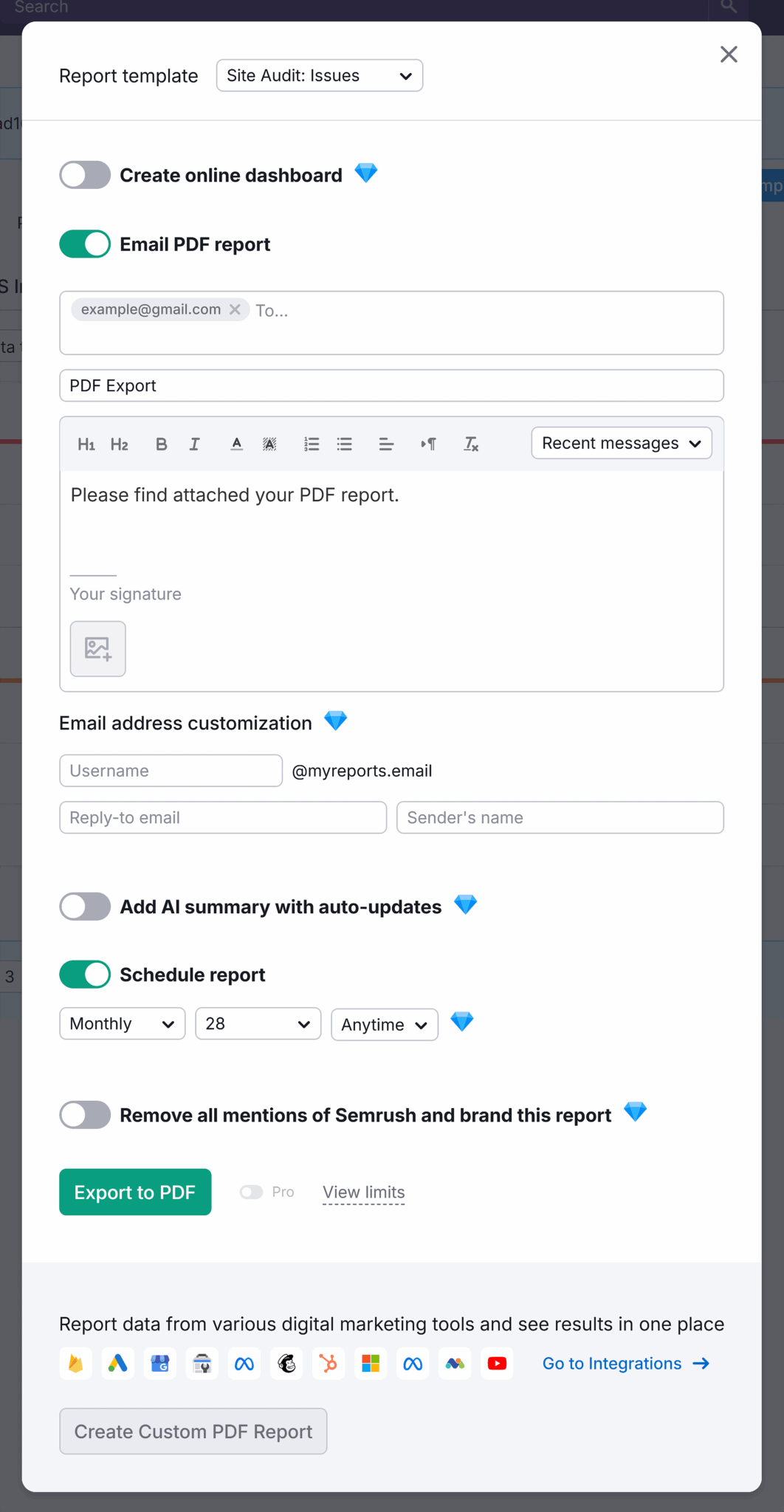
Important note: This workflow above only works if you have issues present.
If your site doesn’t have the issue present but you still want to automate the report (recommended), you can set it up with the workflow below:
Click “Site Audit” > Select your project > “Issues” > Find and click on the issue you want to automate > Select “PDF” > Follow the PDF workflow detailed directly above
5. Spot parameter & duplicate issues
As mentioned in the “Causes” section of this guide, parameters cause duplicate pages, which lead to index bloat.
You can find parameter and duplication issues in Semrush—here’s how:
“SEO” > “Site Audit” > “Issues” tab within your project
Look for the following issues:
- Duplicate title and meta descriptions reports may be an indication that you have duplicate/identical pages. If a page has the same title or the same meta description, the contents of the entire page may also be duplicates.
- Duplicate content issues may occur on pages with overlapping or very similar body content. If the body content is identical, one page (typically the lower-performing one in terms of traffic and/or conversions) needs to be removed and 301 redirected to the page that you’re keeping, or it should be edited to make it unique.
As you review URLs listed, look for URL parameters generating near-identical pages.
Pro tip: When you’re looking at the list of URLs, search for “?” to identify those with parameters quickly and easily.
6. Prioritize fixes with impact
Prioritization within the tool helps you identify the most important fixes. Remember to start working through errors first, then warnings, then notices.
While this prioritization is helpful, it doesn’t give you the whole picture.
For example, you might have errors on two pages that aren’t overly important, but hundreds of warnings or notices across your most important pages. It would make sense to look after your top pages first.
Use Position Tracking and Organic Traffic Analytics reports to help you decide which pages are essential for your content strategy.
To access Position Tracking:
“SEO” > “Position Tracking” > Click your project > “Overview”
This report will only be helpful if you’ve set up keywords to track. Filter pages by highest ranking and review the URLs.
Cross-reference your URLs that have issues with pages that rank well. Resolve issues on these pages first.
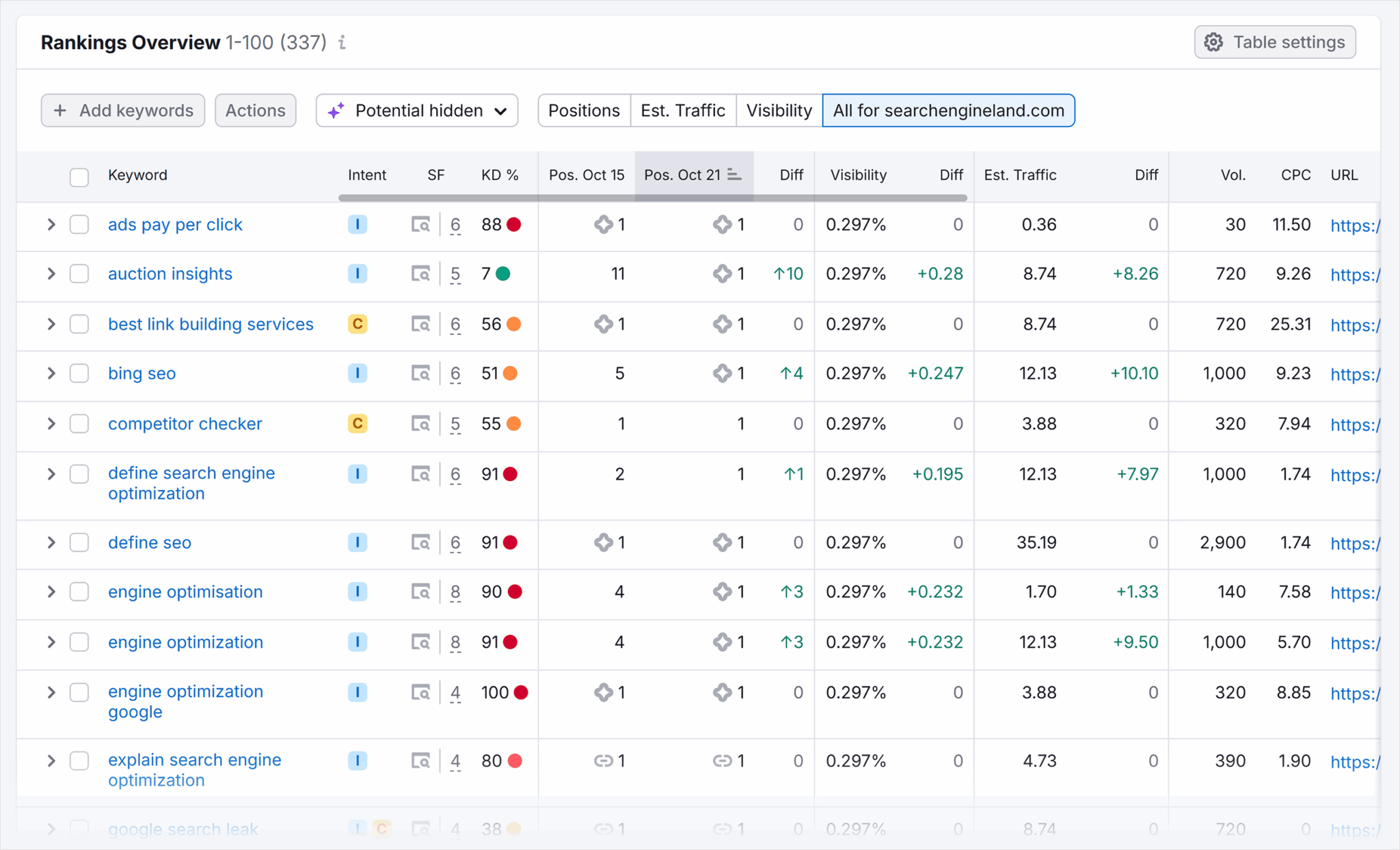
To access Organic Traffic Analytics:
“SEO” > “Organic Traffic Insights” > Click your project > “Overview”
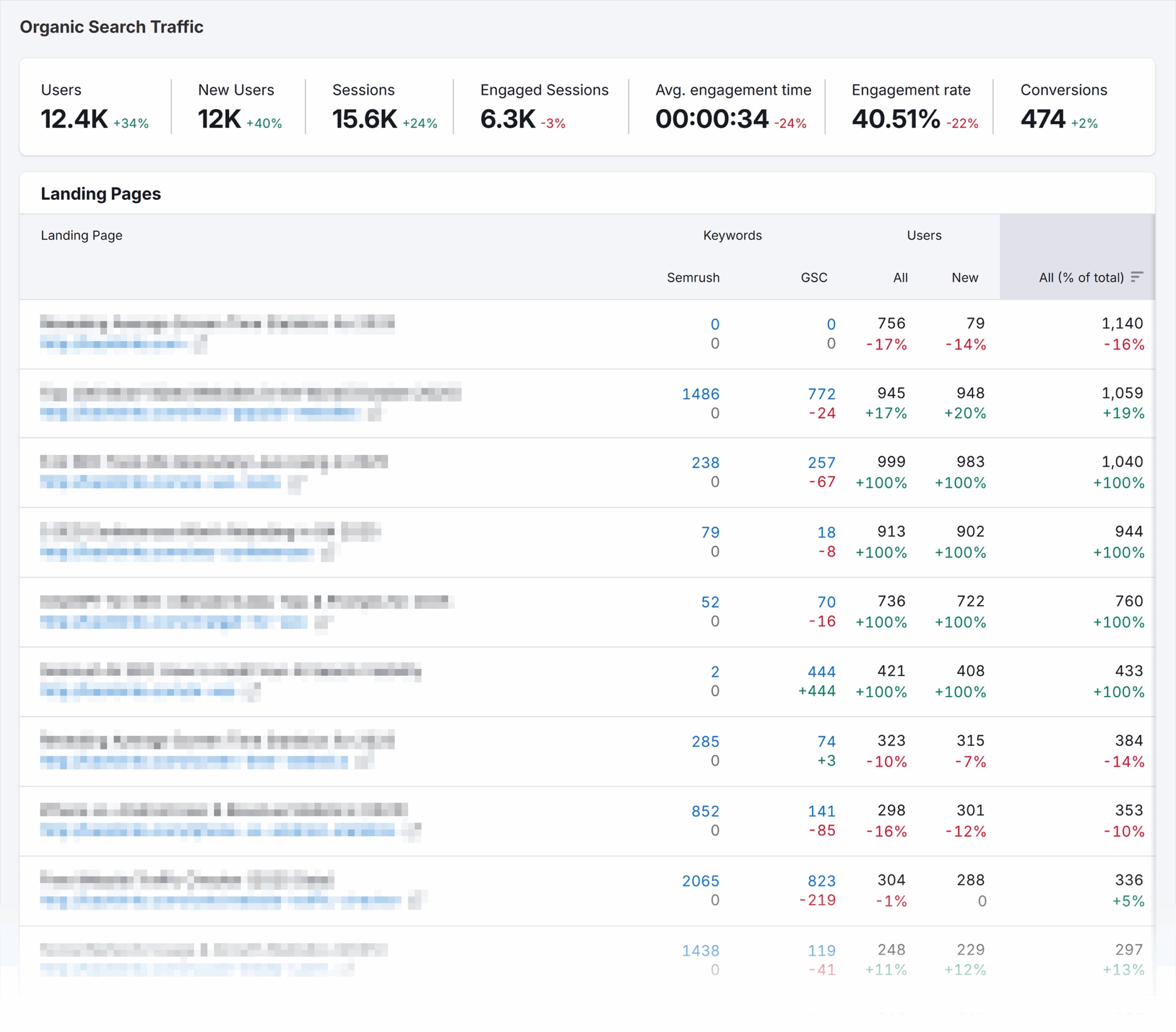
The Traffic Analytics report combines Semrush, GA4, and GSC data into a table to help you determine top pages across a range of metrics and tools.
If you haven’t set up the integration between Semrush and Google’s tools, you’ll need to do that first.
Here’s how:
Go to Semrush > Left-hand menu > “SEO” > “Organic Traffic Insights”
If GSC isn’t connected, you’ll see a “Set up” button next to your project. Click it and set up the integration by selecting your GA4 account and GSC property within the pop-up:

Use this data to identify:
- Low-traffic pages (an indicator of low value)
- High-duplication pages (look for parameters), which are prime candidates for removal/noindex
- Pages driving value (high engagement is an indicator of value)—consider optimization or consolidation instead of pruning
7. Monitor & iterate
Once you’ve pulled all your reports and analyzed index bloat, you need to stay on top of it.
Remember to set up the reports so you get an automated email when new pages show signs of being low value and indexed.
As time goes on, index bloat grows, so prepare to apply necessary fixes as you go (add new noindex tags, check canonicals are functioning as they should, redirect old content, keep your robots.txt updated).
Have your site audit run frequently so you’re always looking at fresh data.
Compare your findings from site audits with GSC. Review the Pages report and track “indexed page count” in GSC vs. sitemap count to see if bloat is shrinking.
As you iterate your pages, keep an eye on the Position Tracking report to ensure pruning or deindexation doesn’t drop visibility for valuable queries.
Track, optimize, and win in Google and AI search from one platform.
Get on top of index bloat for free
Index bloat isn’t just an untidy technical issue. It has a significant impact on a site.
Yet, with monitoring software, it’s easily managed.
Instead of suffering slower discovery of your best content, weaker rankings, and a poorer overall perception of your site in search, try Semrush for free.
You’ll be able to set up all the reports and automations provided above and get your site ranking with all the right pages in no time.
For more information:
Explore more on
Editorial disclosure
Search Engine Land is owned by Semrush. We remain committed to providing high-quality coverage of marketing topics. Unless otherwise noted, this page’s content was written by either an employee or a paid contractor of Semrush Inc.
About the author


