Free XML Sitemap Generator

At this point, you probably know your website like the back of your hand. You know where everything lives. It all feels easy and obvious. However, search engines and AI crawlers don’t have that context. They don’t automatically know what exists, what matters, or where to start.
So how do you make that clear? How do you make sure the work you’ve put in doesn’t get overlooked?
The solution: an XML sitemap.
Before we go further, there are two types of sitemaps:
- HTML sitemaps are for people
- XML sitemaps are for search engines and AI systems
Here, we’re only focusing on XML sitemaps — the version that helps your content get discovered, indexed, and actually show up where it should.

An XML sitemap is a structured, behind-the-scenes map of your key pages. Instead of leaving things to luck, you’re laying everything out clearly so the right pages are easy to find from the start.
In this guide, we walk through the benefits of having an XML sitemap, what an XML sitemap generator is, and how to use one to set up an XML sitemap so the content you’ve worked on can actually be found, indexed, and shown.
What is an XML sitemap generator?
An XML sitemap generator is a tool that automatically creates an XML sitemap for your website. That file is a structured list of your important pages, designed to help search engines like Google and Bing discover and index them more efficiently.
A typical sitemap includes each page’s URL, when it was last updated, how often it changes, and how important it is relative to other pages on your site.
Why does a sitemap matter?
Think of an XML sitemap like a map that not only shows where things are, but also what matters, what’s changed, and what should be prioritized. Without that map, search engines are piecing things together on their own. That means pages can be missed, updates can go unnoticed, and your most important content might not get the attention it should.
With an XML sitemap, you’re giving clear direction and are making it easier for your key pages to be found, understood, and actually shown in search results.
Instead of hoping your content gets picked up, you’re being intentional about how it’s laid out so nothing important is overlooked.
How does an XML sitemap affect SEO and AI search?
Before anything can rank in search or show up in AI results, it first needs to be found.
Search engines and AI crawlers start by crawling your site. From there, they decide what to index. Only after that can your pages appear in results.
See the gap?
If crawlers can’t find your pages, they can’t index them. And if the pages aren’t indexed, they won’t show up in search results at all. Which means all that work you’ve put in can go unnoticed.
This is where an XML sitemap makes a real difference.
It gives crawlers a clear list of your important pages so they don’t have to rely on links alone to discover them. This is especially useful if some of your pages aren’t well-connected within your site.
For example, if a page has no internal links and no backlinks, it’s essentially invisible to search engines and AI crawlers. The only way they’re likely to find it is if it’s included in your XML sitemap.
Rather than leaving discovery to chance, you’re making sure your content can actually be seen, indexed, and considered for both SEO and AI-driven search — which is where results start to happen.
How to generate an XML sitemap
Although you can still generate an XML sitemap manually, for most websites, there’s rarely a reason to do it that way anymore.
These days, sitemap generator tools can crawl your website, identify indexable pages, and create a properly formatted XML sitemap within minutes. Instead of building and updating everything yourself, the tool handles most of the heavy lifting in the background.
Not only does automation save time, it also reduces errors and keeps your sitemap updated as your website changes. That means search engines and AI crawlers can discover new pages faster and understand your site structure more clearly.
In other words, you’re giving crawlers a structured map of your content from the start.
What to do after generating an XML sitemap
Once you’ve generated your sitemap.xml file, follow a few simple steps to get it to start working for you.
1. Perform a quick check
Take a moment to check everything:
- Are all your important pages included?
- Is there anything there that shouldn’t be?
- Does the file load properly in your browser?
Catching small issues with your sitemap now saves you from fixing bigger ones later.
2. Upload the sitemap file
Start by placing your sitemap at the root of your domain.
For example:yoursite.com/sitemap.xml
This is the first place crawlers check, so keeping your sitemap here makes it easy for them to find it without any friction.
3. Link the sitemap in your robots.txt
Add a line in your robots.txt like:Sitemap: https://yoursite.com/sitemap.xml
Think of this directive as leaving a clear signpost. When crawlers arrive on your site, they can immediately see where your sitemap lives instead of spending time looking for it.
4. Submit your sitemap to search engines
Upload your sitemap to tools like Google Search Console and Bing Webmaster Tools.
Not everyone does this step, but it removes the waiting. Instead of hoping crawlers eventually find your sitemap, you’re placing it directly in front of them.
How to use the XML Sitemap Generator
Now that you know how to generate a sitemap and what to do with it, let’s walk through how to actually use a generator tool.
Step 1: Enter your domain
Start by going to the tool and entering your domain (e.g., yourdomain.com), then click on the “Fetch Sitemap” button.

Step 2: Monitor the crawl
Once you’ve entered your domain, the tool will begin processing your site. You’ll see a status that says “Progressing.”
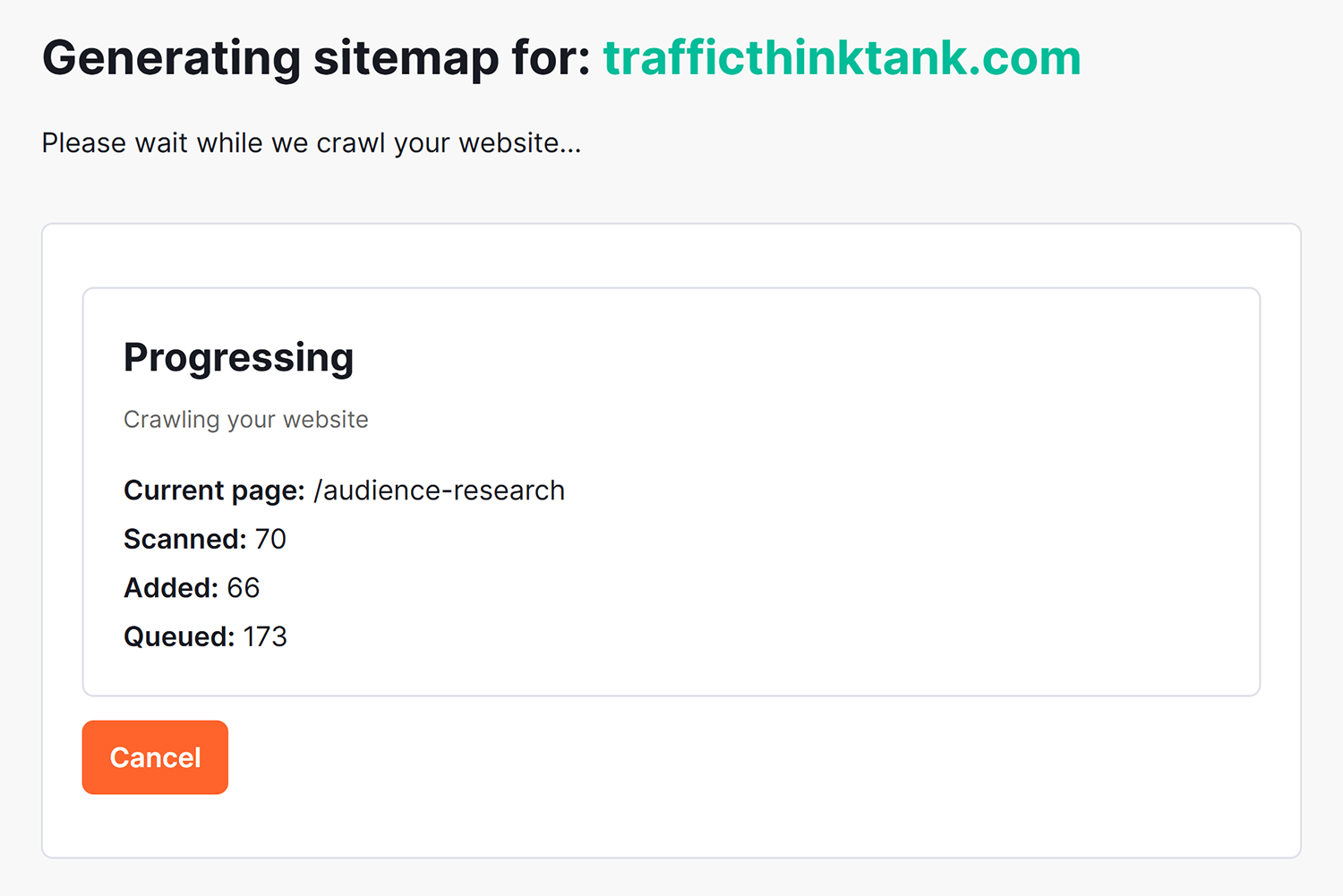
This means the tool is actively moving through your website and building your sitemap in real time. It follows your pages the same way a search engine would — moving from one link to another and collecting all the URLs it can find.
The progress screen will show you:
- Current page: The page it’s scanning right now
- Scanned: How many pages it’s checked so far
- Added: How many of those pages have been included in your sitemap
- Queued: How many pages are still waiting to be processed
Not every page the Sitemap Generator tool scans will be added, which is completely normal. The tool filters pages based on whether they’re indexable.
If you notice the numbers don’t match exactly, don’t worry — nothing’s wrong. The tool is simply doing the work of separating what should be included from what shouldn’t.
The key thing to watch is that:
- The scanned number keeps increasing
- The added number grows steadily
- The queue gradually goes down
That’s a sign everything is working as it should.
If you’re seeing this and thinking, “It’s doing a lot behind the scenes,” you’re right. Your role is to let the Sitemap Generator tool run and then review the final output once it’s done.
Step 3: View your sitemap results
Once the crawl is complete, your sitemap will be ready to view.

You’ll see a summary like:
- How many URLs were discovered
- A structured list of those pages
- The full XML file generated for your site
This is where everything comes together.
At this point, the tool has finished scanning your site and is showing you exactly what it found and decided to include.
You might notice:
- Your main pages (like homepage, about, services)
- Blog or article pages
- Category or archive pages
Now’s a good moment to pause and ask yourself:
- Does this reflect the pages I actually want search engines to see?
- Is anything missing?
- Is there anything here that feels unnecessary or low value?
Remember, this list is what search engines will use as a reference. Rather than rushing ahead, take a quick look through. You’re not expected to analyze everything in detail — just sense-check that it aligns with your site.
If everything looks right, you’re ready for the next step: downloading and submitting your sitemap.
Step 4: Download and implement your sitemap
Once everything looks right, click “Download XML sitemap.”
This gives you the final file you’ll use moving forward.

From here, there are three simple things to do:
1. Add the sitemap to your site
Upload the sitemap file to your root domain (e.g., yourdomain.com/sitemap.xml) so it’s accessible.
2. Link the sitemap in your robots.txt
Add a line like:Sitemap: https://yourdomain.com/sitemap.xml
This helps crawlers quickly find your sitemap.
3. Submit the sitemap to search engines
Upload the sitemap to tools like Google Search Console and Bing Webmaster Tools so it’s picked up without delay.
That’s it. Once you’ve completed these steps, your sitemap moves from being a file to something actively helping your pages get discovered and indexed.
Ready to build a sitemap?
Now that you understand what an XML sitemap is, it’s time to actually use it.
Pages going unnoticed, search engines guessing your structure, important content not getting the attention it deserves — these frustrations become a thing of the past.
With a sitemap generator, you’re laying everything out clearly, making it easier for search engines and AI crawlers to find, understand, and prioritize your pages.
All you need to do is enter your domain and let the tool get to work, taking you from guesswork to strategy and precision.
Explore more on
Editorial disclosure
Search Engine Land is owned by Semrush. We remain committed to providing high-quality coverage of marketing topics. Unless otherwise noted, this page’s content was written by either an employee or a paid contractor of Semrush Inc.
About the author