Google Provides Competitive Information In New Auction Insights Report

 AdWords marketers’ days of regularly refreshing on all their keywords may be over — or at least that activity may not be quite so necessary. Google is releasing a new report — Auction Insights — that helps marketers understand how their ads stand, compared to others in the same auctions.
“For a given keyword, the report tells you in aggregate how you’re doing as compared to other participants,” Bhanu Narasimhan, group product manager for AdWords, told us.
While the report lists the landing page domains for all of the other competitors in a particular auction, Google stresses that the information provided about competitors is no more than a marketer would get by performing the search on Google.com.
The reports won’t give the competitors’ keywords, quality or settings. For example, you can see that a competitor’s ad will be triggered by your keyword, but the other advertiser may not be actively bidding on that specific keyword — perhaps they are using broad match, for example.
The new report provides new data at the keyword level on five different statistics:
- Impression share: the percentage of total impressions the ads will get based on current settings.
- Average position: the average rank of your ad, compared to other domains appearing for the auction.
- Overlap rate: how often your ads overlap with those of another domain.
- Position above rate: how often your ads are above a certain other domain.
- Top of page percent: how often your ads appear in the ad block on the top of the page.

The report, rolling out globally in the next few days, is only available for highly-trafficked keywords, as there’s not enough data available for less-popular ones. Marketers can only see one keyword at a time, currently.
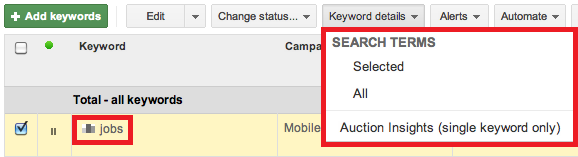
To find the report, go to the Keywords tab, click the box next to the keyword — available keywords will show an icon that indicates the report is available for that keyword. Click the “Keyword Details” tab and choose “Selected (single keyword)” under “Auction insights.”
Explore more on
Add Search Engine Land as a preferred source on GoogleEditorial disclosure
Search Engine Land is owned by Semrush. We remain committed to providing high-quality coverage of marketing topics. Unless otherwise noted, this page’s content was written by either an employee or a paid contractor of Semrush Inc.
About the author