Why Google reviews will power up your local SEO in 2027


A strong Google review strategy is one of the most effective and actionable ways to boost your business’s local SEO performance. Unlike other local ranking signals that may seem out of reach, reviews are something you can actively influence.
Google reviews play a major role in Map Pack rankings, as indicated by industry professionals responding to Whitespark’s 2026 Local Search Ranking Factors survey. Reviews are one of the top 10 local pack/Google Maps ranking factors.
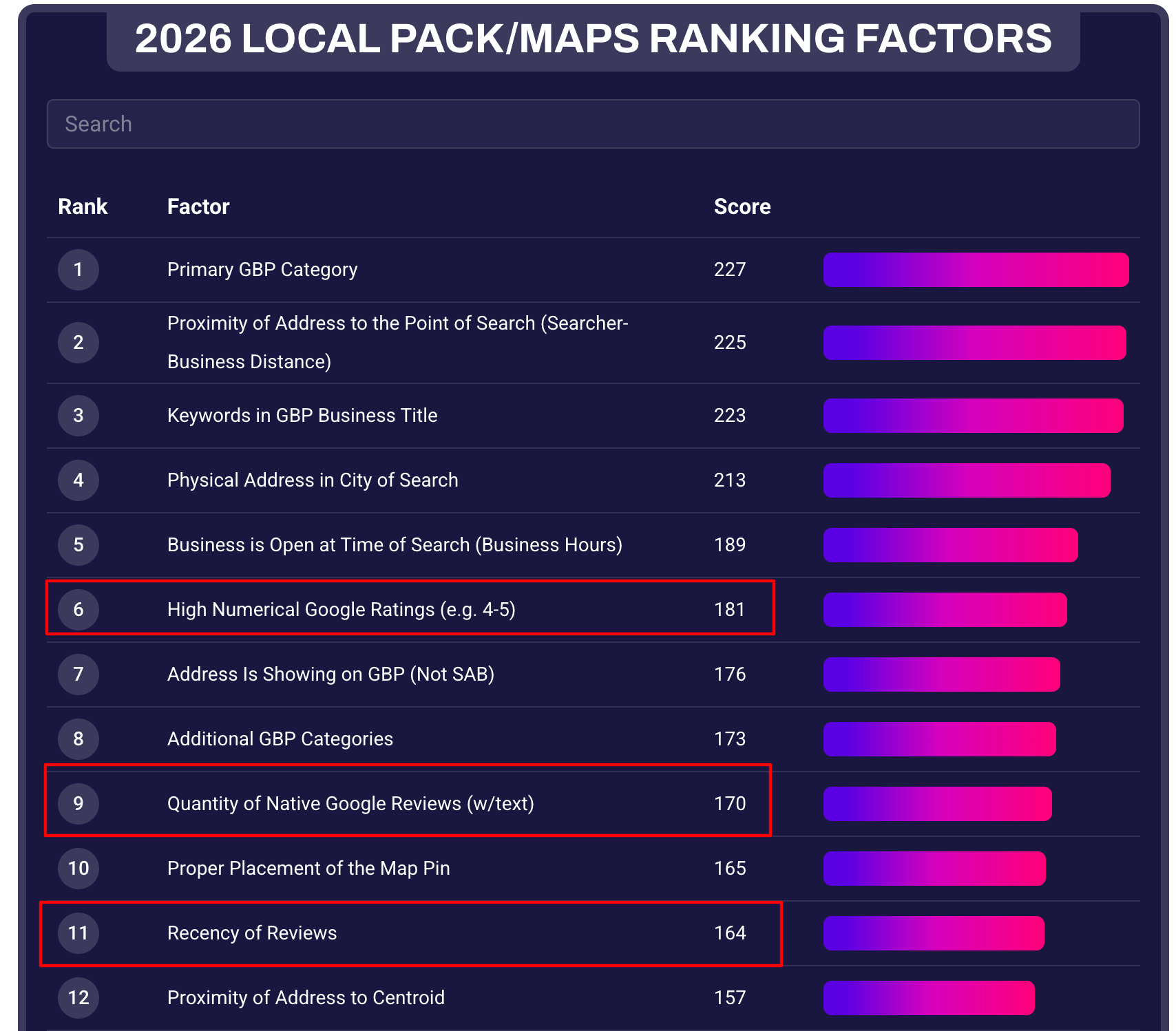
Yet many businesses still underestimate how much reviews matter for showing up in Google Search. Businesses that master these fundamental tactics have a major advantage in the Map Pack:
- Consistently get more reviews on Google.
- Get high-quality reviews with photos or videos.
- Navigate some of the most common review pitfalls.
With Google core updates shaking up local organic search engine results pages (SERPs), Google Business Profile (GBP) is one of the strongest online marketing assets for local businesses. Generate detailed, photo-rich reviews that boost local rankings and insulate your business’s online lead flow.
Why Google’s Map Pack continues to be a reliable lead source
When you want to maintain and grow your visibility in Google Maps, consistently gathering reviews over time is one of the best ways to do it. This is especially true compared to other organic search tactics.
If your business website has seen a decline in traffic from organic search over the last few years, you aren’t alone. Organic websites are being pushed farther down search results pages than ever because of ads and AI Overviews.
Historically, Google’s algorithm updates haven’t affected local organic search much. But in 2025 and 2026, they’ve bucked the trend and dramatically impacted many local business sites.
But Map Pack rankings have been completely unaffected by the issues plaguing their organic search counterparts. Many local businesses (especially home service providers, lawyers, health care professionals, and real estate agents) continue to get a majority of their organic leads from GBP.
The kinds of Google reviews your business needs
Any review your business earns is beneficial, but some reviews outweigh others for SEO and conversion purposes.
Encourage customers to leave detailed text reviews describing the specific services they received. They should mention details like:
- The problem or project they needed help with.
- Their experience with your team regarding communication and timeliness.
- The final results of the service and their satisfaction level.
- The names of individual employees who assisted them.
- High-resolution photos or videos of the finished job.
Detailed reviews trigger review justifications, which are snippets of review text that Google highlights directly in Map Pack results when someone searches for a specific service. Review justifications provide instant social proof, which can boost trust.
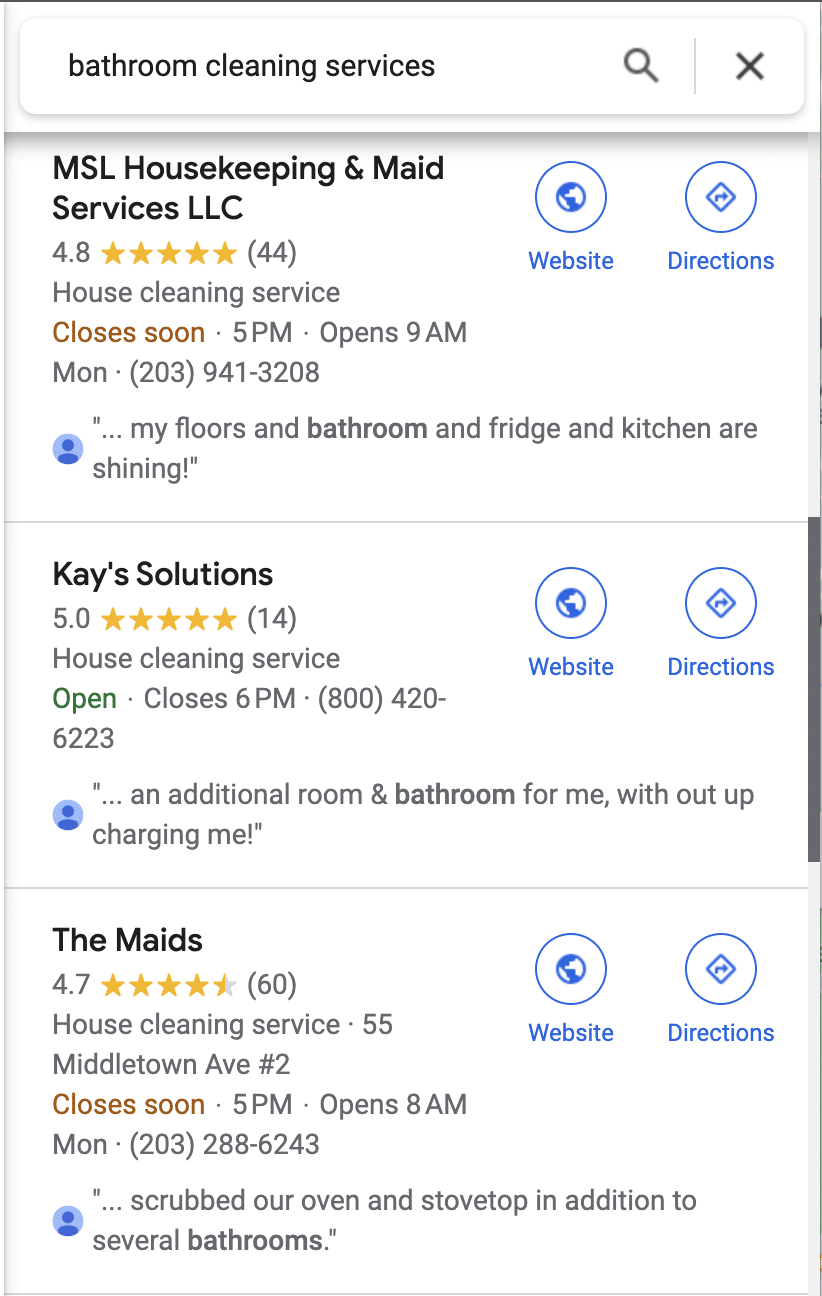
Prioritize reviews with media
Reviews with photos or videos amplify visual credibility. These reviews consistently remain near the top of a GBP’s default “Most relevant” view longer than text-only reviews.
If a negative review is currently near the top of your GBP, photos are the most effective way to push it down.
Earn detailed positive reviews accompanied by job site photos. Encourage your team to remind clients to snap a photo of the completed work, whether it’s a newly installed heating, ventilation, and air conditioning (HVAC) system, a repaired roof, or a replaced garage door spring. Another option is to ask satisfied customers to update their existing reviews with photos.
Tip: When you send a review request text or email, share photos from the job at the same time. That way, the customer can easily add a relevant, unique photo your team is likely already taking.
How to get more Google reviews
Review recency is a crucial local ranking factor. Long gaps between review submissions can cause rankings to slip over time.
The businesses that win the review game are the ones that make review acquisition part of the workflow. Here are some ways to do it.
Ask every customer for a review
Train employees to ask every customer for reviews.
- For front desk staff at storefronts, that means asking at the time of the appointment
- For home services, that means asking at the time of the job completion
- For past customers who never left a review, that means direct outreach by text or phone call
Don’t rely on customers to remember to leave a review, or you’ll miss out on a majority of your review potential.
Incentivize employees (not customers)
Google strictly prohibits incentivizing customers for reviews. Offering discounts, gift cards, or payments in exchange for reviews violates Google’s deceptive content guidelines.
However, you can and should incentivize your staff to ask satisfied clients for reviews. Offer cash rewards, gift cards, or monthly drawings for employees who earn mentions in reviews or who successfully collect reviews with photos attached.
Google’s prohibited and restricted content guidelines clarify that merchants shouldn’t request that staff solicit a certain number of reviews or reviews with certain content. Make sure staff ask customers to review their genuine experiences. If all the reviews mention the same thing or if customers appear coached to say specific phrases, Google may flag the content.
Automated SMS and email outreach
Automate outreach to make the review process effortless. Retrieve your direct review link from your GBP dashboard under “Ask for reviews,” and integrate it into automated text message or email follow-ups right after a service call or job completion. Keep the messaging concise, professional, and clear.
Ask business partners and vendors for reviews
You can ask non-customer business contacts to review your profile if you’ve worked together in a professional capacity. This is particularly helpful for newer businesses or low-volume, high-value service providers like specialized attorneys or commercial contractors. Reach out to accountants, insurance agents, product suppliers, and subcontractors for professional feedback.
Dig deeper: 7 local SEO wins you get from keyword-rich Google reviews
The industry’s trusted source for essential news and analysis.
Sign up for our newsletter to receive exclusive insights and updates directly to your inbox.
- Daily breaking news
- Expert analysis from industry veterans
- Join over 200k subscribers
- Covering SEO, PPC and AIO
Embrace imperfection in negative reviews
In some cases, you may not be able to push down a negative review. Consider it an opportunity to respond thoughtfully, acknowledge customer concerns, and publicly offer solutions.
Negative reviews can be a good thing. Perfection doesn’t always seem trustworthy in the eyes of consumers.
Authenticity matters, and customers often appreciate businesses that show a human side. So while aiming for outstanding service is crucial, an occasional less-than-perfect online review can enhance your credibility.
When a customer sees a business with a rating of under 4.8 or 4.7 stars on Google, they tend to trust it more, according to some studies.
Monitor GBP reviews for strategic insights
Monitoring reviews every quarter gives you deeper insights into your online presence. Track fluctuations in review volume to identify trends that can help improve your review strategy.
Compare your reviews to your top competitors
Ensure you receive a steady stream of new reviews to maintain Map Pack rankings. Pay attention to how many reviews your competition is getting. This tells you how many you need to stay competitive.
At Sterling Sky, we use a report that provides the monthly review count, star rating, and date of the last review for all competitors ranking for a certain keyword. This helps us track how many reviews our clients need to earn to continue ranking and getting calls.

Maintain a rating of at least 4.0
Businesses must maintain an overall rating of at least 4.0 stars to appear in local searches that include terms like “best” or “top.” Google automatically applies a top-rated filter to those queries. Monitor your review metrics to spot changes to your star rating.

How to manage fake reviews
Fake reviews are one of the most frustrating things to deal with as a business owner. To get fake reviews removed, you need to report the reviews for removal using Google’s review management tool. If Google denies your request, you’ll have an option to appeal that decision directly in the tool.

If the fake review still isn’t removed after an appeal, contact Google support. They should be able to remove it from your listing if the review is indeed fake. If all else fails, you can go to the GBP community forum for help.
Google will only remove reviews that directly violate their content guidelines. They won’t remove reviews because the user wasn’t a customer.
Tip: Google will remove reviews if the reviewer directly indicates they worked at the company or if you can prove via publicly available information (like a social media post or staff page on the website) that the reviewer worked at the company.
Fake positive reviews
Sometimes businesses purchase fake positive reviews to game Google’s ranking algorithm. The frustrating thing is that it works a lot of the time. When a GBP listing gets many fake positive reviews, it typically sees improvement in rankings.
Fake reviews are so prevalent in the local business space that federal governments are getting involved. In the U.S., the FTC warned businesses about fake reviews and urged them to address deceptive statements. In the U.K., government regulators are actively investigating five major businesses for fake and fraudulent reviews, according to Reuters.
It may be tempting to report competitors you suspect are buying reviews in hopes of getting them removed and hurting their rankings.
But in most cases, all that effort just isn’t worth it. Even if some fake reviews get taken down (which isn’t guaranteed), their rankings likely won’t take much of a hit. You can, however, report them via Google’s Report Business Conduct form or Google’s Business Redressal Complaint Form.
Google review extortion scams and review attacks
Google review extortion attacks have become a growing threat to local businesses. Scammers flood a profile with multiple fraudulent one-star reviews within hours. Then, they reach out via email or messaging apps, demanding payment or gift cards to remove them. Never pay extortion demands.
Tip: Never pay extortion demands. Google’s automated system often removes review attacks within 24 to 48 hours. If they aren’t removed within that timeframe, contact support.
When targeted by a fake review attack or extortion attempt, follow this three-step process to report it:
- Flag individual reviews: Log into your GBP dashboard and flag every fraudulent review individually as spam or off-topic. You can also flag these in Google Maps when logged into a different Google account not associated with your GBP.
- Report the reviewer’s profile on mobile: Escalating at the account level can help flag coordinated spam networks faster than reporting single reviews alone. To do this, open the Google Maps mobile app, locate the offending review, tap directly on the reviewer’s profile icon, and report the entire user account.

- Submit a merchant extortion report: If you receive explicit demands for payment, file a case through Google’s specialized merchant extortion form. Attach screenshots of the extortion messages along with timestamps and review links.
Navigate common Google review pitfalls
Use these tips to work through a few common issues with Google reviews.
Watch for Google review blocks
When a business profile experiences an unnatural spike in review volume over a short period, Google sometimes adds a review block that prevents new reviews from being posted for 30 days or more.
First, Google will usually (but not always) send an email like this:

Then, they’ll add a profile badge that indicates “suspected fake reviews were recently removed from this profile.”
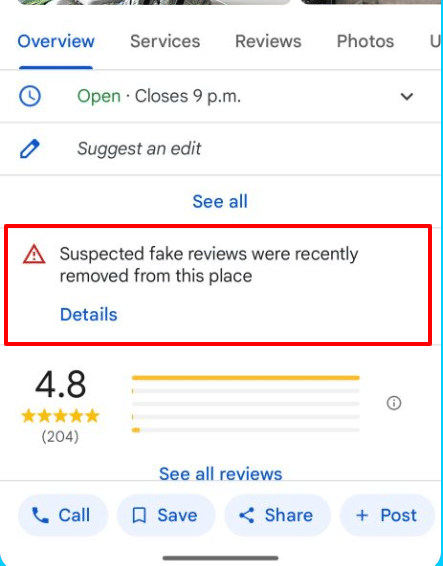
Whether those reviews are completely legitimate or not, the badge looks the same. This messaging isn’t entirely fair to the businesses impacted by spam review attacks through no fault of their own. As a result, users may think the reviews they do have are also fake.
Restore missing Google reviews
Google has an automated spam review system that consistently scans business profiles and removes reviews it deems in violation of the guidelines. When removing old reviews, Google rarely sends email notifications. That’s why it’s important to closely monitor your review count and rating to know when reviews are removed.
The best way to restore missing reviews is to contact support. Type “Reviews.” Then, select “Review missing” and follow the prompts.
Google may ask for the names of the users, dates, or screenshots related to the missing reviews. It’s helpful to have them handy.
If that doesn’t work, head over to the GBP Help Community and post a thread about your missing reviews. Ask a Product Expert to look into it and potentially escalate to Google.
Manage missing reviews after GBP suspensions and reinstatements
It isn’t uncommon for existing reviews to go missing after your GBP is reinstated following a suspension. While Google’s system often resyncs reviews automatically over a few days, some reviews may fail to restore on their own. Support will have to add them back.
In these cases, contact Google support right away with the profile ID and number of missing reviews. Explain that the profile lost all its reviews after being reinstated from a suspension.
Support should be able to find the reviews. But the more proof you give them, the better. This includes:
- The number of reviews missing.
- Reviewer names.
- Screenshots of the reviews.
- The email notification you got when the review was first published.
Dig deeper: How to handle negative Google reviews & protect your brand
Build a resilient local SEO strategy by prioritizing Google reviews
Google reviews remain a cornerstone of local SEO and customer acquisition. Earning detailed, consistent reviews keeps your business visible in Map Packs, protects your lead pipeline, and builds quick trust with incoming leads and customers.
Focus on creating a steady, natural review collection process within your business and stay proactive against missing reviews and review spam. Then, let customer satisfaction drive your local business’s growth in Google Search.
Explore more on
Editorial disclosure
Contributing authors are chosen for their expertise and work under the oversight of the editorial staff. Search Engine Land is owned by Semrush. The contributor was not asked to mention Semrush; the opinions expressed are their own.
About the author


