Title tags: Your complete SEO guide


Your title tag isn’t just a checklist item, it’s your SEO bread and butter.
Why?
Because your title tag is the first impression you’re going to have with both Google and users. It acts similarly to a book title, introducing your page to viewers. Just like a strong book title gets readers to pick up the novel, a strong title tag is what gets readers to click through to your page. But, because there are a long list of rules you have to follow to make your title tag absolutely perfect, it can be hard to get things right.
Read on to learn how to create the perfect title tag so you can hit the mark with search engines and your target audience every time.
What is a title tag?
Let’s start with the basics here: what exactly is a title tag?
In technical terms, your title tag is the HTML title tag or the SEO title. It usually contains the page’s post title, but can brand terms and even emojis. It’s considered part of on-page SEO.
You’ve seen title tags before. Let’s look at one together right now.
Right-click this page. Select “inspect”. Do a “control + F” search for “title.”
Great job! You’ve found the title tag of this page:

You see title tags all the time, even if you’re not aware of it.
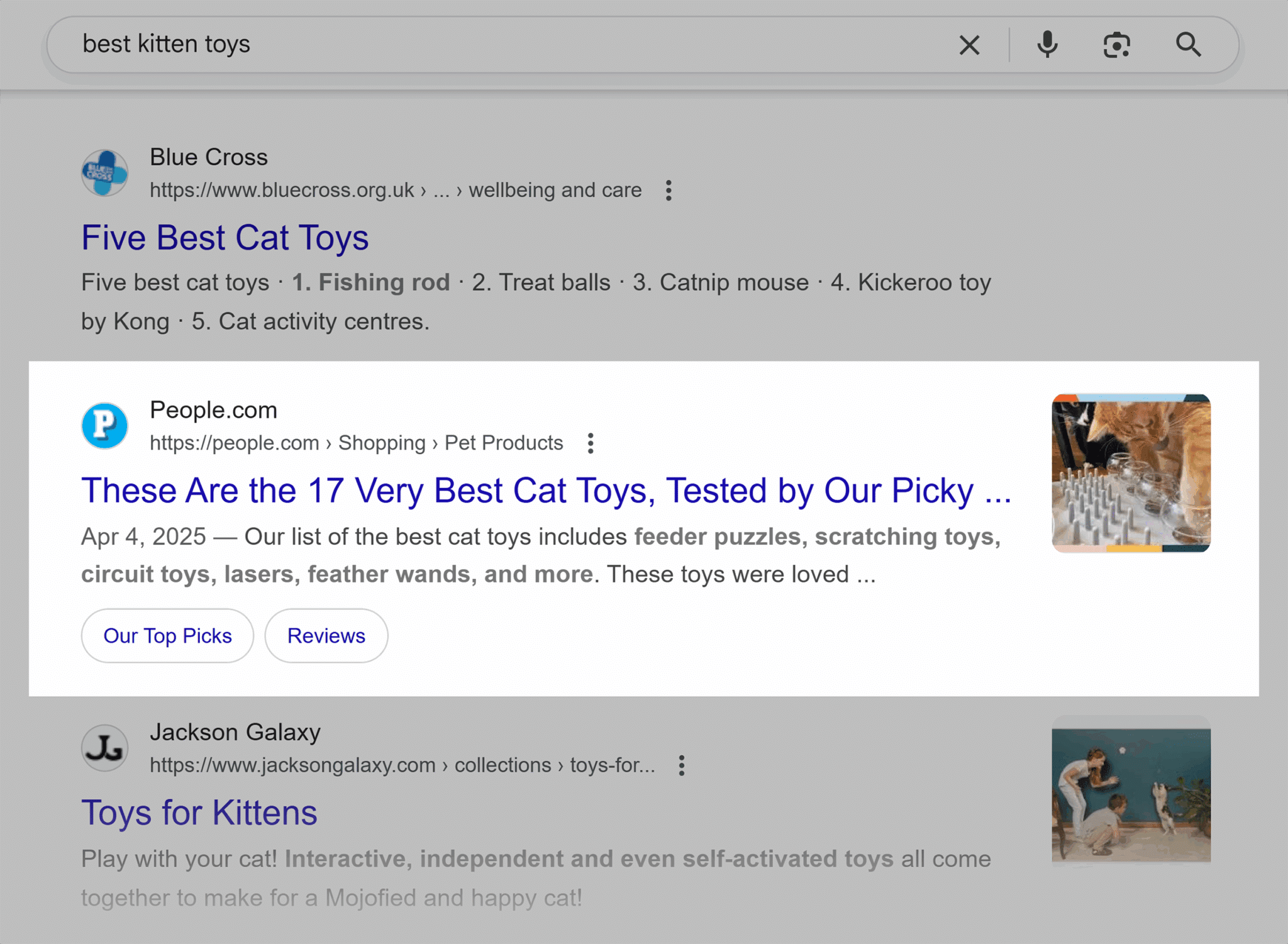
Say you’re searching for a new cat toy for the kitten you just purchased. You typed the search term “best kitten toys” into Google. This is what comes up:

Can you spot the title tags? Here’s a hint: they’re in blue.

All of the blue links that you click on to see that page are title tags.
And if you click into one of those pages, you can actually still spot the title tag on the page itself. Just look at the tab you have opened, and you can find your title tag again:

Now you know how to spot a title tag in the wild now, good work! Let’s dig a bit deeper here.
Take a look at the title tags listed in the search result pages again. Notice how they vary in length and word choice, but all of them include some variation of “best kitten toys” or “best cat toys?”
At first glance, it seems like every page is using the exact same phrases in their title tag—but that’s the weird part: not all of them are.
Google often rewrites page title tags in search results to better match your specific search query. Search for something like “best kitten toys,” and you’ll find the vast majority of the top pages all use either that exact phrase or something similar. But because Google can rewrite these title tags, what you see in the search result pages might not actually reflect what’s in the page’s HTML.
The SEO toolkit you know, plus the AI visibility data you need.

How Google uses title tags in the search engine results page (SERP)—and when it rewrites them
As of Q1 2025, Google rewrites 76% of title tags.
Yes, that is an eye-watering stat. And yes, you still should optimize your title tags.
Why bother if Google is just going to change things anyway?
Think about it this way: without an optimized title tag, Google is completely starting from scratch. An optimized title tag gives search engines a starting point, making it easier for them to understand what your page is about—and, ideally, use your version instead of rewriting.
The other problem? Google doesn’t always get the rewrite right.
The replacement title can be too long, too vague, or even misleading, which undercuts your work. That means the better your original title tag, the more likely Google is to leave it alone.
Let’s go back to our kitten toys example. Say you’re creating a page explaining the top 15 best kitten toys of 2025. If your title tag is something vague like “Fun Pet Products,” Google might struggle to figure out what the page is actually about. But if your title is “15 Best Kitten Toys of 2025 (Vet-Approved),” you’re making things explicitly clear. And the better Google understands things, the more likely your content will be matched to the most relevant searches.
So, what’s actually triggering these rewrites—and how can you avoid them? Let’s take a closer look.
Query relevance
To understand why Google is doing all of this rewriting, you first need to understand Google’s number one goal: provide the best possible user experience. And in this case, that means matching your title tag to a user’s search.
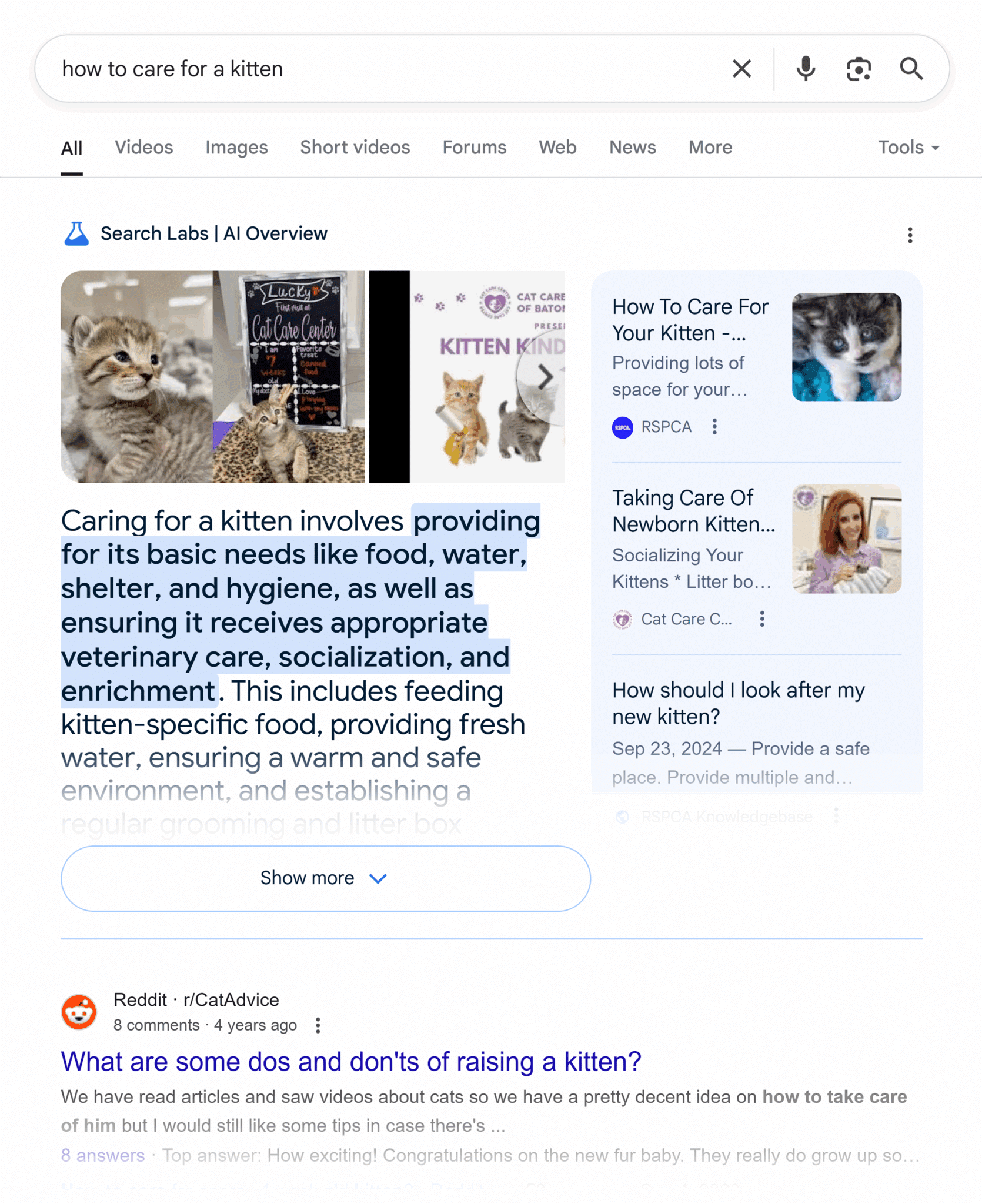
That means if someone is looking for “best kitten toys,” the title tags are going to have instances of “cat,” “kitten,” and “toys.” Or let’s say you’re just starting on your kitten journey. You might search for “how to care for a kitten.”
Don’t scroll down and cheat. Just think about this for a second. What’s your best guess for what those title tags will look like?
Okay, here are your blue links:
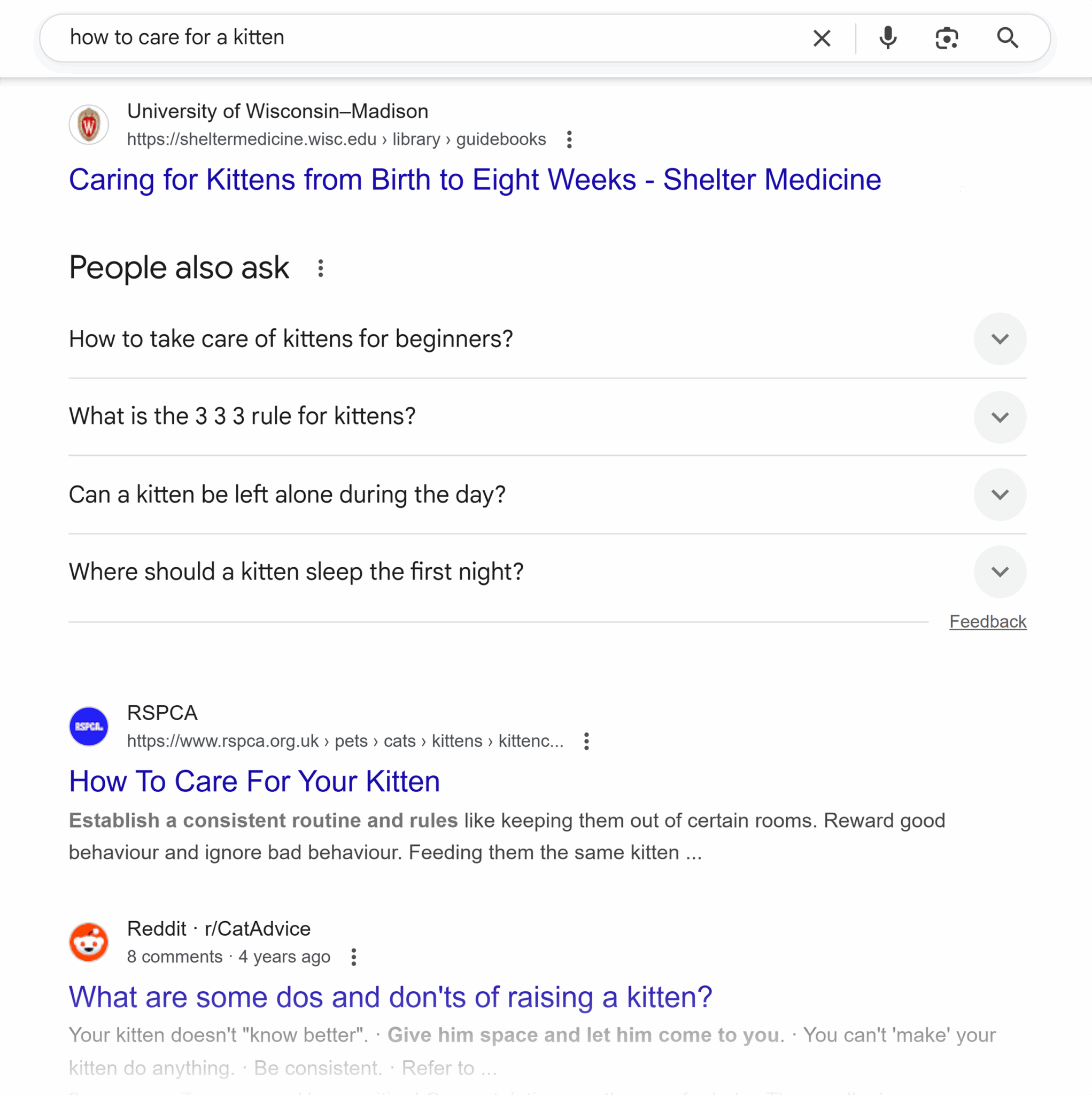
All of these title tags include some variation of “care” and “kitten.” That’s because Google wants to provide search results that are as relevant to your query as possible.
That means that if your title tag doesn’t accurately represent your page’s content, Google is more likely to rewrite it. Instead of using your title tag, it might pull alternate information—like your H1 or another heading—to create a title that better matches the user’s search.
So, if you’re selling kitten toys, but you’ve titled your page “how to care for your kitten,” then Google might ignore that and pull your H1 (“Best Kitten Toys for Playtime”) instead. Why is this an issue? You’ve lost control over how your page appears in search, and Google’s version might not be as accurate or compelling as something you wrote yourself.
Boilerplate or branding patterns
63% of Google’s trims are removing your brand name. Go back to that “how to care for your kitten” example. If you click into that first link from Koret Shelter Medicine Program, you’ll find that the whole title tag is actually:

That whole “Koret Shelter Medical Program”? Cut from the title tag to make things snappier in the search results.

Same thing with the Royal Society for the Prevention of Cruelty to Animals (RSPCA) page below. The actual title tag:

Versus the title tag you see in search:

Why does Google do this?
If your brand name isn’t:
- Adding significant value
- Relevant to the user’s query
Then it’s likely going to go.
Why should you care? If your brand gets cut, you lose a valuable opportunity to build recognition and trust—which is especially important if you’re not already well known. Consistent visibility in search reinforces your presence and credibility with your target audience. But if Google doesn’t think your name adds relevance, it’ll prioritize content clarity over branding, making your listing easier to overlook.
It’s the same case with boilerplate content where you’re using the same words again and again across all of your title tags. If you’re endlessly stating “Our Kitten Products” across all of your kitten toy pages, Google is likely going to nix that and pull something it feels is stronger and more relevant for users. So, for your “Our Kitten Products,” page, Google might grab the keyword-rich subheading “Best Toys for Six Month Old Kittens” instead.
H1/header content
And where’s one of the best places for Google to turn to pull net new title tags? Your H1.
Your H1 tag is the html element containing the headline of the page itself. It’s that big block of text users read before they start to skim.
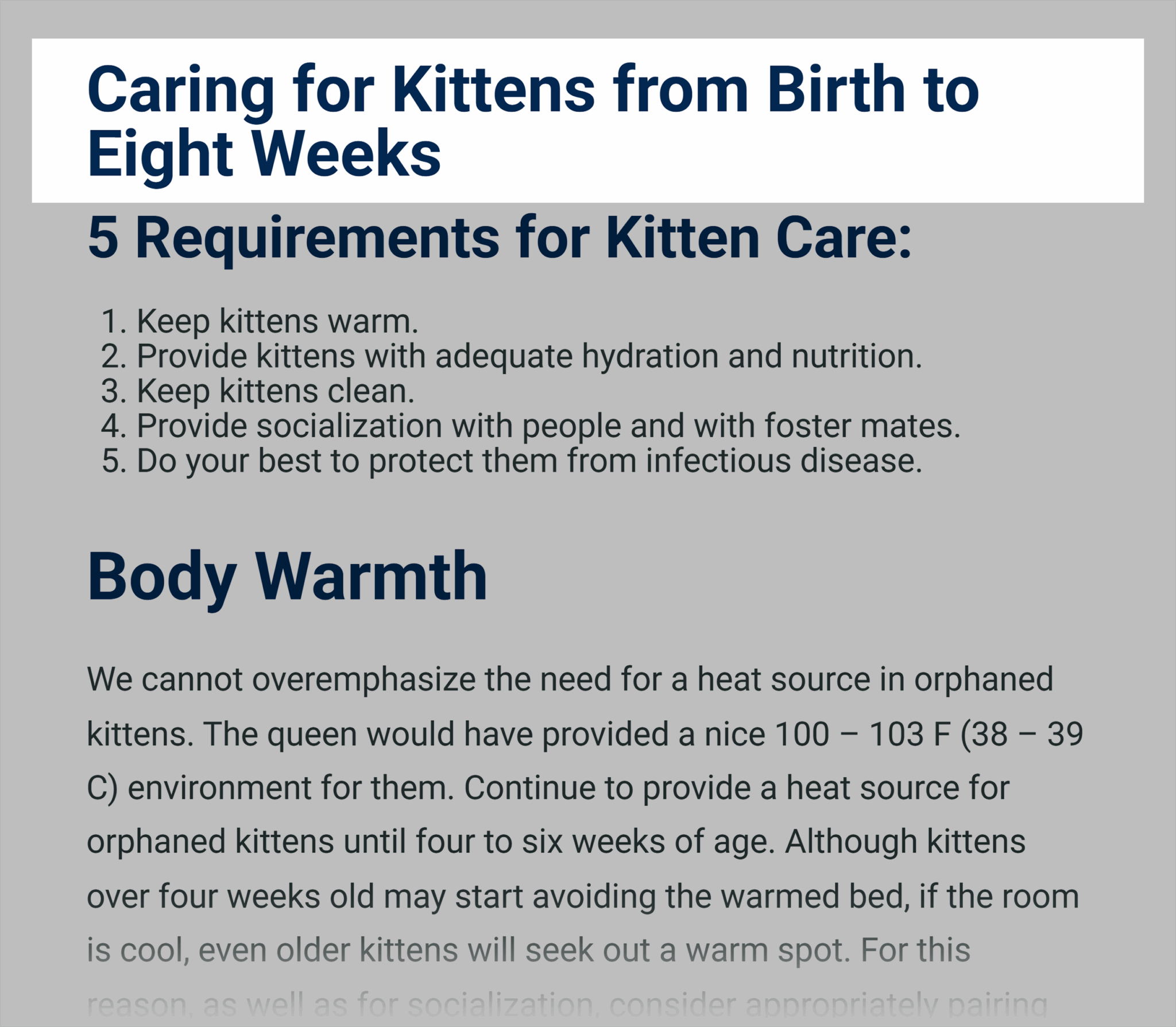
If you take a look at the Koret Shelter Medicine page, you’ll see that the H1 perfectly matches the title tag we see in the search result pages:
Google’s constant repurposing of H1s as title tags means you should prepare accordingly:
- Try matching your title tag to your H1 for easy switching
- Use title case for your H1 (Caring for Kittens from Birth to Eight Weeks is correct, and Caring for kittens from birth to eight weeks is not)
- Keep your H1s topic-relevant and optimized
Page structure
Your title tag doesn’t exist in a vacuum. Google is looking at other content on your page—your headers, internal links, on-page copy—to understand what your page is about. So you’ll want to make sure that your page structure and your title tag are working together to send the same message. If they conflict, Google is far more likely to rewrite your title.
Here’s how to keep your page structure aligned with your title tag to give Google the right idea:
- Make sure your H1 and title tag are in sync. They don’t have to be identical, but they should clearly support the same topic (i.e., if your title tag is “Best Cat Toys,” your H1 shouldn’t be “Best Cat Food.”)
- Keep your on-page copy consistent with your title tag and H1. Again, stay on topic. This reinforces your topical relevance.
- Use subheadings (H2s, H3s) to support your topic. Google scans your subheadings to understand your content. Make sure the headings are all related to the page’s main idea.
Want precise control over how your site shows up in the search result pages? You’ll need to understand exactly what goes into making the perfect title tag.
What makes a title tag effective?
The ultimate goal of your title tag is to make people click. The secondary goal is reaching the kind of people who, post-click, will continue to interact with your site.
The second part is the tricky part. It’s easy enough to make your title click-baity and draw people in, but if you’re reaching the wrong people or not properly aligning with your page’s content, then there’s no point. Those people will leave without taking any action.
Here are the elements you should include to make the perfect title tag:
- Clarity
- Keywords
- Branding
- Length consideration
- Targeted phrasing
Let’s take a closer look at how exactly you should incorporate each of these elements.
Clarity over cleverness
People these days aren’t spending their time reading over every title tag in the search pages. They’re power-skimming and prioritizing readability. That means your title tag needs to be quick and easy to read. This isn’t the place to make hard-to-understand jokes (even if they are very clever). If users have to stop and think—even for a second—they’ll likely skip to the next search result.
Let’s go back to that cat toy example.
There are two different kinds of pages here: pages looking to sell (Amazon and Pets at Home) and pages looking to educate (Cats.com and Catastrophic Creations). Notice how the title tags are very different to match these different user needs.
For pages looking to sell, they’ve kept things simple. Easy to skim. Easy to identify: “best kitten toys” and “kitten toys.” No need to get overly wordy here.
For pages looking to educate, they’ve gone a bit more long-winded because they’re targeting users who are still in the research phase and looking to read. One uses the format of “[number] + [target keyword] + [alluring copy].”
In the case of Catastrophic Creations, they’ve used “Best Cat Toys of 2025: Reviewed & Graded by Experts!” This copy directly addresses the target audience’s pain points of wanting the best for their kitten. Simple, short, and sweet.
Front-loaded keywords
Remember how Google rewrites title tags to better fit a user’s query? The best way to bypass that is by front-loading your title tag with your primary keywords.
You’ll need to do a little keyword research to know exactly what it is that your target audience is searching, but once you’ve identified a term, shove it in the front of your title tag.
Sounds basic, yes, but this technique helps improve:
- Visibility: Google tends to give more weight to keywords at the beginning of your title tag
- Click-through rates: Users are power-scanning the search results and more likely to click when they see your keywords first
- Mobile optimization: Title tags get cut even shorter on mobile, so putting target keywords first means you get important terms out of the way
So if you had a title tag written as “best toys for kittens,” it wouldn’t be quite as relevant if users were searching for “best kitten toys.”
Matching that term order makes it easier for Google to confirm that your page is the most relevant and helpful result.
Branding placement strategies
Remember, Google may remove your brand name from the title tag if it doesn’t seem relevant to the search. That’s why it’s so important to thoughtfully include your brand in the title, especially if your brand name closely aligns with your target keywords.
Your options for placement strategies are:
- Put your brand at the end of your title tag: One of the most common choices and means you should be prepared for branding getting removed. For example: “15 Best Kitten Toys of 2025 | Petco.”
- Put your brand at the front of your title tag: This is a good choice for your homepage only. That’s it. For example: “Petco: Pet Supplies, Pet Food, & Pet Products.”
Let’s look at some of these examples in action:
Here’s an example that lists the brand name at the end of the title tag. Notice how this inclusion makes sense. People are familiar and might even be actively seeking to shop cat litter from Chewy specifically.

But let’s say you were looking for Petco instead. If you just search that branded term, you’ll see that they’ve made the wise decision of putting their brand at the front of their title tag. This makes it easy for users to immediately confirm they’ve come to the right place.

Emotional vs. functional phrasing
There’s a lot to juggle when you’re writing the perfect modern title tag, so, of course, let’s add one more thing to the pile. Depending on your brand and what your page is trying to accomplish, you’ll likely want to use a mix of emotional and functional phrasing.
Emotional phrasing is wording that targets your user’s feelings. Try invoking curiosity, interest, or urgency, compelling users to click. Here’s an example from our “best kitten toys” search:
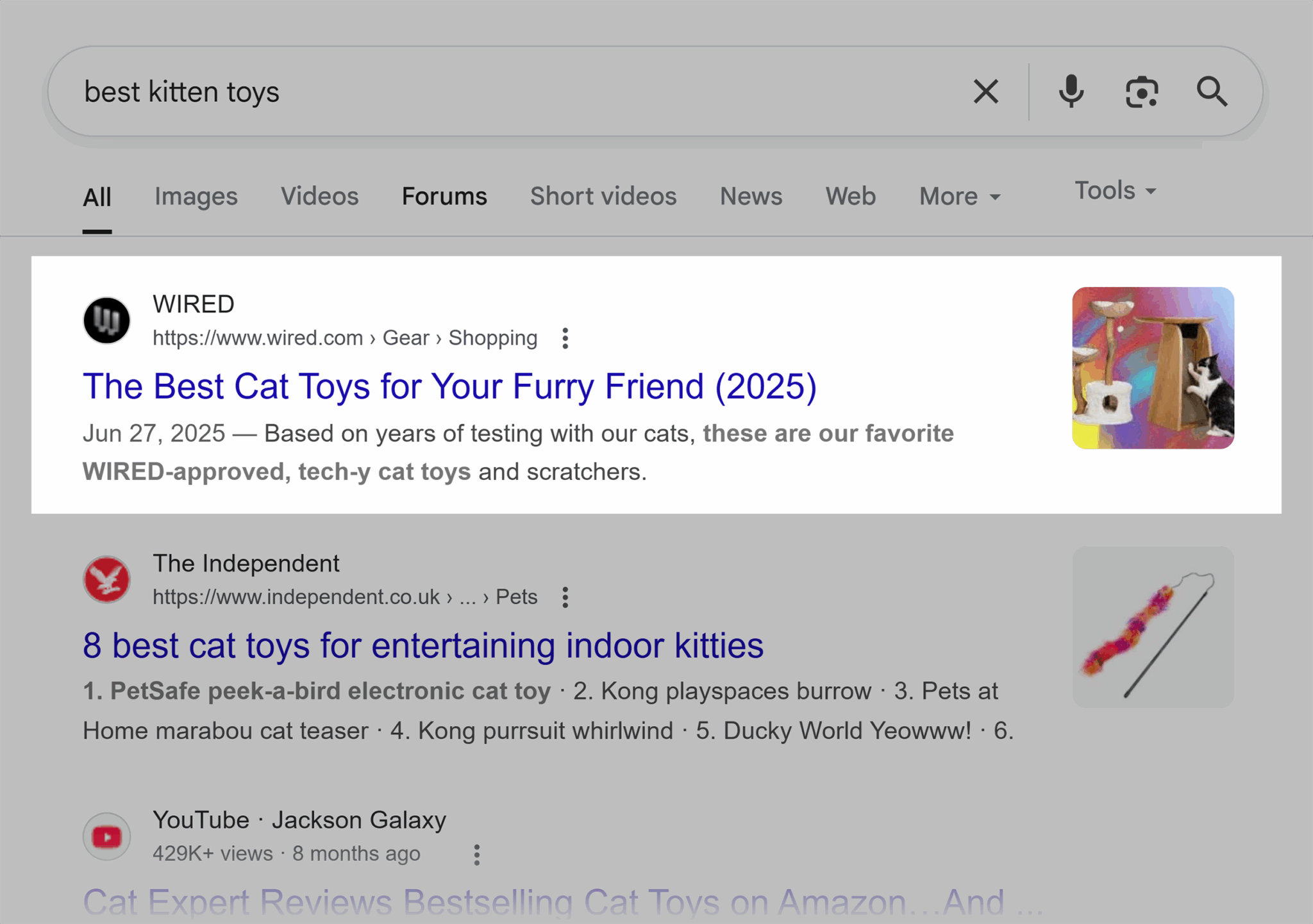
“Furry friend” is the emotional phrasing here. It gives the title tag a much warmer, more personable vibe, creating a connection with the user.
Functional phrasing, on the other hand, highlights the practical and tangible benefits of your page’s content. Think about this cat.com example:
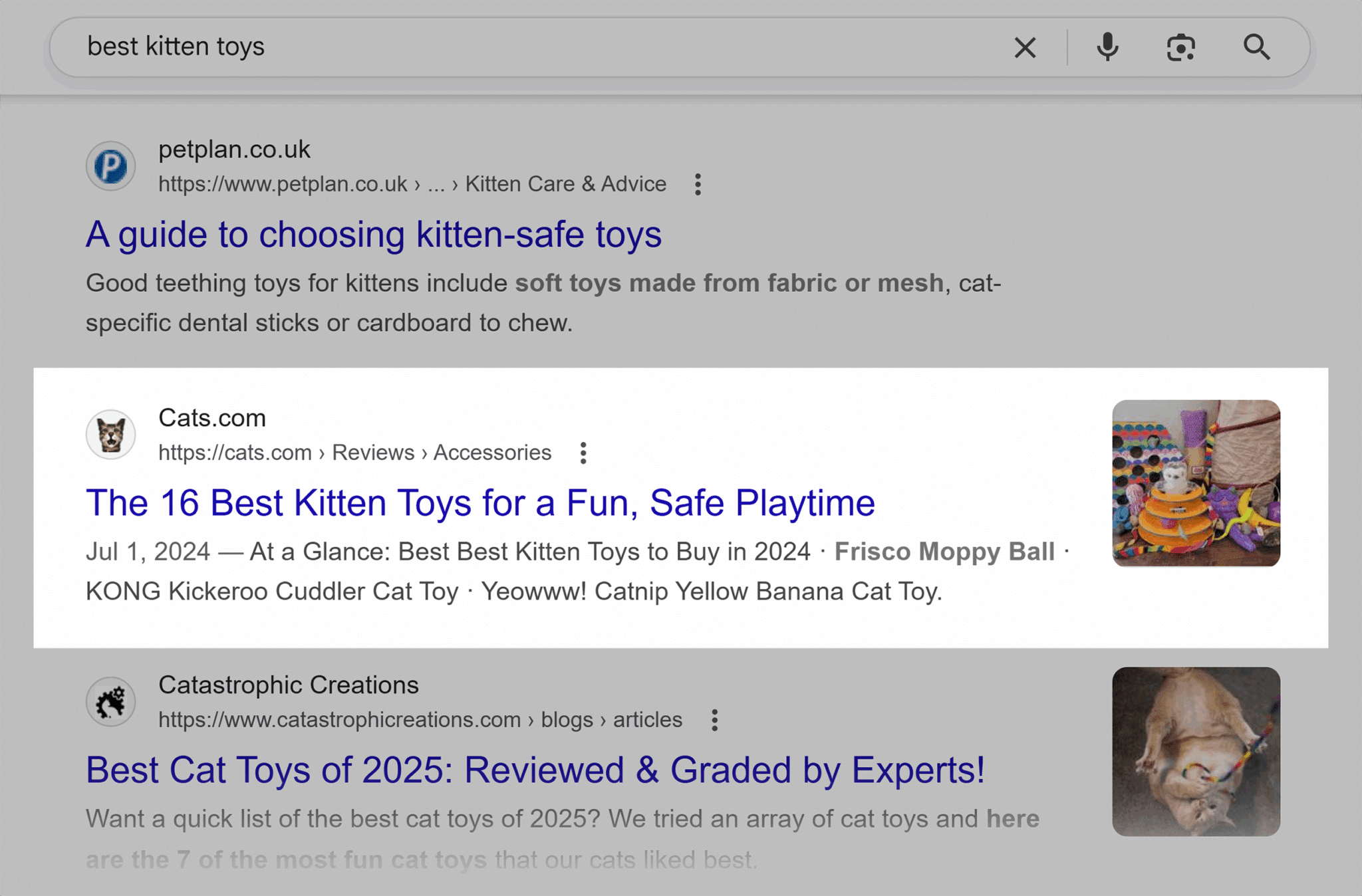
“Fun, safe playtime” is functional phrasing. It’s promising an entertaining, but entirely safe, play session for your kitten.
The best title tags will use a combination of these techniques, promising tangible results for the reader, but also piquing their interest. For example, a title like “15 Best Kitten Toys for Happy, Healthy Furry Friends (Vet-Approved)” combines emotional phrasing (“furry friends”), with functional phrasing (“happy, healthy” and “vet-approved”).
Character vs. pixel limits
Remember how much we’ve been talking about title tag length? Well, you’ve probably been thinking about that in terms of “this is how many characters I can include.” Unfortunately, Google is not a person. It’s thinking about things in terms of pixels.
How exactly does this work? Let’s pretend you’re composing a title tag of only letters. Your title tag could have far more characters if it’s written like this “lllllllll,” with skinny little I’s, whereas a title tag written like “www,” with wide double-u’s, wouldn’t be able to get away with half as many characters.
So, what is the ideal title tag length then?
Title tag length: How long is too long?
If your title tag is too long, you’ll be hit with the dreaded ellipses:
What does it mean to be too long? Unfortunately, that question isn’t easy to answer.
The first roadblock here is how different a user’s experience will be on desktop vs. mobile. Let’s say you’re looking at this people.com example on your phone. Here’s how this title tag looks now:

Mobile devices have more display space, so you’ll get more room to play.
How should this factor into your title tag strategy?
Look at how users are interacting with your site. Yes, Google will be viewing your site from mobile as the default now, but you’ll want to think about your target audience, too. If your analytics show that most of your traffic is coming from mobile, you’ll want to optimize your title tag length for smaller screens.
Okay, but what is that ideal length?
Unfortunately, there’s no straightforward answer for this question either. Technically, this isn’t even the right question to ask. Google isn’t looking at your title tag in terms of character count, but instead it’s looking at width.
Remember, Google isn’t a person. It’s thinking pixels, not characters. But we’re humans, so we don’t tend to think that way. To make things easiest, it’s best to stick to these character counts as your absolute minimum and absolute max:
- Maximum title tag length: 65 characters or 575 pixels
- Minimum title tag length: 30 characters or 285 pixels
These lengths will work with Google, Bing, Yahoo, and whatever other search engines you’re trying to optimize for.
And, since SEO is an ever-changing field, you’ll want to pay attention to more than just Google, Bing, and Yahoo when you’re optimizing your title tags. The way people search—the platforms they use—is always evolving. You’ll need to keep an eye on evolving technologies like AI and how it might truncate and paraphrase, too.
Let’s take Google’s AI Overviews as an example. AI Overviews, or Search Generative Experience as it was called when it was in its beta in 2024, is that new section of Google that has been increasingly appearing at the top of Google search results. It works by pulling a lot of information from various pages to summarize the answer to your query.
Luckily, AI Overviews handles title tags in a similar method to Google search:
- Similar length limits and pixel widths
- Ellipses when the content gets truncated for being too long
- Content rewrites to better match user intent and queries
The key to your title tag surviving unchanged in AI Overviews is similar to surviving in Google search. Users are here to get in and get out with the info. Make things quick and skimmable.
The biggest difference?
AI Overviews is synthesizing information from a wide variety of sources. Your title tags are likely to be chopped to fit into that blend. Prepare yourself for more changes than you might expect to see in Google search results.
Keyword placement in title tags: What SEOs need to know
You already know the basics here: front-load your most important keywords. But like most things title tag-related, effective keyword placement can get a bit more complicated than that.
Exact match vs. partial match
Exact match keywords are when you perfectly match your title to what your user is searching for. So, if someone searches for “cat costume,” your title tag should reflect that exact phrase. Perfectly matching what someone is looking for means you get higher click-through rates because your page seems the most relevant to the search.
Partial match keywords might not get you the same click-through rates, but they’ll also feel more natural to users. “Halloween costumes for cats” may not be an exact match for what a user is searching for, but it sounds a lot more natural than if you just title your page dedicated to seasonal cat-wear “cat costume.”
Balancing primary and secondary keywords
Unless you’re balancing some very big, long-tail keywords—keywords with three or more words—you’ve got 60 characters to play with, and you don’t just want to waste those by simply repeating your primary term over and over again. Weave in your secondary term—a related but distinct keyword that adds further context and variety—instead.
A standard approach is to frontload your primary term, follow it up with a secondary, and include your brand if you still have space.
So, if you’re looking at the “kitten toys” example, you might target a secondary term “teething toys.” Then your title tag might look something like “Kitten Toys – Best Teething Toys & More | [brand].”
Latent and semantic variations
Search engines have gotten really good at picking up on synonyms and related concepts. If you don’t want to repeat yourself with the same word over and over again, you can just use something called semantic terms, or keywords that are adjacent to your primary target.
If you’re pushing your affordable kitten toys, that means you can also use variations like “cheap,” “cost-friendly,” or “low-budget” to make your title tag more relevant and capture long-tail searches.
How to write high-performing title tags (with formulas)

The key to a high-performing title tag?
Clarity, relevance, engagement, and conciseness. Keep it short but stand out.
Here are some of the most common formulas you can apply across your site:
Core formula: [Primary Keyword] + [Secondary Keyword] + [Brand Name (optional)]
Here’s an example of this from Centinela Feed where they’ve used “best cat toys” as their primary keyword and “kitten interactive toys” as their secondary.

Action words formula: [Action Verb] + [Primary Keyword] + [Secondary Keyword]
Below is what this looks like live. You’ll notice that “buy” is the action verb, “best cat toys” is the primary, and “interactive cat toys” and “interactive kitten toys” are the secondary keywords.

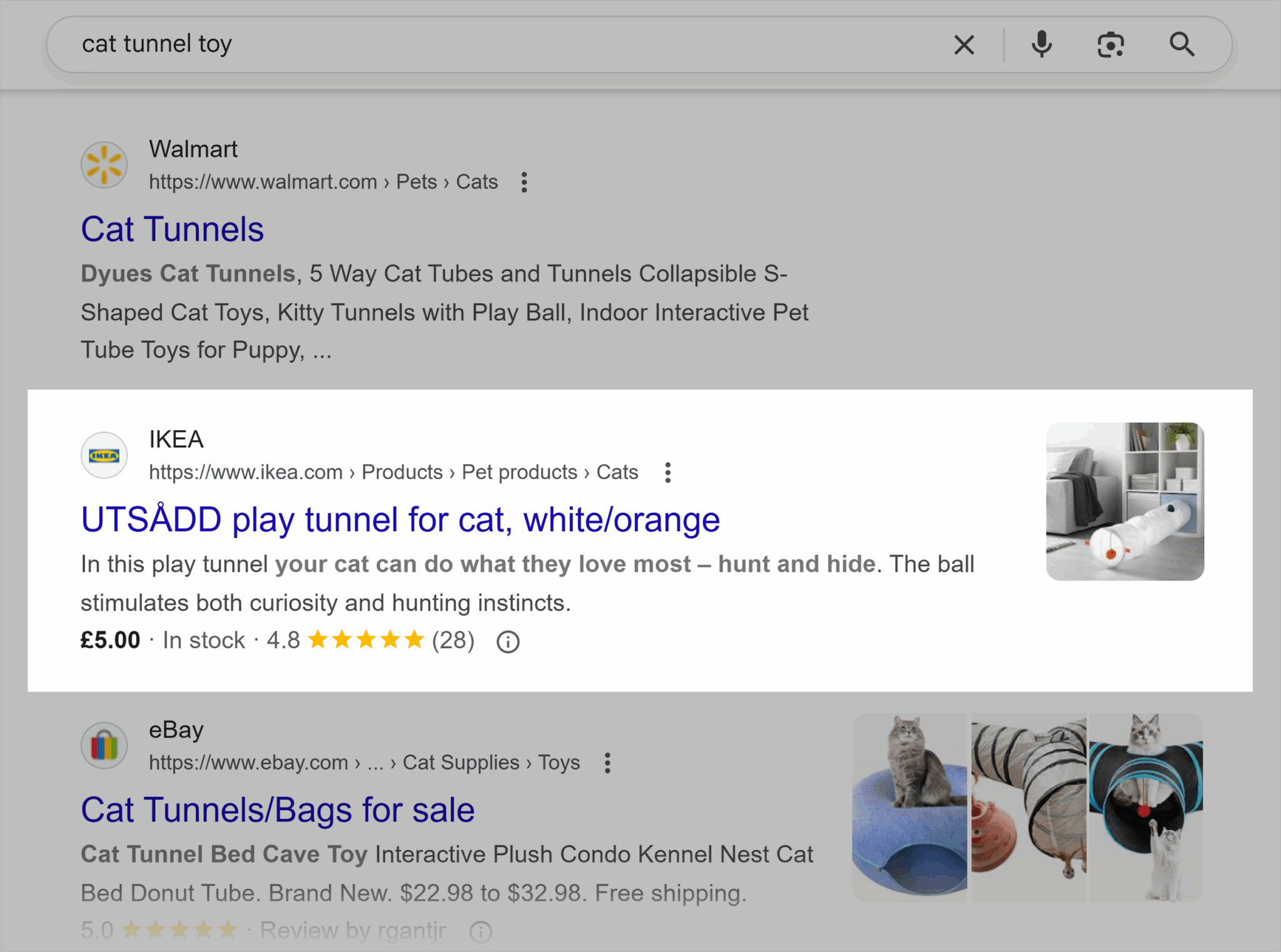
Product page formula: [Product Name] + [Features] + [Brand Name (optional)]
Here’s an example from IKEA of how a product page can apply this formula, with the name of the product and the colors available listed as features.
Informational pages formula: [Keyword Phrase/Question] + [Secondary Keyword] + [Guide/Intro/101]
Here’s an example of this from cats.org:
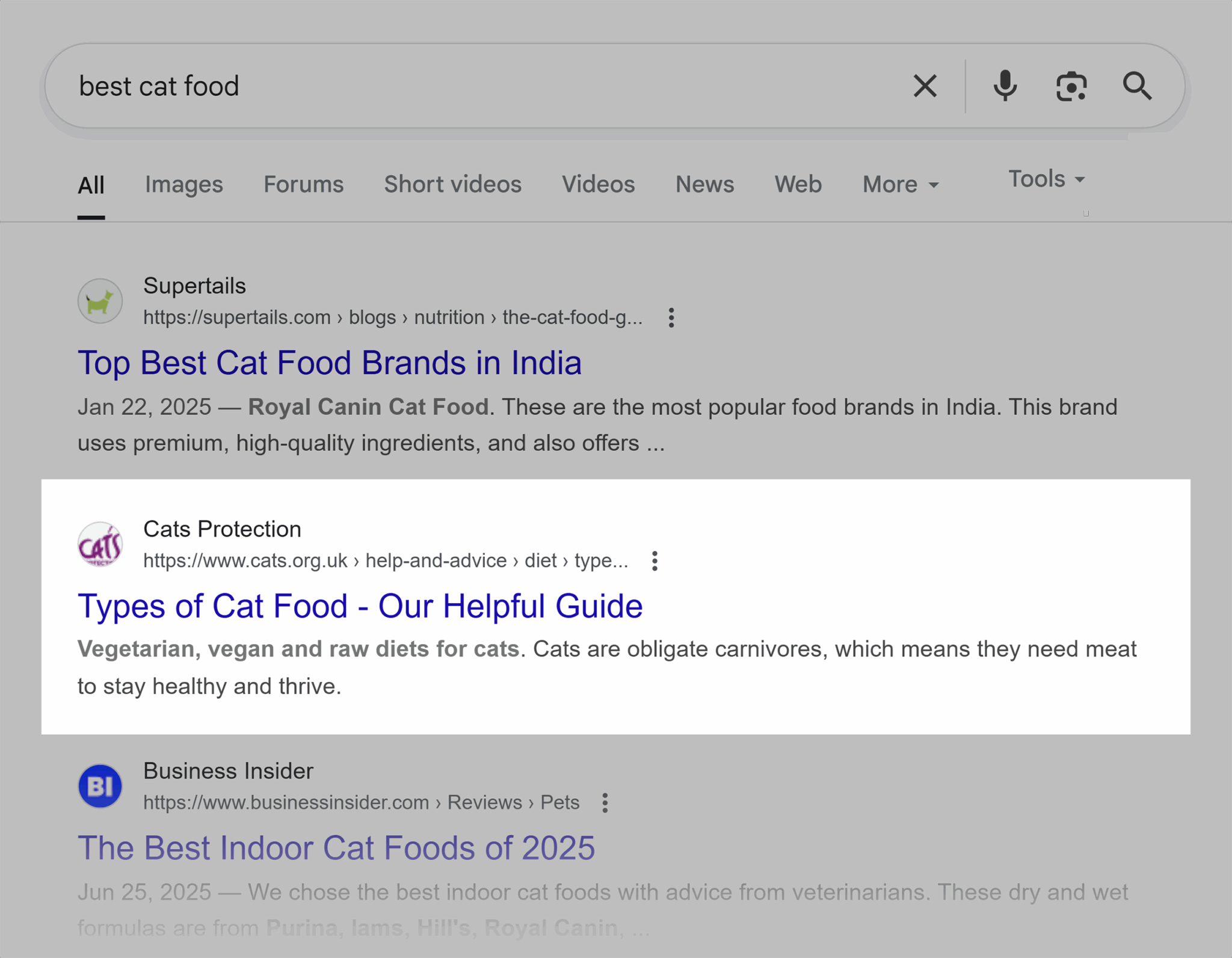
The primary keyword phrase here is “Types of Cat Food.” It’s followed by “Our Helpful Guide,” which indicates that this page will have informational content.
Have extra space in your title tag? Try including these add-ons:
- Call to action: A call to action, or CTA, is an extra push to get users to your site. This could be something as simple as “learn more” or “read more.”
- Expertise signals: If you consulted experts for your page, showcase that. This could look something like saying “expert opinion,” “doctor’s advice,” or even “from a men’s health editor.”

- Numbers: People love numbers. If you’re writing a list, you could simply state how many things you’re discussing. This could also just be including the year the article was written or updated.
Title tag mistakes that hurt rankings and click-through rate
You know how to write a strong title tag now, but what are the common mistakes you need to avoid to keep rankings high and click-through rates growing?
Here are five common mistakes you need to watch out for:
- Keyword stuffing: Yes, including your keyword is good, but no, every other word should not be your keyword. Try to only have one instance of your target term. Including it more than three times makes you sound spammy and can actually result in you losing rankings.
- Duplicate title tags: Each page should have its own unique title tag that accurately reflects the content. Duplication is confusing for both search engines and users.
- Missing or empty tags: Don’t let title tags intimidate you into not writing anything at all. Having blank or empty tags makes it much harder for search engines to understand your content.
- All-uppercase or unclear formatting: Stick to consistent formatting site-wide. Title case title tags have been shown to perform best since they’re easiest for users to skim.
- Misleading or bait-like phrasing: Title tags that promise one thing but deliver another are a blow to your credibility and annoying for your users.
Dynamic title tags for ecommerce and large sites
The strategies we’ve discussed so far work fine when you’re generating title tags page by page, but what’s the best way to optimize at scale?
Using a dynamic, template-based approach.
Let’s break this down.
Template-based titles
Create title tags that automatically generate page titles based on the page’s content. If you’re an e-commerce site optimizing a batch of product pages, you can generate titles that include product attributes, categories, or filters.
Your product page titles could look like this:
[Product Type] – [Product Name] + [Key Feature] | [Brand]
Here’s an example:
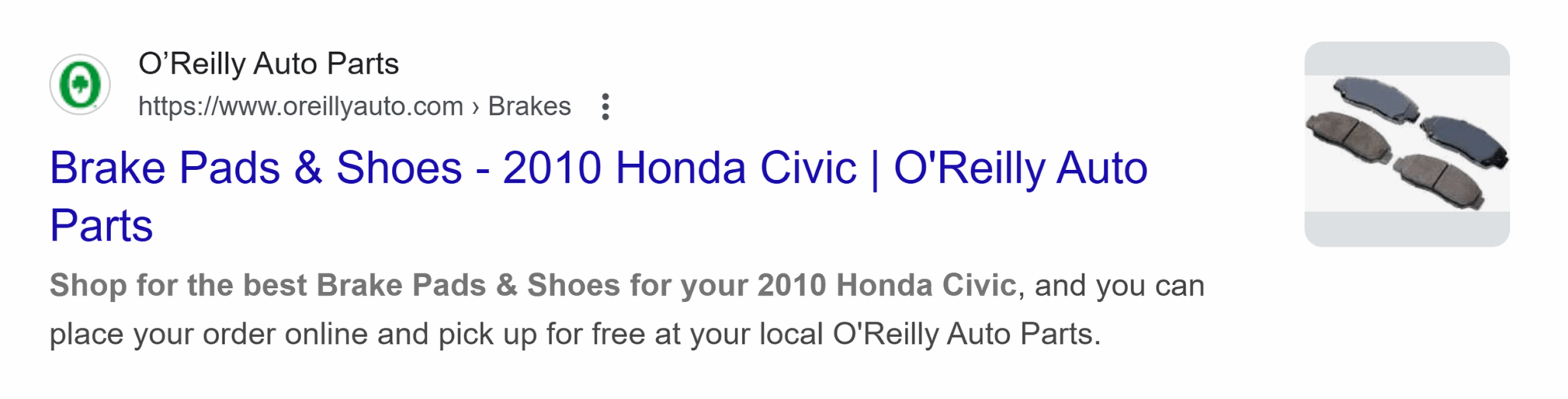
Rules for category, product, and filter pages
When you’re creating your templated title tags, you’ll need to build out different rules for different types of pages.
Category pages that house all of your products should target broader terms. If we’re thinking of our brake pads example, the category page should just target “brake pads and shoes.”
Product pages should be more specific, targeting the product name “2010 honda civic brake pads.”
Filtered result pages are where you dynamically insert the attributes users are searching for—like color, size, brand, or price range—directly into your title tag.
Say someone is looking for ceramic brake pads sold by AC Delco for your 2010 Honda Civic. Your filtered result page could dynamically update its title tag to: Ceramic AC Delco Brake Pads for 2010 Honda Civic.
This dynamic approach means your title tag always stays specific to the user’s search intent, which is a great boost for click-through rates.
Be careful though. If you let every filter combination get a page of its own, you risk creating thousands of thin content pages which will end up competing with each other in search. Make liberal use of canonical tags (which tells search engines which version of the page is the original), and noindex tags (which prevent certain pages from appearing in search results) so Google understands which pages should be contributing to rankings or not.
Handling pagination
Pagination occurs when you break content into multiple pages. A URL that contains /page-1/ is paginated. This is very common for enterprise organizations with lots of products to sort through.
Set up your pages for success with title tags that clearly state where a paginated page sits in the pecking order. If you’re listing pages two and three of your product, your title tag should reflect that with something like this:

Structured data impacts on titles in SERPs
Structured data is a piece of code you add to your page that tells search engines what your page is about. If you’re optimizing a product page, you should include product page schema, which can make it easier for search engines to learn things like product rankings, customer reviews, and product and shipping costs.
Including this type of structured data doesn’t actually control your title tag, but it can change how your listing appears in the search results.
Take a look at this Fashion Nova example. Thanks to the product schema, you can see the star rating. If this was your site, you could also include information on free shipping and return policies.

All of this information can make your title tag stand out less. So if you know you’re going to be including lots of schema information, plan your title tags to make sure they convey all the critical information a user needs at a glance.
Pro tip: Structured data won’t directly impact your rankings, but it does change how your search results appear. Features like star ratings, price, and review counts can make your result more eye-catching—but it also takes up space, detracting from your title tag and meta description. These enhancements can boost click-through rates, but they also force you to be more strategic about wording so your copy still stands out.
How title tags impact AI Overviews and featured snippets
Title tags play a big role in how your page appears in AI Overviews and featured snippets. As a reminder, featured snippets are those concise answers or summaries that Google displays at the top of the search results to quickly answer a user’s query, like this:

Avoiding the common AI Overviews and featured snippet optimization pitfalls and including the right language is key to improving visibility.
So, how exactly does Google use title tags to guide AI Overviews, featured snippets?
Title tags and AI Overviews
When it comes to AI Overviews, your title tag still acts as one of the strongest signals to explain what your page is about which means you’ll still need to pay careful attention to your usage of keywords here.
Look at the AI Overviews for our original query, “how to care for kittens.” You can see the title tags for all the referred pages linked on the right. Notice how you have a bit more space with these title tags, and brand names like “RSPCA” are no longer truncated.

What does this mean when it comes to optimization?
Google’s AI systems will review your title to decide if your content is able to best answer the user’s query. Just the same as ranking in traditional search results, you’ll want a descriptive, keyword-focused title tag that summarizes your page’s content and reinforces your brand’s topical relevance and authority.
Title tags and featured snippets
As for the relationship between titles and feature snippets, Google will often pair an excerpted text with your title tag. This establishes a clear connection between the passage shown and the context of your page.
Here’s how this looks for cat.com ranking for the People Also Ask question “what is the #1 cat food”:

The more accurately your title tag describes your content here, the more likely you are to rank. And the more engaging it is, the more likely interested users are to click.
How to test and optimize your title tags over time
Just because your new title tags just went live doesn’t mean you can rest. Check back in on performance in a month or three. Is traffic trending up? If not, try a couple of these tactics to bump up performance.
A/B testing titles
A/B testing, or split testing, is when you take two different versions of something, in this case, two different title tags, and run them against each other to see which performs best for a specific goal.
In this case, you can either take the title tag for a single page or a group of pages, and test adding in different:
- Keywords
- Call to actions
- Semantic terms
- Numbers
Measure performance by looking at how these updated title tags perform against other metrics like:
- Impressions
- Clicks
- Click-through rate
- Rankings
You can use tools like VWO, SEOTesting.com, or SplitSignal to see what title tag gets you the best results.
Don’t already have a testing tool? No worries.
You can still check your progress manually with Google Search Console (GSC). It’s more hands-on, but all you have to do is keep an eye on page-specific data to see how those metrics evolve.
Dig Deeper: Google’s best practices for GSC A/B testing
Using GSC data (CTR, impressions, queries) to iterate
Google Search Console should be your first stop shop for all things Google SEO data related. It can give you site- or page-specific insights on:
- Impressions
- Clicks
- Click-through rates
- Rankings
- Technical site health
Use this information to keep an eye on specific pages. You can pull metrics on daily reports up to what was happening on your site 16 months ago. Use this data to see how performance changes after you push a bunch of new title tag updates live.
Tracking rewrite frequency and triggers
Google will often rewrite your title tags based on user searches or your own page’s content. You’ll want to manually monitor this. Keep an eye on how your pages appear in search, especially after you push an update live. Look for patterns to see if certain pages are experiencing more or less changes.
You can use this information to better understand where your title might be too vague, overly optimized, inconsistent with your page content, or a poor user fit.
Track, optimize, and win in Google and AI search from one platform.
Nail the title tag, win the click
Title tags may look simple, but they can be one of the most powerful tools in your SEO toolset.
The right title tag can:
- Improve your rankings
- Boost your click-through rate
- Make your content stand out
And you can do all of that across traditional search engines, AI Overviews, or even featured snippets.
Want to make your title tags work harder? Start by auditing all of your current titles. Use the metrics we’ve discussed to see where things fall short on clarity, relevance, or keyword placement. Experiment with A/B testing your way to the perfect title.
Already finished with your title tags? Pat yourself on the back and take a look at your meta descriptions. Check out our guide on how to craft the perfect meta description so you can get an even bigger click-through rate boost.
Explore more on
Editorial disclosure
Search Engine Land is owned by Semrush. We remain committed to providing high-quality coverage of marketing topics. Unless otherwise noted, this page’s content was written by either an employee or a paid contractor of Semrush Inc.
About the author


