Search terms: The foundation of every successful SEO strategy


Everyday billions of people type words into search engines looking for answers, products, and solutions. Meanwhile, digital marketers and businesses are busy trying to optimize their content around what they think people are searching for.
The problem? Those two things aren’t always the same.
What people type into Google—search terms—often differs from the keywords businesses want to target. Understanding the difference between the two is the foundation to effective search engine optimization (SEO) and the key to appearing in search for your target customers.
Here’s how organic search terms and keywords work together, why the distinction matters, and how to use both keywords and search terms to improve your organic visibility and drive more qualified traffic to your site.
What are search terms?
Search terms are the words or phrases you input into a search engine when you’re looking something up.
Remember the last time you turned to Google for help after your pup turned up his nose at dinner—again? “Best treats for picky dogs” was your search term.
Search queries and search terms are basically the same—the exact words you type into Google. They’re close to what marketers call “keywords,” but there are a few fundamental ways they’re different.

Anything that’s entered into Google’s search bar is a search term. And each of these search terms reveal the user’s intent, that is, the overarching reason they’re searching for something, and their needs.
Why should you care what people are looking up?
Backlinko did a comprehensive deep-dive into just this. They analyzed 11.8 million Google search results and found that pages optimized for the search terms users type (instead of industry jargon) netted them 128% more traffic on average. A pet supply store would get far more visitors using “dog treats for allergies” instead of the more technically accurate by far less used “canine hypoallergenic snacks.”
Getting those search terms right directly impacts your visibility.
The SEO toolkit you know, plus the AI visibility data you need.

Search terms vs. keywords: what’s the difference?
To define search more clearly: search terms are what you’re literally typing into that search bar.
Keywords, on the other hand, are the terms you optimize your content for.
They can be the same, but not always.
SEO search term examples
In SEO, for example, you use keyword research to pick out the most relevant terms to optimize a page for.
From the user side, this means if you’re looking up “best treats for dogs with sensitive tummies” (which is your search term), you may see a page called “dog treats for sensitive stomach” (which is the keyword). The latter is what SEO optimized for that page.

From the business side, let’s say you’re a pet store specializing in a variety of dog food.
You already know that your customers use a huge range of search terms to find your site like:
- Dog food for large dogs
- Dog kibble for Pomeranians
- Dog food bag for older dogs with sensitive stomachs
- Puppy food for lab
These search terms are all different, but they overlap in one crucial way: they share the same search intent. In other words, these are all terms someone would use when they’re looking to make a transaction.
This means that by optimizing your page with a keyword that matches that intent, Google knows that your page is going to be the most helpful to users. And that is how you use search terms to improve your ranking.
PPC search term examples
On the other hand, for pay-per-click advertising (PPC), keywords are how Google matches ads to what people are looking for.
Let’s look at things from the user’s side first.
You’re still searching “best treats for dogs with sensitive tummies.” That’s your search term.
Advertisers likely bid on broader keywords like “dog treats,” “sensitive stomach dog treats,” or “soft dog treats” to appear for your search and other related searches.
So when you see ads like “Blue Buffalo Bits Plus Training Treats,” it’s because Petco’s keywords matched your search intent—even if they didn’t bid on your exact phrase.

Now from the business side, let’s say you’re a vet business looking to capture more patients.
In addition to the obvious keywords like “vet” or “veterinarian,” you’ll want to add the word “emergency vet near me” and “dog dental clinic” to your ad campaign. Including terms like “pet hospital” or “animal clinic” helps your ad show up for a wider range of relevant local searches, even if the exact keyword isn’t in your ad copy.
With the right keywords and location targeting, your Google Ads show up for those actively looking for your services nearby, increasing the chances they’ll call or visit your clinic.

In the example above, the search team is “dog vet near me.” The keyword? “Pet hospital.”
Simply put, search terms come from users. They’re random and person-specific.
In comparison, keywords are targeted and used to make content easier to find.
Search terms vs. keywords: Common misconceptions
There are a few common misconceptions when it comes to search terms vs. keywords. The most common are believing:
Keywords vs. search terms are the same things
Keywords and search terms are closely related, but they’re not exactly the same, and the semantic difference is actually important to understand in the search world. A search term is the exact word or phrase someone types into a search engine. A keyword is that broader term a marketer uses to capture related search queries.
Keywords only help marketers target their users
Keywords do help marketers reach their target audience, but they also play a major role in other marketing efforts, like SEO strategy, content creation, and paid campaigns. Choosing the right set of keywords means your website and ads appear for people who are ready to buy your product.
Search terms just show how users are searching
Search terms reveal the language real people actually use. They’re great for businesses because of the insights they provide into what the customer is actually looking for.
Keywords are only for SEO and PPC
Keywords are invaluable for SEO and PPC to make sure you’re optimizing a page correctly, but they also play a big role in content, site structure, and even product marketing. Using the right keyword in the right place can mean a big boost to visibility.
Search terms only help users find online information
Search terms are vital information for businesses. Businesses need to understand how their users are searching to properly optimize their content and turn those clicks into sales and leads.
How search terms relate to SEO
Search terms are the bread and butter of SEO.
You can’t sell hypoallergenic kibble to a worried dog parent if you’re not properly positioned for allergy-related issues. Your website needs to include terms users are actually searching for, like “food for picky dogs,” otherwise your audience will never find you.
Optimizing for the wrong terms means, at best, no one finds your site. And at worst, the wrong people find your site, throwing off your stats and hurting conversion rate. Like if someone is looking for “dog grooming tools” that lands on your treat page, they’ll throw off your stats and hurt your conversion rate.
And optimizing for the right terms? You’re perfectly positioned for users who are ready to make a purchase. That means when a customer searches for “best dog treats for sensitive stomachs” and you have that written all over your page, you’re in the sweet spot.

It gets even better than that—Google rewards pages optimized for the right keywords with better rankings because you’re giving the users what they want.
Remember: Google wants users to be happy. A positive user experience means repeat customers.
So the better you understand and optimize for the language people use to find your site, the more Google will reward you with prime ranking real estate and better and better organic visibility.
Where to find real search terms users are typing
Before you can drill down into your SEO strategy, it’s important you first know which search terms people are using to find your site.
But how?
Here are the four ways most SEO’s utilize to find the real search terms users are using:
Google Search Console
Google Search Console is a free tool and should be the first place you go to find real search terms.
Why?
It’s data sourced directly from Google about your specific site.
You can use this tool to look at data like:
- Site clicks
- Site impressions
- Changes in data over time
- Queries used to find your site

Here’s a step-by-step guide to finding your site’s search terms in Google Search Console:
- Log into your Google Search Console account
- Select your website property from the dashboard
- Click on “Performance” in the left-hand menu
- You’ll see a graph with key metrics like clicks, impressions, average CTR, and average position
- Scroll down to the “Queries” section to see the exact words and phrases users search for to find your site

- Use filters above the graph to narrow data down by:
- Clicks (to focus on high-traffic terms)
- Click-through rate (CTR)
- Impressions
- Positions
- Date range (to analyze recent vs. older data)

Pro tip: Export this data into a spreadsheet for easier sorting and analysis so you can spot trends and opportunities faster.
And don’t worry. We’ll get into how to use data like clicks and impressions to pick out which search terms are best in a moment.
Google search functions
Another great, free tool to turn to for keyword research? Spoiler alert, it’s still Google, only this time you can try going straight to the search bar itself.
Try Google’s autocomplete function to see what Google’s recommending for specific search queries. This is a great way to get a sneak peak into what Google thinks its users, and therefore your potential customers, are thinking. Users can use the keyword insights you gather here to build up new content and to optimize pre-existing content that might not be performing as well as it could be.
Say you type “best dog treats for dogs” into the search bar. Our autocomplete would look like this:

This tells us what kinds of specific dog food types people are looking for. If you were a dog food business that offered special kinds of food, this would tell you what kinds of kibble you should invest in to capture future users.
Inside the search engine result pages—SERP—itself, stop by the People Also Ask box to farm for FAQ content. The People Also Ask box is that feature that shows related questions that other users have searched for. It usually appears somewhere beneath the first few search results, but can appear further down.
Optimizing for these questions improves your chances of ranking here.
Check out the People Also Ask box below:
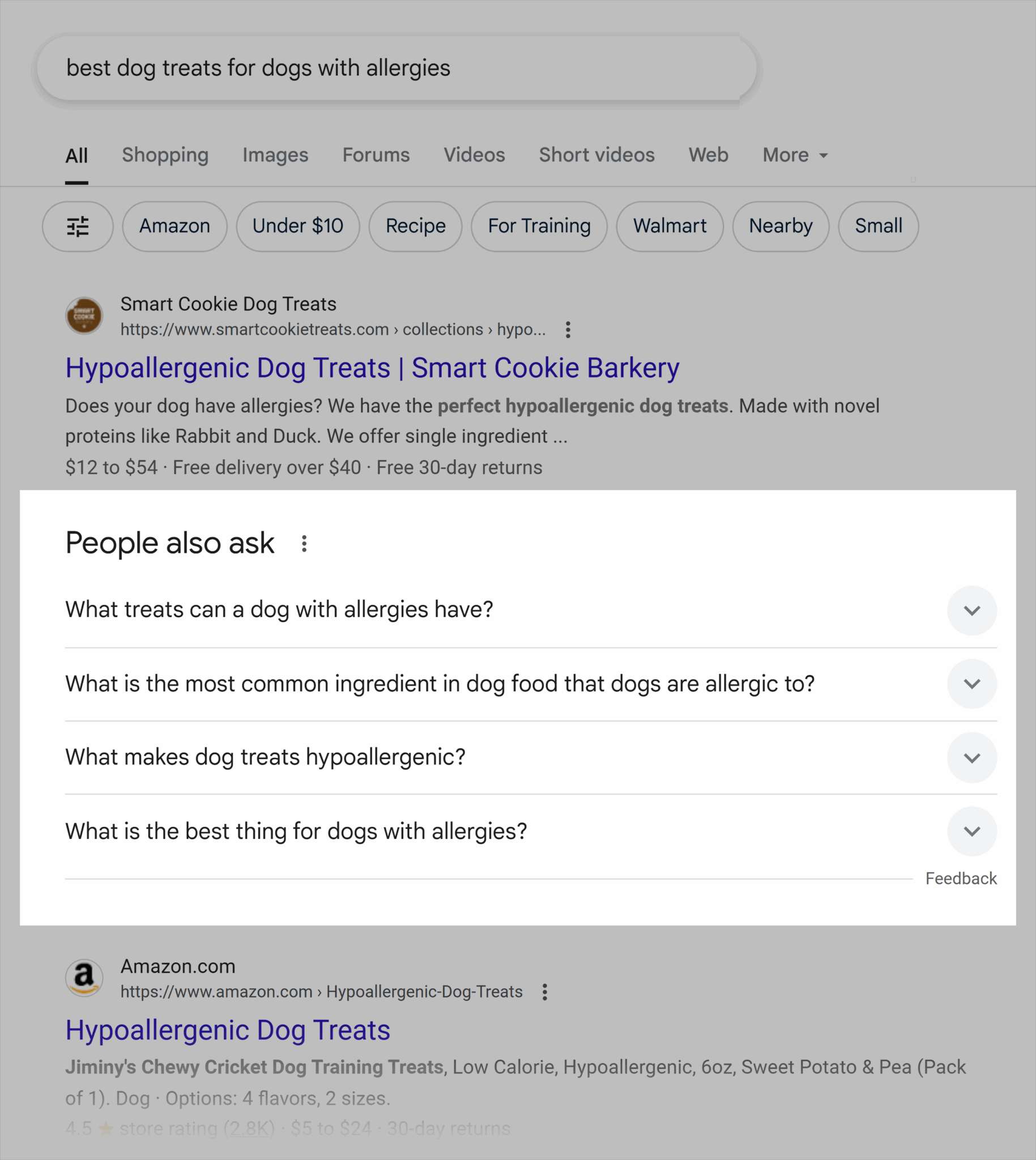
This tells you that if you’re working on your product page for “hypoallergenic dog food” that you should include an FAQ section at the bottom of that page that addresses questions like:
- What is a hypoallergenic dog treat?
- What is the most common ingredient in dog food that dogs are allergic to?
- What is the best thing for dogs with severe allergies?
And don’t sleep on related searches. These appear at the very bottom of the Google search results page and show terms closely related to your search. They’re a goldmine for discovering new ways people phrase things—and for expanding your search term list.

If you’re searching for “best treats for dogs with allergies,” then these related searches show how you should also optimize for:
- Homemade treats for dogs with allergies
- Soft hypoallergenic dog treats
- Best dog treats for dogs with allergies homemade
SEO tools
SEO tools like Semrush, Ahrefs, and Ubersuggest are the best place to get holistic data on your site—as well as insights into your competitors and what they are doing on their sites. Yes, you can spy on them.
Let’s take a look at Semrush’s Keyword Overview tool and what you can do with it:
- Monthly search volume: An estimate of how many people are looking up that keyword every month
- Keyword difficulty: How hard it is to rank for that term
- URLs ranking on the first page for that term
- Search intent: Commercial, informational, navigational, transactional
- SERP features: If the search engine result pages include rich snippets, local pack, images, People Also Ask, AI Overviews, etc.
- Paid search info: Cost to bid on that term, how competitive it is, etc.

You can also get recommendations specific to your site by entering your own domain.
This will get you information about:
- Personal keyword difficulty (PKD): How easy (or difficult) it’ll be for your website to rank for your target term
- Current position: Where you’re currently ranking on the SERPs (if you’re ranking)
- Potential position: Where you could rank with the right content
- Topical authority: How relevant your content is to your target keyword
Then find new keywords with the Keyword Magical Tool. Use this to generate thousands of new keyword ideas based on your current search terms.
Here’s recommendations for other potential keywords based on the term “do dogs eat grapes”:

You can also use SEO tools to spy on your competitors. Your competitors have already done a lot of the legwork—don’t let that go to waste. Analyzing the terms they rank for can reveal valuable search opportunities that you need to tap into.
You can do this with the Keyword Gap tool to see what your competitors are ranking for that you’re missing out on.
You can do this by:
- Enter your domain and up to five competitors in the Keyword Gap tool and click “Compare.”
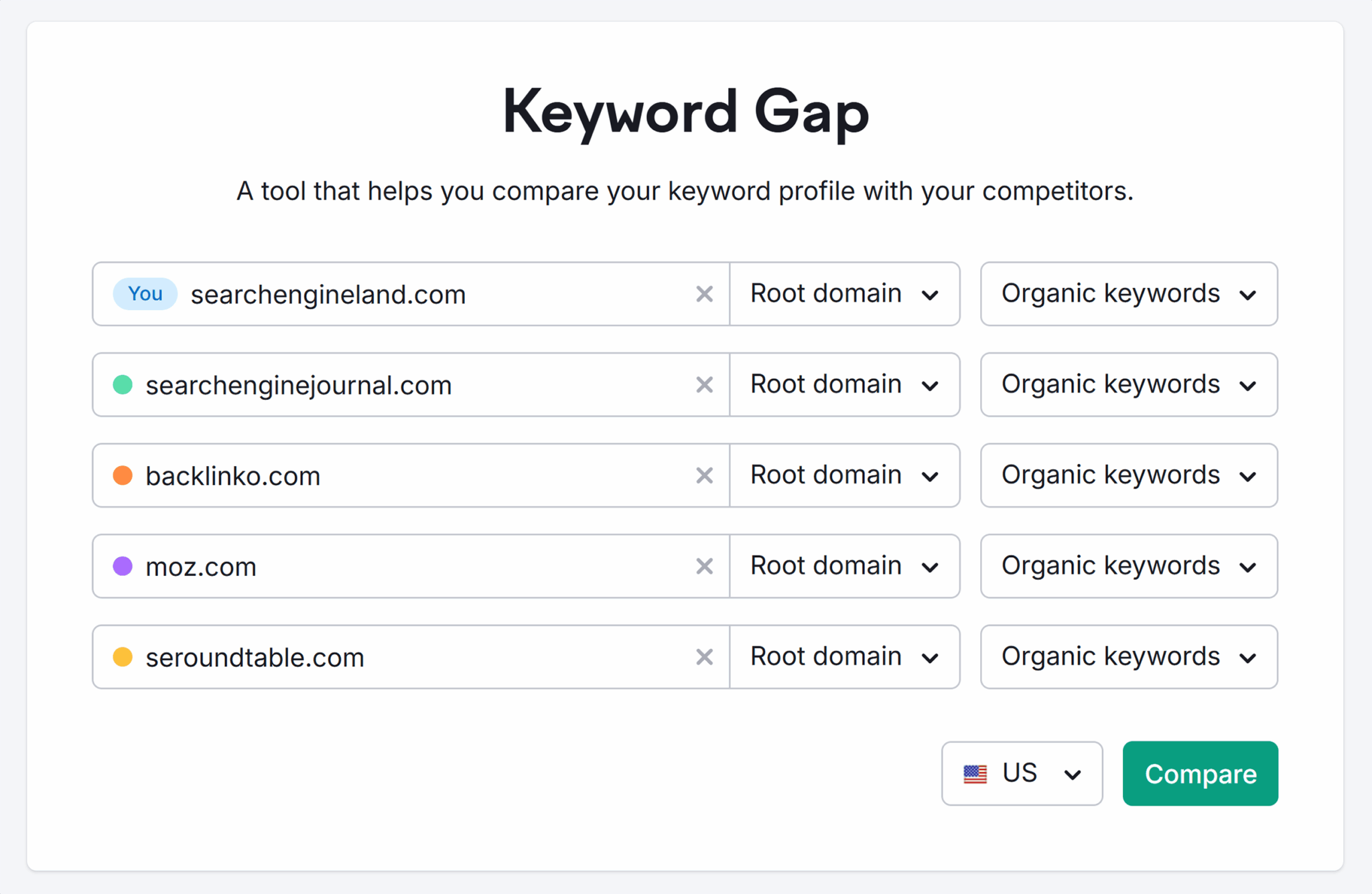
- View “Top Opportunities” for terms that have highest search volume that you’re not ranking for

You can see here that the top opportunities Semrush suggests for Search Engine Land:

If you’re working with a limited budget or just getting started with SEO, Ubersuggest is a more accessible tool compared to Semrush or Ahrefs. It doesn’t have as many features, but it can help you with tracking site performance and exploring basic keyword opportunities.
Use Ubersuggest to:
- Trank rankings for certain keywords across your site
- Analyze top-performing competitor content
- Review site-wide organic performance
- Get keyword ideas based on a target phrase
- Look over your site’s backlinks and domain strength

For example, try entering your domain into Ubersuggest’s dashboard. You can see all sorts of information like:
- Top keywords you’re ranking for
- How those rankings have changed over time
- Suggestions for new keyword opportunities

Compared to Semrush and Ahrefs, Ubersuggest’s data is a bit more limited. But for freelancers, smaller teams, or marketers just getting started out with SEO, Ubersuggest’s intuitive interface makes it easy to uncover quick wins.
Social listening
Social listening means eavesdropping about what people are saying about your brand, industry, or other topics on social media, forums, blogs, review sites, and more. It lets you tune into online conversations so you can see what the cultural zeitgeist is talking about.
You can utilize social listening tools like Google Alerts or AnswerThePublic to identify trending questions or industry-specific search terms.
Google Alerts lets you monitor the web for new content around specific keywords. Simply enter the search term you want to monitor (in this case “dog food for dogs with sensitive stomach”), and you can set a daily alert that sends you related news articles, blog posts, and forum mentions.

AnswerThePublic shows you questions related to your target topic across popular search engines. With the free account, you can get three daily searches, so use them judiciously.

This example shows how a search term like “dog food” has 116 related questions. You can also see information like search volume, cost per click, and relevant People Also Ask questions.

You should also keep an eye on social media. Depending on your industry, LinkedIn, Instagram, Facebook, or even TikTok is a good place to go to monitor how search terms are ever-evolving.
Keep on eye on things like:
- Relevant search hashtags or trending sounds tied to your industry (like #dogsoftiktok)
- How your audience is speaking about your product (do they say “sensitive stomach” or “tummy troubles”?)

Your audience is already telling you what they care about. Use social media listening tools to tune into that language so you can reach them exactly where they’re searching.
How to analyze and choose effective search terms
You’ll want to pick a set of search terms for each page on your site. And no, it’s not as easy as choosing similar keywords that have a high search volume.
Let’s break down what four things you’ll want to consider when picking out the best search terms for your strategy:
- Search intent: What the user is hoping to find with their search
- Search volume: Average number of times a keyword is searched each month
- Keyword difficulty: How hard it is to rank for a keyword based on current competition
- Click potential: Likelihood that users will actually click on results for this keyword
Search intent
The number one thing you’ll want to consider when analyzing and choosing effective search terms is this: search intent.
But what exactly is search intent?
Search intent is the motivation behind the user’s query. There are four main types:
- Informational: Used by those looking for an answer to a question (e.g. “what ingredients are good for dogs with sensitive stomachs”)
- Commercial: Used by those thinking about making an action like a purchase (e.g. “best dog food for sensitive stomachs”)
- Transactional: Used by those ready to perform the action (e.g. “buy dog food for sensitive stomachs”)
- Navigational: Used by those looking to get somewhere online (e.g. “Hill’s Science Diet sensitive stomach login” or “Blue Buffalo website”)
But why should you care?
Mismatched search intent is a major reason why pages can fail to rank, even when they are full of good content.
If you create a product page titled “what causes stomach issues in dogs” (informational intent), it won’t rank well because Google knows users at that stage are looking for information, not a product.
You can figure out the intent behind a search term pretty easily. Just look at the words themselves:
- “How to,” “what is,” “why” are all informational
- “Best,” “top,” “vs,” “compare” are all commercial
- “Buy,” “discount,” “price” are all transactional
- Brand names or “login” are navigational
Getting search intent right means that even a newer site can outrank well-established competitors. Google wants to reward your page if it exactly aligns with what the user is searching for, even if your domain isn’t as authoritative as other ranking competitors. It’s less about who’s got the bigger brand, and more about who has the more useful content.
Once you define your optimal search terms, you’ll want to match them to your content strategy. Let’s look at how to do that:
- A blog post like “what to feed a dog with a sensitive stomach” is perfect for ranking with informational, question-based keywords
- A comparison page about “best dog foods for sensitive stomachs” will align well with commercial-intent searches
- A product page targeting “buy grain-free turkey dog food for sensitive stomachs” is perfect for transactional intent
- An admin page like “Purina user login” fits with navigational queries
Before you get started optimizing, make sure to jot down these two pro tips:
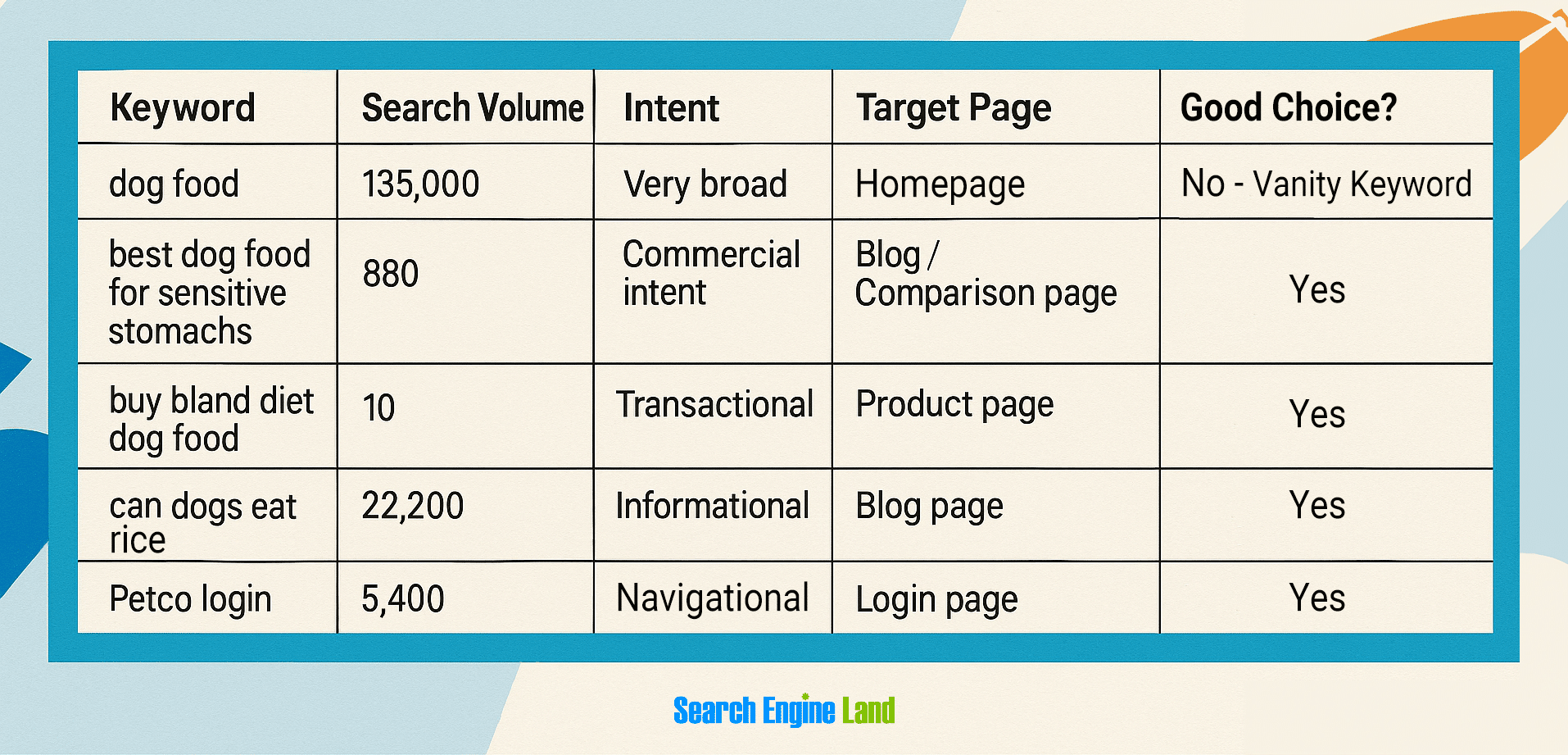
Pro tip: Avoid vanity keywords
Vanity keywords are terms that are too broad to fit your site. These are those oh-so-tempting super high monthly search volume keywords that will throw off your conversion rate—if you even manage to rank.
For example, if you sell dog food for sensitive stomachs, don’t be drawn in by the high search volume of “dog food” or “pet supplies.” Those terms are way too generic. You’ll be fighting in the search pages with big-box retailers and brands, and that’s an almost impossible war to win. And you’d be fighting for searchers who are probably just browsing and not even ready to buy.
Aim instead for something more specific like “grain-free dog food for sensitive stomachs” or “best dog food for senior dog with allergies.” You’ll have far less competition—and far higher intent.
Pro tip: Avoid low-intent queries
Low-intent queries are words or phrases where users aren’t ready to convert. Avoid these for your lower funnel pages designed to push users to purchase. There’s no point in selling to someone who’s not ready to buy yet.
A good example of this would be if you decided to target “can dogs eat rice” for your product page. A question like that belongs on a blog, not a page with transactional intent. Something like “buy diet dog food” is high-intent and a much better fit.
Search volume
Next: you’ll want to review the search volumes for your target search terms.
Depending on the word or phrase you’re reviewing, you might be looking at a term searched 10,000 times a month. Or maybe something only searched ten times.
Just be careful to not let search volume rule your strategy.
Obviously you’ll want to seek out terms that have higher search volume when possible, but it’s not the defining feature of this decision process.
Let’s say you sell custom orthopedic dog beds for the aging pet population. It would be tempting to target a keyword like “dog beds” with its 90,500 monthly searches, but with how broad that term is, you’re unlikely to rank. And even if you do, your product is probably too specific to drive conversions.
You’d want to focus on a more specific term like “orthopedic dog beds for large breeds.” This only gets 20 searches a month, but it matches your product exactly. That means you’re more likely to rank—and those 20 people are far more likely to make a purchase.
Note: You’re better off optimizing for a term that fits your page perfectly that people are only looking for ten times a month than something vaguely related that is searched 10,000 times.
For one thing, you’re unlikely to rank well for something irrelevant. And even if you do, those are 10,000 potential users who will likely bounce right off your page versus ten users who are actively looking for what you’re selling—with their credit card in hand.
Keyword difficulty
Next, look at the keyword difficulty.
Like we mentioned above, this is how hard it can be to rank for that specific term.
Keyword difficulty is usually scored from 0 to 100. The higher the score, the more competitive the term. This number is measured by your competition. Search pages with the big brands like Google itself will be much harder to compete for.
When reviewing terms for keyword difficulty, take into account your own site’s authority.
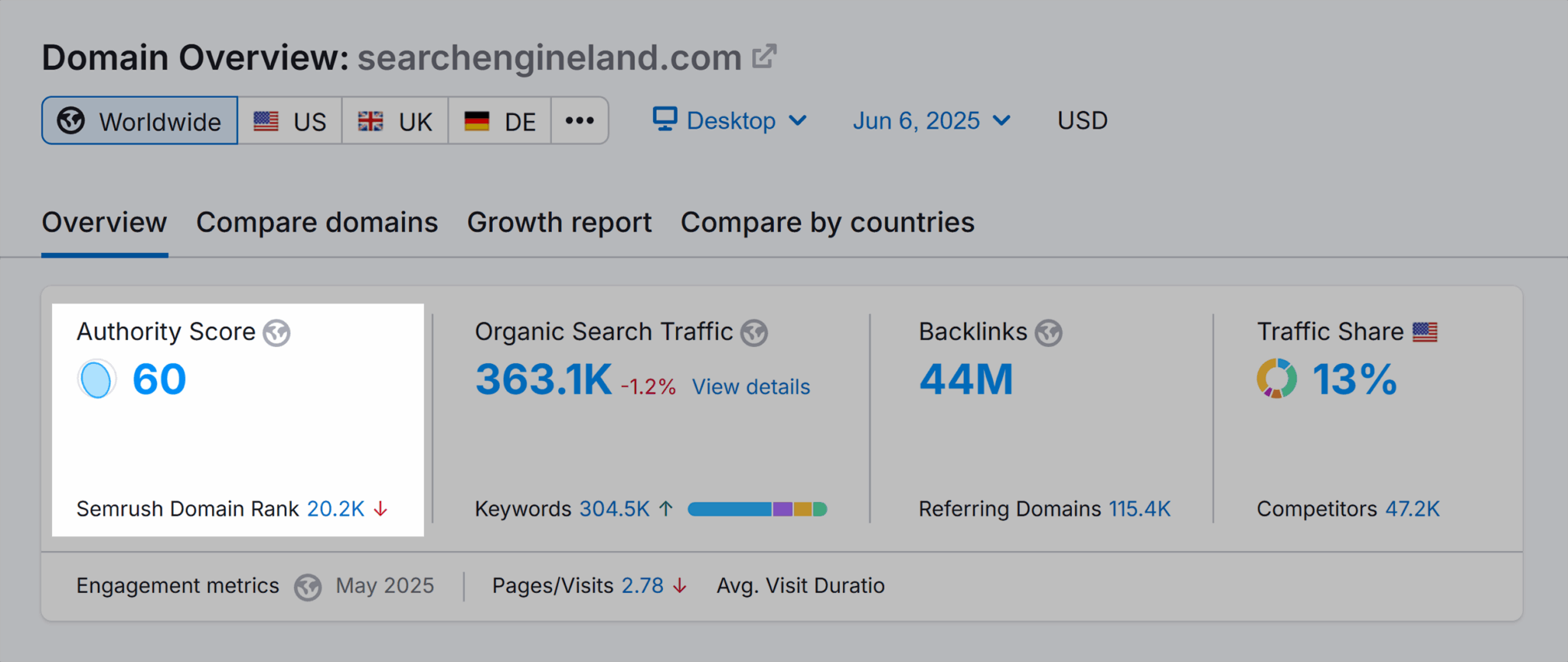
If you have an SEO tool, evaluate your authority score or domain rating—the former if you have Semrush, the latter if you have Ahrefs. The closer that number is to 100, the more likely you’ll be able to rank for those more difficult terms.
Here’s how to find the keyword difficulty of a term if you’re using Semrush:
- Enter your keyword into the Keyword Overview tool and hit “Search”

- Look at the Keyword Difficulty Percentage to get an idea of how difficult it would be to rank for that term
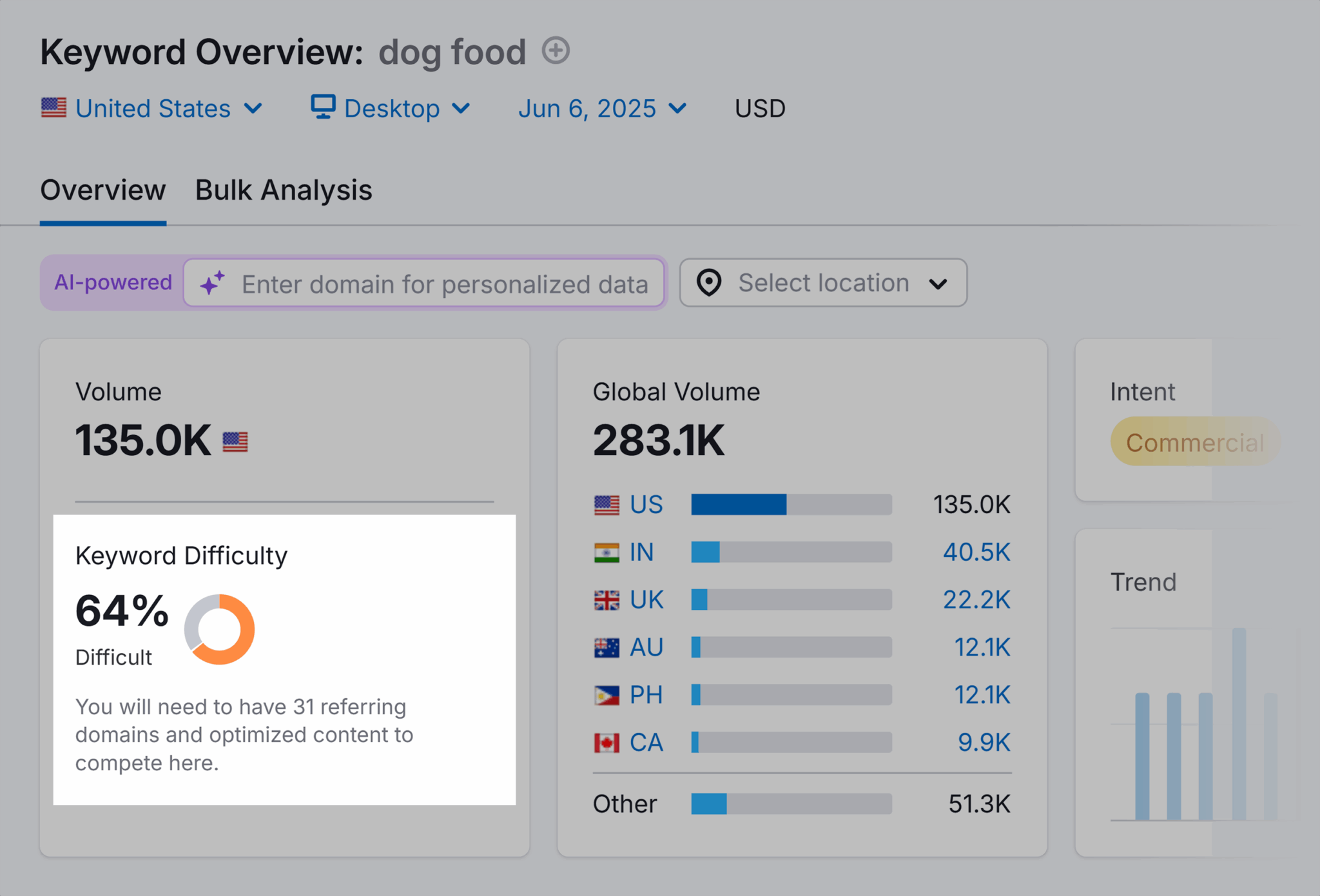
- Check the “SERP Analysis” to see what sites are ranking on the first page

- If you see big brands like Chewy, PetSmart, or Amazon, you’re looking at a hard to rank for keyword
Here’s the part most people forget: your own site’s authority matters here, too.
You can also check your Authority Score under Domain Overview. If you’re using Ahrefs, this is called your Domain Rating instead. The closer that score is to 100, the easier it’ll be for you to compete for more difficult terms.
Not sure where to start?
If your site is new or has a lower authority score (under 30), focus on terms with a keyword difficulty lower than 30 or 35. These are usually long-tail keywords or niche queries that can help you start ranking much faster.
Click potential
Keyword clickability is the likelihood someone is going to click on your page. Let’s take a look at what that means next.
Clickability is influenced by:
- Ranking position: Where your page appears in the search result page for a specific term (ranking #1 means you’re the top organic result)
- Brand: If the searcher recognizes or is looking for your company
- Metadata: Page title and meta description
- Presence of other SERP features: Extra elements on the results page (e.g., featured snippets, knowledge panel) that push organic results lower and change user engagement
When optimizing for a specific term, keep an eye out for how often users are actually clicking on the pages in the SERP. Some result pages with lots of featured snippets have very low clickability because the user can get their answer and leave immediately, no extra clicks needed.
You’ll want to target search terms with high click potential.
Gauge the clickability of a term by searching the word or phrase, and scanning the results for SERP features like featured snippets or shopping ads that might be pushing down high-ranking organic pages.
If the search pages immediately answer your query with a featured snippet, AI Overview, or People Also Ask box, you’re looking at a low-priority, low clickability term.
If organic results are near the top of the search results and there are few user distractions, there’s likely a high clickability, especially if you’re working with a recognizable brand.
Prioritize search terms that will drive traffic to your site. Even keywords with low search volume but high clickability can be valuable if they bring users to your page.
Best practices for using search terms in content
Okay, so you’ve found your search terms and you’re ready to start pulling in new, qualified people to your site. Now the next thing you need to know is how to apply those search terms in your content.
Including your target search definition and terms in page titles signals to Google what your content is about. The better Google understands your content—and how it helps people—the more likely you are to rank.
Do this by including your newly found search terms in important places on the page like:
- Meta title: Blue clickable headline that appears in Google search results
- Meta description: Short summary text underneath page title in search results
- Page title: Title shown in browser table and often set as meta title
- Headers: Section titles that break up the content on a page
- On-page copy: Main written content on the page (includes paragraphs, lists, captions)
How you include your search terms (if you want to use that exact word or phrase, how many times you should use it, and what other kinds of words you should include) varies from page title to on-page copy to metadata.
Title tag
Metadata is prime real estate for search terms. Metadata comes in two parts: title tags and meta descriptions.
Here’s an example:

Your title tag is the overall title of the page, and one of the best places to signal to Google what your page is about.
Be careful when squeezing in search terms here. You’ll want to keep things below 65 to 70 characters to avoid your title tag getting truncated.

Meta description
Meta descriptions actually don’t directly impact rankings. But they do make a big difference when it comes to click-through rates.
Here’s an example in the wild of a title tag (in blue) and a meta description listed the SERP.

But, since the search term someone uses to pull up your page in the SERP will be bolded in the meta description, your meta description holds a lot of weight when it comes to click through rate. Try to include your search term here at least once.
Pro tip: Keep your meta description to a maximum of 160 characters. If it’s longer than that, you risk Google either not including the whole description or that it will start pulling a copy from your page that it “likes” better.
What do we mean by saying Google will pull other copy it “likes”?
Google wants to present copy it thinks is most relevant to users. Notice how the two examples above have two different meta descriptions despite being for the same page?
That’s Google rewriting a description to what it believes better matches the search query. If you don’t match the user’s search intent, you lose autonomy over what your readers will see.
Page titles
Page titles should tell you at a glance what the page is about. They provide context and relevance for both users and search engines.

Try to always include some variation of your search term in your page title. This is one of the first things people see when they land on your page, so it’s a valuable landscape to signal to those users (and Google) why you should be ranking for this term.
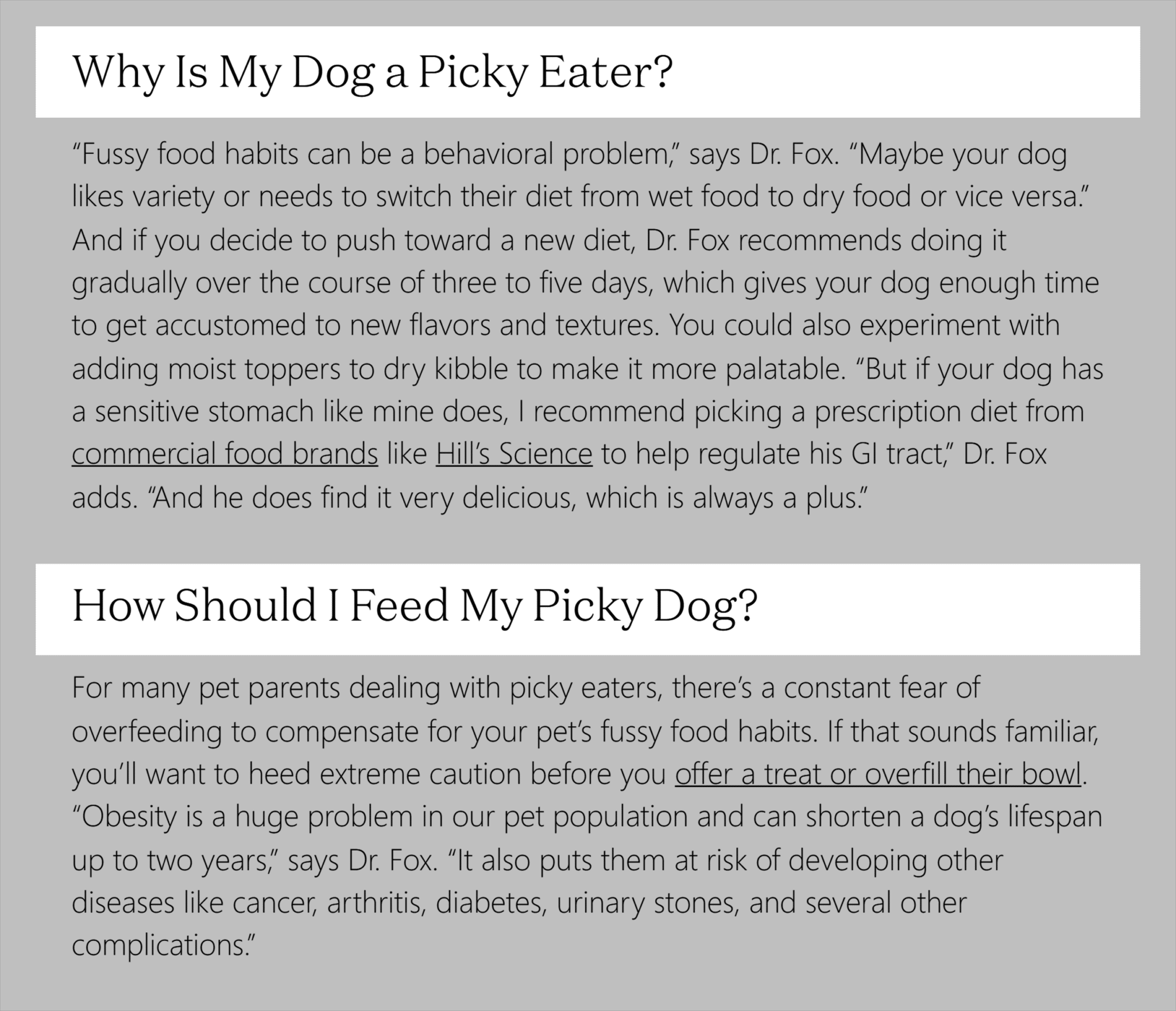
Headers
Headers, in a similar fashion, act similarly to chapter titles to a book in that they indicate the overall content of the page. Include instances of your search terms here too.
On-page copy
On-page copy supports your header and title. It plays a less critical role in ranking.
The name of the game here is simple. Add your search terms where they make sense. Don’t force words where they don’t belong.
Make sure you’re writing your content for humans first. Then go down your list and check off the terms you’re supposed to include.
The one thing you’ll need to keep in mind as you add your search terms to your page title, headers, copy, and metadata?
Keyword stuffing.
Avoid keyword stuffing
Keyword stuffing is when you try to unnaturally squeeze in search terms. Shoving in keywords where they don’t belong can actually hurt your page’s ability to rank, so tread lightly.
Think about it from the user’s perspective.
Would you rather visit a page that is a “Dog Veterinary: Dog Vet Services for Dog Illnesses” with headers like:
- “Dog Vet: Your Favorite New Dog Veterinary”
- “Vet for Dog: Why You Need a Dog Vet”
- “Get Help From a Dog Vet Now”
Or would you prefer a page like “Dog Veterinary: Get Help for Your Best Friend”, with headers like:
- “Helping Dogs of All Sizes, Breeds, and Ages”
- “Get Testing Here”
- “Learn How Our Vets Can Help”
The first version feels robotic and like it’s not designed for a human to read. The repetitive, keyword stuff-y use of “dog vet” hurts user experience. And search engines want to provide the best user experience so people keep coming back for more searches.
Search engines are smart enough to know when you’re forcing keywords and when you’re talking like a person and providing clear, helpful content. Keyword stuffing makes your site seem spammy, and it can actually hurt your rankings in the long run.
Keep things natural. Optimize for the user’s experience. Real people want clarity and relevance—not endless, keyword-targeted repetition. Write like you’re talking to someone, not trying to rank on a machine.
Common mistakes people make with search terms
Using search terms correctly is (unfortunately) harder than it looks. Here are the top pitfalls to watch out for:
Speaking company jargon, instead of your customer’s language
Your customers don’t use industry jargon. They don’t say things like “dog food formulated for optimal nutrient consumption.” They’re asking “what can dogs eat” and “what are the best foods for a dog with a sensitive stomach.”
If you don’t use your customer’s language throughout your site, they’ll think your product is made for someone else.
Keep a close eye on your social listening tools to see exactly how your customers are talking. Reviews, social media comments, and even customer support tickets are gold mines for authentic customer language.
Over-optimizing for the wrong terms
This mistake is discreet but dangerous.
You might be targeting “top dog foods for labs with sensitive stomachs” thinking you’re going to bring in users ready to buy only to realize, as conversion rates drop, that the people finding this content are actually looking for informational content.
Or maybe you were looking at a mixed SERP before, with half of the pages being commercial and the other half informational. But now you’re only bringing in informational users that won’t convert.
Note: A mixed SERP is a search results page that includes a variety of content that caters to different kinds of search intent, like commercial, informational, and transactional pages all ranking on the same query.
Avoid this by always analyzing the search intent behind your target term before optimizing your page. If you see a mixed SERP, say commercial and informational content, you can still rank, but make sure your page clearly leans in one direction.
If you’re aiming for commercial intent, make a comparison page that ends with a strong CTA, not a blog.
Ignoring SERP changes
Of course, because it’s always updating its algorithms, Google can flip the search intent script on you. A search term that once brought in commercial intent might switch to informational.
This is very common for search terms that include superlatives such as “best” or “top” like “best dog food for allergies”. One month, the top results might be a product page. The next, blog posts. Google constantly updates search pages to what it thinks users are looking for.
Stay ahead of this by:
- Monitoring your top performing pages. If you see conversions dropping while clicks hold steady, check to see if Google changed the SERP.
- Search the term every few months. Review the search pages to see if there’s been a shift in intent.
- Be ready to adapt. Don’t put all your eggs in one basket—or all your conversions in one page. Prepare for intent shifts and focus on optimizing other pages in case you see a drop in purchases.
Missing long-tail opportunities
And finally, don’t make the mistake of ignoring long-tail opportunities.
Long-tail terms are those sentence-like search terms that come with a tiny search volume to match.
Don’t be fooled by those small numbers. Because these search terms are so specific, the users who search them will be especially pleased with your page being an exact match.
Take our “dog food” example again. This is way too vague. But “best grain-free dog food for small dogs with seasonal allergies?” Perfect for the 15 pound and under grain-free dog food page.
Here’s how to find long-tail keywords:
- Use tools like Google Search Console and AnswerThePublic to find the search terms your audience is using
- Review the People Also Ask box
- Look at your own site’s search history or customer support tickets to find questions in the wild from your own customers
Track, optimize, and win in Google and AI search from one platform.
Quick audit checklist
You can reduce these mistakes by regularly reviewing your pages after you push optimizations live.
Check to see if:
- Impressions have gone up, but not clicks: It’s likely you’re targeting the wrong search intent. If you’re ranking for “can dogs eat blueberries” with your dog food product page’s robust FAQ, users are just getting their answer and bouncing.
- Impressions and clicks have gone done: It’s likely you’re targeting the wrong search terms. For example, you’ve optimized your product page for “pet nutrition services” when people are actually looking for “Australian Shepherd dog food for allergies.”
- Clicks have gone up, but not conversions: It’s likely you’re targeting the wrong search intent. This might look like you are getting clicks for “best dog food for skin allergies” but your page only describes how much fish oil helps with dog dandruff.
And before you hit publish on those new page optimizations, ask yourself:
- Did I include my search terms in all the right places? You have to include search terms in your page title, headers, copy, and metadata. But you need to stay in that Goldilocks zone and avoid treading into keyword stuffing territory.
- Does the search intent for this keyword align with the search intent for this page? You have to get the search intent right, otherwise you won’t get any impressions, or you’ll capture all the wrong users.
Don’t try to rank for “can dogs each chicken” for your product page. That belongs on a blog post. Focus instead on “best dog food for chicken allergies.” - Does the copy feel natural? Read everything out loud. Does it sound loaded with industry-specific jargon no customer would ever recognize?
Avoid lines like “this hypoallergenic dog food designed to help with allergies is the best allergy-friendly dog food.” Try instead “our allergy-friendly dog food is great for pups with sensitive stomachs.”
Start optimizing your content for search terms
The difference between ranking on page one and page five comes down to understanding both the technical search definition and exactly what your audience is actually typing into that search bar.
Search terms aren’t just words—they’re windows into your customer’s minds. When someone searches for “best treats for dogs with sensitive tummies” instead of “canine hypoallergenic snacks,” they’re telling you exactly how they think and how they talk about their problems. Your job is to match that language.
Ready to put to practice what you’ve learned? Here’s the best way to get started:
Phase 1: Audit your current performance
- Open Google Search Console and identify the top five pages driving organic traffic
- Analyze what search terms people are using to find those web pages
- Review your page content to see how well you’re using those terms (or if you’re using those terms at all)
Phase 2: Identify new opportunities
- Use SEO tools like Semrush and Ahrefs to find target keywords based on search intent, volume, keyword difficulty, and click potential
- Run a competitor analysis to discover search terms your competitors are ranking for that you’re missing
- Look for long-tail opportunities that match your specific offerings
Phase 3: Optimize and expand
- Update your existing high-priority pages with better search term integration
- Create new content targeting the gaps you identified
- Monitor performance and adjust based on what you find actually drives clicks and conversions
This isn’t a one-and-done process. Search behavior is always evolving—and Google is always changing. The businesses that rank well are those that treat search optimization as an ongoing conversation with their audience.
Need help digging into the nitty-gritty of on-page SEO or content marketing strategy? Our complete guide to optimizing content will walk you step by step through how you can get your content ranking on page one of the SERPs.
Explore more on
Editorial disclosure
Search Engine Land is owned by Semrush. We remain committed to providing high-quality coverage of marketing topics. Unless otherwise noted, this page’s content was written by either an employee or a paid contractor of Semrush Inc.
About the author


