Google Revamps Submit Content Page
Google has updated their URL submission tool page and redesigned their Submit Your Content page.
The old URL which was at google.com/webmasters/tools/submit-url/ now returns a page not found (404) error. The issue with that is, Google should really use a 301 redirect because it ranks in the top position for [google webmaster tools] and [google submit URL]:

The truth is, the add URL page is actually at google.com/webmasters/tools/submit-url, that is without the backslash at the end of the URL. It must be a bug on Google’s side, either they should redirect google.com/webmasters/tools/submit-url/ to google.com/webmasters/tools/submit-url or make both work.
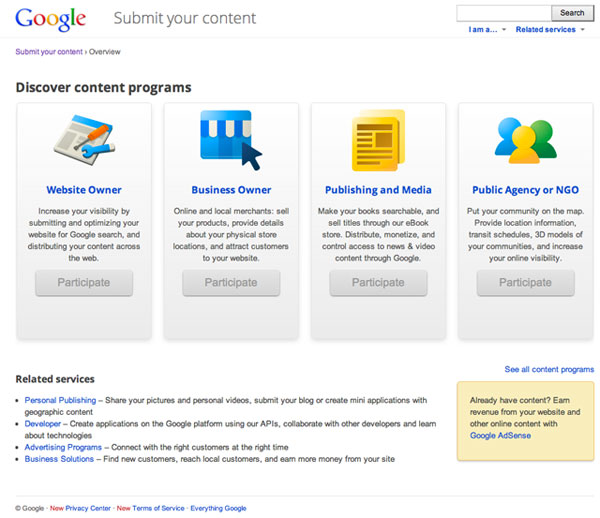
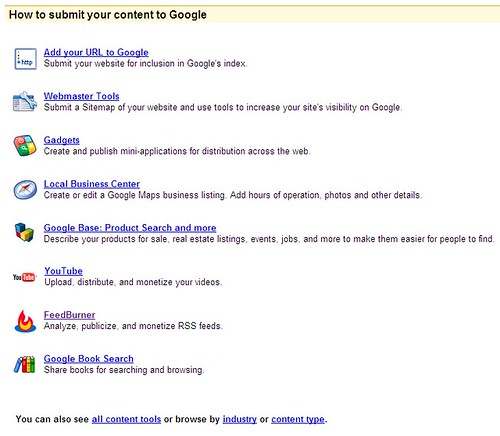
In any event, now the new place to submit content is at google.com/submityourcontent. The page isn’t new, but it has recently been redesigned. The page launched back in September 2008 with a single page to find out how to submit content to Google’s various portals. It now looks like this:
Prior, it looked like this:
It is now broken down into four categories to submit content:
(1) For Website Owners
(2) For Business Owners
(3) For Publishing and Media
(4) For Public Agency
When you go to each of those landing pages, some of the content submission URLs differ, while some overlap between the four. One example is that all four have the submit URL to Google web search option.
Related Stories:
Explore more on
Add Search Engine Land as a preferred source on GoogleEditorial disclosure
Search Engine Land is owned by Semrush. We remain committed to providing high-quality coverage of marketing topics. Unless otherwise noted, this page’s content was written by either an employee or a paid contractor of Semrush Inc.
About the author