AI Overviews tools and software for optimizing and tracking results

While some SEO and generative AI best practices overlap, ranking in Google’s AI Overviews requires both different optimization tactics than traditional search results and different tools to measure success.
AI Overviews pull from multiple sources to answer complex queries, prioritizing content that demonstrates expertise, addresses comprehensive subtopics, and follows technical SEO best practices.
Everyone wants to appear in these highly-coveted AI Overviews, but tracking visibility has become more difficult. Notably, traditional rank tracking tools can’t show you whether your content appears in these AI-generated responses or how prominently you’re featured compared to competitors.
The SEO toolkit you know, plus the AI visibility data you need.

In this guide, we explore the specific tools you need to optimize for and track visibility in Google AI Overviews, with practical workflows for each.
Note: If you want to understand the ranking factors that make content eligible for AI Overviews — like following SEO best practices, ranking well organically, targeting keywords that trigger AI Overviews, building brand authority, and optimizing content structure — refer to our guide covering AI Overview ranking factors. And don’t forget to learn more about how AI Overviews are triggered.
Website crawling and auditing software
To rank in AI Overviews, your content should first meet Google’s core technical requirements. Crawling and auditing tools identify issues that prevent proper indexing and ranking. After all, if you want to rank anywhere, Google needs to be able to find you.
Start with Semrush’s Site Audit tool to scan your website for technical SEO issues. The tool checks for crawlability problems, broken links, duplicate content, and indexing barriers that could prevent your content from appearing in search results…including AI Overviews.
How to run a site audit
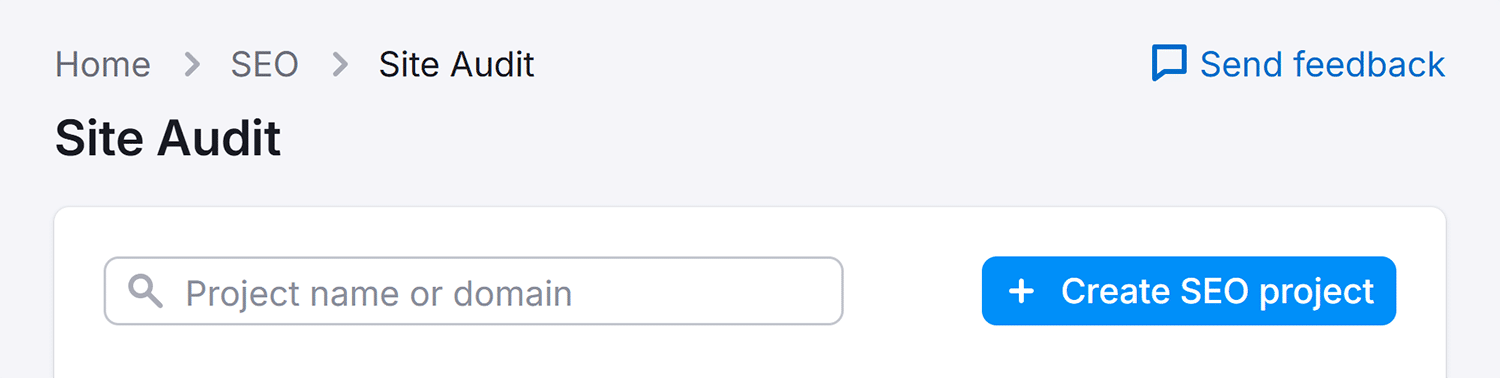
Step 1: Navigate to Semrush’s Site Audit page
Here you’ll see any existing audit projects, or you can click “Create SEO Project” to run an audit on another website.
Step 2: Set up your audit
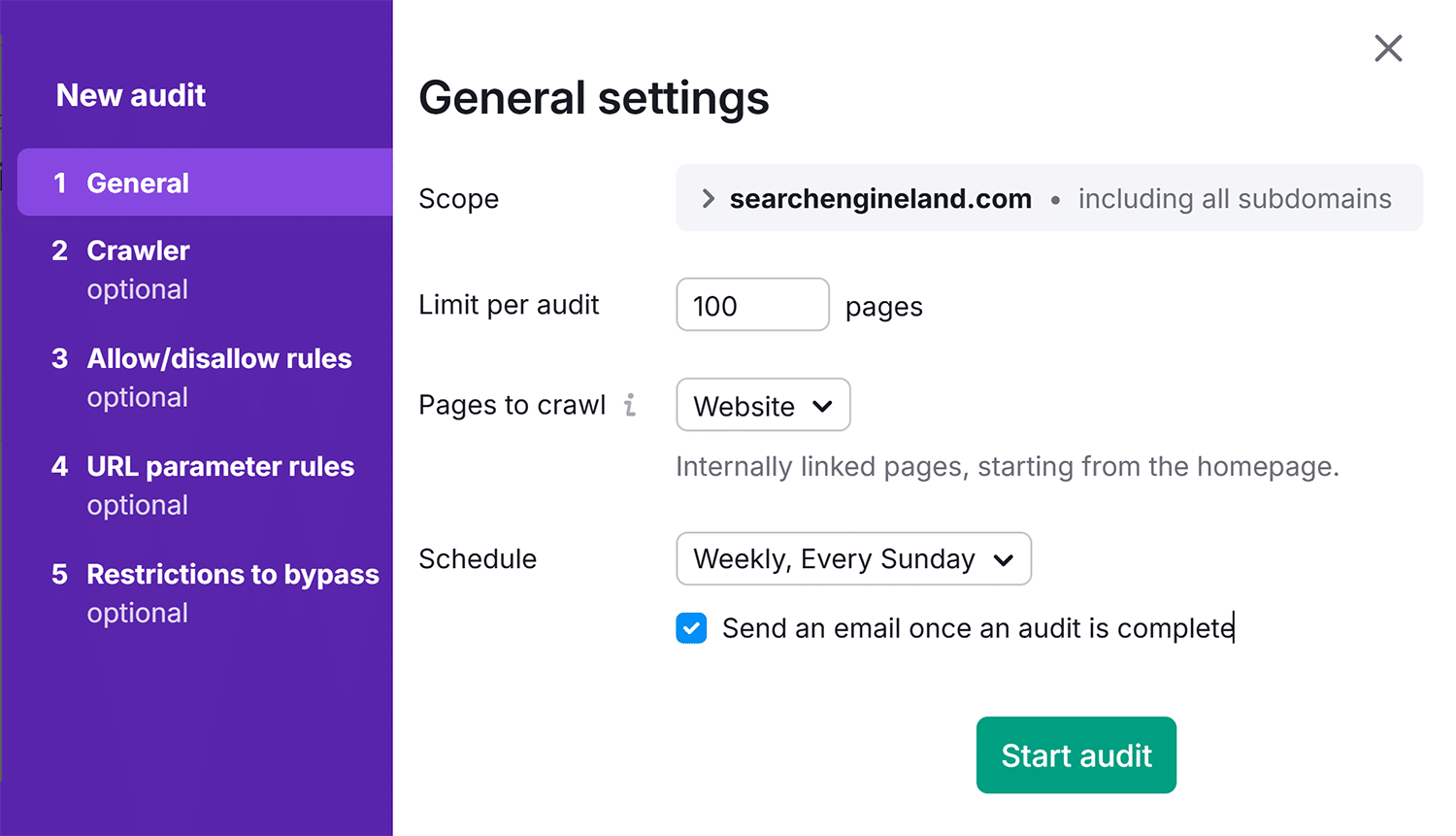
Enter the domain you want to audit. You can customize audit parameters, including crawl delays, disallow options, and more. Once you’re done, click “Start Audit.”
Step 3: Review audit data
Once the initial audit is complete, assess your site’s standing.
Here’s what you can learn:
- Overall site health
- Number of crawled pages with potential issues
- AI search health
- If pages were likely blocked from AI search
- Total number of errors
- Overall crawlability
- Important errors, including the specific pages where the errors can be found and tips on how to resolve them
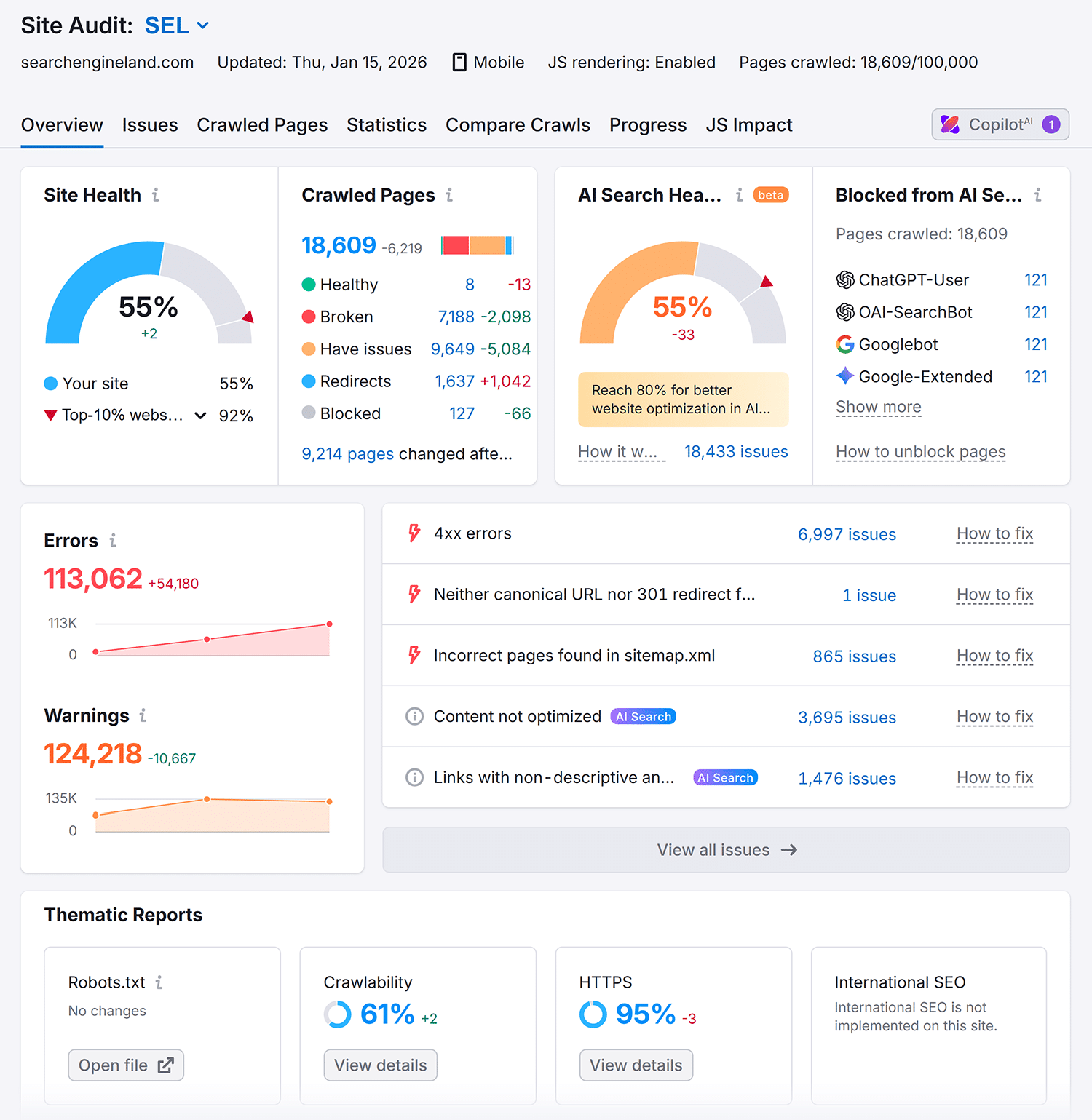
These audits can help you identify issues that are hurting crawlability on an individual page level, allowing you to prioritize high-value fixes fast.
For example, if your guide on “keyword research strategies” has a noindex tag preventing Google from indexing it, that’s a critical fix, especially if the keyword is likely to trigger AI Overviews.
However, missing alt text on a decorative image in your site footer is a lower-priority issue that won’t directly impact whether your content appears in AI-generated responses.
Additional audit tools
Other tools that can be used for site crawling and auditing are Screaming Frog and Sitebulb.
Screaming Frog offers deeper technical analysis for larger sites. The tool crawls your website like a search engine bot, revealing technical issues that might not appear in other auditing software.
Use Screaming Frog to:
- Analyze your HTML structure
- Identify missing schema markup
- Review internal linking patterns
Sitebulb provides visual reports that make complex technical issues easier to understand and prioritize. The tool’s “Hints” feature explains each issue in plain language and suggests specific fixes, making it valuable for teams without dedicated technical SEO resources.
Tools for keyword research and analysis
Identifying which keywords trigger AI Overviews helps you prioritize content that has the highest chance of appearing in these results. AI Overviews appear most frequently for informational, long-tail, non-branded queries with lower search volume.
Semrush’s Keyword Magic Tool helps you find keywords that are more likely to trigger AI Overviews. Ahrefs’ Keywords Explorer offers similar filtering capabilities, with additional SERP feature data showing which keywords currently display AI Overviews.
To identify AI Overview opportunities with the Keyword Magic Tool:
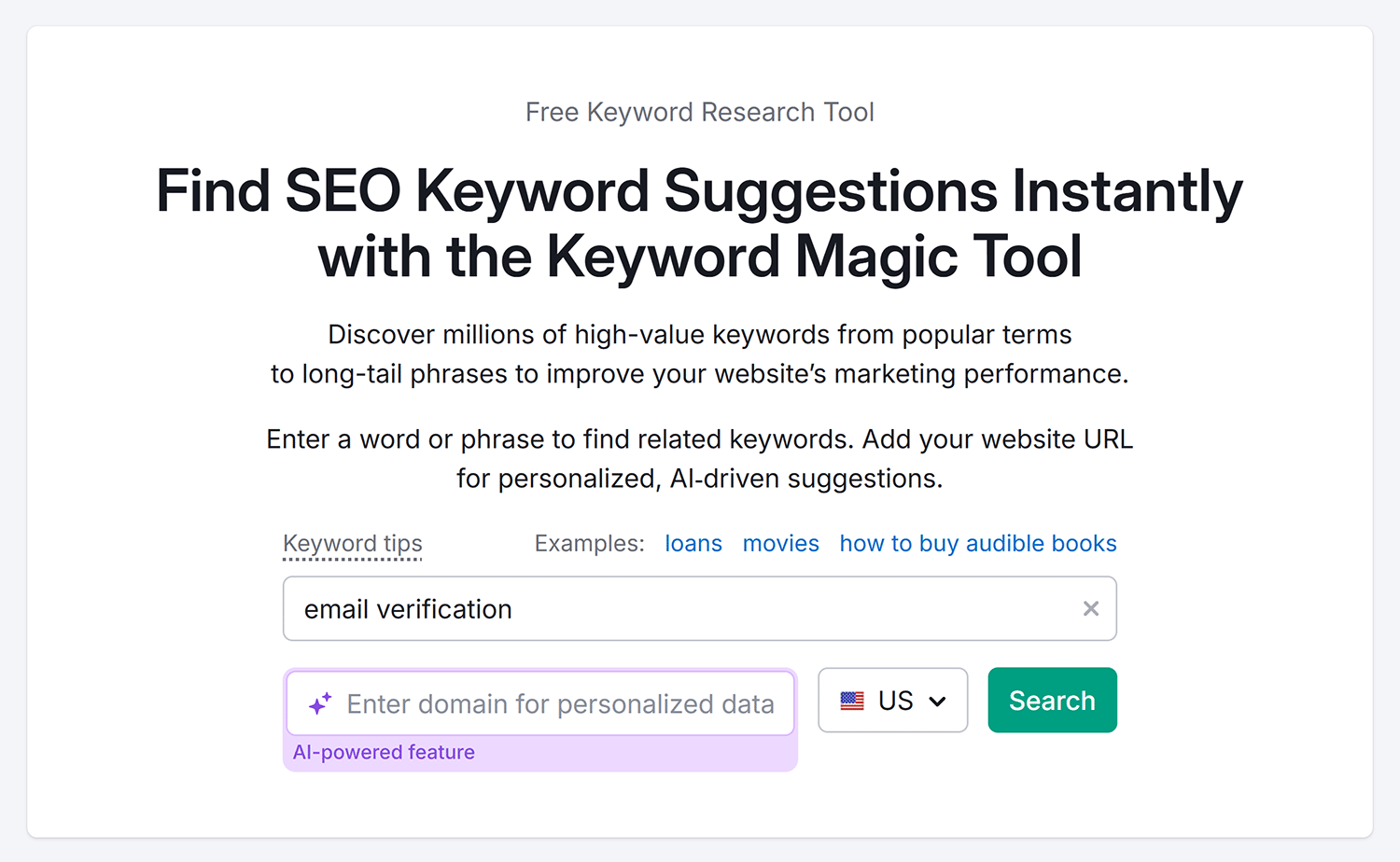
Step 1: Choose a seed keyword
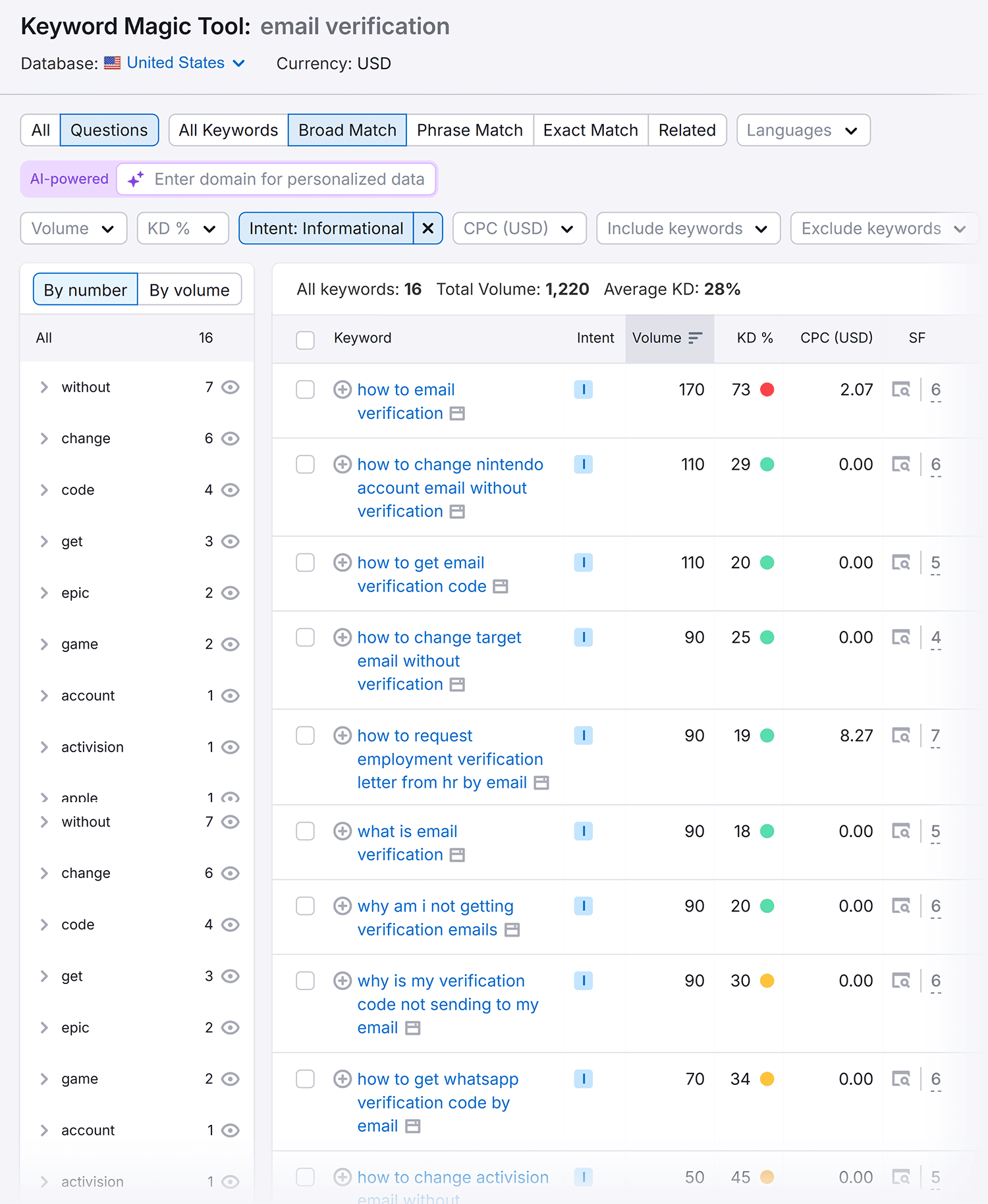
Add a seed keyword that you want to search for. If we’re writing a blog post about email verification best practices, for example, we might use “email verification.”
Step 2: Apply filters to find AI Overview-friendly keywords
Use these filters to narrow down your keyword list, as it may help you identify searches most likely to trigger AI overviews:
- Intent: Find queries where users seek detailed answers rather than wanting to make a purchase, opting for “informational” intent over “purchase” intent
- Questions tab: Surface long-tail variations that typically trigger comprehensive AI responses
- Include/Exclude filters: Remove branded terms since AI Overviews appear less often for branded searches
- Volume filters: Prioritize keywords with lower search volume
- CPC (low to high): Find informational queries with low commercial relevance
Step 3: Check if AI Overviews already appear
Before committing to a keyword, verify whether it currently triggers AI Overviews. Keywords that already show AI Overviews represent proven opportunities. For keywords without AI Overviews yet, focus on those meeting the criteria above, since they’re more likely to trigger AI Overviews as Google expands coverage.
Optimizing existing vs. new content
How you approach AI Overview optimization depends on whether you’re working with existing content or starting from scratch.
For already-ranking pages, prioritize optimizing your highest-ranking content first. Content ranking in positions 1-10 has a greater probability of inclusion in AI Overviews since Google already views it as authoritative on the topic, so you want to shoot for those high-ranking positions.
For brand new pages, target keywords where AI Overviews already appear and where you can demonstrate clear expertise. Creating new content for keywords that don’t yet trigger AI Overviews is riskier, as you’re betting that Google will add AI Overviews for those queries in the future.
If there’s no AI Overview for a specific query, look for keywords that meet the following criteria since these are more likely to trigger an AI Overview in the future (compared to other types of keywords):
- Informational (use the Keyword Magic Tools’ Intent filter)
- Long-tail (use the Questions tab)
- Non-branded (use the Include or Exclude keywords filers)
- Lower search volume (use the keyword Volume filters)
- Low CPC (use the CPC filters)
Note: Avoid sensitive topic queries unless they’re central to your site’s expertise, as AI Overviews can appear less frequently for these topics. Examples may include topics about self-harm, health, or divisive political issues.
Tools for PR & building brand authority
Brand authority correlates strongly with AI Overview inclusion. Google cites established brands more frequently in AI-powered responses, which means building brand recognition directly impacts your AI Overview visibility.
Track three key brand authority metrics:
- Branded web mentions
- Branded anchor text
- Branded search volume
Each metric signals brand recognition that influences AI Overview selection.
Tracking brand mentions
Brand mentions across the web signal to Google that your brand is established and authoritative — key factors in AI Overview selection.
Press releases were long considered an outdated tactic, but if brand mentions influence visibility, that could explain why some are seeing renewed success using them.
Being mentioned on the domains Google frequently pulls from to generate AI Overview responses may increase your chances of appearing in those AI-generated summaries.
Semrush’s Brand Monitoring tool tracks mentions of your brand name across the web, including news sites, blogs, and forums. The tool shows not just where you’re mentioned, but also the authority level of sites mentioning you. Mentions on high-authority domains in your industry can carry more weight than mentions on low-authority sites.
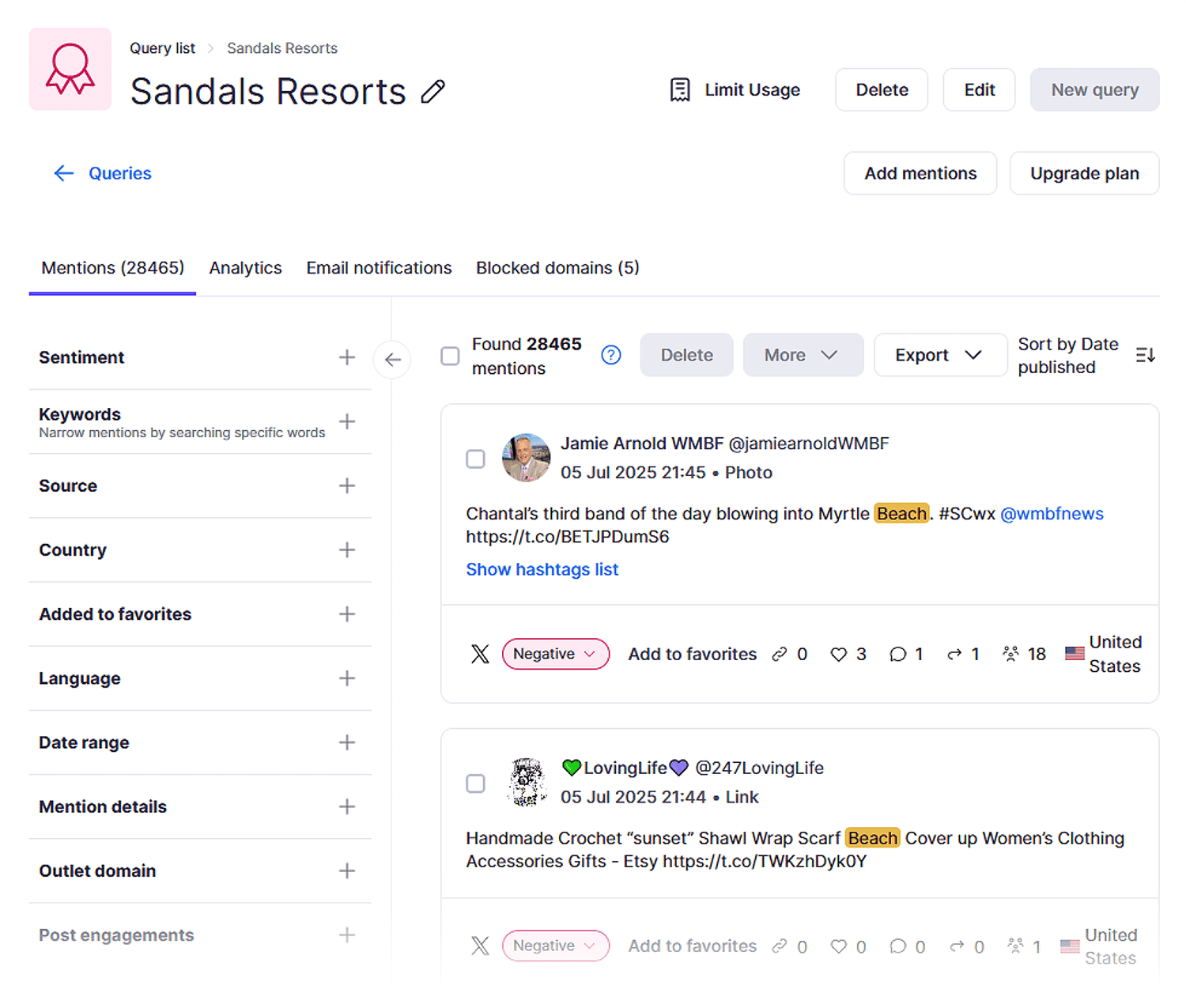
To get the most value from brand monitoring:
- Review the “Mentions” tab regularly to identify where your brand appears
- Focus on earning mentions from authoritative domains that strengthen your brand signals
- Export mention data periodically to track whether your brand visibility is growing over time
The Media Monitoring feature expands this tracking to include PR coverage and journalist mentions. This is particularly valuable if you’re actively working to build brand authority through press releases and media outreach, as it helps you measure the impact of PR campaigns on brand visibility.

BrandMentions is another great option. This tool provides real-time alerts when your brand is mentioned online. The immediacy of these alerts lets you respond quickly to coverage opportunities, engage with mentions, and track sentiment as it develops rather than discovering mentions days or weeks later.
Analyzing branded anchor text
Branded anchor text in backlinks signals brand recognition and authority. The more often other sites use your brand name when linking to you, the stronger your brand authority appears to Google.
Semrush’s Backlink Analytics tool shows how often your brand name appears in backlink anchor text compared to generic anchors like “click here” or keyword-focused anchors.
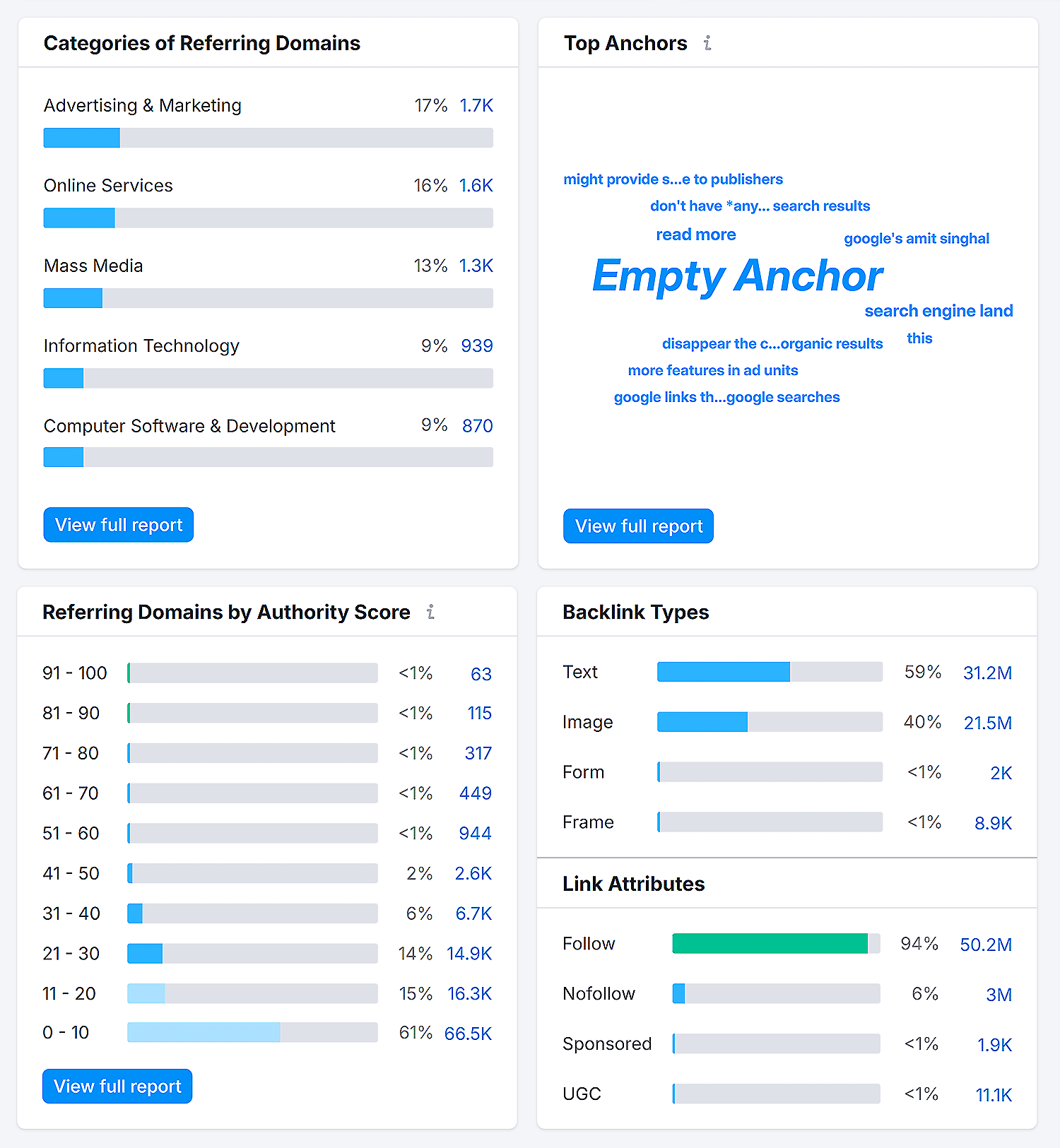
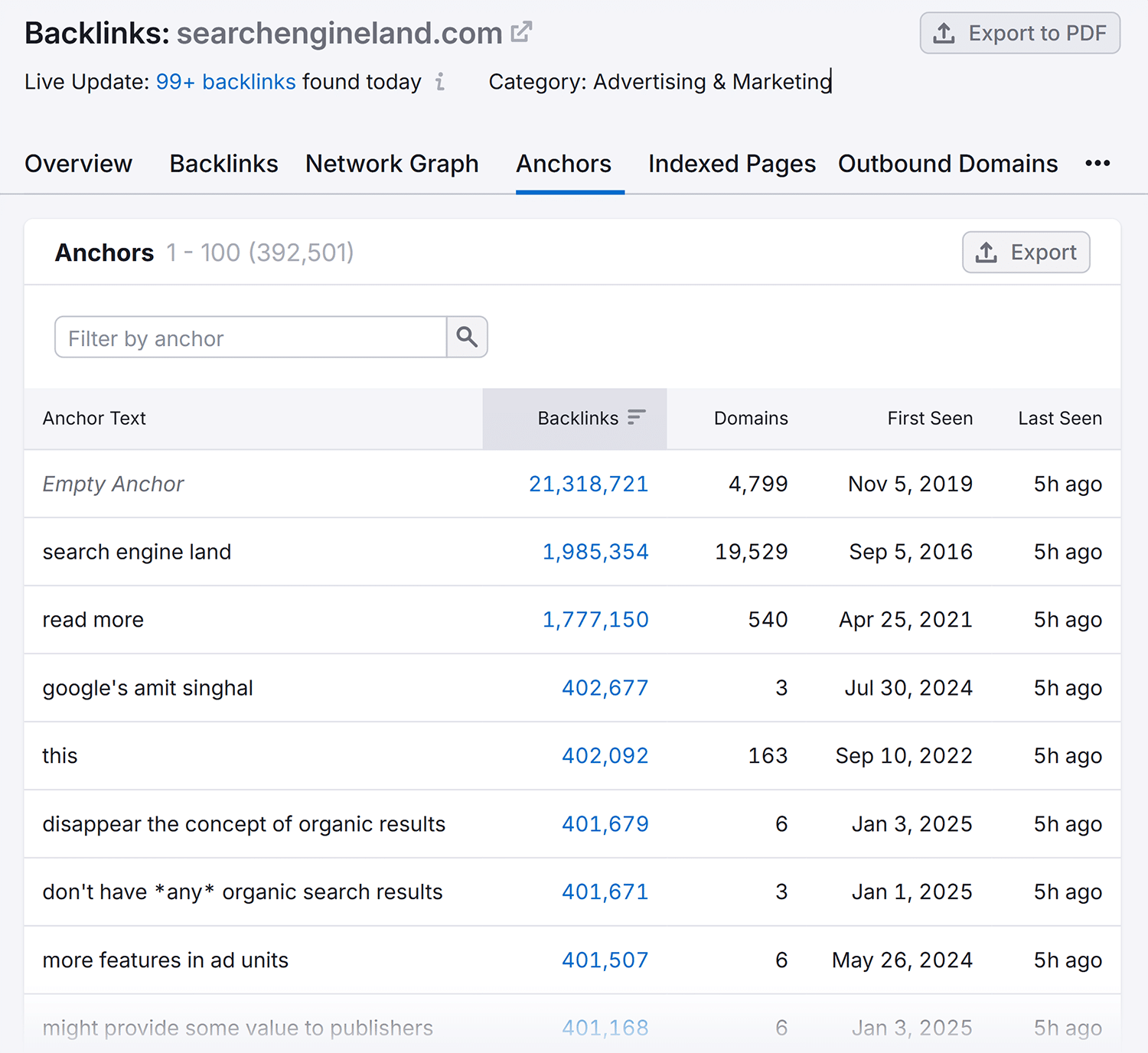
To review branded anchors, find the “Top Anchors” section and click “View full report.” You’ll see how many backlinks use empty anchors, along with different popular anchors used.
Monitoring branded search volume
Branded search volume — the monthly search volume for your brand name — indicates growing brand awareness. As more people search for your brand by name, it signals to Google that you’re an established entity worth citing in AI Overviews.
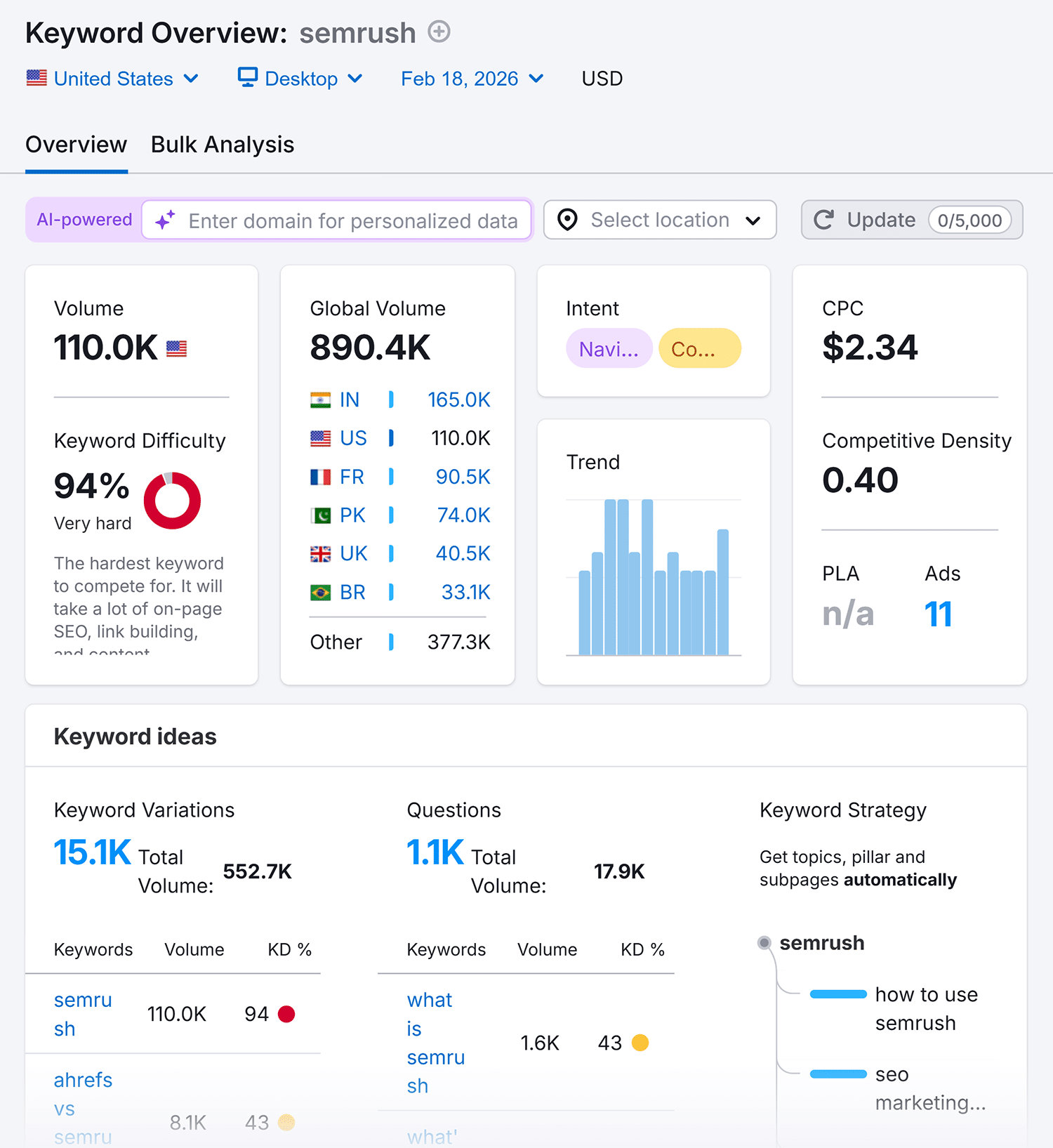
The Keyword Overview tool lets you see your branded search volume Enter your brand name to see monthly search volume based on your country, global search volume, and trends. Consistent growth in branded searches correlates with increased AI Overview visibility and demonstrates stronger brand awareness overall.
Research tools for AI Overview content optimization
Content optimization for AI Overviews requires demonstrating expertise, covering comprehensive subtopics, and structuring content for machine readability. The tools below help you achieve all three.
Creating content that demonstrates E-E-A-T
E-E-A-T (Experience, Expertise, Authoritativeness, Trustworthiness) signals influence, and it can directly impact whether Google includes your content in AI Overviews. Google itself has said it wants “reliable, people-first content,” and it’s likely that E-E-A-T comes into play here.
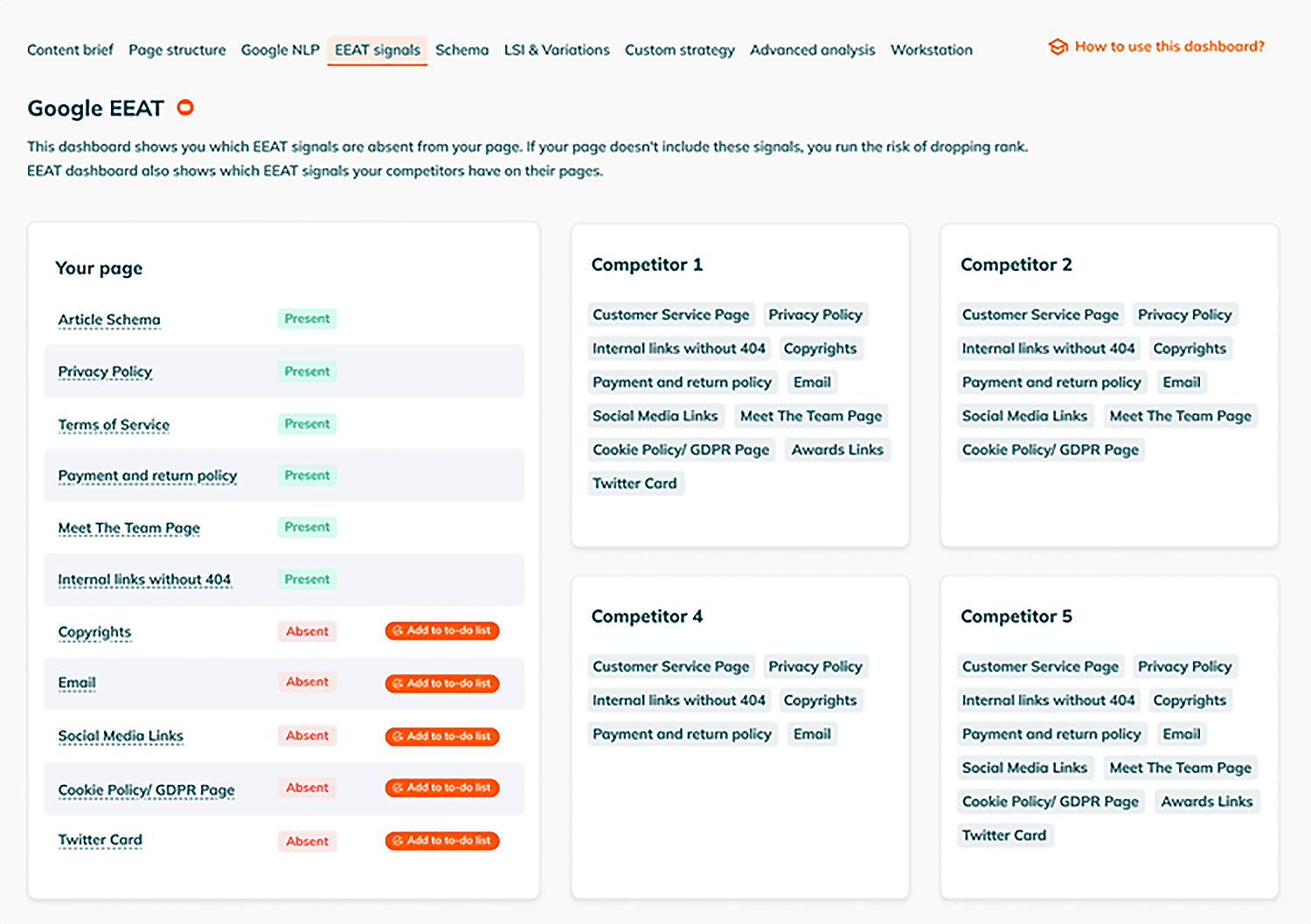
POP’s E-E-A-T Checker scans your page for E-E-A-T signals and compares them to top competitors. The tool identifies missing author information, insufficient source citations, and weak trust signals that could prevent AI Overview inclusion.
Semrush’s Content Toolkit helps you create and optimize content that demonstrates E-E-A-T. The toolkit finds relevant topics, generates content briefs, and optimizes existing content for both AI-driven and traditional search.
Here’s how to use the Content Toolkit for AI Overview optimization:
Step 1: Create a new content brief or select existing content
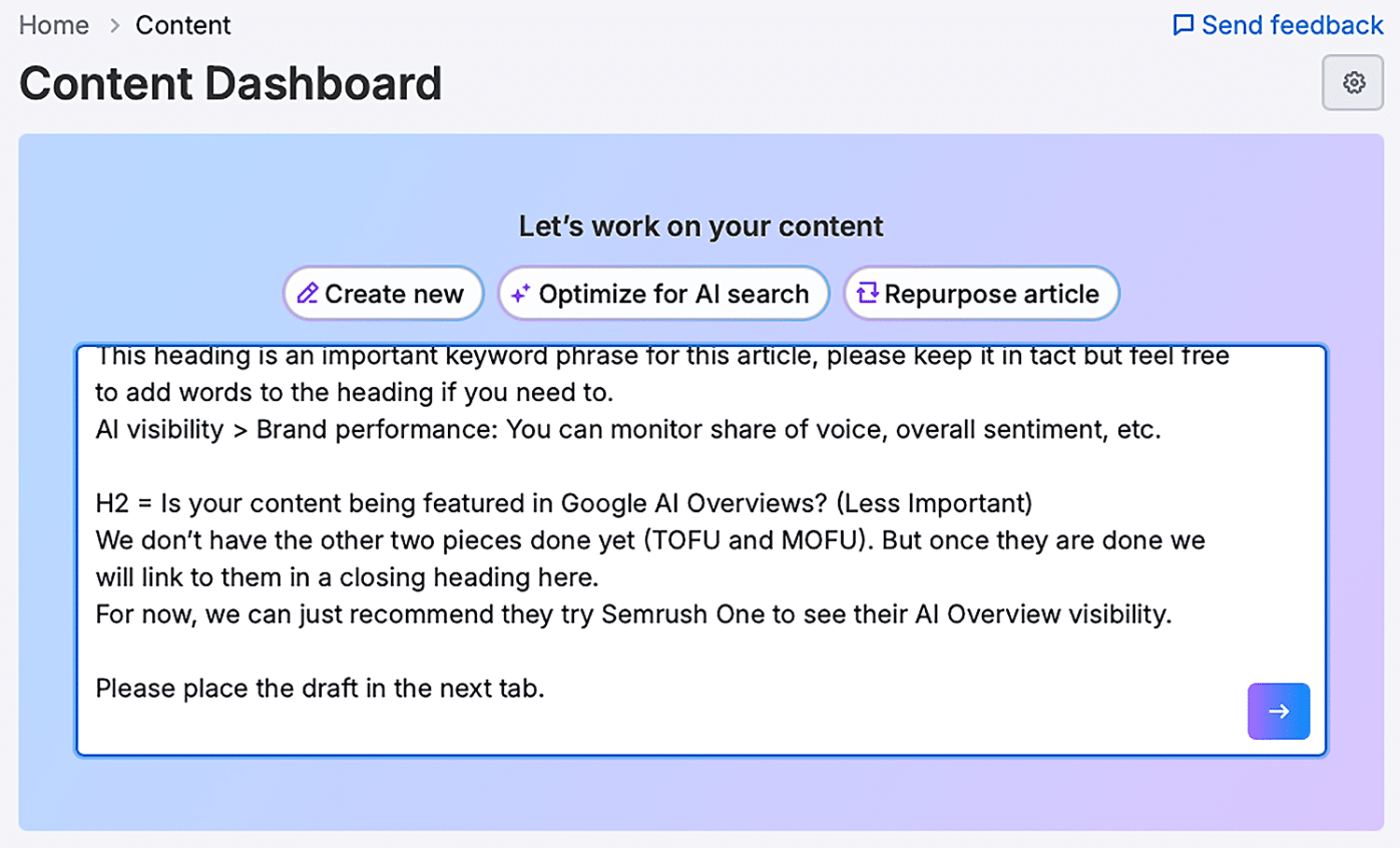
Choose whether you’re starting from scratch to create an AI-generated article or if you’re optimizing a published article. When optimizing, choose “Optimize for AI search.”
Enter the text you want to optimize or a topic you want to generate. Click the arrow to continue.
Step 2: Review suggestions for AI visibility
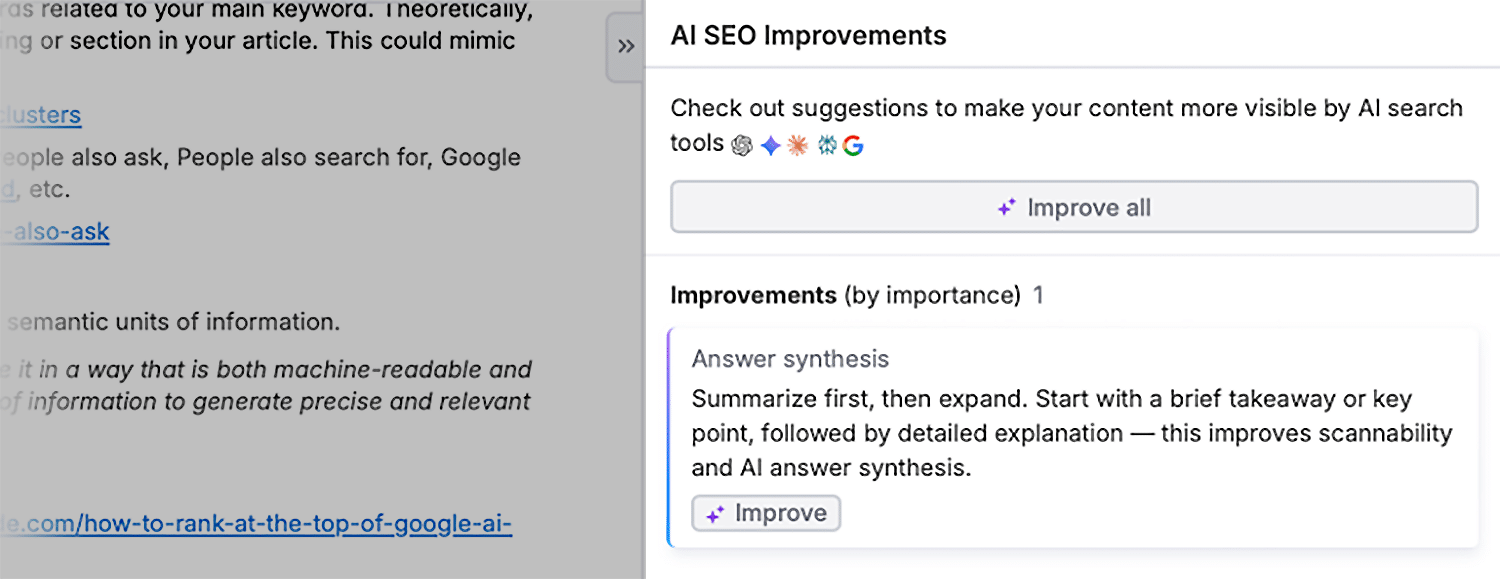
The toolkit may provide suggestions for how to improve your content. You can review the standard SEO improvements and the AI SEO improvements, which may contain tips to sound more authoritative and demonstrate expertise.
Optimizing content for query fan-out
Google may use “query fan-out” — issuing multiple related searches across subtopics to develop comprehensive responses — to generate AI Overviews. Content that addresses the main query plus relevant subtopics may get cited more consistently.
Here’s how query fan-out works:
- Google identifies related subqueries for a main topic. For example, searching “best protein for runners” triggers subqueries like “best whey protein for runners,” “plant-based protein for runners,” and “post-run recovery supplements.”
- AI Overviews that address all of these subtopics cite multiple sources. Content covering the main topic plus all major subtopics in one article may get cited more frequently than content addressing only one subtopic.
Understanding which subtopics Google associates with your main query helps you create comprehensive content that gets cited more frequently in AI Overviews.
Tools for identifying query fan-out opportunities
The following tools can help you identify which topics you need to create comprehensive content for more AI visibility.
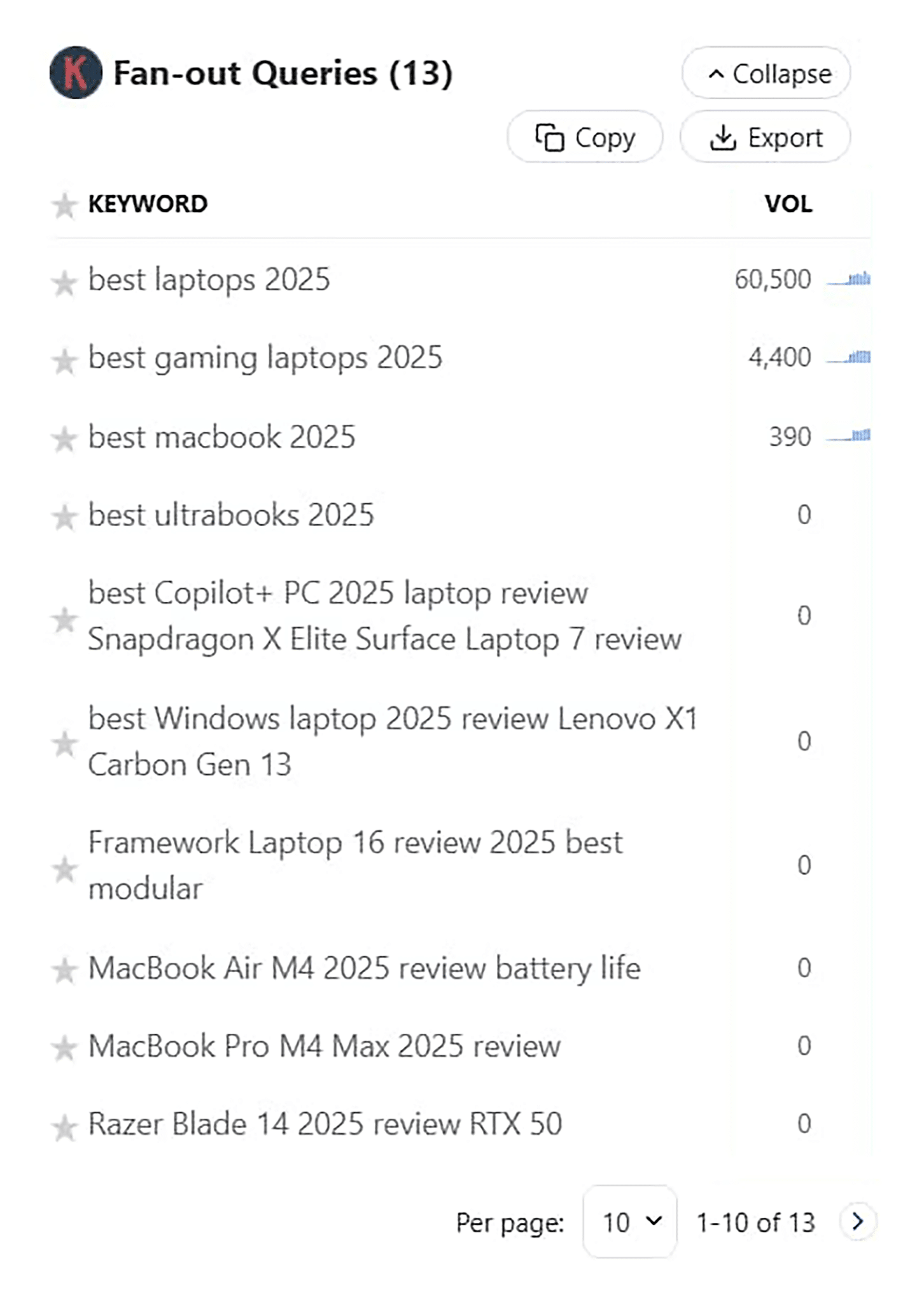
Keywords Everywhere, a Chrome extension, displays related searches directly in your browser as you research topics.
With this tool, you can see the fan-out queries on ChatGPT. This information can be used to map out what you will cover in your content if you want to rank in AI Overview.
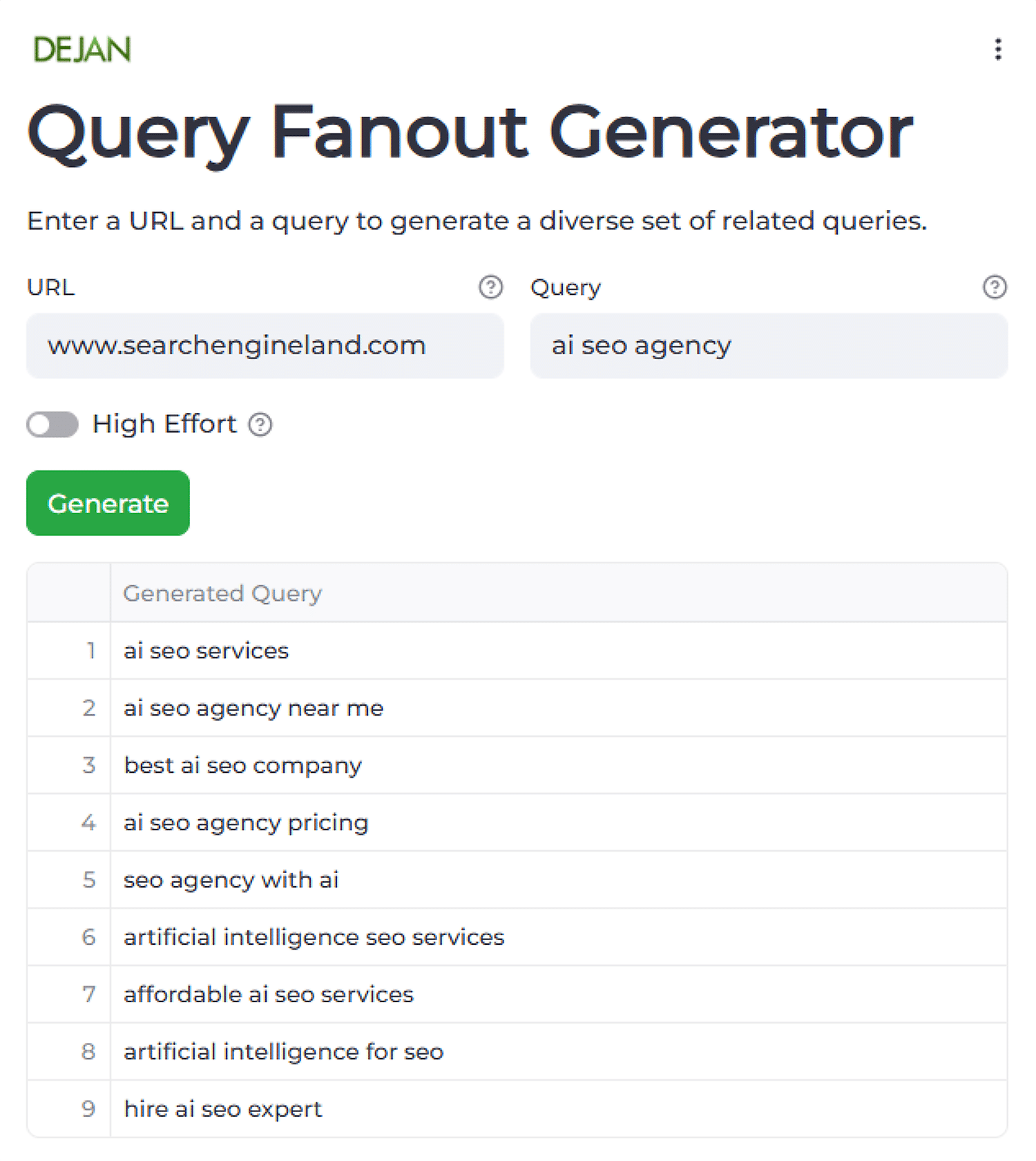
Query Fan-Out by DEJAN provides a dedicated tool for discovering related subqueries. Enter your target keyword to generate a comprehensive list of related questions and subtopics that AI Overviews address when responding to that query.
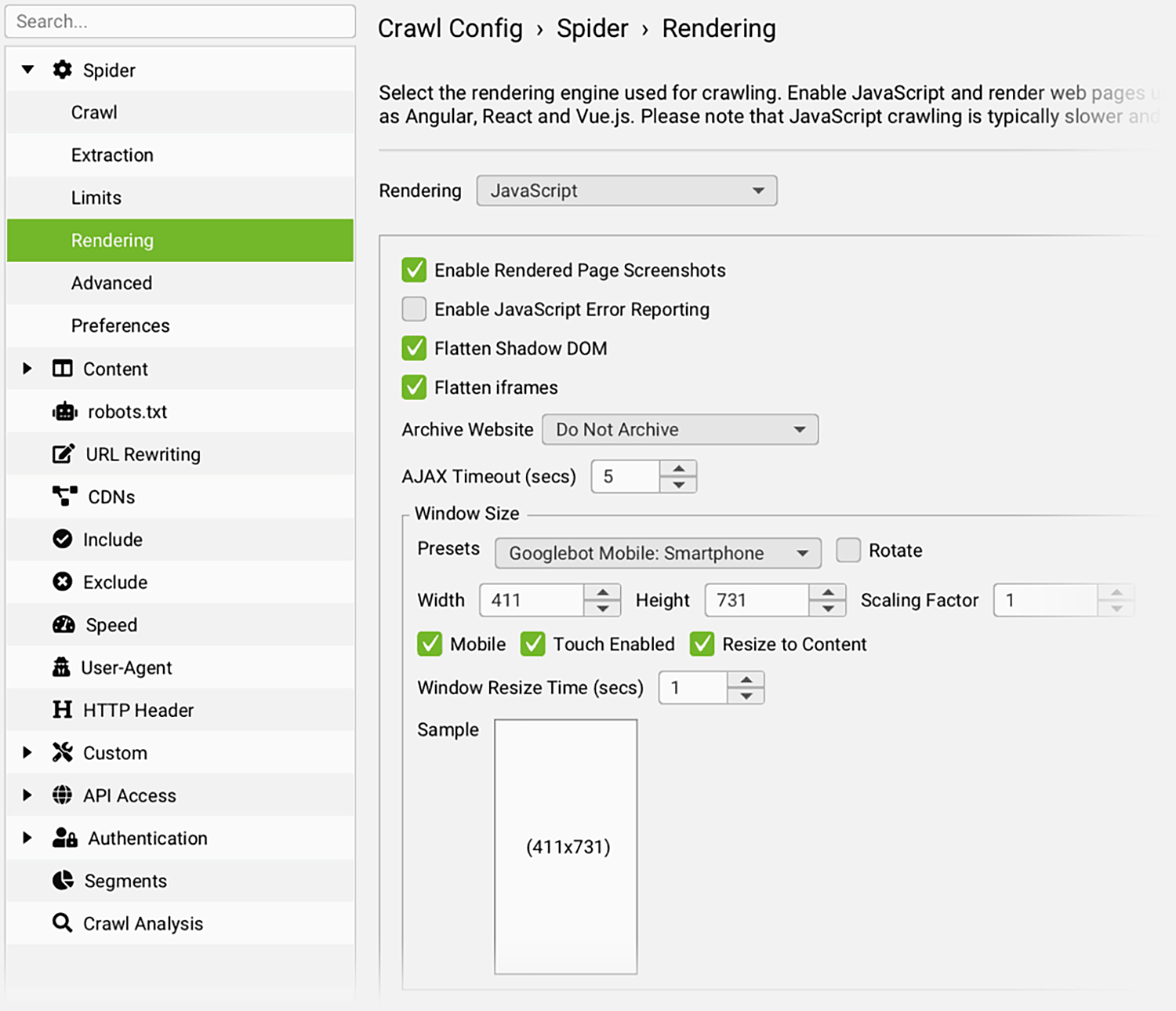
Go Fish shows us how to combine Screaming Frog’s crawling capabilities with Gemini to see if your current webpages are covering all of the query fan-out topics in addition to your main topic.
It’s a little complicated to set up, but it’s great if you’re looking to optimize existing content.
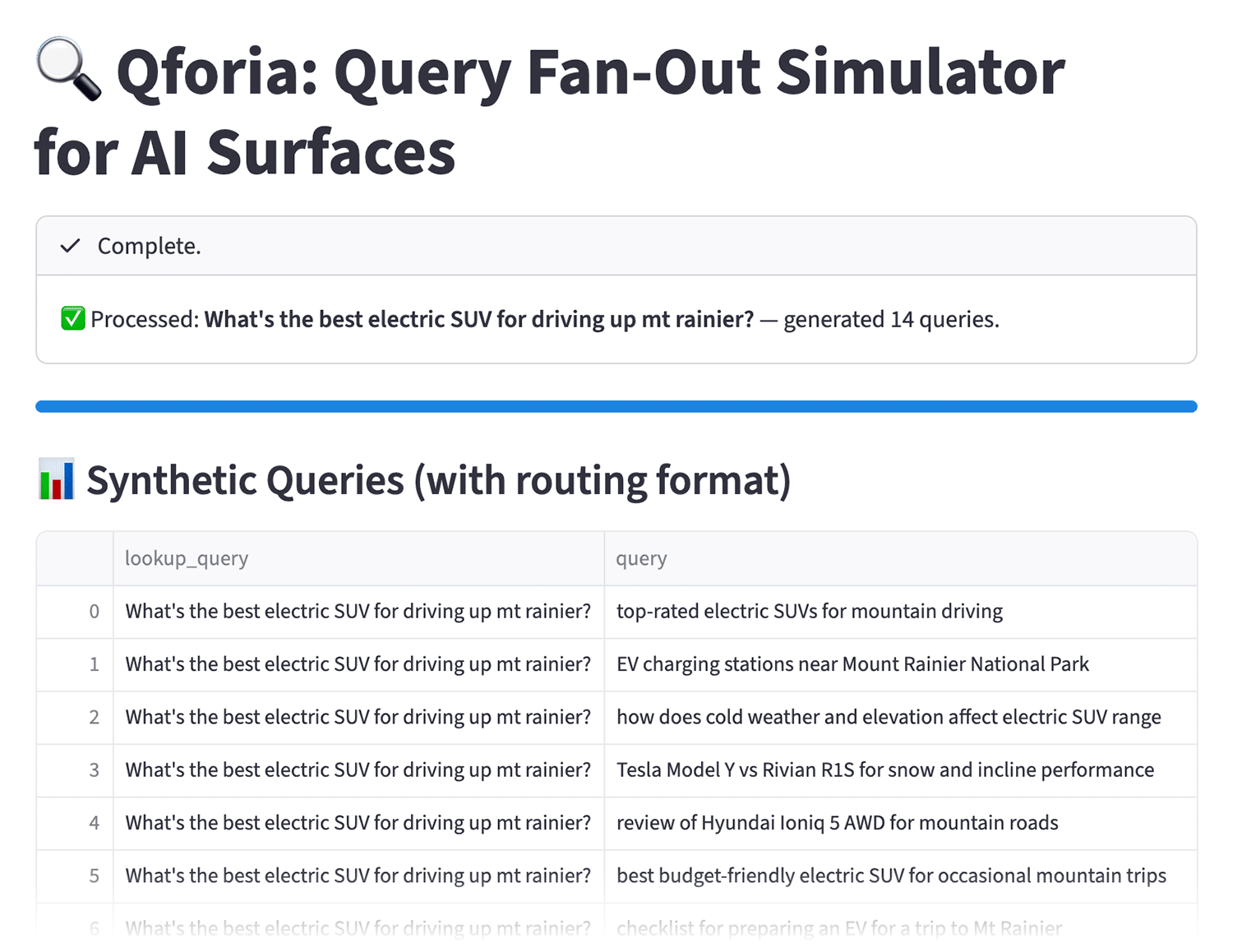
Qforia by iPullRank can integrate with Gemini to analyze query fan-out patterns and provide recommendations for structuring content to address multiple related queries within a single article. The tool goes beyond just identifying subtopics — it suggests how to organize them for maximum AI Overview visibility.
Alternative ways to mimic query fan-out
Semrush’s Keyword Strategy Builder offers an alternative approach using its clustering feature. With this functionality, you can research your main keyword and the tool groups related keywords into clusters based on semantic similarity.
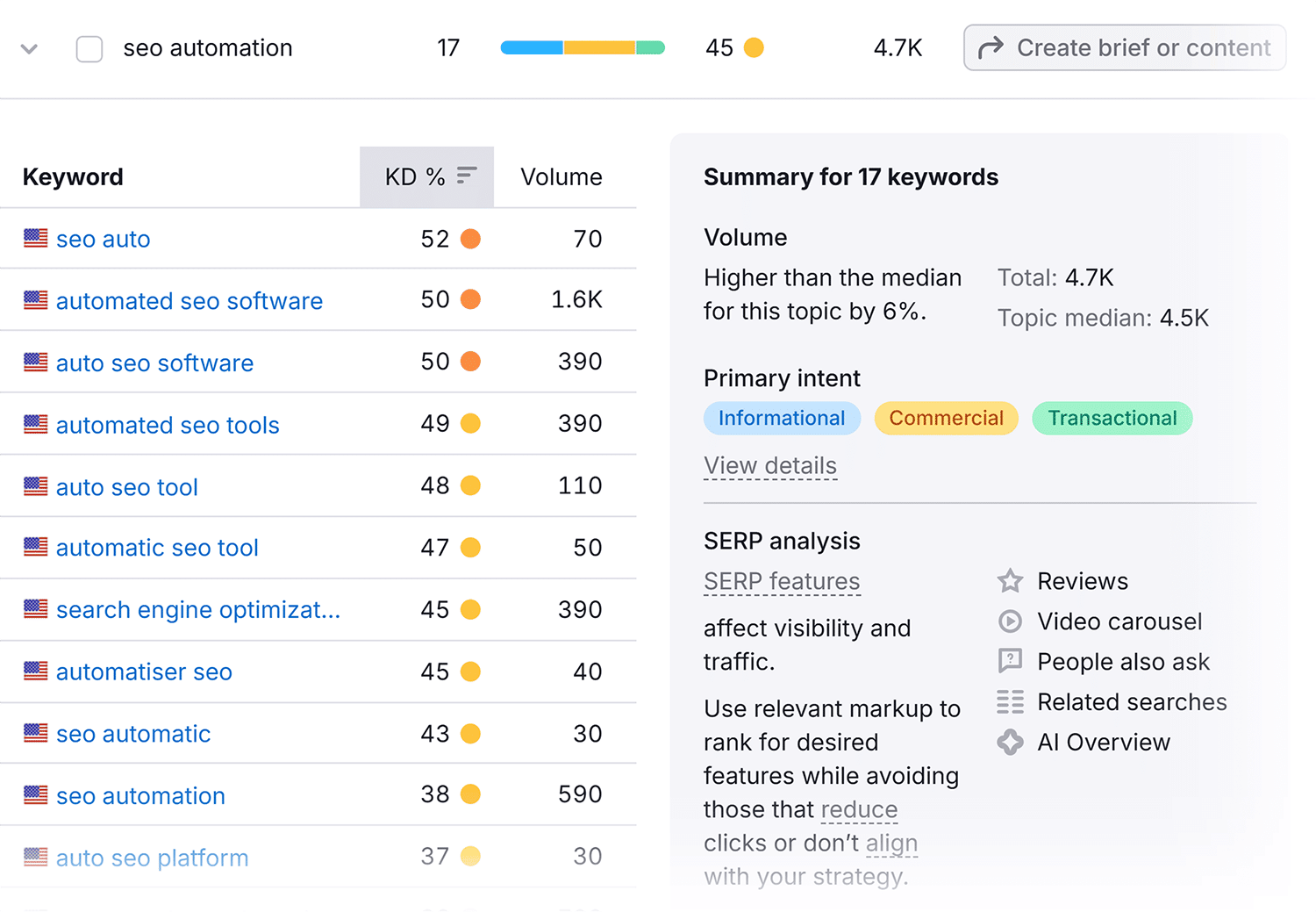
Each cluster could map out all the topics to cover in your article, mimicking what Google does with query fan-out. This is particularly useful if you want to ensure comprehensive topic coverage within a single piece of content.
Manual research methods
If you don’t have access to specialized query fan-out tools, Google’s own SERP features reveal related subtopics for free:
- Review the People Also Ask boxes to see which follow-up questions and FAQs Google associates with your main query. These questions represent common user needs that AI Overviews often address.
- Check “People also search for” suggestions that appear after clicking a search result and returning to the search results page. These reveal related queries users frequently explore.
- Use Google autocomplete by typing your main query and noting the suggested completions. These suggestions show popular variations and related searches.
- Take advantage of other tools like Google suggest, AnswerThePublic, and AlsoAsked
Dig deeper: The obvious SEO opportunity with People Also Ask
Tools for content chunking and semantic structure
AI systems retrieve content more accurately when it’s structured in clear, semantic “chunks,” which organizes content into distinct units of information that address specific subtopics. This is because well-structured content makes it easier for AI to extract the right information for AI Overview citations and generate both accurate and precise results.
Start by structuring your content with clear headings and subheadings that divide information into logical sections. Each section should address one specific aspect of your topic with a clear beginning and end.
Fortunately, there are several tools that can help you ensure that your semantic structure and content chunking will be appreciated by both humans and machines.
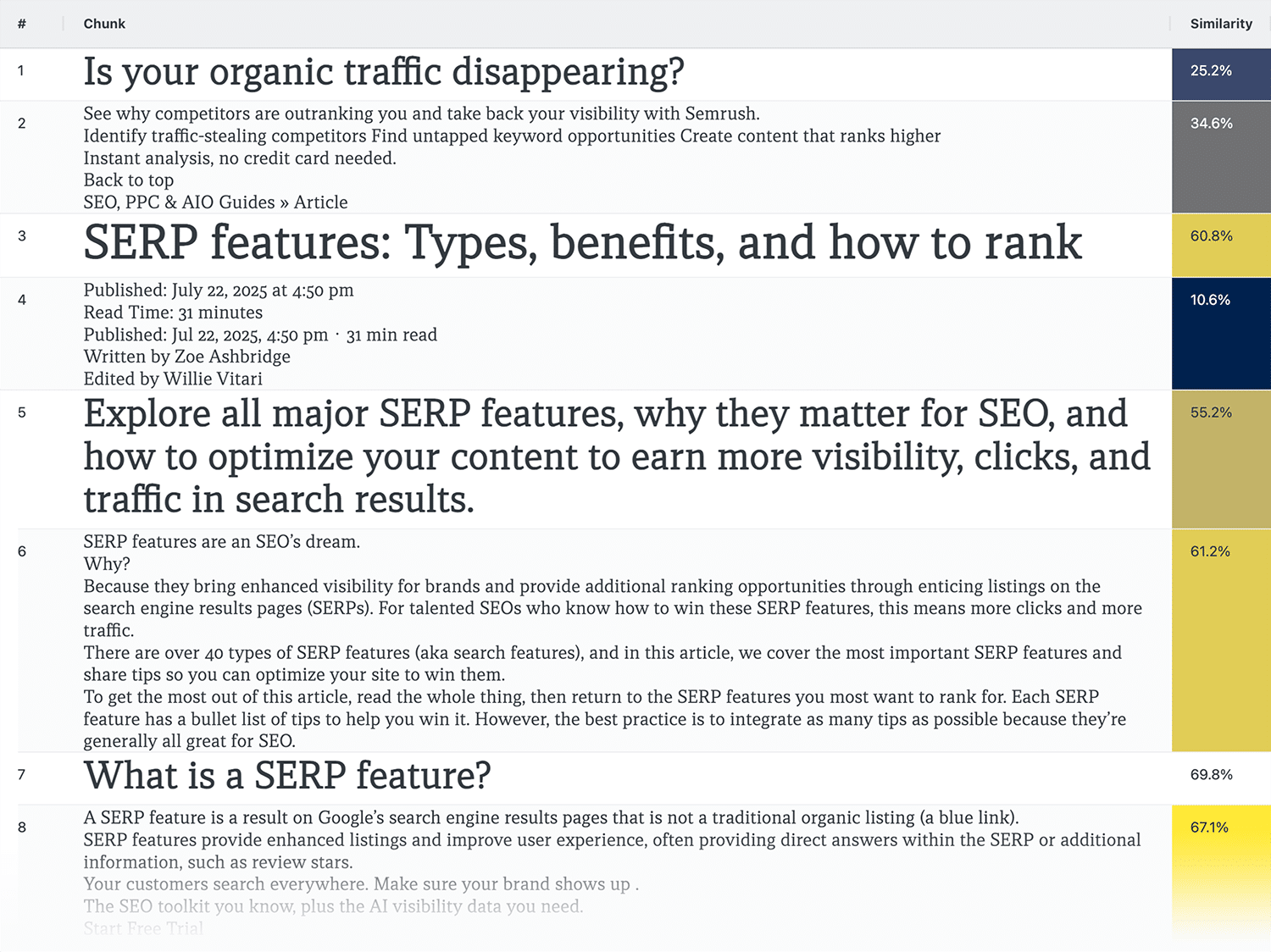
iPullRank’s Relevance Doctor breaks content into passages and scores each for semantic similarity to your target term. This shows which sections strongly align with your topic and which need strengthening.
The tool offers two chunking methods:
- Layout-based chunking: Breaks content by HTML structure, using H1 and H2 tags as boundaries
- Semantic chunking: Groups text based on meaning, keeping related ideas together even across sections
To use Relevance Doctor:
Step 1: Enter your URL and target keyword
Provide the page you want to analyze and the main keyword it targets. Then enter a prompt, keyword, or phrase and select your chunking method.

Or, if you want to review unpublished content, you can enter text and then add a prompt, keyword, or phrase.
Step 2: Review passage scores
The tool shows how well each section aligns with your target topic. Low scores indicate sections that need strengthening or restructuring.
Step 3: Strengthen weak sections
Rewrite or restructure sections with low relevance scores to better address your topic. Check that each H2 section addresses a distinct subtopic rather than mixing multiple concepts in one section.
Chunk Visualizer and ChunkViz are two other valuable tools that provide visual representations of how your content divides into semantic units, making it easier to identify sections that lack clear boundaries or purpose.
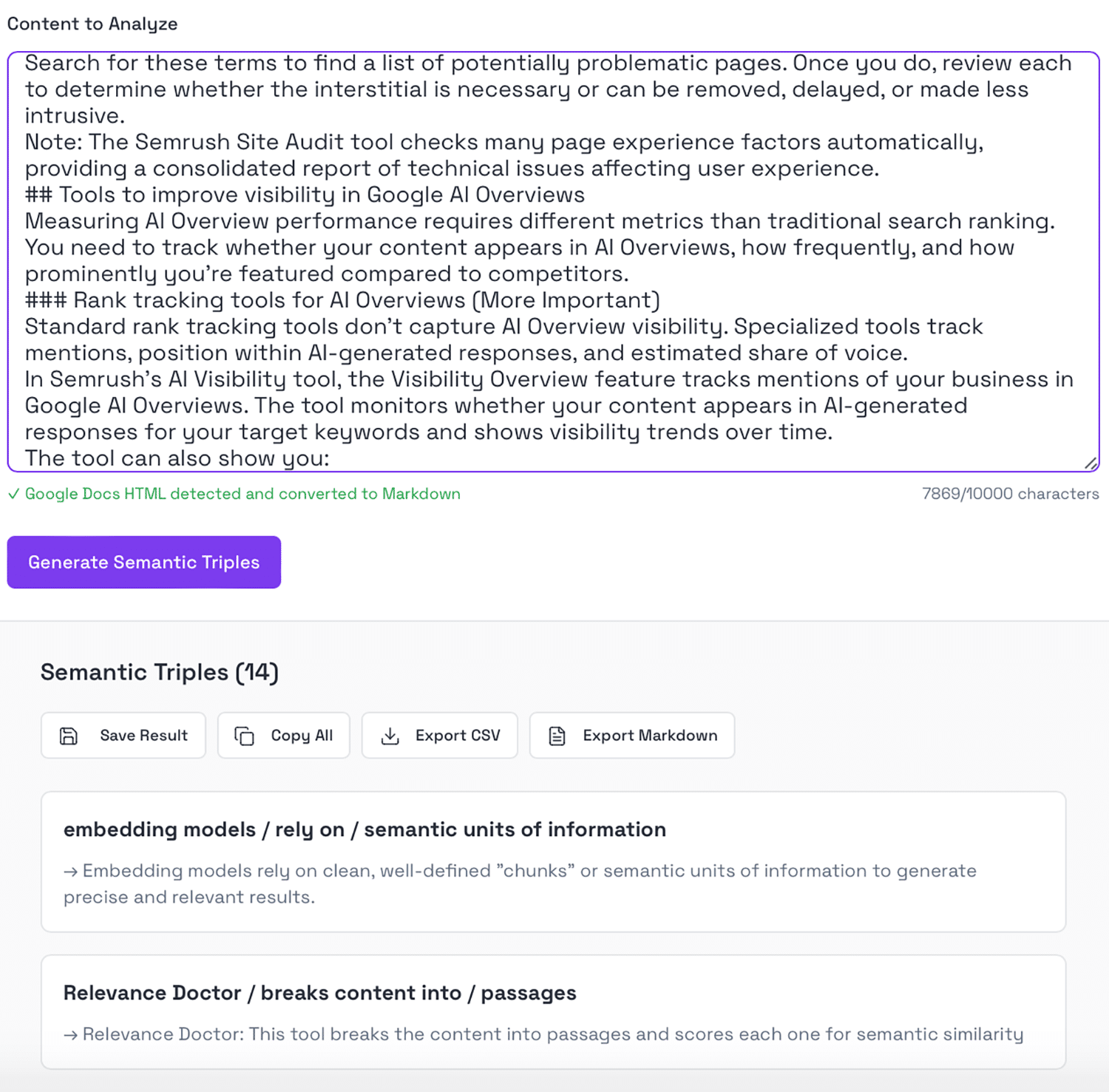
Semantic triples follow a simple structure: entity / relationship / entity (for example, “Nike UK headquarters / are located in / London”).
Clear “subject-predicate-object” (SPO) statements matter because they help AI systems extract information to include in AI Overviews. When Google creates “fraggles” — fragments of pages combined to provide AI answers — it looks for passages with clearly stated entity relationships. Content that explicitly connects concepts (like “A virtual assistant / helps / clients with administrative tasks”) is easier for AI to parse and cite.
A tool called Semantic Triples analyzes the relationships between entities in your content, helping you understand whether your content clearly establishes key concepts and their connections. This can be critical for AI systems extracting information to include in overviews.
Page experience optimization software
Google considers page experience signals when selecting content for AI Overviews. Sites with poor technical performance, security issues, or mobile usability problems appear less frequently in AI-generated responses.
Google evaluates four core page experience factors:
- Site speed
- HTTPS security
- Mobile usability
- Intrusive interstitials
Tracking these metrics is essential to help you optimize for better rankings from an experience perspective.
Site speed tools
Site speed tools can help you assess page and site loading speed, which is a critical metric that impacts Google’s and users’ perception of your page.
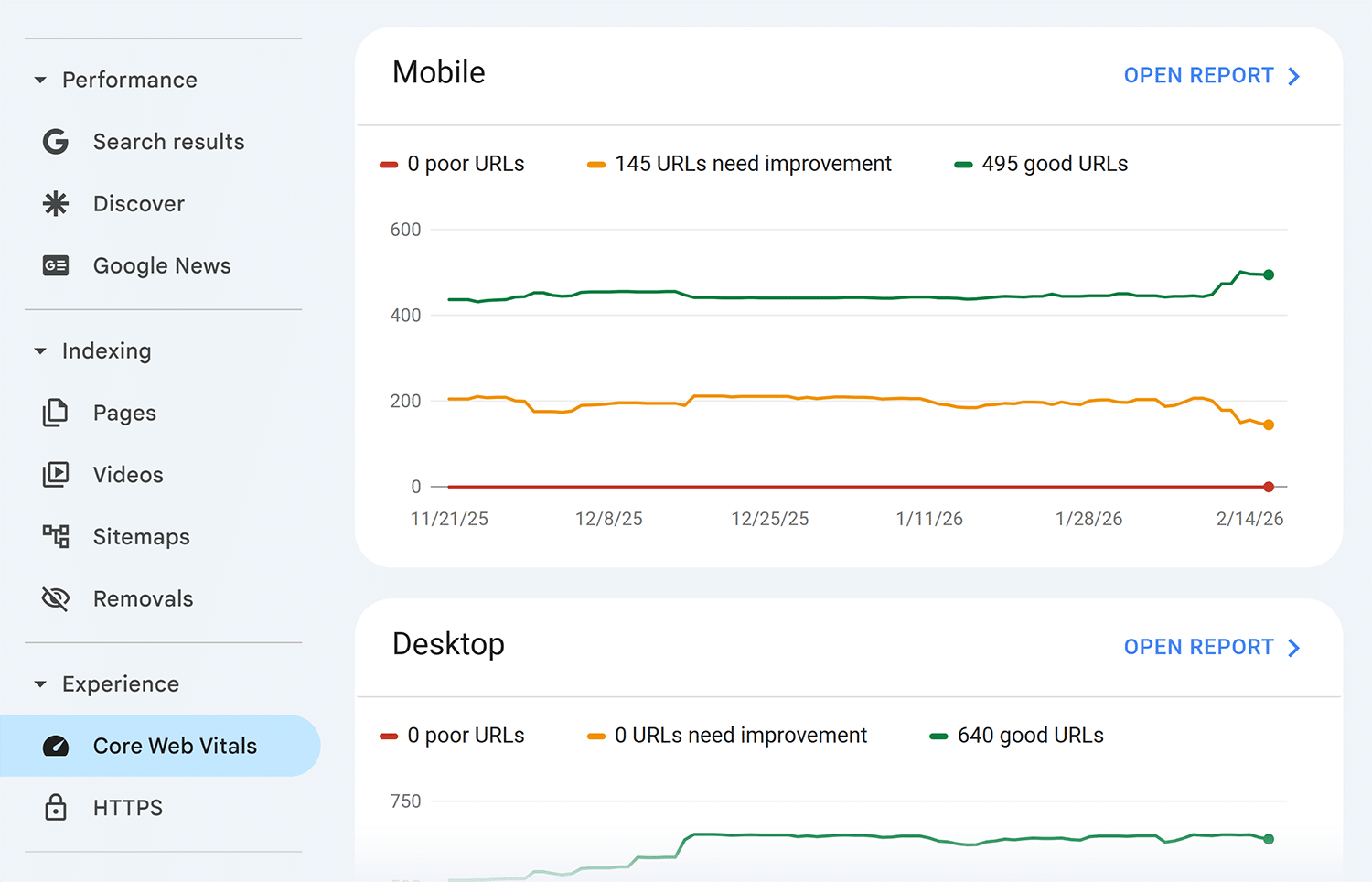
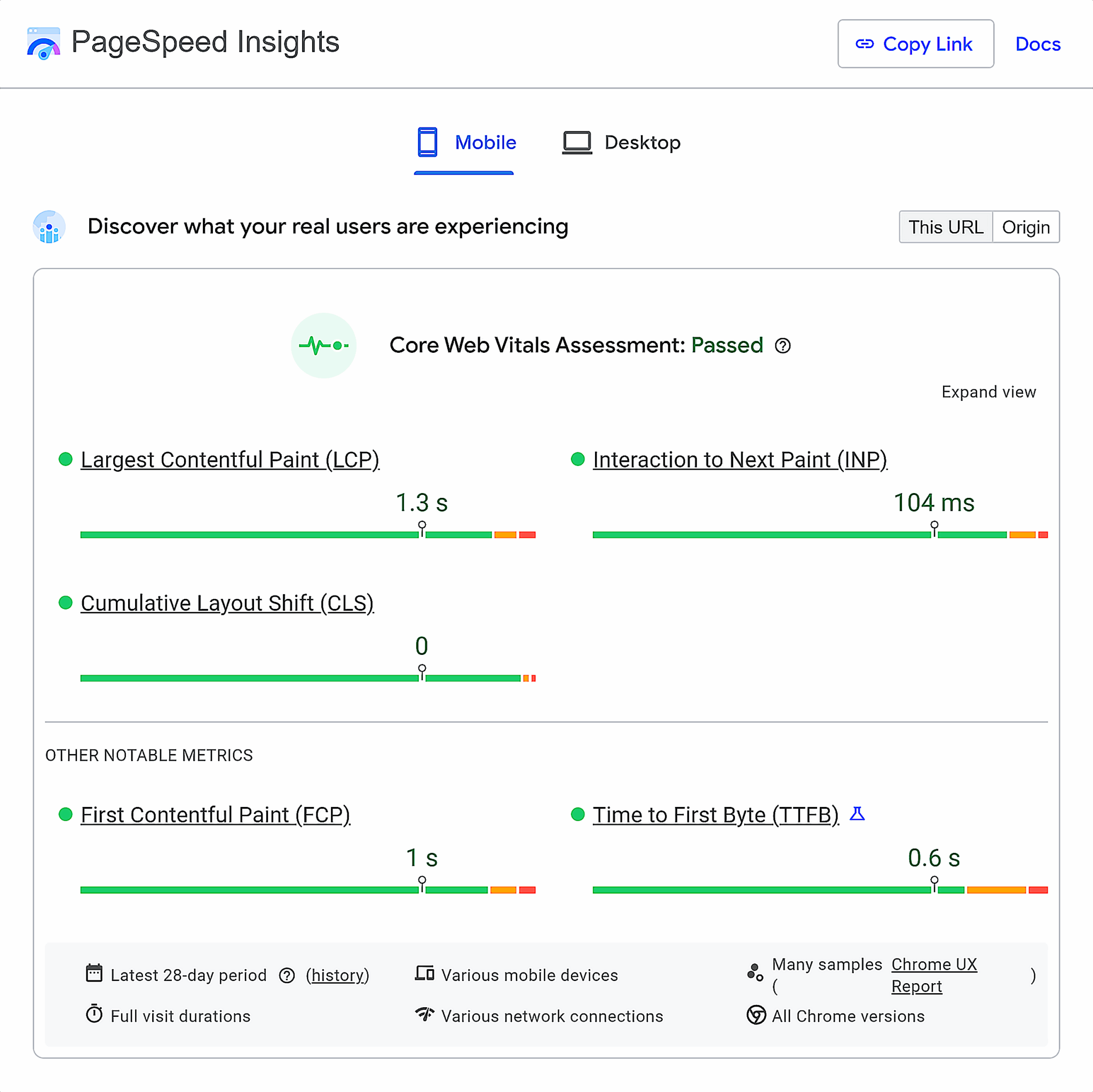
Core Web Vitals in Google Search Console shows your site’s performance on Google’s three key speed metrics:
- Largest Contentful Paint (LCP)
- First Input Delay (FID)
- Cumulative Layout Shift (CLS)
These, respectively, assess your site’s loading performance, responsiveness, and visual stability.
PageSpeed Insights also provides detailed recommendations for improving specific page speed issues. The tool analyzes both mobile and desktop performance, offering specific technical fixes ranked by impact. This is useful when you need actionable steps to resolve speed problems identified in Search Console.
Security tools
Security is a non-negotiable requirement for AI Overview inclusion. Google won’t feature content from insecure pages in AI-generated responses.
HTTPS report in Google Search Console identifies any pages still using insecure HTTP connections. All pages must use HTTPS to qualify for AI Overviews.
If you find HTTP pages in this report, prioritize migrating them to HTTPS immediately, especially pages targeting AI Overview keywords. This may help improve visibility and is a relatively simple fix.
User experience and mobile usability tools
Mobile usability directly impacts whether your content qualifies for AI Overviews, as Google prioritizes mobile-friendly experiences.
While Google retired its dedicated mobile-friendly testing tool in 2023, mobile optimization remains critical. Use the alternatives below to verify your pages work well on mobile devices.
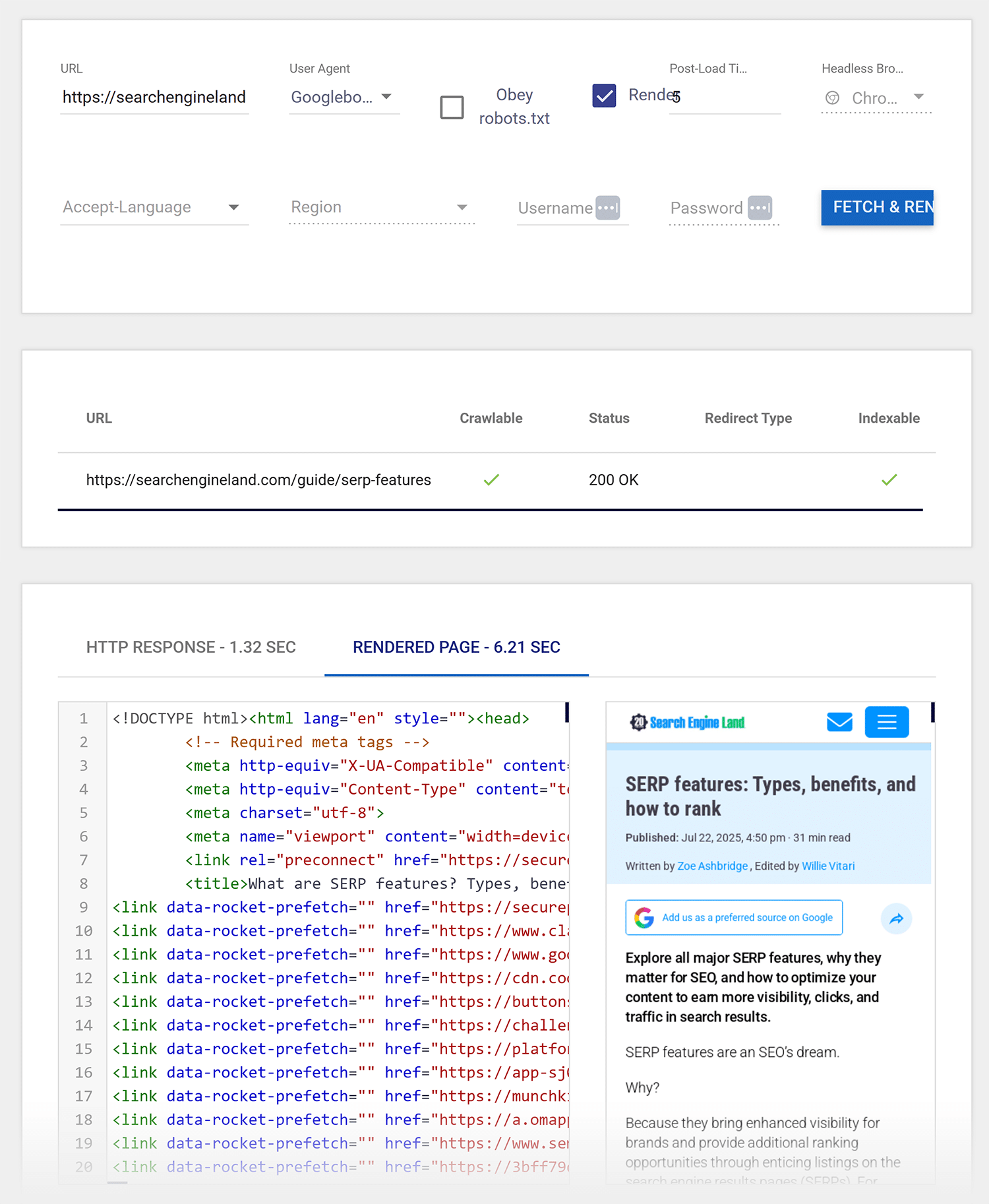
Fetch & Render lets you select “Googlebot Smartphone” as the user agent to see exactly how Google views your pages on mobile devices. This reveals rendering issues that could prevent proper indexing.
Chrome DevTools device emulation provides one of the fastest ways to check mobile experience during content creation. Right-click any page in Chrome, select “Inspect,” then toggle the device toolbar to preview mobile rendering across different screen sizes.
Intrusive interstitials detection
Intrusive interstitials — pop-ups that block content on mobile devices — negatively impact page experience and reduce your chances of appearing in AI Overviews.
Screaming Frog can detect pages with intrusive interstitials in bulk using the following process:
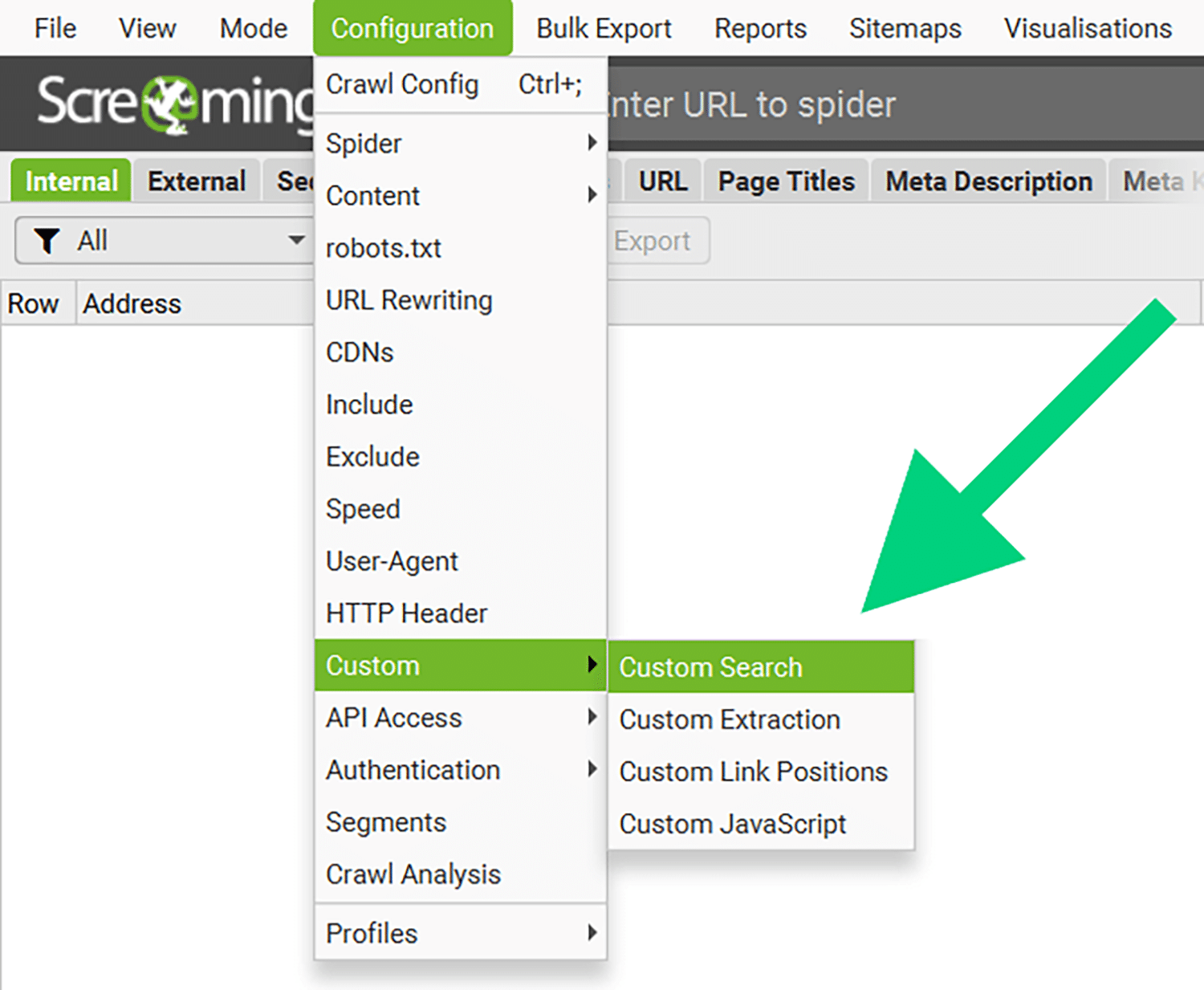
Step 1: Use the platform’s Custom search
Click “Configuration” in the top navigation bar. In the drop-down menu, select “Custom” and then “Search.”
Step 2: Search for interstitials
The goal is to identify JavaScript code containing terms like “popup,” “modal,” or “interstitial.” Search for these terms to find a list of potentially problematic pages. Once you do, review each to determine whether the interstitial is necessary or can be removed, delayed, or made less intrusive.
Pro tip: The Semrush Site Audit tool checks multiple page experience factors automatically, providing a consolidated report of technical issues affecting user experience.
Tools to improve visibility in Google AI Overviews
Measuring AI Overview performance requires different metrics than traditional search ranking. You need to track whether your content appears in AI Overviews, how frequently, and how prominently you’re featured compared to competitors.
Rank tracking tools for AI Overviews
Standard rank tracking tools don’t capture AI Overview visibility. Specialized tools track mentions, position within AI-generated responses, and estimated share of voice.
In the AI Visibility Toolkit, the Visibility Overview feature tracks mentions of your business in Google AI Overviews. The tool monitors whether your content appears in AI-generated responses for your target keywords and shows visibility trends over time.
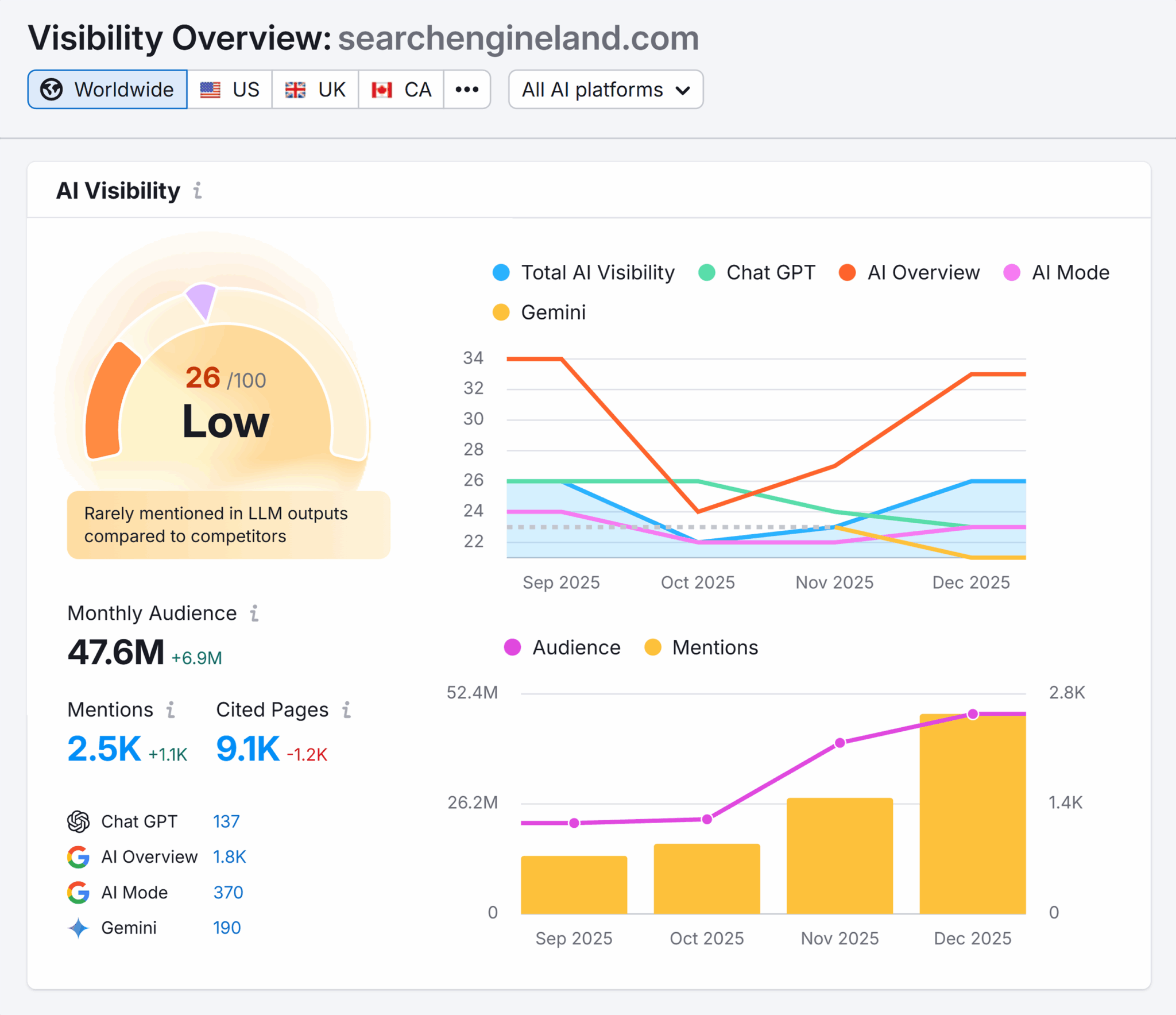
The tool can also show you:
- AI visibility score
- Performing topics
- Topic opportunities
- Cited sources
- Source opportunities
- Cited pages
Tracking these metrics reveals patterns in your AI Overview performance. If your visibility is declining for specific topics, it could mean competitors have published stronger content or Google’s algorithm preferences have shifted.

The prompt tracking feature shows whether you rank in AI Overviews for specific queries. It can provide insight into your visibility, but doesn’t show your position when multiple sources are cited within a single AI Overview.

AI Overview Monitoring by Thruuu addresses this limitation by showing your “Brand Position,” which is the order in which your brand appears within AI Overview citations. This metric reveals whether you’re the primary source or a secondary citation.

Being cited first typically indicates stronger authority on the topic, while appearing later suggests your content provides supporting information rather than the main answer.
Best tools for monitoring AI Overviews
Beyond tracking presence in AI Overviews, monitor your share of voice and the sentiment of how your brand is discussed.
In Semrush’s AI module, the Brand Performance feature tracks share of voice across AI-generated responses. This shows what percentage of AI Overviews in your topic area include your brand name compared to competitors.
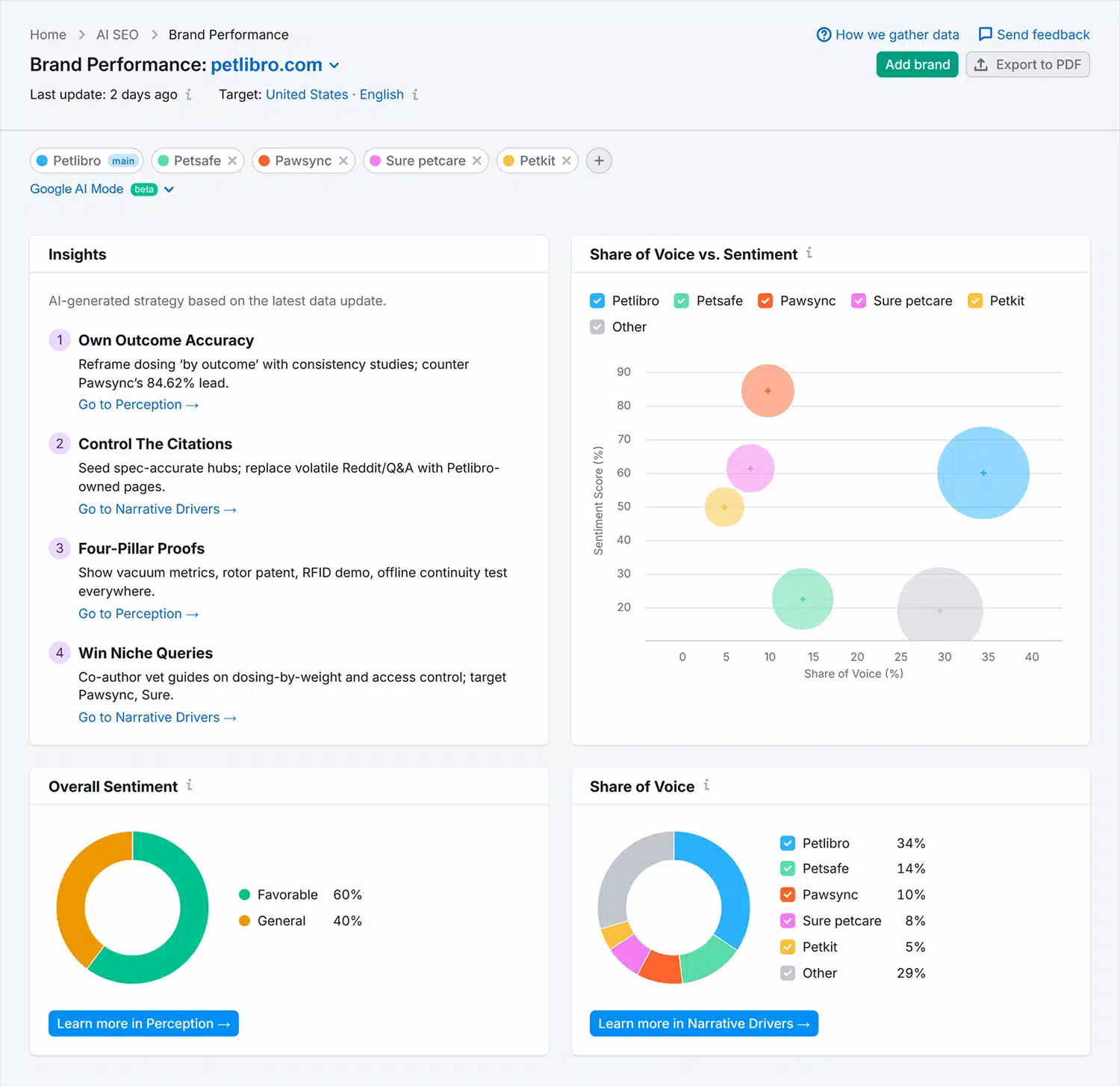
The tool also monitors overall sentiment, which can help you assess whether AI Overviews mention your brand in positive, neutral, or negative contexts. Negative sentiment could indicate product or service quality issues or brand perception problems that need addressing.
For example, if AI Overviews consistently mention your project management software in responses about “collaboration tools with steep learning curves” or “platforms users find difficult to adopt,” this signals a brand perception issue around usability.
Track, optimize, and win in Google and AI search from one platform.
Is your content being featured in Google AI Overviews?
Getting your content into AI Overviews comes down using the right tools to meet specific technical, content, and authority requirements.
Optimizing for AI Overviews, on the other hand, requires both the right tools and a strategic approach:
- Start with technical SEO audits to ensure your content can be properly crawled and indexed
- Identify keywords that trigger AI Overviews and prioritize content addressing those queries
- Build brand authority through PR and strategic mentions
- Structure your content to demonstrate expertise, address comprehensive subtopics through query fan-out, and organize information in clear semantic chunks
Semrush One brings together every tool mentioned in this guide, from Site Audit and Keyword Magic Tool to AI Visibility tracking and Brand Monitoring. Instead of juggling multiple subscriptions and platforms, you get a unified dashboard that shows exactly where you stand in AI Overviews and what to fix next.
Start tracking your AI Overview visibility today and identify which optimization efforts will have the biggest impact on your rankings.
Explore more on
Editorial disclosure
Search Engine Land is owned by Semrush. We remain committed to providing high-quality coverage of marketing topics. Unless otherwise noted, this page’s content was written by either an employee or a paid contractor of Semrush Inc.
About the author