New: Block Sites From Google Results Using Chrome’s “Personal Blocklist”

 Google has announced that a new way to block certain sites from appearing in Google’s search results, though a special Google-made Chrome browser extension named Personal Blocklist.
Using Personal Blocklist
How do you use Personal Blocklist?
(1) Download and install the extension over here. You will need Chrome.
(2) When you are viewing search results on Google, you can then click “block URL” under the search result:
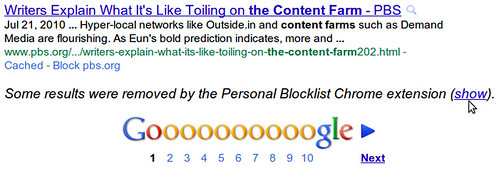
(3) When a set of search results is impacted by this choice, Google will tell you at the bottom of the search results. The warning Google gives you reads “some results were removed by the Personal Blocklist Chrome extension” and is followed by a “show” button that will take you to the management of that blocklist:
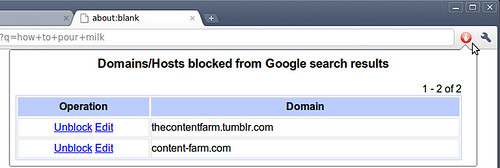
(4) You can manage the blocklist by clicking “show” in the screenshot above or by editing the extension in preferences:
Group Wisdom For Blocking?
While Personal Blocklist is designed to allow individuals to build up their own unique blocklists, Google says it may use the data to influence the search results for others. From its announcement:
The extension also sends blocked site information to Google, and we will study the resulting feedback and explore using it as a potential ranking signal for our search results.”
Google also said this is an early test and is only available now on Chrome and English, French, German, Italian, Portuguese, Russian, Spanish and Turkish languages.
Previous Blocking On Google
It was known that the Chrome extension was coming but, Google has had other forms of blocking search results in the past. This came in the form of stars in search results, before that via SearchWiki, up and down arrows, and many more methods of removing search results in the past. Will this stick? I assume so, at least in the form of a Chrome extension.
Postscript From Danny Sullivan: Before people get too excited about Google “crowdsourcing” a way to block sites, it’s worth remembering that it never seemed to do that with SearchWiki, much less with the voting options that it added to the Google Toolbar back in 2001. Yes, 2001 — 10 years ago. Any of this from the News.com article back at the time sound familiar:
Whether it works or not, Google’s effort is one of the boldest attempts so far to combat the rising tide of commercialism among search engines and portals.
Two weeks ago, Google began quietly testing a Web page voting system that, for the first time on a large scale, could eventually let Web surfers help determine the popularity of sites ranked by the company’s search engine.
Explore more on
Editorial disclosure
Search Engine Land is owned by Semrush. We remain committed to providing high-quality coverage of marketing topics. Unless otherwise noted, this page’s content was written by either an employee or a paid contractor of Semrush Inc.
About the author