Website migrations: a plan to keep your traffic and SEO safe
Worried your website migration will impact site rankings or performance? Done correctly, web migrations are nothing to fear.
A careful website migration can minimize risks such as losing traffic, rankings, and revenue.
A website migration can even boost website performance.
This article is a comprehensive guide to website migrations, from what they are to how they are done and the key factors you need to consider to make your migration successful. If you read this article and treat it like a plan, you’ll know how to migrate your site with minimal interruptions to your users, SEO, and business.
What is a website migration?
A website migration describes a project where you change a website’s structure or content hierarchy significantly.
Why would I need to migrate my website?
There are many reasons for migrating a website. Commonly, website migrations take place because you’re:
- Changing your domain name
- Launching a new site design or rebranding
- Consolidating multiple websites
- Significantly amending pages and content structure
- Re-platforming (moving from WordPress to Shopify, for example)
If you’re making substantial changes to your current site structure, you likely need a website migration project.
The SEO toolkit you know, plus the AI visibility data you need.

What are the risks of a site migration for SEO?
A common worry for SEOs during a website migration is that traffic might suffer. In most cases, this is a risk, but if you manage the migration efficiently and cautiously, your traffic should remain stable or improve.
In the worst case, there may be some traffic fluctuations. The level of risk depends on a range of variables, many of which we’ll cover in this article.
The main thing is that you’re approaching your website migration positively and with the best intentions for SEO and the business more broadly.
Migrations need a tailored strategy based on business goals
Your website migration plan must consider business goals and metrics, especially if you make significant changes.
For example, if you’re migrating from a content management system (CMS) like WordPress to Shopify, you’ll be forced to change your URL structure. As far as SEO is concerned, this is always risky. But, if moving to Shopify is the best decision for the business, then it’s the best for SEO–even if it comes with short-term ranking fluctuations.
Understanding business goals helps you assess the risks and rewards. It would be short-sighted to make the safe decision for SEO when the business could thrive with a new CMS, for example.
Key factors to consider before migrating a website
Before you get started migrating your website, here are some of the key factors to consider. We’ve provided some insights into how you can protect each of these critical factors during the migration project.
Traffic impact
One of the most essential factors in website migration is the potential impact on SEO and resulting traffic drops.
Yes, it is as critical as that.
If you alter a URL, it’s a new page with no ranking history. If you change the URL for a page that used to be page one, rank one, then you can’t expect the new page to replace the old one without careful planning and preparation. This is why it’s necessary to prepare and follow best practices.
You can protect all of your pages by:
- Adding 301 redirects
- Migrating the existing title tags and meta descriptions
- Migrating content such as text, images, alt text, etc., precisely as it is on the current site
The best part?
You can plan to improve your new site to increase traffic. For example, if you’re migrating your website because the current URL structure is poor, things should improve.
Audience expectations
Your existing audience is likely comfortable or at least familiar with your current site. The migration shouldn’t leave users frustrated.
Consider:
- How users currently use the website
- The top pages users navigate to
- How current users interact with the site
Try heatmap tools such as Microsoft Clarity or Hotjar to learn more. Both of these tools show you where users click on your website. Use this data to identify the most clicked menu items versus redundant menu items that aren’t clicked.
The data might influence your new navigation for the better.

Timeline management
Managing a website migration is tough, and there are a lot of significant moving parts. Ideally, you’ll have a Project Manager responsible for the entire site migration process. It will be their role to ensure everything happens in the correct order and on time.
The order of a site migration might be:
- Set a meeting to outline site goals as well as business and marketing goals.
- Perform an SEO audit and build a plan so the migration boosts traffic. This audit should include things like 301 redirects and URL structure.
- Involve Design who, thanks to the steps above, can consider messaging, goals, and SEO implications.
- Website development.
- Make a staging site available so you can test if everything is working.
- Push the site live between Monday and Thursday. Avoid Fridays and peak sales times in case something goes wrong.
- Test the live site.
- Perform a post-migration SEO audit to check everything was successfully migrated.
- Ongoing monitoring of the site.
How do I prepare for a site migration?
In this section, we’ll get into the actions you can take to prepare a successful site migration.
Conduct an SEO audit
A pre-site migration SEO audit is critical. The audit gives you a benchmark for reference after the site is live. You can check if the site has improved or identify issues. You can also use the audit to influence decisions on the new site.
You can read everything you need to know about conducting an SEO audit here. But at the very least, your pre-site migration SEO audit must include:
- Keyword and position benchmark so you can quickly see if anything important drops. Use the Position Tracking tool to monitor your keywords.
- High-performing pages so you know what your most important pages are. Use the Organic Research report to identify the top pages.
- Backlink analysis so you know which URLs have the most links. Use Backlink Analytics report to identify pages with the most impactful links.
- A full crawl of the site provides a list of all URLs and associated metadata. Crawl the site using Screaming Frog, review the data, and save the file in a safe place.
- Site speed benchmark so you can measure success where page speed is concerned. Use PageSpeed Insights to get an idea of how your site performs now.
- Sitemaps and robots exports so you have a reference point in case something goes wrong. Visit www.yourdomain.com/sitemap.xml and www.yourdomain.com/robots/txt and make copies.

Further reading: 7 tips for delivering high-impact technical SEO audits and SEO prioritization: How to focus on what moves the needle
Set up a keyword and position benchmark
Using the Position Tracking tool, you can identify and monitor your most important keywords so that if the worst happens—and you lose rankings—you can quickly spot the loss and solve it.
Navigate to Semrush and log in.
On the left-hand menu, click “Position Tracking.”

Go to your project and navigate to “Overview.”

You’ll see an overview of your keyword positions if you’re already using Position Tracking.
You might want to alter how you track keywords for a site migration.
The goal?
To keep you focused on what really matters.
Your site will likely rank for thousands of keywords. If you’ve used Position Tracking before, you might find the report is focused on keywords that don’t matter to you anymore. A good audit and tidy-up of the keywords you’re tracking will set you up for future success.
Consider tracking:
- Few, but important keywords to avoid overwhelm
- Money-generating keywords
- Keywords that your top pages rank for
Pro tip: Use tags to manage the keywords. For the keywords you most want to track pre and post-site migration, you could add the tag “site migration.”
Analyze top pages
It’s best practice to identify your top pages so you can spend extra time ensuring these pages are carefully migrated.
You can use Semrush for that.
Find and click “Organic Research” on the left menu.

Enter your domain and click “Search.”

Next, click “Pages.”
The pages report shows your pages filtered by the highest traffic numbers. You want to protect the top pages the most during the site migration.
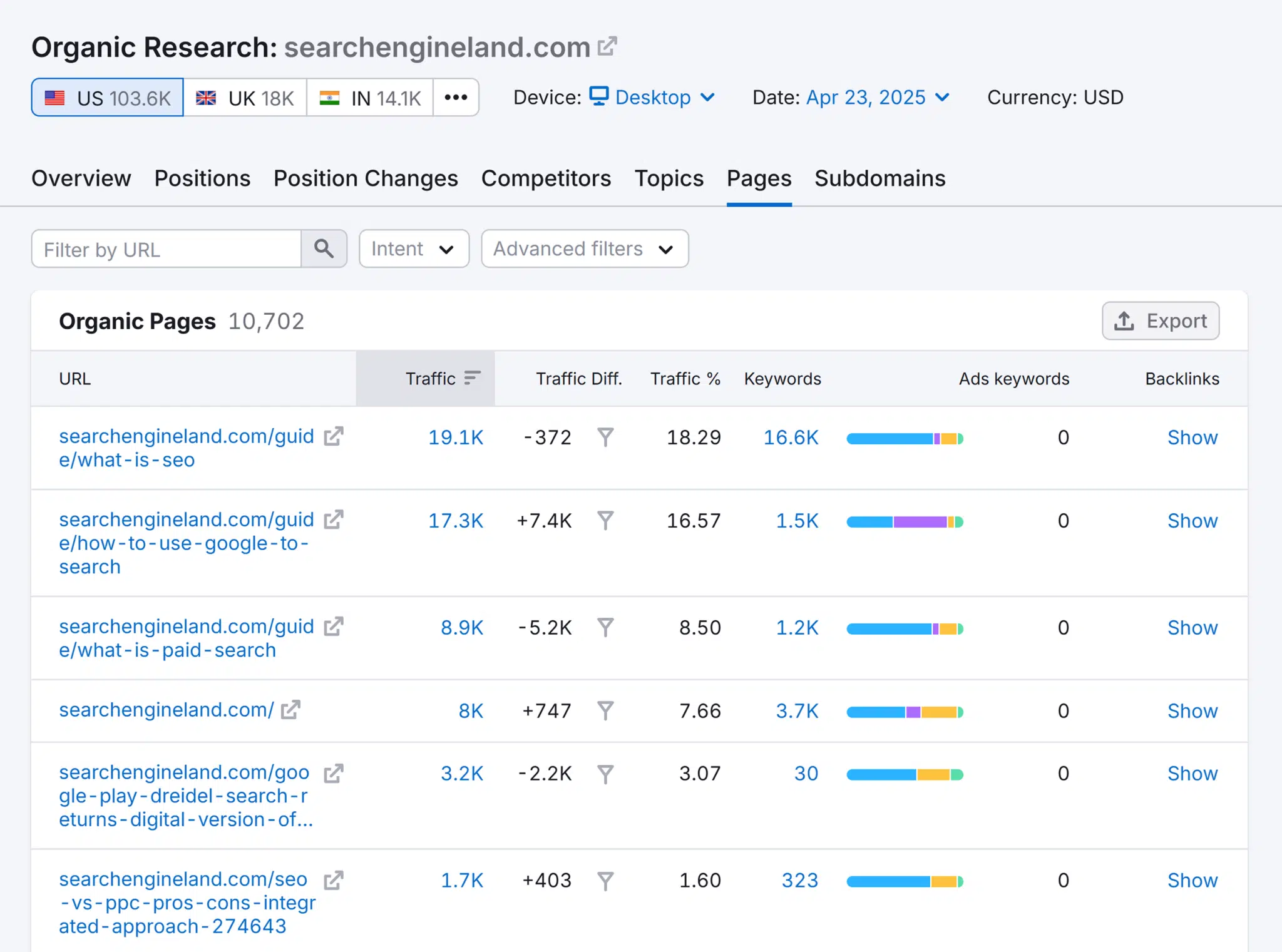
As you can see in the screenshot, What is SEO? brings 32,000 users to Search Engine Land. If we were migrating, we’d want to take extra care implementing the migration best practices (bulleted above) on these pages.
Pro tip: You can filter by country at the top of the page’s report. Ensure you’re filtered to the country most important to you.
You should cross-reference this data with Google Search Console.
Analyze backlinks
Your site migration is likely to impact backlinks.
Ideally, URLs with a lot of relevant, high-quality backlinks will stay the same. However, this isn’t always possible. Protecting backlinks is one reason to add 301 redirects.
You can analyze backlinks using Semrush.
Once logged in, click “Backlink Analysis” on the side menu. Type in your URL and click “Search.” You’ll see the overview of your links.
Click “Indexed Pages.”
The indexed pages report is filterable by External Links and Domains. Plus, Backlinks, Internal Links, and Last Seen.

For your site migration, focus on “Domains” and “External Links.” During the migration process, pay extra attention to pages with a high number of high-quality, relevant external links and domain links; check that the 301s are correctly implemented.
Pro tip: If you have a good relationship with the website administrator of a linking site, you can ask them to update their link to your new one.
Map content and URLs for consistency across platforms
If you’re an SEO thinking about a website migration project, you’re either enthused about the opportunity to get your URL structure perfect or worried about the repercussions of such a task.
Either way, the migration can be a positive for SEO.
Almost every site can reap the benefits of SEO-friendly content and URL structure. The hours you put in now prepare the new website for success.
Think about your ideal:
- Navigation
- Optimized URL structure
- Content map and content hierarchy
- Analytics and tracking requests
Prepare your sitemap and update your robots.txt
When a website is being migrated—such as changing its structure, platform, domain, or hosting provider—an SEO uses a sitemap to help search engine crawlers understand where all the important pages are located. Submitting an updated sitemap helps preserve rankings by guiding search engines to from the old site to the new structure quickly and accurately.
A sitemap acts like a map or guide for Google and other search engines, telling them exactly which URLs exist and should be crawled. This is especially important during a migration because old URLs may change and without a clear sitemap, search engines could miss or drop pages from their index, leading to a loss in organic search traffic.
You also often need to update the robots.txt file during a website migration to ensure that search engines can properly crawl and index the new site structure, accounting for all the URL changes. This file tells search engine bots which parts of your site they can or cannot access. During a migration, the paths to content or the site’s structure may change, and outdated robots.txt rules could accidentally block important pages or fail to disallow sensitive ones. Updating it helps prevent crawl errors, ensures your new pages are discoverable, and protects private or unfinished areas of the site from being indexed.
Common mistakes made during website migrations
Let’s look at a few common mistakes made during the website so you’re prepared.
The site fails page speed and Core Web Vitals
If you’re migrating a site and the migration includes new development, you might as well rebuild the site to meet page speed and Core Web Vitals benchmarks. This isn’t easy, and you will likely need to talk to a developer to see if they fully understand what’s entailed in building a high-performing site.
Have the conversation early on so you can set expectations and manage the development scope. You want to make sure that the site’s performance and responsiveness are both supported before and after the migration.
Further reading: Tips to boost your website’s performance
Broken redirects
A broken redirect occurs when a link points to a page that no longer exists or doesn’t lead users—or search engines—to the correct destination.
Properly executed redirects are a critical part of SEO website migration projects for preserving SEO value and providing a smooth experience for visitors. If redirects are missing, misconfigured, or pointing to the wrong pages, users may hit error pages, and search engines may drop those URLs from their index, leading to lost traffic and rankings.
In many cases, you’ll want to set up 301 redirects page by page so the current page points to the new page (the closest possible match). Don’t get lazy with redirects. Taking the time to do it correctly will help your users avoid dealing with broken links, instead ensuring they come to your site—and that your new domain at least maintains (or even improves!) its past performance in search engine rankings.
Be especially thorough with your most valuable pages, which you can identify through traffic data and backlink analysis.
Oh, and test them once the site is live to catch any errors.
A well-executed redirect strategy helps your site maintain (or even boost) its visibility in search results while giving visitors a seamless browsing experience.
Lost metadata
It’s easy to lose metadata, especially if you’ve used plugins or apps, leaving you with untapped fields that could help reinforce the right SEO signals for each page. Check that critical SEO factors like metadata are correctly migrated.
Remember the recommended full site crawl during the audit? The crawl should include this information so you have a reference point.
Your site is deindexed
When developers are working on a staging site, they should deindex the staging site so it doesn’t gain traction in Google search engine rankings.
It’s not uncommon for the no-index directive to end up on the final site once it’s pushed live. If this happens, your entire site will be knocked out of the index and will no longer appear in the search results. Check that your site is indexed.

Staging site is live
Similar to the above, sometimes, developers forget to no-index the staging site. If this happens, Google may discover and index it. You never want a staging site in the index.
Website migration SEO: your questions answered
How do I know if I can trust someone or an agency to handle a site migration for me?
Finding the right person (or people) to handle a site migration is critical. You want a team that understands the depth and breadth of the project, from user experience to development and, of course, SEO implications.
Ask for case studies and references. Look for completed website migrations with proven success. Ask for graphs from Google Search Console showing data before, during, and months after the migration.
You’re looking for:
- Minimal downtime
- No-to-low fluctuations in clicks and impressions
- No-to-low impact on revenue
Ask questions like:
- How many migrations have you handled?
- What is your migration progress?
- How do you protect SEO during a website migration?
- What do you need from me during the website migration?
- Who will be managing the project?
- Who will be the main point of contact?
Are some SEOs better than others at handling site migrations?
Yes. There’s no doubt that some specialists are better than others when it comes to website migrations and SEO.
Communication is key. Even a well-intentioned developer or project manager can take on the website migration process without a complete understanding of what’s involved. You must get all internal stakeholders (including Marketing, Design, and Engineering) to collaborate to contribute to a migration that works for all.
Track, optimize, and win in Google and AI search from one platform.
How should this website migration fit into existing SEO work?
If you’re migrating a site, you’ll likely need to spend considerable time early in preparing the web migration project. You may need to focus your SEO tasks on the migration and deprioritize those that are less important.
We can’t stress enough the value of preparation and planning for a successful migration.
How do I know if a website migration is needed or just an agency upsell?
A website migration is only needed if it suits the business. Before undertaking any website migration, you should list reasons that benefit internal teams, customers, and business goals.
Do I need an XML sitemap or an HTML sitemap?
An XML sitemap is specifically designed for search engines—it lists all important URLs on your site so bots can easily discover and crawl them, especially during a transition when pages might move or change. Submitting an accurate, updated XML sitemap to tools like Google Search Console ensures search engines can quickly find and index your new or redirected pages, helping preserve rankings.
An HTML sitemap, on the other hand, is more for human visitors navigating your site. It’s not essential for migration, though it can help with user experience afterward.
SEO, website migrations, and implications: overlooked details can lead to traffic loss
A successful website migration project is all in the preparation. If you are prepared with data and a healthy plan, you can solve any potential issues eventually.
Take your time during the early stages of the migration, gather the data, and make a detailed plan.
About the Author