LLM prompt tracking: How to monitor generative AI prompts more accurately, and with more context
Today, prompt tracking works well but it doesn’t give you the full picture. Learn how to make your prompt monitoring work better for you.
AI answers are less stable and less measurable than traditional search results. The best way to track prompt visibility today is to treat prompt monitoring as one layer in a broader measurement stack, not as a standalone source of truth.
See where your brand appears in AI search, where competitors are winning, and what it takes to become the answer AI recommends.
This guide explains where prompt monitoring breaks down, what it’s still good at, and how to combine it with analytics, webmaster tools, and server logs for a fuller view of AI visibility.
Challenges and limitations of prompt tracking today
Prompt tracking has become popular because brands want a faster answer to a simple inquiry: “Do we show up in AI answers for the topics that matter to us?”
That’s a fair question. But AI search doesn’t behave like a traditional search results page.
With traditional rank tracking, you’re measuring against a relatively structured environment. However, with generative AI, you’re measuring against systems that can change the answer format, cited sources, wording, and even brand recommendations from one run to the next.
The challenge isn’t that prompt tracking tools are flawed or useless, it’s that they’re measuring a much noisier environment.
There’s no universal index to query for AI results
Traditional search tracking has a clearer measurement surface. Tools can pull data from search engine results pages, APIs, or large-scale scraping systems built around relatively stable result formats.
AI platforms don’t offer that kind of shared measurement layer.
ChatGPT, Gemini, Claude, Perplexity, Copilot, Google’s AI Overviews and AI Mode all have different interfaces, retrieval behaviors, access restrictions, and answer formats. Some support API-based testing. Others don’t expose the same experience through the API that users see in the product interface. Many platforms vary output formatting or personalize responses more heavily.
Prompt monitoring tools often have to simulate sessions, standardize messy outputs, and compare results across platforms that were never designed to be measured in the same way. As a result, the data you get from prompt monitoring is usually directional, not definitive.
Dig deeper: AI Overviews tools and software for optimizing and tracking results
The AI-generated outputs aren’t stable
The biggest reason prompt monitoring needs careful interpretation is the outputs are unstable. For instance, a brand’s average position might move from position five to position eight. That’s frustrating, but it’s still measurable.
An AI answer, on the other hand, can cite your brand in one run, omit it in the next, and then bring it back with different sources a few minutes later. LLM responses can vary significantly between sessions, users, and even identical prompts run minutes apart, making it difficult to consistently reproduce the same brand recommendation.
So, when a tool tells you that your brand appeared for a prompt, that finding may be real. But it may still represent a fleeting moment, not a durable position. This isn’t a flaw in prompt tracking tools. Instead, it’s a reflection of how AI answer engines work.
A useful way to think about it is this:

That difference changes how you should interpret LLM tracking. A brand that appears once in a sampled AI answer can look stronger than it really is if the underlying answer pattern is highly variable.
SparkToro’s January 2026 research reinforces that point. Repeated tests across major AI platforms produced highly inconsistent recommendation lists, which means point-in-time AI visibility snapshots can be noisy and easy to overinterpret.
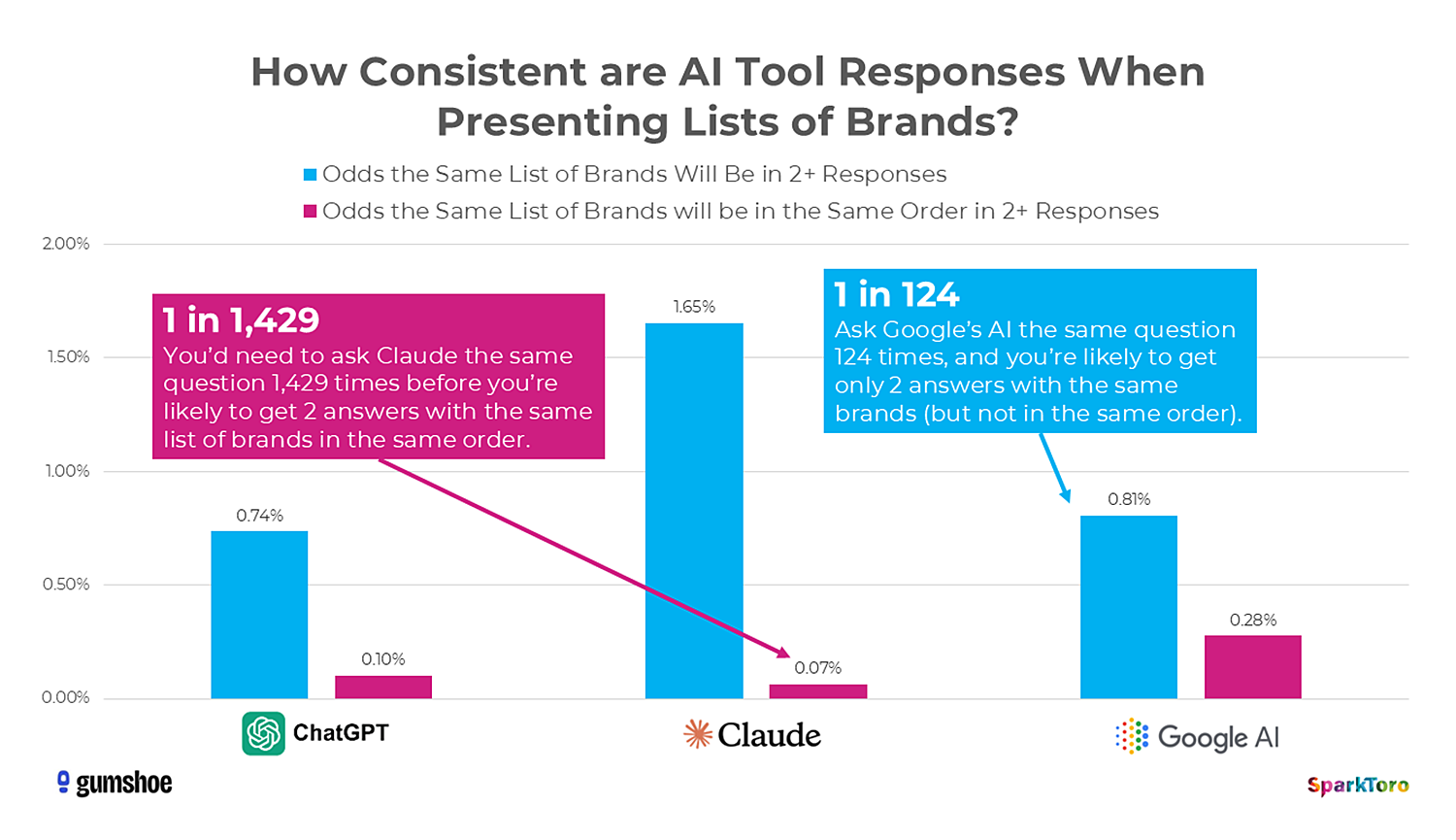
That’s why prompt tracking is best used as directional evidence, not as a precise ranking system.
Existing prompt tracking tools are in early stages
Just because tracking LLM responses is a highly variable endeavor doesn’t mean you should ignore prompt tracking entirely. These tools already provide useful directional insight, and they’re far better than flying blind.
In fact, prompt tracking tools are already useful for three things:
- Finding directional visibility. You can see whether your brand is showing up at all for important commercial-intent or informational prompts.
- Spotting repeat themes. Even in a noisy environment, recurring prompts, sources, and competitors can reveal patterns.
- Prioritizing deeper investigation. Prompt tracking can tell you where to look more closely in analytics, Search Console data, referral traffic, and source citations.
This information is valuable — the mistake is treating early prompt visibility metrics as equivalent to traditional rank tracking. They’re not. Today, they’re closer to sampled observation data. Accuracy and depth should improve as the category matures.
What can you do to get better AI reporting in the meantime?
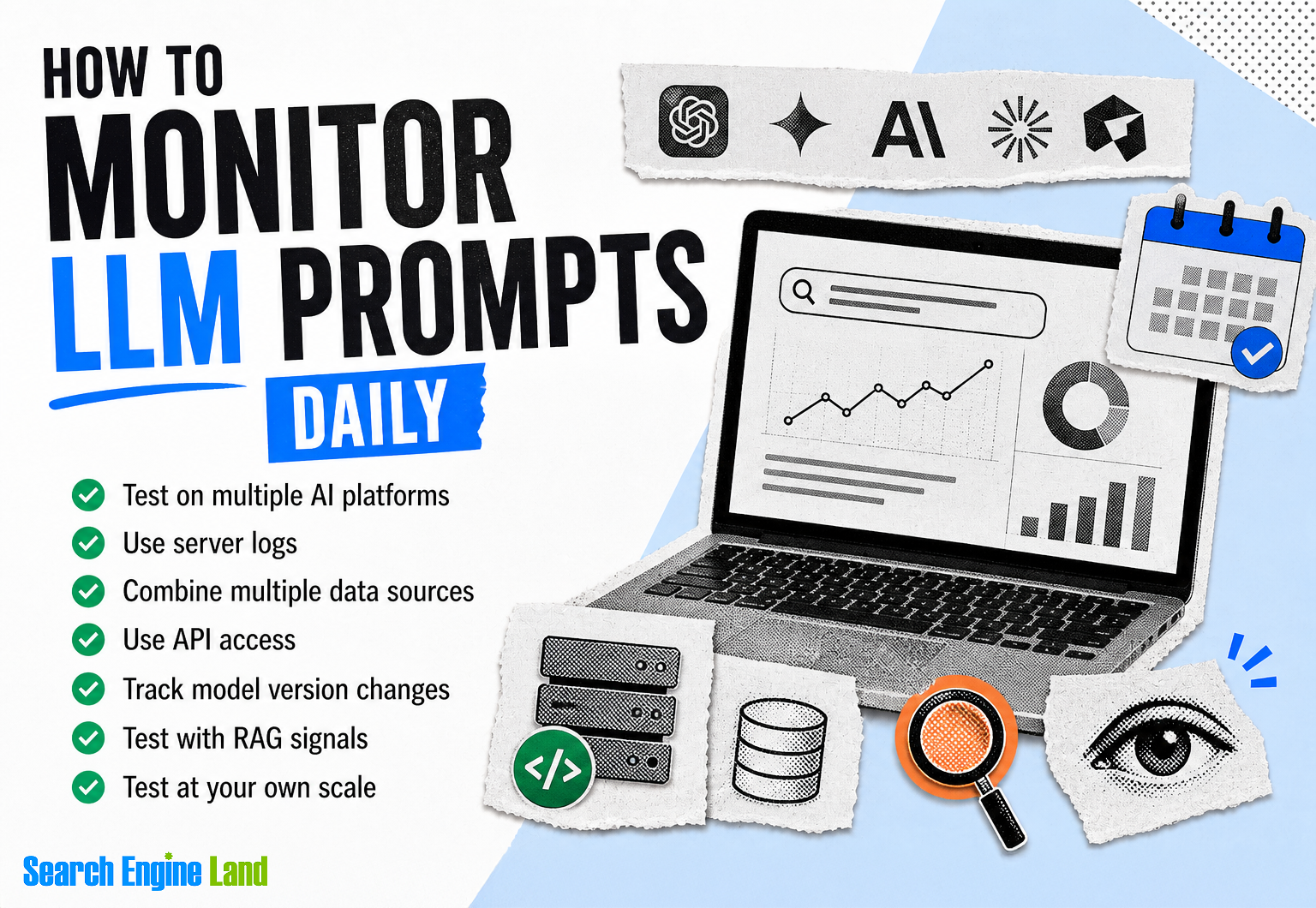
You can get a stronger view of AI visibility when you combine prompt tracking with first-party performance data and platform-specific signals. The goal is simple: Stop asking one tool to answer every AI visibility question.
Set realistic expectations
Start here. The metrics you see in prompt trackers are snapshots. They can tell you that something is happening, but they usually can’t tell you the full size, consistency, or business value of that visibility. That’s true for you and for everyone else.
The unfortunate reality is that it will take time for prompt tracking tools to measure AI visibility more reliably.
So, instead of asking, “What’s our exact AI rank?” ask better questions that will lead to making better marketing and business decisions:
- Are we appearing more often over time?
- Which topics seem to trigger mentions or citations?
- Which competitors appear in the same prompt set?
- Which pages earn actual visits after appearing in AI answers?
Dig deeper: The complete guide to AI prompts
Combine multiple data sources
This is where prompt monitoring becomes much more useful. If you combine sampled prompt visibility with analytics, webmaster tools, and crawl data, you can start separating visibility from actual business impact.
No single source gives you the full picture. But together, they can help you understand visibility, traffic, and likely AI discovery patterns with much more context.
Here’s a practical framework:

Use Google Analytics 4 to measure AI traffic that actually arrives
Google Analytics 4 will not show you every prompt. But it will show you something more important: whether AI visibility turns into sessions, engagement, and conversions.
That matters because prompt appearance without traffic or downstream action may be interesting, but it’s not the same as performance.
Group together referral traffic from platforms such as ChatGPT, Perplexity, Copilot, Grok, and other AI answer engines. Then compare those users against other channels using metrics like engaged sessions, conversion rate, and assisted conversions.
If you want a cleaner view, build a dedicated channel grouping for AI referrals.
You can also look for landing pages that attract AI referral traffic disproportionately. Those pages often reveal the content formats, entity coverage, and page structures AI systems are more likely to cite.
For Google AI Overviews specifically, it can also be useful to track visits that include the #:~:text= fragment as a supporting clue. It’s not a full solution, but it can add context when paired with landing page and query analysis.
Use Google Search Console to find query patterns that look like prompts
Google Search Console doesn’t label a query as “This came from an AI Overview,” but it can help you spot prompt-like search behavior.
One of the most practical approaches is filtering for longer queries. Many AI-assisted searches are conversational queries that are more detailed than classic head terms. Reviewing query sets by word count can help you isolate segments that deserve closer attention.
Darren Shaw shared a practical way to do this in Google Search Console:
Go to “Performance” > “Search Results”

Set the date range to 12 months:

Click “Add filter” > “Query”. Change the dropdown to “Custom (regex)” and paste a regex that filters for long queries: ^(?:\S+\s+){9,}\S+$. Click “Apply”:

This won’t be exact because some long queries still come from traditional search behavior. But if you compare long-form query growth, landing pages, and click patterns over time, you can get a better sense of where AI-assisted discovery may be increasing.

Tip: Start by reviewing queries with six, eight, or 10 or more words, then compare which threshold produces the most useful patterns for your site.
Use Bing Webmaster Tools for grounding query data
Bing Webmaster Tools has become one of the most useful direct data sources for tracking AI citations and grounding queries.
In February 2026, Microsoft introduced AI Performance in Bing Webmaster Tools public preview. It reports when your site is cited in supported AI-generated answers, which pages are cited, and which grounding queries triggered those citations.

Bing’s AI Performance doesn’t solve AI reporting as a whole. But it gives you something rare in this category: platform-native visibility data tied to actual AI answer experiences.
If your audience uses Copilot or Bing’s AI-generated summaries, this should be part of your measurement stack.
Use server logs as an early visibility signal
Server logs give you a different kind of insight. They show whether AI crawlers and fetchers are hitting your content at all. That includes user agents associated with platforms such as GPTBot, ClaudeBot, PerplexityBot, and others.

Log file analysis won’t necessarily prove that your content is being cited. But it can help you answer early operational questions such as:
- Are key pages being crawled by AI-related bots?
- Which sections of the site get the most fetch activity?
- Are new pages being discovered quickly?
- Are AI-oriented crawlers concentrating on a narrow subset of pages?
Once you have a clear view of crawler activity, you can compare it with AI referral traffic using versions of a crawl-to-refer ratio. This is still an emerging metric and requires technical expertise, but it can be a useful internal benchmark when you want to understand whether AI systems are consuming your content far more often than they’re sending referral traffic back to your site.
Tips for better LLM prompt monitoring today
If your goal is more trustworthy prompt monitoring, don’t just “track more prompts.” Instead, “track prompts more intentionally.”
Test on multiple AI platforms
Different AI systems have different retrieval partners, citation behaviors, safety filters, answer styles, and brand selection patterns. A prompt set that looks strong in one platform can look weak in another. Relying solely on one platform can distort your understanding of visibility.
A better approach is to monitor a focused prompt library across multiple AI platforms over time.
That helps you answer questions like:
- Do we appear across the ecosystem, or only in one environment?
- Which competitors are platform-specific vs. broadly present?
- Which prompts produce consistent mentions across more than one AI surface?
This can give you a better sense of how often you’re actually appearing in AI-generated results. It’s also usually more affordable to test a limited number of prompts across several platforms than to run thousands of prompt variations yourself.
Use API access where available
Where platforms allow it, API-based testing gives you a cleaner experimental setup than manual testing or interface scraping.
With APIs, you can log:
- The exact prompt used
- The timestamp
- The model version
- Structured response output
- Testing settings and metadata
This information makes your dataset easier to compare over time. It also makes it easier to rerun tests, segment results, and review raw outputs later.
Just remember that API outputs don’t always match the consumer-facing experience exactly, especially when the product includes live search, personalization layers, or interface-specific retrieval behavior.
Log model version changes
LLM behavior shifts with model updates. When visibility changes, don’t assume your content caused it.
Track the model name, version, and test date for every recurring prompt run so you can separate likely model-level changes from page-level or brand-level changes. Without that layer, a platform update can look like a content win or loss when it’s really neither.
Test with retrieval augmented generation (RAG) signals
Many LLMs now use web search or retrieval to ground their answers, meaning your visibility may reflect both what the model learned during training and what it can retrieve from the web in real time. It may also reflect classic discoverability signals, such as whether your pages are crawlable, current, clearly structured, and already visible on the open web.
This is why prompt monitoring shouldn’t be isolated from SEO. Traditional SEO signals like ranking position, structured data, and content freshness still influence what gets cited.
If you can test prompts in conditions with and without web grounding, do it. It can help you understand whether your brand appears because the model already learned about it during training, because your content can be retrieved at answer time, or because both are contributing.
That distinction affects strategy. For example:
- If visibility appears mostly in grounded environments, content freshness and source citations may matter more
- If visibility appears even without retrieval, brand familiarity and existing model exposure may be stronger factors
Test at scale on your own
In theory, the most statistically meaningful way to monitor LLM prompts is to run a very large testing program yourself.
That means thousands of prompt variations, across multiple models, repeated over time, with clean logging for output, citations, timestamps, and model versions.
It’s possible, but for most teams, it’s not practical because it’s expensive, time-consuming, and difficult to operationalize well.
Additionally, unless you’re a large brand with a clear measurement framework, it’s easy to collect a huge amount of prompt data without knowing what decision it should drive. That usually means wasted budget, noisy reporting, and very little action.
So, yes, testing at scale on your own can produce a richer dataset. But it’s usually only worth the investment if you already know how you’ll use that data to improve visibility, content strategy, or ROI.
For most brands, a smaller and more disciplined prompt library is the better starting point. For example, instead of tracking hundreds of prompts at once, you might monitor 20-30 high-value prompts across a few core product, comparison, and category themes.
Analyze the sentiment of your prompts
Showing up in AI answers is only part of the story. You also need to understand the tone and context of those mentions.
Are you being recommended positively? Are you being compared unfavorably? Are you showing up mostly in troubleshooting contexts? Are complaints or negative reviews shaping how your brand appears?
This is where perception data becomes useful.
In Semrush’s AI visibility tools, the “Perception” view can help you evaluate the sentiment and framing of prompts where your brand appears. This feature gives you a more qualitative layer of reporting.
For example, if your visibility is growing but a large share of mentions is tied to complaints, pricing objections, or negative comparisons, your reporting should reflect that. Visibility without favorable context isn’t the same as brand strength.
How to review sentiment in Semrush
Go to Semrush > AI Visibility. Open “Perception” and enter your domain:

Get insights on how your brand and website are perceived, where you’re strong, and where you need to improve:

Dive deeper: SEO prompts for ChatGPT
Benchmark against competitors
Competitive comparison is often where prompt monitoring becomes most actionable.
Instead of obsessing over one brand mention, compare the same prompt set across your brand and a small competitor group.
AI share of voice
If you measure how often your brand appears vs. two or three competitors across the same prompts, you can build an AI share of voice view. It won’t be a perfect market-share metric, but it’s useful for directional benchmarking and competitive positioning.
If, for instance, one competitor consistently appears across informational and commercial prompts where your brand is absent, that tells you something important. Usually, it means they’re stronger in one or more of these areas:
- Topic coverage
- Source citations
- Brand familiarity
- Off-page mentions
- Product-category association
Use Semrush’s AI Visibility tool to get this information.
Go to Semrush > AI Visibility. Open “Brand Performance”:

- Review the “AI SoV” view
- Compare your brand against a focused competitor set
- Look for gaps across the same prompt set, not just overall visibility totals
- Analyze the differences to guide content, PR, and brand-association work

Prompt gaps
Prompt gap analysis is one of the most practical outputs from AI visibility reporting.
Look for prompts where competitors are cited or recommended and your brand is not.
Then ask:
- Do we have content for this topic?
- If yes, does it get any AI referral traffic or citation evidence?
- If not, is this a content gap, a distribution gap, or a credibility gap?
The above framework helps you avoid jumping straight into content production when the real problem may be off-page visibility, weak citations, or poor product-topic association.
Here’s how to find prompt gaps in Semrush.
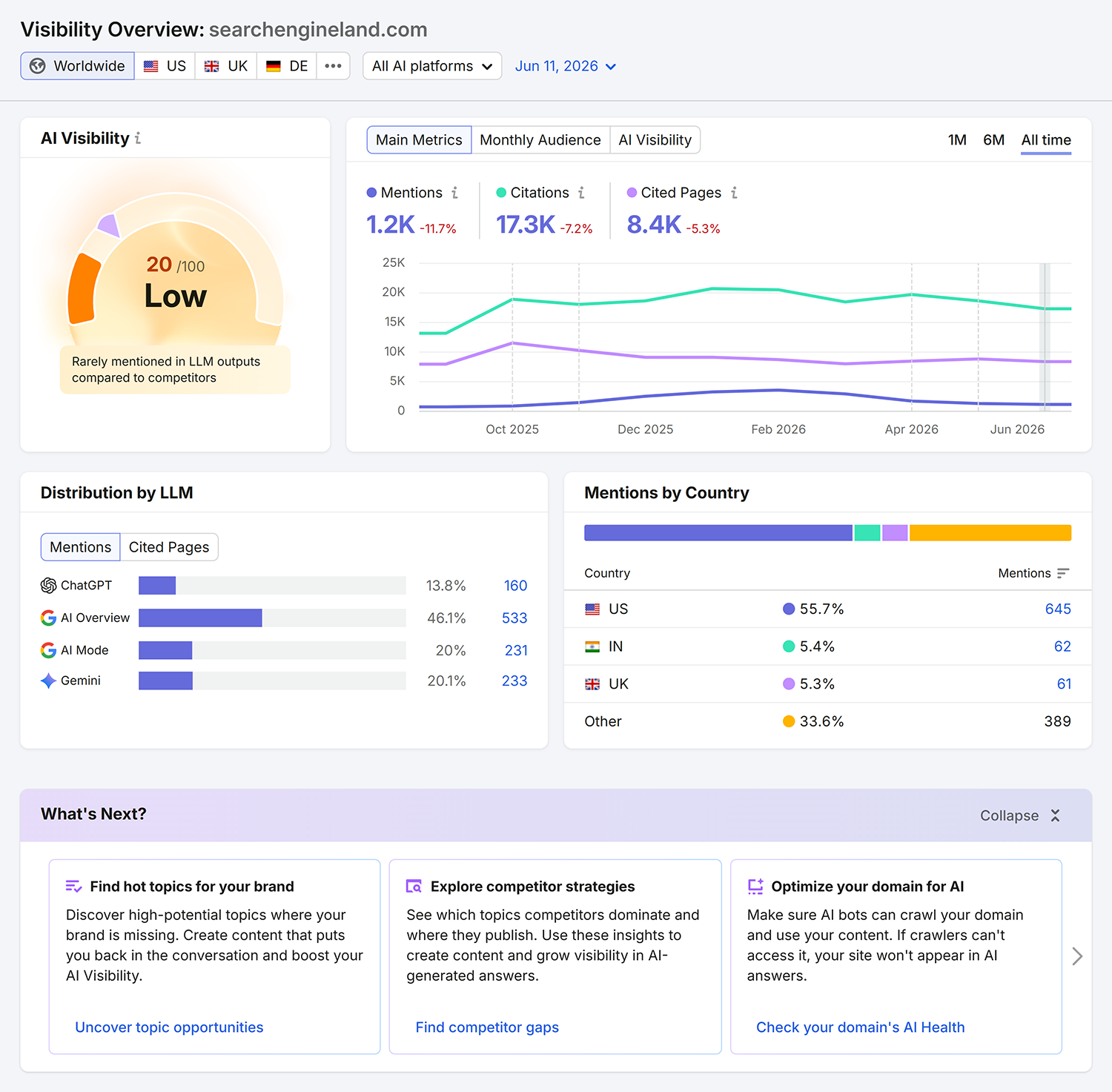
Go to Semrush > AI Visibility. Open “Visibility Overview” and enter your domain:

Check your “Visibility Overview”. Prioritize the gaps that matter most for traffic potential and business relevance:
Topic and source opportunities
Separate missing visibility into two buckets:
- Topic opportunities: Competitors appear for topics you haven’t covered well enough
- Source opportunities: Competitors are cited from publications, forums, or communities where your brand is absent
That second category matters more than many teams realize. Sometimes the fastest way to improve AI visibility isn’t publishing yet another page, it’s strengthening your presence in the places AI systems already cite.
Get prompt and topic volume
Not every prompt deserves the same level of attention. That’s why prompt or topic volume estimates are useful. They help you understand which prompt themes appear to matter more within a given AI environment.
This is the closest current equivalent to keyword prioritization for prompt reporting. If a prompt cluster has meaningful estimated demand and your brand is missing, it may deserve faster action than a low-volume edge case.
In Semrush’s Prompt Tracking tool, the “Top Prompts” view can help surface which prompts and topics generate the most estimated visibility opportunity inside the selected LLM.
How to review top prompts in Semrush:
Open the Prompt Tracking tool. Go to “Top Prompts”:

- Sort prompts by estimated topic or prompt volume
- Group related prompts into themes instead of treating each one as a separate battle
- Compare high-opportunity prompts against your current content, competitor visibility, and referral data
- Prioritize the prompts where visibility potential and business relevance overlap

Use this strategy carefully — treat it as a prioritization layer, not as a guarantee of traffic.
See your brand in AI search results
One of the easiest ways to misread prompt monitoring is to look only at dashboards. Exports and visibility summaries are useful, but they strip away context.
Whenever possible, review the actual AI result being tracked. It shows you:
- How your brand is framed
- Which competitors appear alongside you
- Which sources are cited
- Whether your mention is central or incidental
- What a real user is likely to see
Understanding the AI result’s context will change how you interpret visibility. For example, a citation buried near the end of a weak answer isn’t the same as being directly recommended in the opening lines.
How to inspect tracked AI results in Semrush:
Open the Prompt Tracking tool. Navigate to “Top Prompts”:
Select a tracked prompt where your brand appears and open the saved result view or screenshot:

- Review answer wording, cited sources, and surrounding brand mentions
- Tag the prompt based on whether the mention is favorable, neutral, incidental, or competitive
Turn prompt monitoring into a better measurement system
Don’t waste time fruitlessly searching for that one perfect AI visibility number. Instead, build a reporting stack that combines prompt tracking with referral data, platform-native visibility signals, and content diagnostics. It’ll give you a much clearer view of what AI visibility actually means for your brand.
See where your brand appears, where it doesn’t, and exactly how to win more visibility across search, AI, local, social, and every channel that matters.
About the Author