What is negative SEO? And how to prevent, detect, and recover from it


Negative SEO is the act of intentionally sabotaging a site’s organic search engine rankings. The culprits behind these attacks are often competitors trying to steal your site’s traffic and rankings.
The goal is to trick search engines into thinking your website uses spammy SEO tactics, which can get your site flagged and penalized, while also making it appear untrustworthy and low-quality to visitors.
Over 422,000 websites were hit with some form of negative SEO spam in 2024, hinting that these types of attacks are more common than many site owners realize.
Typical negative SEO tactics include:
- Spammy backlink building
- Fake negative reviews
- Content scraping
- Click fraud
- Site hacking
- Sentiment manipulation
The good news? Search engines are already capable of detecting and ignoring many of these attempts.
The bad news? Search engines alone can’t fully protect your site. While Google recommends not worrying about negative SEO attacks, real-world proof indicates that attacks can have a lasting, damaging effect on your website.
To protect your site, it’s important to understand what these attacks look like in the real world.
Common types of negative SEO attacks

These attacks are based on Google’s spam policies and what it considers toxic behavior. Let’s review each type so you know what to watch for.
Spammy backlinks
Backlink spam happens when many low-quality websites link back to your site, often from dozens or even hundreds of different domains, sometimes over the course of just a few days or weeks.
Building spammy backlinks is a common tactic because it’s both easy to execute and inexpensive. It also doesn’t require website access (unlike site hacking or other advanced techniques). Popular methods include:
- Link farms: These are networks of low-quality domains that interlink to each other. Some low-end link vendors sell these links with the goal of creating the appearance of a strong backlink profile, which, in theory, strengthens search engine rankings. More often, however, link farms have a distinct, unnatural “link footprint” that is easy to detect and can be used to damage a site’s backlink profile.
- Automated tools: These tools generate backlinks in bulk by auto-posting on forums, blog comments, or directories, causing an unnatural surge of spammy links in your backlink profile.
These methods can trigger a manual penalty or cause algorithms to deprioritize your site for appearing to “game” the system.
Pro tip: Audit your backlink profile at least once per month with tools like Semrush or Ahrefs to catch and disavow toxic links early (learn how to perform an audit in the “How to detect a negative SEO attack” section below).
Fake reviews
Attackers may leave negative fake reviews on various review sites (e.g., Yelp, Google Reviews, Trustpilot, G2, or Tripadvisor), which can damage your reputation and lower your rankings on these sites and other critical places like the Google Local Pack.

Fake reviews can be especially damaging to local businesses and brick-and-mortar establishments that rely on local reviews and the Google Local Pack to drive foot traffic.
It can be hard to spot a fake review, but telltale signs include poor grammar, misspellings, repetitive phrasing, and vague complaints. A sudden wave of negative reviews in a short time period is also a strong sign they may be fake or auto-generated.
Check the reviewer’s profile to determine whether it looks legitimate and if they’ve made a lot of random reviews recently. Together, these signs can point to a fake reviewer.
Pro tip: Actively monitor your review platforms and use a review monitoring tool to get real-time email alerts of new reviews.
Content scraping
Content scraping happens when attackers copy and republish your content on their own sites, creating duplicate content and risking that their version outranks yours in search results.
This has become a bigger issue as AI tools can now mass-generate slightly spun content, making it harder for search engines to identify the original.
Pro tip: Use rel=canonical tags, which are HTML snippets on your pages that tell search engines your site hosts the original version to be crawled and indexed.
Click fraud (or CTR manipulation)
Click fraud is the act of inflating click-through-rate (CTR) by repeatedly clicking on the same webpage result, oftentimes via a bot or automated tool. Fraudsters use it for:
- Boosting their own rankings: The fraudster inflates their page’s CTR and engagement metrics by faking clicks, scrolling, and browsing, tricking search engines into thinking the content on the fraudster’s site is valuable.
- Hurting your rankings: They flood your listing with fake clicks that bounce quickly, creating a high CTR mixed with a high bounce rate, which may signal to search engines that your content doesn’t satisfy user intent.
Pro tip: While Google says it can detect and discount fake engagement, monitor unusual traffic patterns such as huge spikes in clicks and bounce rates with tools like GA4 or GSC.
Site hacking
Site hacking can be one of the most damaging types of negative SEO. A hacker gains access to your site with the sole purpose of sabotaging your site’s authority. Hacking tactics include:
- Injecting spammy links to unrelated or harmful websites (such as gambling, casino, or adult sites) that make your site look like it’s part of a link scheme.
- Adding hidden text or cloaked content that violates Google’s guidelines, showing users one version of a page and search engines another, often filled with spammy links or irrelevant keywords.
- Adding noindex or canonical tags that deindex important pages, resulting in your most critical, traffic-driving pages not showing in search results.
- Redirecting traffic to competitor or spam sites, which damages user trust, increases bounce rates, and hurts overall SEO performance.
- Altering site speed or structure to harm user experience, ultimately causing worse user engagement metrics and higher page abandonment rates.
- Spamming open comment forms or user-generated content fields with toxic links or keyword-stuffed content, which could dilute your page’s optimization and hurt your site’s authoritative signals.
These attacks can be subtle and hard to detect—until your traffic suddenly drops and you’re flagged by Google Search Console (GSC).
Pro tip: Keep your server software, CMS, and plugins up to date and use complex, long passwords to minimize vulnerabilities.
Bonus tip: update the URL of your site’s admin login page so it doesn’t follow a generic structure. For example, a WordPress login URL typically defaults to example.com/wp-admin or example.com/wp-login. Instead, use a plugin like WPS Hide Login to customize the URL, which prevents hackers from easily finding your login page and attempting to hack your password.
Negative brand mentions and sentiment manipulation
Brand mentions carry more ranking weight than ever as search engines and AI tools increasingly pay more attention to what others are saying about your brand online.
The SEO toolkit you know, plus the AI visibility data you need.

Spamming forums, community-network sites (like Quora or Reddit), or social media with false negative narratives to damage your brand’s Experience, Expertise, Authoritativeness, Trustworthiness (E-E-A-T) could cause damage that’s very difficult to undo.
In the era of AI, trust, originality, and authority are the pillars of SEO, and the most dangerous negative SEO tactics are the ones that subtly undermine those pillars.
Pro tip: Set up real-time Google alerts to catch negative or inaccurate brand mentions before they spread. Set alerts for your brand name, domain, product names, and even variations of these names (e.g., a common misspelling of your brand name).
Can negative SEO happen unintentionally?
Absolutely—and you could even be the culprit if you aren’t careful.
For example, you could hire a link-building “expert” on Fiverr.com who promises 30 backlinks within seven days from sites with a domain authority (DA) of 80 to 90—for just $30.

But any link-building professional knows that promise is a red flag. These links often come from spammy networks or hacked sites, and a sudden spike in unusual backlinks can trigger site penalties.
If you need to beef up your backlink profile, you’re better off manually building links yourself or hiring a reputable, professional agency. This gives you total control over where your backlinks come from and the quality of your linking content. And if you ever do get penalized, it’s much easier to manage and remove those links. When you don’t have that control, getting toxic links taken down can be a frustrating, often unsuccessful battle.
Fast, guaranteed, and dirt-cheap links are typically the type of links that will hurt your site more than boost it. A good rule of thumb is that if it seems too good to be true, it probably is.
Another example of accidentally becoming your own negative SEO attacker:
A site owner redirected their old domain to a new one after changing it. However, the old domain’s registration lapsed for about a week before the site owner noticed and renewed it.
Within that short timespan, numerous third-party sites scraped the expired domain and added it to their lists of “domains for sale,” resulting in hundreds of auto-generated spammy backlinks. And since that domain redirects to the new one, all of those backlinks now point to the new domain.

The result? Not only is the old domain now listed as “for sale” when it really isn’t, but the new domain also experienced a surge in low-quality backlinks with identical anchor text. Which could raise red flags with search engines and cause lower rankings. Even months later, the new domain is still getting new spammy backlinks from this innocent error. The site owner accidentally sabotaged their own SEO by overlooking their domain renewal.
This emphasizes how relatively easy it is to unintentionally hurt your own site’s SEO. That’s why regular audits, backlink monitoring, and domain hygiene (e.g., email authentication, DNS settings) are critical for preventing negative SEO incidents.
How to detect a negative SEO attack

Some attacks are easier to spot than others. You might notice a surge in toxic backlinks or a sharp drop in rankings. Other times, it takes longer, like spotting odd referral traffic or receiving a duplicate content warning in Google Search Console.
Fortunately, there are plenty of tools to help you monitor for warning signs before serious damage is done. Let’s review them.
Google Search Console (GSC)
To check for toxic backlinks, navigate to “Links” in the left-hand menu of GSC. Find “Top linking sites” and click “MORE” to review the list and identify suspicious links (take note if they’re linking to many of your pages).

Use your own judgment to determine if the links are, in fact, spammy. The best way to find out is to visit the site (just approach cautiously—nobody has time for malware).
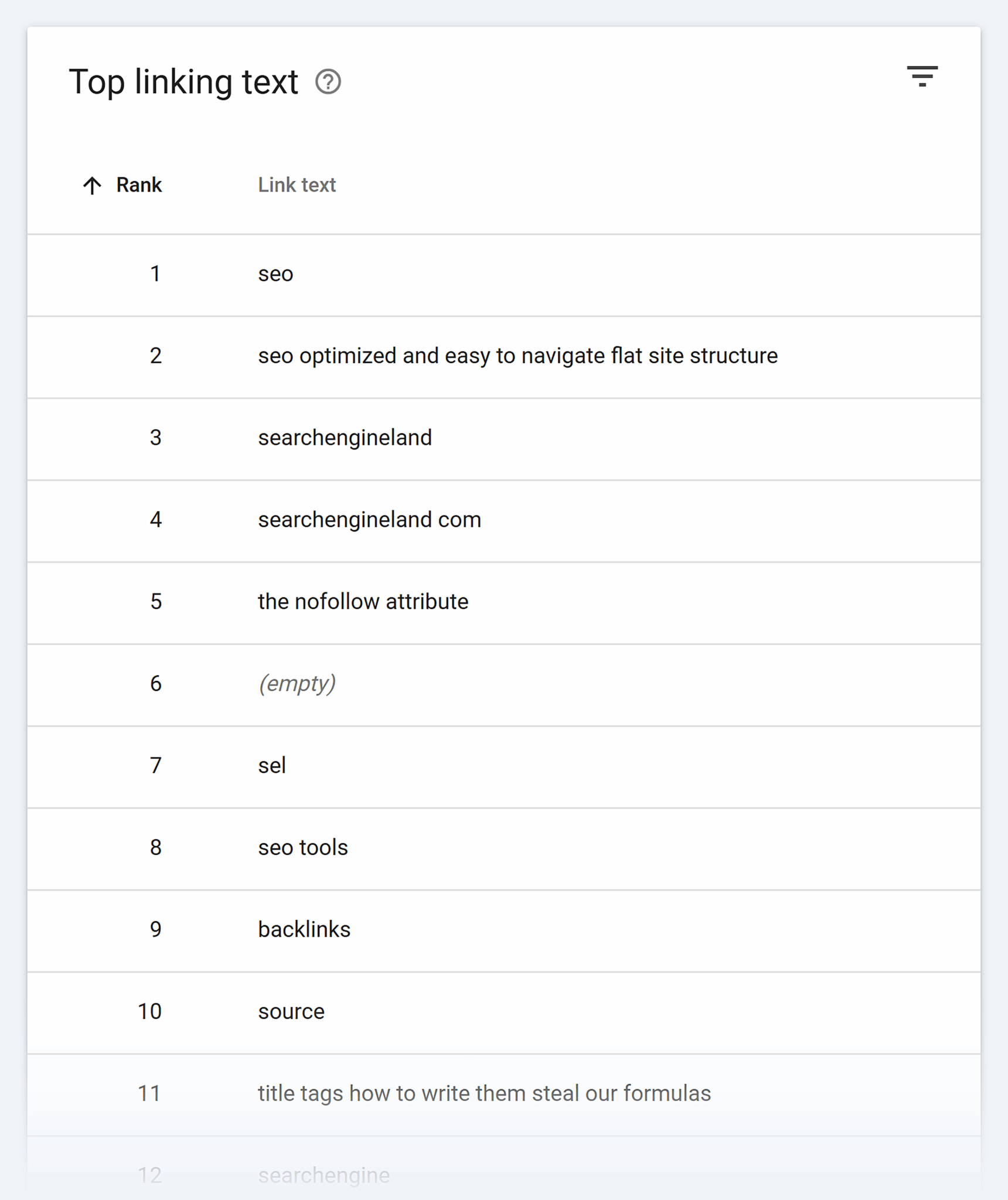
Check “Top linking text” in the “Links” section as well to see if there’s any shady or irrelevant anchor text being used (e.g., “casino,” “online pharmacy,” or “sports betting”).
Periodically check “Security & Manual Actions” in GSC because, unlike the other methods that require your analysis, these alerts directly tell you that something is off—and you should listen to them.
Review “Search results” under the “Performance” tab to check for drastic drops in impressions or clicks. Big drops in impressions often indicate big drops in site rankings (which could indicate a negative SEO attack).

GSC offers a great high-level view of your site’s performance and SEO issues, but other tools provide deeper insights and take the guesswork out of spotting a negative SEO attack.
Let’s explore each one.
Semrush
Use the “Backlink Audit” tool in Semrush’s SEO dashboard to determine your site’s backlink toxicity score.

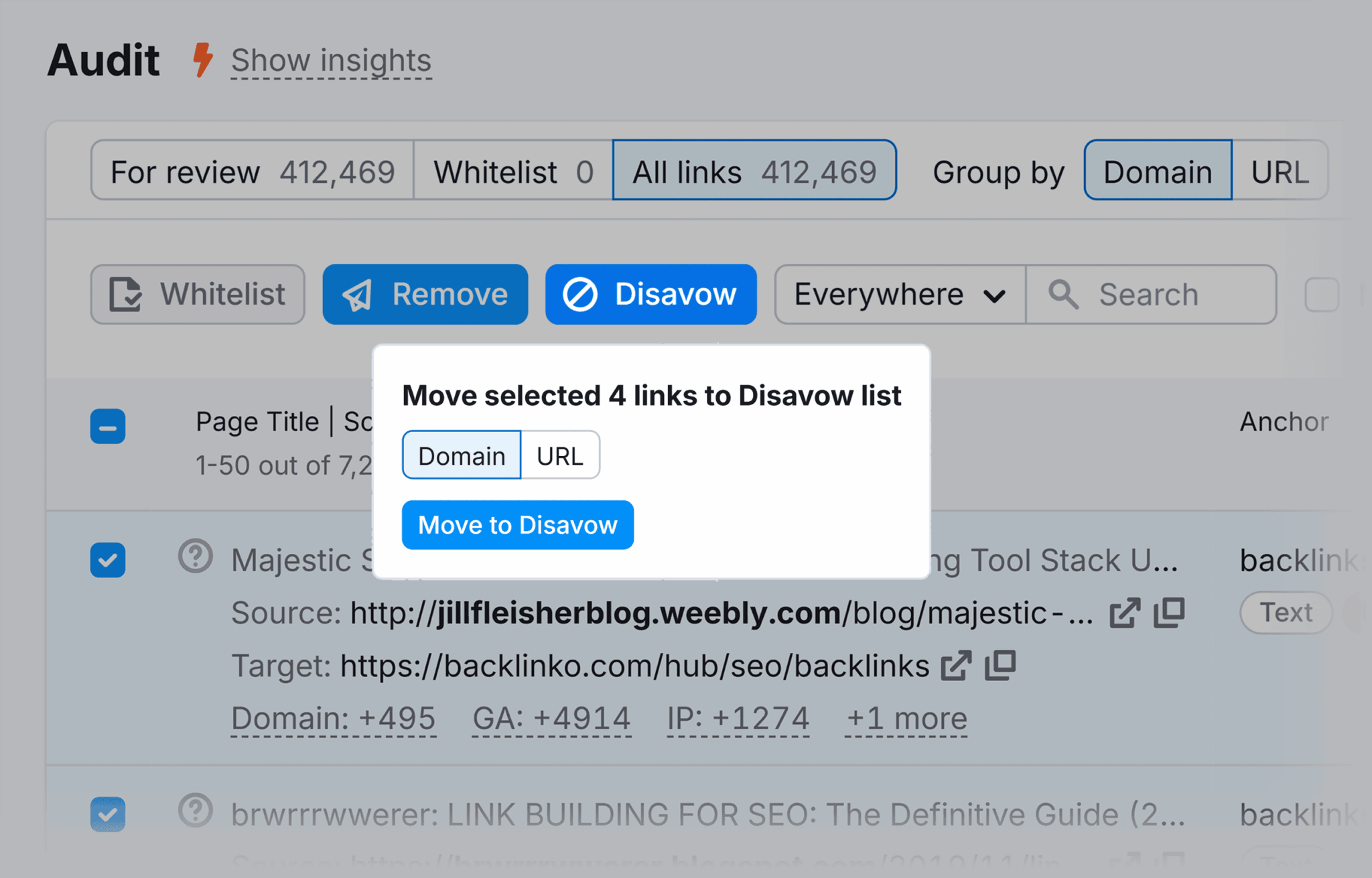
Review your toxic links and decide which ones should be:
- Whitelisted because they aren’t harmful
- Added to a Remove list where you’ll contact the site owner to ask for link removal, because they’re likely spam or low-quality links
- Added to a Disavow list because they’re toxic links, and you will submit the list to GSC’s Disavow tool to ensure they are ignored by Google
You can also use the Brand Monitoring app to stay on top of negative brand mentions or sentiment manipulation.

You can track new mentions across blogs, forums, and news sites, allowing you to quickly respond to or investigate suspicious patterns.
Easy workflows to catch issues early
Stay ahead of negative SEO by incorporating simple habits into your routine workflows that help you keep tabs on your SEO health:
- Export backlink reports monthly from GSC and Semrush or Ahrefs
- Set Google Alerts for your brand, domain, and key product names
- Monitor rankings weekly using a keyword tracking tool
- Review your referral traffic in Google Analytics for unusual sources
- Scan for duplicate content using Copyscape or Siteliner
Consistent monitoring helps you catch negative SEO threats before they cause long-term damage.
How to prevent negative SEO

You can’t prevent someone from trying to attack your site, but you can take steps to minimize the damage. Let’s walk through the best preventative strategies.
Harden your technical SEO
- Keep your CMS, themes, and plugins up to date to minimize the risk of hacks.
- Use an SSL certificate (HTTPS) to ensure secure connections on your website.
- Leverage security headers (small snippets of code that live in your site’s header and instruct browsers on how to handle your site’s content). They help prevent malicious attacks by setting clear rules for how browsers should interact with your site.
- Use common crawl protection tactics like honeypot traps (invisible links or fields that give robots away if clicked since humans can’t see them), CAPTCHA and JavaScript challenges (prevents non-human traffic from reaching key pages), and rate limiting and request throttling (which limits the number of requests a specific IP address can make).
Note: You can update your robots.txt file to instruct well-behaved bots on which parts of your site to crawl and ignore, but this will not protect you from bad bots because they will ignore the instructions.
Regularly monitor your link profiles
You can use a variety of tools to monitor your link profiles:
- Google Search Console: a great (free) starting point for checking who links to your site and spotting suspicious anchor text
- Semrush: offers detailed backlink analytics, toxic score detection, historical link tracking, and disavow file exports
- Ahrefs: strong for detecting new, lost, and broken backlinks, with powerful filters and link-growth alerts
- Backlink Monitor: specifically designed for tracking backlinks and keyword rankings, and also offers email alerts for new and toxic links
- Majestic: known for its Trust Flow and Citation Flow metrics, this tool is useful for digging into backlink quality and link neighborhoods
Export your backlink profile monthly to spot suspicious activity, like sudden spikes from spammy domains or lost links from reputable sites that may have been replaced by an attacker.
Set up alerts for brand and site name mentions
- Use Google Alerts to track brand, product, or domain mentions
- Use Semrush Brand Monitoring to track social mentions, press coverage, and backlinks
- Monitor social, review platforms, and forums for impersonation or false claims
Deter content scrapers
- Use rel=canonical tags to signal original content to search engines. This helps consolidate ranking signals and prevent duplicate content issues if others republish your work.
- File DMCA (Digital Millennium Copyright Act) takedown requests. If your content is stolen, submit a request to the offender’s hosting provider or search engines like Google. While takedown isn’t guaranteed, it creates a formal record of the offense, shows you’re protecting your intellectual property, may deter the offender, and might discourage their host from supporting them.
- Watermark important visuals or use brand-specific phrasing. Create your own watermarks with tools like Canva, Photoshop, or Lightroom and add subtle, semi-transparent logos or icons to critical spots of the image that make it difficult to crop out.
Maintain domain hygiene
- Renew your domains early or set up auto-renew to avoid lapses
- Audit your redirects regularly to ensure they point to the right content
- Watch for “for sale” listings or impersonations of expired domains
How to recover from a negative SEO attack
If you think you’ve been attacked, stay calm and act swiftly. Time is the most powerful factor in minimizing or eliminating damage from an attack.
Assess the damage
Check for ranking drops, traffic declines, and deindexing in Google Search Console. To see if a page has been deindexed, copy and paste the URL into GSC’s search bar and hit “Enter.”

If it comes back looking like the image above, hit the “REQUEST INDEXING” button to speed up the recrawl.
But before doing that, it’s smart to quickly copy and paste a chunk of text from the page into Google to see if the same content appears on other sites. If it does, that’s a sign of duplicate or scraped content, which could prevent your page from ranking properly. Consider revising or removing the copied content before requesting re-indexing.
From there, audit your backlink profile for sudden spikes in spammy domains or anchor text, and check brand mentions and review platforms for false claims or impersonation.
Clean up the attack
While some tactics, like spammy backlinks or duplicate content, can be addressed directly, others may require technical clean-up, ongoing monitoring, or formal reporting. Start with the following steps:
- Use Google’s Disavow Tool: After performing a backlink audit, flag clearly toxic or manipulative backlinks and submit the list to Google.
- Reclaim deindexed pages: If attackers added “no index” tags or canonicalized key pages to irrelevant URLs, remove or correct the tags and then request reindexing in Google Search Console.
- Look for spammy page injections: Use a site search by typing “site:yourdomain.com” into Google to identify any unexpected or cloaked pages that may have been added to your site structure.
- Harden open entry points: Disable or moderate open comment forms, user-generated content fields, or unsecured contact forms that may have been exploited to insert spam.
- Scan your .htaccess and robots.txt files: These files help search engines crawl and index your site. Hackers sometimes alter these to block crawl access to critical pages or redirect bots to irrelevant or malicious URLs.
- Remove or rewrite scraped content: Do this only if it’s outranking yours. If your version is still ranking, filing a DMCA takedown is safer than making changes that weaken your original content’s authority.
- Set up daily or weekly site backups: Regular backups allow you to quickly restore a clean version if it’s ever compromised. Storing recent backups makes it much easier to revert to a stable, unhacked state and minimize downtime.
File for reconsideration (if applicable)
If you received a manual action from Google, follow their instructions and submit a reconsideration request. Be honest, document your cleanup efforts, and explain how you’re preventing future issues.
Respond to reputation damage
- Flag and report fake reviews on Google, Yelp, or other platforms
- Respond professionally to false claims to protect your brand’s credibility
- Reach out to websites impersonating your brand or file a DMCA takedown if needed
When to escalate or get legal/agency help
Most negative SEO issues can be handled through monitoring and cleanup, but some situations cross the line into fraud, impersonation, or brand abuse, and these situations may require outside professional support.
When to take it further
- The attack includes brand impersonation, phishing, or fake websites pretending to be your business
- You’re seeing fake reviews or defamatory content posted across platforms
- There’s evidence of hacked pages, malware injections, or criminal behavior
- Your site or customer data may have been compromised
What to do
- Document everything you can by tracking backlinks, taking screenshots of impersonation, reviewing timestamps, and logging ranking drops.
- Report abuse to Google, web hosts, review platforms, or domain registrars as applicable.
- If the issue continues, involve legal counsel or a digital forensics team to investigate and take formal action. They can help identify the attacker, gather evidence, issue takedown requests, or pursue legal action for defamation or fraud.
Track, optimize, and win in Google and AI search from one platform.
Securing your SEO foundation with long-term protection
There’s a lot you can do today to prevent negative SEO down the road.
- Get a deeper understanding of technical SEO so you can ensure that all the right safety precautions are in place to prevent attacks before they happen
- Integrate monitoring tasks into your regular workflows
- Learn how to run an effective and thorough local SEO site audit to ensure your reviews and online brand presence are up to snuff
By taking a proactive approach, you can minimize risk, protect your reputation and rankings, and stay one step ahead of negative SEO.
Explore more on
Editorial disclosure
Search Engine Land is owned by Semrush. We remain committed to providing high-quality coverage of marketing topics. Unless otherwise noted, this page’s content was written by either an employee or a paid contractor of Semrush Inc.
About the author