SEO reporting: How to track, prove & improve performance

SEO reporting is the reporting you do that bridges the gaps between SEO execution, a website’s performance, and stakeholder understanding. The better you can bridge that gap, the more benefits you’ll see, perhaps most importantly, stakeholder buy-in, which helps secure future budgets and demonstrates your value and impact on business objectives, such as revenue.
Sounds simple, but it’s not.
Reports often fail because they’re bogged down with the wrong things—vanity metrics, siloed data, and attribution gaps—which make it hard to connect the SEO team’s efforts to revenue. And, these reports can take considerable time to create, stealing time from productive work.
In this article, we’ll cover what SEO reporting should accomplish, how to structure reports for different stakeholders, and the tools—including AI—that make light work of the entire process so that you’ll be able to create reports that bring clarity, consistency, and executive alignment to your work.
What SEO reporting should accomplish
Your SEO report is a (usually) monthly snapshot of how your work, search visibility, and organic traffic are performing.
It’s common for SEO reports to detail clicks, impressions, and a human-written overview of what happened at the end of the month, compared to the previous one.
But SEO reports should go beyond this surface-level analysis that simply includes charts and keyword positions. Instead, the reports should explore the details, the business outcomes, and find the stories behind the data that inspire action for the future.
Here’s what SEO reports should accomplish and how to do it:

Show impact on business goals (revenue, leads, conversions), not just rankings
It’s a mistake to think that SEO is simply generating clicks and impressions from a search engine.
The future of SEO depends on strong SEO reports connecting SEO efforts to business outcomes that matter.
You should know how SEO is impacting:
Qualified leads
Qualified leads are prospects that fit your ideal customer profile (ICP) and show intent to buy. SEO attracts the right people to a website through targeted content and keywords carefully selected based on their search intent. Ideally, you want audiences who are ready to buy. That said, SEO often attracts audiences who are not yet prepared to buy. These audiences require marketing alignment so that you can nurture them to conversion (which means you get to report on higher conversion rates!).
Typically, qualified leads are broken down into two types:
Marketing Qualified Leads (MQLs) are users who have taken a specific action (such as filling out a form) that indicates a high level of interest in products and services. From a marketing perspective, these appear to be good leads, but sales will need to confirm.
Sales Qualified Leads (SQLs) are leads that sales have been reviewed, vetted, and deemed worth pursuing because they match the ICP and have buying intent.
If SEO is attracting the right people, pages across the site will convert organic traffic.
Important note: If you’re receiving high traffic numbers without conversions, then that’s an indication that your SEO efforts aren’t working. Clicks are great, but conversions and sales drive business goals.
It’s crucial to report on MQLs within SEO reports because it shows the value of the work. SEO specialists need to be able to confidently say things like:
“From the 35 contact forms filled out in [month], I found 20 marketing qualified leads. Where are these leads now? Did Sales close on any of them?”
When SEO teams have this level of clarity on leads, it opens up conversations on accountability.
For example, Sales can let you know how many leads were closed, and you can all celebrate the win.
Or, Sales can tell you why they didn’t close the leads, which might shine a light on broader problems like:
- Salespeople are overworked and are physically unable to get to all the leads
- There’s not enough automation to support the sales teams
- Leads, while interested, are not closing with your business, but instead with competitors due to better deals, stronger offers, or faster follow-up
Alternatively, Sales might disagree with Marketing about the lead quality, highlighting a need to refine targeting or messaging.
Regardless of the outcome, SEO and Marketing must have some insight into the quality of leads.
You can help qualify leads by asking questions early on. For example, on landing pages, add contact forms that ask for budget or qualifying questions, such as company size. Don’t overdo it. You want your forms to have a friendly UX.
If you set your contact forms up properly, you would then be able to export data, including the answers to questions within the form, to help you spot a high-quality lead fast. More sophisticated solutions use automations and CRMs or business intelligence (BI) platforms with lead scoring to do this automatically. More on the tools and platforms available to enhance reporting later.
The SEO toolkit you know, plus the AI visibility data you need.

Conversions
Conversions are the actions you want your visitors to take on your site.
For example:
- Filling out a form
- Contacting the business
- Downloading a resource
- Making a purchase
You can track conversions using events and key events within Google Analytics (GA4). If SEO is working for your business, then you will see conversions from organic traffic.
Pro tip: If SEO has requested a page geared for conversion and other channels direct traffic to it, SEO reports can claim some attribution for conversions made via other channels. After all, it is SEO’s research and understanding of search and the ICP’s needs that contributed to the page being created in the first place. More about this in the Marketing alignment section.
Here’s how to set up basic, out-of-the-box events within GA4.
Go to GA4 > Click “Admin” in the bottom left of the page, next to the cog > Data collection and modification > Click “Data Streams”
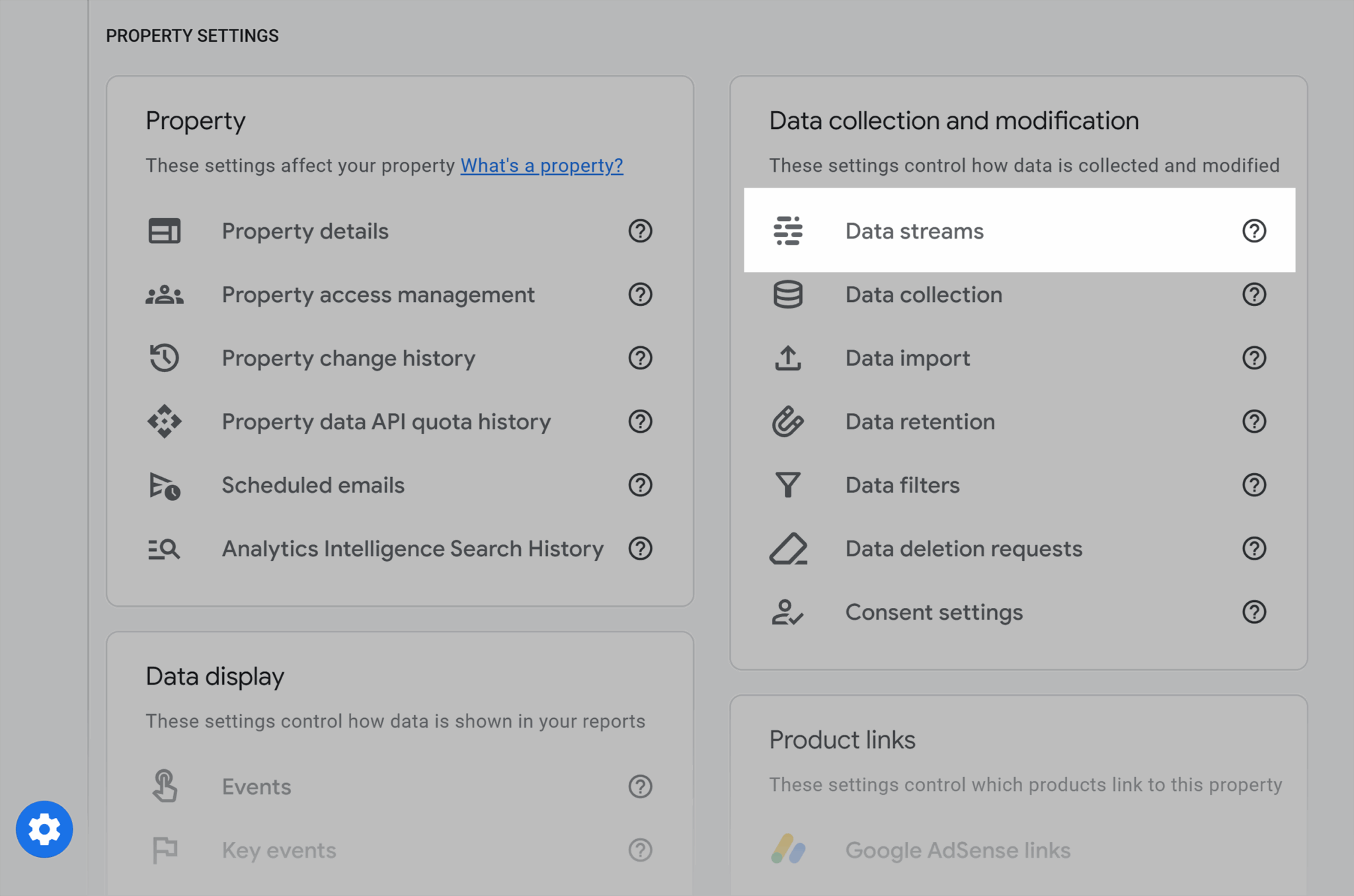
Choose the data stream you’re editing, and you’ll see a screen that looks like the one below:
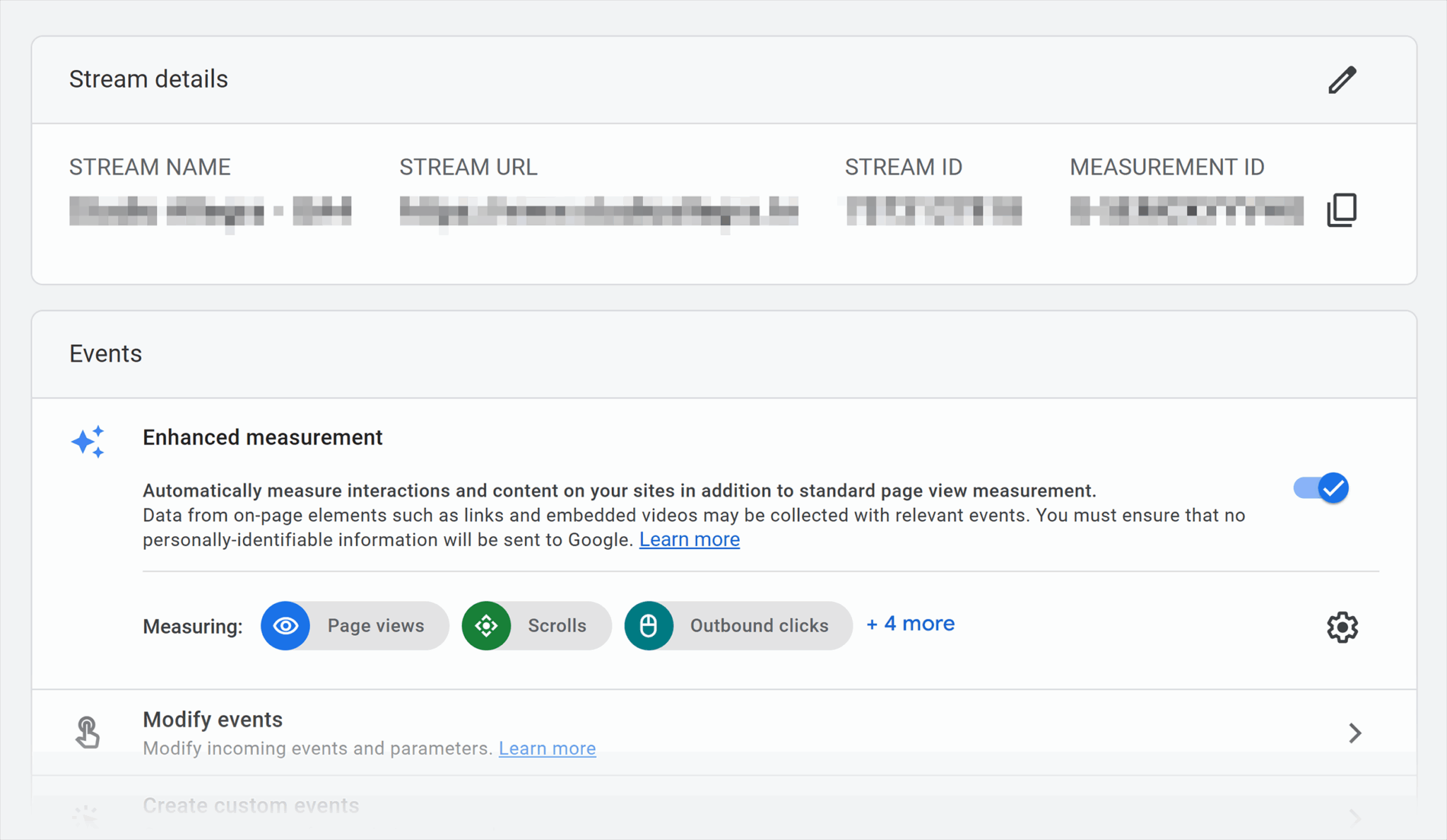
Check you have the “Enhanced measurement” toggle turned on.
If you do, you will be measuring:
- Page views: Counts every time a page on your website is loaded or reloaded in a user’s browser
- Scrolls: Tracks when a visitor scrolls down to 90% of a page, signaling they engaged with most of the content
- Outbound clicks: Measures when a user clicks a link on your site that takes them to an external domain
- Site search: Records when a user performs a search using your site’s internal search function
- Video engagement: Captures interactions with embedded YouTube videos (e.g., start, progress milestones like 25% or 50%, and completion)
- File downloads: Tracks when a user downloads a file (such as a PDF, whitepaper, or brochure) from your site
- Form interactions: Monitors activity on forms (e.g., a user starting to fill it in, completing and submitting, or errors that occur)
With this data turned on, you can view events.
Go to the menu > “Engagement” > “Events”
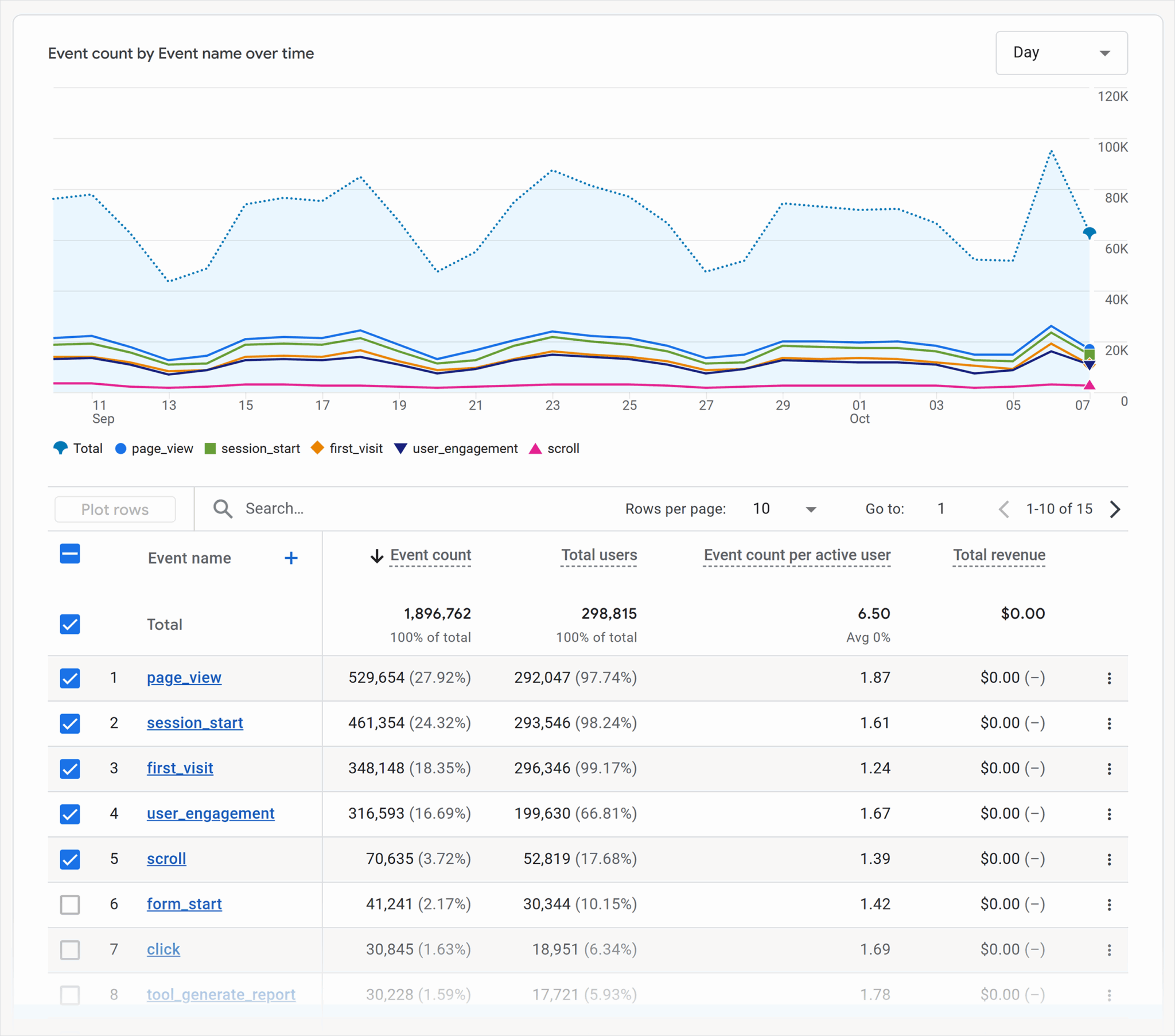
The report shows all of the out-of-the-box events, as well as custom ones if you’ve set them up.
Form fills are standard and include:
- form_start: This metric is triggered when a user begins interacting with a form (e.g., clicking into the first field). It helps measure intent, even if the form isn’t completed.
- form_submit: This metric is triggered when a user successfully completes and submits a form. This is usually the key conversion event for lead generation.
Conversion reports should always be part of your SEO reporting, because they drive business goals. You can still include metrics such as clicks and impressions.
Further reading: Our article Master GA4: Google Analytics 4 tips & tutorials includes a section on how to configure GA4 for SEO insights and provides a step-by-step guide with visuals on how to create custom events and how to make light work of creating reports by connecting GA4 and Looker Studio.
Audience building and segmentation
Audience building refers to a tactic where SEO teams grow segments of engaged users who fit your ICP. This audience can be remarketed to using Google Ads, paid retargeting campaigns, or email marketing.
SEO builds audiences by creating content that consistently meets user needs, then improving visibility in search so users can find it.
Reporting on audiences built and the success that came from those audiences is very important because SEO is a broad marketing channel that serves users across the funnel. Unlike highly targeted marketing channels like ads, SEO doesn’t just aim to serve users who are ready to convert; often, SEO is how users are initially introduced to a brand.
For example, a marketer might have a problem they need an answer to. They search: “How can I make SEO reporting easier?” and find an article from a SaaS company. It is highly unlikely that this person is ready to purchase software, but they might read the article and fill in the gaps they had concerning SEO reporting.
So, what happens next?
The reader moves on from the article, hopefully improves their reporting and may—or may not—come back to the site.
Audiences that PPC teams remarket to are more likely to return. And since they’ve read your article and are now connected to the brand, they’re a little warmer and more likely to convert.
If you don’t build the audience, or pass that audience to PPC teams, and then report on how that audience engaged with the brand a second or third time, then your reporting will show only clicks and impressions to that piece of content; it’s nice to have.
But clicks and impressions don’t pay the bills or keep SEO specialists in work.
Work with other marketing teams to nurture the audiences who read relevant content but aren’t ready to convert.
So, how do you build audiences? In GA4.
Go to GA4 > Click “Admin” in the bottom left of the page, next to the cog > Data Display > Click “Audiences”
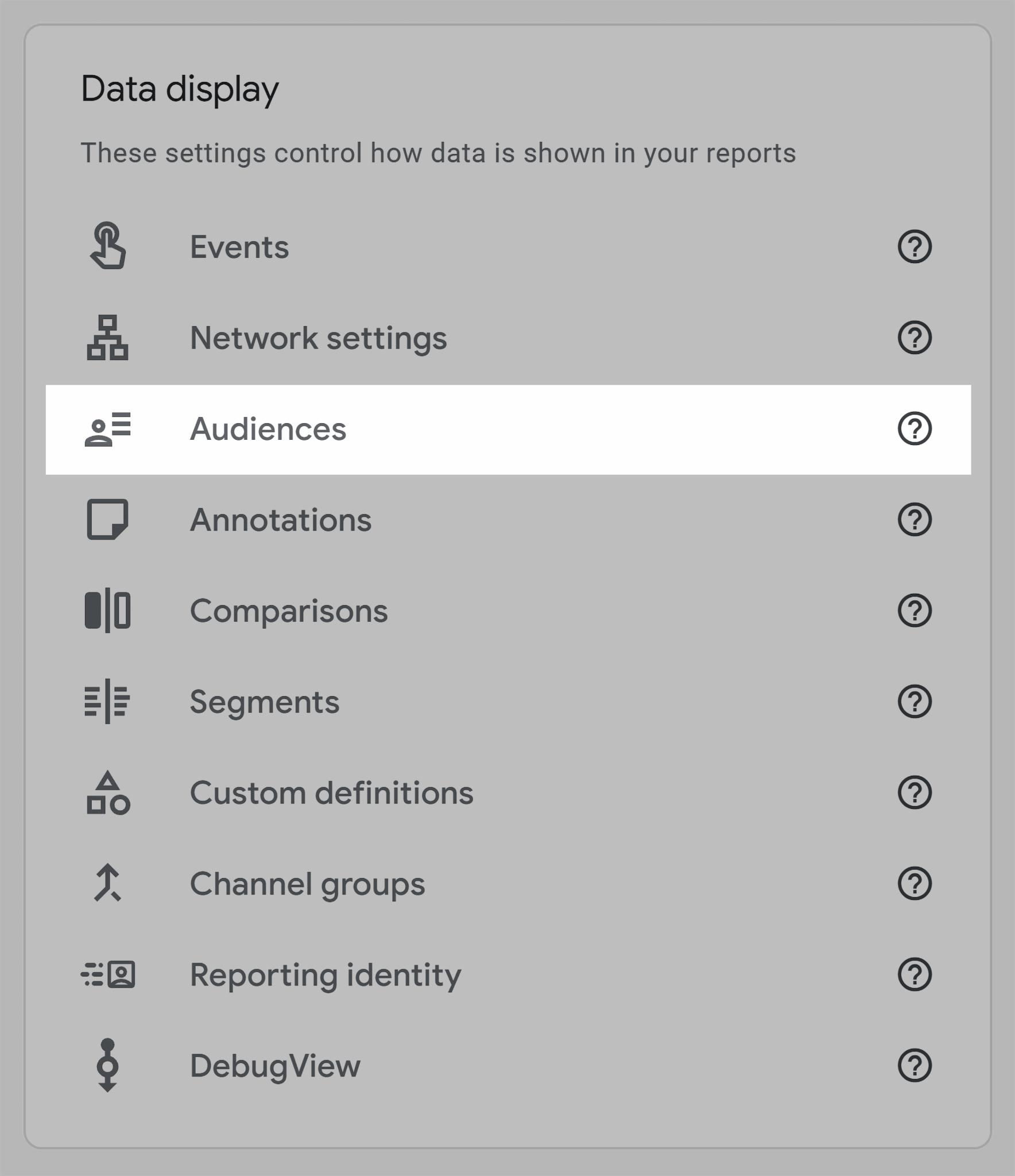
Next, “New Audience” > “Create a Custom Audience”
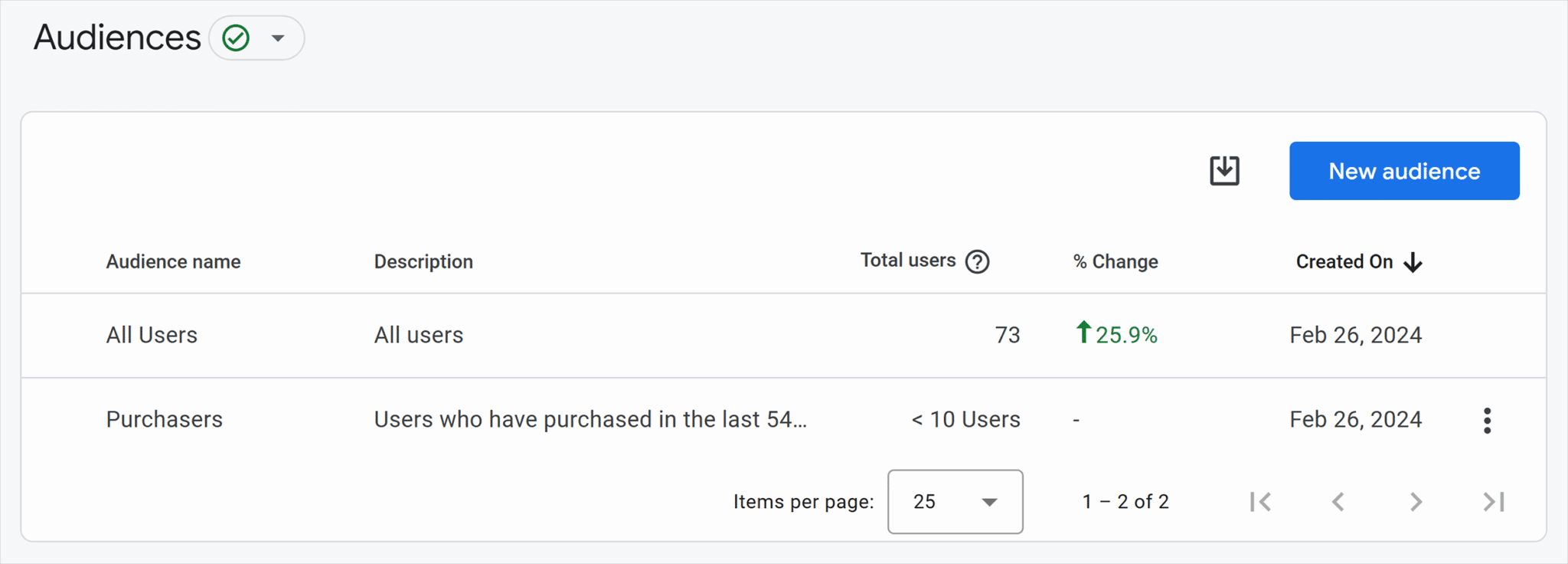
From here, you can create an audience based on desired actions, such as specific page views or events.
Here’s how to set up page views.
Click the dropdown “Add a new condition” > start typing “page path” > Click “Page path + query string” > Type in your URL (e.g., a view to a specific blog) > Set the time period to “True at any point in time”
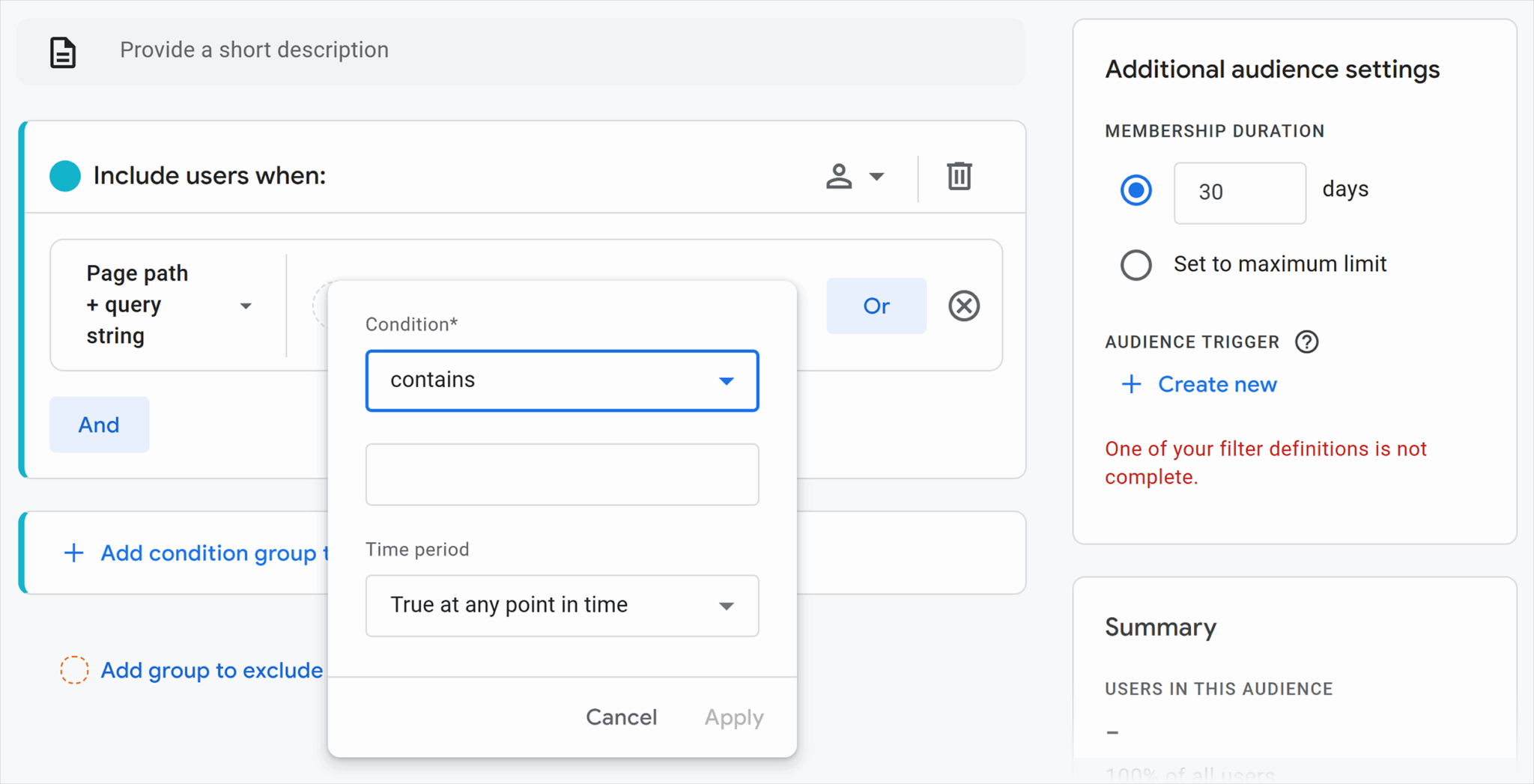
This setting will build an audience of people who have visited that specific page. The window on the right shows how large that audience might be.
You can add “AND” parameters to combine page views or events. For example, you can create an audience of people who have viewed a specific page AND downloaded a white paper.
Once you’ve created the audience, you can see it in the Audiences page.
PPC teams will be able to access that specific audience and send targeted campaigns.
For example, sticking with the example above, the person typing “How can I make SEO reporting easier?” and visiting a blog might engage with an ad that furthers their awareness of SEO reporting. Then, you might retarget this audience with an advertisement that shares a benefit of your SaaS product, such as streamlining reporting. An ad would typically include a call to action (CTA) and a reason to click it. In this example, a free demo for the SaaS tool might be enough to convert the audience.
Segmentation like this is powerful because it separates audiences based on behaviors and needs. The content helps you identify what specific users are looking for, and you create targeted offers that are irresistible to click.
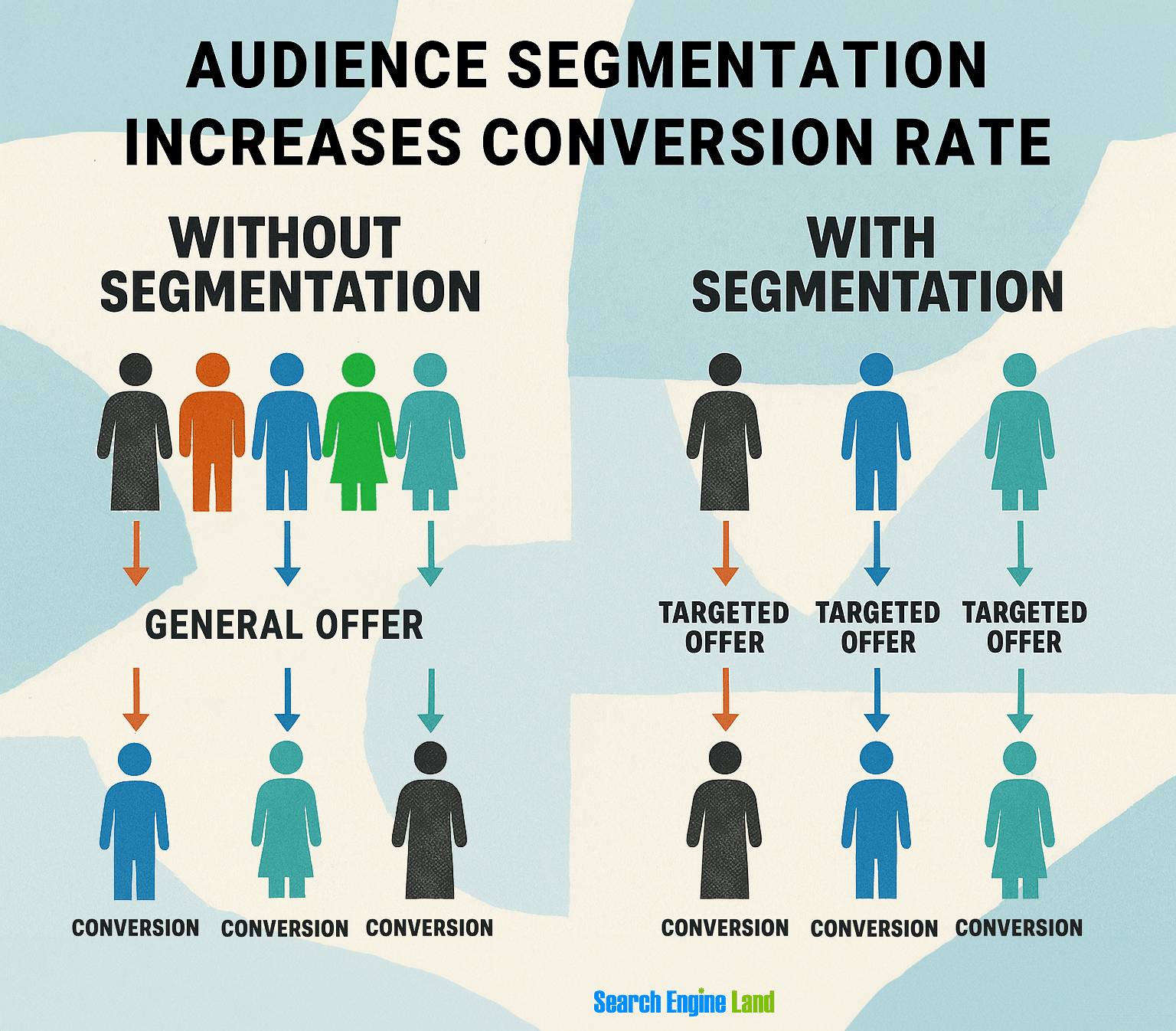
SEO reports need to “borrow” insights from paid teams; otherwise, this conversion is attributed to ads, when in reality it was the SEO and the marketing alignment that took a cold website visitor and turned them into a warm lead, a demo conversion, and a revenue potential.
Revenue
Revenue is the most important metric of all. It is the total amount of money a business earns from sales of products or services. It is what every director or business stakeholder cares about.
You must track revenue from SEO efforts.
In the sections above, we have covered how to do this, but to reiterate:
Tracking revenue from organic traffic
You must track revenue from organic traffic. GA4 is suitable for measuring revenue using various reports, such as the “Pages and screens: Page path and screen class” report which shows revenue by page.
Here’s how you find it:
Go to GA4 > Click “Reports” in the left menu > “Engagement” > Page and screens: Page path and screen class

The landing page report, which is the option below Page and screens: Page path and screen class in the menu, is also good for showing sales generated from SEO efforts. It shows which pages traffic entered the site on, and if a sale was made within that session, it records it on GA4.
If SEO requested the landing page, based on research and an understanding of user search behavior, then you can demonstrate that SEO is working for the business because people who visit pages created off the back of SEO research are continuing on to buy within the same session.
However, recording revenue on GA4 has two problems:
- It uses last touch attribution models, which means that SEO is only attributed with a sale if the user came directly from search. If a sale was made because of a word-of-mouth referral, which resulted in someone searching the brand name and converting, SEO gets the attribution, but it wasn’t really SEO in this case.
- It cannot show SEO-assisted sales. If SEO built the audience and online ads converted them later, the PPC team is attributed with the sale. This is why it’s important to do some manual work to identify SEO-assisted sales. BI platforms can help with multi-touch attribution, where all channels that contributed to a conversion are credited. More on these tools later.
SEO assisted sales
Tracking assisted sales is essential because it helps you build a better overview of SEO’s impact on sales.
An assisted sale is a sale that SEO efforts have contributed to, but didn’t close in the end. If SEO built the audience that PPC converted, make sure you build this into your report as an assisted sale. SEO deserves some of the revenue attribution.
The simplest way to report on these assists is to talk to marketing teams. Yep, simple cross-team conversations. As part of the reporting process, you need to get all voices heard to align on what’s working across channels.
Build trust across departments (Marketing, Product, Leadership) and align marketing teams
Your SEO report is an opportunity to align marketing teams and build trust across departments.
In many ways, especially in today’s hyperonline world, SEO is at the center of all marketing.
From what people search and keyword research, SEO has the insights into audience behavior, common queries, and challenges that brands can solve.
When you know what challenges your audience faces, you can create content and marketing campaigns to serve them. You can also share these insights with leadership and product development teams.
SEO is just one part of the marketing puzzle, and effective marketing combines efforts across the business.
For example, if Marketing has a goal to increase conversions from a specific audience, SEO should work with all marketing teams to achieve the goal.
Working together, you are able to create campaigns across channels that might look like this:
- SEO teams create content for a particular audience with a specific problem. For example, a SaaS company might attract marketing teams who want help with their reporting. This content builds an audience.
- PPC teams retarget audiences with messaging about streamlined reporting, money saved, and a free demo.
- Email teams nurture those who signed up for the demo with training, resources, and webinars.
- Sales teams reach out to demo-sign-ups and offer face-to-face value.
When you have a successful campaign, all of Marketing is contributing to its success.
Similarly, you might become aware of a common problem users are facing with the product as you analyze brand sentiment in AI tools. You might learn that there are some negative sentiments. When you discover issues like this, you can report them to the product development team, who can then resolve the problem.
Important note: Creating a robust SEO report requires some manual work and feedback loops within marketing teams. Not everyone needs to be involved in these conversations, and reports can be adapted for different stakeholders. There’s a section below on how to structure SEO reports for different audiences that covers this in detail.
Accountability tracking
Above, we mentioned accountability tracking in relation to qualified leads and whether or not sales are closing these leads.
Accountability tracking goes beyond leads and revenue.
For example, if SEO needs a particular web page to rank and gain traction for a specific keyword, then SEO might need to ask for resources from:
- Content writers and content marketing strategists
- Website designers
- Developers
If content writers aren’t available to write the content, or design and development teams are not prioritizing the SEO team’s requests, then the SEO team cannot work efficiently.
In an SEO report, you can note expected work for the month ahead, and if this isn’t completed, it can be flagged in the next report. You can talk about issues preventing productive work from happening with the broader team and strategize ways to resolve them in the following month.
Equally important, you can celebrate where you did hit your projected targets and keep the momentum going.
Done with grace and a conscientious team striving for marketing success, accountability tracking creates a healthy, productive environment for everyone.
Provide insights for decision-making, not just status updates
Many SEO reports show graphs with metrics like clicks up or down, and a sentence about the percentage increase or decrease month on month.
The problem with this?
It’s just a status update that doesn’t help its readers to make any meaningful decisions from it. There are no actionable steps.
What SEO teams can provide instead is a report that’s based on their analysis and with their expertise woven throughout.
You need to dig in and explain why there’s a decrease, or celebrate the increase and explain why it happened for other stakeholders.
When you connect the dots, you:
- Help stakeholders see what’s happening, why, and what it means for the business, which helps earn their buy-in and engenders respect for both your marketing channel and for you as a specialist.
- Process data and make recommendations that you’re confident in. If you take actionable next steps that capitalize on the win or turn negative outcomes into positive next steps, you’ll maintain momentum for yourself and your team.
Highlight opportunities and risks
When you’re taking the time to analyze data as you create reports, you’re putting yourself in the best position to see and capitalize on opportunities while detecting risks as early as possible.
For example, if clicks dropped and you reported on the status only, you might report that clicks are down 50%. However, if you take the time to analyze the data and provide a rationale, you might be able to identify an underlying issue. For example, a technical issue might be causing your best pages to drop out of the index. That’s something you can fix.
These issues show up in your SEO report first, and, if you catch them early, you can act before the problem gets bigger.
Core metrics and key performance indicators (KPIs) for SEO reports
The metrics you report on and the KPIs you choose for your SEO reports largely depend on your business, its objectives, and the work that sits within SEO’s remit. The SEO role is increasing, and for many, includes traditional search as well as AI search. Sometimes, SEO specialists are also responsible for social media search. The roles and responsibilities of SEO are less linear than they used to be, so reporting will vary depending on the SEO team’s accountability.

Here are some metrics that SEO teams might report on.
Visibility and rankings
Think of visibility and rankings as a status update. They’re not metrics suitable for decision-making, but tracking visibility and rankings is still helpful; it provides a broad overview of what’s happening on a site and can help you detect issues.
For example, if clicks suddenly drop, there might be a technical problem.
Here are some key metrics:
- Keyword performance tracks how well your target keywords are ranking in search engines, including positions and clicks. Rankings are the first sign that your SEO efforts are paying off and a prerequisite for conversions. Track keywords by position, and if you’re using a keyword positioning tracking tool, use tags. You can tag keywords by intent so your most important ones (the commercial and transactional keywords) are reported on separately, since they’re the keywords that make money for the business.
- Monitoring search engine results page (SERP) features tracks your visibility in search elements beyond traditional blue link listings. For example, AI overviews, local packs, and People Also Ask. SERP features matter because these features are more engaging than a traditional link. Getting visibility in AI overviews is also highly desirable since AI search is predicted to surpass traditional search in a few years, and AI overviews feature prominently above organic listings.
- Share of voice measures how much visibility your site captures compared to competitors for a defined set of keywords or a topic. It’s important because it shows your presence in the market and indicates your brand’s authority on a subject.
Traffic quality
It’s one thing to earn a click, but it’s another to earn a click from quality traffic. Quality traffic refers to site visitors who are engaged with your website by visiting multiple pages, triggering events, or converting.
Signals of traffic quality include:
- Organic sessions measure the total number of visits from organic search. It shows how much traffic SEO is generating, and isn’t confined to new users on a website, but also returning visitors. Visitors who come back to your site are engaged.
- Engagement metrics look at how visitors interact with your site. An engagement in GA4 includes a session that lasts longer than ten seconds, includes a conversion event, or has at least two page views.
- Branded vs non-branded query reports compare how much of your traffic comes from people already searching for your brand name versus those discovering you for the first time. This distinction is key to showing whether SEO is driving new audience growth or primarily capturing existing demand. Capturing branded search is excellent, but SEO has an important role in capturing interest from non-brand search.
Conversions & revenue
As mentioned above, SEO reporting has to connect to outcomes that impact the business. By tracking conversions and revenue-related metrics, you can show stakeholders the real return on SEO efforts.
- Assisted conversions measure when SEO played a role in the customer journey, even if the final conversion came through another channel. They highlight SEO’s influence across multi-touch journeys.
- Pipeline influence shows how SEO contributes to opportunities in the sales pipeline, not just top-of-funnel leads. This is especially important in B2B, where deals often involve long cycles and multiple touchpoints.
- Return on Investment (ROI) calculates the revenue generated from SEO compared to the cost of SEO activities. It’s the most straightforward way to demonstrate the value of SEO to executives making budget decisions.
Further reading: The ROI of SEO: How to Measure SEO ROI (with Formulas)
Technical health
A website’s technical foundation determines how well search engines can crawl, index, and serve your content to users. Reporting on technical health makes sure SEO performance isn’t held back by site errors, speed issues, or accessibility problems.
Reporting on technical health can help detect early problems.
Common things to report on include:
- Crawl stats: These show how often and how efficiently search engines are crawling your site. Monitoring this helps you catch issues like crawl bottlenecks, server errors, or index bloat, which wastes crawl budget on low-value pages.
- Core Web Vitals: These measure user experience signals like loading speed, interactivity, and visual stability. A slow site could be a sign of a technical problem, or even an issue with the hosting.
- Index coverage: Index coverage tracks which of your pages are successfully indexed in search engines. It helps you spot problems like important pages being excluded or thin/duplicate content being over-indexed.
- Structured data: This is code added to your site that helps search engines understand your content and display rich results like FAQs, reviews, or product details. Reporting on structured data is important because it can improve visibility in SERPs, boost click-through rates, and highlight errors that may prevent your site from appearing in enhanced search features.
Your technical SEO can have a surprising impact on SEO generally.
For example:
- A tidy, technically healthy site increases your chances of content being discovered by bots and indexed so that searchers can find it.
- Structured data increases your chances of appearing in rich results and helps Google contextualize what a page is about.
- Speedy sites are widely preferred by users and might help you clinch a higher rank compared to a slow site. Plus, Google bots can navigate fast websites more efficiently.
- Good technical SEO practices are a sign of an authoritative and safe site, which builds trust and E-E-A-T signals.

Content performance
You must report on content performance in your SEO report. It is very much at the heart of SEO. You can report on content performance simply in terms of clicks and impressions.
But, it’s best to take it a step further and consider:
- Top-performing pages that highlight which URLs bring in the most traffic, leads, or revenue. This helps you double down on what’s working and showcase clear wins to stakeholders. If a landing page requested by SEO is being used by Marketing and working, it needs to be reported on, and a portion of all sales attributed to SEO efforts.
- Link equity flow shows how internal links (and backlinks) are distributed across your site. Reporting on this helps ensure that authority is passed effectively to the pages that matter most. If you identify pages with few links, you might use this report to set tasks to add links in the following month.
- Decay analysis tracks when previously strong pages start losing traffic or rankings. Spotting this early allows you to refresh or optimize content before visibility drops too far.
Important note: Content decay, in terms of reduced clicks, may be due to SERP features changing and the AI overviews being present. When AI overviews fulfil search intent, searchers don’t always click through to a website. This is called a zero-click search. It’s important to establish why clicks declined because if AI overviews are present, it’s unlikely that optimizing content will help you get more clicks.
How to structure SEO reports for different audiences
From the details provided above, it’s clear that SEO reporting can be a lot, and it’s important to balance getting the information you and stakeholders need without creeping into overwhelm.
The first step in creating reports is to establish what everyone wants to see.
There is no time more poorly spent than on reports that no one reads or understands. It might surprise you what different teams want to see, so don’t just assume. Instead, ask.
Not only is structuring your SEO reports helpful for managing who sees what and when, but you should also create a process that streamlines your reporting process and allows you to come to the table with the most accurate information.
For example, reporting can be done with this process:
- Step 1: SEO teams (and other marketing teams, and sales) gather their data that’s important to them.
- Step 2: Key teams meet to discuss findings from the data. This meeting is an opportunity for Marketing and Sales to align their stories and data takeaways, ready for key stakeholders.
- Step 3: Reports are finalized with the data and a holistic overview of what has been achieved between marketing teams and across campaigns.

This process empowers all teams with data and findings across Marketing. It enhances marketing reporting because it guarantees you’ll present findings to stakeholders confidently and in alignment, which builds trust within stakeholder groups, and that you’ll all be ready for most questions that come your way.
Here are some ideas of what stakeholders might like to see:
- Technical teams need to know where there are issues that must be resolved. Their reports might include details like crawl data, site speed, indexation errors, and structured data. You can use tools to automate reports to tech teams so issues could even be resolved ahead of your report, meaning your reporting on problems resolved, rather than problems that exist. More details on tools later.
- Regional and local teams need data specific to their area. Consider geo-specific performance, local SEO insights from Google Business Profile, and increased visibility within specific locations.
- Marketing leadership needs to hear about marketing alignment from all teams. And it helps if someone can do the thinking and processing of information for business managers. This is why step two, key teams meeting, of the process outlined above is important. You should share campaign alignment, content performance, and multi-channel impact with marketing leaders.
- Executives (C-Suite) are generally looking for high-level KPIs, ROI, and competitive benchmarks.
Tools and platforms for SEO reporting
Many tools enhance, or even automate, the SEO reporting process.
Some essential (and free) tools and platforms include:
- Google Search Console (GSC) provides direct data from Google on how your site performs in search, including clicks, impressions, keyword rankings, crawl stats, and index coverage.
- GA4 tracks user behavior on your site, including sessions, engagement, conversions, revenue attribution, and other key metrics.
- Looker Studio is a free dashboarding tool that integrates with GSC, GA4, and other data sources to create automated, shareable reports. It’s an excellent tool for automating reports. If you’re still screenshotting graphs and findings manually, consider giving Looker Studio a try.
These tools are a must-have in the SEO reporting process. They’re free to use, loaded with data, and unlike third-party SEO platforms, GSC provides actual data, from Google, about your website. Although it’s not perfect and doesn’t provide everything, it is probably the most reliable tool you can use to monitor your SEO success.
Popular SEO platforms include:
- Semrush is an all-in-one SEO platform offering keyword tracking, competitive analysis, backlink audits, and site health monitoring. This tool can be used for basically everything and automates reports, too. Technical issues can be emailed directly to technical teams every week and treated like a task list.
- Ahrefs is best known for its backlink database and keyword research tools. Its API can be used to automate reporting.
- Sistrix is a visibility-focused platform that tracks keyword rankings, SERP performance, and competitor benchmarks.
These platforms can do a lot within a single tool, and they’re beneficial for filtering and refining data and creating reports. For example, in Semrush, you can track specific keywords, including the visibility and SERP features.
Enterprise business intelligence (BI) integrations include:
- Tableau is a powerful data visualization tool that turns complex SEO and business data into clear, interactive dashboards.
- Power BI is Microsoft’s platform that integrates easily with enterprise systems like Dynamics and Excel. Ideal for those who want to blend SEO data with sales, finance, or operations.
- BigQuery pipelines are Google’s data warehouse solution that stores and processes very large datasets, often used as the backend for enterprise reporting.
These tools connect SEO data with wider business datasets like sales and CRM, to give executives a single source of truth. Instead of SEO reporting in isolation, BI tools let you show how organic search influences revenue, pipeline, and overall marketing performance.
AI in SEO reporting
There’s no doubt that AI is beneficial in SEO reporting, but you must balance AI usage with manual research, analysis, and processing. Over-reliance on AI can remove the human element from reporting, which is a mistake because you need to do some analysis to process data effectively.
AI might also miss nuance. For example, a sudden increase in indexed pages might appear as a positive, but a manual analysis might reveal a problem, such as high numbers of low-value content being indexed.
Here are ways you can use AI to enhance SEO reporting, without losing your valuable insights.
Semrush AI SEO toolkit
AI SEO toolkits are quickly becoming a critical part of SEO reporting, particularly as AI search is expected to surpass traditional search by 2028.
Semrush AI SEO toolkit provides insights into AI performance using natural language. The AI-powered recommendations the tool offers for increasing visibility are well summarized and prioritized, so you know what can be done now, what requires considerable effort, and what might have a positive impact.
Anomaly detection helps you spot potential issues fast and before they become a huge problem.
And you can track key metrics like brand performance and share of voice within AI tools.

AI-assisted dashboards and AI within tools like GA4
AI-assisted dashboards enable you to query data in plain language and receive a specific report, eliminating the need to navigate to a report and spend time filtering it to obtain the correct dataset before analysis.
For example, you ask GA4, “Which landing pages lost visibility last month?” and the insights tool will tell you in natural language and provide the supporting data.
Automated report generation
Instead of typing up your insights each time, you can use AI to analyze the data and provide an overview for your report. This information will be useful, but it will lack nuance and storytelling, and of course, it won’t really be able to apply data analysis to wider marketing goals and campaigns. You still need to do some work on the analysis and content.
Another practical use case is meeting transcripts.
For example, if you’ve completed step two of the reporting process outlined above and met with your marketing teams to discuss the stories behind the data, you can use AI to analyze a meeting transcript and extract all of the key insights for you.
That can save a lot of time.
The AI will synthesize key points from the meeting and generate a decent report from that. No one has to type the meeting minutes. Plus, you’ll come away with the essential points stored in the AI tool of your choice (Sybill AI is a good one). There’s no risk of forgetting important insights.
Important note: while AI streamlines the SEO reporting process, you must be responsible. Fact-check outputs and layer human oversight throughout the report. A report compiled entirely from AI will lack depth and nuance, and AI is always at risk of misinterpreting context.
Predictive analytics
Predictive analytics uses historical data and market trends to forecast traffic, conversions, and even revenue. This can be especially powerful when setting expectations with stakeholders.
For example, sales teams often use predictive analytics functionality as part of their CRM. Predictive analysis uses previous data, like the behavior of similar leads who convert, to forecast how the current pipeline might convert. Sales teams can use AI to help score leads and predict their likelihood of closure based on a range of factors, like user behavior.
Instead of simply reporting on what happened last month, you can show what’s likely to happen next quarter based on patterns.
These forecasts aren’t guarantees, of course, but they can help leadership to plan budgets, campaigns, and resources with more confidence.
They also position SEO as a forward-looking, strategic function, rather than one that only reports on the past.
Common mistakes to avoid in SEO reporting
Throughout this article, we’ve covered what SEO reporting must do, and by comparison, things it should not, but some of the most common mistakes are outlined here for further clarity.
Do not:
- Overemphasize rankings instead of outcomes. Rankings are important, and you must keep an eye on this data, but tangible business outcomes like leads, conversions, and sales or revenue are what matter.
- Drown stakeholders in data without insights. Your report is a dialogue between you and stakeholders. Don’t leave data processing to stakeholders. You need to process it and tell them the insights. This will help them see your value, keep them focused on the metrics and points that matter, and help you secure future investment.
- Create reports without context. Reporting numbers without competitive benchmarks and insights is meaningless to stakeholders. A traffic dip might be alarming until you see that AI overviews are present and serving search intent, reducing the need for people to click through to your site. How you move forward from this challenge is what matters.
- Inconsistent cadences (or skipping or changing reporting schedules) make it harder for stakeholders to trust the process, and reports lose credibility. You must report on the same datasets. For example, if you report month on month, do this every single time, even if the results are not in your favor. Consistency builds confidence and keeps SEO tied into regular business planning.
Track, optimize, and win in Google and AI search from one platform.
Make SEO’s business alignment unmissable for your teams
SEO reporting isn’t just a list of details, or even just an insight into performance; it’s so much more than that.
SEO reporting is your opportunity to share your perspective with stakeholders, prove impact and value, secure buy-in, and guide smarter decisions. Remember to:
- Align your content strategy with your business objectives so you know which outcomes to report on. This practical guide to content strategy details how to align content with business objectives with a step-by-step-guide.
- Work closely with other marketing teams, especially paid media. This article, Why SEO and paid media need each other in the AI search era goes into detail about collaboration.
- Talk to stakeholders about what they want to see in reports. This article SEO stakeholders: Align teams and prove ROI like a pro teaches you how to align with stakeholders, and handle challenges.
Ready to create reports fast, wow stakeholders, and future-proof the search landscape with AI recommendations and insights? Try Semrush for free.
Explore more on
Editorial disclosure
Search Engine Land is owned by Semrush. We remain committed to providing high-quality coverage of marketing topics. Unless otherwise noted, this page’s content was written by either an employee or a paid contractor of Semrush Inc.
About the author