SERP features: Types, benefits, and how to rank

SERP features are an SEO’s dream.
Why?
Because they bring enhanced visibility for brands and provide additional ranking opportunities through enticing listings on the search engine results pages (SERPs). For talented SEOs who know how to win these SERP features, this means more clicks and more traffic.
There are over 40 types of SERP features (aka search features), and in this article, we cover the most important SERP features and share tips so you can optimize your site to win them.
To get the most out of this article, read the whole thing, then return to the SERP features you most want to rank for. Each SERP feature has a bullet list of tips to help you win it. However, the best practice is to integrate as many tips as possible because they’re generally all great for SEO.
What is a SERP feature?
A SERP feature is a result on Google’s search engine results pages that is not a traditional organic listing (a blue link).
SERP features provide enhanced listings and improve user experience, often providing direct answers within the SERP or additional information, such as review stars.
The SEO toolkit you know, plus the AI visibility data you need.

What are the most important SERP features?
The most important SERP features enhance your listings and drive business goals, such as increased clicks and organic traffic.
Below, we’ve reviewed the most commonly seen SERP features that are valuable to win placement in, providing an example and a description for each.
AI overviews
AI overviews take prime position at the top of SERPs and provide AI-generated answers to search queries. AI overviews gather information from sources across the web and use generative AI to summarize findings and cite sources.
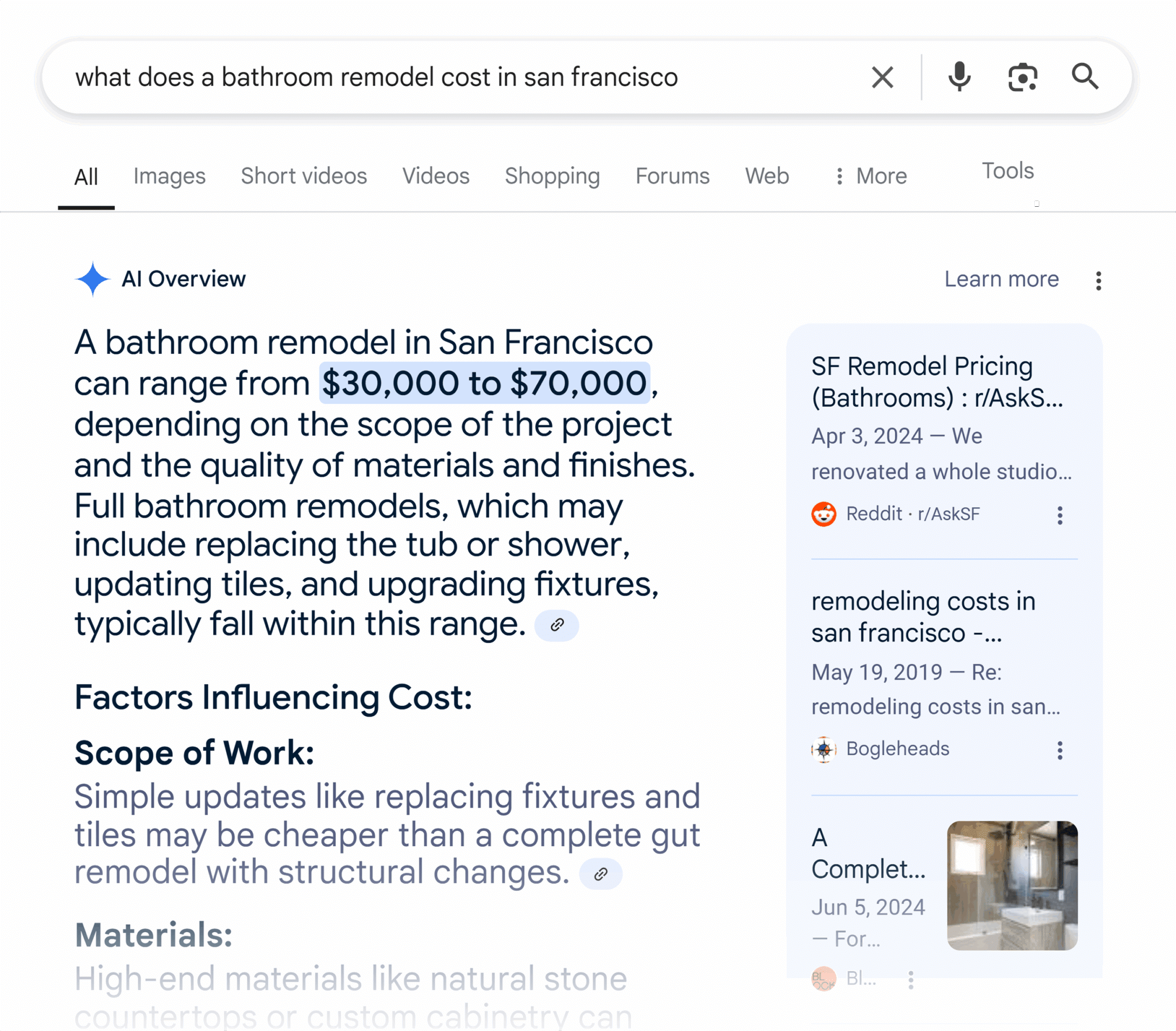
If AI overviews are present, a user may not need to visit a website because the overview fully answered their query. This is known as a “zero-click search.” Currently, AI overviews appear mostly for informational queries. For example:
- What is…
- Best time to…
- How to…
Despite their negative impact on organic traffic numbers to websites, AI overviews are still powerful for brands.
Why?
AI overviews:
- Put your site at the top of Google’s search results
- Feature your brand as a trusted and cited source
- Can result in multiple listings (In the example above, you can see that Search Engine Land appears twice.)
To optimize for AI overviews, follow these tips:
- Structure your content clearly
- Use ordered/unordered lists
- Target question-based and intent-rich keywords
- Answer questions concisely
- Format questions and answers using headings and body text
- Optimize for long-tail keywords
Further reading: Will Google’s AI Overviews kill the click? and Google shares 8 ways to be successful with AI Search experiences
Featured snippets
Featured snippets appear at the top of SERPs but under AI overviews. Featured snippets are sometimes called “rank 0” because they’re placed above the first organic ranking.
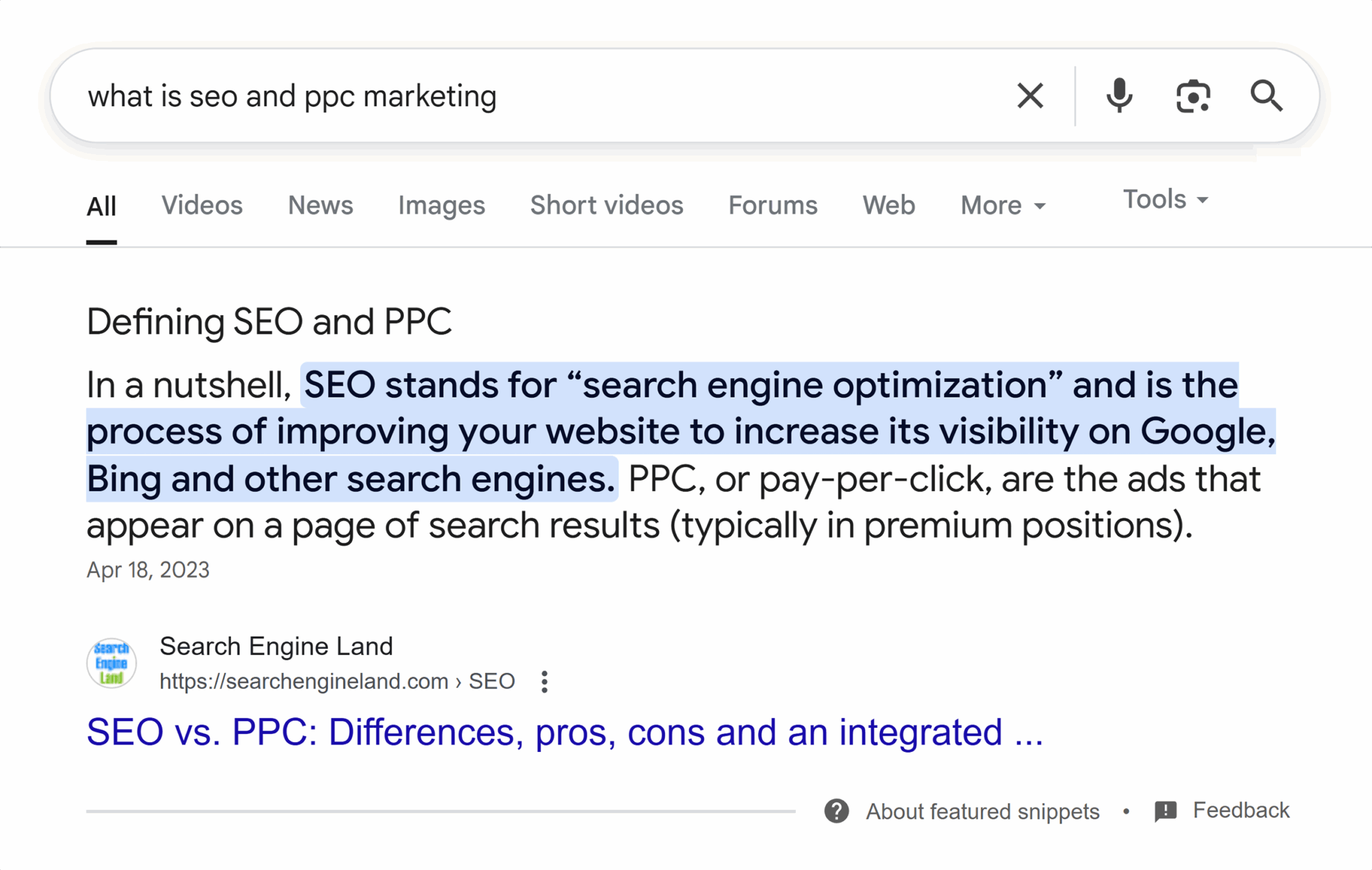
Unlike AI overviews, featured snippets do not use generative AI. Instead, featured snippets pull an excerpt from a webpage that best answers the search query and display it on the SERP verbatim.
Here’s the content displayed in the featured snippet pictured above as it appears on the source webpage. It is identical.

AI Overviews can fully replace the featured snippet. As seen in the chart below, featured snippets appear less frequently since their implementation.
Here’s what traffic from featured snippets looks like for one website:

Now compare that to traffic from AI overviews for the last year:

To optimize for featured snippets, follow these tips:
- Structure your content clearly
- Use ordered/unordered lists
- Embed key information in tables
- Target question-based and intent-rich keywords
- Answer questions concisely
- Format questions and answers using headings and body text
- Optimize for long-tail keywords
- Maintain a clear, shallow site architecture
- Improve page authority
People Also Ask
People Also Ask (PAA) is an accordion-style SERP feature that displays questions and answers related to the search query. Generally, PAA appears high in the search results after the first organic listing but can be displayed anywhere throughout the SERPs.
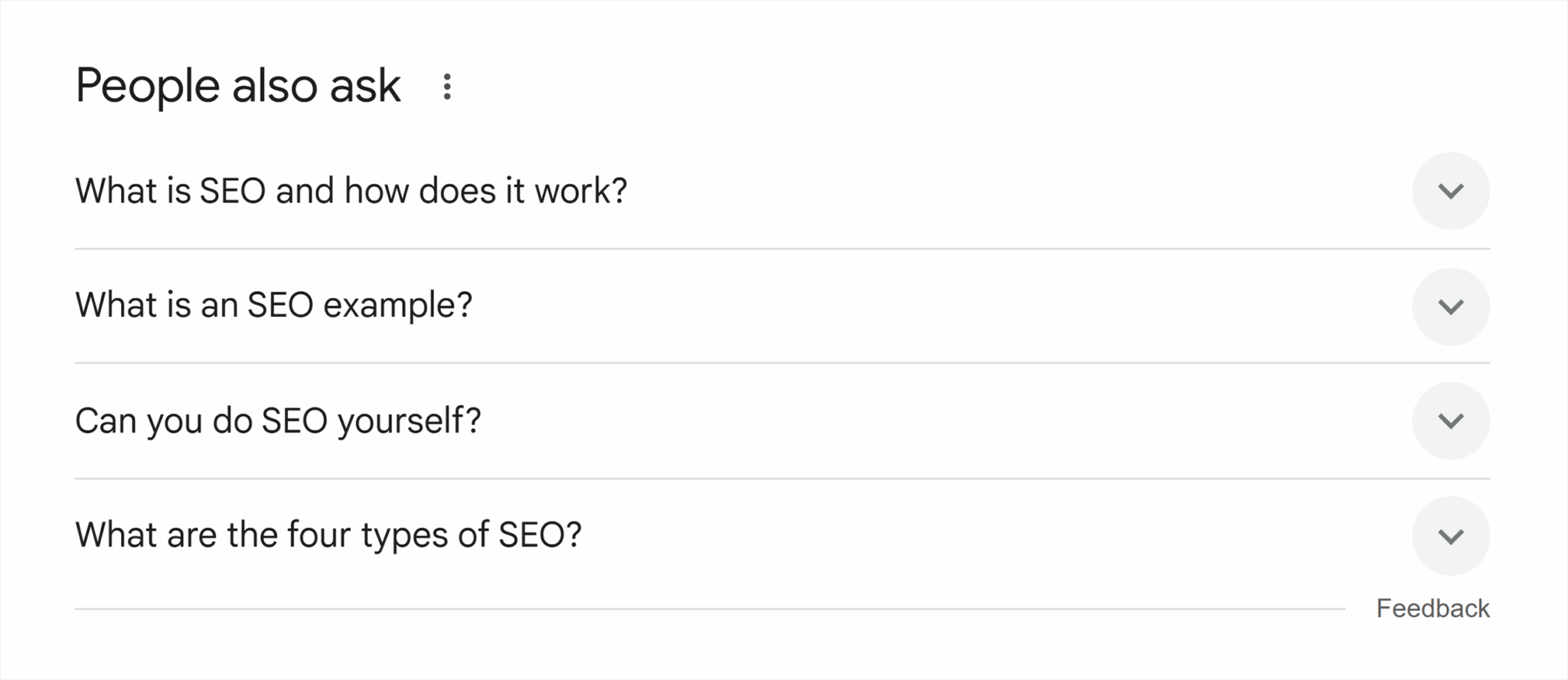
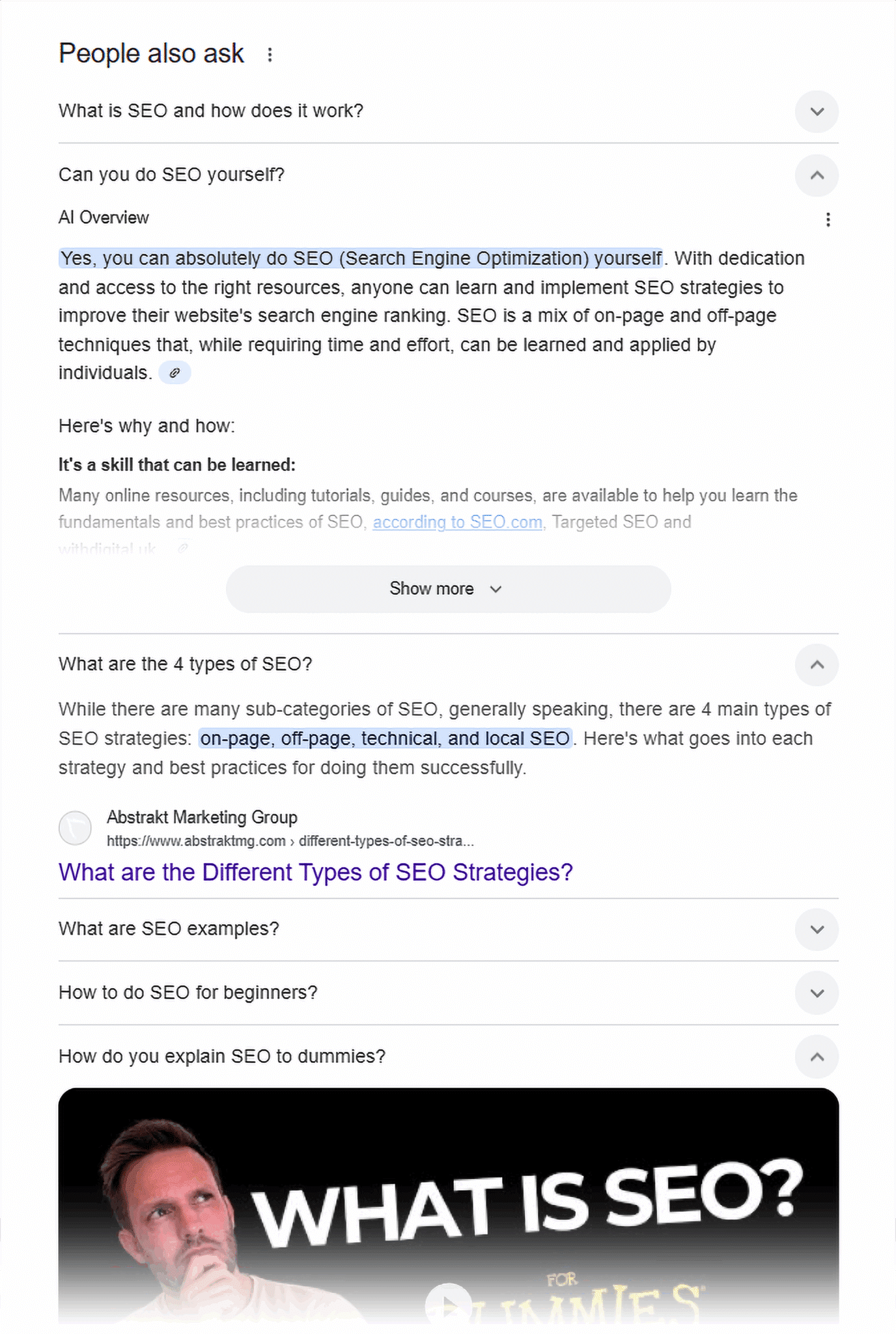
Within People Also Ask, Google displays answers to questions in different formats, including:
- AI overviews
- Featured Snippets
- Videos
The image below shows each of these formats.
To optimize for People Also Ask, follow these tips:
- Structure your content clearly
- Answer questions concisely
- Format questions and answers using headings and body text
- Optimize for long-tail keywords
- Target question-based and intent-rich keywords
- Use schema markup
- Maintain a clear, shallow site architecture
- Improve page authority
Knowledge panels
A knowledge panel is a SERP feature that displays information about entities such as people, organizations, things, or places.
This information can include:
- Facts and data about the entity
- Key information, like birth dates, founding dates, job titles, and more
- Authoritative sources related to the entity, such as Wikipedia and social media profiles
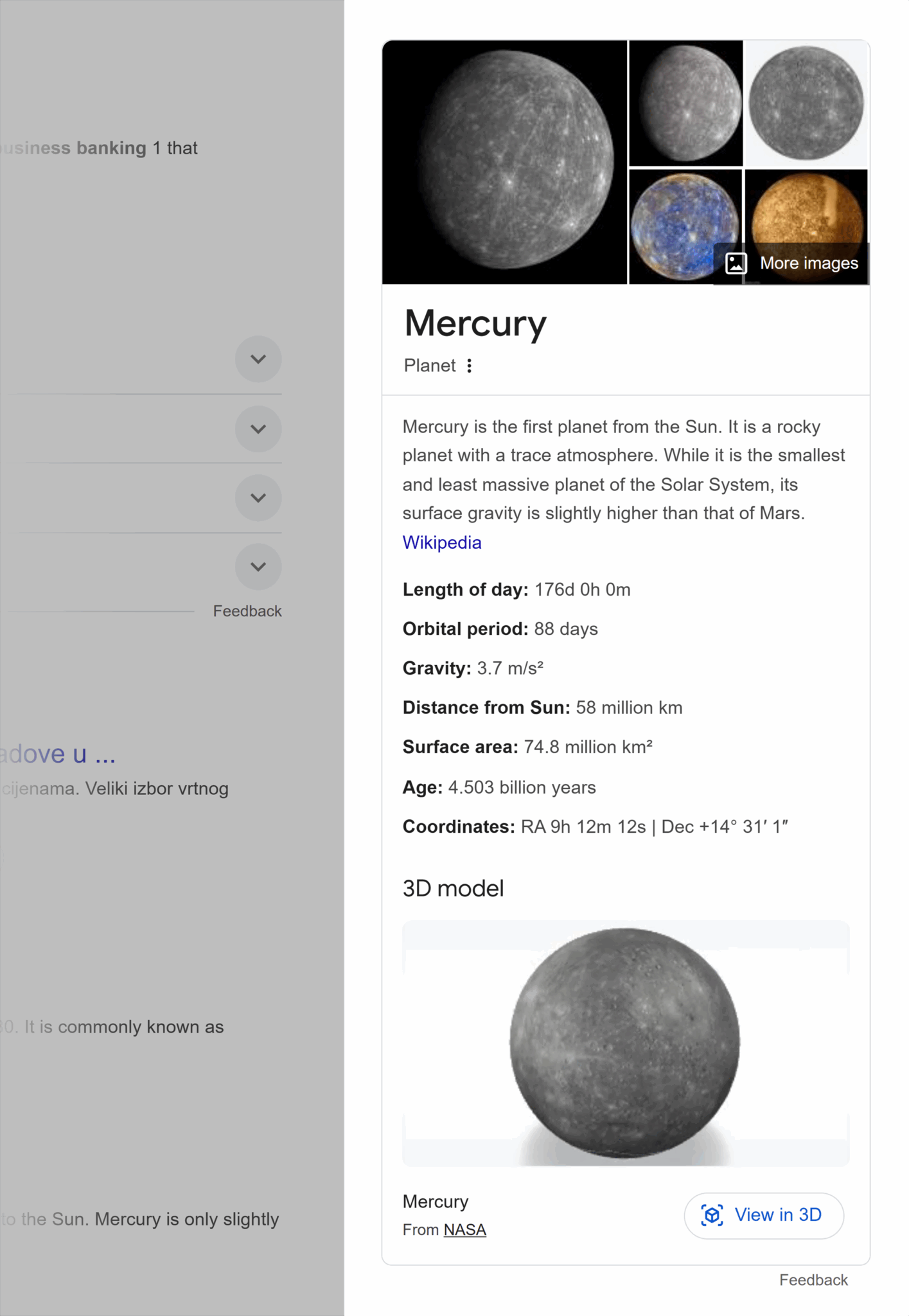
The knowledge panel typically appears on the right-hand side of desktop search results and at the top for mobile.
Above, the knowledge panel for “Mercury” (categorized as a “thing” for these purposes) displays data about the entity and is on the right side of the SERP.
Knowledge panels can vary in appearance and format. Here are some more examples.
“Person” knowledge panels include biographical information, notable works, images, and more.

“Organization” knowledge panels include brand names, industry, description, key people, founding dates, and more.
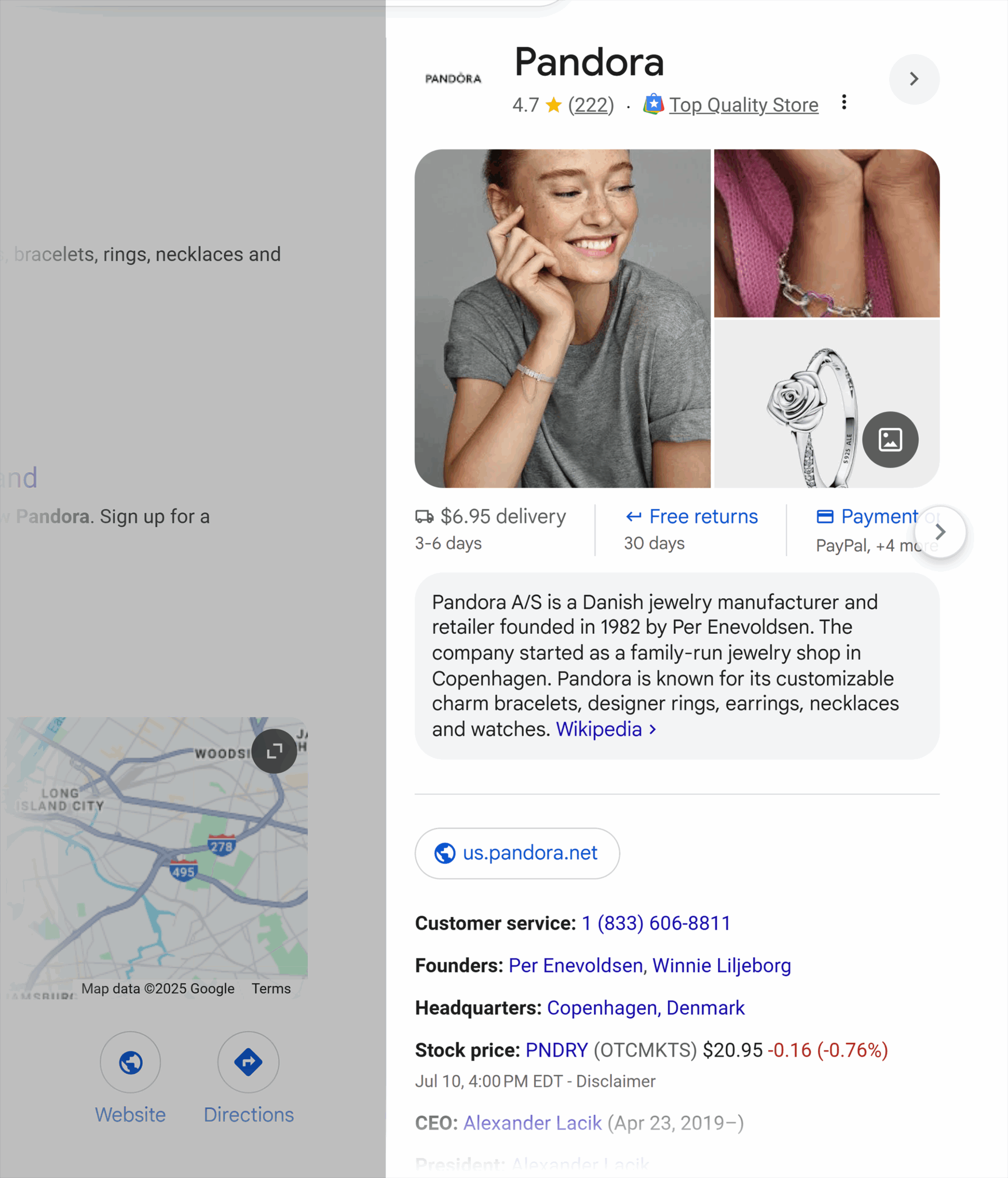
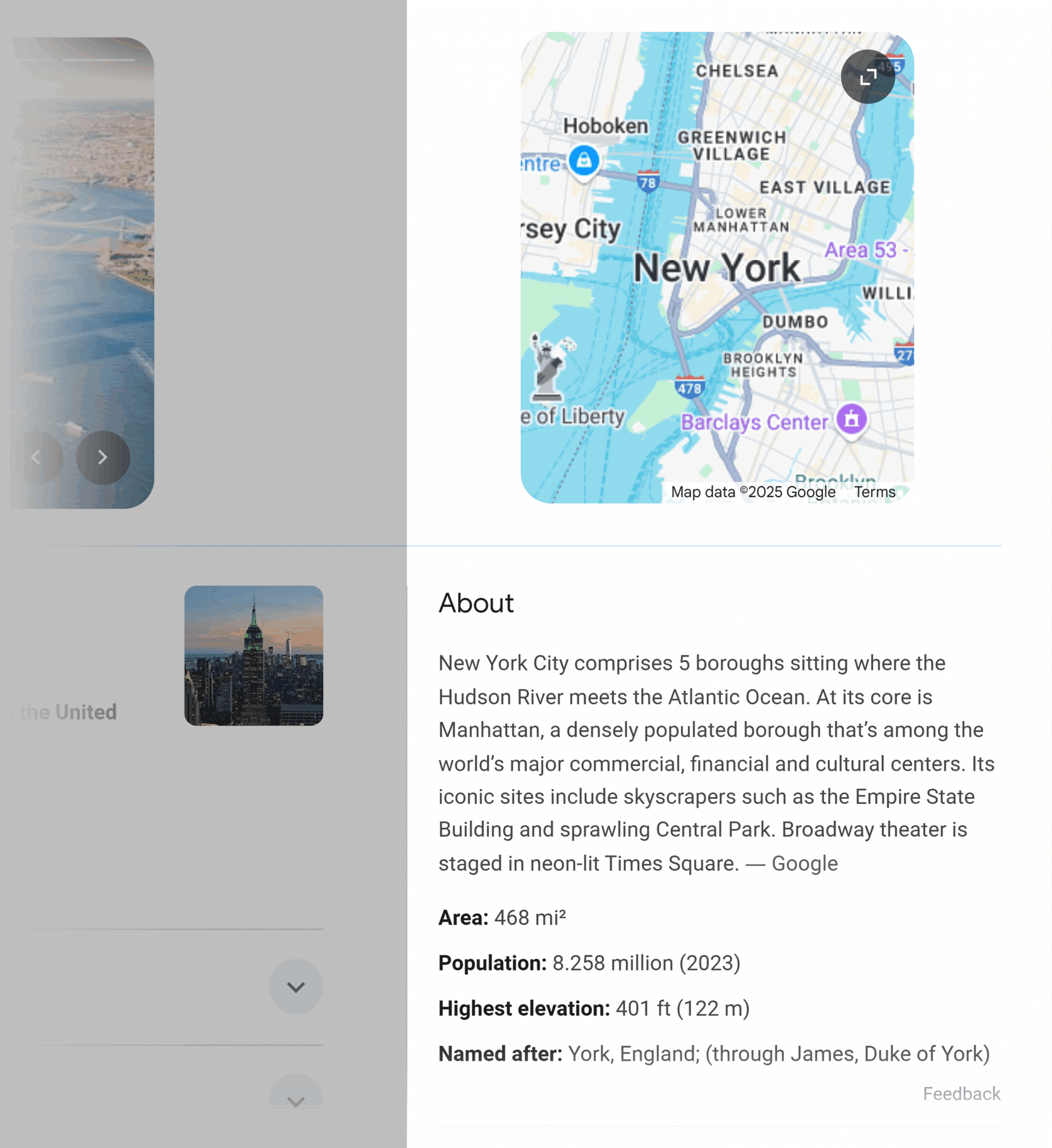
“Place” knowledge panels include a description, data, images, a map, and more.
Further reading: How to optimize your company’s Google knowledge panel
It’s easy to confuse knowledge panels with Google Business Profile listings or local packs.
To help differentiate a knowledge panel, here’s a quick look at a Google Business Profile as it would appear on a SERP.

Google Business Profile (GBP) listings are not SERP features, though they could influence your knowledge panel (more on that in the Google Business Profile tip below). GBPs appear on the right-hand side of Google SERPs (like knowledge panels do) when you search for a particular company or place.
Unlike with knowledge panels, businesses have more control over the information displayed in a Google Business Profile listing. Business owners can claim their listing and input the information that displays on Google.
There are some things businesses can’t control, such as reviews and the “people also searched for” section. The public can also make suggested edits to Google business listings.
Any business or place can create a Google Business Profile as long as customers can either make in-person contact or visit a physical location during specified hours of operation.
Further reading: How to set up and optimize your Google Business Profile and How to optimize your company’s Google knowledge panel
To optimize for knowledge panels, follow these tips:
- Use schema markup
- Validate schema with Google’s Rich Results Test
- Optimize Google Business Profile
- Maintain a clear, shallow site architecture
- Improve page authority
Local pack
The local pack SERP feature (also called the map pack or snack pack) is a location-based search result. This SERP feature includes places that are:
- Related to the search query
- Near the physical location where the search was made
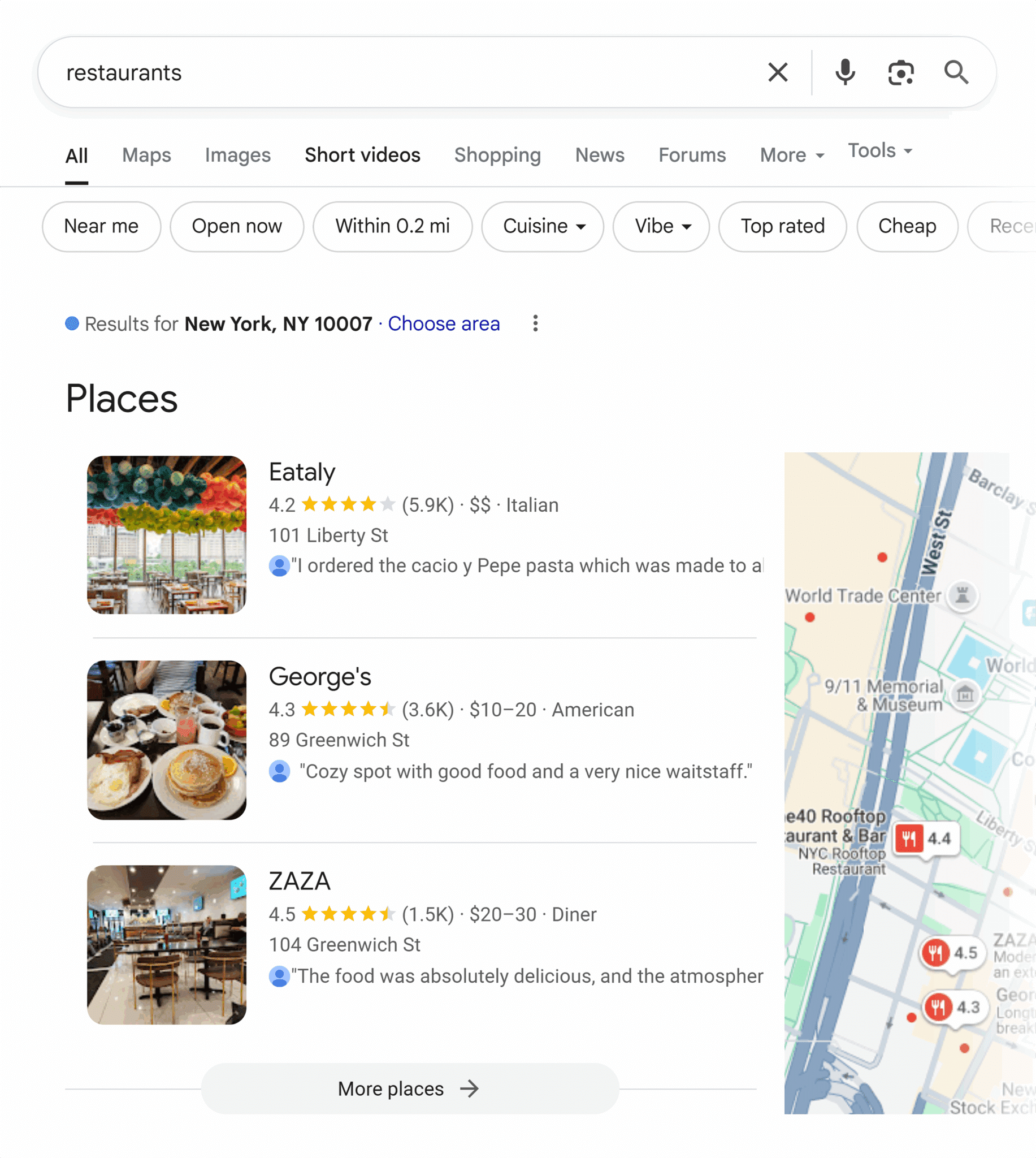
The goal of the local pack is to help people find and navigate to a place that fulfills their search query, like finding a restaurant when searching “food near me” or the local supermarket when searching “grocery store.”
Local packs appear for searches with commercial intent: the searcher is ready to purchase in person and in the local area. Successful local SEOs keep an eye on local pack performance.
Further reading: Google Maps + Local Search rankings are NOT the same
To optimize for the local pack, follow these tips:
- Use high-quality images and include alt text
- Use high-quality videos
- Use schema markup
- Optimize Google Business Profile
- Maintain a clear, shallow site architecture
- Improve page authority
Shopping and popular product results
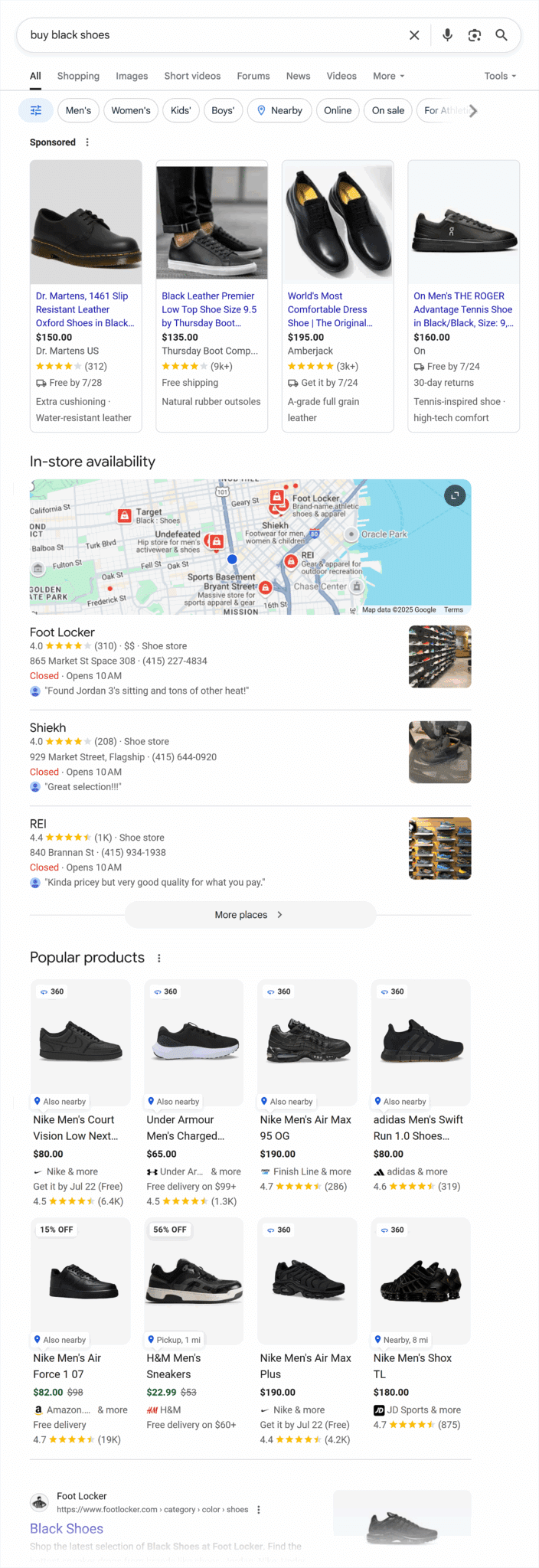
Shopping results are SERP features that display products, prices, and ratings. If you’re an e-commerce store, you’re paying attention to these.
It’s easy to confuse the “popular products” organic SERP feature with the sponsored ads. In the example below, the sponsored ads are at the top while the organic popular products feature appears below the local pack.
To optimize for the shopping and popular product results, follow these tips:
- Structure your content clearly
- Embed key information in tables
- Optimize your title tags
- Manage internal links
- Optimize for long-tail keywords
- Use high-quality images and include alt text
- Use high-quality videos
- Use schema markup
- Validate schema with Google’s Rich Results Test
- Submit a product feed via Google Merchant Center
- Optimize Google Business Profile
- Maintain a clear, shallow site architecture
- Improve page authority
- Monitor the SERP feature landscape regularly
Video SERP features
There are three types of video SERP features:
- Video SERP features appear next to traditional organic listings
- Video carousels feature multiple videos in one place
- Featured videos showcase one video at the top of the SERP
Here are examples of each video SERP feature.
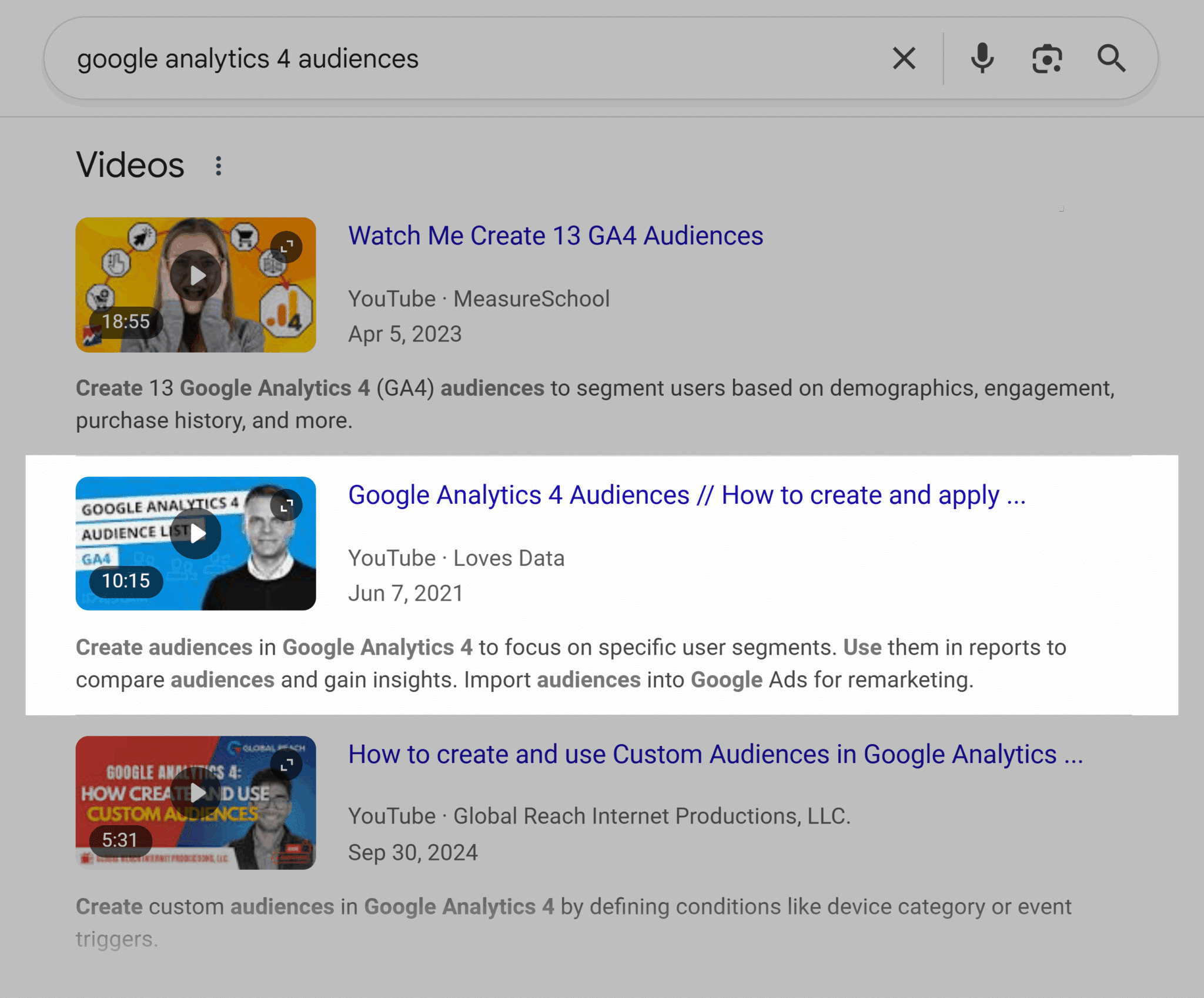
Video listings appear within the traditional, blue-link organic search results. On desktop, a video thumbnail appears to the left of the meta description and below the title tag.
Video carousels appear in two styles; one style has videos featured one on top of the other, and the other has videos side-by-side. Both are displayed in the following image.

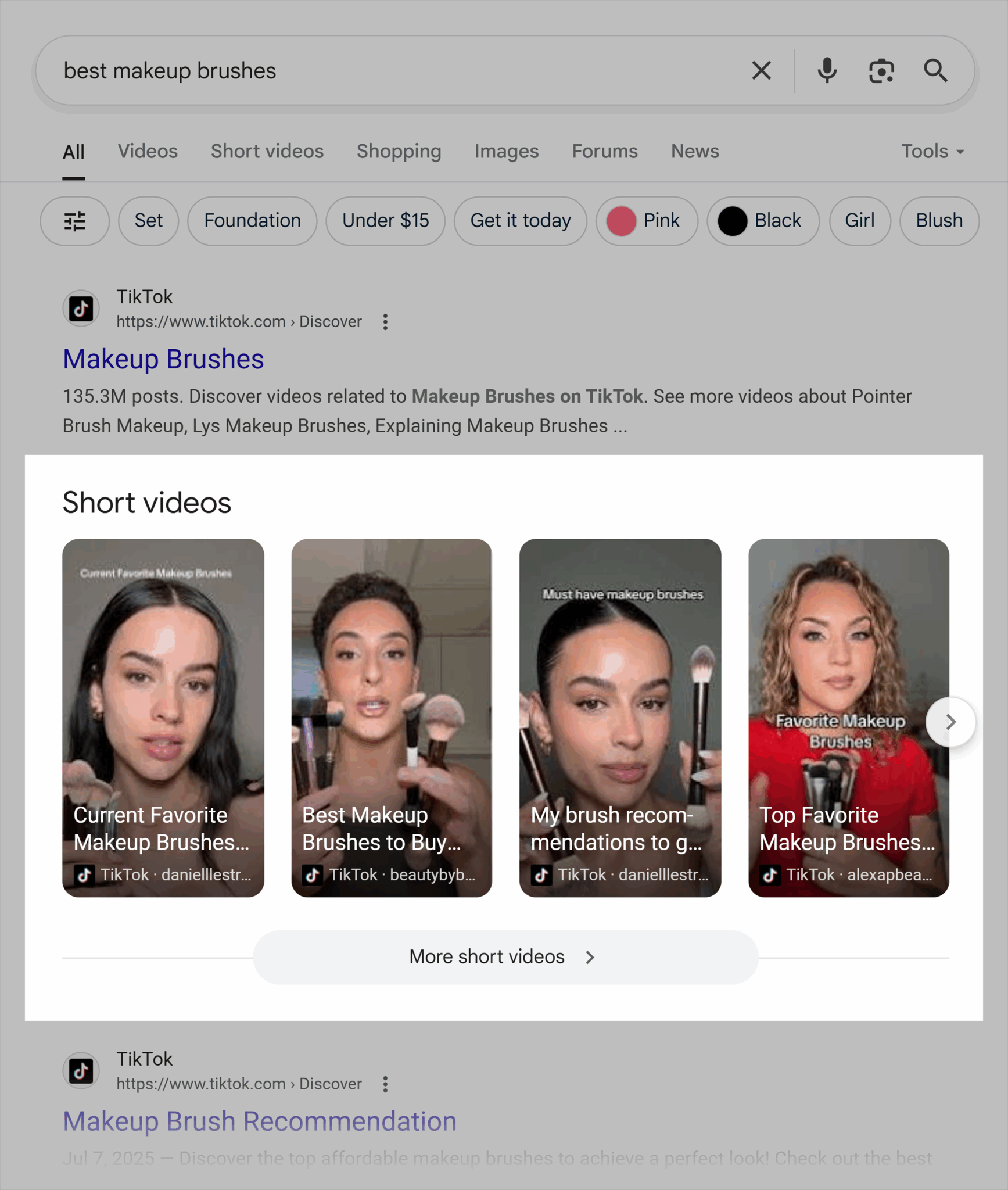
Sometimes video carousels feature short videos:
Featured videos appear at the top of Google’s SERPs, and the thumbnail is generally larger than what’s in video carousels and videos within traditional listings.
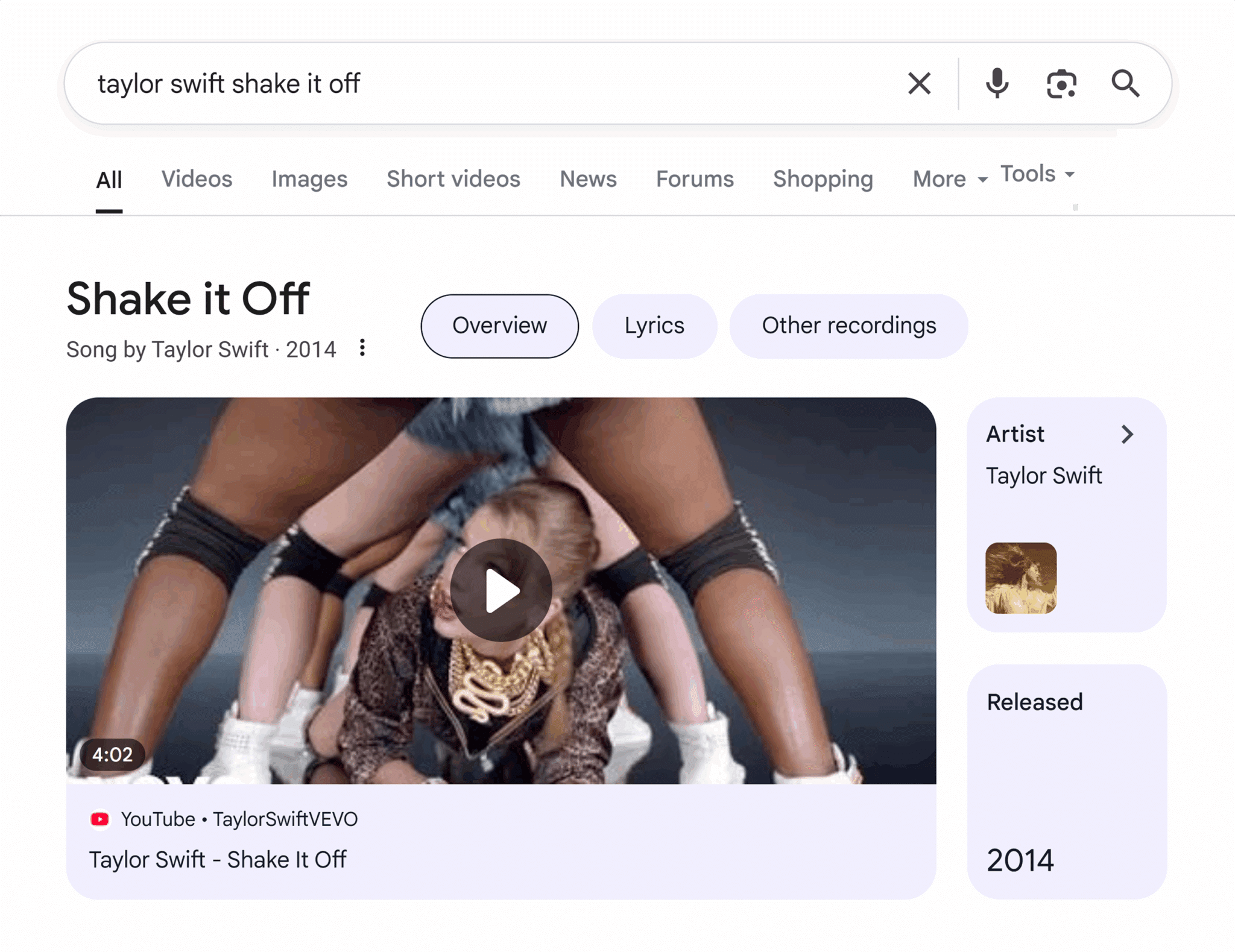
Video results appearing within Google search results are usually uploaded to YouTube, but TikTok, Facebook, Vimeo, and other videos occasionally appear.
To optimize for the video SERP features, follow these tips:
- Optimize your title tags
- Optimize for long-tail keywords
- Target question-based and intent-rich keywords
- Use high-quality videos
- Publishing videos to YouTube
- Use schema markup
- Validate schema with Google’s Rich Results Test
- Improve page authority
Top stories
Top stories is a news box with current articles. It appears for news-related searches and generally appears at the top of the search results page, but it can appear further down, too.
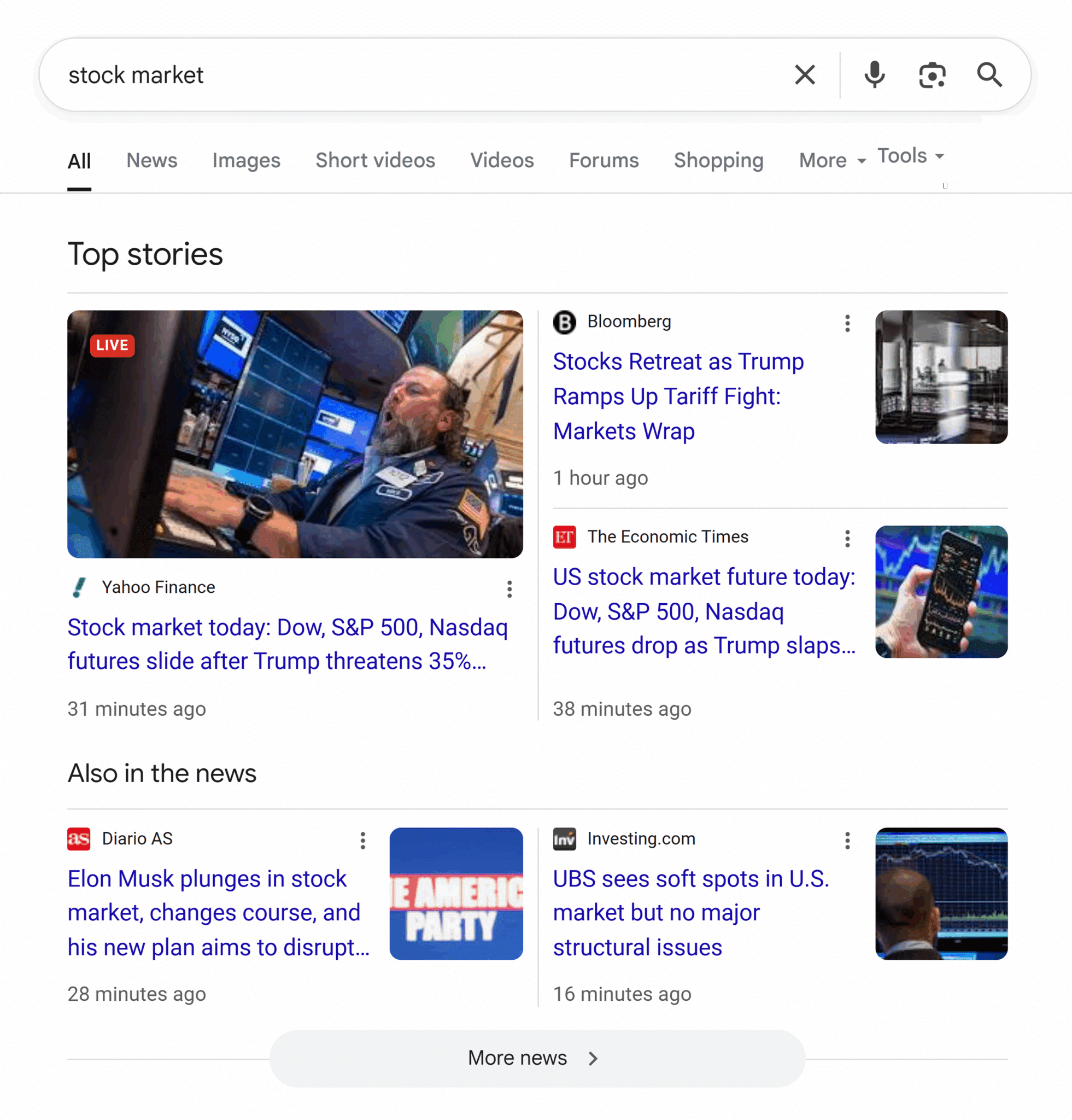
To optimize for the top stories feature, follow these tips:
- Structure your content clearly
- Answer questions concisely
- Format questions and answers using headings and body text
- Optimize your title tags
- Manage internal links
- Include internal jump links and a table of contents
- Optimize for long-tail keywords
- Use high-quality images and include alt text
- Use high-quality videos
- Publishing videos to YouTube
- Submit your site to Google Publisher Center
- Maintain a clear, shallow site architecture
- Improve page authority
- Monitor the SERP feature landscape regularly
Sitelinks
Sitelinks are extra links to important pages on your website under the main listing and are influenced by menu navigation and internal linking. Generally, the pages that are easiest to access and most linked to will appear here.
Sitelinks most commonly appear for branded searches, such as in the example screenshot below:
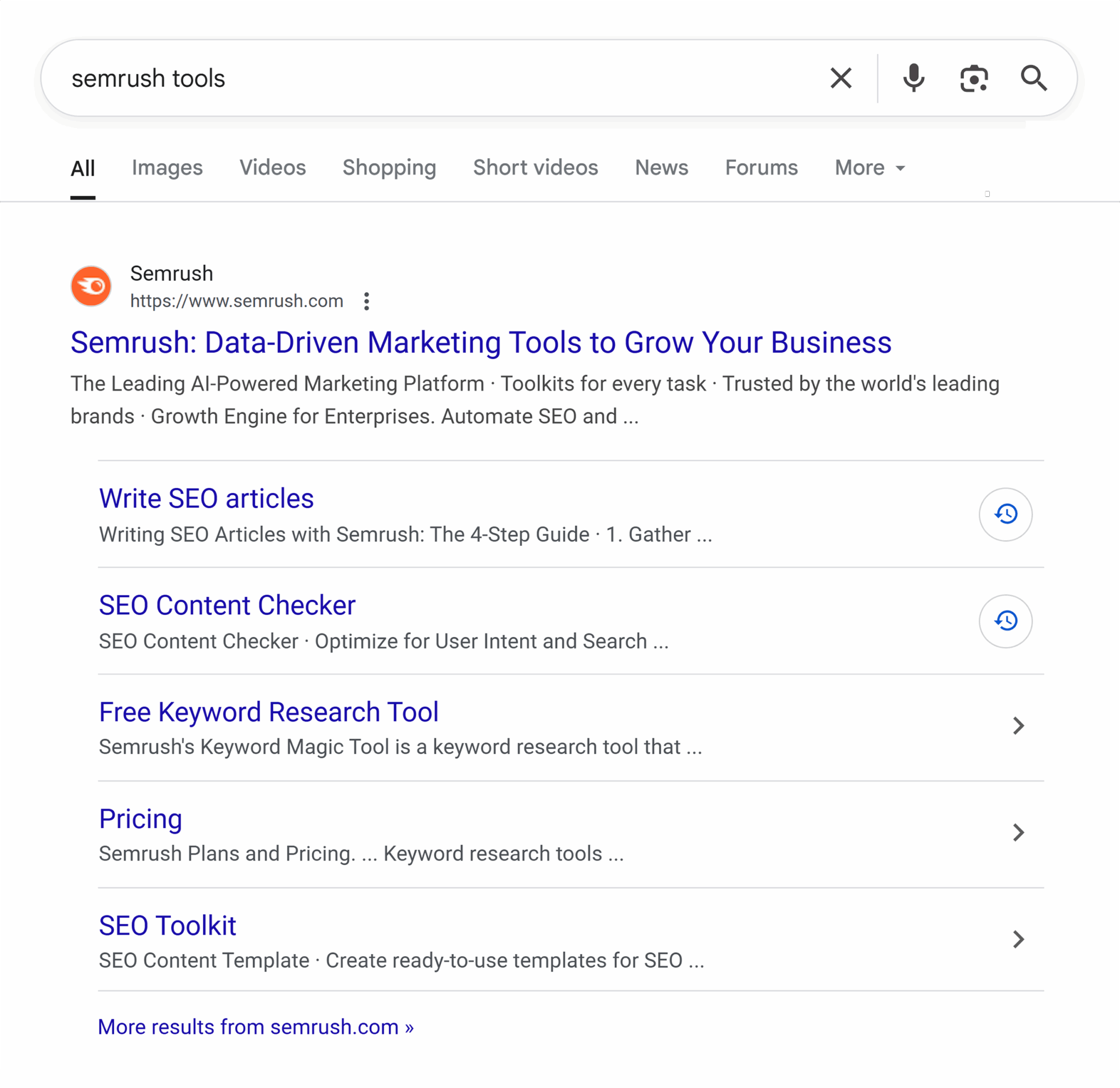
A smaller version without the excerpt text can also appear for non-branded searches. These sitelinks appear in-line below the meta description and can link to important sections of the ranking page or to other pages on the site that are relevant to the search query.
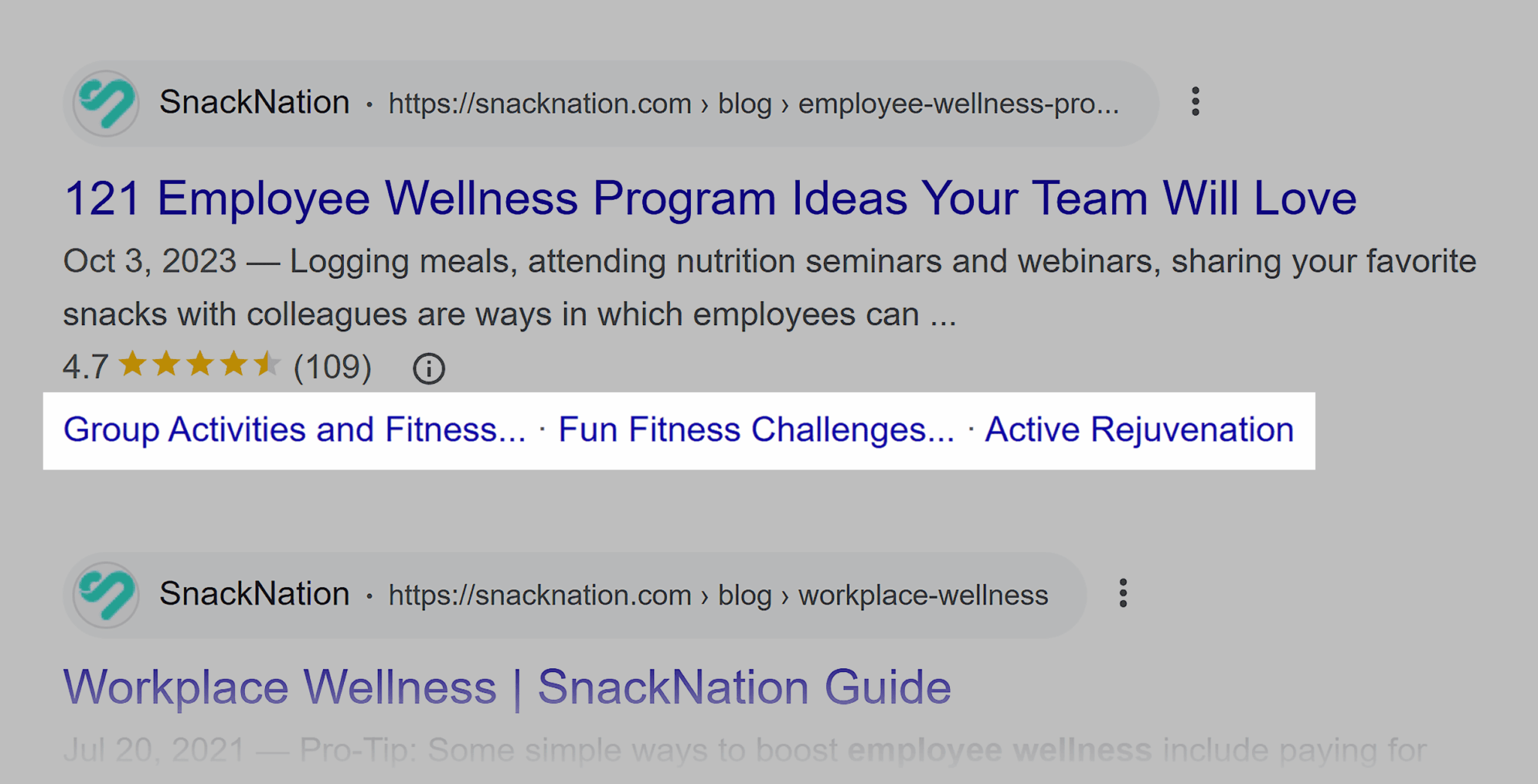
To optimize for sitelinks, follow these tips:
- Structure your content clearly
- Optimize your title tags
- Manage internal links
- Include internal jump links and a table of contents
- Maintain a clear, shallow site architecture
- Improve page authority
- Monitor the SERP feature landscape regularly
Image SERP features
There are two types of image SERP features:
- Image SERP features appear next to traditional organic listings
- Image carousels feature multiple images
Here are examples of each image SERP feature.
Image listings appear within the traditional, blue-link organic search results. On desktop, the image thumbnail appears to the right of both the title tag and the meta description.
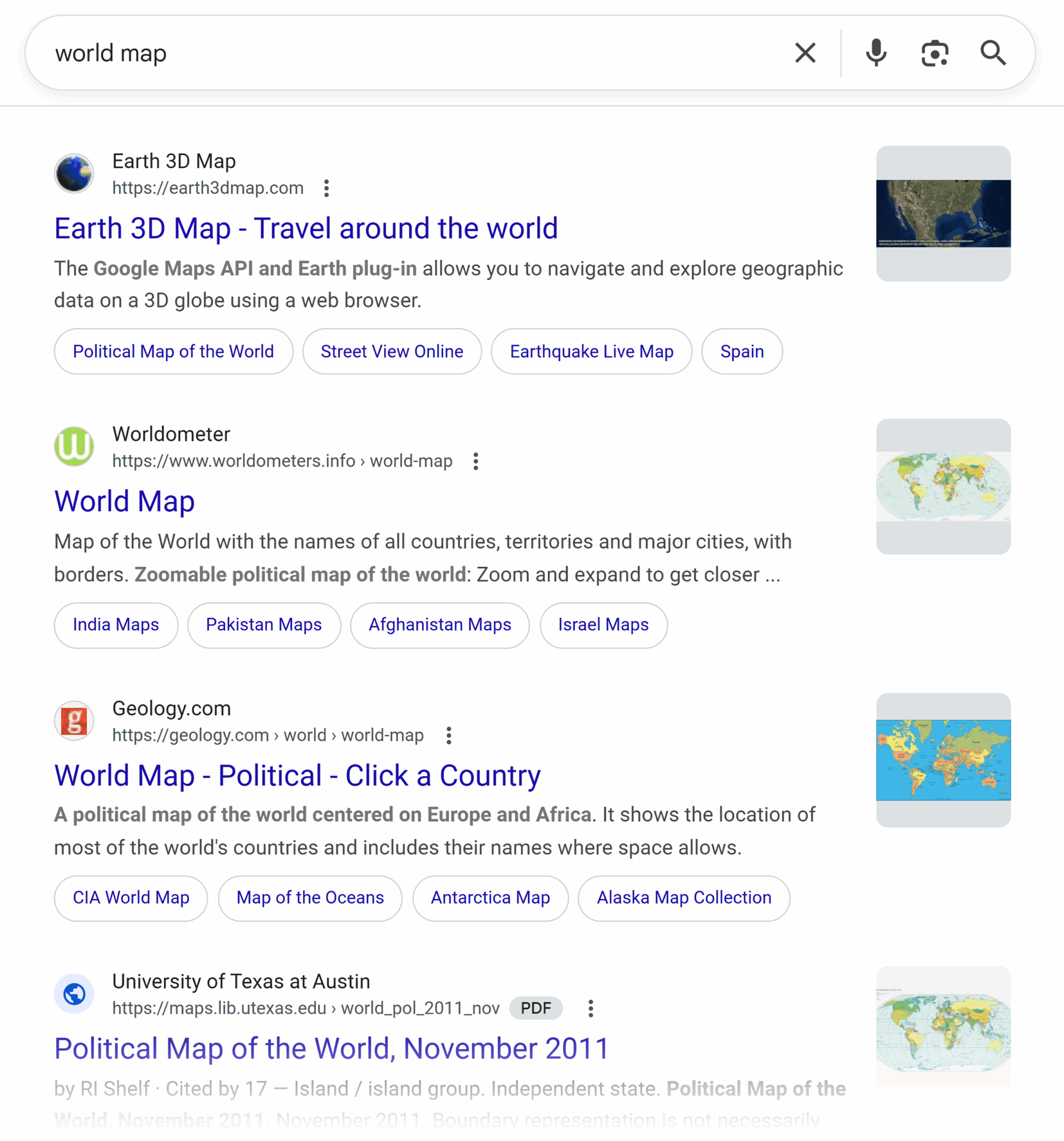
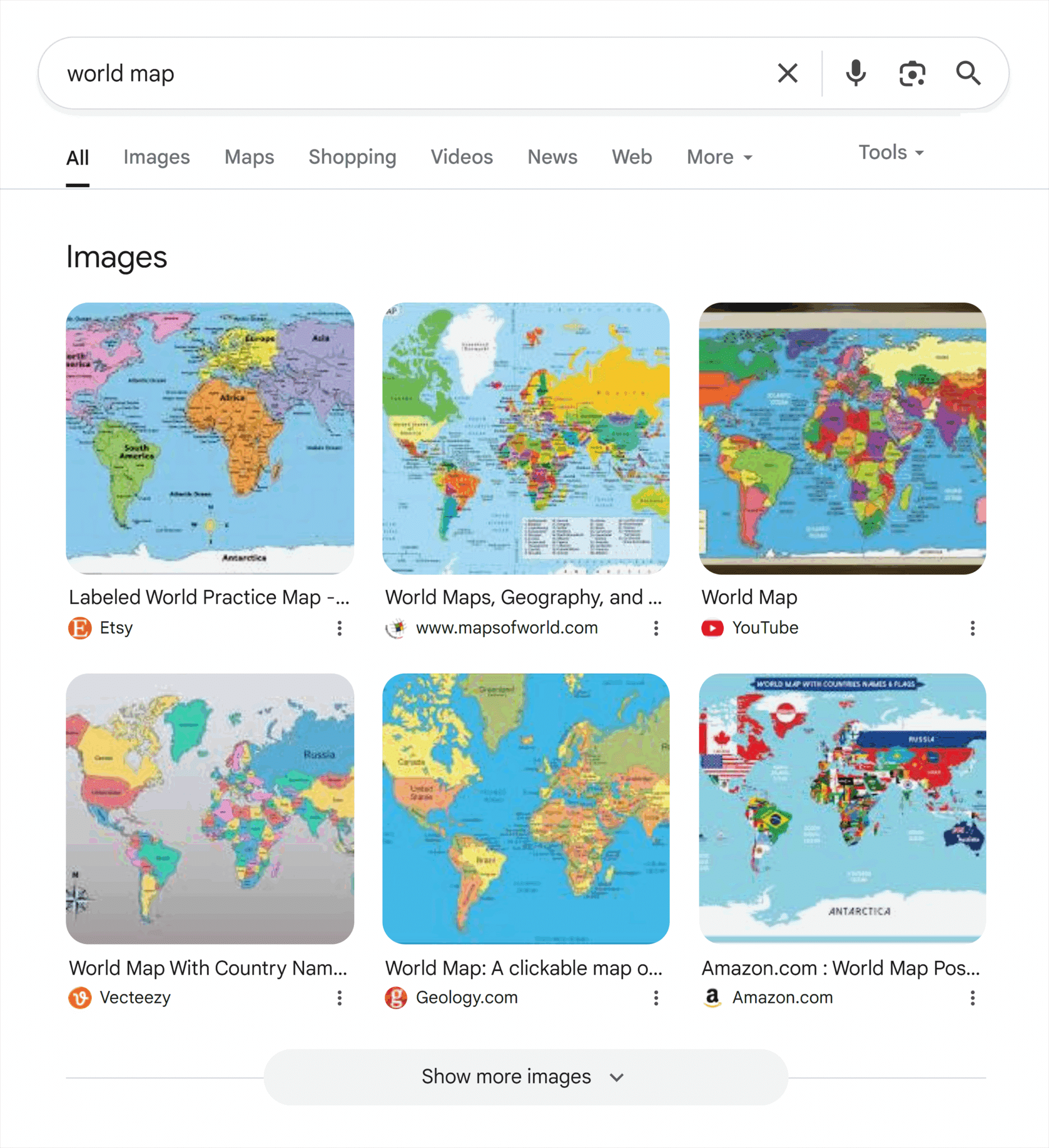
Image carousels appear in SERPs as a grid, like the example below.
Or horizontally side-by-side, like the following image.
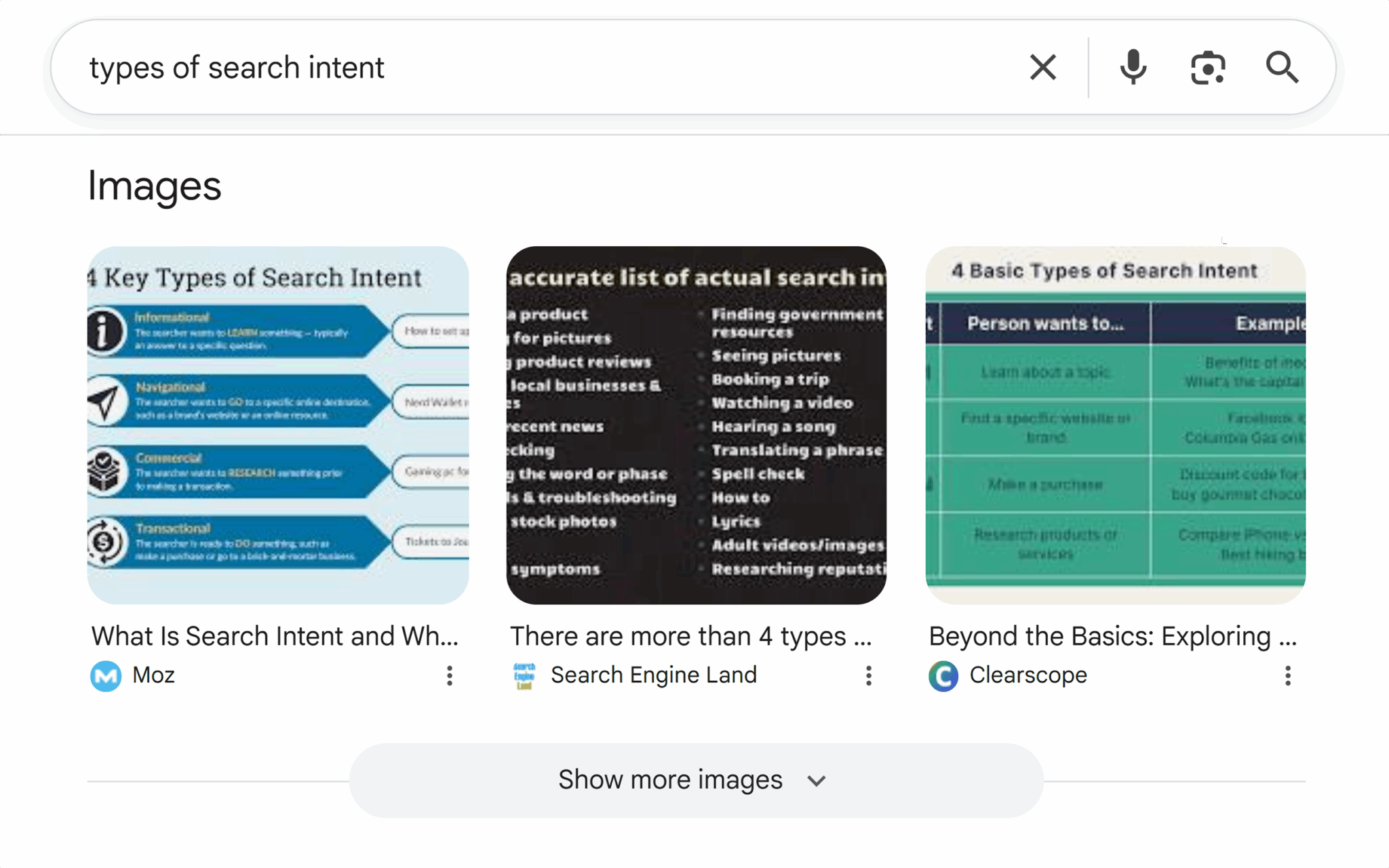
To optimize for image SERP features, follow these tips:
- Optimize your title tags
- Optimize for long-tail keywords
- Use high-quality images and include alt text
Breadcrumbs
Breadcrumb SERP features show the page hierarchy in the SERPs, above the title tag.
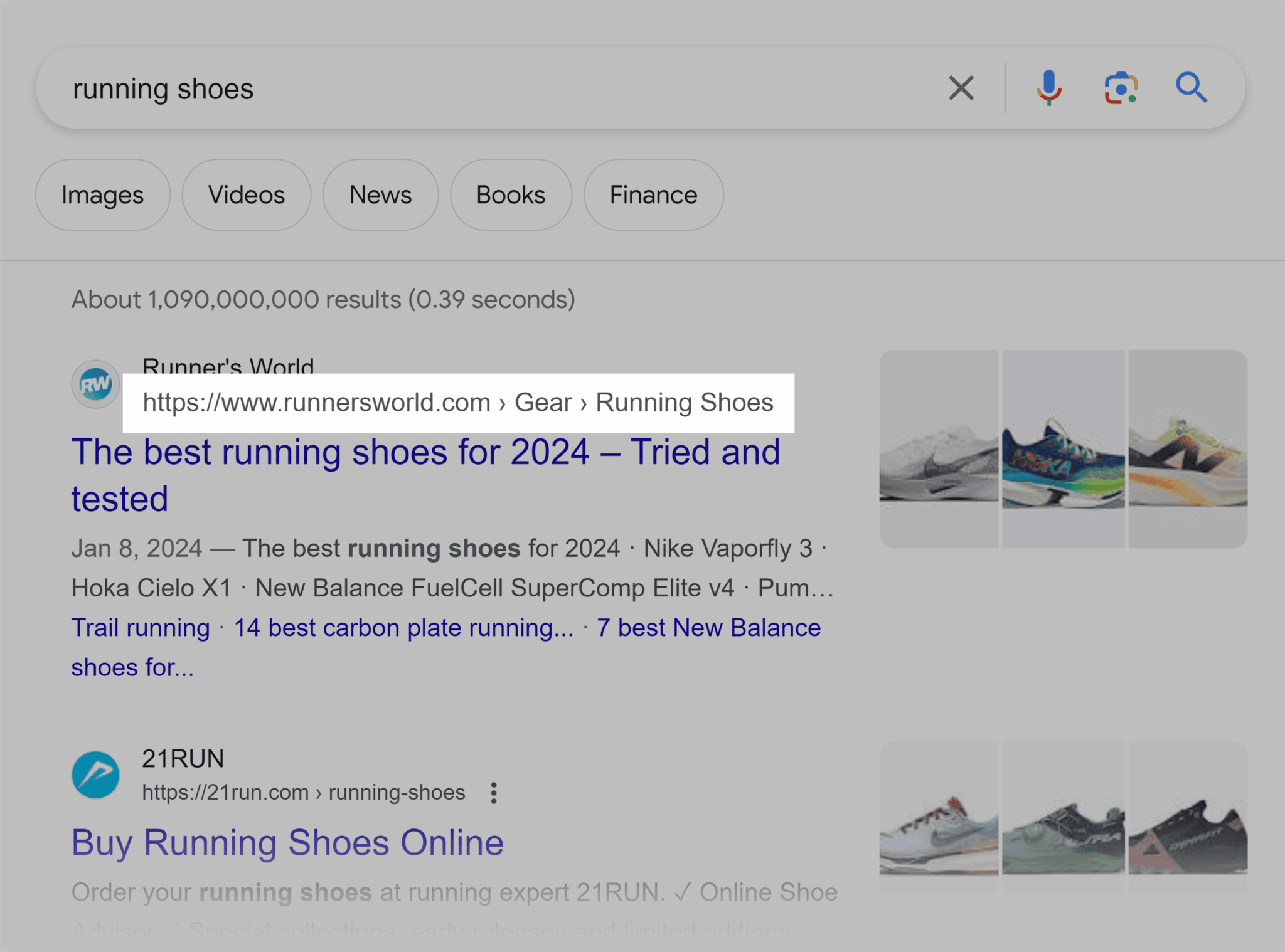
This is useful for contextualizing a page.
To optimize for breadcrumb features, follow these tips:
- Structure your content clearly
- Use schema markup
- Validate schema with Google’s Rich Results Test
- Maintain a clear, shallow site architecture
Rich snippets
Rich snippets are a subset of SERP features. A rich snippet is like an enhanced listing. Rich snippets include extra data points and can be visual, which can increase click-through rates to your traditional listings.
There are many different types of rich snippets, and we cover some of the most important ones below.
Review snippets
Review snippets bring the reviewer’s name and their review’s rating into the SERP underneath the traditional blue link listing.

Pros and cons
The review snippet in the screenshot below includes pros and cons:
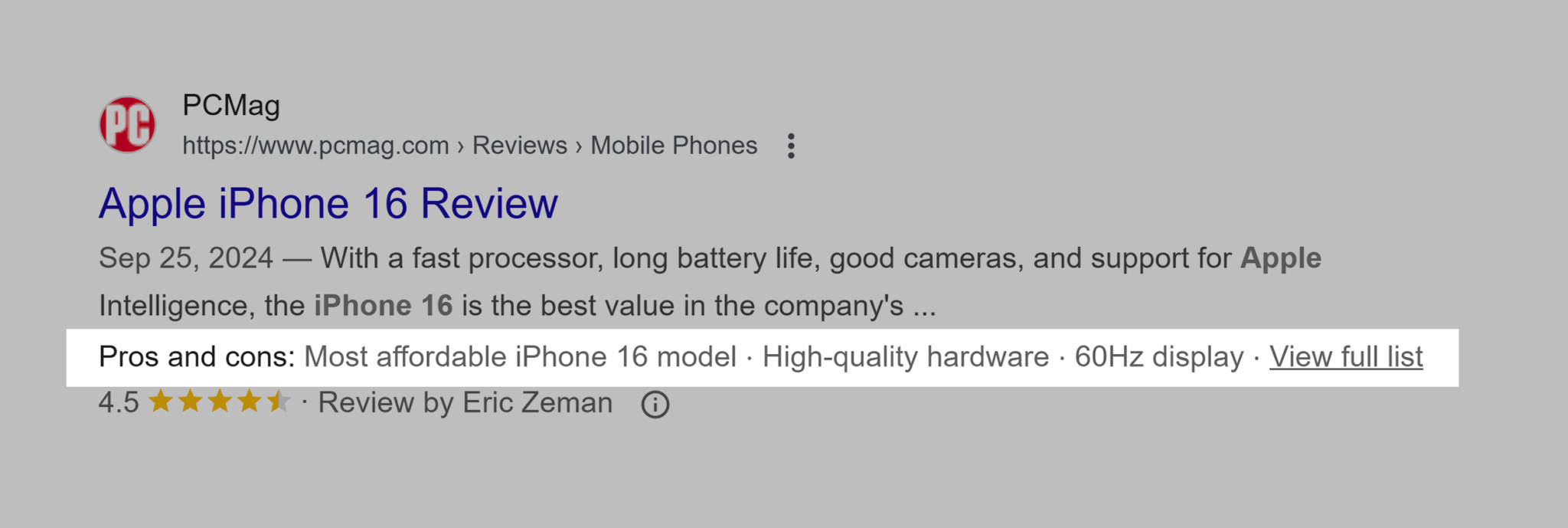
Pros and cons are pulled directly from the content within the article. Structured data helps earn review snippets and pros and cons.
Review snippets are not to be confused with aggregate ratings.
Aggregate ratings
Aggregate ratings display the average of multiple ratings in the SERP listing. The rich snippet includes rating stars, the rating number, and the number of reviews.

The difference between Aggregate Ratings and Reviews is that one person completes a review, and Aggregate Rating is the average of multiple ratings.
Enhanced product listings
Enhanced product listings provide information about a product that might encourage users to click on the listing.
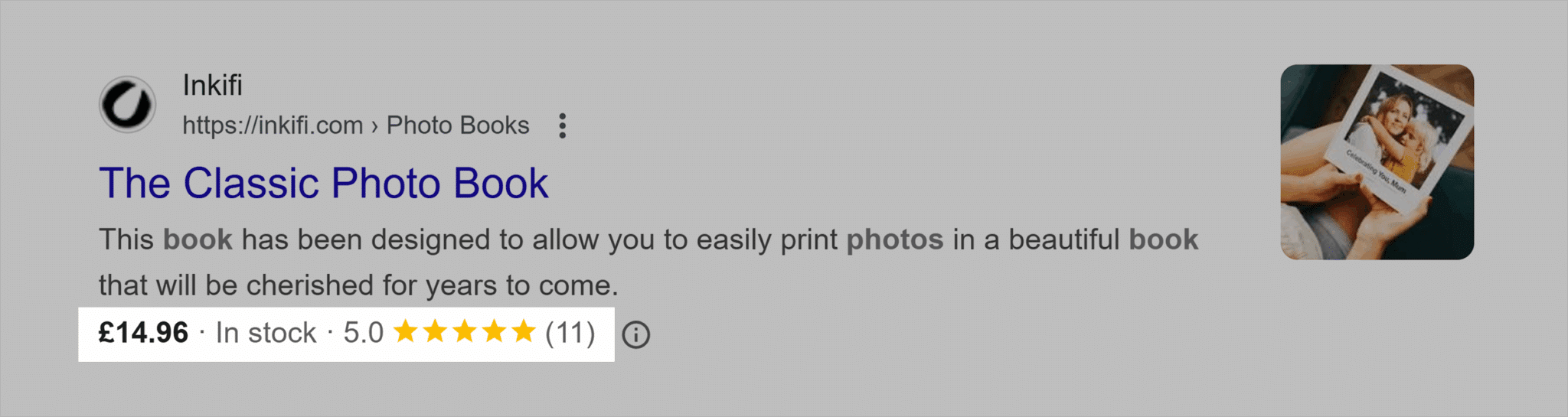
The screenshot above shows:
- The price
- Product availability
- Delivery charges
This type of information might increase clicks to a listing because the searcher can see:
- Whether the price is within their budget
- That the item is available to buy now
- Delivery charges
To optimize for rich results, follow these tips:
- Structure your content clearly
- Embed key information in tables
- Use schema markup
- Validate schema with Google’s Rich Results Test
- Maintain a clear, shallow site architecture
Events
Events are listed at the top of the SERPs, making browsing events easy for users. The events SERP feature is a carousel. Brands running in-person events or webinars can use event schema to increase the likelihood of ranking here.
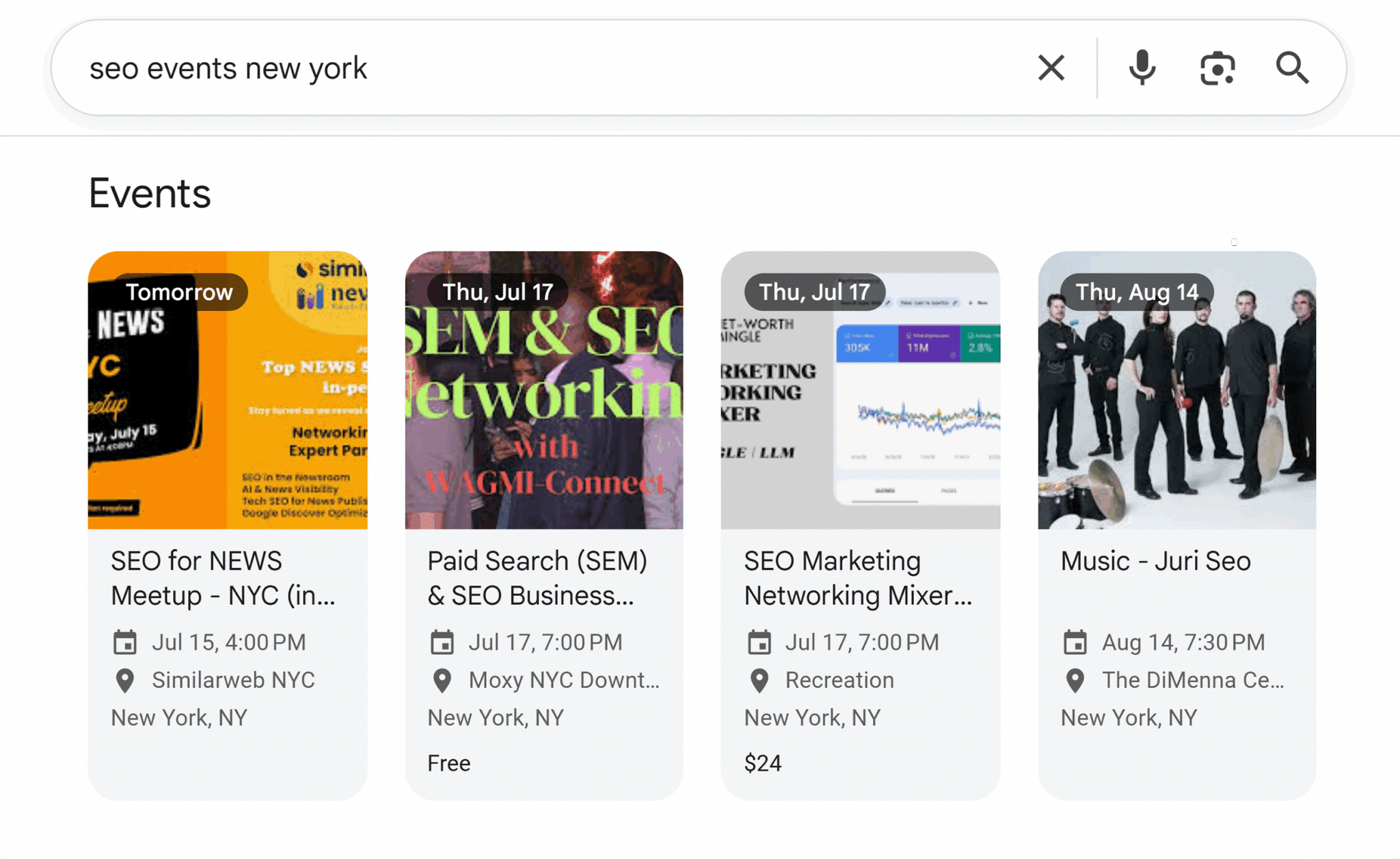
The benefit of a feature in the events carousel is that you might reach a new audience because people are searching for events by topic or location.
To optimize for event SERP features, follow these tips:
- Structure your content clearly
- Embed key information in tables
- Use schema markup
- Validate schema with Google’s Rich Results Test
- Maintain a clear, shallow site architecture
20+ tips to win SERP features
The following tips will help you secure SERP features for your website content.
Before we get into specific tips, it’s worth noting that earning SERP features isn’t quite the SEO black magic that some people believe it to be.
A large portion of the work associated with earning SERP features is traditional best practices that good SEO professionals consistently do well.
These practices include:
- Optimizing title tags and metadata
- Providing helpful content written with readers in mind
- Providing a great page experience
- Making sure a site and its contents are crawlable
- Keeping content up to date and factually accurate
- Working with subject matter experts to create content
Regarding appearing in AI overviews, Google recently shared eight ways to be successful with AI Search experiences. Here’s the article on Google’s Search Central Blog.
On to the more specific tips:
1. Structure your content clearly
Clearly structuring content with headings (H-tags), bullet/numbered lists, and tables makes content easier for humans to read.
And for Google?
Well-structured content is easier to crawl and extract, increasing your chances of earning citations in featured snippets, People Also Ask, or AI Overviews.
As a rule, well-structured content includes one H1, then H2s, H3s, and H4s, as needed. Think of your heading structure like a book:
- The heading one (H1) tag is the title
- Heading two (H2) tags are chapters (or main sections)
- Heading three (H3) tags are subsections within the chapter or main section
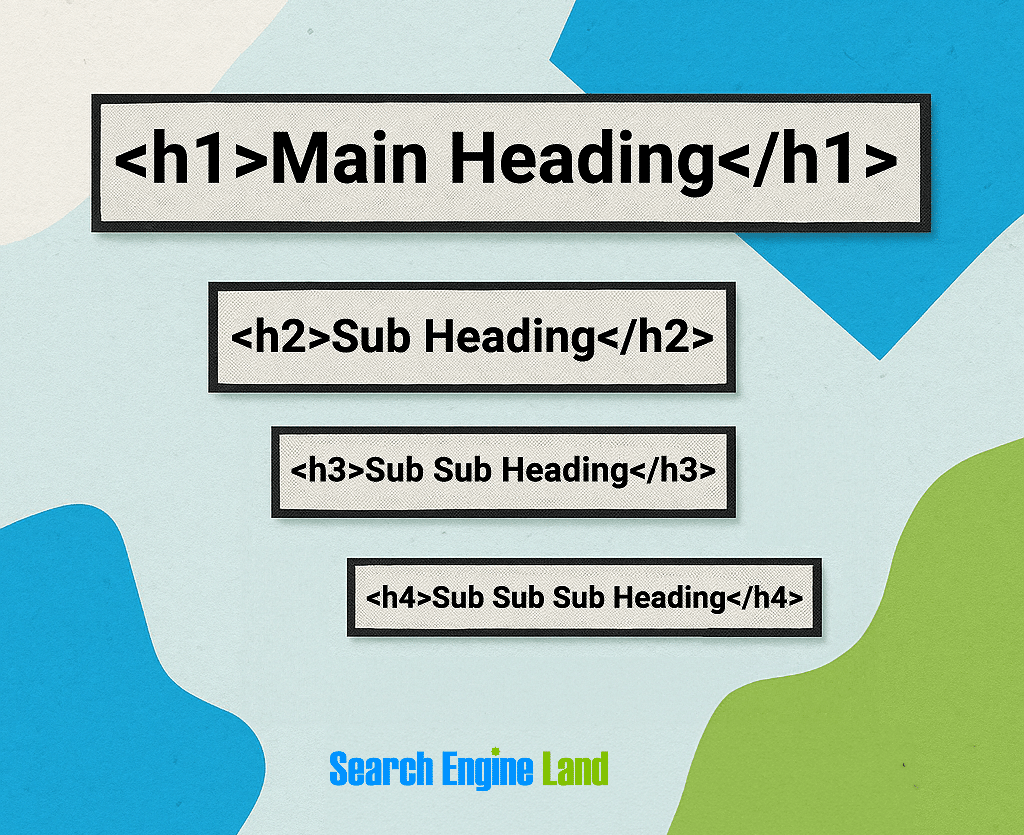
Generally, content has one H1, and as many H2 and H3 tags as needed. Occasionally, H4 tags are necessary. H5 and H6 tags are rarely required, but if you need them and it makes sense structurally, go ahead.
Formatting content with headings is especially useful for questions.
Heading tags are very simple.
Heading 1
<h1> Your heading here </h1>
Heading 2
<h2> Your sub-heading here </h2>
Heading 3
<h3> Your sub-sub-heading here </h3>
2. Use ordered/unordered lists
Where you can, use lists to break up long pieces of text, making it easier for readers to skim and read. There is also some evidence to suggest that AI search tools like ChatGPT pull information from lists.
- Ordered lists are numbered lists.
- Unordered lists are bulleted lists.
The lists must be coded to be effective. The infographic below shows what the code and its output look like.
You add this code to the HTML of your website.
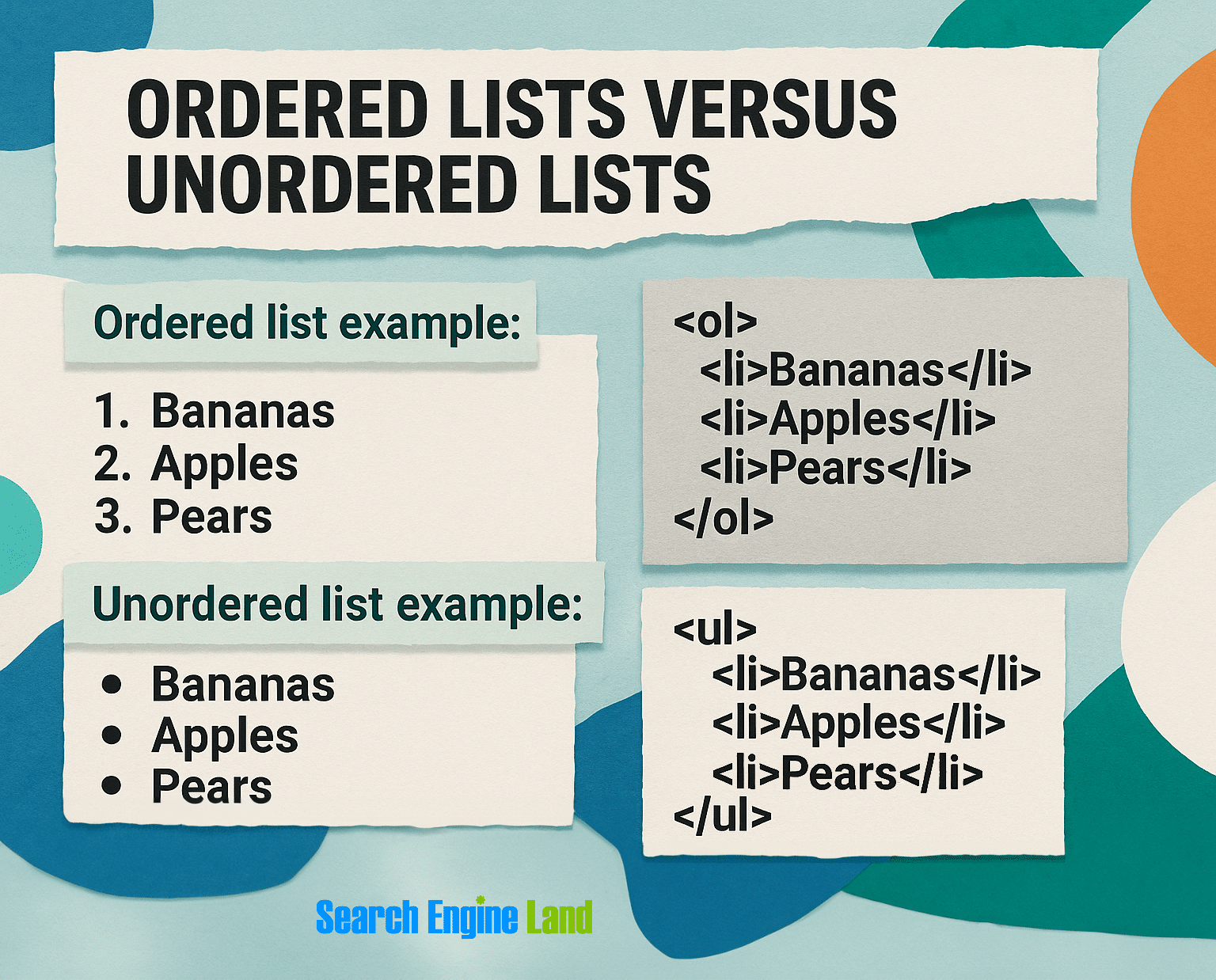
Here’s the code for an ordered list:
<ol>
    <li>Your line item</li>
    <li>Your line item</li>
    <li>Your line item</li>
</ol>
Here’s the code for an unordered list:
<ul>
    <li>Your line item</li>
    <li>Your line item</li>
    <li>Your line item</li>
</ul>
The takeaway: you can’t just use hyphens or numbers to create a list. It needs to be coded.
Pro tip: Make your lists easier to scan by bolding the key idea at the beginning of each item. Use <strong>your text</strong> in your code to apply bold formatting. We do this a lot in our content.
3. Embed key information in tables
Like lists, tables help readers skim and understand information. Also, it makes content snippetable and organized for Google and other search platforms.
Tables are handy for pricing, specs, or comparisons.
Here’s what a table might look like on a website:
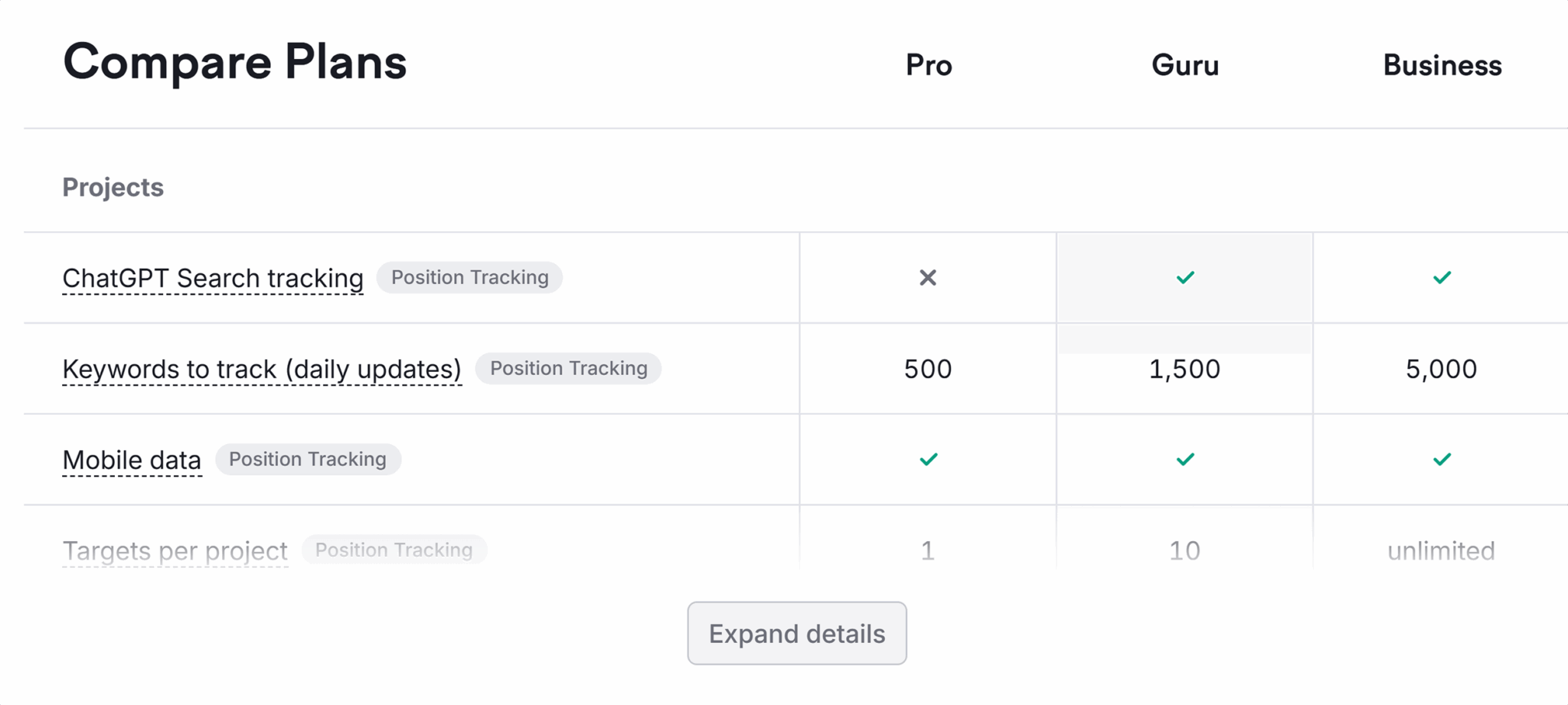
To be useful to search engines, tables must be coded. Images are great, but they’re not readable by crawlers.
How a table appears visually depends on the website’s table styling and cascading style sheets (CSS), which complement HTML and control the styling of HTML elements.
Examples of visual elements controlled by CSS include:
- Colored headings
- Text alignment
- Alternating row colors
- Row and column borders
4. Answer questions concisely
When you’re answering questions for featured snippets or People Also Ask, provide short, clear answers directly below subheadings.
Be concise.
Try to answer the question in a sentence or two, then elaborate.
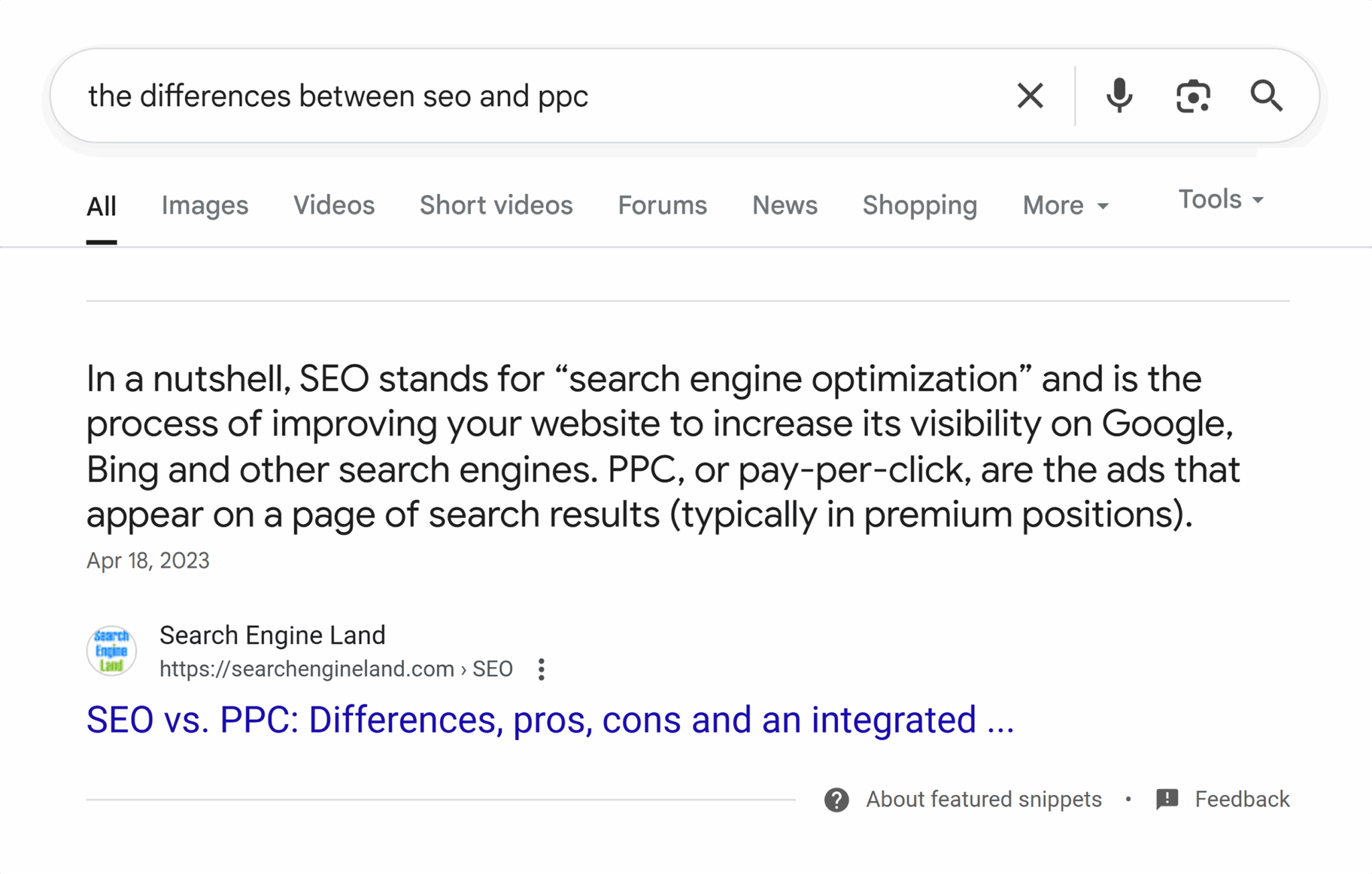
At Search Engine Land, we write with the most important point (MIP) in mind for every section of every article. This means we lead with the information readers care about most, followed by supporting details, a writing technique also known as the “inverted pyramid.”
Here’s an example of the MIP and inverted pyramid in action:
5. Format questions and answers using headings and body text
Heading structure helps Google understand your content’s structure and extract the relevant sections for related queries.
If you’re answering questions and answers within an article, format the question as a heading where it makes sense to do so, then answer it in the body text.
Here’s how this looks on Search Engine Land:
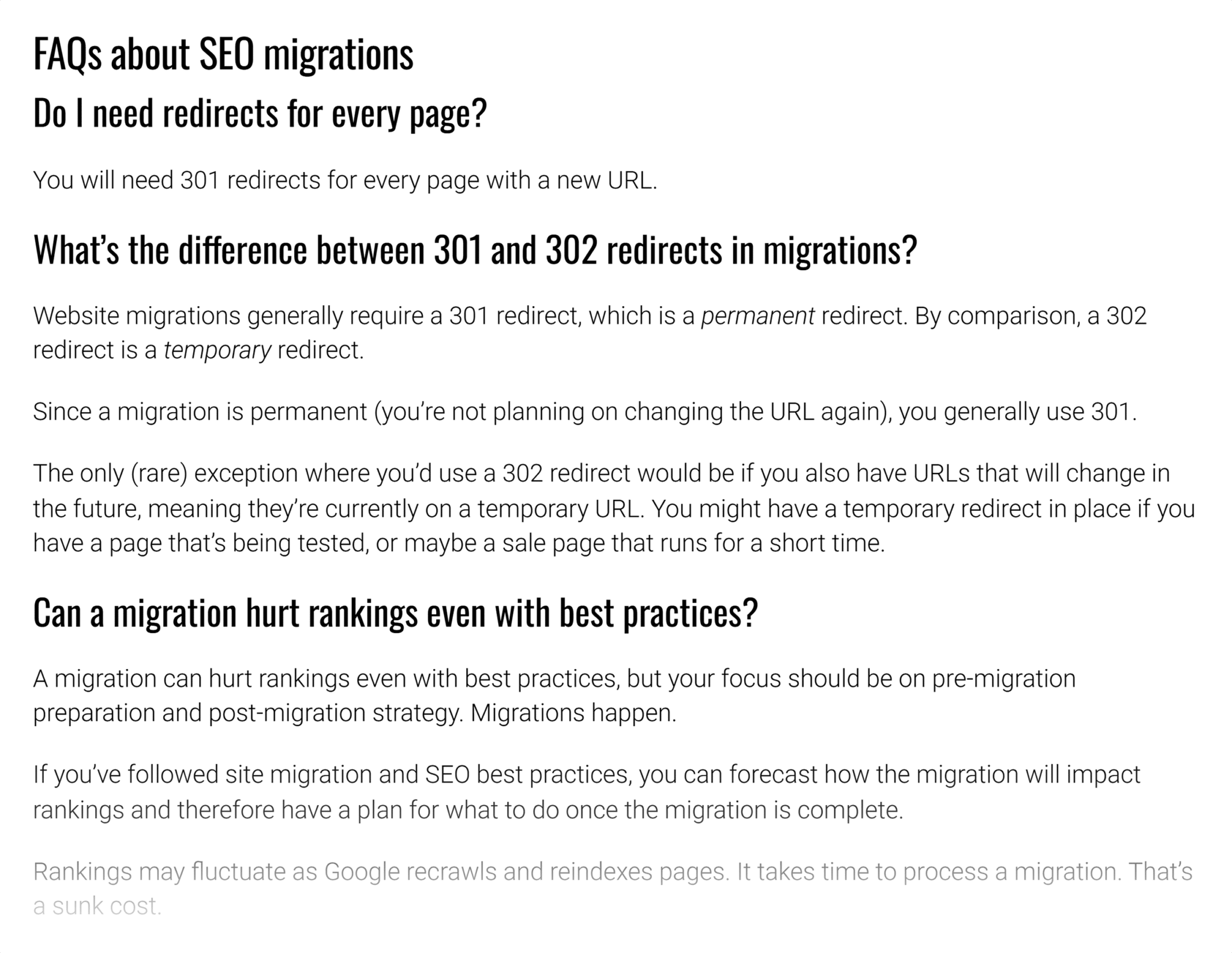
In the code, the formatting looks like this:
<h3>Do I need redirects for every page?</h3>
<p>You will need 301 redirects for every page with a new URL.</p>
The questions are formatted as H3s, and the answer is in body or paragraph text.
Pro tip: Level up this tip by including a schema. FAQPage schema should be used on pages that cover many different questions with brief answers. QAPage schema should be used when an entire page is dedicated to comprehensively answering a single question. Jump to the schema tips.
6. Optimize your title tags
Optimized title tags are important for SEO. Your title tags appear in the traditional blue-link listing. Optimized title tags are generally a good practice for SEO because a well-written title tag can increase click-through rates and increase the relevance of your content.
Optimized title tags also provide additional context about a page to search engines and may influence SERP features like:
- Featured snippets
- People Also Ask
- Top stories
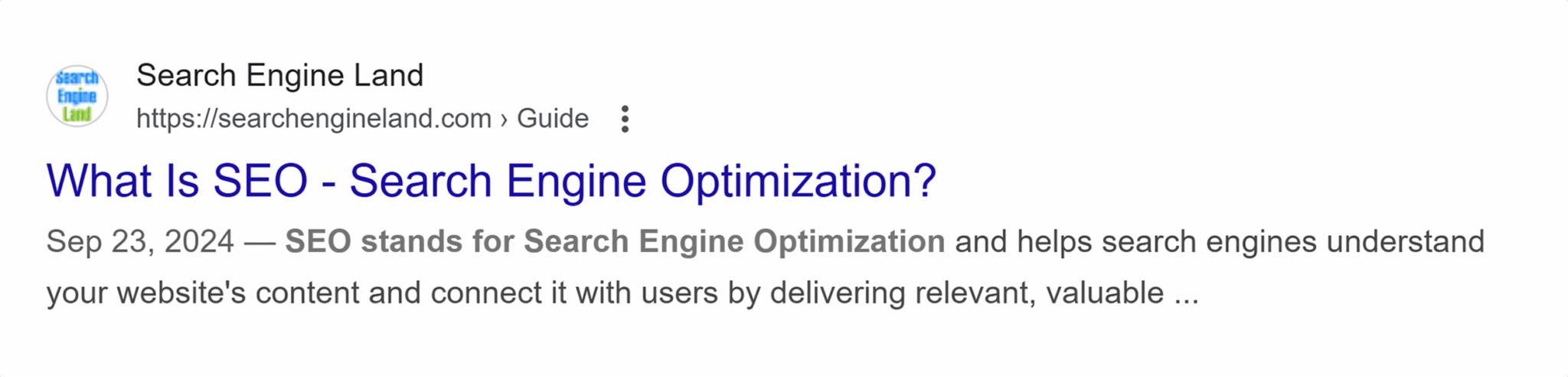
Quick tips for optimizing title tags:
- Include your most important keyword: the keyword you want to rank for.
- Include the question if it’s an article answering a specific question. The example above does this.
- Keep the title tag to a maximum of ~60 characters. You want the entire title tag to be read within Google’s search result listings. If your title tag is too long, it will be truncated in the SERPs.
Further reading: Title tags and SEO: Everything you need to know in 2025
7. Manage internal links
Internal links (also called inlinks) are links in your content that link to another page on your website.
Inlinks encourage sitelinks and keep crawl bots (specifically Google’s Googlebot) on the most important pages of your website. Crawlers move around the internet following links, so it’s important to consider how your internal links impact how they navigate your website.
Gary Illyes, an Engineer on the Search team at Google, explains how inlinks influence crawling and indexing:
Think of inlinks as a mention. If you link to a page a lot, you’re “mentioning” it a lot, and Googlebot will spend more time on the page because it will follow the links to it. Frequently linked-to pages are deemed more important, so Google is more likely to feature the linked page as a sitelink.
8. Include internal jump links and a table of contents
Jump links (also known as anchor links) take a reader from one section of a page to another. They’re commonly used in tables of contents. Jump links are very helpful for users, especially in long-form content pieces, because they allow readers to get straight to the section they’re most interested in.
Here’s what a table of contents looks like:
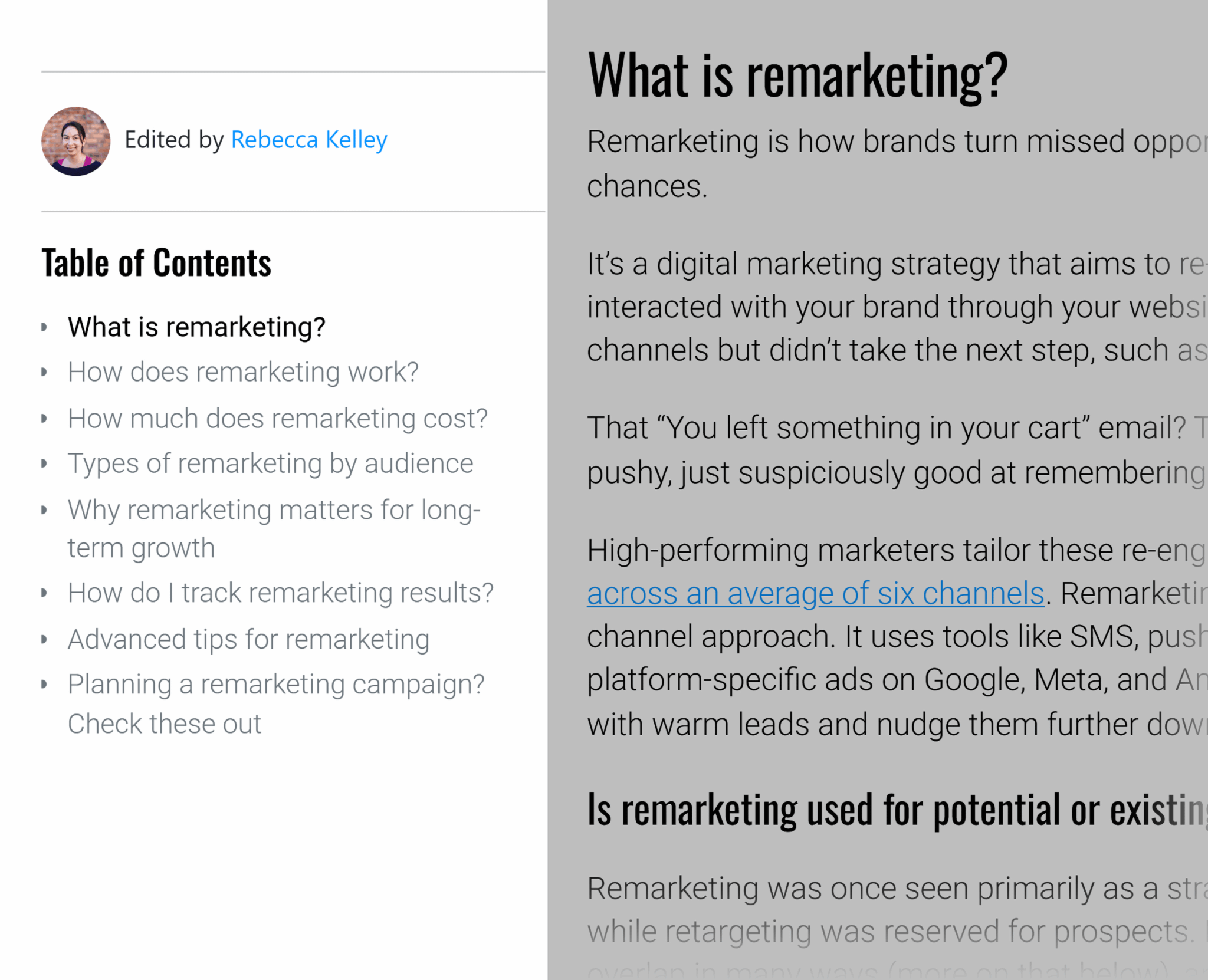
Since Google crawls the internet following links, the link’s anchor text will add context to a page, indicating what it’s about. Make sure your anchor text contains keywords where natural. Usually, you’d use the heading title for a jump link’s anchor text, and if you’ve optimized your headings, the anchor text will already include keywords or related terms.
Jump links are added within the code of a website. You need to do two things:
- Assign an ID to the section you want to link to
- Create an anchor link that points to the ID
Assigning an ID to a section
Jump links are commonly added to headings. For example, if you have an H2 titled “What is a SERP feature?” assign the ID to the heading tag within the HTML.
A normal heading tag would look like this:
<h2>What is a SERP feature?</h2>
You add an ID to the heading.
In the code, it looks like this:
<h2 id="what-is-a-serp-feature">What is a SERP feature?</h2>
Once your section has an ID, you can add an anchor (<a>) tag.
Creating an anchor link
In your table of contents, you likely jumplink to every H2.
You need to create a link that matches the section’s ID.
An anchor link is very similar to adding a normal link. It uses the anchor tag <a> like all other links. In addition, you include a # to indicate that the link exists within the same page.
In the code, it looks like this:
<a href="#what-is-a-serp-feature">What is a SERP feature?</a>
Tips for creating jump links:
- Assign one ID and one link at a time if you’re doing this for the first time. It’s very easy to create anchor links, but it’s also easy to get confused when building multiples simultaneously. Working one-by-one allows you to identify where a mistake was made.
- Check each anchor link a couple of times, and check on both desktop and mobile views.
- Stick to an anchor tag format across all pages. Use lowercase, try to include a keyword if it makes sense, and match or closely match anchor links to headings.
9. Optimize for long-tail keywords
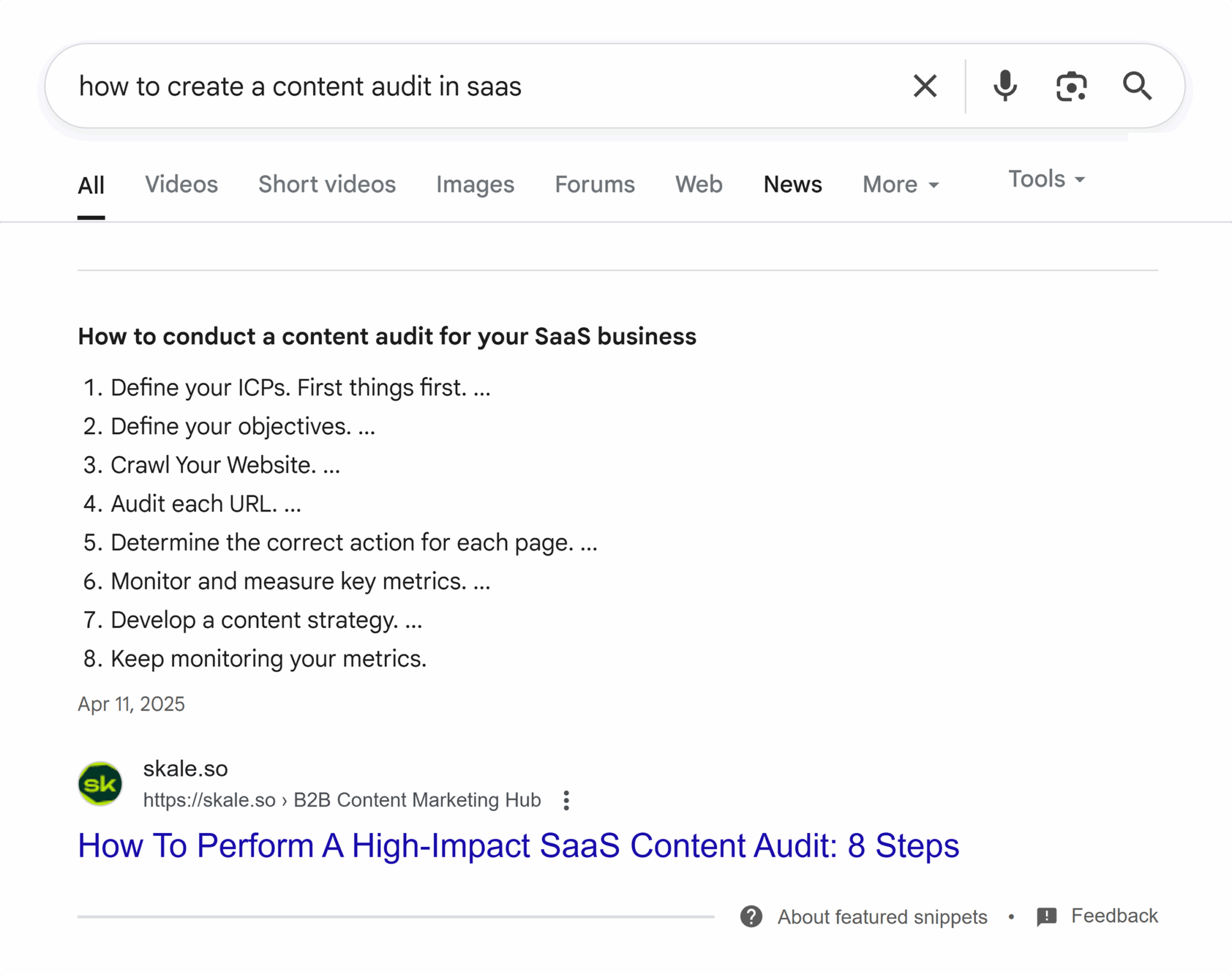
Specific queries are more likely to trigger SERP features.
The more targeted you are in addressing a user’s query, the more likely you are to rank for it.
Here’s an example of a niche featured snippet.
And here’s a video that earned two SERP features for one keyword search because it’s so targeted. The same video secures a video SERP feature and a mention in the first query in PAA.
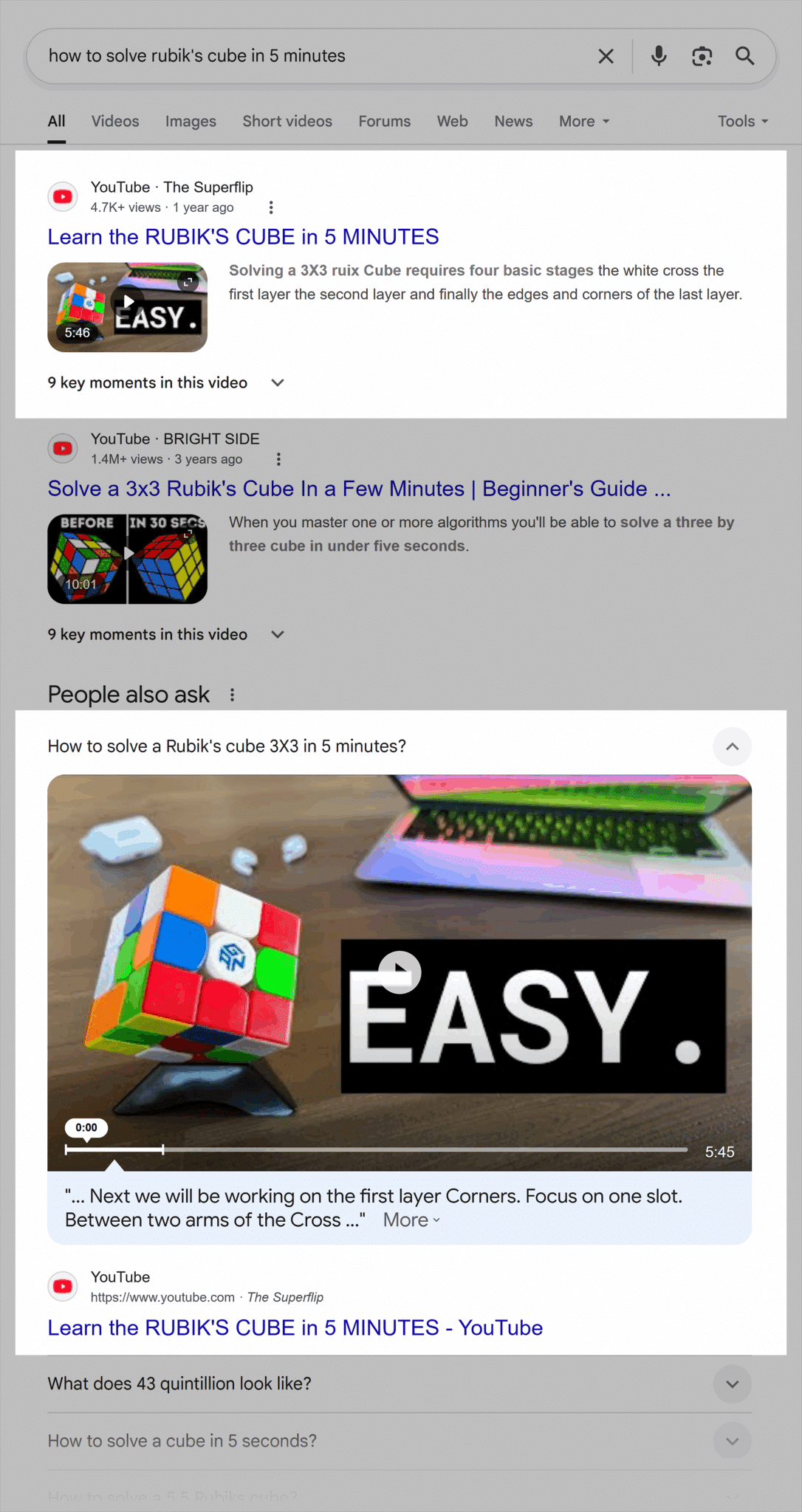
Pro tip: Don’t discount long-tail keywords for the sake of more clicks. Targeted keywords secure SERP features and help people convert.
It can be tempting to ignore long-tail keywords because the search volume is generally lower than that of broader terms.
However, ignoring long-tail keywords is a huge mistake.
Long-tail keywords can often be better for return on investment (ROI), not just for SERP features, but for business in general.
If you solve a specific problem for a specific person, you’re more likely to convert them once they click.
10. Target question-based and intent-rich keywords
If you want to appear in featured snippets or PAA, you need a good keyword research tool to determine what queries people search for that return a SERP feature.
Here’s an example using Semrush’s Keyword Magic Tool, the tool with the largest database of keywords. It’ll provide the most queries of any tool, so you know you’re giving yourself the best chance of appearing for all keywords your audience is searching.
Open Semrush > “SEO” > click “Keyword Magic Tool” in the left-hand menu > type in your keyword > “Search.”
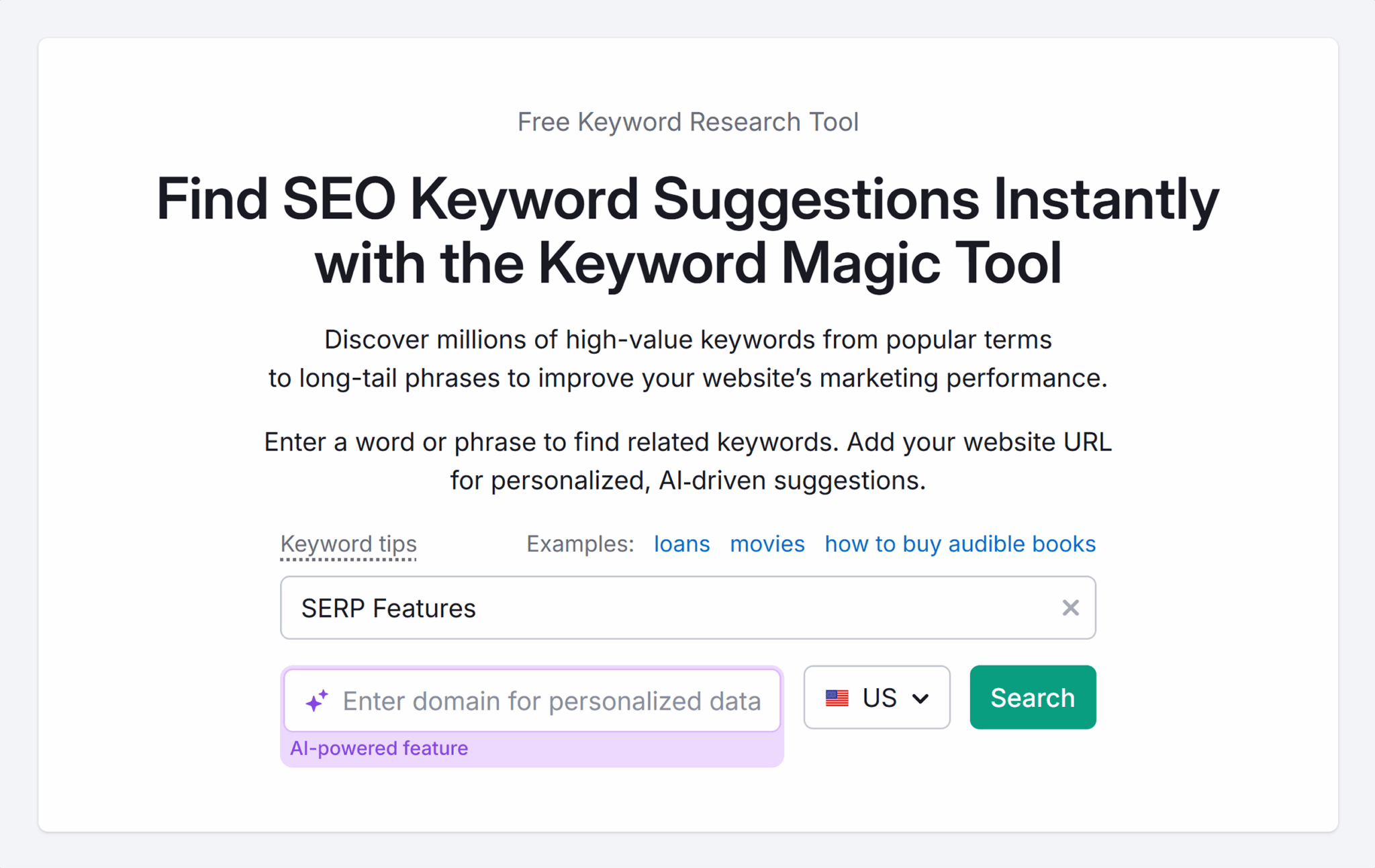
Optionally, you might want to:
- Filter by the country in which you’re most interested in ranking
- Add your domain for AI-powered personalized data
- Experiment with different keywords, as shorter, broad keywords will give you more keyword ideas, but you might want to explore more granular terms
Once the report has loaded, you’ll see a list of keywords.
Filter the keywords to “Questions.”

This report shows all questions relating to the keyword you entered. There are four types of keyword match types, and you can toggle to change the keywords listed:
- All keywords include all broad match, phrase match, exact match, and related keywords
- Broad match includes the words you typed in, plus variations in any order
- Phrase match includes the exact phrase you typed, in that order, with other words before or after
- Exact match includes the exact words you typed, in the same order, with no extra words
- Related includes terms that are conceptually similar but may not include the words you typed
At a minimum, you need this report to show the following columns:
- Keyword: The keyword recommendations
- Intent: What the searcher wants from the search (featured snippets and PAA usually display informational queries)
- Volume: The estimated search volume per month
- Keyword difficulty: How easy it is to rank for a keyword (the lower the number, the easier it is to rank)
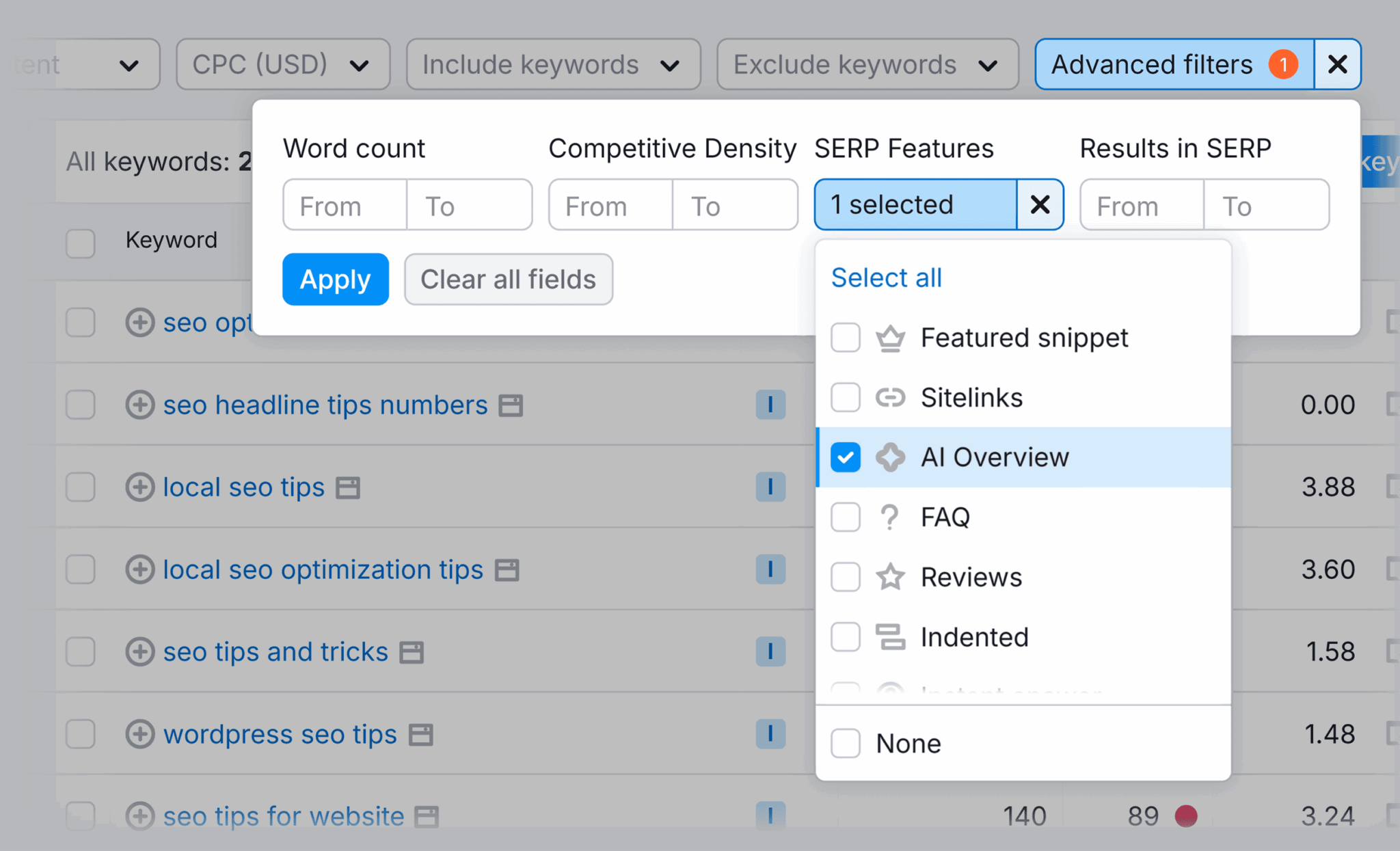
- SERP features: The SERP features that a keyword returns
Pro tip: Use SERP features to help you decide if you’re pursuing the right keyword to earn your desired SERP feature.
11. Use high-quality images and include alt text
Images can increase your chances of appearing in image SERP features such as carousels.
Ideally, images will be your owned media and not stock, but sometimes this isn’t possible. On a website, there are two types of images:
- Decorative images add a visual layer to pages and are a better choice for using stock or AI-generated images compared to product images
- Images that influence sales, such as product images or team photos, should be your images and true to what people get if they buy your product or work with you
Here are top tips for getting the most out of your images:
- Include a keyword in the image’s filename. Don’t upload an image titled IMG_6490. Instead, name the image using the focus keyword.
- Write descriptive alt text and add a keyword. You must write alt text with screen readers in mind, but you can weave in keywords as long as they sound natural and make sense.
- Resize images so they don’t interfere with page loading times. ShortPixel is good. It also has a WordPress plugin that can automate image compression for you.
12. Use high-quality videos
Videos can increase your chances of appearing in image SERP features such as video carousels.
Creating your own videos is something you absolutely should be doing. Video media is personal and helps connect with viewers. Plus, you might build some authority signals with Google.
That said, you don’t have to use your own videos. Embedding someone else’s video into your web pages is helpful for readers.
Here are three top tips for getting the most out of your videos:
- Embed videos set to play from certain chapters or time stamps if it makes sense. This helps with context and helps users get to relevant and interesting sections.
To do this, go to the video on YouTube > Click “Share” > Click “Embed” > Scroll down > Tick the box next to “Start at” > Edit the start time > Click “Copy” to copy the embed code.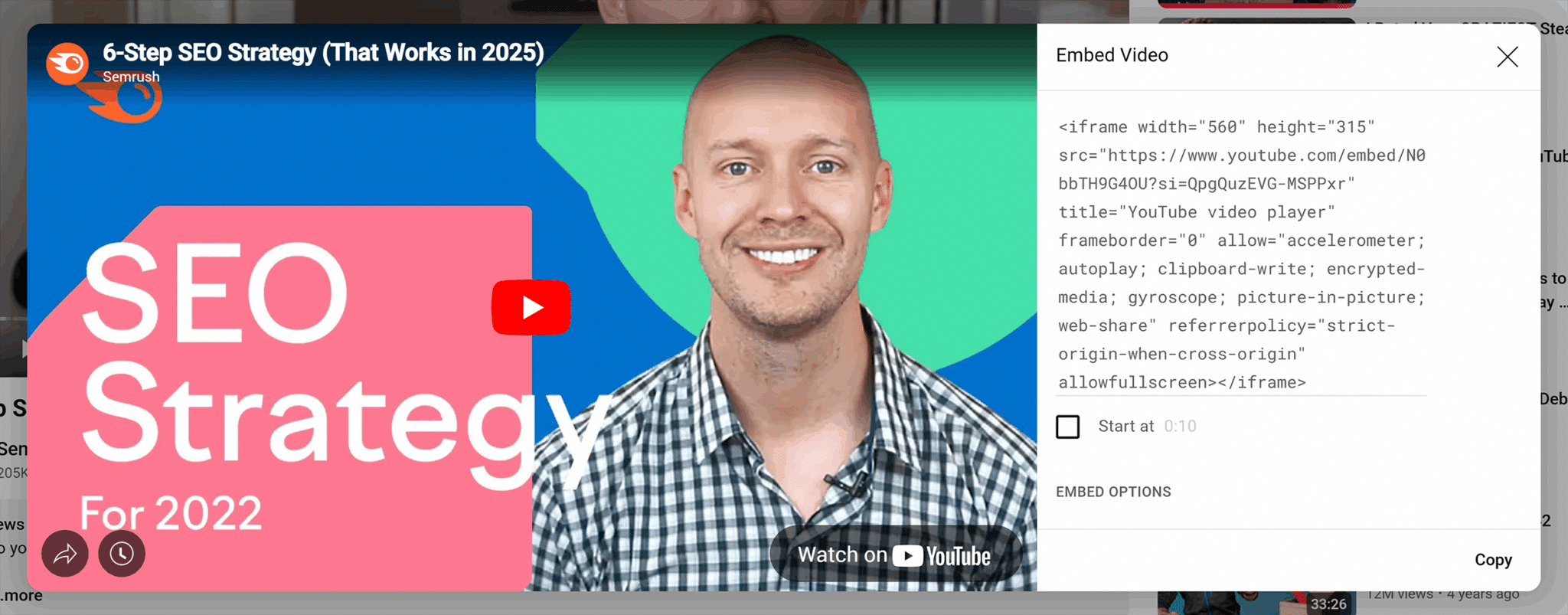
In the embed code, you’ll see “start=” followed by the time you selected in seconds.
- Use videoObject schema if you upload a video to your website. Schema provides additional context about the video to Google. There are over 100 properties associated with videoObject schema. Explore the options on the schema.org website here and create something custom and detailed.
Alternatively, there are schema generators that can help you create basic video schema. Here’s an example using videoschema.com: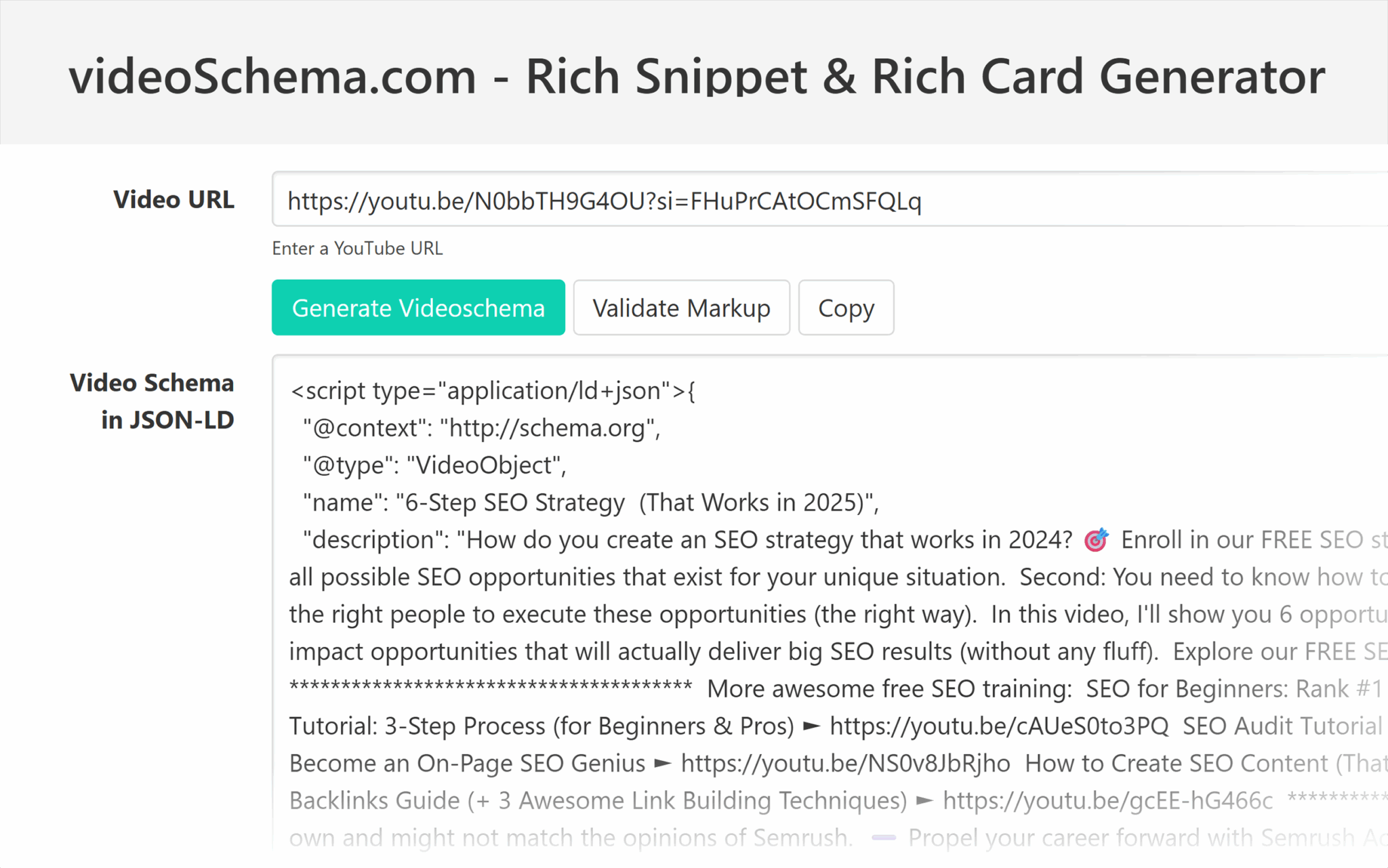
The tool pulls all the information available within YouTube and creates schema. As you can see from the image, this is effective, but you’d need to edit it. The schema shouldn’t include the break lines (***) or emojis, but it’s a helpful starting point.
Remember to check the schema using the schema validator tool. - Follow all best practices when publishing to YouTube so your video may rank with both the YouTube URL and the URL of the page on your website that includes the embedded video.
13. Publishing videos to YouTube
There are many video publishing platforms, such as Vimeo and YouTube, and short-form video social media platforms like TikTok, Facebook, and Instagram.
If SERP features are your goal, publishing videos on YouTube gives you the best chance of achieving them.
Why?
YouTube is a Google-owned platform that is prioritized in SERPs. Seven videos were recommended in one SERP mentioned above, and five were published on YouTube.
If you’re prioritizing short-form videos and using TikTok, consider repurposing videos for YouTube.
Here are some top tips for publishing videos to YouTube:
- Use keywords in your video and add them to the video title and description.
- Add chapters so users can use time stamps to skip to the section they’re most interested in. If it makes sense, include keywords in the chapter titles.
- Optimize your video file name by including a keyword.
- Add subtitles so people can watch without needing sound.
14. Submit your site to Google Publisher Center
Publishing through Google Publisher Center increases your chances of appearing in the Top Stories carousel and other news-related SERP features.
By submitting your site and news feeds to Google Publisher Center, you’re signaling to Google that your content is newsworthy and timely.
Further reading: Get started on Google News with Publisher Centre
15. Use schema markup
Schema markup is incredibly useful for earning SERP features, particularly rich results such as review stars. Sometimes, you can add schema markup to a page and see the rich result in a few days.
It doesn’t always work like that, however.
Schema markup does not guarantee you’ll earn a rich result, but if it’s implemented correctly, it increases the odds you’ll earn rich results.
There are 816 schema markup types, so look at the entire range on schema.org to find opportunities that work for your website.
Here are some influential choices for earning SERP features and rich results:
Organization schema
Organization schema and its many properties can help secure knowledge panels for organizations because you can provide data like customer service numbers, founding dates, founder and employee information, and much more. You can also connect your digital entities and properties, such as social media profiles, using sameAs schema.
Pro tip: Because organizations are so individual, you must review organization schema properties on schema.org.
Here’s an organization knowledge panel that may have been influenced by schema:
Here’s an example of a simple organization schema from Google’s documents:
<script type="application/ld+json">
{
    "@context": "https://schema.org",
    "@type": "Organization",
    "url": "https://www.example.com",
    "sameAs": ["https://example.net/profile/example1234", "https://example.org/example1234"],
    "logo": "https://www.example.com/images/logo.png",
    "name": "Example Corporation",
    "description": "The example corporation is well-known for producing high-quality widgets",
    "email": "[email protected]",
    "telephone": "+47-99-999-9999",
    "address": {
        "@type": "PostalAddress",
        "streetAddress": "Rue Improbable 99",
        "addressLocality": "Paris",
        "addressCountry": "FR",
        "addressRegion": "Ile-de-France",
        "postalCode": "75001"
    },
    "vatID": "FR12345678901",
    "iso6523Code": "0199:724500PMK2A2M1SQQ228"
}
</script>
Person schema
Person schema and its many properties can help secure knowledge panels for people because you can provide details about what you do, your accomplishments, and connect your digital entities and properties, such as social media profiles, using sameAs schema.
Pro tip: Because people are so individual, you must review person schema properties on schema.org to build schema that’s most informative about you.
Here’s a person knowledge panel that may have been influenced by schema:

Here’s an example of a simple person schema:
<script type="application/ld+json">
{
"@context": "https://schema.org",
"@type": "Person",
"image": "[yourimageurl.com]",
"email": "[email protected]",
"jobTitle": "[job title]",
"name": "[full name]",
"description": "[description].",
"birthDate": "1990-12-31",
"url": "[www.example.com]",
"sameAs": [
    "https://www.linkedin.com/in/yourusername",
    "https://www.tiktok.com/yourusername",
    "https://www.youtube.com/yourusername"
    ]
}
</script>
FAQPage schema
FAQPage has many benefits. It makes content easier for search engines to understand, and it may make content more likely to appear in PAA and featured snippets. FAQPage schema also helps with voice search optimization.
Here’s a simple FAQPage schema template example:
<script type="application/ld+json">
{
    "@context": "https://schema.org",
    "@type": "FAQPage",
    "mainEntity": [
        {
            "@type": "Question",
            "name": "[The Question?]",
            "acceptedAnswer": {
            "@type": "Answer",
                "text": "<p>The full answer</p>"
            }
        },
        {
            "@type": "Question",
            "name": "[The Second Question?]",
            "acceptedAnswer": {
            "@type": "Answer",
                "text": "<p>The second full answer</p>"
            }
        }
    ]
}
</script>
Review schema
Review schema shows rating stars, the rating number, and the reviewer’s name in the SERP.
A review rich result looks like this:
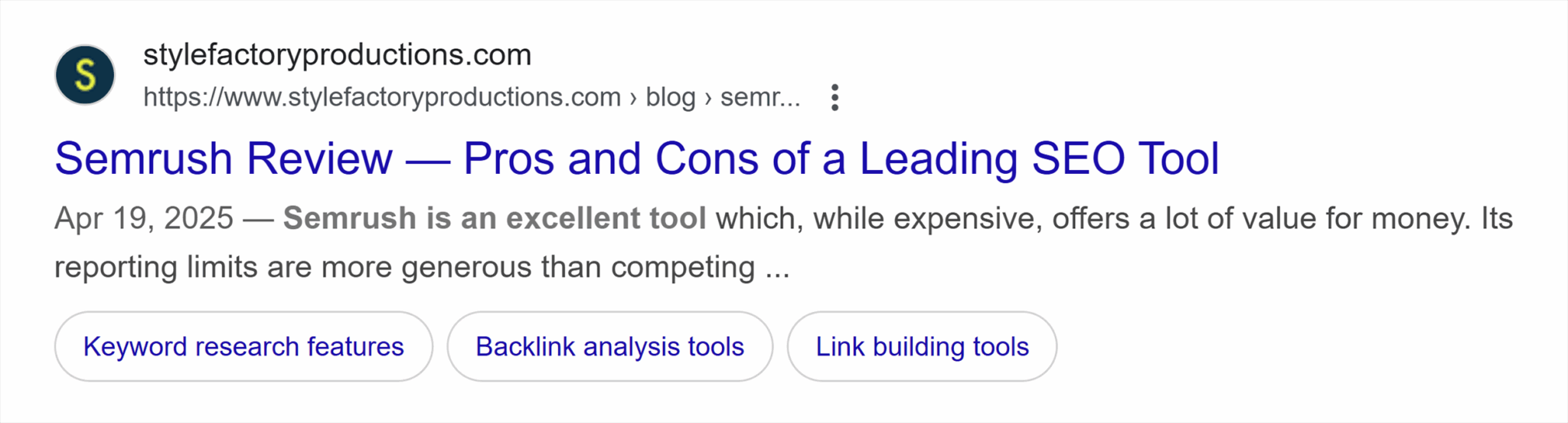
Here’s a simple schema template for the review of an organization:
<script type="application/ld+json">
{
    "@context": "https://schema.org/",
    "@type": "Review",
    "itemReviewed": {
        "@type": "Organization",
        "image": "https://www.example.com/.jpg",
        "name": "[Organization Name]",
        "telephone": "0000000",
        "address" :{
            "@type": "PostalAddress",
            "streetAddress": "[Address line 1]",
            "addressLocality": "[Address line 2]",
            "addressRegion": "[Address Region]",
            "postalCode": "00000",
            "addressCountry": "US"
        }
    },
    "reviewRating": {
        "@type": "Rating",
        "ratingValue": 4
    },
    "author": {
        "@type": "Person",
        "name": "Joe Bloggs"
    },
    "publisher": {
        "@type": "Organization",
        "name": "[Where was the review published]"
    }
}
</script>
Review schema is easily confused with AggregateRating.
AggregateRating
AggregateRating schema shows rating stars, the rating number, and the number of reviews.
Where Review schema publishes details about one review, AggregateRating summarizes the results of many.
AggregateRating is easily identifiable because it doesn’t include review author names, as there will be many different reviews included. Plus, it includes the number of reviews following the rating stars.
Here’s what an aggregate rating rich result looks like:
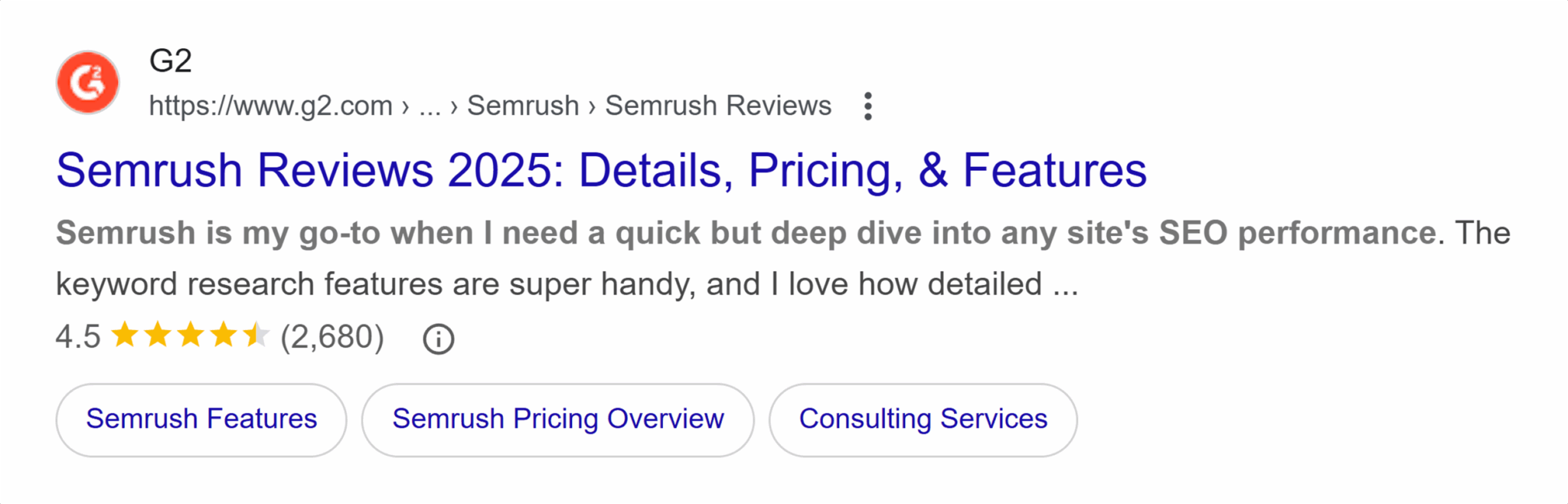
Here’s a simple schema template for an organization aggregate rating:
<script type="application/ld+json">
{
    "@context": "https://schema.org",
    "@type": "Organization",
    "name": "The Org",
    "aggregateRating": {
    "@type": "AggregateRating",
        "bestRating": "5",
        "worstRating": "1",
        "ratingCount": "37",
        "ratingValue": "4.8"
    }
}
</script>
Here’s another schema template for a product aggregate rating:
<script type="application/ld+json">
{
    "@context": "https://schema.org",
    "@type": "Product",
    "name": "The Product Name",
    "sku": "The Product SKU",
    "aggregateRating": {
    "@type": "AggregateRating",
        "bestRating": "5",
        "worstRating": "1",
        "ratingCount": "37",
        "ratingValue": "4.8"
    }
}
</script>
- bestRating is the highest value allowed in the rating system. If you’re referencing reviews on Google or G2, then the highest number is five.
- worstRating is the lowest value allowed in the rating system. If you’re referencing reviews on Google or G2, then the lowest number is one.
- ratingCount is the total number of ratings.
- ratingValue is the average of all ratings.
Pro tip: You never want to manually manage schema, but you especially don’t want to manually manage AggregateRating schema because it changes too frequently. Incorrect implementation could affect trust signals if ratings were lower than presented, for example. Speak to developers about automating AggregateRating schema.
16. Validate schema with Google’s Rich Results Test
Validate all schema created for errors. And if you’re using schema to gain rich results, you can validate using Google’s Rich Results Test.
Schema validator
Validate schema for errors using the schema validator tool. You can validate schema in two ways using this tool:
- Validate using the URL if the schema is on the site
- Validate using a code snippet before uploading the schema
Here’s how you do it for a URL.
Go to the schema validator tool > Click “Run new test” > “Fetch URL” should already be selected > Enter your URL > Click “Run test.”
The validation looks like this:
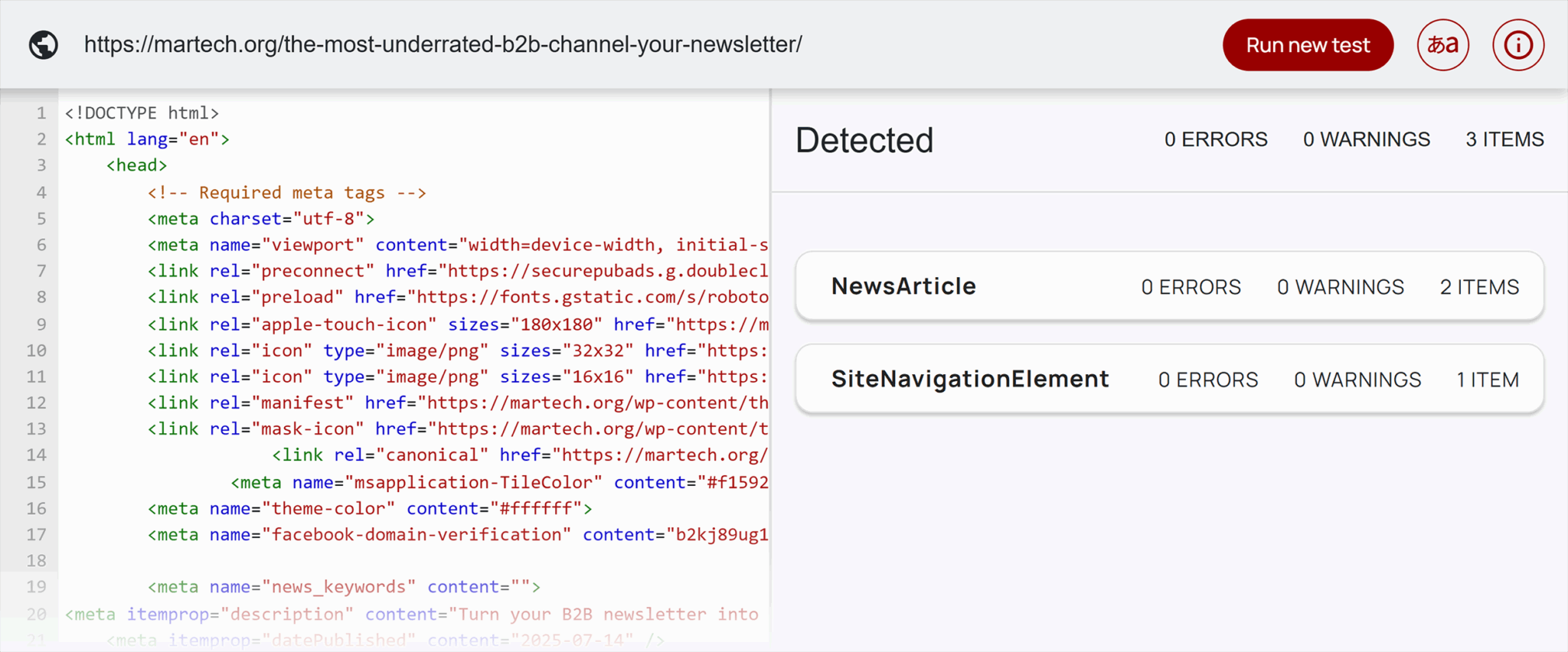
The tool will list all detected schema on the right-hand console and pull the code into the left-hand console.
If you have errors or warnings, you’ll see them on the right.
Google’s Rich Results Test
Google’s Rich Results Test tool allows you to paste a URL or code to see if your page is set up to support rich results.
Here’s how you use it with a URL:
Go to Google’s Rich Results Test tool > URL is already selected > paste your URL > Click “Test URL.”
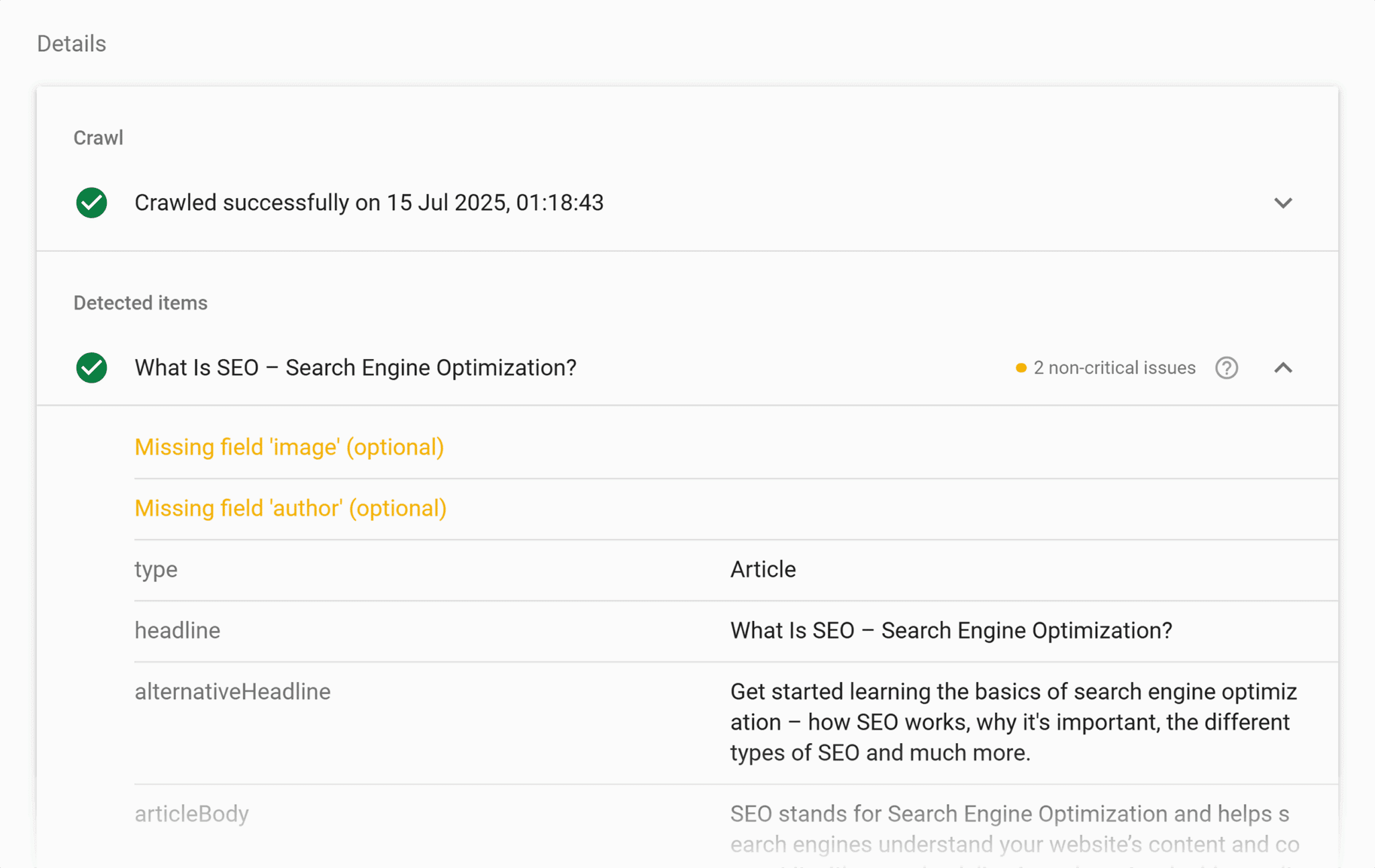
The report looks like this:

The report shows detected structured data and flags any concerns. In the example above, one non-critical issue was detected. If you click on the structured data listing with the issue, the tool will show you the problem.
17. Submit a product feed via Google Merchant Center
If you’re selling products, you should really use Google Merchant Center. You can submit a product feed, which may help products appear in SERP features like “Popular Products.”
When you submit a product feed, you’re providing Google structured data about your inventory, including:
- Product name
- Prices
- Descriptions
- Images
- And more
In the video below, Alan Kent, Google Developer Advocate, explains more:
Level up your analysis by associating your Google Search Console (GSC) with Merchant Center.
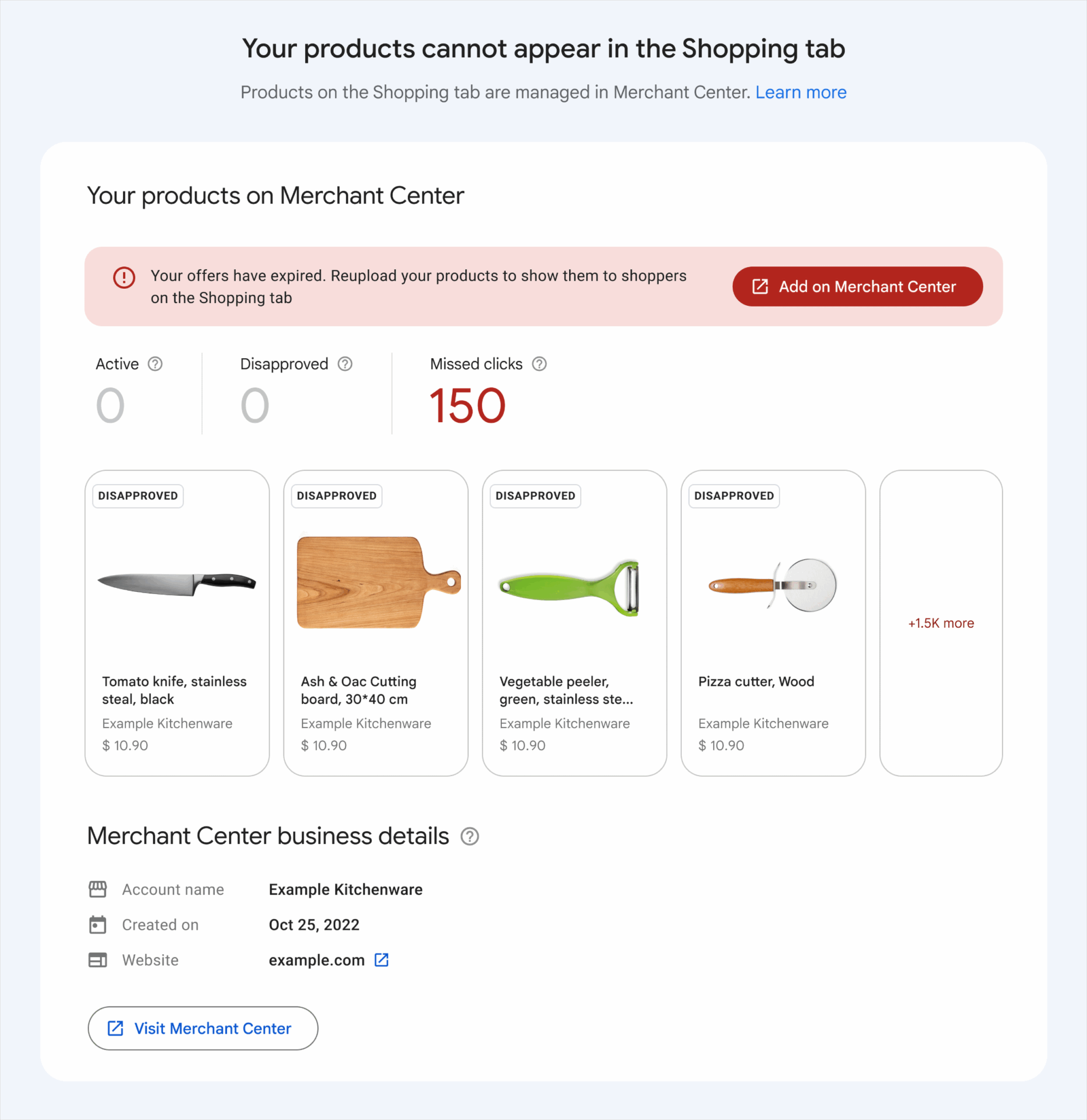
Through Google Search Console, you’ll find product recommendations such as:
- Notifications when products stop appearing in the Shopping tab
- Opportunities to increase clicks and improve rankings
Here’s what it looks like in GSC:
18. Optimize Google Business Profile
Your Google Business Profile includes a trove of information for Google. This information could influence knowledge panels about your business.
The information in Google Business Profile includes:
- Company name
- Description
- Open hours
- Social media profiles
- Reviews
- And more
All businesses who interact with or meet customers during their hours of operation should create and optimize a Google Business Profile.
Here’s how you do it.
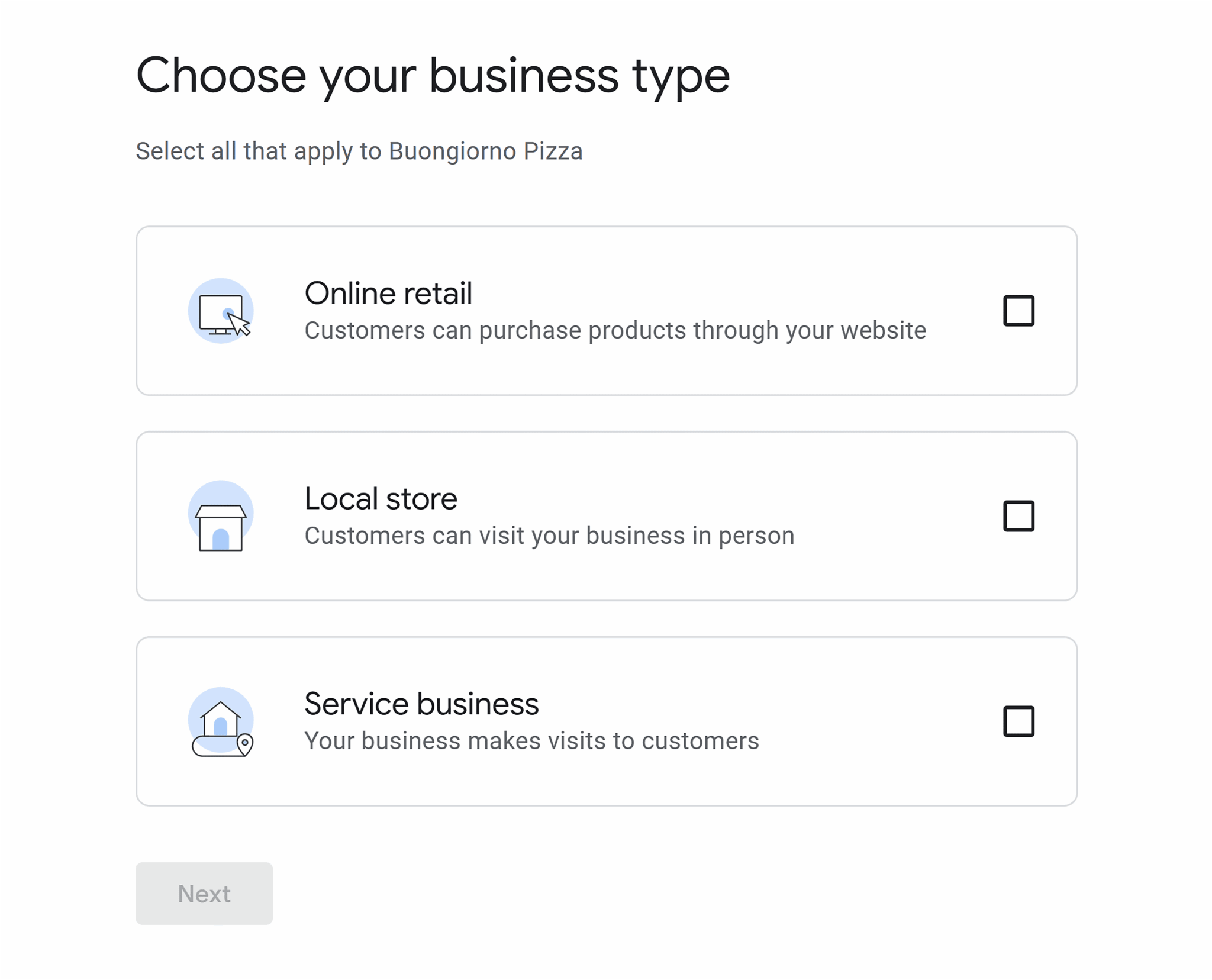
Go to Google Business Profile and click “Get Started.”
The system will take you through questions about your business page by page. It’ll include your business name, business type, and more.
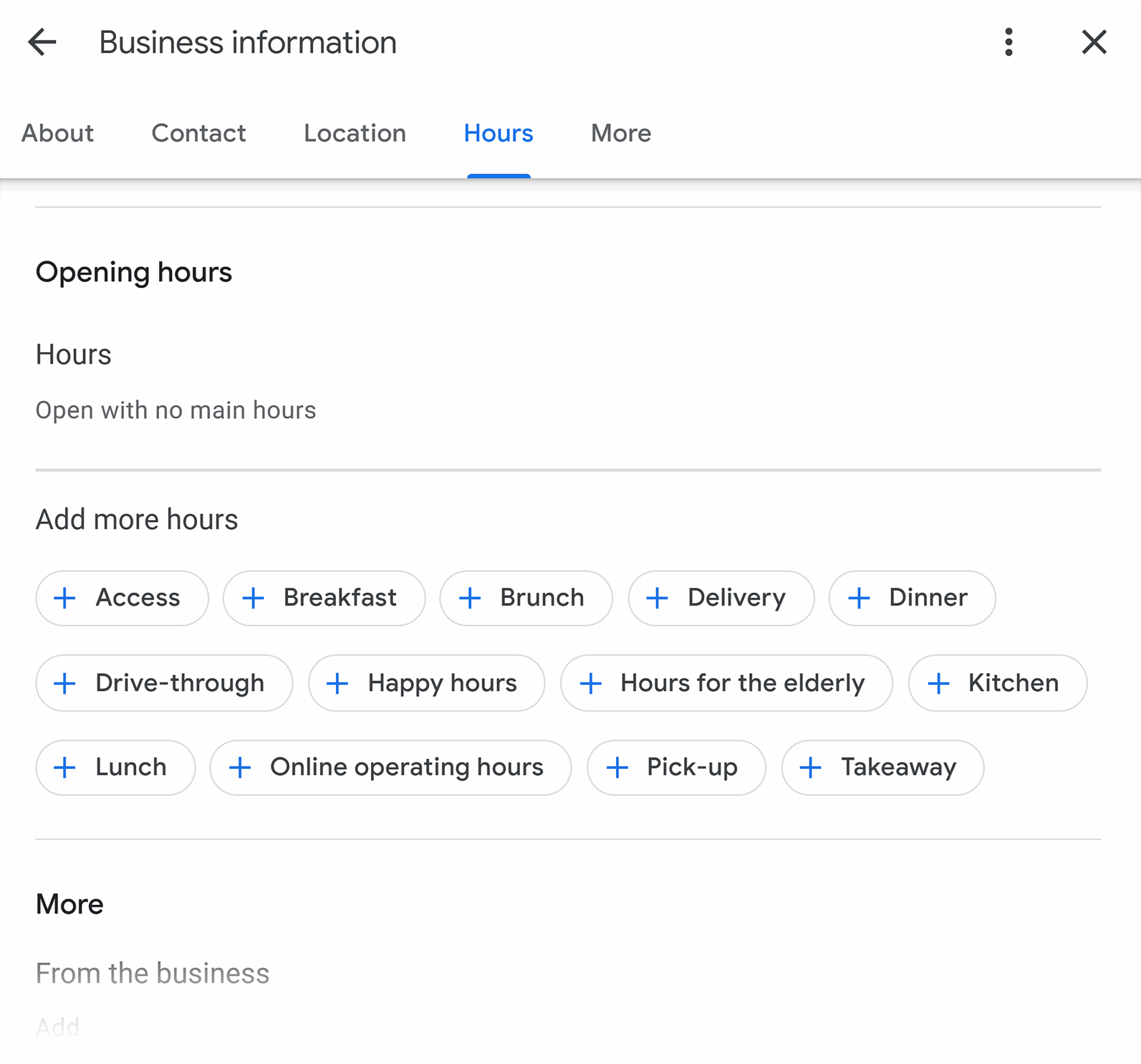
Once you’ve created an account, you’ll be able to make edits to it at any time. Just log in to Google Business Profile or edit from the SERPs:
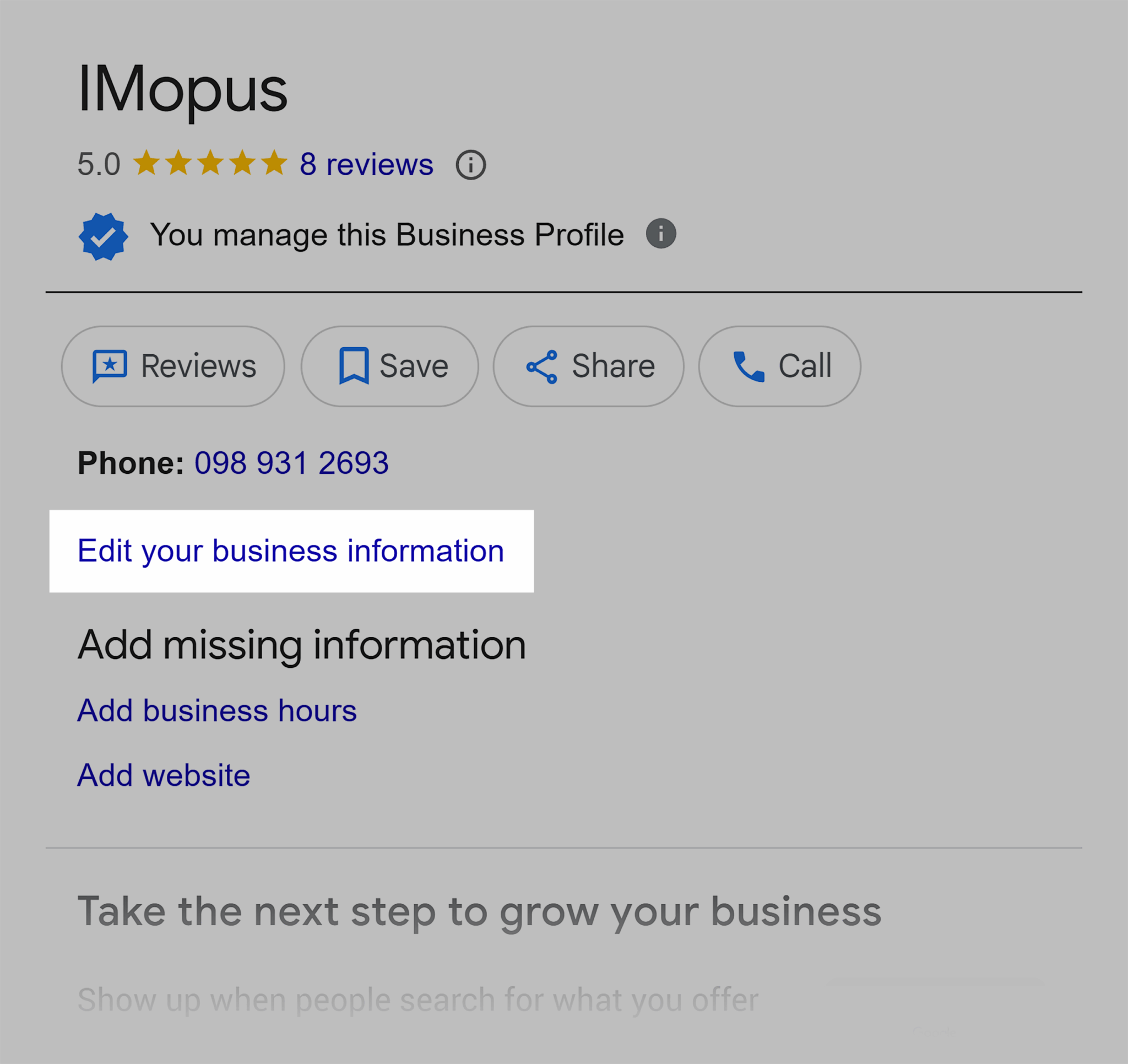
From SERPs, you get a pop-up, like this:
Pro tip: Create your business profile from a company-owned email, ideally managed by founders. If an employee sets it up, you could use a universal email like hello@ so multiple people can access, and founders will maintain access when employees leave their employment.
19. Maintain a clear, shallow site architecture
For content to rank anywhere on Google, it must be easy to discover and crawl. Maintaining a clear, shallow site architecture is key.
The bigger the site, the more difficult maintaining a shallow architecture becomes.
The key?
Ensure the most important pages are one or two clicks away from the homepage.
This is achieved through:
- Good internal linking throughout the site
- A logical navigation that links to the important pages
- Linking to important pages from the homepage
20. Improve page authority
Authority brings trust, and with trust comes increased rankings. Securing SERP features is a long game of growth and brand visibility.
Page authority is built through:
- Writing good, helpful content that meets user search intent
- Gaining backlinks from highly relevant, authoritative sources (think PR)
- Verifying website authors and businesses with social media platforms like LinkedIn or knowledge panels and Wikipedia pages
21. Monitor the SERP feature landscape regularly
There are already over 40 types of SERP features, and as demonstrated above, SERP features change over time. Currently, featured snippets are getting less visibility, and who knows what the future holds? A few years ago, none of us would’ve guessed that generative AI would be at the top of the SERPs!
You can monitor your SERP positions in two ways:
Position tracking
If there’s a SERP feature you’re particularly interested in watching, use Semrush’s Position Tracking tool, which shows you SERP features associated with keywords you’re tracking.
Go to Semrush > in the left-hand sidebar find “SEO” > click “Position Tracking” > Choose your project > “Overview.”
Within the overview, you can:
- Filter by SERP feature type using the dropdown
- See the SERP feature ranking by reviewing the icons within the position column

Organic research report
The organic research report is better if you want to analyze all SERP features showing your site.
In the left-hand sidebar find “SEO” > click “Organic Research” > Type your domain > “Search” > “Positions.”

This report shows all the SERP features in a column so you can see SERP feature opportunities.
What to do with information gained from SERP feature monitoring?
- Improve content by adding features such as videos. If Google ranks it, your audience wants it.
- Refresh content to requalify for lost SERP features so you can maintain rankings.
- Analyze what features appear for your target keywords and mirror that format to give yourself the best chance of ranking for more keywords.
SERP feature FAQs
What are SERP features, and how do they affect organic traffic?
SERP features are enhanced listings in Google’s search results. Any listing or detail (such as rating stars) that is not a traditional blue link result is a SERP feature.
SERP features affect organic traffic to websites negatively or positively, depending on the feature.
For example, AI overviews might reduce clicks for informational queries because the AI can answer the query sufficiently on the SERP, so the user doesn’t need to click through to a website for more information.
However, rating stars, which show how a product or service is rated, might encourage clickthrough as searchers can see if buyers have been happy with their purchase.
What’s the difference between a rich result and a featured snippet?
A rich result enhances a traditional blue-link listing. A rich result is an umbrella term that includes enhanced features that help a user decide which blue link they want to click.
For example:
- Review snippets
- Rating stars under product or service listings
- Breadcrumbs in SERPs
- Sitelinks
A featured snippet is one type of SERP feature and provides information related to a query. It may be that a featured snippet answers the searcher’s need within the SERP.
Do SERP features reduce or increase my click-through rate?
SERP features can reduce or increase click-through rates, depending on the exact SERP feature in question.
AI overviews, for example, can reduce clicks to websites, particularly for informational searches. This is because the AI overviews can comprehensively and concisely answer questions, and the search is fully resolved within the SERP.
However, rich results enhance listings and help searchers decide what to click. For example, if you’re ranking for a product and your product has the highest number of reviews and ratings, you’re more likely to earn the click.
How can I get my content to appear in a featured snippet?
You can get your content to appear in featured snippets by:
- Using a hierarchical heading structure including one H1 and as many H2s, H3s, and H4s as needed. Google can pull snippets from well-structured content, especially if a heading is a question and the following body text answers the question succinctly.
- Structuring content clearly with paragraphs and numbered and bulleted lists.
- Update your content so the information you’re providing is up to date and accurate.
What types of schema markup help trigger SERP features?
The schema markup that helps trigger SERP features includes:
- Review schema shows rating stars, the rating number, and the reviewer’s name.
- AggregateRating schema shows rating stars, the rating number, and the number of reviews.
- Pros and cons schema shows pros and cons within the SERPs.
- FAQPage may encourage rich results, such as PAA or featured snippets.
- Recipe schema shows the time to cook a recipe in the SERP and can include AggregateRatings.
- Organization schema and its many properties can help secure knowledge panels for organizations.
- Person schema and its many properties can help secure knowledge panels for people.
- Event schema can help events appear at the top of SERPs for local searches.
Why did my page lose its featured snippet or rich result?
There are many reasons why a page could lose a featured snippet or rich result.
Featured snippets are highly desirable SERP features, and it could be that a competitor has targeted the snippet and taken your place. Review the new ranking content and compare it to yours. Is it better, or more up to date? If it is, you can edit your content to become the most helpful answer online.
Other reasons might include changes to heading structure. Featured snippets often appear for queries that are answered succinctly with the heading aligning with the query, followed by a very concise and “snippetable” answer.
Schema changes might influence rich results, such as rating stars appearing in SERPs. Try updating your schema.
Finally, Google might’ve simply rolled out an algorithm update, and now a different type of content is being prioritized. You may need to tweak content to please the new algorithm, although sometimes it’s worth waiting to see what happens. Google is always tweaking and testing, and it may be that the SERPs return to what they were previously when your site was ranking.
How do People Also Ask (PAA) boxes work, and how can I rank in them?
People Also Ask (PAA) is an accordion-style SERP feature that provides questions and answers.
You can increase your chances of ranking within PAA by:
- Answering questions directly and succinctly
- Using a hierarchical heading structure, so the heading is the question, and the answer is directly below it
- Include FAQs within your content, much like the FAQ section you’re reading now.
- Using FAQPage schema
Can videos or images show up as SERP features, and how do I optimize for them?
Videos and images can show up in SERP features. The following SERP features are all related to video or images:
- Image is a SERP feature that shows an image next to a traditional listing.
- Image carousel is a SERP feature that shows images in a carousel format.
- Video is a SERP feature that shows a video next to a traditional listing.
- Video carousel is a SERP feature that shows videos in a carousel format.
- Feature video is a SERP feature that shows video at the top of the SERPs.
You can optimize for image and video SERP features by:
- Using alt text in images to help contextualize what the images are about. Be descriptive and use keywords, but remember that alt text is intended for visually impaired website visitors, and make it useful for them.
- Using video schema to help contextualize what a video is about.
- Upload videos to YouTube over other video platforms. YouTube is a Google-owned platform, and it ranks more frequently in SERPs than alternatives. Upload your video with keywords in the title tags and description.
How do I qualify for sitelinks in Google search results?
Navigation and internal linking help sites qualify for sitelinks in Google search results.
- Pages with high numbers of internal links are more likely to feature in sitelinks.
- Important pages should be easy to reach within a click of the homepage. These pages are more likely to feature in sitelinks.
- Make sure you have a sitemap in place.
- Use breadcrumbs and breadcrumb schema.
Track, optimize, and win in Google and AI search from one platform.
Which SERP features matter most for SEO in competitive industries?
The SERP features that matter the most for SEO in competitive industries are the ones that help your business the most. There are over 40 SERP features, and different features serve different business and marketing objectives.
Here’s a guide on which SERP features matter based on goals:
- Increase clicks by adding schema to your website, which helps you earn rich results. Featured snippets also increase clicks.
- Get more eyes on your videos by uploading them to YouTube, including descriptive title tags and descriptions, and adding schema when embedded on a site.
- Increase visibility in AI by answering questions succinctly and directly. Also, increase your site’s authority with citations and backlinks.
Work towards your first SERP feature
It’s easier to earn SERP features on search results pages where your site is already performing well. Start by doing some keyword research and identifying keywords where you already have strong visibility; a page one ranking would be ideal. Look for SERP features that you want to be included within and follow the tips outlined under the SERP feature in this article. From there, it’s a matter of patience! Watch and see if Google rewards you with increased visibility in the SERP feature.
You can do one-off SERP feature keyword research manually, but if you want a helping hand, Semrush’s Keyword Magic Tool shows you all the relevant Google SERP features for every keyword. Plus, you can track your success with Position Tracking, too.
Explore more on
Editorial disclosure
Search Engine Land is owned by Semrush. We remain committed to providing high-quality coverage of marketing topics. Unless otherwise noted, this page’s content was written by either an employee or a paid contractor of Semrush Inc.
About the author