44 Best ChatGPT Prompts for SEO

Approximately 86% of SEO professionals are using AIs like ChatGPT as their new marketing intern. The days of spending an hour fretting over an email are in the rearview.
But are you really using ChatGPT to its full potential? Because your new AI assistant can do a lot more than help you ask your SEO client for clarification.
Read on to learn the 44 best ChatGPT prompts for SEO—designed to turn hours of keyword research, page optimizations, schema generation, and competitor analysis into a 15-minute process.
And the secret to ChatGPT producing that top-quality piece of content?
A killer prompt.
What are ChatGPT prompts for SEO?
A ChatGPT prompt for SEO is the specific set of instructions you provide ChatGPT, directing it to complete a search engine optimization task as its response, like asking it to write a blog post or suggest keywords.
It’s like briefing an intern: You want to be as clear, concise, and specific as possible.
The more accurate the prompt, the more accurate ChatGPT’s reply.
The SEO toolkit you know, plus the AI visibility data you need.

Elements of a good ChatGPT prompt
Review all of the tips below before you submit a prompt. The larger the task, the longer the prompt (usually). You’ve got space for 4,096 characters. Use it effectively.
Here’s your go-to checklist to QA your prompts before you hit “enter”:

Did you tell ChatGPT what role it’s playing?
Give ChatGPT a “persona” or job title to work with. This helps it better frame its answer with the right tone and complexity.
For example, “you’re an experienced SEO strategist” or “you’re a technical SEO expert who specializes in website migrations and is speaking to a beginner audience.”
Is your prompt as clear as possible?
Yes, this is obvious. No, it’s not easy to do. Spell out what you need as clearly as possible. Do you need a list? A paragraph? Bullets? Brainstorming?
For example: “List five blog ideas in a bulleted list targeting the search phrase “how to use ChatGPT for B2B SEO.” Select ideas designed for a managerial-level audience.”
Did you include your goal?
If ChatGPT knows why you’re asking your query, it can better tailor its response.
For example: “Write a meta description that improves CTR by emphasizing how much better [customer’s product] is than [competitor’s product]. Base the reason on the cost-effectiveness of [customer’s product].”
Did you add formatting specifications?
Include requirements for specific tones, length, formatting, keywords, and audience.
For example: “Write a three-paragraph product description for a Shopify page using our company guidelines, targeting terms like “jackets for cats” and using a bulleted list to include product features.”
Did you provide any additional documentation?
Feed ChatGPT past work, brand guidelines, and competitor pages before prompting it. And make sure to remind it about what it knows—ChatGPT can have a bad memory, too.
Did you provide any examples?
ChatGPT can’t read your mind (yet). If you have an idea in your head of what you’re looking for, tell it.
For example: “Format this content in a table with three columns using these headings: “search term,” “search volume,” and “keyword difficulty.”
Checking these elements off the list when making your prompt will get you a far better output, whether you’re asking for schema, new copy, or an entirely new blog. The more specific you are, the higher the quality of content you unlock from ChatGPT.
And best of all? You don’t need to be afraid of getting penalized for using generative AI.
“Our focus is on the quality of content, rather than how content is produced.”
Yes, “using automation—including AI—to generate content with the primary purpose of manipulating ranking[s]” is bad. But appropriate use?
“Appropriate use of AI or automation is not against our guidelines. This means that it is not used to generate content primarily to manipulate search rankings, which is against our spam policies.”
In other words: appropriate use is fair game.
But what exactly does Google consider to be “appropriate use” of AI?
Google is (unsurprisingly) vague. The most important point is that you still want to generate quality content that helps your user. That means as long as your ChatGPT-generated blog answers your user’s query, you’re good to go.
Ready to turn your endless back-and-forth with ChatGPT into a thing of the past? Here are the best SEO prompts for ChatGPT:
SEO content prompts (with copy-paste examples)
The first rule of SEO is that you need quality content to rank on Google. These prompts show you how to create keyword- and user-optimized copy that gives you a solid base to start ranking.
Blog post outlines from a keyword
ChatGPT is a great place to quickly generate content briefs and blog outlines.
Make sure to provide detailed information about your:
- Target audience
- Keyword
- Search intent
- Competitors
- Word length
Prompt: You’re a content strategist with expertise in SEO blog writing. Create a detailed outline for a blog post targeting the keyword [keyword].
- Include relevant related terms like [keyword], [keyword], and [keyword].
- Target [provide your word count].
- Your target audience is [provide your target audience]. The goal of this content is to [educate, convert, etc.].
- High-ranking competitors include [competitor]. Emulate and improve upon their content.
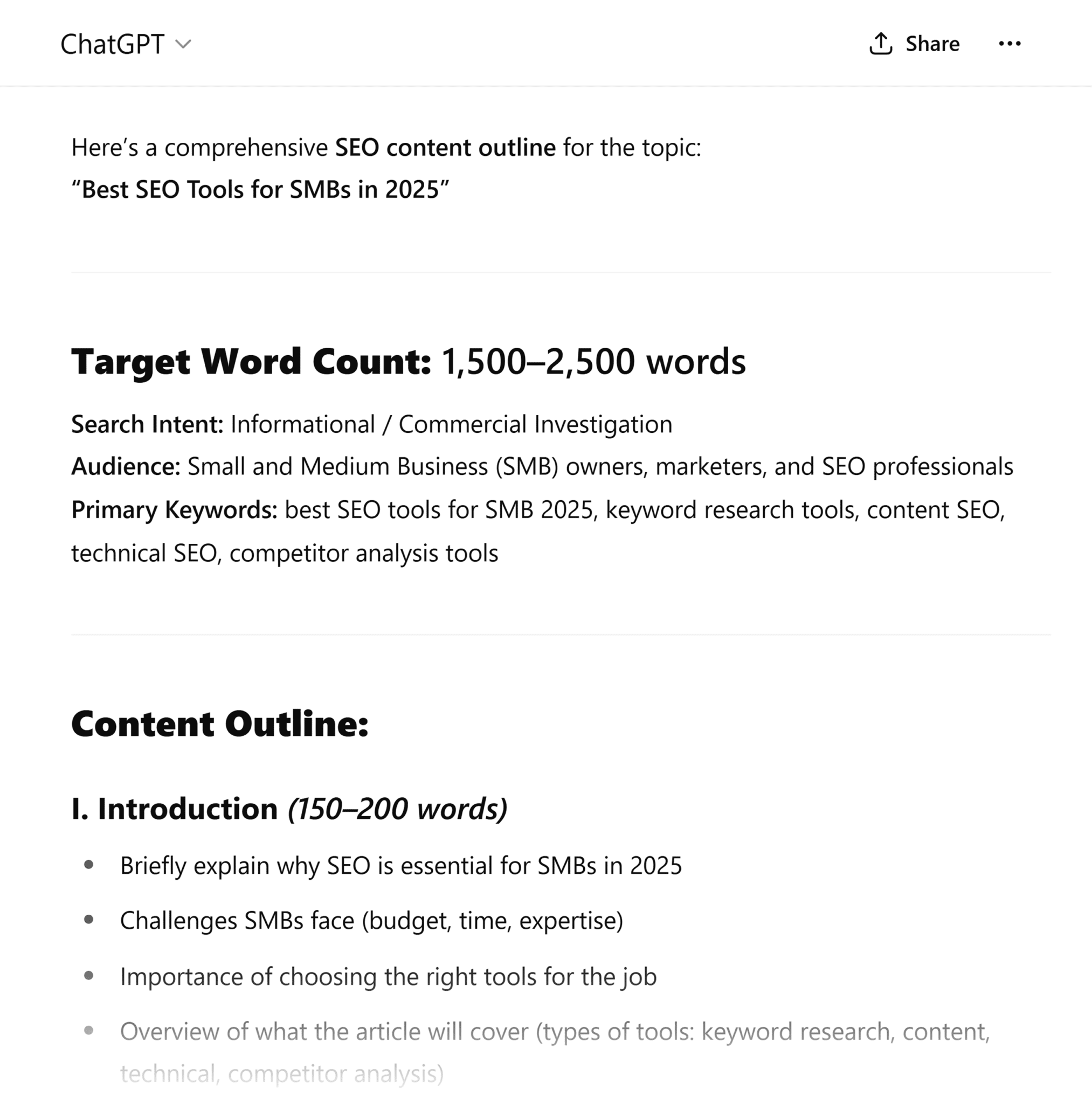
The screenshot below shows ChatGPT’s output when the following prompt was submitted:
You’re a content-writing expert specializing in SEO. Generate a content outline targeting “best SEO tools for SMB in 2025.”
- Include terms like “keyword research,” “technical SEO,” “content SEO,” and “competitor analysis.”
- Target 1,500 to 2,500 words.
- The target audience is SMB VPs and CEOs. The goal of this content is to educate the user.
Featured snippet optimization
Use a ChatGPT SEO prompt to rewrite your content to better target featured snippets.
But what exactly is a featured snippet?
Featured snippets are specialized search results that appear at the top of Google’s search engine results pages (or below the AI Overview when it’s present). They most commonly appear in response to long-tail, informational, and question-based searches.
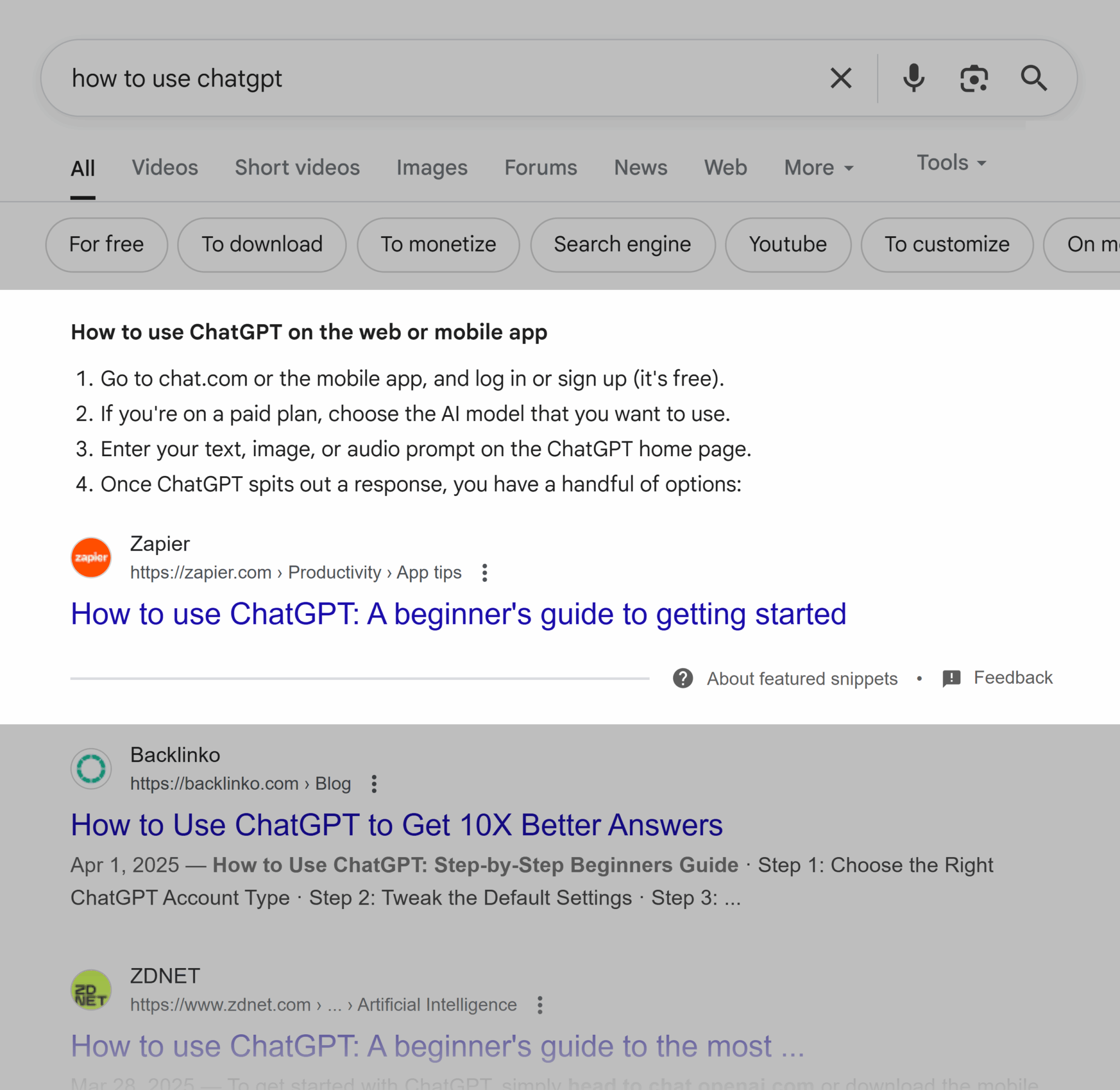
Ranking for featured snippets is a special skill that requires careful competitor analysis, keyword research, and strong content-writing skills.
To use ChatGPT for featured snippet optimization, you’ll need:
- Target keyword
- Competitors
- Content formatting
Here’s what you should ask:
Prompt: You’re a content-writing SEO expert. You specialize in reworking content so it can rank for a featured snippet on Google. Review this piece of content [paste current content]. I want to rank for the featured snippet for [keyword].
Currently, [competitor] is ranking with a [content formatting] using [copy and paste content from current competitor]. Please rewrite the content I gave you so it’s better optimized to rank for a featured snippet.

Pro tip: Featured snippets favor content formatted in bulleted lists or short paragraphs. Google wants scannable, easy-to-digest content. Structure your content accordingly.
Title tag and meta description generation
Use ChatGPT for metadata generation at scale. Your title tag and meta description are both key pieces of content when it comes to bringing users to your site. See below for an example of how a title tag (highlighted in yellow) and meta description (highlighted in green) appear in the SERPs.
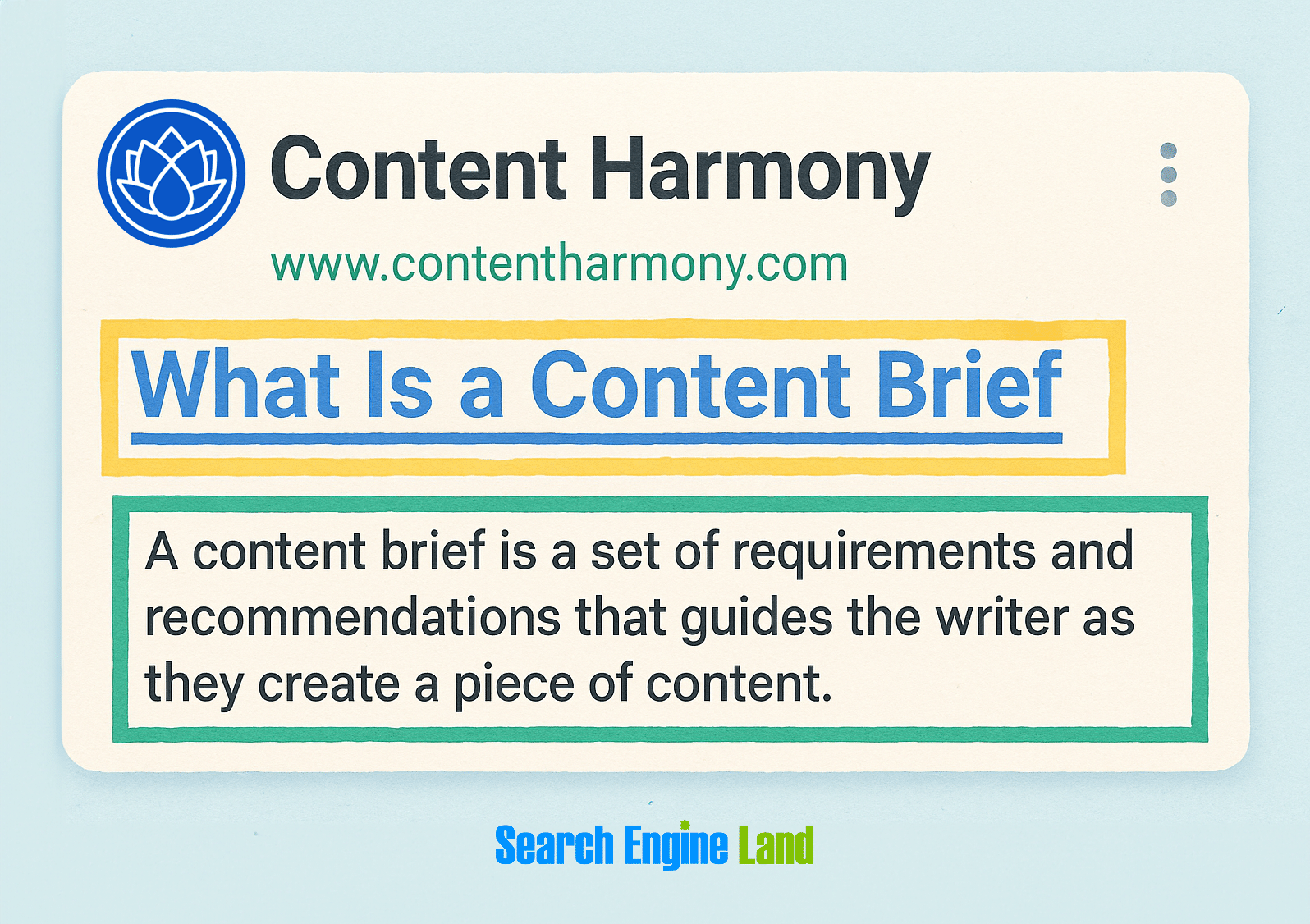
Your title tag is essentially the title of your page and is usually the same as your H1. Lead with your primary keyword. And try to keep things between 60 and 70 characters. Too short, and you’re not making full use of the character count. Too long, and your title tag will be truncated by Google.
Your meta description is like the back cover of a book. It describes what a user can expect to read about on your page. It doesn’t actually contribute to rankings, but any terms included in the search query will be bolded, so a properly optimized meta description can make your content’s relevance clear and increase click-through rate. Try to keep your meta descriptions to between 140 and 160 characters.
When using ChatGPT to generate metadata, you’ll need to do some virtual handholding. ChatGPT’s not the best at counting large numbers of characters (yet), so even when you give it a character count, it’ll often test the limits.
That means if you’re looking to generate metadata at scale, you should get the information into a table so you can easily check in a spreadsheet if the character count lines up.
Prompt: You’re an SEO expert. Create title tags (<70 characters) and meta descriptions (140-160 characters) for the following list of URLs: [provide list of URLs] Base your target keywords on the terms included in the slug.
You can also use ChatGPT to generate a handful of ideas to optimize a single page:
Prompt: You’re an SEO expert who excels at writing brand-accurate, search-optimized, high-CTR metadata. Create five different title tags and meta descriptions for [URL]. The target keywords are [keywords]. The main CTAs you should include are [CTAs]. Focus on how to improve click-through rate while still matching the character count.
Internal linking suggestions
Internal linking is important for both users and search engines because it makes it easier to navigate your site.
To take your internal-linking strategy to the next level, you’ll need to provide ChatGPT:
- Your website’s sitemap or a list of relevant URLs
- Text of the page you want to link from
Prompt: You’re an SEO expert helping me improve my website’s internal linking. Review the content below and suggest strong internal links based on this list of URLs [paste list of target URLs]. Format your response by listing what pages I should link to and the keyword-optimized anchor text I should use.
Keyword stuffing review
Yes, ChatGPT may not be great at counting the exact number of characters that go into your title tag and keeping it below that 65-character count, but you know what it can count for you? How many instances you have of your target keyword in your on-page copy.
Monitoring keyword density, or how often your target keyword appears in the page copy, can help you avoid keyword stuffing (overuse of a keyword in your copy). Keyword stuffing is something Google will punish you for, so use this prompt to avoid over-optimizing.
A good rule of thumb for keyword density is to only have one to three mentions of your target term per 100 words. So, no more than 1-3% of your copy should be mentions of your target keyword.
Prompt: You’re an SEO expert. Count the number of times my target keywords [insert keywords] are used in this copy [paste copy]. Check to see if I’m keyword stuffing, or if I have the right amount of keywords to properly signal what this content is about to users and search engines.
FAQ content creation for schema
Schema is a type of structured data that is a piece of HTML code you add to your page to assist search engines in better understanding the content. It doesn’t directly help with rankings and isn’t visible on the page, but it does help you take up more space on the SERPs.
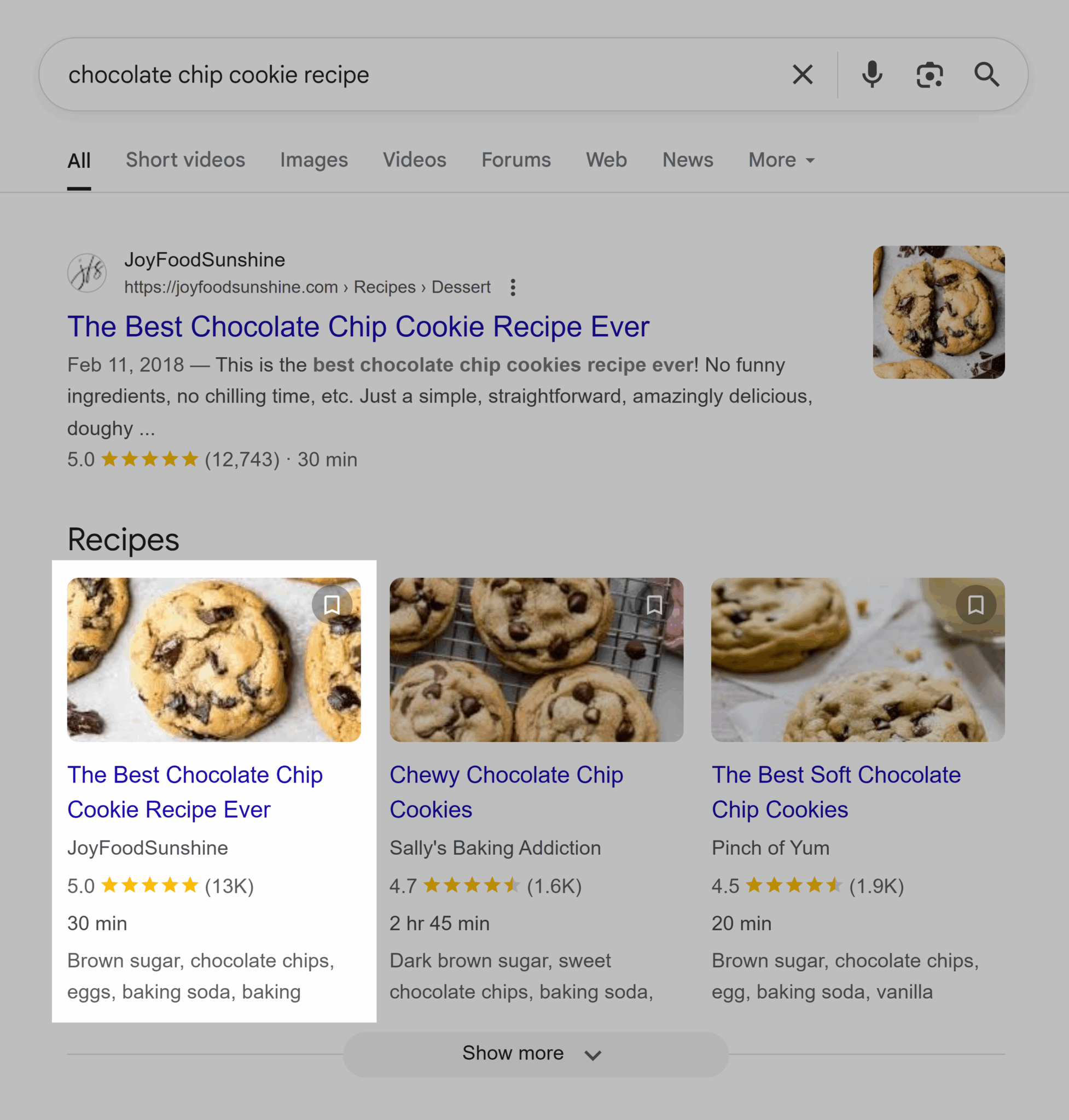
For example, if you were creating a page about your grandma’s favorite chocolate chip cookie recipe, you would add recipe schema. This addition makes it easier for Google to see that your recipe takes 30 minutes, requires brown sugar, and has a five-star rating from over 13,000 reviewers.
FAQ content should be clearly and concisely written in a Q&A-style format. Adding FAQPage schema to that content increases your chances of appearing in People Also Ask and featured snippets. Take a look at a People Also Ask SERP feature below.
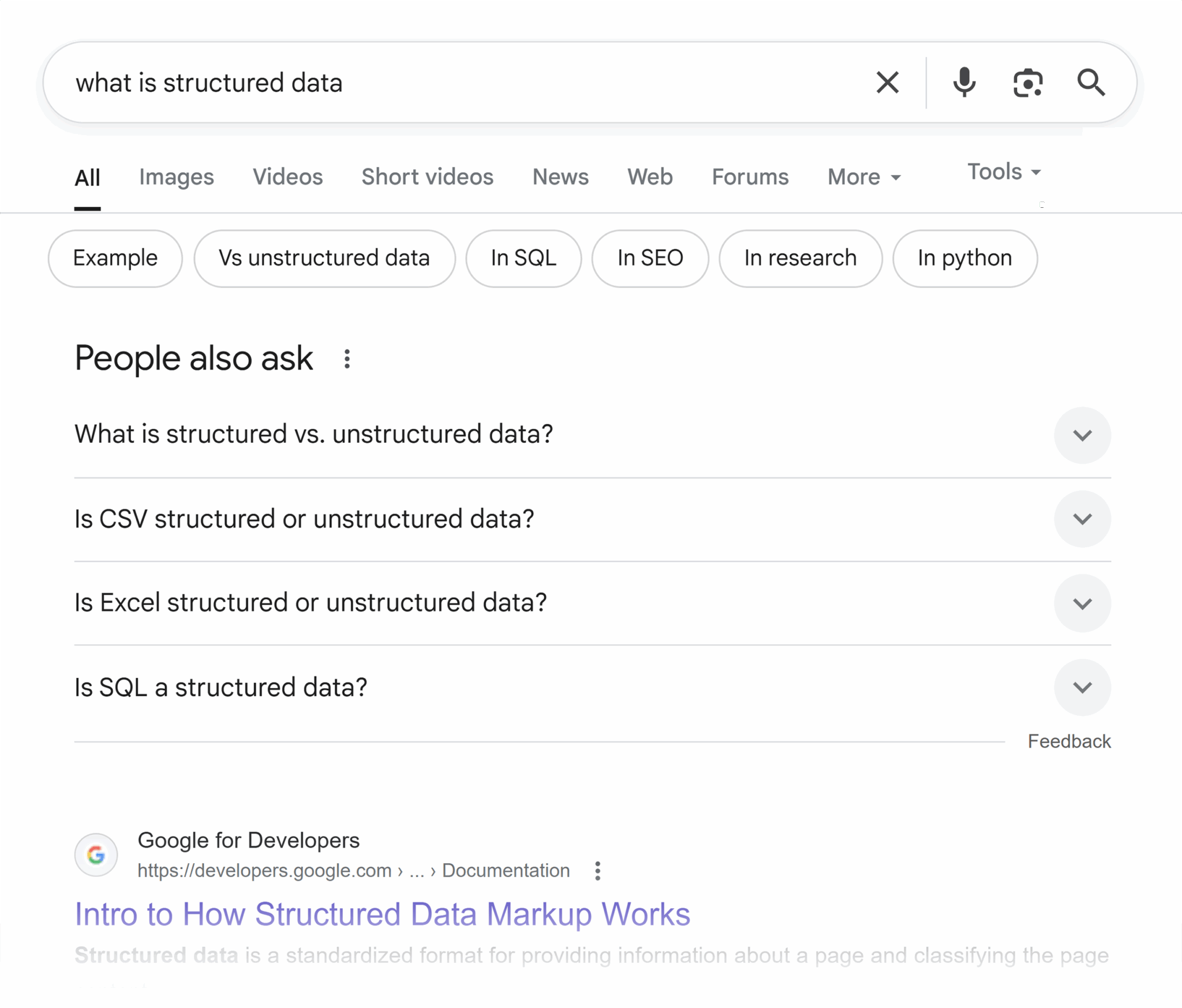
Your FAQ content should always be designed with the audience in mind. You can pull question inspiration from the search pages themselves by analyzing the People Also Ask feature, or you can turn to ChatGPT.
Prompt: Act as a content SEO writer. I’m creating an FAQ section for a [product page, category page, blog page, etc.]. I’m targeting the keyword [keyword]. The audience is [describe your target audience].
Please generate five to seven natural-sounding frequently asked questions and answers that:
- Answer common user questions related to this keyword
- Are written in a way that suits FAQPage schema
- Use our brand voice [provide brand voice examples]
- Keep answers to less than two to three sentences each
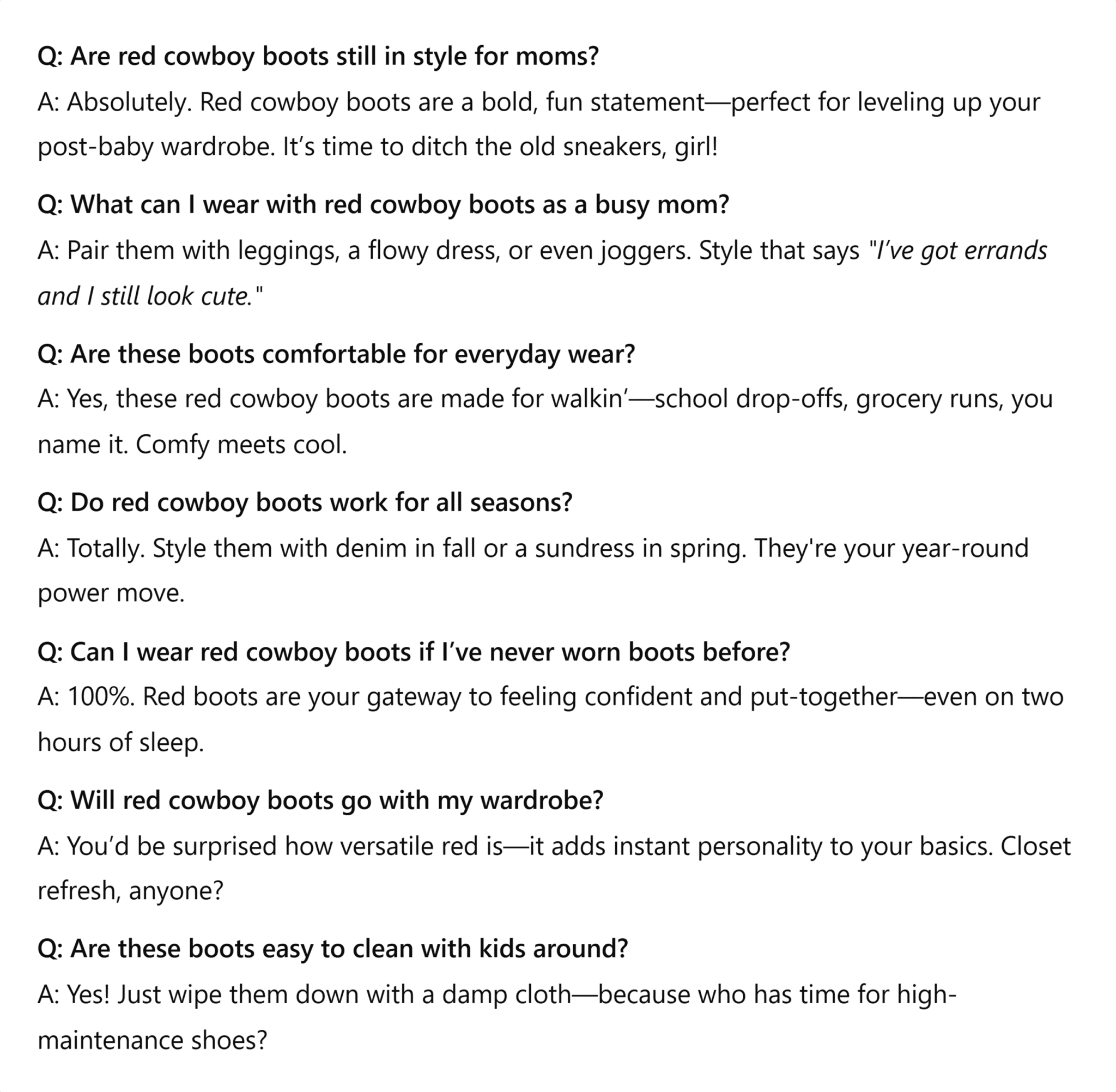
Let’s say you’re generating FAQ schema for your new product page featuring a pair of red cowboy boots and targeting recent mothers looking to elevate their closets. Your ChatGPT-generated FAQ section would look something like this:
Keyword research prompts
Keyword research is the process of identifying what words and phrases your target audience is searching on Google to find the products and services you offer.
When you’re working with ChatGPT through these prompts, remember to take into account things like monthly search volume, keyword difficulty, search intent, and what level of the marketing funnel your keywords are part of.
Monthly search volume is how often a term is, on average, searched in a month. A term with less than 50 searches each month is usually considered uncommon, whereas a term with more than 1,000 searches is popular.
Keyword difficulty is how hard it is to rank for a certain term. This number is measured on a scale from 0 to 100 and is based on the authority and number of pages already ranking. A term with a keyword difficulty of less than 30 should be much easier to rank for than one with a keyword difficulty of 60.
Search intent is the user’s ultimate goal for running their search.
There are four different kinds of search intent:
- Informational: Users who are looking for the answer to a question (“what’s the best cat food for an older cat”)
- Commercial: Users who are researching a product before making a purchase (“best cat foods”)
- Transactional: Users who are ready to make a purchase (“cat food for sale”)
- Navigational: Users who are looking to visit a specific website or page (“Petco login”)
The marketing funnel represents the stages a customer goes through before making a final purchase or decision. There are three parts:
- Top of funnel: This stage represents informational searches. These are users who are still looking for answers.
- Middle of funnel: This stage represents users who are moving toward a purchase. These are usually commercial terms like “brand vs brand” and navigational searches.
- Bottom of funnel: This stage represents users who are ready to buy. These users have decided on what they want to purchase and from whom.
Pro tip: ChatGPT can only guess at numbers like monthly search volume and keyword difficulty, so you should stick with your traditional SEO tools when collecting these metrics.
Keyword research for a new page
ChatGPT can do the groundwork for that new blog post you’re building. Use this prompt to quickly identify all of the short-tail and long-tail keywords you need for writing and optimizing.
Short-tail keywords are terms that are frequently searched. Usually no longer than one to three words, they’re harder to rank for since they’re so broad, but they can be useful for targeting a wide range of searchers.
Long-tail keywords are terms with three or more words. These keywords usually have a lower search volume but are easier to rank for because the competition is lower. Keep an eye on these keywords, especially for more targeted pages.
Make sure to ask ChatGPT to surface keywords with a certain search intent, as each of your organic pages should be dedicated to serving users with a particular search intent.
Combine this information into one prompt to get your keyword research:
Prompt: You are my SEO associate. You specialize in keyword research for the [industry]. Provide a list of 100 search terms to help a page based on [target keyword]. Include short- and long-tail keywords. Focus on [specify search intent] keywords. List this information in four columns, dividing up short-tail, long-tail, and search intent, with a final column for notes.
Here’s what ChatGPT provided when I submitted the following prompt:
You are my SEO associate. You specialize in keyword research for the economic sector. Provide a list of 100 search terms to help a page based on “microeconomics for beginners.” Include short- and long-tail keywords. Focus on informational intent keywords. List this information in four columns, dividing up short-tail, long-tail, and informational keywords, with a final column for notes.

This prompt gets you an instant list of keyword ideas so you can immediately start optimizing. And if those terms don’t fit, you can always go back to ChatGPT to get more.
Create question-based keywords based on your target term
Yes, you should still mine your competitors and search engine result pages for FAQ and People Also Ask content, but you can also automate that research.
And the best way to get this kind of content? Rather than telling ChatGPT it’s a worker, instead tell it that it’s a customer. Get inside the head of your target audience so you can better understand the kinds of questions they’re asking.
Here’s how you should ask ChatGPT to produce a super-specific list of questions to build informational content:
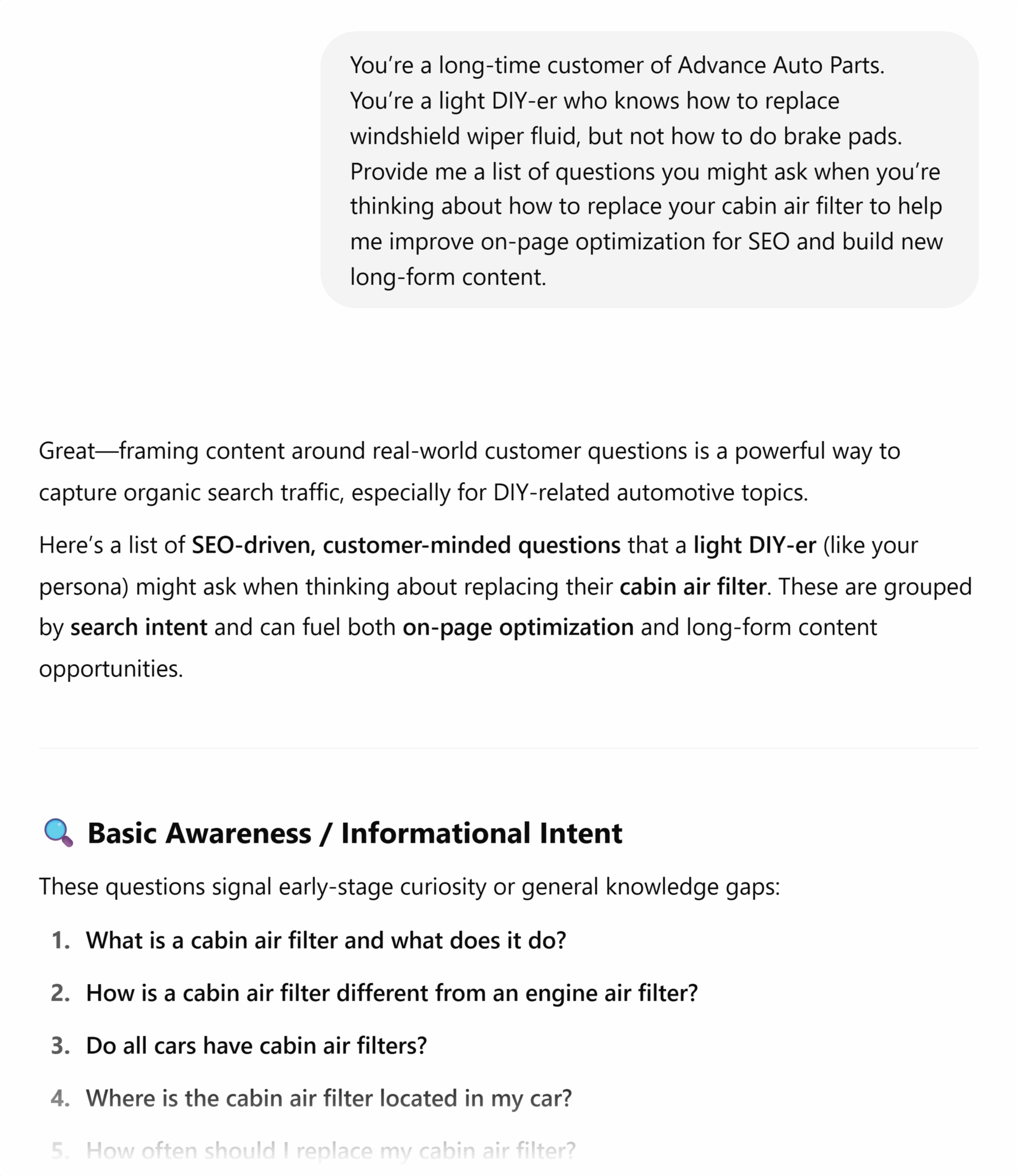
Prompt: You’re a long-time customer of [your company]. You’re a [describe what this target persona is like: new mother, college grad, office worker, etc.]. Provide me with a list of questions you might ask when you’re thinking about [common target persona pain point] to help me improve on-page optimization for SEO and build new long-form content.
Here’s this prompt in action:
Cluster keywords by intent
When you’re working through your keyword research, try grouping your keywords by search intent. This tells you what kind of content you should build or optimize to better rank for each term.
In the dark days, SEOs would have to do this by hand. But now, all you have to do is ask ChatGPT:
Prompt: You’re an SEO expert who excels at keyword research. Here’s a list of target terms [paste list of keywords]. Please sort these by search intent (transactional, commercial, informational, navigational). Present the final output as a bulleted list with each type of search intent dividing the sorted keywords.
Create a long list of keyword ideas using the Alphabet Soup Method
The “Alphabet Soup Method” is a special keyword research technique where you utilize Google’s autocomplete feature.
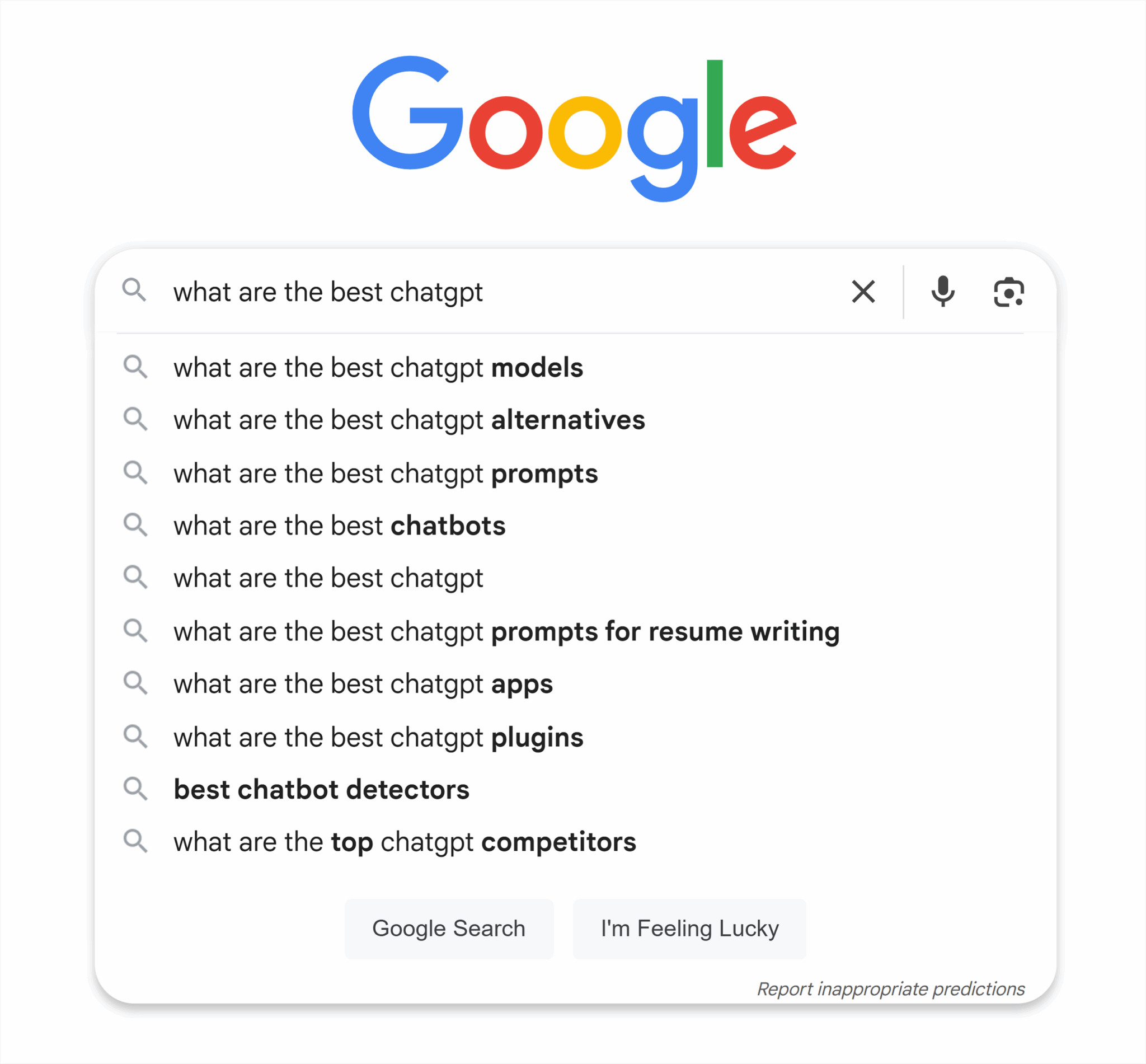
The traditional way of finding these keyword ideas would be to enter your target keyword and add an additional letter. You would then review the recommended search results for those additional letters from A to Z to see what Google recommends. This was previously quite time-consuming, but now you can automate this process with ChatGPT.
Prompt: Suggest keyword ideas for “target keyword [a]”, beginning with “a,” then generate ideas for “b,” “c,” “d,” and so on until you reach “z.” Focus on terms that would be best for SEO.
Here’s what this prompt looks like when filled out and submitted:

Generate long-tail queries from a head term
ChatGPT is the place to go for query mining. Take your head term or a broad keyword that generates a large amount of monthly searches (e.g., “ChatGPT SEO” would be the head term for this article) and ask ChatGPT for long-tail queries to use in building supporting content.
Prompt: You’re an SEO analyst helping me with keyword research. We’re working on building out content for [head term]. Provide all of the relevant long-tail queries that can help build our authority for the head term and improve our ability to rank.
Group keywords by funnel stage
Just as you should group your keywords by search intent, you should also sort them by funnel stage. This tells you what a user is expecting when they land on your page.
A top-of-funnel search looking for the answer to a question? They’re not ready to buy. Don’t push hard with your CTAs. Just offer them the chance to sign up for your newsletter.
Now, a bottom-of-funnel search? Make it as easy as possible for them to make a purchase.
Prompt: Act as an SEO analyst. Review this list of target terms [paste list]. Sort these keywords based on what level of the marketing funnel the user is in when they search the term. Provide the output in the form of a table that divides keywords into top, middle, and bottom of the funnel.
Create blog ideas for ecommerce categories
If your blog ideas are starting to all sound the same, ChatGPT is a great place to turn to for inspiration. This example is for ecommerce categories, but you can adjust the prompt to fit whatever industry you’re in and whatever target audience you need to appeal to.
Include these key pieces of information in your prompt to get the best results:
- Target audience: Who are you trying to sell to? Think about things like age, race, gender, location, tax bracket, and any other relevant characteristics.
- Industry: What industry are you working in? Try to be as specific as possible (think “B2C ecommerce industry selling rubber duckies for Jeep dashboards”).
- Previous content: Explain what content you’ve already used so you don’t get duplicate ideas—bonus points for including what content worked well and what didn’t.
- Target category: If you have a specific category you want blog topics for, focus there first.
- Desired outcome: Do you want to drive more revenue? Capture more traffic? Sell more of a specific product?
- Your unique offer: What makes you stand out from the competition? Low prices? Better quality?
Prompt: You’re an expert SEO content writer. Brainstorm 10 blog ideas for an ecommerce brand selling [product]. Our products are more [insert selling point, such as higher quality, faster shipping, better customer service, etc.], and our target audience is [explain your target audience]. Here are the previous blogs we’ve written [paste blog titles]. We’ve seen our audience really resonate with [explain best performing content].
Please focus on ideas that can point users to [specific product you’re trying to sell more of]. Our goal is to [provide an easy to understand and measurable KPI].
Technical SEO prompts
Technical SEO is the behind-the-scenes optimizations that make your site easily accessible and navigable for web crawlers. It requires analyzing things like crawling, indexing, and how search engines—and users—move around your site.
Here are some useful technical SEO prompts:
Schema markup creation
There are many kinds of schema you should consider adding to your page:
- Organization schema for About Us pages to describe your business
- Event schema for upcoming events
- HowTo schema for guides
- Article schema for long-form content
Use tools like Schema Markup Testing Tool and Schema Markup Validator to see what schema your competitors are using—and to test the code ChatGPT gives you to make sure everything works.
If you’re ever confused about what kind of structured markup you should use, just ask ChatGPT:
Prompt: You’re a technical SEO expert. I want to improve the schema markup on this page [provide page contents]. Here are the kinds of structured data my competitors are using [this information is optional, but provide it if you want a more accurate answer]. Please provide a bulleted list of recommendations for what kind of schema I should use.
Pro tip: ChatGPT is still learning and schema is very specific. Don’t forget to verify any schema ChatGPT provides you with the Schema Markup Validator.
Generate a robots.txt file
Your robots.txt file is a text file that search engines review before they crawl your site. It’s basically a set of instructions for where crawlers should and should not go. You can use directives like “disallow” and “allow” to let search engines access some pages and not others.
Every site should have a robots.txt file. It’s an easy way to surface your sitemap and make it easier to navigate your site. And, even better, it’s easy enough to make with ChatGPT’s help.
Note: When you’re working on prompts like this that don’t call for evaluation or judgment calls, you don’t need to assign ChatGPT a role or persona.
Prompt: Generate a robots.txt file for [domain]. Include:
- Blocks for any crawlers from WordPress admin (/wp-admin, /wp-login.php)
- Blocks for staging and developmental subdirectories
- Allow access to CSS and JavaScript files for rendering
- Include a link to my XML sitemap [link to XML sitemap]
Pro tip: Always test your robots.txt file. Use a third-party tool to confirm you haven’t accidentally blocked any high-priority pages.
Create an XML sitemap
An XML sitemap is a file that lists all of the pages on your site that a search engine should be able to access. You should include pages that are:
- Returning 2XX codes
- Indexable
- Self-canonicalized
You don’t need to rely on plugins to create your XML sitemap. Here’s what you should ask ChatGPT for:
Prompt: Generate an XML sitemap using the following URLs [provide a list of all the indexable, self-canonicalized, 2XX pages on your site].
Suggest crawl optimization tactics for large sites
ChatGPT truly excels at data analysis. If you’re running into index bloat with a larger site (search engines are not finding and ranking high-quality pages that should be driving traffic), you can create a list of troubleshooting ideas with ChatGPT.
There are a couple of different ways to do this.
You could simply pose your problem to ChatGPT and ask it what it needs to know:
Prompt: You’re a technical SEO consultant. We’re a [describe your site size/industry] struggling with index bloat. Google isn’t indexing our [insert problem pages], so we’re receiving no traffic to them. What information do you need to create an informed crawl optimization strategy to get those pages indexed?
If you’re not sure where to start, ask ChatGPT what it should know and work from there.
If you already have an understanding of the situation, you’re always better off providing ChatGPT more data.
Say you just ran a log file analysis. That data is perfect to feed into ChatGPT for a second pair of eyes.
Prompt: You’re a technical SEO consultant. We’re struggling to get Google to crawl our new blog content. Here’s our crawl log data [paste data]. Review this content and identify any crawl errors, duplicate content issues, or pages that might be slowing the crawler. Create a bulleted list of your findings and recommendations to improve crawl optimization.
Identify duplicate content risks
While Google won’t outright penalize you for having duplicate content, the overall impact is generally negative. Duplicate content confuses search engines and can make it harder for your site to rank and acquire backlinks to the desired pages.
ChatGPT can’t actually crawl the URLs you provide. But it can compare content. To have this task done right, you’ll want to include information beyond page URLs, like metadata and even headings and intros.
Prompt: Act as a technical SEO consultant. I’m pasting the metadata and H1s from 100 pages. Please review and identify any that look too similar and pose a risk of duplicate content or cannibalization.
Create a basic technical audit checklist
If you’re just getting started with technical SEO or you’re handing a technical task off to a coworker with less experience, a basic technical SEO checklist can make it much easier to get started.
Include information like:
- What kind of site you’re working on (size, industry, CMS)
- Amount of dev support you have to implement changes
- Goal of this audit
- Previous/recent technical changes (site migration, new pages added)
Prompt: You’re my technical SEO manager. I’m brand new to SEO and don’t know how technical SEO works. We’re working on a [explain what kind of site—small local, enterprise B2B, etc.]. There is [none, some, a lot of] dev support. Please provide a basic technical SEO audit checklist with the goal of checking the site’s current health.
The site has recently been through a [explain any recent changes to the site, like a site migration] and seen some [describe any problems that might have come from those recent changes like drops in organic traffic].
Here’s an example of ChatGPT’s response to this prompt:

On-page optimization prompts
On-page optimization consists of editing the actual on-page copy to improve keyword signaling, user experience, internal linking, and more. The goal of these tactics is to improve the page’s content, resulting in higher SERP rankings for target terms.
Optimize on-page content with new keywords
It’s always worth giving existing content a little tune up. This gives that older piece of content the refresh it needs to start ranking again and driving valuable traffic to your site.
Here’s the ChatGPT prompt you should use to make that old piece of content new again:
Prompt: You’re an SEO content expert. Review and update this piece of content for [target term]. [add your content here]. High-ranking competitors’ pages include [paste competitor content here]. The goal of this piece of content is to attract [explain area of funnel] users and get them to [explain the page’s conversion goal]. Please provide your recommendations in bullet points.
Test a new article intro
Different kinds of voices will resonate with your target audience. If you notice that the bounce rate is off the charts for a particular blog and you’ve tried everything, try rewriting your article intro into something that resonates.
Get ChatGPT’s help to understand what pain points your target audience is struggling with and create a new, engaging introduction.
For this prompt to do well, provide the following:
- Article content
- How you want the intro to change (appeal more to emotion, include more statistics, etc.)
- What your goal with this change is
Prompt: Act as a content writer for [industry]. Write a new introduction for [article]. Focus on [describe what change you want to see]. Our goal with this change is to [describe your goal].
Here’s what this prompt looks like when filled out:

Analyze and rewrite heading tags for SEO and UX
Your headings are important places to signal what a page is about to users and crawlers. Your H1 should typically be no longer than 70 characters, include a target keyword, and summarize the page’s purpose. Subsequent headings break up and summarize the copy, making it easier for users to scan.
Headings can be hard to get right because they need to be optimized for both SEO and user experience (UX). Use ChatGPT as a way to generate different ideas so you can quickly A/B test your way to a strong piece of content.
You can either do this at scale for a batch of pages, or just grab a set of headings for a single page.
Prompt: You’re an SEO expert who knows everything there is to know about keyword optimization and improving on-page content for a stronger user experience. Please review these headings [paste headings] and provide recommendations to improve SEO and UX. The goal of this task is to improve rankings for [keyword], readability, clarity, and alignment to user search intent. Maintain the brand voice of [brand]. Provide your suggestions as a bulleted list.
Improve thin content on product or service pages
Thin content is when your page has little to no content, typically less than 300 words. When a page has thin content, users and search engines have trouble understanding the purpose of the page and getting value from it.
Bulk up the content on your product and service pages. By making these pages more helpful to users, you can improve both rankings and conversions. Pull the content for a single or set of product or service pages, then provide ChatGPT with this prompt:
Prompt: Act as an SEO content expert. Review and improve upon the thin content for these [product or service] pages. Think about how to improve keyword signaling for [keywords], improve user experience, and maintain a strong above-the-fold page experience. Provide your recommendations in a table format, including the URL, target term, previous thin content, and new recommended content in different columns.
Suggest semantic keywords and related entities
Semantic keywords and related entities are words, phrases, or topics closely related to your primary keyword. If you’re optimizing for “electric cars,” your semantic terms might be “charging station” or “battery range.”
Before AI, you might find these terms by looking at competitor title tags, headers, and copy to see what kinds of topics they were covering to help them rank at the top of search.
Now, you can prompt ChatGPT with:
Prompt: You’re an SEO strategist focusing on improving content relevance and depth. I’m building a [landing page, blog, product page] targeting [target keyword], and want to include semantically related terms to support ranking. My audience is [brief description of target audience].
Please return:
- List of 10-15 semantically related keywords
- Any named entities (brands, tools, concepts) relevant to this topic
- Suggestions on where/how to incorporate these entities and semantic keywords into the page

Add updated statistics to your content
Stats are key for building authority. And no, that’s not what’s happening if you’re citing a study from 2019.
Here’s what to ask ChatGPT if you want to really buff up a piece of content:
Prompt: Consider yourself a statistician with expertise in [target topic]. I want to update statistics for [provide your content]. Please provide a list of relevant stats from 2024 to 2025 on the topic [target topic]. Link to the source of your statistics. All of these stats should include numbers.
Just make sure to double-check all of ChatGPT’s sources before you start updating links on your site.
Generate structured data (JSON-LD) for a page
We already talked about how to make content for FAQ schema, but how hard is it to get ChatGPT to write schema for you?
Spoiler alert: It’s pretty easy.
Let’s say you’ve decided you want to implement LocalBusiness schema to improve your local SEO, but you’re still a little fuzzy on all the details you should provide.
Prompt: Act as a local SEO professional with a specialized skill in writing schema. We need to create localBusiness schema for [business]. Let me know all of the information you need to generate the code.

Although our goal here is to get ChatGPT to work as efficiently as possible, it’s better for you to ask it questions and enable it to ask you questions. In this case, if you don’t know what information you need to create localBusiness schema, simply ask.
Once you have this information ready, here’s your final prompt:
Prompt: Act as a local SEO professional with a specialized skill in writing schema. Create localBusiness schema for this organization using this information: [paste all of the relevant info ChatGPT requested]
Local SEO prompts
Speaking of local SEO, let’s take a look at the kinds of prompts you should be using to improve your local keyword signaling so you can put your business on the map (literally).
Generate Google Business Profile descriptions
The description field is a key part of optimizing your Google Business Profile (GBP).
Use this description to:
- Address audience pain points: Explain how your product/service can help your target audience
- Describe your products/services: Succinctly describe your product so any user would understand what it is
- Include target keywords: Avoid keyword stuffing by not including more than three instances of the same term per 100 words
- Include location keywords: Mention towns, streets, and landmarks near your business
The better your description, the better Google understands your business—which improves your chance of ranking higher for a local query.
Just make sure to keep it all below 750 characters.
This can be tricky, but ChatGPT makes it a matter of mixing and matching various descriptions until you get something you like, instead of having to stare at a blank page.
Prompt: Act as a local SEO expert and help me generate four different Google Business Profile descriptions for my business. My target audience is looking for [describe pain point], and I’m selling [describe product/offering]. My target keywords include [list keywords], and I want to include location-specific information such as [list landmarks]. The goal of this task is to improve my local keyword signaling and make it easier for users to understand what my business does. Each description shouldn’t exceed 750 characters.
If you’re unsure about what information you should provide, it can be helpful to ask ChatGPT what additional information it needs to do an amazing job.
Prompt: Act as a local SEO expert. I want your help writing a few different Google Business Profile descriptions for my business [provide some business information]. What info do you need from me to do an amazing job writing a description designed to help my business rank higher for searches like [target keyword]?
And remember that ChatGPT doesn’t excel at getting character counts correct, so be sure to double-check the output description length before posting anything to your GBP.
Create location page content
Location page content is key to getting your website to rank for local searches. These pages clearly signal to users and search engines that you serve a specific geographic area, making you much more likely to appear in local search results.
The only problem with this kind of content? It’s tedious, especially if you’re working with multiple locations—unless you’re using ChatGPT.
Let’s say you’re a local pizza chain that’s just opened five new locations in areas across the East Coast. You’ll want to be as specific as possible when you provide this prompt so that you don’t have an endless back-and-forth with the AI.
Make sure you provide information about:
- Where your new locations are
- Landmarks near those locations
- Target keywords
- Target audience
- What sets you apart from the competition
- Placeholders for images
- Page formatting
- Brand voice
- Previous location page content (if applicable)
- Competitor location page content that you like
Prompt: You’re a local SEO expert. Help me build out [number] new location pages for my [type of business or industry] across the following cities [list cities and states].
Each location services a target audience of [describe target audience], and our brand positioning focuses on [explain main value proposition]. Our tone is [explain brand voice].
I like the formatting of this competitor [provide competitor content] and this competitor [provide competitor content]. I don’t like how this competitor looks [provide competitor content].
Create an outline that uses the same formatting as the first two competitors. Include places for location-specific pictures and a map at the bottom. Focus on how you can create content that’s both targeting user pain points and optimized to perform well in local search.
Ask me any followup questions before you start if there’s more info you need to do a great job.
With a more complicated query like this one, it’s always best to allow ChatGPT to get more information from you if it needs it. If you fill out only part of this prompt but leave ChatGPT room to ask questions, you can get a reply like this:

After answering the additional questions, here’s the content ChatGPT provided:

Suggest local backlinks and citation sources
To best support your new business location pages, you’ll need some local backlinks. Backlinks are when an external site links back to your page. It’s a sign of trust, and the more backlinks you gather from authoritative brands and websites, the more Google will trust your brand—and the easier it will be for you to rank for unbranded keywords. Local backlinks are especially useful for improving local rankings.
You can reduce the manual outreach effort usually required for building backlinks with a strong ChatGPT prompt.
Here’s the info you’ll need to provide to get a useful answer:
- Your business type and location (e.g., local pizza restaurant located in Charlotte, NC)
- Target audience (e.g., college student looking for a greasy pizza hangover cure)
- Target keywords (e.g., “late night pizza near me”)
- Competitors—especially those with strong backlink profiles and established brands
Prompt: You’re a local SEO expert with deep experience in building local backlinks and citation campaigns to improve local search visibility. I’ve recently opened a new location in [city, state], and I’m targeting [brief description of product/service] for [describe target audience, such as college students, retirees, busy commuters, etc.].
My primary keywords include [list two to three local SEO keywords], and my main competitors are [list competitors or websites].
Help me build a strong local backlink profile by providing:
- A list of relevant local blogs, news outlets, or media sources near or in [city]
- Local directories or community organizations that align with my business
- High-quality local or industry-relevant backlink opportunities based on competitor profiles
Also, please write a short and compelling email outreach template I can use to pitch these sources for backlink or mention opportunities. Keep it in my brand voice, which is [describe tone, such as casual, confident, friendly, professional, etc.].
Write customer review responses with brand voice
Keeping up with customer reviews is important but time consuming.
The key to training ChatGPT to handle this task is making sure it can successfully mimic your brand voice. It’s a bad situation when customers think they’re getting a kind and empathetic reply from a human, only to realize that they’ve been speaking with a bot.
And remember, if a customer is unhappy with your product or service, always take it offline. You don’t want to have a messy fight in your Google Business Profile comments.
Provide this information to set up ChatGPT for success:
- Brand voice (provide previous replies to customers, copy from your site, and any brand guidelines you might have)
- Common replies to positive, negative, and neutral customer queries
Prompt: You’re a long-time employee deeply invested in the success of [local business]. I need your help replying to customer reviews on our Google Business Profile. Our business tone is [insert brand guidelines, examples of brand tones]. Previous replies to positive comments have looked like [example], neutral comments like [example], and negative comments like [example]. For any negative comments, we want customers to reach out to our email so we can help them offline. I’m going to provide a set of recent customer reviews. Please provide replies using our brand voice.
Here’s what the reply looked like for a local pizza business that just opened near UNC-Charlotte.
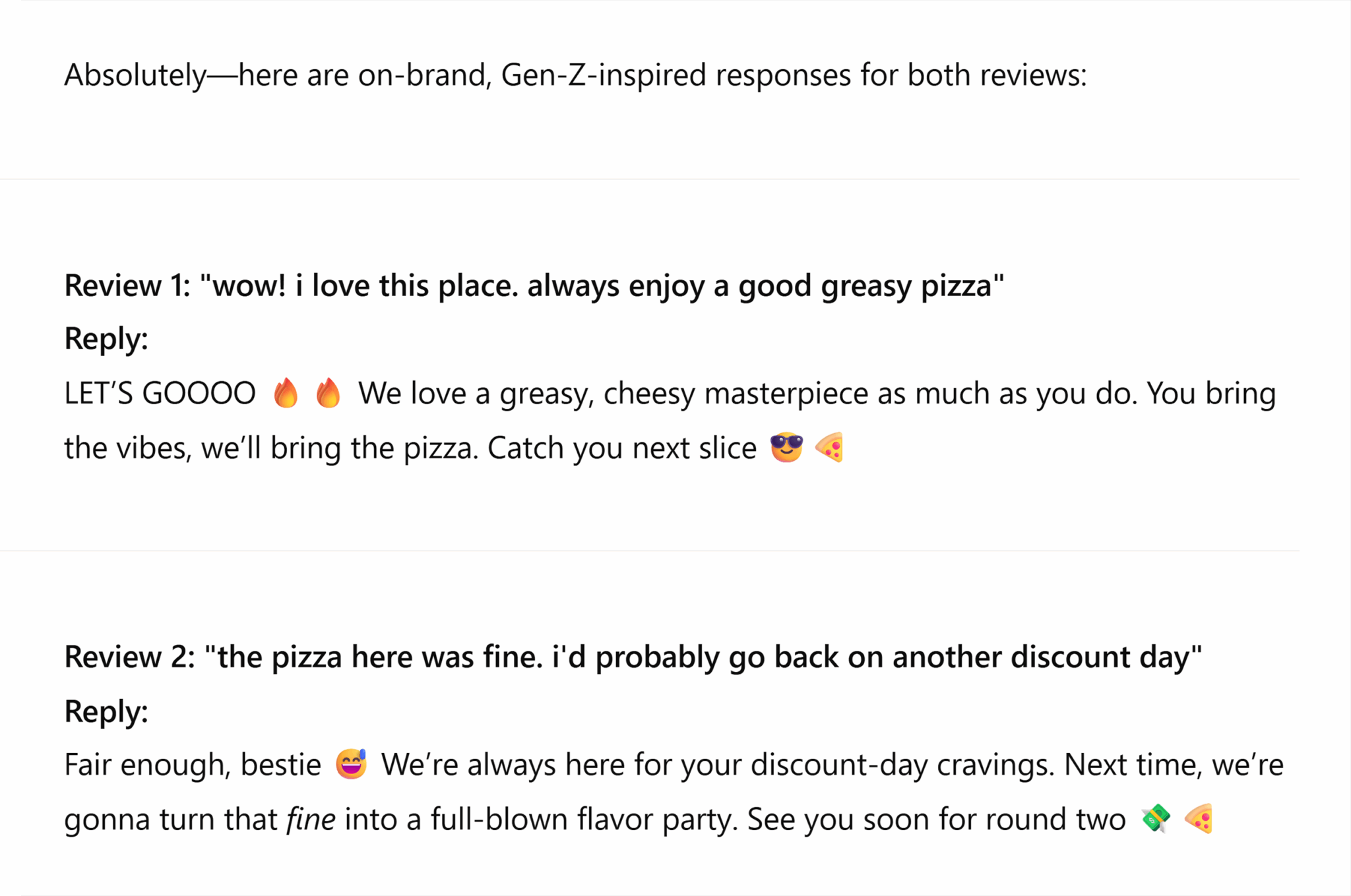
SEO reporting and analytics prompts
SEO reporting and analysis is important regardless of industry and company size, whether you work in-house, at an agency, or freelance. You’ll always need to pull data, analyze campaign progress, and report on metrics.
It can be intimidating to stare at a graph or spreadsheet full of data. These ChatGPT prompts can break things down into bite-sized, approachable data points.
Summarize GSC data in plain English
Google Search Console, or GSC, should be one of your go-to sources for organic data. It’s like a streamlined Google Analytics 4 (GA4), but just for organic traffic.
Use it to find information like:
- Impressions: How often your site appears in the SERPs
- Clicks: How often a user clicks on your page from the SERPs
- Rankings: Average ranking for a specific term
- Click-through rate: How often your listings are clicked on compared to total impressions
- Indexation issues: Sitewide issues like URLs that lead to 404 errors, pages with redirects, and pages excluded by a noindex tag
- Core Web Vitals: User experience for desktop and mobile, focusing on site speed
GSC has a lot of data for you to comb through, and it can easily get overwhelming. Turn to ChatGPT to make analysis easier.
To get the right SEO prompt, you first need to understand what problem you’re trying to solve. It’s okay if you don’t know what spreadsheet to pull first. ChatGPT can help.
Common GSC problems you might spot include:
- Ranking drops
- Drop in clicks but no drop in impressions
- Drop in clicks and impressions but no drop in rankings
- Pages get crawled but not indexed
- Pages not getting crawled
Crawled but not indexed and pages not getting crawled at all are two very common issues, especially for larger sites. The way that search engines interact with pages is to first crawl, render, index, and then rank the content, so if your pages aren’t even getting crawled or indexed, you’re far from driving organic traffic.
To analyze these issues, you’ll want to prime ChatGPT carefully so you get the best answer. Hallucinations (when ChatGPT provides misleading or inaccurate information it’s positioned as correct) can become a problem, especially when lots of numbers get involved. Avoid hallucinations by never copying and pasting any numbers you receive from the AI without first confirming their accuracy.
Here’s what you need for your ChatGPT prompt:
- Exported spreadsheet of data
- Clear problem statement
- How long the problem has been going on
- Any changes that occurred before the problem
- Any previous fixes you’ve tried (if applicable)
Prompt: You’re an SEO data analyst reviewing the data from [site]. We’ve recently had an issue where [describe site issue]. Rankings have [remained the same, increased, decreased]. Our seasonal trends are usually [describe seasonal trends]. We first became aware of this problem [however many weeks/months ago], but our [efforts to address the problem] haven’t worked. We’ve made [no other changes/various changes] to the site. Please review this data from the last [time period] and provide at least five different reasons why you think this might be happening and the best ways for us to address these issues.
For example, you might ask:
You’re an SEO data analyst reviewing the data from example.com. We’ve recently had an issue where all of the SEO-focused pages are seeing drops in clicks but not impressions. Rankings have remained the same. We usually don’t see seasonal trends. We first became aware of this problem three months ago, but our A/B test to include numbers in titles tags to improve clicks didn’t work. Please review this data from the last six months and provide at least five different reasons why you think this might be happening and the best ways for us to address these issues.
You also don’t need to have a problem to have ChatGPT do some advanced data analytics on your GSC.
Let’s say you want to improve rankings for your site as a whole. Or for a specific page.
You can still export a spreadsheet of data from GSC that pulls clicks, impressions, rankings, and click-through rates and then feed that to ChatGPT. Ask for an analysis to help you understand where and what you should optimize.
Prompt: You’re an expert SEO analyst. Here’s the data for [list target pages]. We want to improve [rankings, clicks, click-through rate, etc.]. Based on what you see here, what strategy would you recommend to make these pages better?
Create client-ready SEO summaries
Translating SEO to client-speak can be similar to foreign language translation. There’s a lot of acronyms and initialisms in SEO—not to mention the Google algorithm is always changing on us—so even your rehearsed speech needs constant touching up.
Using ChatGPT as your SEO-to-client-speak translator means you don’t have to spend 30 minutes staring at an email wondering if “Clicks dropped 3% MoM for PDPs for target KWs due to decline in MSV” is proper layman’s speech.
Prompt: You’re an expert SEO and client manager. You know exactly how to take technical SEO speak and translate it into something even people who barely know how to use Google would understand with ease. Here’s what I want to say [enter text]. Please translate this into one to two paragraphs of layman’s English.
Note: Have ChatGPT format this to fit whatever medium you’re sending the message in. Don’t stress over the headline for that email, have ChatGPT write it for you. Don’t worry about making things into perfect bullets for a deck, have ChatGPT do it for you. Just remember to specify the format of the output in your prompt.
Compare organic traffic YoY or MoM
You always need to keep tabs on organic growth (or decline), so constantly returning to GSC, GA4, or your traffic tool of choice is an SEO requirement.
But please, for the sake of your eyes, have ChatGPT interpret the little bumps and drops in the graph so you don’t have to spend all day squinting at your computer screen.
Prompt: You’re an SEO analyst with five years of experience reviewing MoM and YoY data for anything SEO and coming up with killer hypotheses explaining what caused traffic inclines and declines. Here’s the recent MoM performance for a page optimized three months ago [provide data]. Based on this data, what do you recommend we test or try to optimize to improve performance for [clicks, revenue, click-through rate]?
Suggest SEO KPIs based on business model
Finding SEO KPIs, especially if you’re just starting out with a more technical brand, can be a struggle. ChatGPT can do it for you, but you’ll need to be careful with the information you provide to get a strong, accurate answer.
Clearly provide business information on your:
- Product or service offering
- Target audience
- Industry
- Competitive landscape
- SMART (specific, measurable, achievable, relevant, and time-bound) SEO goals (e.g., increasing organic traffic, driving more organic revenue)
Prompt: You’re an SEO consultant helping me review the organic KPIs for my business [business name]. We offer [product or service offering] in [industry]. Our main competitors are [list competitors]. We’re trying to build [SEO SMART goal—increase organic traffic by 20% before end of year, increase organic revenue 15% YoY]. What SEO KPIs do you suggest we focus on to best measure our optimization efforts?
Competitor analysis prompts
Competitor analysis might feel like the equivalent of sneaking a glance at your neighbor’s answers on a test, but it’s a much-needed tactic to stay ahead. Things are always changing in SEO, and if your competitors tested something that works, you need to pick up on that strategy to keep pace.
And even if you want to keep an eye on your competition, you might not have the time. That’s where ChatGPT comes in.
Prepare a list of major competitors
Sometimes you get stuck with a brand that you simply do not understand. You don’t know what they sell, so you can’t even begin to imagine what brands are their competitors. That’s when ChatGPT comes in handy.
If you’re really stuck, you can just provide the site URL. If you’re looking for something more specific, focus on a certain product or offering.
Prompt: You’re an SEO analyst. Provide a list of the top 10 organic competitors for [site]. This information will help inform future competitor analyses, so please pick competitors that are performing equally or better than my site. Provide the list in a table format, with estimated monthly visitors, authority score, and whatever other metrics you think are useful.
Here’s this prompt in action for Search Engine Land.
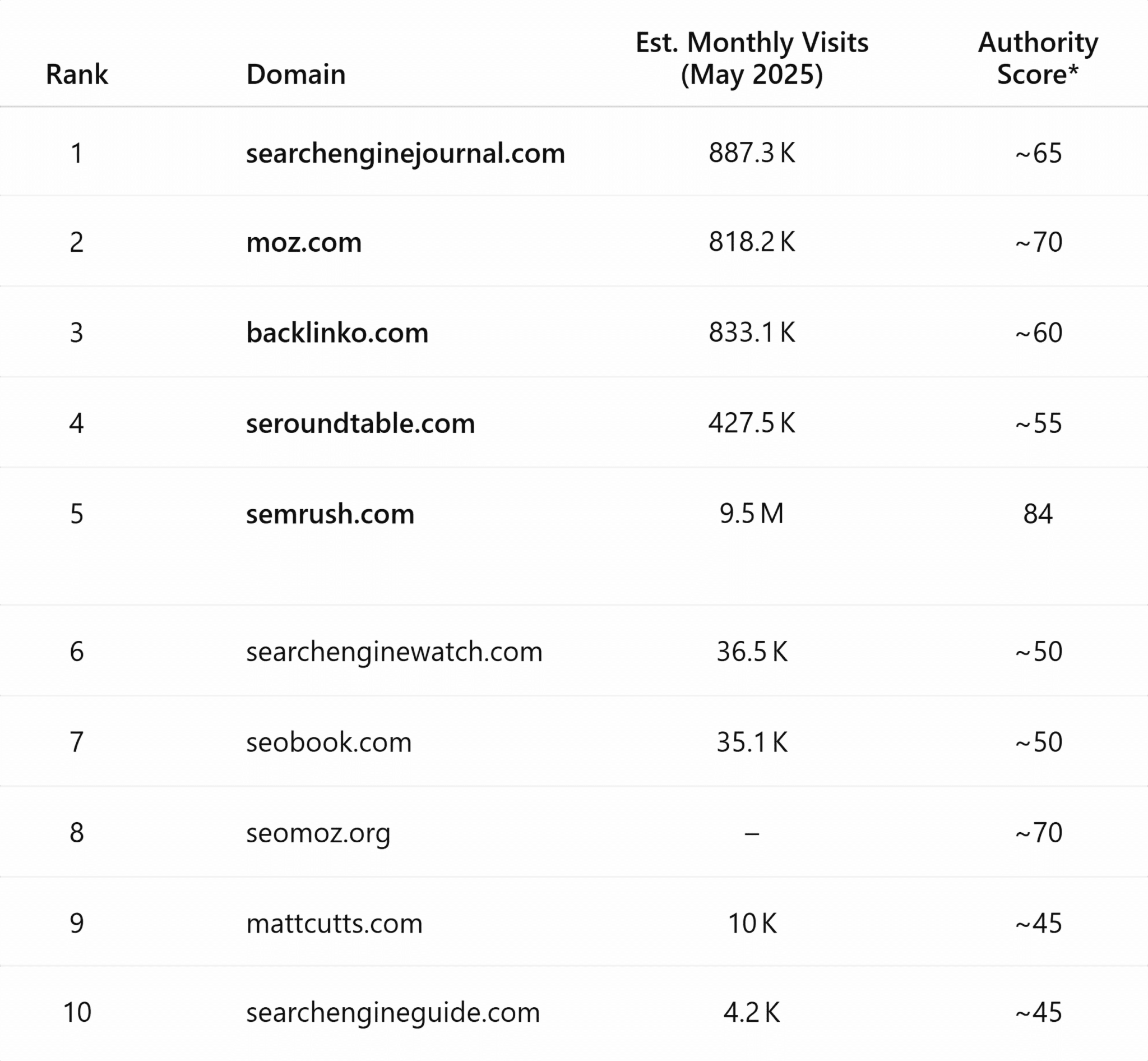
And if you want to dig in even deeper, consider examining brand sentiment and LLM visibility to your competitors’ performance, all using Semrush Enterprise AIO.
Identify competitor target personas and keywords
Try a prompt like this to identify your competitor’s buyer personas and target keywords, which you can use to inform your own organic strategy.
Use this information to improve your own target personas and bulk up your keyword list.
Why bother looking at your competitors? If they’ve already done the heavy lifting for you, you might as well take a peek at their research.
Prompt: You’re an SEO content expert. Analyze these pages to determine what this competitor’s audience personas and target keywords are to inform [your brand’s name] SEO strategy. Provide this information as a table that breaks down the brand, who this piece of content was made for, and what keyword the content is targeting.
Competitor content gap analysis
Use ChatGPT as your tool to find new topics where your competitors are ranking but you’re not. This is especially useful if you feel like you’re scraping the bottom of the barrel when it comes to blog posts.
Prompt: You’re an SEO expert. Here’s a spreadsheet that includes the URLs for all of the previous blogs we’ve written for our site. Compare this list to our competitors [site 1], [site 2], and [site 3], and provide a list of recommended target keywords for topics that our competitors are writing about that we aren’t. Please provide this list by providing the target topic and a list of any relevant keywords.
Competitor E-E-A-T analysis
E-E-A-T (expertise, experience, authority, trust) tells search engines and users who you are and why you’re qualified to talk about a specific topic. Look to your competitors to see how they’re sending E-E-A-T signals so you can strengthen your own signaling.
Prompt: You’re a Lily Ray-level SEO E-E-A-T expert. Analyze this competitor brand’s content for E-E-A-T [paste competitor content]. Compare it to our current E-E-A-T content [paste your own E-E-A-T content]. Provide a table breakdown of what we can do to improve, with one column explaining the improvements, another explaining the ROI, and another explaining the level of effort required.
Audit competitor SEO strategy
Use a combination of ChatGPT and SEO tools like Semrush and Ahrefs to spy on your competitors and repurpose their organic strategies.
You can have ChatGPT focus on specific things like:
- Content: Writing style, keyword usage, content structure
- Linking strategies: Internal and external linking methods
- Metadata optimization: Review title tags and meta descriptions
If you’re looking for specificity, try a prompt like:
Prompt: You’re an SEO analyst working for a site [your site URL]. We’re performing a competitor SEO audit, specifically looking at [competitor] to see how we can emulate and improve upon their keyword-usage strategy sitewide. Based on their content, provide their top-ranking keywords and on-page optimization strategies. Provide a bulleted list of recommendations on how we can outperform them in organic search.
Or you can have ChatGPT look at your competitor’s SEO strategy as a whole, though you’ll get a less specific answer.
Prompt: You’re an SEO analyst working for a site [your site URL]. We’re performing an SEO competitor audit looking at [competitor], [competitor], and [competitor]. We want to improve our [organic rankings, traffic, revenue] to better match [competitors]. Please review each of these competitor sites and provide recommendations on what they’re doing better than our site, what they’re doing worse than our site, and how we can improve our own site based on this data.
Advanced and unconventional SEO prompts
Your creativity is the only limit when it comes to ChatGPT (well, that and you can only submit 20 messages every three hours with the free GPT-4o model before you get downgraded). Try out some of these more unconventional SEO prompts for ChatGPT.
Generate programmatic SEO templates
Programmatic SEO is a form of SEO that uses technology to scale and automate optimizations. It’s a more common tactic for large, enterprise sites that don’t have time to manually review each page. And it works best when you create a template that can scale across an entire site.
ChatGPT can help with programmatic SEO by:
- Generating landing page content templates at scale
- Suggesting modular sections based on use case
- Optimizing metadata for target keyword search intent
- Generating product or service page FAQ sections
- Creating an internal linking logic to apply to site folders
To get the most out of ChatGPT, you’ll need to provide some information:
- Content’s primary SEO use case: Are you creating templates for local service landing pages? Blog content? Ecommerce PDPs?
- Main keyword format: Provide the typical format of your target keyword (e.g., “best [service/product]” or “best [service/product] in [city]”)
- Target audience: This might look like “people searching for [service/product]” and you can add a location if you’re working with local SEO
- Desired page structure: More specificity means less back-and-forth—explain what H1s, H2s, and H3s you want, what the intro/outro and CTA should look like, if you want FAQs, and so on
- Data variables: These are the pieces of content that will vary from page to page (e.g., for local SEO, cities, service type, average ratings)
- Writing tone/style: Provide your style guide here if applicable, or otherwise describe your brand tone and supply snippets from other similar pages
Prompt: Act as an SEO content strategist. We’re building a programmatic SEO page template for the keyword format [keyword format]. These pages will be used to rank for local-intent searches like [provide a keyword example that uses the same keyword format].
Generate a modular content template including:
- Suggested H1-H3 headings
- Intro paragraph logic
- Metadata templates
- Variable sections (e.g., neighborhood, proximity to college campus, reviews, features)
- Internal linking ideas
- Short FAQ section (no more than 200-300 words)
Use a friendly but knowledgeable tone.
Here’s what ChatGPT’s reply looks like using this prompt for a food blog:
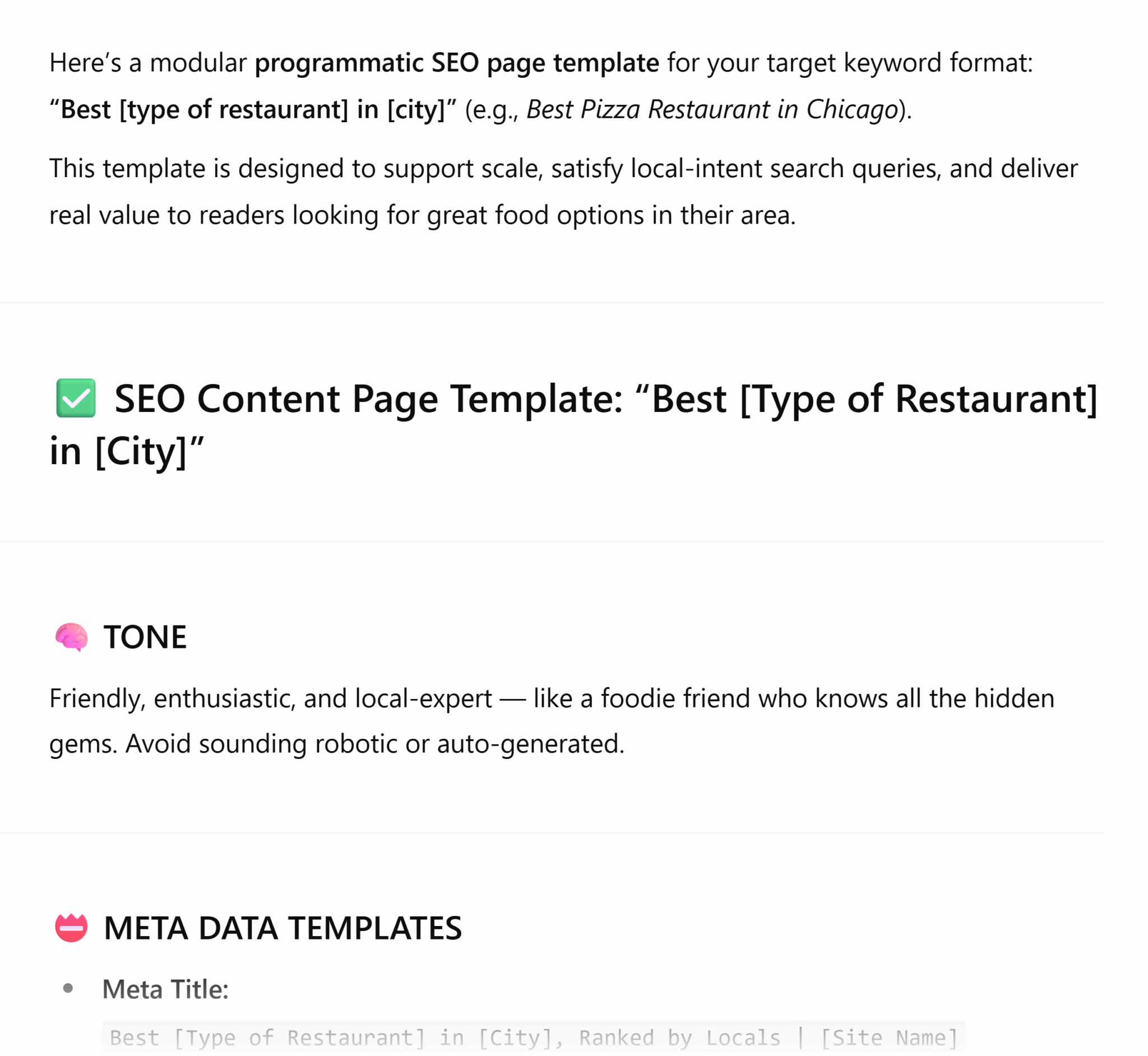
Predict what Google might show in a search generative experience result
No, ChatGPT cannot double as a crystal ball—but it can sure try. It can simulate the AI-generated summary that a search generative experience (SGE) would provide. You’ll just need to provide it with the right info.
What you need:
- Query you’re targeting (let’s stick with our local pizza metaphor “is greasy pizza good for hangovers”)
- Intended audience (college students staring into a pizzeria window nursing an early morning hangover)
- Current top-ranking pages and other SERP content (this is optional, but it will make the prediction more accurate)
- Your own content (also optional)
Prompt: Act as Google’s search generative experience. Pretend someone has entered the query [keyword]. What would your preview of the AI Overviews and/or featured snippet look like? Make sure your response includes:
- A summary of the topic in two to four paragraphs in concise, helpful, and accurate language
- Likely sources and other authoritative info
- Reflection on what users are likely to see in SGE, not just a traditional search
Here’s what ChatGPT’s reply is for this example using “is greasy pizza good for hangovers”:

You can get even more specific in your prompt with these add-ons:
- Assume the user is [your target persona]
- Pull a mix of information and commercial intent if the query is mixed search intent
Zero-click SERP survival prompt
Zero-click SERPs, or search engine result pages that users visit and get the information they need directly from the SERP without needing to click on anything, are the bane of every definition page’s existence. These search results are becoming increasingly common for guides, informational queries, branded queries, and even tools like calculators, where users can get what they need from a SERP feature.
You can still get value out of these pages—just turn to ChatGPT for inspiration.
Feed this information to ChatGPT to power your prompt:
- Target keyword
- Search intent type
- SERP format (featured snippet, knowledge panel, etc.)
- Goal (do you want to win the snippet, capture clicks below the snippet, build brand awareness)
Prompt: You’re an SEO strategist who specializes in making pages ranking in a zero-click SERP still produce ROI. You’re targeting [keyword], a query with [informational, commercial, etc.] search intent that appears in a SERP with features like [People Also Ask box, featured snippets, etc.]. Based on this information, I want you to provide a strategy for how I can optimize my page to benefit from this zero-click SERP format.
Entity-based content enhancement
Entities is just a fancy name for the “things” that Google recognizes—organizations, locations, products, and so on. These all exist in Google’s Knowledge Graph, which helps search engines connect and relate topics to one another. Optimizing your content for entities helps Google better understand your content, which can boost your ability to rank.
Provide this information to ChatGPT:
- Main keyword or topic
- Content type
- Target audience
- Current content draft (if you have it)
- Competitors you’re trying to outrank (optional)
Prompt: Act as an SEO content strategist. For the topic [target keyword], list 15-20 named entities (like companies, people, tools, technologies) that would enhance the semantic depth of a blog post. Include both broad and niche entities. Identify places in the blog [provide content] where I can naturally insert these entities to improve semantic SEO signaling.
Moving away from the pizza example, let’s look at a more complex topic like cloud communications. If we were to ask for help on a topic like “what is cloud communications” and just identify common entities, ChatGPT’s reply would look like this:
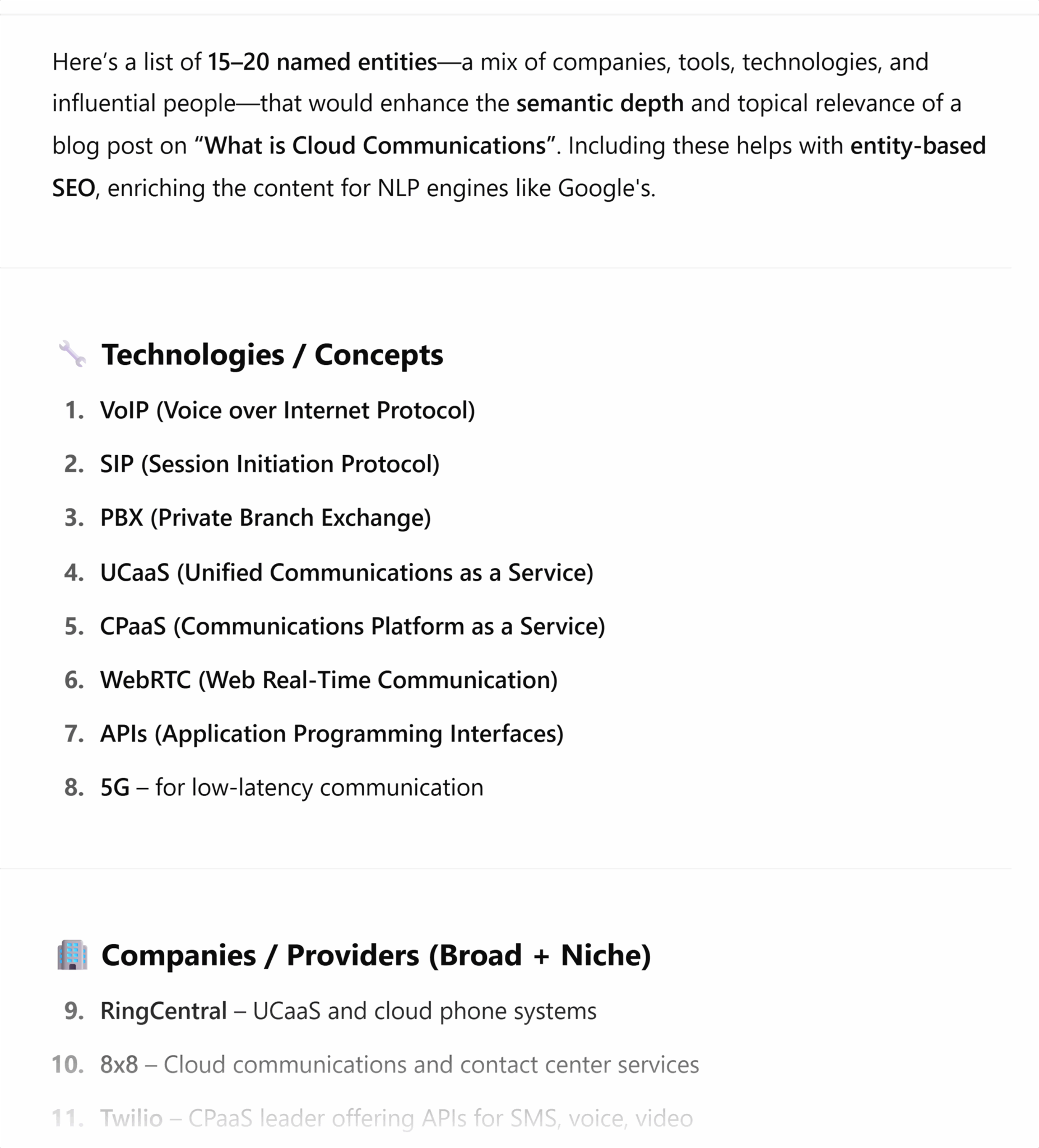
SERP feature forecasting
A lot of SEO is being reactive and playing defense against new algorithm rollouts, so using ChatGPT to get ahead of the game can give you a leg up on your competitors.
Remember: ChatGPT doesn’t “see” Google’s search results the same way a person does. But it can still access real-time information to make sure you get the most relevant answer for your query.
Here’s what to provide to set up ChatGPT for success:
- Target keyword
- Content type (blog, PDP, whitepaper, local landing page, etc.)
- Goal of content (educate, convert, rank in featured snippet, etc.)
- Any schema or structured data you’re using
- Your niche/industry
- Keyword search intent
- Known SERP features (People Also Ask, featured snippet, etc.)
Prompt: Act as an SEO strategist. I’m creating a [type of content] targeting [keyword]. The search intent is [informational, transactional, etc.], and the goal of this content is to [convert, educate, etc.]. Based on the typical Google SERPs, what SERP features are most likely to appear for this query?
What’s the best way for me to structure my content to improve my chances of appearing in those SERP features? Please include formatting, content tips, and any other pieces of feedback you think might be helpful.
Combine SEO with CRO suggestions
Conversion rate optimization (CRO), is the art of transforming a page that sees traffic but doesn’t generate revenue into a revenue generating machine. Basically, you’re A/B testing your way to the best copy, images, and even button placement to drive conversions.
CRO and SEO work hand-in-hand. SEO drives prospects to a page. CRO converts them.
To get the most useful SEO/CRO suggestions from ChatGPT, you’ll need to provide information like:
- Target page URL and content
- Primary keyword
- Goal behind this optimization (e.g., drive more newsletter sign ups, organic revenue, etc.)
- Target audience
- Any known issues (e.g., bounce rate has been increasing, barely anyone interacts with the bottom-of-page CTA)
Prompt: Act as an SEO and CRO strategist. Review this page [provide URL] targeting [keyword]. The goal is to improve this page’s [provide goal, organic revenue, CTAs, etc.].
Here’s the page copy: [provide copy]
Please review and suggest:
- SEO improvements (headings, keyword usage, internal linking strategies)
- CRO improvements (CTA placement and copy, layout suggestions, readability)
Return the results in a two-column format with SEO suggestions on the left and CRO suggestions on the right.
Track, optimize, and win in Google and AI search from one platform.
Using ChatGPT for SEO
When used correctly, ChatGPT is a powerful SEO tool. It can turn hour- and even day-long tasks into a 15-minute conversation. But you have to provide the right prompt to get the right answer.
Bookmark this guide. Test these prompts. Try to integrate them into your own workflow, and don’t be afraid to make edits. This is just one way to use ChatGPT—not the only way to use it.
The best SEO prompts for ChatGPT are those that are tailored to you. Your brand guidelines, your goals, your style. And now, you have the blueprint to build them. When you’ve mastered ChatGPT, try other LLMs to see which gives you the best results
Explore more on
Editorial disclosure
Search Engine Land is owned by Semrush. We remain committed to providing high-quality coverage of marketing topics. Unless otherwise noted, this page’s content was written by either an employee or a paid contractor of Semrush Inc.
About the author