UTMs for Google Business Profile: Track clicks smarter
Learn how to use UTM parameters to track traffic from your Google Business Profile. Unlock insights, measure ROI, and fine-tune local SEO performance.
Why UTM tagging matters for Google Business Profiles and Google Maps
Urchin Tracking Module (UTM) parameters help track searcher engagement with specific elements of Google Business Profiles (GBPs). Without these snippets of code being added to the URLs of fields in your GBPs, local businesses will find it difficult to separate out GBP traffic from the organic and direct traffic data that’s reported in Google Analytics 4 (GA4) and Google Search Console (GSC).
UTMs are valuable in local SEO because they add a new layer of insight into the aspects of GBPs that deserve most attention in any local search marketing strategy. Add them to ensure you’re delivering an experience that’s engaging customers.
Here’s a quick example of what a URL looks like when its been marked up with a UTM code:
https://www.example.com?utm_source=gbp&utm_medium=organic&utm_campaign=gbp-listing
Everything in the above example which follows the “?” is UTM code.
Limitations of native GBP Insights
UTMs tags help solve a historic attribution problem related to Google Business Profile Insights reporting and the limitations it has concerning its ability to fully report on all of a site’s pages.
The “Performance” tab of the New Merchant Experience interface that enables the editing of Google Business Profile provides helpful, but limited, analytics.

This information, called “GBP Insights,” reports on:
- Total number of user interactions with the Google Business Profile
- Clicks-to-call
- Requests for driving directions
- Clicks-to-website
- Where applicable, bookings, product views, and menu clicks
While this information is important, the “clicks-to-website” tab tells an incomplete story. It only reports on clicks on the main website URL you’ve added to your Google Business Profile in the primary website field. It doesn’t reveal data about people clicking through on other URLs your GBP contains, or what actions they take once they land on your site.

Meanwhile, without UTMs, traffic stemming from your listings gets lumped into the “Direct” and “Organic” headings of GA4. Because of this, it’s hard to understand how many searchers are reaching your website from your GBP vs. from Google’s organic search engine results. This makes it difficult to assess which components of your search marketing strategy are providing the best ROI and deserve most attention.
These metrics could help you make smarter decisions to optimize everything from your business listing through your Google Ads, so you can pull in better website traffic that’s more likely to convert.
Why UTM tagging is critical for multi-location attribution and GA4 accuracy
The deficits of GBP Insights are further compounded when you’re marketing a local business with multiple locations. UTMs help to separate out one physical location of your business from another in your GA4 reports because you can specify specific branches of your company right within the code. This enables brand leadership and SEO and marketing departments to evaluate branch-level performance, particularly when it comes to website elements like location landing pages or service area landing pages.
Further, UTMs enable you to track whether time and money invested in making improvements to the GBPs of your various branches is actually driving measurable growth in user engagement. UTMs give marketers a vital way to demonstrate that their use of allocated budgets is delivering value.
Understanding where traffic from GBP and Google Maps actually comes from
When it comes to assessing how the public is actually discovering and interacting with a company’s online presence, details matter. One poorly-understood fact is that google.com/search (which is where local pack and local finder results live) and google.com/maps (which is where Google Maps results live) are not the same thing; your rankings and traffic can be different on each distinct platform, and without UTMs, it can be hard to tell which fields of your listings in these environments are actually driving traffic.
Mobile and mapping applications (like Google Maps, which is the default mapping app on Android devices) will simply be reported as “Direct” in analytics programs, without any nuance. In the absence of UTMs, local businesses can’t parse whether people are clicking on something like a menu link most often, or if a different field like Google Updates is driving more interest.
Meanwhile a program like GA4 will lump all branded and unbranded traffic under the “Organic” label. Branded searches are those that have the intent of connecting with a specific brand. An example of this would be a search like “Whole Foods Market.” Unbranded searches, by contrast, don’t contain a brand name. An example would be “grocery store near me.” When applied, UTMs can help local businesses understand whether branded or non-branded queries are driving the most clicks.
The SEO toolkit you know, plus the AI visibility data you need.

Where to apply UTM tags in GBPs
To begin accessing the superior insights provided by UTMs, you’ll want to add them to as many of the links within your Google Business Profiles as possible. We’ll cover common options, but it’s important to keep in mind that Google is constantly changing available GBP fields, adding new elements and sometimes removing them.
The linked fields available to your business will be based on the primary GBP category you have chosen for each of your listings. All industries will have a primary website field, but brands in the restaurant industry, for example, will want to make use of a secondary call to-action (CTA) like the menu field. Another example would be an event center using the ticket sales field, while a landscaping company wouldn’t. Typical fields include:
- Primary website URL field
- Booking/appointment link
- Google Products
- Google Updates/Posts
- Reservation links
- Place an order links
- Menus
- Ticket sales

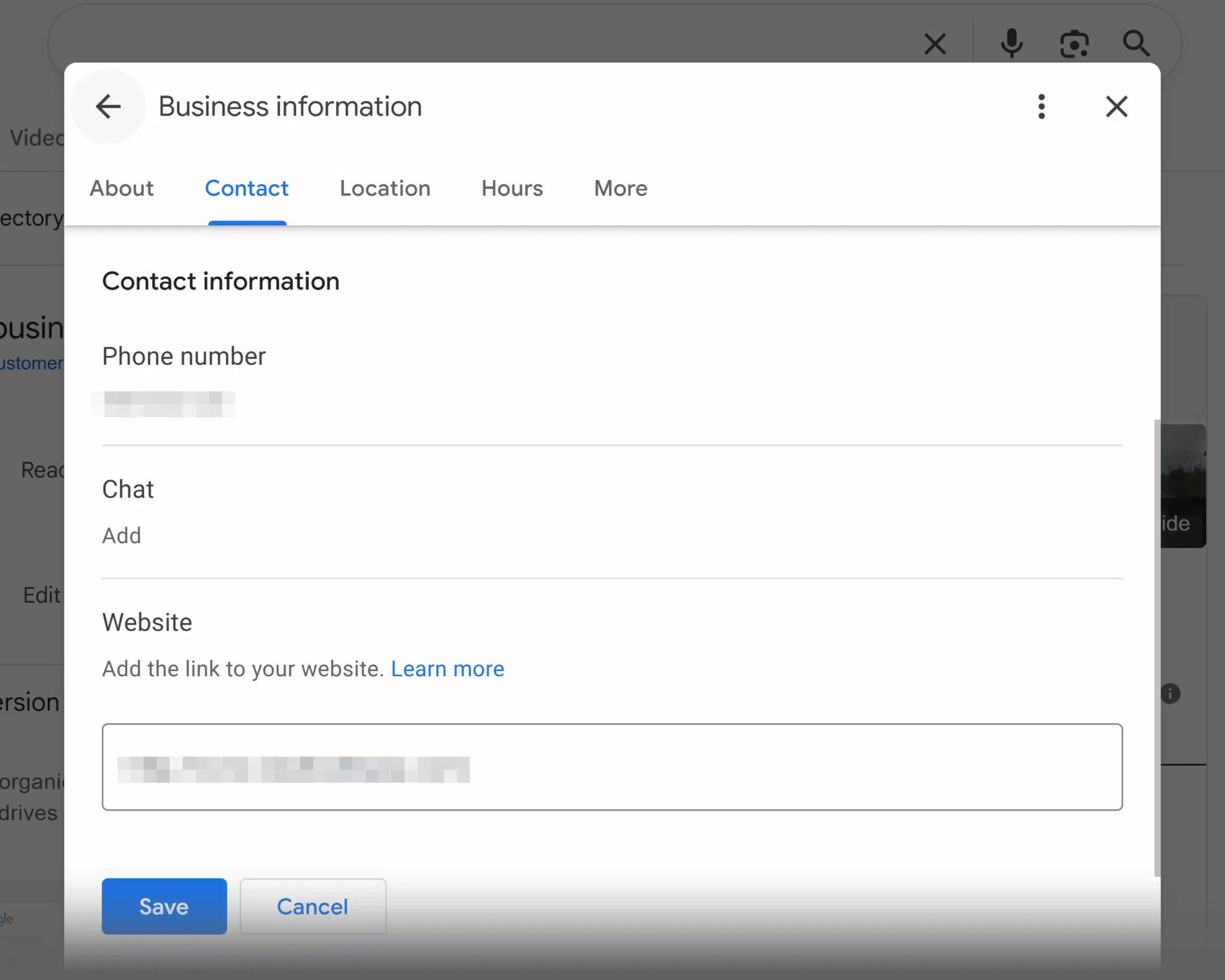
Add UTM codes by accessing the New Merchant Experience dashboard within Google’s search engine results and clicking on the relevant sections that control the element you want to edit. For instance, the primary website URL is located under the “Edit profile” icon, while the bookings URLs would be under the “Bookings” icon. Here’s a screenshot of where to go to edit your primary URL, for example:
Pro UTM Tips
Before you invest time in adding UTMs to your GBP URLs be sure:
- You’ve got a consistent and accurate business name, address, and phone number in place on your Google Business Profile so that everyone on your team knows which location you’re tracking.
- Any UTM-tagged URLs you use are based off the canonical URL (the preferred version of a URL that you want search engines to index) and is not redirecting or returning anything other than a 200 status code (meaning that servers can successfully request the URL).
- You’ve run a Google Search Console report to be certain your UTM landing page URLs are being indexed and have resolved any indexation problems.
- Your Google Business Profiles are in good shape, in terms of compliance with the Guidelines for representing your business on Google; confirm that you’re eligible for a listing and are representing its name and contact info accurately and consistently with its real-world presence. For example, if you were to create a GBP for an ineligible location, it’s likely to be removed by Google at some point, negating any work you’ve invested in incorporating UTMs.
- You’re actively managing UTM tracking; this isn’t a set-and-forget task, because your website content will change over time when you add new pages or change page URLs, and you may need to periodically edit the URLs your GBP is pointing to.
Recommended UTM structure for GBP tracking
A free tool that’s useful for this step of building UTM marked-up URLs is the Google Analytics Campaign URL Builder, which allows you to add custom parameters to your URLs for GA4 measurement.
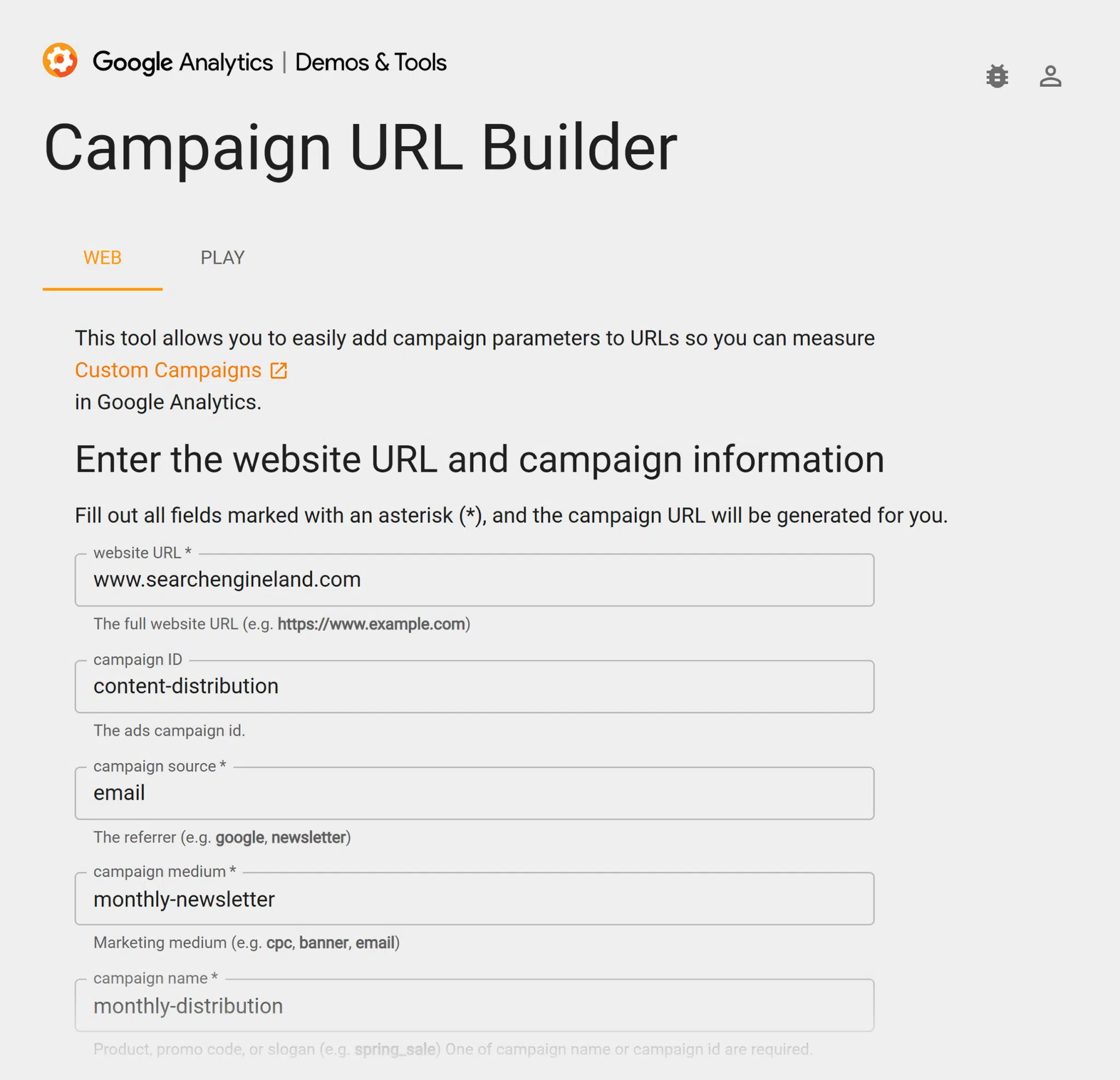
You will see how this tool provides a variety of fields like:
- Website URL: The page you are linking to
- Campaign Source: Where people are coming from—in this case “gbp” because you’re tracking Google Business Profile activity
- Campaign Medium: Set this to “Organic” to be sure it’s bucketed in the default organic search channel
- Campaign Name: The GBP feature (like a menu or booking link) people are clicking on
- Campaign Content: If multiple GBPs are using the same links, use this field to differentiate between them. For example, you can put “San Francisco” in this field for your San Francisco branch, and “San Jose” in your “San Jose” branch.
Note that you do not have to use every possible field if they are not applicable to your needs. For example, it’s not required that you use the “Campaign ID” field unless it has a specific value to you.
What does a URL look like with UTM code embedded in it?
If you are adding UTMs for a single location business, here is an example of how your URLs should look with UTM codes added to them:
https://www.example.com?utm_source=gbp&utm_medium=organic&utm_campaign=gbp-listing
If you are adding UTMs for a multi-location business, here is an example of how your URLs should look with UTM codes added to them:
https://www.example.com/locations/fresno-branch?utm_source=gbp&utm_medium=organic&utm_campaign=gbp-listing&utm_content=fresno-branch
For an extensive set of templated examples, we recommend Claire Carlile’s free spreadsheet of UTM codes.
Common mistakes to avoid with GBP UTM tagging
Jumping over these prominent UTM pitfalls will make your journey towards smarter data a smoother one:
Case insensitivity
GA4 reporting is case-sensitive, and will mistakenly report that the same naming fields with upper and lowercase letters are separate entities. Keep things simple by using lowercase letters only across all of your UTM conventions. For example, you don’t want your content field marked as “Fresno” in one instance and “fresno” in another.
Lack of naming conventions
Be sure to settle on a conventional methodology of how you use each of the UTM fields. Don’t use something like the “campaign name” field to specify one kind of pathway users are taking from your GBP to your content on one of your listings and then use it for something else on a different GBP you’re managing. For example, don’t call your Fresno branch “fresno” in one instance and “branch 23” in another. Be consistent so that the data makes sense across all locations when you look at your reports.
Track, optimize, and win in Google and AI search from one platform.
Lack of UTM parameter legibility
If the words being used for different parameters don’t automatically clue you in to the fact that you’re looking at data about your branch in Fresno or traffic from your restaurant’s menu link, it will make your reports harder to understand. Be as specific as you can in labeling each parameter.
Canonical conflicts
As mentioned above, don’t UTM tag URLs that redirect or render anything other than a 200 status code. If, for example, your website had a location landing page for your Fresno branch that you then built an improved version of to which you redirected the old URL, be sure your UTM code is pointing to the preferred URL, not the redirected one.
Using UTMs that break page rendering or GA4 session stitching
Page rendering is the process of code being converted into interactive digital web content. GA4 session stitching is the process of building a pathway that links user behavior across different sessions or devices. Be sure your UTM code is clean and doesn’t include errors like extra question marks or ampersands. For example, note the mistakes here of extra elements:
https://www.example.com??utm_source=gbp&utm_medium=organic&&utm_campaign=gbp-listing
Overlooking Google Tag Manager
The more you delve into the benefits of UTM tagging, the more time a program like Google Tag Manager can save you. This program enables you to create and manage multiple kinds of tags (including UTMs) and manage them without having to alter your website’s own code.
If you’re finding UTMs useful in the context of your Google Business Profiles, you’ll want to learn more about how they can help you analyze how the public is engaging with your website, as well.
Dig deeper: Read Getting Started with GoogleTag Manager and catch up on recent improvements Google has rolled out for this program in 2025.
Next steps
Local search is undergoing a significant evolution due to the advent of AI. While tracking organic traffic from GBP fields with UTMs remains as important as ever, it is just one part of the emerging local search marketing scenario in 2025.
You can get a clearer idea of the bigger picture by reading AI and local search: the new rules of visibility and ROI in 2025. Learn how discovery, experience, relevance and authority, conversions, and performance can become the pillars of your local search marketing strategy going forward.
About the Author