How to optimize a website for AI crawlers and AI agents


It’s inescapable, AI search is here to stay, and that means that the forward-thinking SEO and GEO specialists are thinking about AI crawler optimization to make sure that their content remains visible across the search landscape.
But what exactly does AI crawler optimization entail?
In this article, we’re going to cover — in great detail — how to optimize for AI crawlers. That means, we’re going to show you all of the latest experimental actions you can take today to make your site more accessible to AI crawlers. We will also cover the technical foundations, including code, line-by-line instructions, and Markdown snippets that AI crawlers understand, site structure recommendations, and best practices, to help ensure that your website stays discoverable in both traditional search results as well as in AI-powered answers and tools.
The SEO toolkit you know, plus the AI visibility data you need.

Best practices to optimize for AI crawlability
For now, AI search crawler optimization techniques still closely mirror traditional technical SEO best practices. That means that pages need to be accessible, crawlable, and clearly structured. However, there are some nuances, and AI crawler limitations might surprise you; for example, they might not see all the content on your website (we’ll cover this below in points 2 and 3).
The section below highlights the seven best practices to optimize for AI crawlability.
1. Logical site architecture
A logical site architecture has long been a foundation of SEO, and it continues to play a major role in optimizing website structure for AI crawlers.
Why?
A logical site structure helps AI crawlers to:
- Discover pages efficiently: A logical site structure helps SEO and GEO specialists build a strong internal linking profile. Linking related pages together helps AI crawlers to find the important pages. To put it simply: the more internal links a page has, the more likely a crawler is to find it.
- Understand relationships between topics: Clear hierarchies (e.g., parent-child pages) and topic clusters signal how pages relate to one another, allowing AI systems to understand context.
- Decide which URLs to trust: Consistent URL structures, canonicalization, and controlled parameters help crawlers identify the authoritative version of a page, reducing ambiguity and preventing duplicate or low-value URLs from being prioritized.
The infographic below shows a common site architecture. It’s a hierarchical site architecture with parent pages (e.g., blog) and child pages (e.g., blog post 1)
A parent page is a top-level or category page that groups related content (e.g. Services, Blog, or Shop).
Child pages are subpages that belong to that parent and provide more specific information (e.g. individual service pages, blog posts, or product pages).
This structure helps users (and crawlers) navigate a site intuitively and helps search engines understand how content is related.

Dig deeper: Site architecture: Creating a website structure that ranks
Here are some tips on how to optimize website structure for AI crawlers:
Normalize URL structure to avoid duplication and confusion
Clean, normalized URL structures help AI crawlers efficiently deduplicate content and identify which version of a page represents the “canonical” (read: indexable) source for a concept. When multiple parameterized or duplicate URLs exist for the same content, AI systems can end up crawling the wrong URL, or they might de-prioritize pages to conserve resources.
Crawlers assign a “crawl budget” to every site, and if you’ve got thousands (or even millions) of duplicate or irrelevant indexed pages, crawlers will eventually stop crawling, leading to lost coverage or ambiguity about which page is the trusted source.
Tip: If you’re feeling overwhelmed by canonicalization or URL structure, read “Canonicalization and SEO: A guide for 2026” and “SEO-friendly URLs: What you need to know.” These articles provide a comprehensive guide on both.
Structure content into clear hierarchies and topic groups
A clear page hierarchy and semantic grouping that organizes related pages around a single topic will allow AI crawlers to understand how your content fits together rather than indexing each page in isolation. Logical taxonomies with clear category and subcategory structures, along with parent–child URL paths and internal links within topic clusters, signal how concepts relate and which pages are foundational versus supporting.
For example, you might have service pages with sub-services, such as www.example.com/seo-services/ as a parent page, then sub-service pages as child pages like www.example.com/seo-services/local-seo or www.example.com/seo-services/technical-seo.
This structure improves an AI system’s ability to summarize, compare, and contextualize your content. Additionally, your content presents you as a coherent knowledge source rather than a collection of isolated pages.
Control faceted navigation and filter-generated URLs
Faceted navigation can severely limit AI crawlability if it generates an unlimited number of crawlable URL combinations. Without controls like canonicals, noindex directives, or restricted parameter handling, AI crawlers may waste crawl resources on near-duplicate filtered pages and miss important core content.
Properly constrained facets focus crawl effort on meaningful, stable URLs, preserving crawl budget and helping AI systems concentrate on pages that accurately represent your products, categories, or expertise.

Tip: Martech’s article, URL parameters: A marketer’s guide to management and best practice, provides a comprehensive guide to managing URL parameters, including faceted navigation and filters.
While a logical site architecture has always been essential for SEO, the rise of GEO is increasing its importance. As people search for more nuanced and specific use cases, websites are publishing more sub-service pages, use-case pages, and case studies to meet that intent. While this expanded content creates new opportunities, it also makes it easier for sites to lose a clear, logical hierarchy because SEO specialists need to manage more pages.
Tip: You can use tools to audit websites automatically and set up email PDF reports so serious issues are emailed to your inbox at set frequencies. This automation makes site management much easier for SEO specialists who can’t manually monitor every page of a growing site.
Now that we’ve talked about how to manage a site’s overall hierarchy, let’s look at how you can manage on-page content using HTML and JavaScript, and the pros and cons of both.
2. HTML content
HTML is one of the most important aspects of AI crawlability.
Why?
Because, unlike Google’s crawlers, which can execute JavaScript and render pages, AI crawlers rely on the HTML response.
Dig deeper: JavaScript SEO: How to make dynamic content crawlable
A guaranteed way to optimize website content for AI search crawlers is to make content available in HTML. Most sites will do this already, but sometimes content is rendered in JavaScript (we cover that in the next section).
Sticking with HTML for a minute, the most important elements are text and links.
Crawling links is how all crawlers discover new content to index or use in AI responses. If the crawler encounters a link in one piece of content, it may also crawl the linked page. Often, a link is a crawler’s first discovery of a page.
The main takeaway: Make sure all content and links load without issue. Your pages need to be indexable, fully functional, and, most importantly, your most significant content must be available directly in HTML rather than rendered via JavaScript (more on this in the next section).
Here are some of the HTML elements that AI crawlers focus on:
- HTML content: AI crawlers can read raw HTML, including text, headings, lists, internal and external links, and media files such as PDF and .txt.
- Metadata (<meta>, titles): Crawlers extract <meta> tags (like title and description) and other structural metadata since it’s part of the HTML.
- Structured data (JSON‑LD, etc.): Inline structured data in HTML (e.g., schema/JSON‑LD) is visible because it’s part of the initial HTML.
You can review the HTML on any page following this workflow:
Visit the page you want to check and right-click anywhere > “View Page Source.”
The following image shows how an article on Search Engine Land appears to users on the front end (on the top) and how that same content appears in the HTML (on the bottom, in the source code).

Now that we’ve explained the basics of HTML, let’s move on to JavaScript.
3. JavaScript
Without getting too technical, here’s a brief explanation of how Google bots crawl and index a site, so you can understand how AI crawlers differ and why JavaScript rendering is an issue.
Keep in mind, Google’s crawling and indexing process is more advanced than most AI crawlers.
After Googlebot discovers a page, it crawls the HTML, then, importantly, in another phase, it renders the page. This rendering phase allows Google to index content that is injected or modified by JavaScript. After that, the content is indexed and ranked.
Important note: Although Google can render JavaScript, it’s best practice to keep your most important content in HTML and avoid adding or modifying it with JavaScript.
The infographic below shows how Google processes your site.
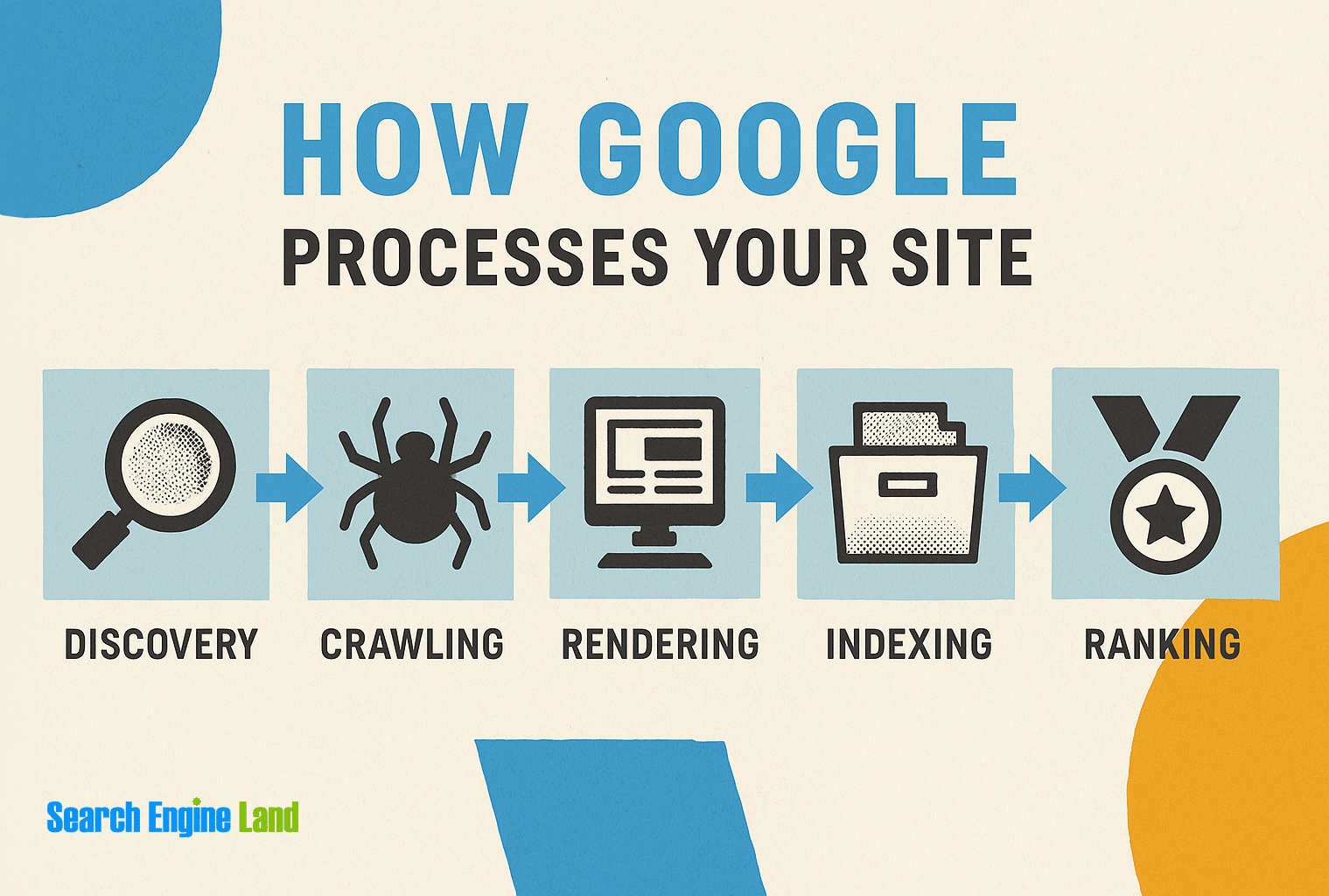
The rendering phase is what makes Googlebot more sophisticated than most AI crawlers.
While many AI crawlers can download JavaScript files as text, they do not execute the JavaScript code to render dynamic content because it’s so resource-intensive.
As a result, content injected by JavaScript after page load is generally invisible to these AI crawlers unless it’s also present in the initial HTML.
You don’t have to take our word for this.
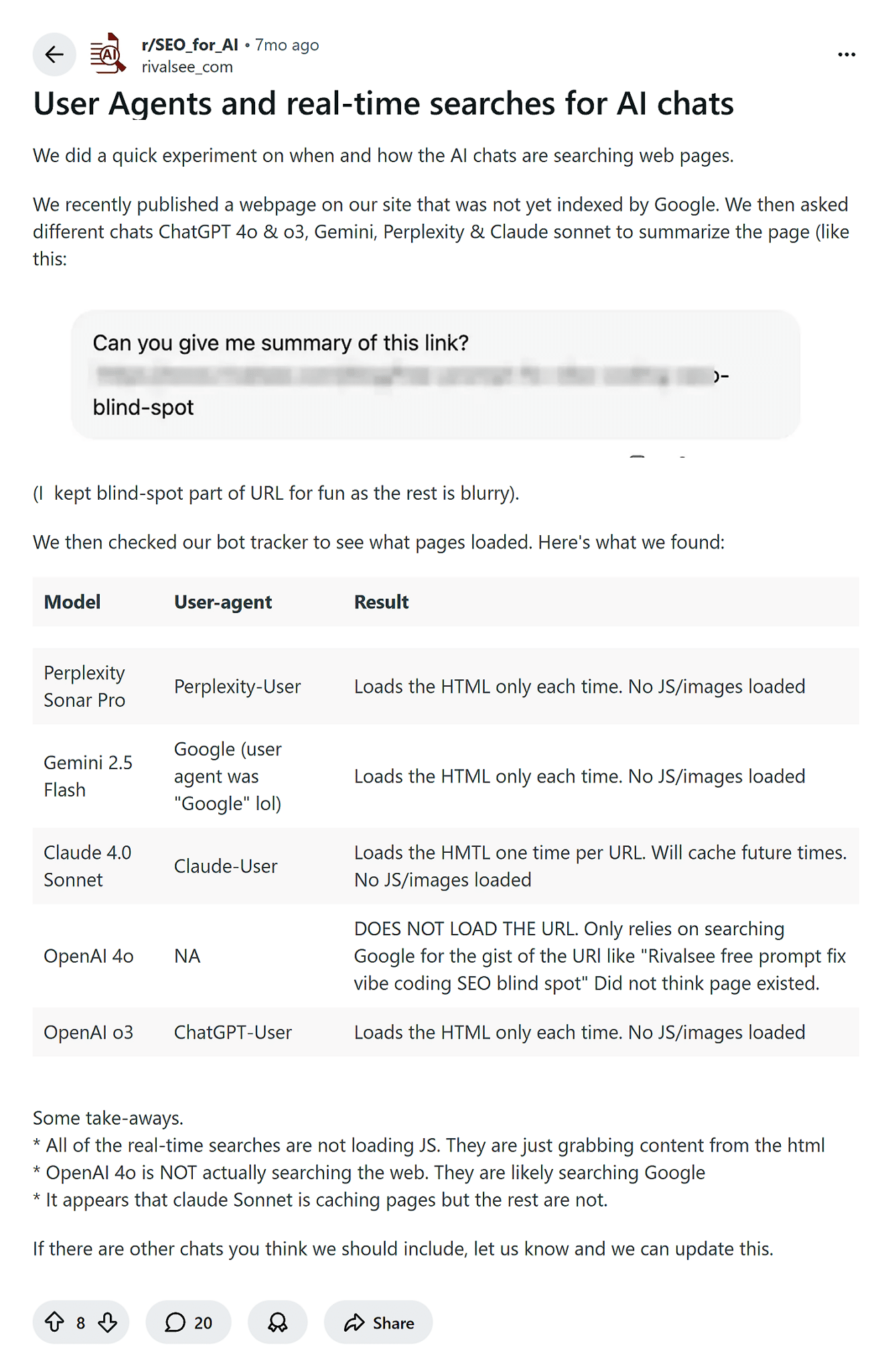
SEO and GEO experts are running experiments and finding that many AI crawlers fail to render JavaScript.
A recent study found that popular AI search tools, including Perplexity Sonar Pro, Gemini 2.5 Flash, Claude 4.0 Sonnet, and OpenAI o3, load only HTML.
Here’s the table shared and the study results:
Generally, JavaScript is responsible for:
- Loading and updating content dynamically after the page has loaded
- Powering interactive elements such as menus, tabs, sliders, and accordions
- Handling user interactions like button clicks, form submissions, and filters
- Fetching data from APIs to display real-time or personalized content
Because JavaScript handles the above, AI crawlers don’t interact with forms or UI elements; they don’t click buttons, submit forms, or trigger interface events. They simply download content programmatically.
They also don’t execute interactive web apps. Crawlers can’t drive user interface flows, manage sessions, or interact with web application states; that’s outside the scope of crawling.
JavaScript handles interactions that aren’t necessarily issues for crawlability and indexing, but if critical content or links only appear after JavaScript rendering or user interaction, most AI crawlers won’t be able to access them, meaning the content may never be crawled, understood, or used in AI-generated responses. It’s effectively invisible.
The main takeaway: Ensure all your most important content is available in HTML. If you notice an issue with your site’s rendering, reach out to the development teams and work together to ensure your most important content is available in the HTML.
If you’re not sure how JavaScript is changing your code, use the Chrome extension, View Rendered Source. Download the extension, add it to your browser, then run the extension by pressing “ALT + U” to see how the raw source compares to the rendered source.
Here’s what it looks like, using the example provided by the extension:
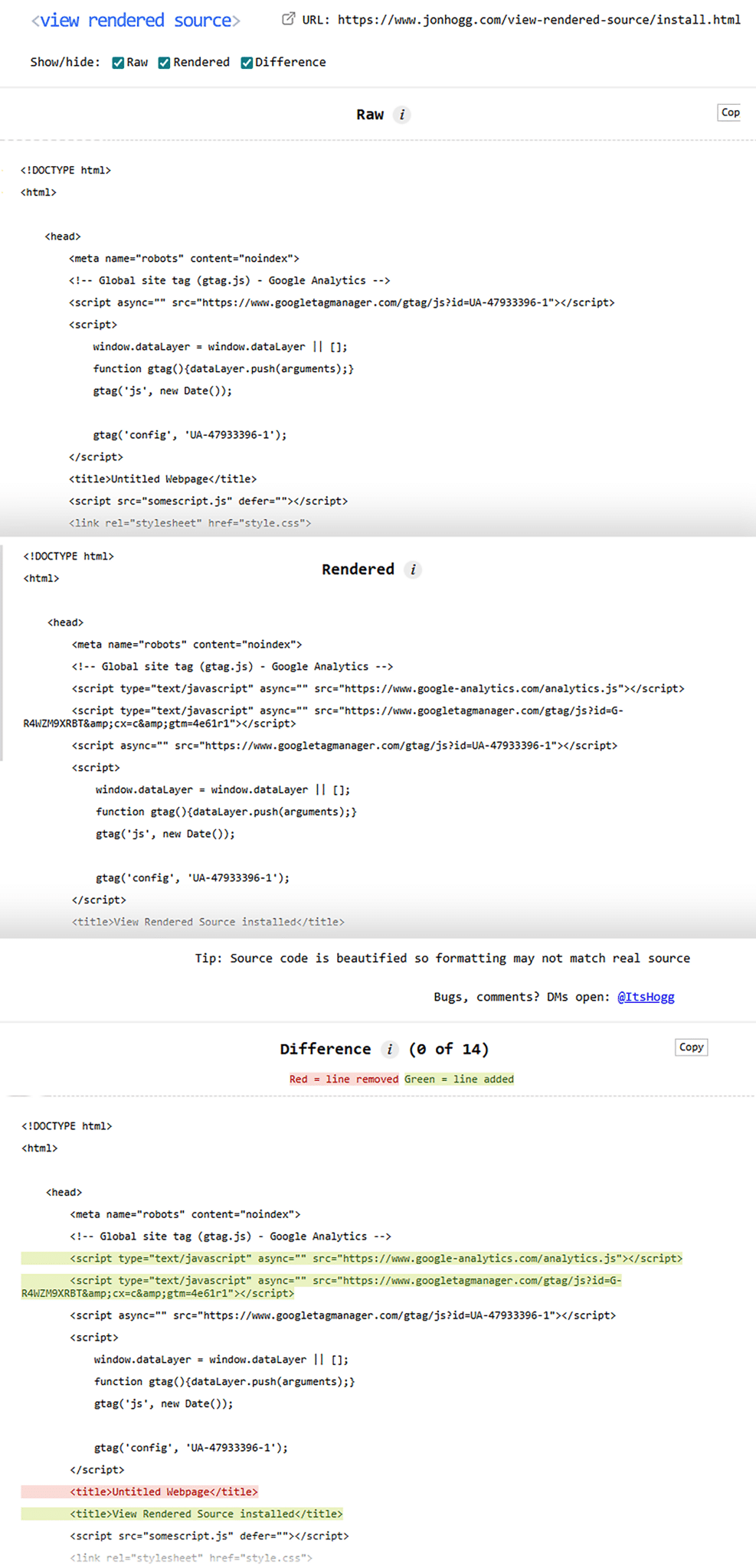
The rendered version of the site (in the middle of the image above) shows more information than the raw HTML (on the top). The bottom image shows the differences between the two. The green highlights indicate content added through JavaScript, and the red highlight indicates content removed.
In this example, the content highlighted in green (and therefore added by JavaScript) is the important, on-page content that you’d want indexed. Because it’s impacted by JavaScript and not available in the HTML (top image), we can surmise that AI crawlers can’t index it.
In the majority of cases, you’ll want your content to load in raw HTML (top image). There may be exceptions. For example, if you’re using JavaScript to enhance functionality, such as interactive tools, logged-in dashboards, and real-time data. In these situations, JavaScript is acceptable because the functionality outweighs the value of the content being readable to crawlers.
4. XML Sitemap
An XML Sitemap is a file that lists all the URLs that you want crawlers to discover and index. Generally, as you update or add pages, they’re automatically added to the sitemap and therefore ready for bots to crawl the links and discover new pages.
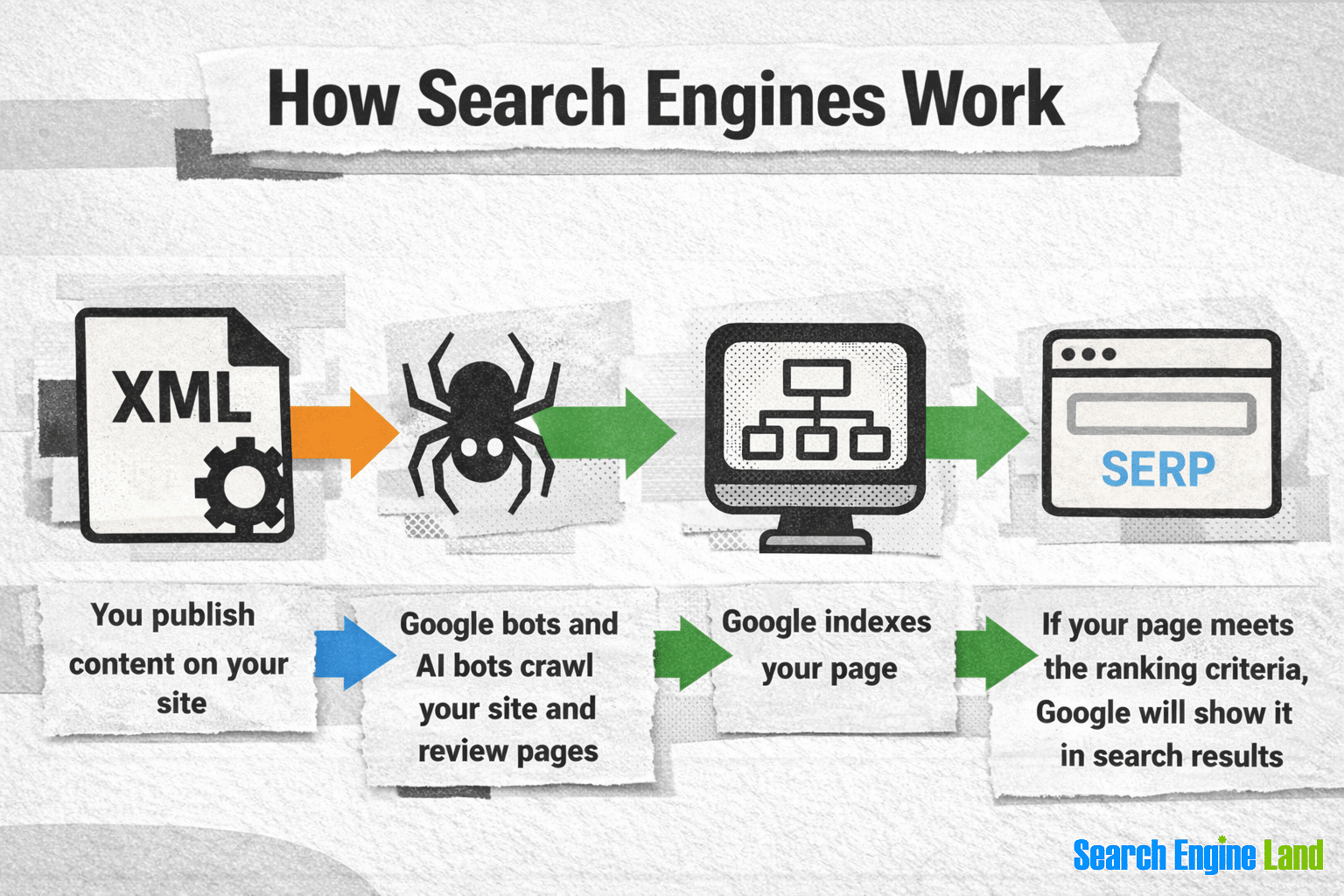
Because links are so important to all crawlers, maintaining a sitemap.xml file is key.
Your sitemap should only include pages you want crawled, indexed, or used in AI responses. Best practice is to exclude low-value, duplicate content, or URLs you don’t want indexed (a thank-you page, for example), as this helps crawlers focus on your most important content and avoids wasting crawl resources.
Adding a sitemap.xml file to your website is one of those tasks that sounds difficult, but in reality is easy. Many platforms, like WordPress or Shopify, have plugins and apps that make it simple. For super-small sites that rarely change, you can add the sitemap manually, but it’s not generally recommended.
There are some best practices to look out for when adding an XML sitemap:
- Use <lastmod> tags to signal freshness: Including <lastmod> dates helps crawlers understand when content was last updated, which can influence recrawl timing and prioritization.
- Automate sitemap updates: Sitemaps on active sites should update automatically whenever pages are added, removed, or modified, reflecting the current state of your site at all times.
- Reference your sitemap in your robots.txt file. Since AI crawlers may check additional directive files, you should also include the sitemap URL in your ai.txt, llms.txt, and llms-full.txt files (more on these files later).
Dig deeper: XML sitemaps: What they are & why they matter for SEO
5. Indicate content freshness
Content freshness matters because subject-matter experts and businesses have a responsibility to provide accurate, up-to-date, and genuinely valuable information. Updating content should be driven by your audience’s needs — not by algorithms.
That doesn’t stop us from digging into how content freshness impacts AI crawling and visibility.
A recent study from Seer Interactive examined how content freshness influences visibility across large language models (LLMs), analyzing over 5,000 URLs cited by systems like ChatGPT, Perplexity, and Google’s AI Overviews.
The findings show a clear recency bias: Nearly 65% of AI bot log hits targeted content published or updated within the past year, and almost 90% targeted content published or updated within the past three years.
Google’s AI Overviews had the strongest bent for recently updated content. About 44% of AIO citations are from 2025, and 85% come from the previous two years.
However, freshness is not universally important. It’s contextual and depends on the industry.
Industries with rapidly changing information, such as financial services, showed extreme recency bias, while sectors like energy and instructional “how-to” content demonstrated much longer shelf lives. In some cases, high-quality evergreen content continued to attract AI crawlers even a decade later.
The takeaway: Old content isn’t invisible, but updating it can improve AI visibility, depending on the subject and industry. Update your content when it makes sense, aim to provide the most up-to-date information, and put your human visitors first.
You can indicate content freshness by sharing two dates on the front end of a site. It seems logical that providing a “published date” and a “modified date” on the front end would help users and crawlers understand when a piece of content was last updated, right? Turns out it’s not always that crystal clear.
Although simple, this method has actually caused problems.
Anecdotally, SEO professional Abby Gleason found that including both dates led to a drop in organic CTR. Keep in mind, this case study was not on AI search. Despite the updated date present, Google continued to show the original published date in search results.
How can you solve for this disparity? One potential solution is to use schema and structured data to mark up dates more clearly for AI crawlers, while leaving the modified date visible to users on the front end.
The takeaway: Use datePublished and dateModified in the schema to indicate when content was created and last updated.
If you’re new to schema, this article Schema markup: What it is, how to use it, & real-life examples goes through it in detail and it also includes article schema examples including datePublished and dateModified.
6. Site load speed
AI crawlers can only process what successfully loads. If pages load slowly or fail to load at all, crawlers have nothing to read or index.
What’s worse? Slow pages can really impact user experience.
Fast pages are beneficial because they:
- Allow AI crawlers to crawl more pages per visit. Faster response times let AI crawlers fetch more URLs within a single crawl session. This increases crawl depth and improves coverage, ensuring more of your site is discovered and processed.
- Enable complete page understanding. When pages load quickly, AI crawlers are more likely to access all critical content, internal links, and structured elements.
- Encourage more frequent crawl visits: Consistently fast and stable performance signals reliability. As a result, AI crawlers are more likely to revisit your site regularly, helping new or updated content get discovered sooner.
- Prevent crawl slowdowns or temporary pauses: Stable, fast-loading pages reduce the likelihood of crawl backoff behavior. Crawlers are less likely to throttle or pause crawling, allowing content discovery to continue uninterrupted.
The takeaway: Improving your site speed will enhance user experience and help AI crawlers access more content, understand it more accurately, and return more often.
You can check page load speed using free tools like Google Lighthouse.
Here’s how to do it:
Visit the page you want to check > Right click > choose “Inspect” > Within the console, click “Lighthouse” > Select your options from “Mode,” “Device,” and “Categories” > “Analyze Page Load.”
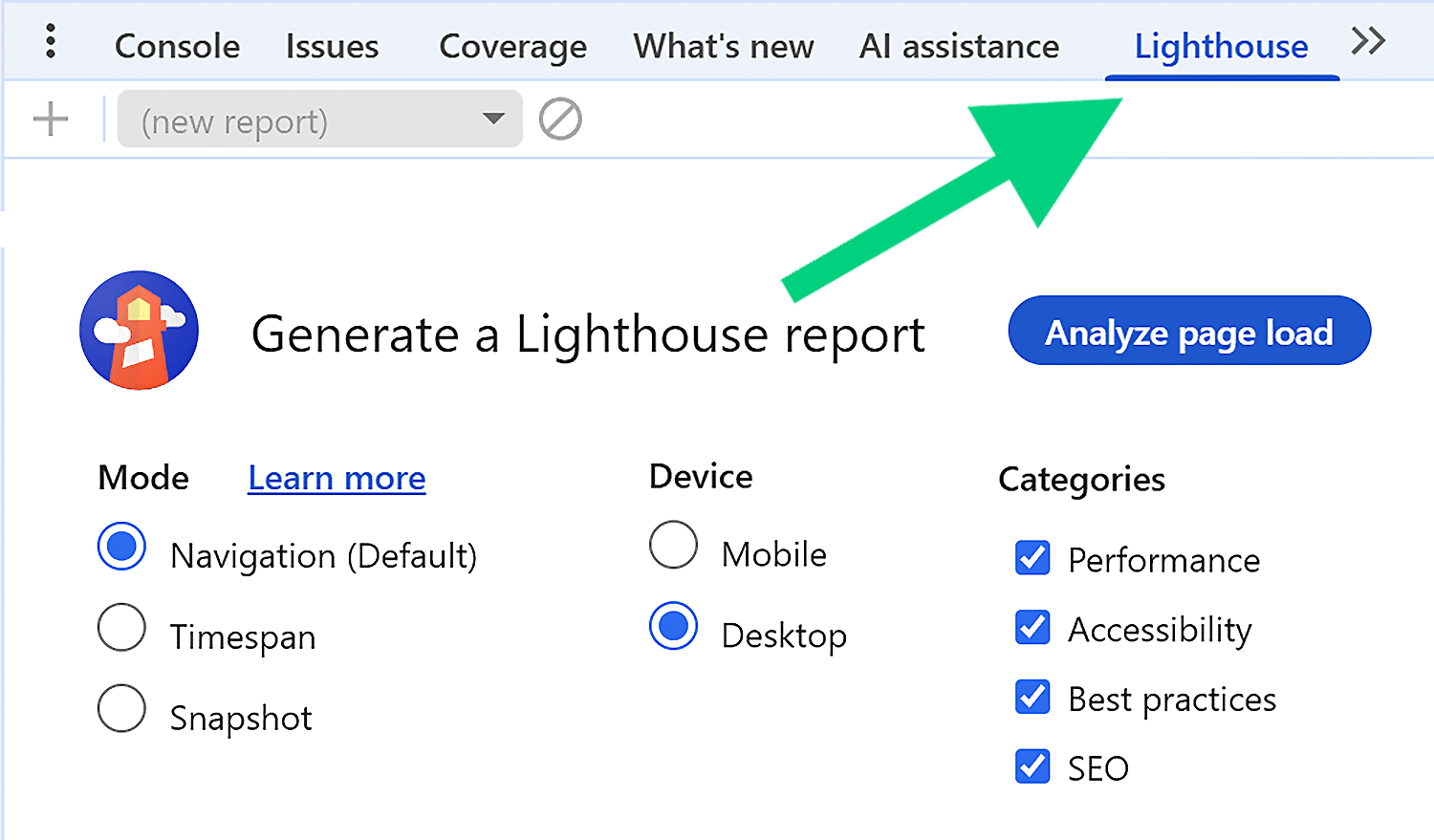
After you’ve clicked “Analyze Page Load,” an audit of your on-page elements will begin, and Lighthouse presents a report with a score and a complete list of actions to improve page speed.
Tip: If a site feels fast, it usually is. Rather than chasing every performance recommendation, work with your site developers to prioritize the fixes that deliver clear, measurable improvements without draining developer resources.
7. Site audits
Regular site audits are key to maintaining your website because technical issues that affect crawlability, performance, and rendering can emerge over time, often without obvious visual signs. If you don’t audit your site, you can miss errors.
Ongoing audits help catch problems early, ensuring both AI crawlers and human users can consistently access, understand, and navigate your content as intended.
Many SEO specialists rely on tools to monitor websites and flag issues as they occur. If you don’t use a tool, you’re essentially guaranteeing that you’ll eventually miss issues across your site, for example, links break, images get uploaded without alt text, pages are deleted, 404s occur, and so on.
Small technical issues can easily cause site issues that are detrimental to SEO.
Most sites benefit from consistent monitoring, as well as a more in-depth audit at monthly, quarterly, or annual intervals, depending on your site and preferences. Large sites often benefit from more frequent auditing because more people edit them and there’s more that can go wrong.
Semrush is a comprehensive auditing tool that you can use to monitor many aspects of your websites, like on-page elements, backlinks and technical errors.
Notable elements for AI crawling include:
- Crawlability and indexability: Identify blocked pages, noindex issues, broken links, and crawl errors that could prevent AI crawlers from accessing content.
- JavaScript rendering issues: Spot pages where important content or links may not be visible in the initial HTML.
- Site performance: Review page speed, response times, and server errors that can limit crawl depth and frequency.
- Internal linking: Ensure important pages are well-linked and not buried behind deep or orphaned structures.
- Duplicate content and canonicalization: Confirm that AI crawlers can clearly identify the canonical version of each page.
The takeaway: Maintaining a site’s crawlability is essential, and this can only happen if SEO specialists review site performance and resolve issues as they occur. Tools are essential for monitoring sites optimally.
The following image shows the site audit dashboard. You can access this report following this workflow:
Semrush > “SEO” > “Site Performance” > “Site Audit.”
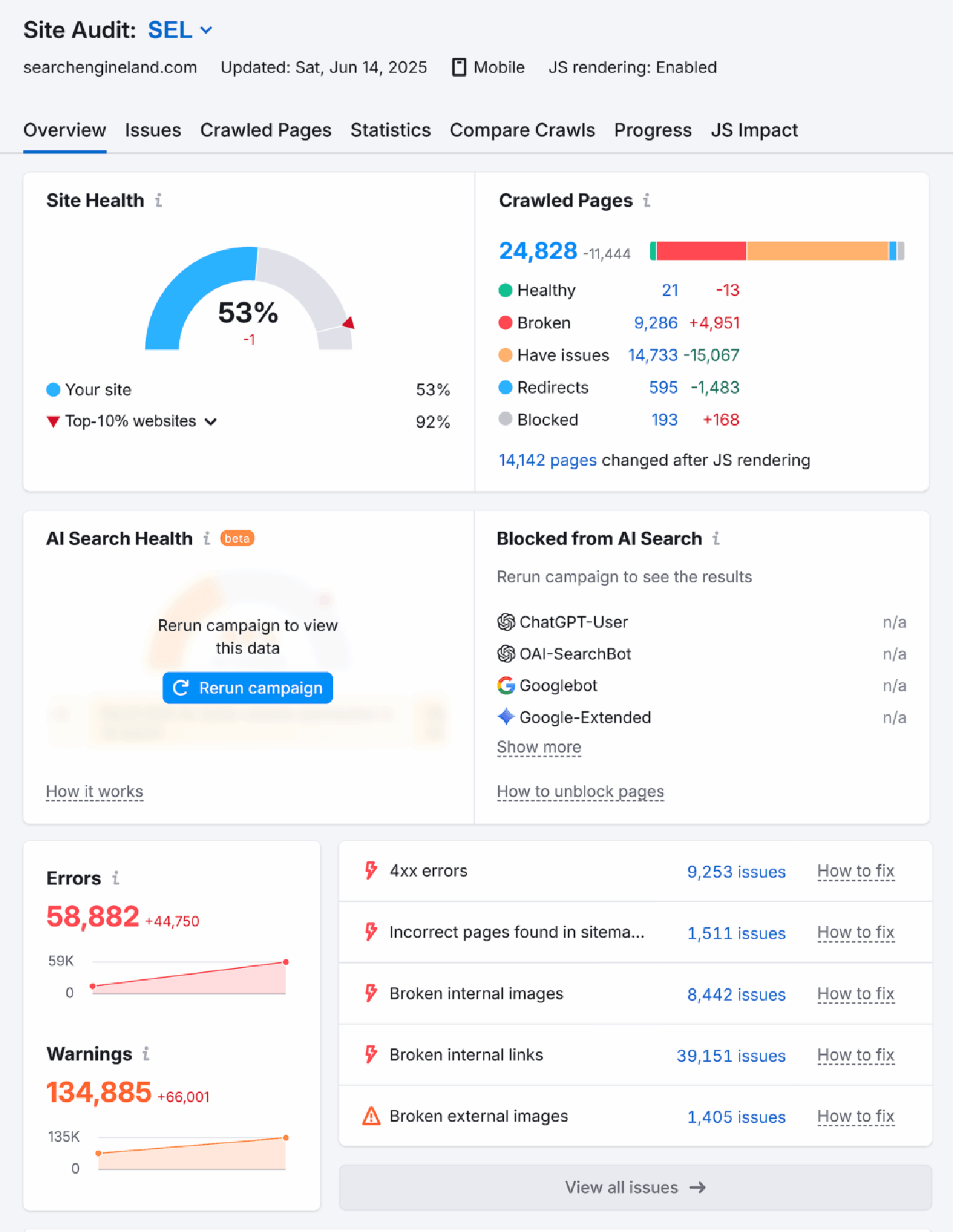
Click “Issues,” and you’ll see your site’s errors, warnings, and notices:

This report helps identify the most important actions to undertake by prioritizing potential issues into three categories:
- Errors: Critical issues that can prevent pages from being crawled, indexed, or fully accessed by AI crawlers and search engines.
- Warnings: Important issues that may limit crawl efficiency, visibility, or understanding, but aren’t immediately blocking access.
- Notices: Lower-priority recommendations and best-practice improvements that can enhance overall site quality and performance.
Using directives for AI crawlers and agents to guide their crawls
You can help AI crawlers find your best content and ignore the content that you don’t need them to index and summarize by using directives, that means the instructions or commands you give to crawlers, within your site’s code.
AI crawlers generally obey the same crawl directives as traditional search engine bots, but this can vary by provider. Some directives are also experimental, but generally easy to implement. It doesn’t hurt to experiment to find what works and what doesn’t.
This next section covers the most common crawl directives and control files, and explains current expectations for how AI crawlers and agents interpret them.
Robots.txt
A robots.txt file is a plain text file placed in the root of your website. The “root” of a website is the top-level folder of your site; the main location where your website lives on the server.
SEO specialists may need to work with developers to add .txt files to the root of a website, but there are plugins (like Yoast or RankMath for WordPress) that make it simple for any website administrator.
You can find any robots.txt file by visiting a URL with the added robots.txt on the URL like this: https://www.example.com/robots.txt
Here’s what Search Engine Land’s robots.txt file looks like:

The file provides crawl instructions to bots. You can target all bots using the * symbol (a wildcard), as you see in the Search Engine Land example above.
Alternatively, you can address specific bots, such as Bingbot (as seen above), with individual rules. Targeting different bots lets you allow or block access to specific content based on the crawler. For example, it might be your company’s preference to allow Bingbot and Googlebot on your site, but disallow AI search tools like GPTBot or ClaudeBot. Below, we’ve shared the exact code to do this if you’d like.
In the Search Engine Land example, you can see that URLs containing “/tag/” and /*?*/ are disallowed for all bots. This means Search Engine Land has directed crawlers not to read or index these URLs.
Important note: Disallowing a crawler in robots.txt does not guarantee that a crawler won’t discover, index, or reference a page. This is true for all files mentioned throughout this section. However, it is best practice to use allow and disallow in robots.txt files.
The table below shows common robots.txt directives, what they mean, and whether or not AI crawlers obey them:
| Directive | Meaning | Do AI crawlers obey? |
| User-agent | Specifies which crawler a rule applies to | Some crawlers, such as ChatGPT, suggest they obey this |
| Disallow | Prevents crawlers from accessing a page or path | Some crawlers, such as ChatGPT, suggest they obey this |
| Allow | Overrides a disallow, allowing crawling of a subpath | Some crawlers, such as ChatGPT, suggest they obey this |
| Crawl-delay | Suggests a wait time between requests | Unknown |
| Sitemap | Points to sitemap files for discovery | Crawlers may use this to find pages |
If an AI crawler finds links to your pages from other sources, such as backlinks or third-party websites, it may still discover those URLs without ever checking your robots.txt file. Google explains this clearly in its introduction to indexing and robots:
“A page that’s disallowed in robots.txt can still be indexed if linked to from other sites. While Google won’t crawl or index the content blocked by a robots.txt file, we might still find and index a disallowed URL if it is linked from other places on the web. As a result, the URL address and, potentially, other publicly available information such as anchor text in links to the page can still appear in Google Search results. To properly prevent your URL from appearing in Google Search results, password-protect the files on your server, use the noindex meta tag or response header, or remove the page entirely.”
The takeaway: Having a robots.txt file has been a foundational part of SEO for many years, and every site should have one.
How to block AI crawlers with robots.txt
The robots.txt file is commonly used to block crawlers (traditionally, search engine crawlers) from viewing certain pages of a website. For example, pages like thank-you pages, internal search results, or temporary promotional pages often aren’t intended to appear in search results, so you use robots.txt to block them.
These days, it’s likely that more crawlers are visiting your website because AI tools each have their own crawlers. Website owners might want to keep some crawlers on their website (traditional search crawlers, for example) while blocking AI crawlers.
Why?
AI crawlers and how they treat content they crawl is becoming an issue for some webmasters. AI tools crawl websites and reuse content, without credit, to generate responses; many site owners are raising valid questions about whether all of their content should be accessed or repurposed in this way. As a result, some web owners want to keep AI off their site.
When you want to block crawlers from certain parts of your website, you can use a directive just as Search Engine Land does in the example above.
It looks like this:
User-Agent: *Disallow: /*?*
To block an AI crawler from accessing parts of your site, you can use the same Disallow directive in your robots.txt file and target the AI crawler by its user agent name. This tells the crawler which paths it should not request or crawl.
Here’s an example that blocks GPTBot from crawling a specific URL:
User-agent: GPTBotDisallow: /url-to-disallow/Sitemap: https://www.example.com/sitemap.xml
If you wanted to block an agent from crawling all URLs containing a certain word, like your tag pages, you simply add that in the disallow, e.g., disallow: /tag/. This is what you see in the Search Engine Land example above.
You can change your user-agent to match the crawler you want to send the directive to. This is true for all code examples throughout this section.
Some common AI crawler user agents include:
- GPTBot – OpenAI (used for ChatGPT and related systems)
- ClaudeBot – Anthropic (used for Claude)
- PerplexityBot – Perplexity AI search
How to allow AI crawlers with robots.txt
By default, most AI crawlers are allowed to access your site unless explicitly blocked. However, you can clearly allow specific AI crawlers and define which sections of your site they may crawl using the Allow directive in your robots.txt file.
This is useful if you’ve restricted broader paths and want to grant specific crawler access to specific content.
Here’s an example that explicitly allows GPTBot to crawl key sections of the site:
User-agent: GPTBotAllow: /blog/Allow: /resources/Allow: /services/Sitemap: https://www.example.com/sitemap.xml
Meta robots tag
The meta robots tag is an HTML <meta> tag placed in the <head> section of a webpage that gives page-level instructions to crawlers.
Unlike robots.txt, which controls crawling at the site or directory level, the meta robots tag applies to individual pages and is read when a crawler successfully loads the HTML.
In addition to traditional directives like noindex and nofollow, the meta robots tag can also be used to communicate AI-specific usage preferences through newer, voluntary directives such as noai, noimageai, and noLLM.
These directives are designed to signal how AI systems may (or may not) use your content:
Examples of directives include:
- noai: Signals that AI systems should not use the page’s content for AI training or generative use. This is a voluntary directive and is only respected by AI crawlers that explicitly support it.
- noLLM: A variation of noai that specifically indicates the content should not be used by LLMs for training or reuse. Support varies by AI provider.
- noimageai: Signals that images on the page should not be used to train AI image-generation or computer-vision models. This directive is aimed at AI systems crawling the web for image datasets and is also voluntary.
Because these directives are embedded directly into the page’s HTML, they offer more granular control than file-based approaches such as robots.txt or llms.txt.
Important note: Like other AI-focused directives, support and adoption are not universal. Using AI-directed meta robots tags is experimental; using tags may or may not be impactful.
The table below shows some meta tag examples with their purpose, and current expectations on whether or not crawlers will obey them:
| Meta Tag | Purpose |
| Tells crawlers not to index the page in search results |
<meta name="robots" content="nofollow"> | Tells crawlers not to follow links on the page |
<meta name="robots" content="noarchive"> | Tells crawlers not to store a cached copy |
<meta name="robots" content="none"> | Equivalent to noindex, nofollow; tells crawlers not to index the page or follow links on the page |
<meta name="robots" content="noai"> | Tells AI systems / LLMs not to use page content for training |
<meta name="robots" content="noLLM"> | Alternative variation signaling no LLM training |
<meta name="robots" content="noimageai"> | Tells AI systems not to use images on the page for training image-generation models |
How to manage AI crawlers with the meta robots tag
Not every page is meant to be indexed. For example, pages like thank-you pages, internal search results, or temporary promotional pages, or staging sites aren’t intended to appear in search results or be reused elsewhere.
You can use the meta robots tag to signal that a specific page should not be indexed, followed, or used for AI training or generative purposes.
Here’s an example that blocks indexing and signals AI usage restrictions:
<meta name="robots" content="noindex, nofollow, noai, nollm, noimageai">
To allow AI crawlers to index and use a page, you can either omit restrictive directives entirely or explicitly state that indexing and link following are permitted.
Here’s an example that allows indexing and AI usage:
<meta name="robots" content="index, follow">
X-Robots-Tag
The X-Robots-Tag is an HTTP response header that provides crawl and indexing instructions at the server level, rather than inside a page’s HTML.
It’s worth noting that the X-Robots-Tag can only be read and followed if crawlers are allowed to access the page.
Some AI crawlers and search engine bots respect X-Robots-Tag directives in the same way they respect meta robots tags. Of course, that means that some don’t. In addition to traditional directives like noindex and nofollow, you can also include AI-specific directives such as noai, noLLM, and noimageai to signal restrictions on AI usage.
The table below shows X-Robots-Tag directive examples with their purpose, and current expectations on whether or not crawlers will obey them:
| X-Robots-Tag Directive | Purpose |
noindex | Prevents the resource from being indexed |
nofollow | Prevents crawlers from following links in the resource |
noarchive | Prevents the storage of a cached copy |
noai | Signals that AI systems should not use the resource for training or generative use |
noLLM | Signals that large language models should not use the resource |
noimageai | Signals that images should not be used for AI image training |
Like other AI-focused directives, support for noai, noLLM, and noimageai is voluntary. Adding X-Robot-Tag directives to influence AI crawlers is experimental at this stage; it may or may not work. The AI systems are not clear on whether they will follow this directive or not.
How to manage AI crawlers with the X-Robots-Tag
You can use the X-Robots-Tag HTTP header to prevent AI crawlers and search engines from indexing or using specific resources — especially non-HTML files like PDFs, images, or documents.
Here’s an example that blocks indexing and AI usage of images:
X-Robots-Tag: noindex, nofollow, noai, noLLM, noimageai
To allow AI crawlers and search engines to index and use your content, you can either omit the X-Robots-Tag entirely or explicitly allow indexing.
Here’s an example that allows indexing and AI usage:
X-Robots-Tag: index, follow
But keep in mind, yet again, that some AI crawlers may obey, while others won’t.
Proposed and emerging AI crawler directives
While some crawling directives have been around for a long time (shout-out to robots.txt), the rise of AI search and AI crawlers is pushing SEO specialists and technical thought leaders to consider what else we can do to improve the crawl experience for AI systems.
Here are some proposed or emerging solutions:
robots.json
Some developers have floated the idea of robots.json, a JSON formatted alternative to robots.txt for AI crawlers. The appeal is straightforward. JSON would let site owners express granular, unambiguous rules that machines can parse more reliably than the line by line text used by robots.txt, llms.txt, or llms-full.txt.
A JSON based file could also separate permissions for different use cases. Traditional search indexing, AI training, and content summarization could each get their own rules, capturing nuance that plain text directives struggle to convey.
The concept stops short of a real proposal. There’s no formal specification, no standards body behind it, and no agreement on what fields or structure the file would contain. No major crawler or AI company currently honors such a file.
How managing AI crawlers with robots.json would work
Tools like Generate Robots.json by Content Powered let you create JSON that block or allow certain user agents from accessing websites.
An example looks like this:
{
  "user_agents": [
    {
      "name": "*",
      "allow": [
        "/"
      ]
    },
    {
      "name": "GPTBot",
      "allow": [
        "/urls-that-ai-can-crawl"
      ],
      "disallow": [
        "/urls-ai-cannot-crawl",
        "dont-crawl-this-either"
      ]
    }
  ]
}
ai.txt
In May 2025, a group of researchers published a paper on arxiv.org proposing ai.txt. The language is designed to give site owners more granular control over how AI models interact with their content. Unlike robots.txt, which operates at the URL level, ai.txt would allow element level regulation. Site owners could specify which actions, such as training or summarization, are permitted or prohibited for specific content on a page.
The proposal includes two compliance mechanisms. One is programmatic enforcement through structured rule parsing. The other is prompt level enforcement that embeds constraints directly into the instructions given to AI models.
For now, ai.txt is strictly an academic proposal. No major AI company or crawler currently honors such a file, and real world adoption is nonexistent. That puts it behind even llms.txt in terms of traction. Proposals like this one may still shape future standards discussions as the AI landscape evolves.
Here’s what’s proposed:
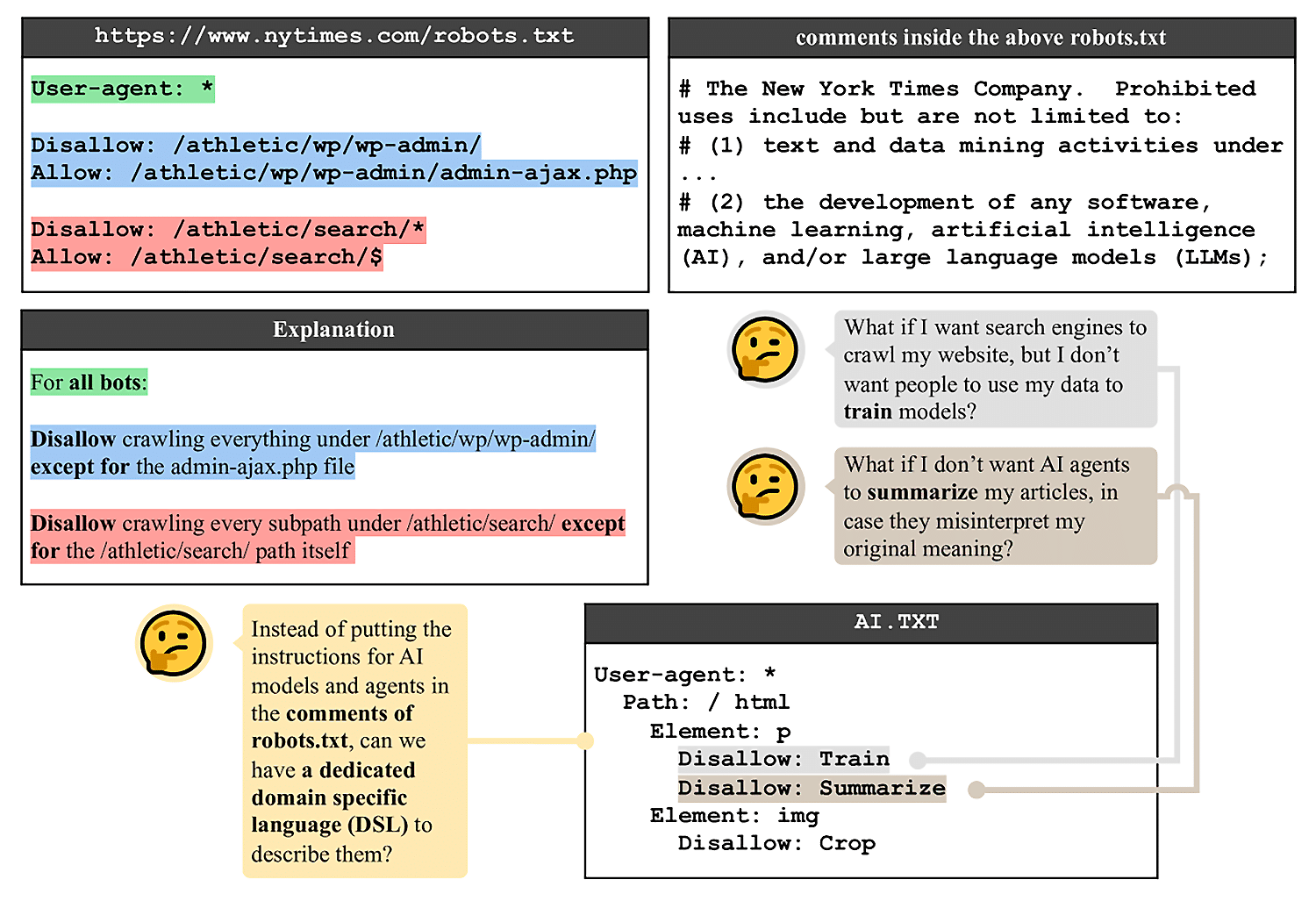
The screenshot above shows a robots.txt file with standard disallow or allow directives. The ai.txt file becomes more nuanced. In this example, within ai.txt, training and summarizing content have been disallowed.
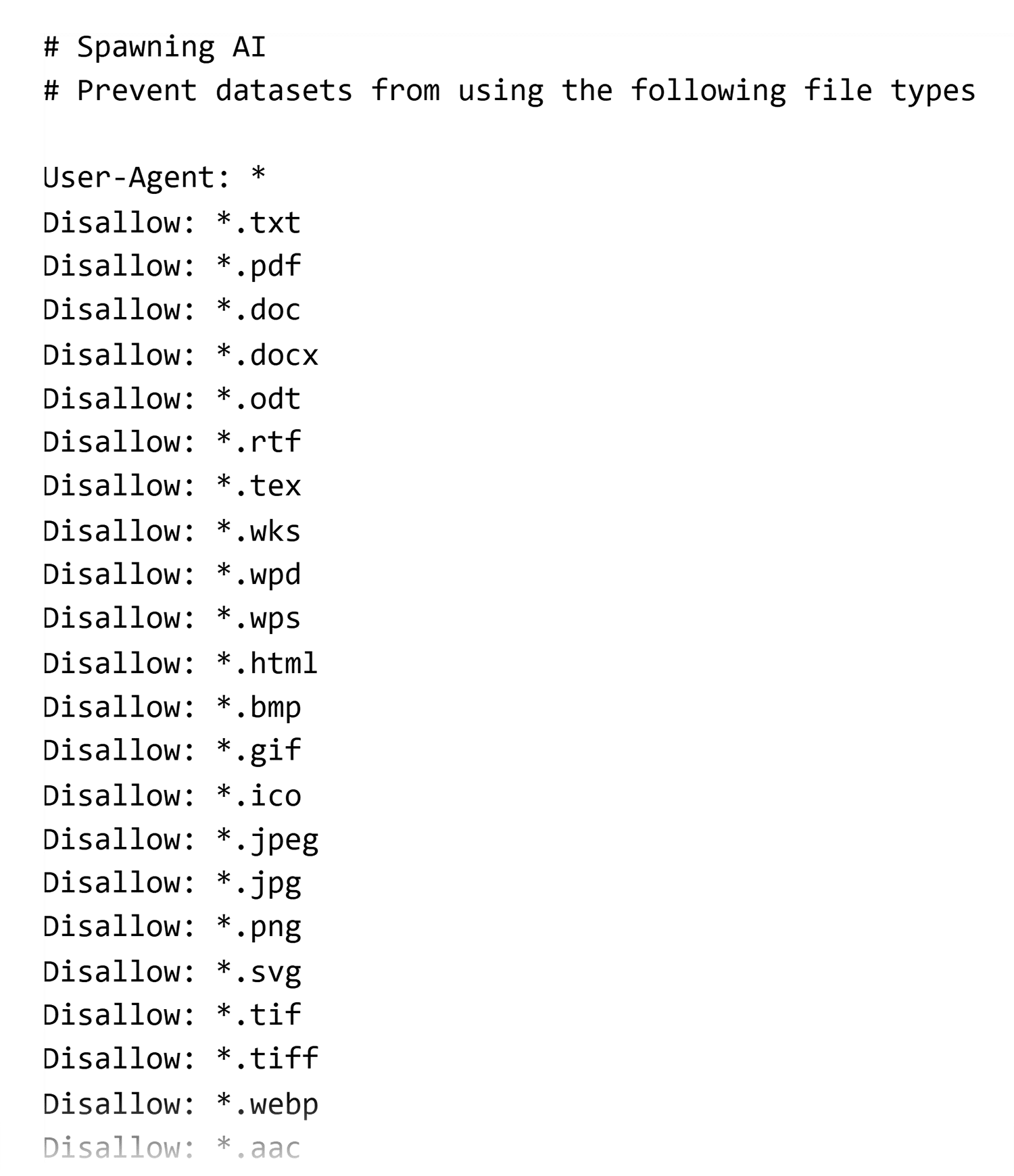
Companies like Spawning are pioneering the ai.txt file with tools and free ai.txt generators. Arxiv also doesn’t have an active ai.txt file. Make of that what you will.
Although adoption isn’t universal, there are many sites that have an ai.txt file in place. Just search for “site:.com/ai.txt” on Google to see.
Here’s what an ai.txt file looks like when generated by Spawning:
How managing AI crawlers with ai.txt would work
If the arxiv.org proposal were successful, you could block AI crawlers from different activities on your website.
Here’s a solution for blocking AI entirely from training and summarizing content:
User-agent: GPTbotPath: /the-urlElement: pDisallow: trainDisallow: summarize
Here’s a solution for blocking AI from training on your content, but enabling it to summarize content:
user-agent: GPTbotPath: /the-urlElement: pDisallow: trainallow: summarize
You would be able to allow AI crawlers using the below:
User-agent: *Allow: /
Providing more context to AI crawlers
Some .txt files can provide more context to AI crawlers. These files, called llms.txt and llms-full.txt, have gained some traction, particularly among developer documentation sites, though they are not an official standard.
llms.txt
A llms.txt is a plain text or Markdown file placed in the root of your website. At the moment, the use of llms.txt is a suggestion by Jeremy Howard, the founding CEO of answer.ai. No AI tools have provided insights into whether, or how, they use or will use the llms.txt file.
The file’s proposed purpose is to provide a list of URLs, page titles, published and modified dates, and an excerpt or additional information about each page.
The llms.txt complements the robots.txt by providing context about a page in a way that is readable for AI crawlers.
Here’s what Howard says about this new file format:
“llms.txt is designed to coexist with current web standards. While sitemaps list all pages for search engines, llms.txt offers a curated overview for LLMs. It can complement robots.txt by providing context for allowed content. The file can also reference structured data markup used on the site, helping LLMs understand how to interpret this information in context.”
You can find available llms.txt files by visiting a URL like this: https://www.example.com/llms.txt
Here’s what Search Engine Land’s llms.txt file looks like:
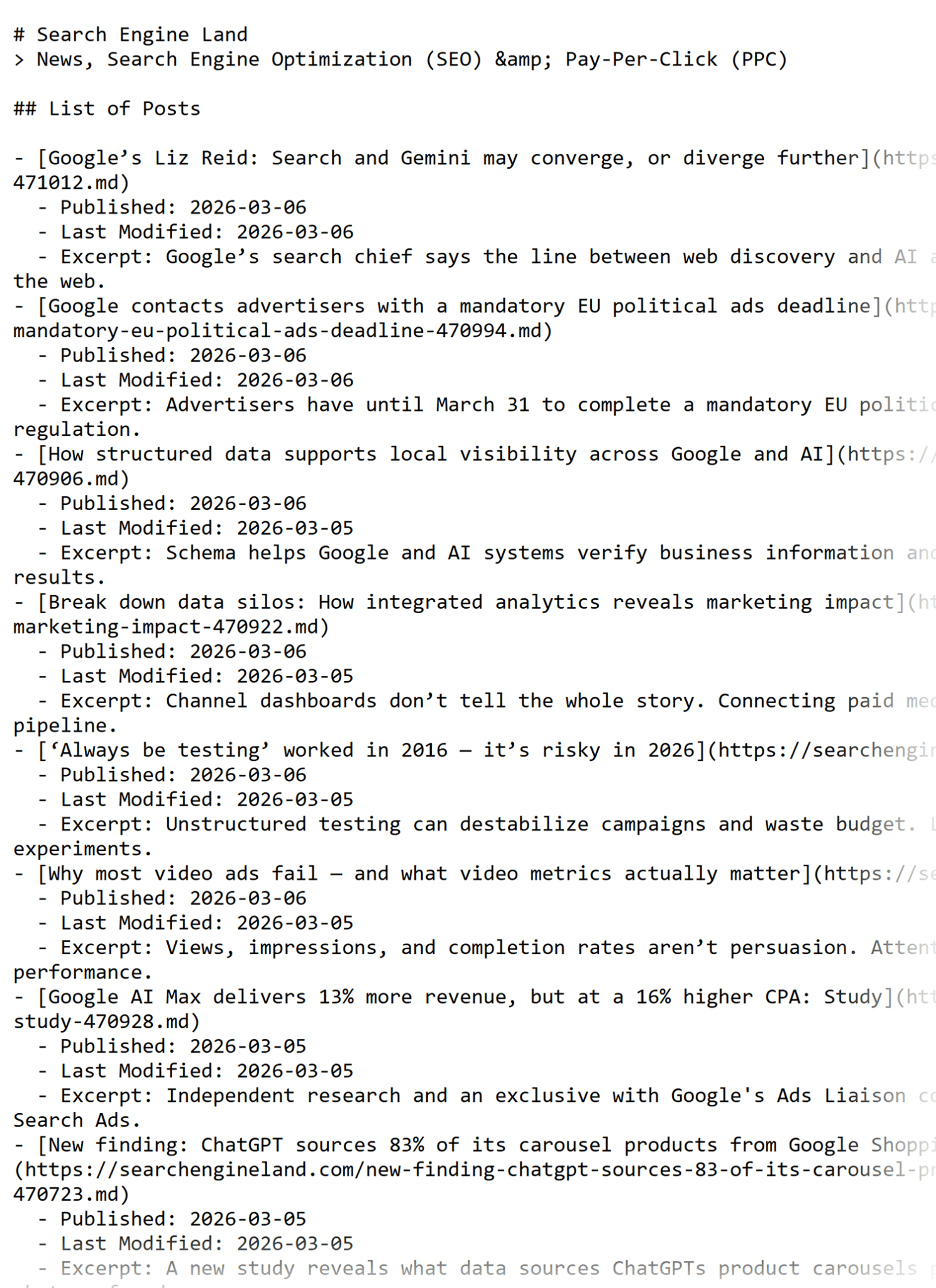
Some SEO specialists argue that AI tools never visit llms.txt, but this isn’t strictly true.
Here’s a crawl log from a site showing LLMs visiting the llms.txt file:

The screenshot above shows a ChatGPT useragent crawling llms.txt. While we know that LLMs can, and do, access and crawl llms.txt, it’s still not clear how AI crawlers use the file or what impact it has on training and indexing in AI search tools.
Adding llms.txt to your site is still very experimental.
Candidly, Ana Fernández tracked 10 sites to see if llms.txt mattered; it didn’t. However, Fernández still considers adding llms.txt a best practice, but not an essential level for growth compared to other efforts like creating content, structuring it for extraction, and making content technically visible.
For many sites, like those on WordPress and using plugins like Yoast, adding the llms.txt is easy and fast, and it doesn’t hurt to try it. Weigh the time it takes to add the file against the potential output before you add llms.txt to your site.
How to create an llms.txt file
You can add .txt files to the root of your website.
There are two main ways you can do this.
First, you can do it manually, but this isn’t recommended.
The manual approach might be fine for:
- Very small, static websites
- Sites that rarely change content
- One-off experiments or testing
But for most active websites, manual management is not recommended.
Why?
Because it’s not automated. Ideally, every new page, removed page, or URL change will automatically update, and that’s where plugins come in handy if you’re using CMS platforms like WordPress.
If you are going to attempt it manually, here’s how:
You can create a plain txt file, manually list the URLs or paths, and add an excerpt about the page. See the Search Engine Land example above to see how this works.
Upload it to the root of your site (e.g., yourdomain.com/llms.txt)
Using plugins (recommended): Yoast makes it easy.
Since WordPress powers the majority of websites online, we’ve created a workflow for using Yoast and WordPress.
Yoast handles llms.txt generation automatically, meaning:
- The file updates as your content changes
- You don’t need to track URLs manually
- The rules stay aligned with your site structure, indexing settings, and technical SEO configuration
Automation is especially important for growing sites where content is added, updated, or removed regularly.
How to add llms.txt using Yoast if you’re already using Yoast SEO
Log in to your WordPress dashboard > Click “Yoast SEO” > Click “Settings” > Scroll down to “API” > Find “llms.txt” > Toggle “Enable Feature.”
Here’s what the backend looks like:
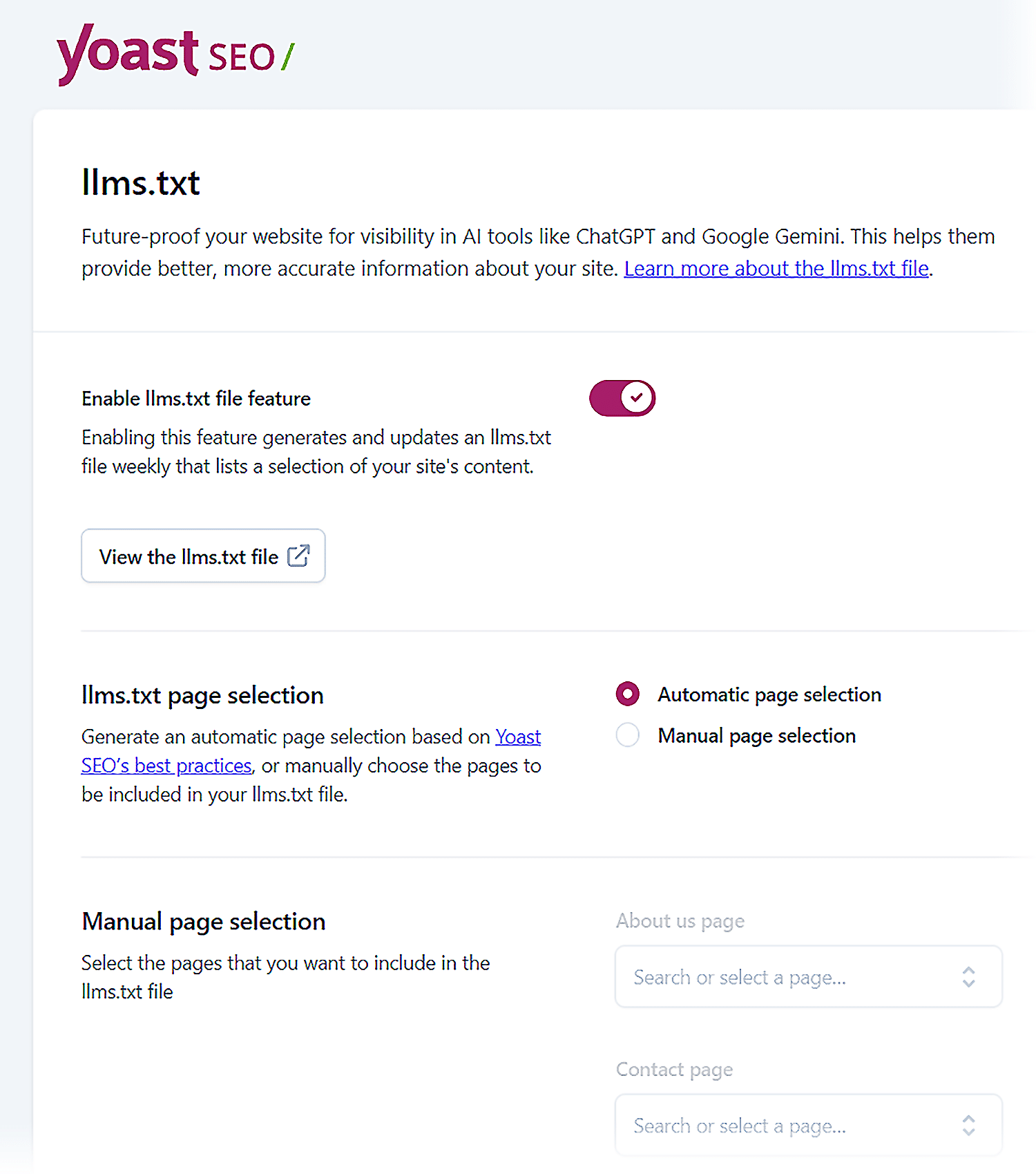
If you don’t have Yoast set up, you can see how to do that here. Alternatively, you can use the Website LLMs plugin by Ryan Howard. Other CMS platforms, like Shopify, also have LLMs.txt apps.
llms-full.txt
A llms-full.txt file is an expanded .txt file that uses plain text and Markdown-style formatting.
llms-full.txt is an informal, experimental idea for a structured text file that carries extended or detailed content meant for AI systems. It has no standard, limited and inconsistent adoption, and no formal support from any major AI platform.
You can find available llms-full.txt files by visiting a URL like this: https://www.example.com/llms-full.txt
Sites like Cloudflare and Zapier have good examples of comprehensive llms-full.txt files.
Here’s what Zapier’s llms-full.txt file looks like:
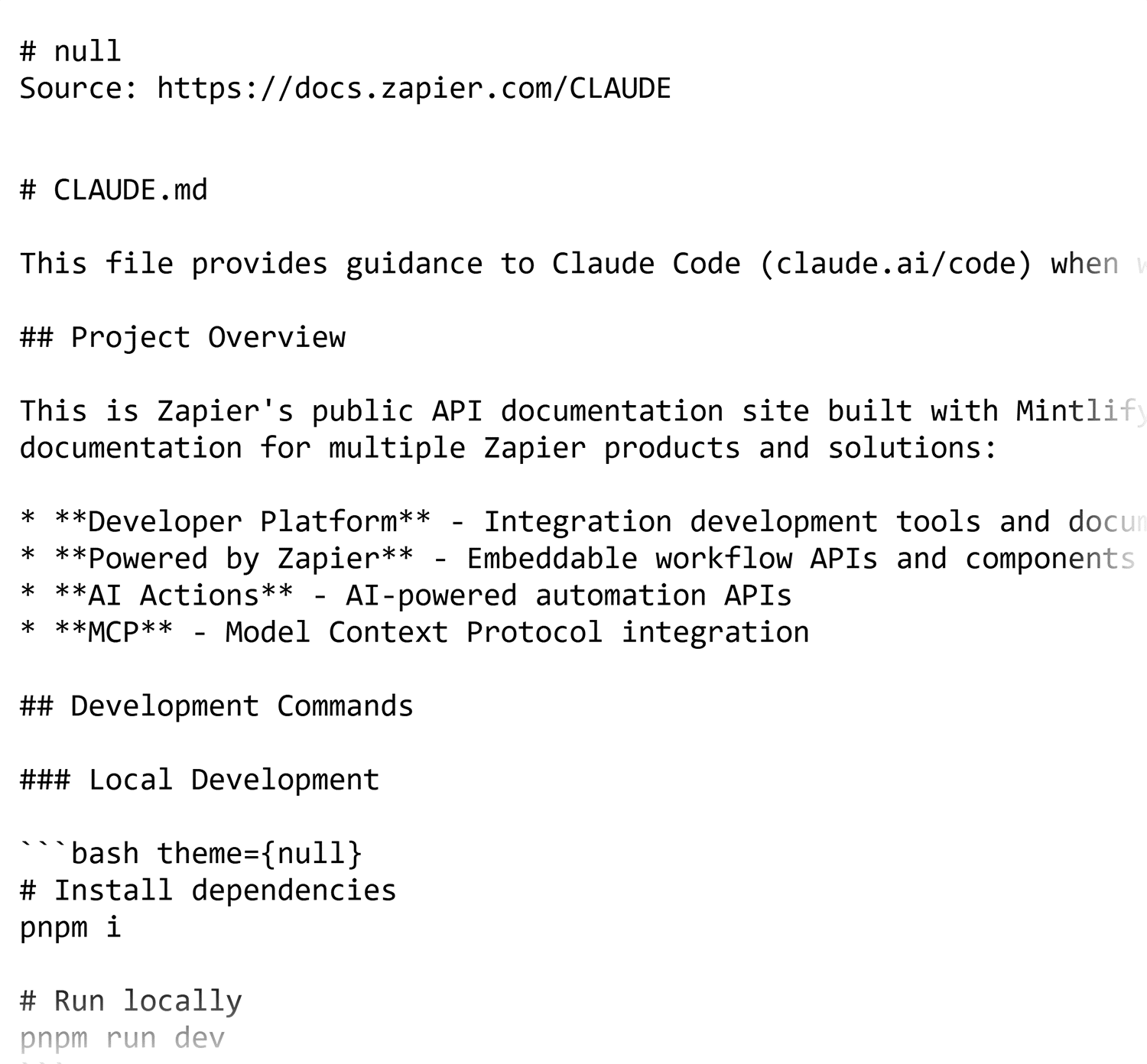
The purpose of Zapier’s llms-full.txt file is clear.
The document says, “This file provides guidance to Claude Code (claude.ai/code) when working with code in this repository.”
Compared to llms.txt, this file provides far more context, structure, and instruction, and is particularly useful for complex or technical content.
The idea behind the file is to format code and developer workflows so that LLMs can better crawl and index how to use code, which would produce better AI answers, reduce code errors and enhance developer experiences with that company’s products and codebase.
How to create an llms-full.txt file
For companies like Zapier and Cloudflare, the llms-full.txt file is a machine-readable export of existing documentation.
To create the llms-full.txt, you can:
- Pull existing content from your knowledge base or code repositories
- Convert rich text into markdown using software like Docs™ to Markdown, which is part of Google’s Workspace
- Export the file as a .txt
- Serve the file on the website at the root
It’s likely that companies deploying llms-full.txt at scale will have automated processes in place that update any relevant Markdown files when the documentation is updated.
What is pay-per-crawl?
Cloudflare’s pay-per-crawl is an initiative that gives website and content owners autonomy over what can be used in AI from their website.
Instead of allowing or blocking AI crawlers, Cloudflare proposes a third option: charging a fee for AI crawlers to crawl your site, and therefore use and train on your content.
Charging AI to crawl a site stops AI crawlers from having uncompensated open access to content. This uncompensated access is an issue for content owners because AI uses that content to train on, or summarizes human-written content without compensation in any form; Sometimes site content is used without citation.
Pay-per-crawl benefits site owners by:
- Creating a revenue stream from AI access so that their hard work is fairly compensated.
- Reduces the need to block AI crawlers entirely so sites can still appear in AI search tools.
It’s currently in private beta, but if you want early access, you can sign up here.
How to ping AI crawlers to crawl your site
The honest answer is: You can’t directly “ask” AI crawlers to come to your site the way you can submit a URL to Google Search Console. There’s no equivalent submission tool for most AI companies. But there are concrete things that actually work to make your content accessible and discoverable to them.
AI systems generally don’t roam the web randomly. They rely heavily on search engine indexes and licensed datasets, among other sources.
What can help:
- Ensure the page is indexable
- Submit it to:
- Google Search Console
- Bing Webmaster Tools
- Make it internally linked (not orphan pages)
- Earn external links (backlinks still matter)
If a page is not in search, it may be unlikely to ever appear in AI retrieval systems.
Historically, SEO specialists have been able to prompt search engine crawlers to visit their websites using tools like Google Search Console and Bing Webmaster Tools.
Today, AI crawlers are also accessing websites, and it’s natural to want a way to directly ping them. While there’s no guaranteed or standardized method yet, encouraging search engine crawlers to recrawl your site may be an effective starting point. Many AI-powered tools rely on search engine indexes or upstream crawl data, so improving search engine discovery often increases AI visibility as well.
In this section, we’ve covered how traditional SEO specialists prompt search engine crawlers to crawl content, along with a few experimental approaches that may also surface your content to AI system
Google Search Console’s URL Inspection
On Google Search Console, there’s the URL Inspection tool that can help speed up indexing.
Visit GSC > Click “URL Inspection” > Paste your URL into the bar at the top > Press “Enter” > Click “Request Indexing.”
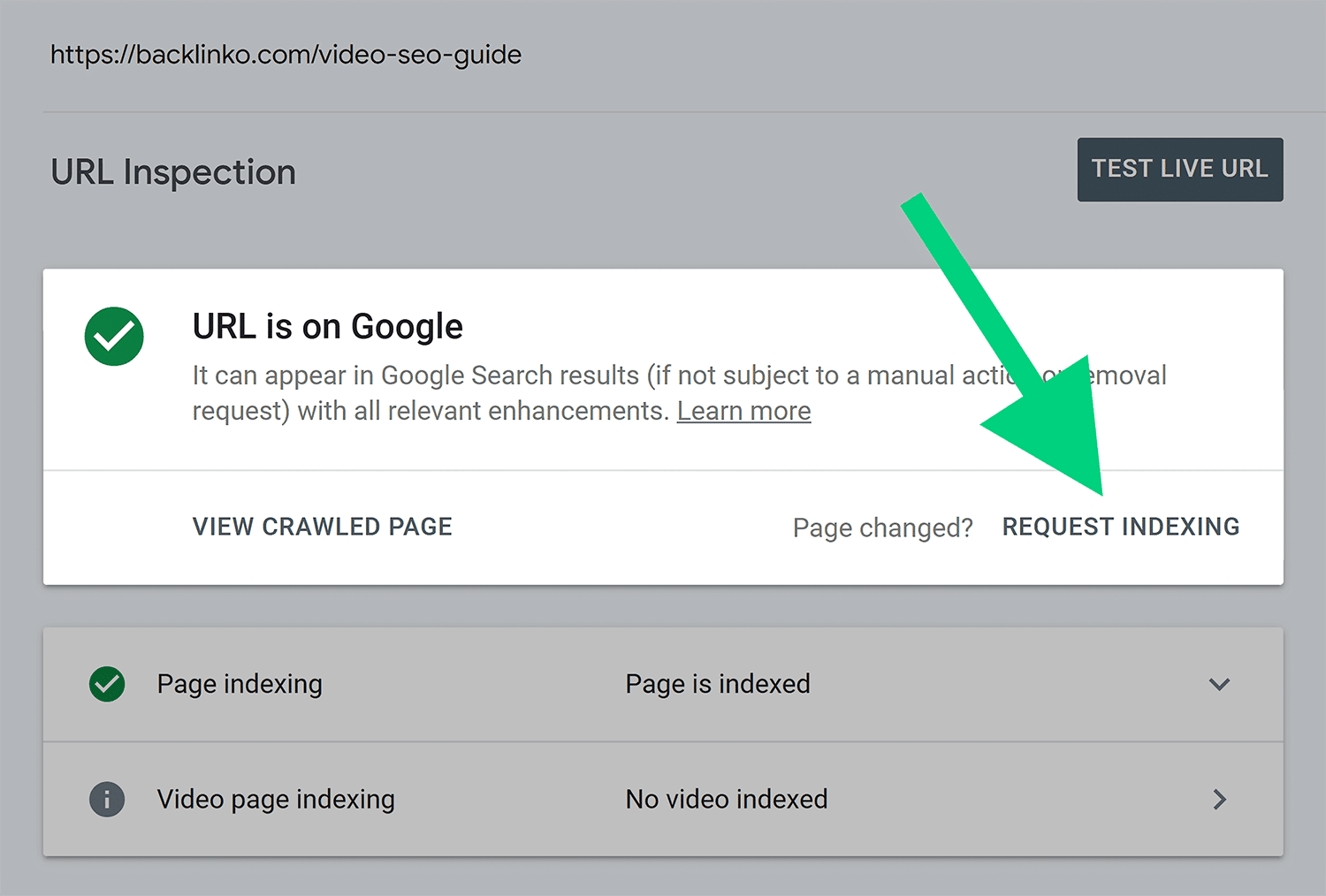
Then you can request indexing for a new page or an edited page.
Google Search Console’s sitemap tool
If you’ve edited or added many pages, it’s better to submit a complete sitemap.
To do that:
Visit GSC > Hover over “Indexing” > Click “Sitemaps” > Paste your sitemap URL > Press “Submit.”
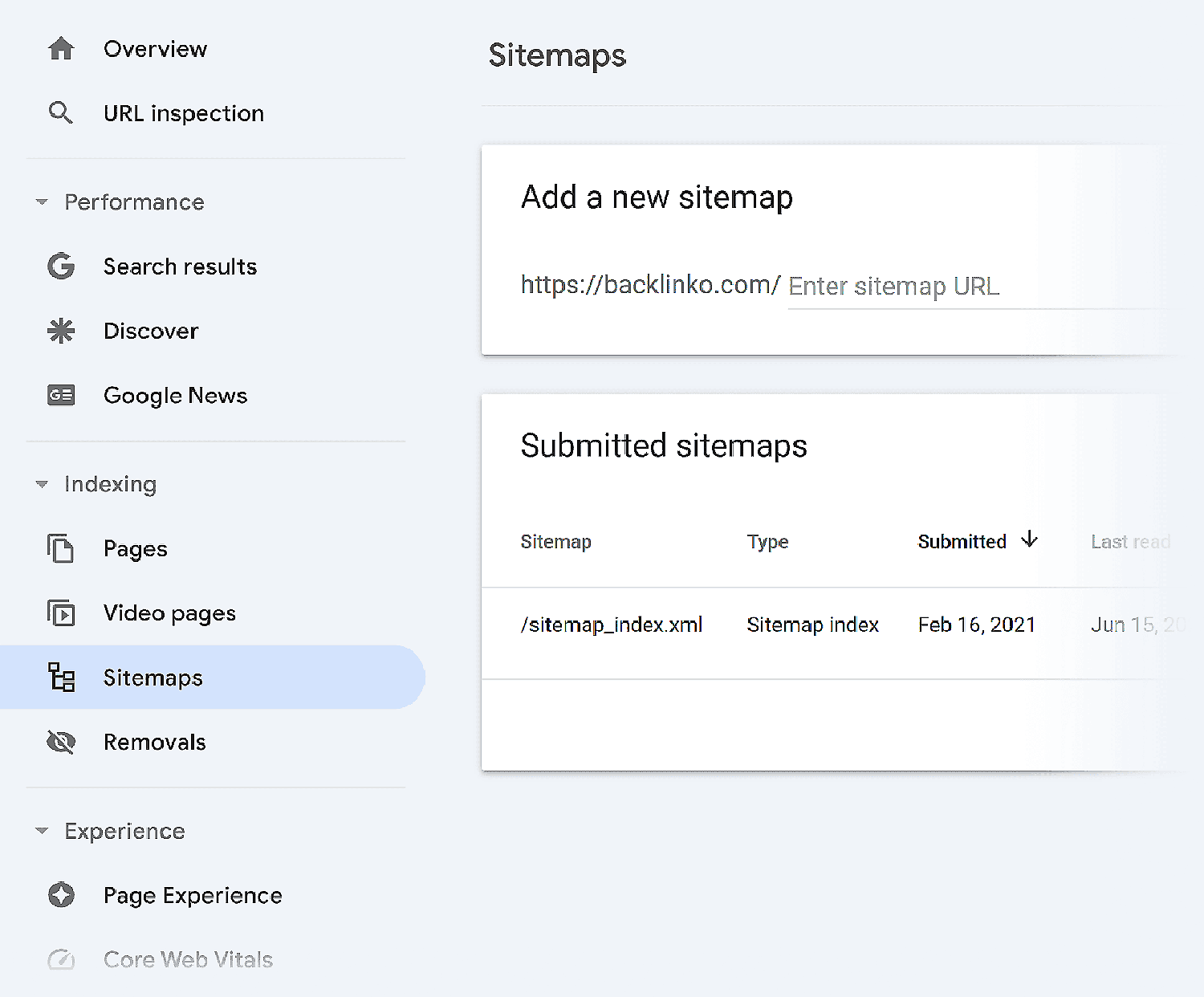
This pings Google to crawl your website.
Dig deeper: The ultimate Google Search Console guide: Everything you need to know
Bing Webmaster Tools URL submission
On Bing Webmaster Tools, the URL Inspection tool is how you can submit or resubmit your URLs for inspection.
Visit Bing Webmaster Tools > “URL Inspection” > Paste your URL into the bar at the top > Press “Inspect” > “Request Indexing.”
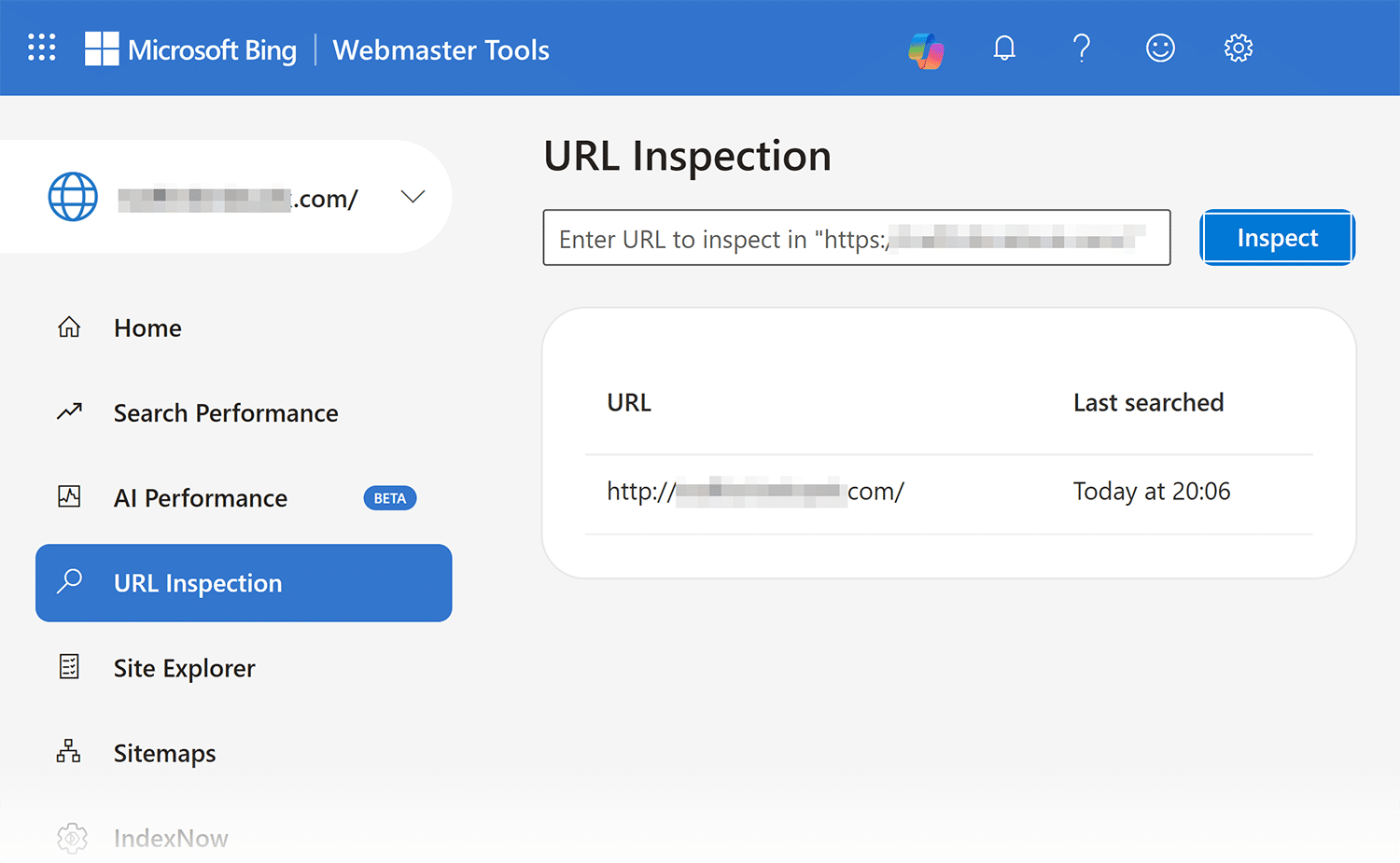
You can request indexing for a new page or an edited page.
Bing Webmaster Tools sitemap tool
If you’ve edited or added many pages, it’s probably best to submit a complete sitemap.
To do that:
Visit Bing Webmaster Tools > Click “Submit sitemap” > Paste your sitemap URL > Press “Submit.”

This pings Bing to crawl your website.
Cloudflare’s AI Index
One emerging option is Cloudflare’s AI Index which builds an AI optimized search index for your site automatically.
The index exposes your content through a set of standard APIs. These include an MCP server, auto generated llms.txt and llms-full.txt files, a search API, and a pub/sub system that notifies subscribing AI platforms whenever your content changes. The goal is to replace blind crawling with a structured, permissioned model where AI builders subscribe to your content rather than stumble onto it.
Cloudflare also plans to offer an aggregated Open Index that bundles participating sites together, letting AI builders search across many sites at once.
But the limitations are real. AI Index is still in private beta, and it requires your site to be on Cloudflare. There’s no public information about which AI companies, if any, are actively subscribing on the builder side. The concept is one of the first attempts by a major infrastructure provider to build a direct bridge between site owners and AI platforms. Whether it moves the needle on AI discoverability is still unproven.
Can AI crawlers access your site?
If you want a site that’s earning visibility in AI search tools, you must ensure AI crawlers can access your content in the first place.
Track, optimize, and win in Google and AI search from one platform.
Start by identifying rendering issues, blocked resources, slow load times, or crawl restrictions that can prevent AI systems from seeing the same content that human users do.
For now, one of the easiest ways to check whether your website is as visible as possible to AI crawlers is by using Semrush One.
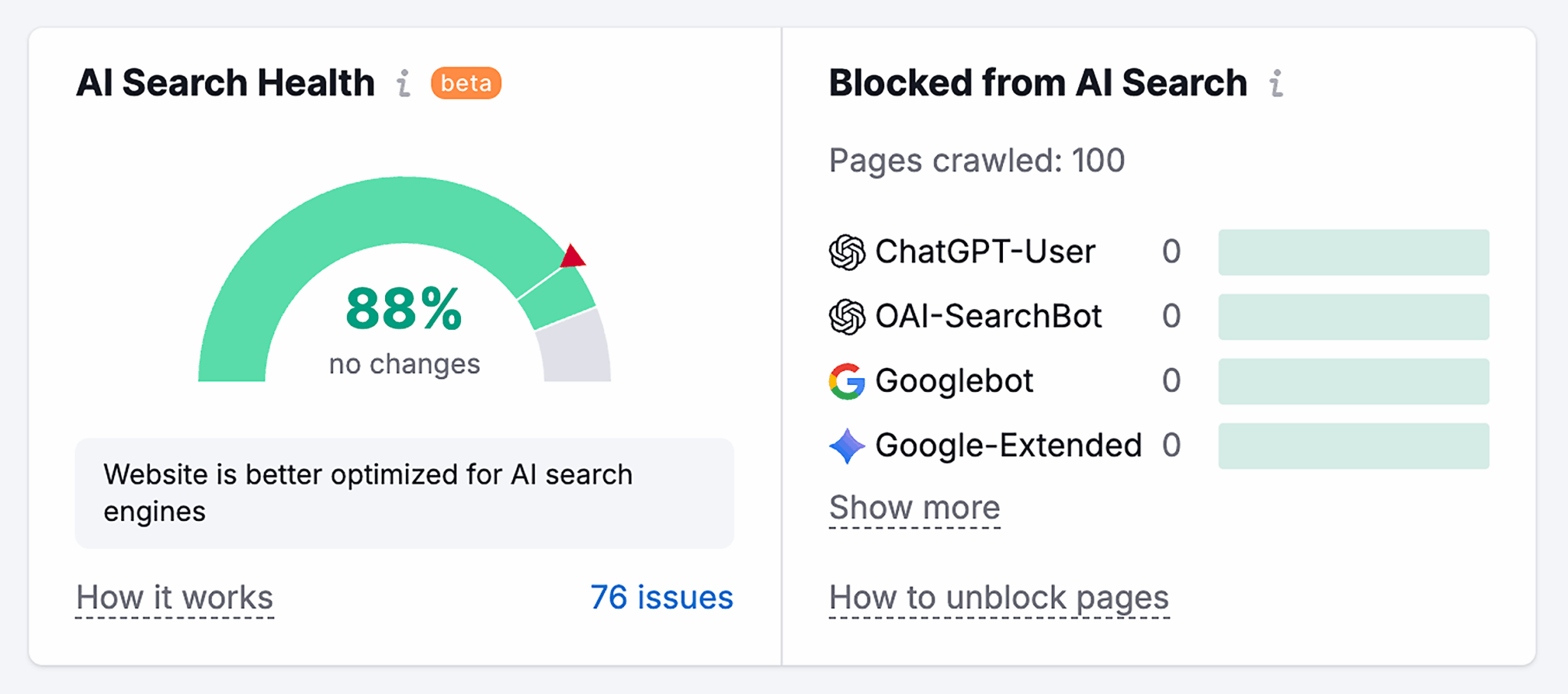
Its Site Audit tool helps identify crawlability, rendering, and accessibility issues that may affect how both AI crawlers and search engine bots interact with your site. Reviewing these signals can quickly surface problems that limit AI visibility — before you move further down the funnel.
And don’t miss the rest of our series on AI crawlers. If you missed it, review Part 1, What are AI crawlers and bots?, where we cover the basics of AI crawlers and how they work. Then read Part 3, Tools and software to manage AI crawlers accessing your site, for a breakdown of the platforms and monitoring tools that can help you control, analyze, and optimize AI crawler activity on your website.
Explore more on
Editorial disclosure
Search Engine Land is owned by Semrush. We remain committed to providing high-quality coverage of marketing topics. Unless otherwise noted, this page’s content was written by either an employee or a paid contractor of Semrush Inc.
About the author