What is on-page SEO? Key elements & best practices


Introduction: What is on-page SEO and why does it matter?
On-page SEO is a method of optimizing your webpages to improve their rankings in organic search results and attract more traffic from search engines.
It includes everything you do on your pages themselves, like writing super relevant content with keyword-rich headings, linking to other pages internally, and giving your images descriptive file names.
Basically, on-page SEO is all about making your pages relevant, useful, and easy to understand for both humans and search engine bots.
On-page SEO is one of the major pillars of any SEO strategy. Together with off-page and technical SEO tactics like improving website speed, building backlinks, and adding schema, it can help you significantly improve your search rankings and organic traffic.
Any type of website can benefit from on-page SEO. This includes:
- SaaS companies
- Ecommerce companies
- Small and midsize businesses (SMBs)
- Local businesses
- Bloggers
- Affiliate businesses
- Nonprofits
In this guide, we’ll give you all the details about everything an on-page SEO strategy should include. By the end, you’ll be able to optimize your site like an on-page SEO pro.
But first, there are a few things you should know about what on-page SEO can really do for your online visibility and website traffic.
The SEO toolkit you know, plus the AI visibility data you need.

The goal of on-page SEO
The main goal of on-page SEO is actually pretty simple: To help search engines and users clearly understand exactly what a web page is about.
Search engines like Google want to understand your webpages in order to deliver the most relevant, helpful content to users.
Why?
Because surfacing the most relevant, helpful content creates the best possible user experience, making users want to return to the search engine again and again.
On-page SEO plays a critical role in turning your webpages into user-friendly content that Google prefers. It focuses on these three content necessities:
- Relevance: Your content should directly match what the user was looking for when typing in their query. This is called matching the user’s search intent. Strategic use of keywords, headings, and supporting details tells search engines that your page is one of the best answers to a specific query.
- Clarity: A clear structure, readable formatting, and logical flow help both users and search engines navigate your content easily.
- Usability: Fast load times, mobile-friendly design, and accessible media contribute to a better experience.
If your content hits all of the points above and offers true value to the reader, then it probably meets Google’s Helpful Content guidelines. These guidelines are all about creating content for people, not search engine bots.
If you’ve focused on all of that when creating your content, it likely has the ranking signals it needs in order to be on the first page of search results.
Does that seem like a lot of work to put into one piece of content? It might be, but it’s all super important if you want the best chance of ranking in search.
It’s much easier if you take it one element at a time! Use this list of key elements as an on-page SEO checklist.
Key elements of on-page SEO

Title tags
Title tags define the title of your webpage and act as the clickable links that appear in search results.
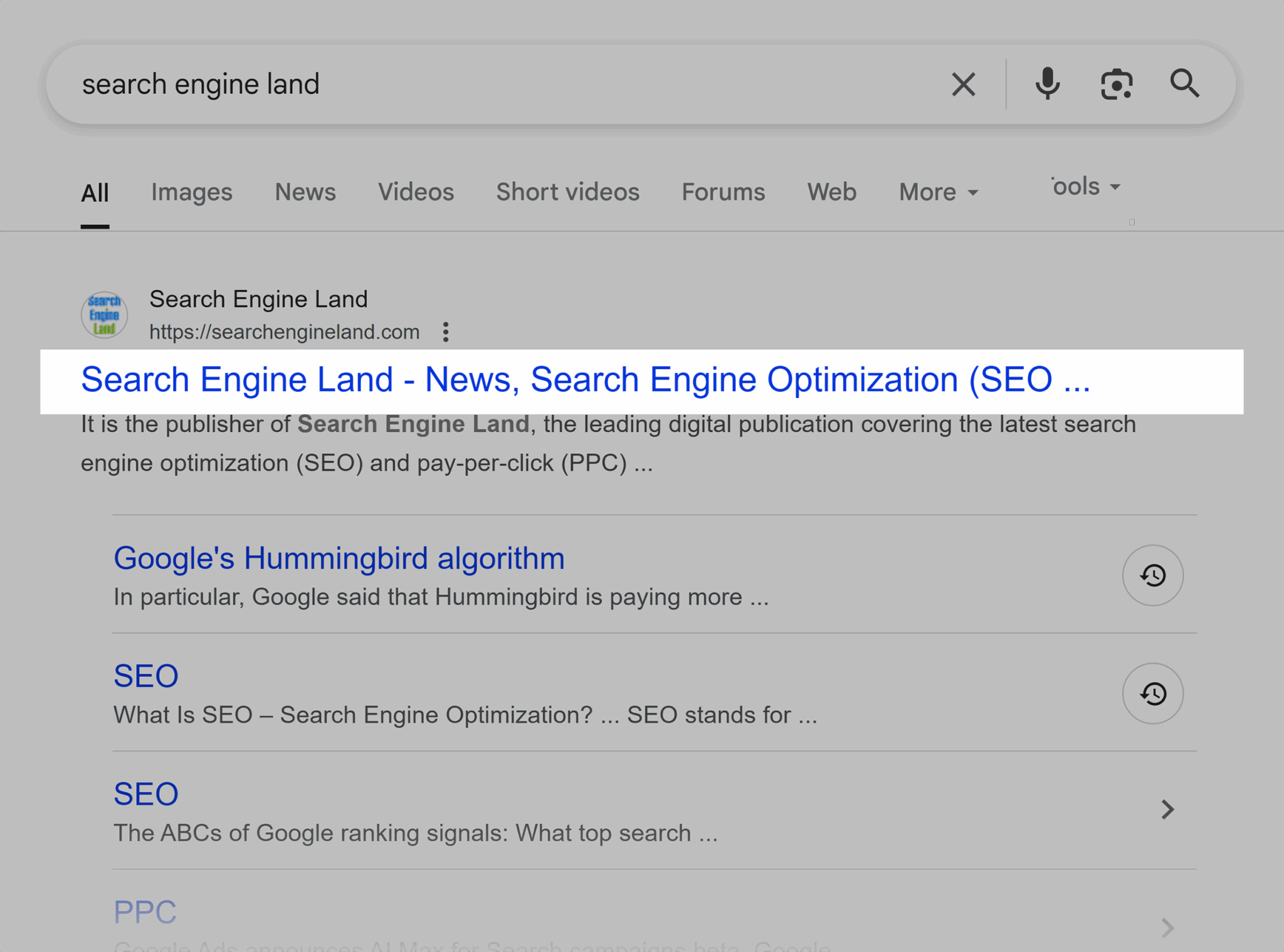
Your title tags should tell searchers exactly what content they’ll find when they click to your website. They should also be enticing to click on.
Title tags can influence SEO by helping search engines understand your page’s content and relevance.
Here are a few title tag best practices to keep in mind:
- Your focus keyword should be close to the beginning of your title tag if possible
- Put your page or post title first, then your site name
- Keep your title tag short and to-the-point if you can, making sure it’s below 60 characters
- Think of it like an ad for your content and make it ultra clickable
- Make sure the title tag is not exactly the same as others appearing on the first page of search results for your focus keyword
Meta descriptions
Meta descriptions (also called “snippets”) are brief summaries of a webpage’s content that appear below the page title in search engine results. Together with title tags, they are part of the meta tags tied to a page.
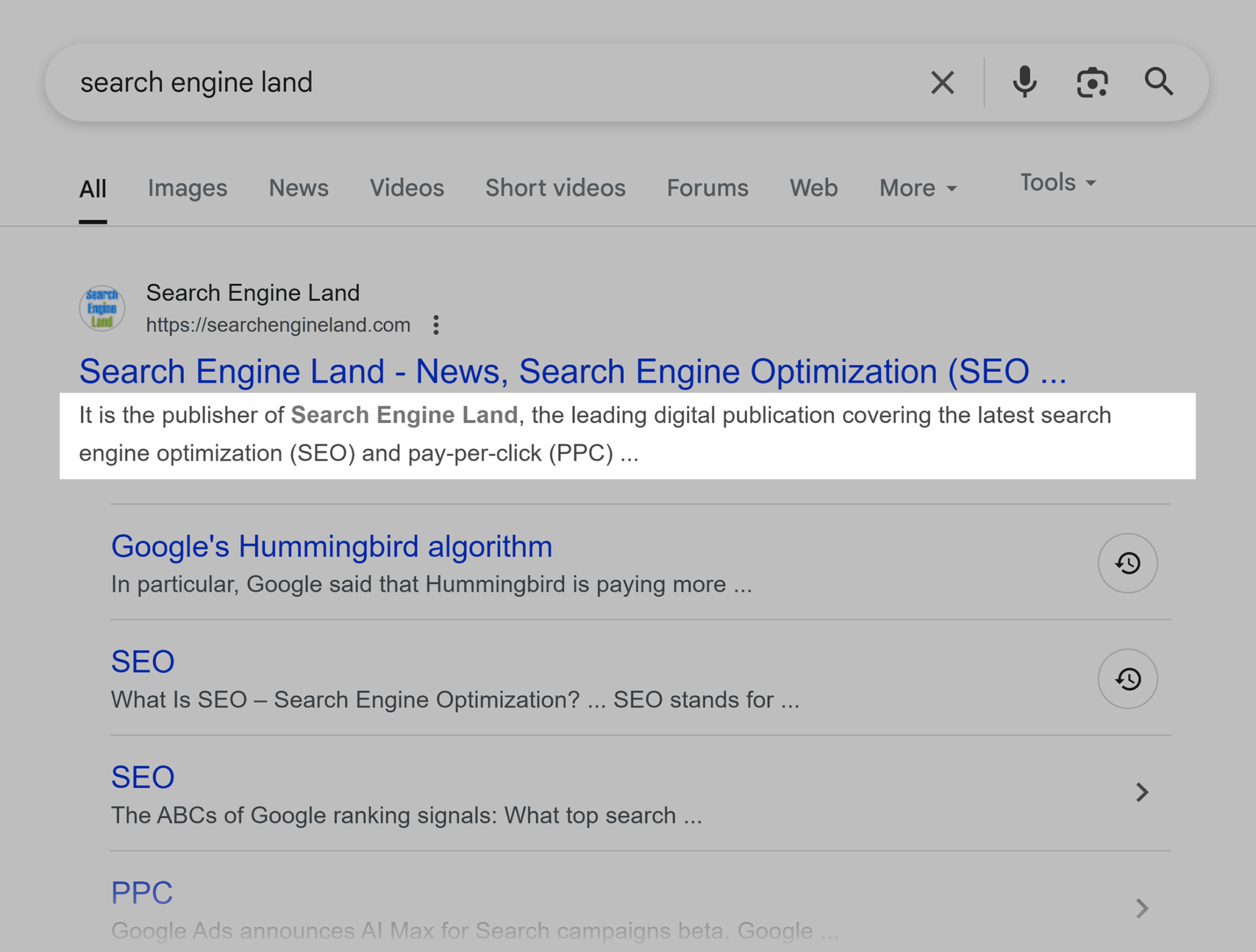
Although meta descriptions don’t directly impact your rankings, that doesn’t mean you shouldn’t care about writing a compelling, keyword-rich summary of your page. Google can still use meta descriptions to understand your content.
Note that Google often rewrites meta descriptions on its search results pages to match the searcher’s query as closely as possible by grabbing content from your page. So, don’t worry if what you see in search results isn’t exactly what you wrote.
According to Google Search Central,
“Snippets are automatically created from page content. Snippets are designed to emphasize and preview the page content that best relates to a user’s specific search. This means that Google Search might show different snippets for different searches.”
A few more things you should know about meta descriptions:
- Make sure to use your most important keywords (without keyword stuffing)
- Keep meta descriptions shorter than 160 characters
- Including a call to action can help improve your click-through rate
- Write them for people, not search engines
Headings (H1–H6)
Headings (H1–H6) are HTML tags within your page content that give it structure. They designate the importance of different keywords and content.

H1 is the main title on your page, while H2 to H6 represent decreasing levels of subheadings. Like an old-school outline.
Search engines use headings to understand your page’s structure and content hierarchy. Although they don’t influence SEO as much as they used to, they still help search engines understand the topics your content covers.
Users use headings to skim your article and determine which sections they want to read. That leads to a better user experience, which is great for SEO.
Here are a few tips for writing great headings:
- Keep them short and descriptive
- Use keywords throughout (but don’t keyword stuff)
- Create a thoughtful, easy-to-follow hierarchy
- Make sure they directly describe the content below
URL structure
URL structure is the way your site’s URLs are formatted and organized.
Clean and descriptive URLs are another important element of on-page SEO because they help both users and search engines understand what your page is about before they even visit it.
A well-structured URL should:
- Include your focus keyword
- Be short and descriptive
- Use hyphens to separate words
- Avoid unnecessary parameters, numbers, and dynamic strings
- Avoid stop words that search engines often ignore such as “and,” “the,” and “in”
For example, instead of: example.com/page.php?id=123&category=seo-tips
A better URL would be: example.com/seo-tips/on-page-optimization
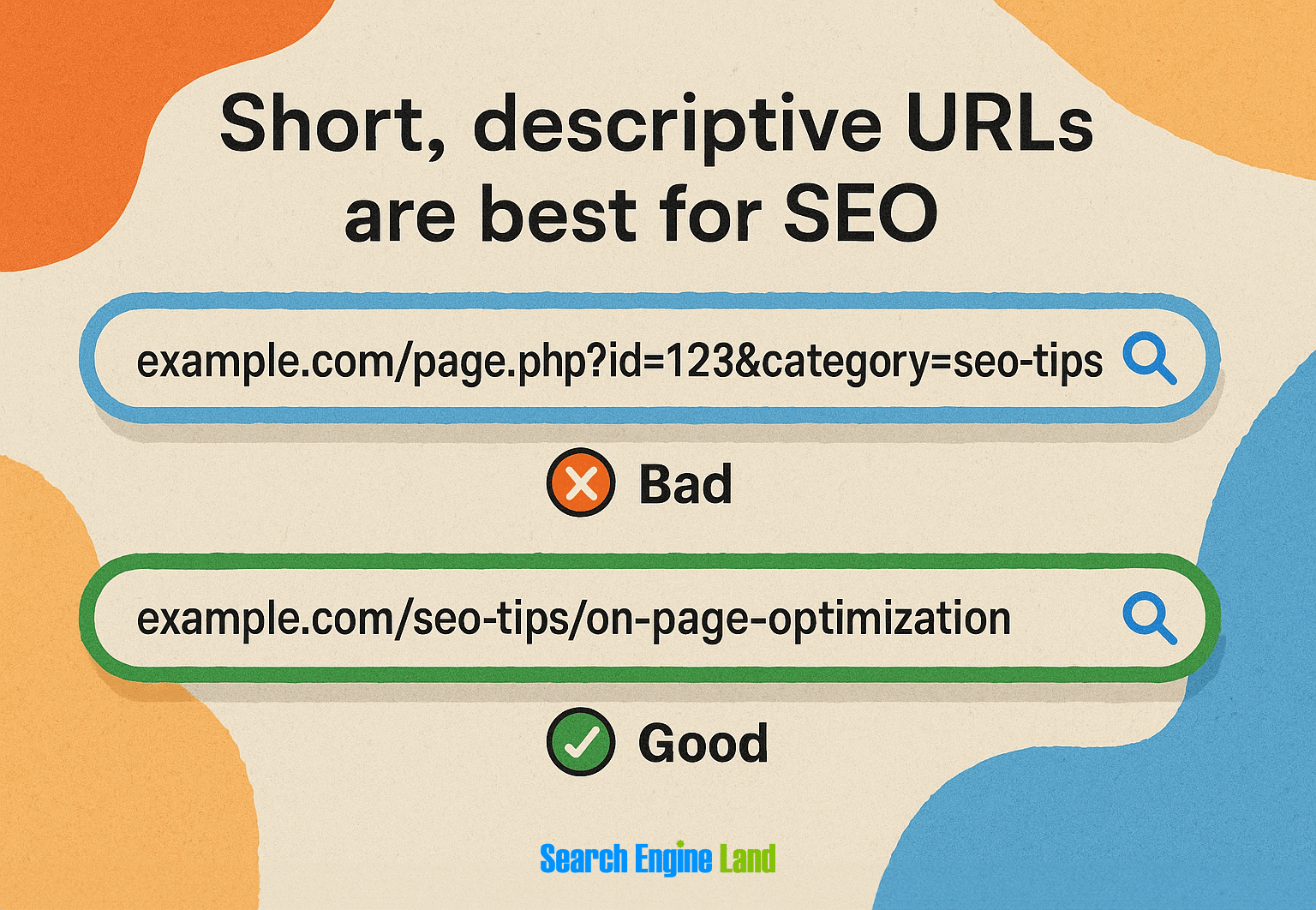
Remember that changing URLs on existing pages can lead to broken links and lost traffic, so avoid changing URLs after publishing. Always set up proper 301 redirects if you do need to change your URL structure.
Internal linking
Internal linking is the practice of linking one page of your website to another page on the same domain. It helps search engines crawl and index a site more effectively while also guiding your users to related content.
It can be incredibly beneficial for your SEO, so make sure to keep internal linking high up on your on-page SEO checklist.
Here are some of the top reasons why internal linking matters so much to your website’s SEO:
- Distributes link equity (ranking power and authority) throughout your site
- Helps search engines index and understand your content
- Improves user navigation and keeps people on your site longer (i.e., increases dwell time)
- Establishes information hierarchy and relationship between pages
Need help creating a seamless internal linking strategy?
Try building topic clusters.
A topic cluster involves creating a “pillar page” that broadly covers one main topic. Then, create multiple “cluster pages” that delve into specific aspects of that topic.
For example, your pillar page might be something like “The Ultimate Guide to Building Your Personal Brand on LinkedIn.”
“Cluster pages” you might create and link to from your pillar page could include “How to Decide What to Post on LinkedIn” and “Best Times to Post on LinkedIn.” You can also link cluster pages to each other and back to your pillar page.

Dig deeper: How to identify and create content pillars that boost brand awareness
Keep in mind that the anchor text (clickable, linked text) you use in your internal links matters, too. Use descriptive, keyword-rich anchor text that accurately describes the linked page, but vary the anchor text to avoid over-optimization.
Avoid generic phrases like “click here” and “read more,” and keep it relevant and natural.
Pro tip: Link to your most important pages more frequently, especially from your high-authority pages that already rank well in search engines. This helps indicate to Google which content you consider to be the most valuable on your site.
Keyword optimization
Knowing where, how, and how often to place keywords on your page is fundamental to on-page SEO.
You also have to be careful not to over-optimize (also known as keyword stuffing). Google may detect it and choose not to rank your page in search at all.
Place your primary keyword naturally in these key locations:
- Title tag (preferably near the beginning)
- H1 heading (usually the title of your page or article)
- First 100 words of your content
- At least one subheading (H2 or H3)
- Image alt text (when relevant)
- URL
- Meta description
Semantic relevance is key
Search engines understand semantic relationships between words.
In other words, they aren’t just pulling up results for the verbatim query the searcher typed in. Instead, search engines use related keywords and context to surface the most accurate and related results.
This means you should:
- Include related terms and synonyms that support your main topic
- Cover subtopics that users expect to see when searching for your main keyword
- Answer common questions related to your topic
- Use Latent Semantic Indexing (LSI) keywords that are closely related to your main keyword
For example:
If you’re writing about “how to create a content strategy,” semantically related terms might include “keyword research,” “target audience,” “search intent,” and “on-page SEO.”
Google’s “People Also Ask” boxes are excellent resources for finding these semantically related terms. When you search for “content strategy,” the questions that appear in these boxes represent precisely the related topics and questions users want answered, making them perfect additions to strengthen your content’s semantic relevance.
Content quality and relevance
Quality, relevant content is an absolute necessity. In fact, you may as well not even attempt an on-page SEO strategy without including it.
To create quality and relevant content, be super mindful of:
User intent
Before you create a piece of content, think about and research the user intent behind the focus keyword you’re going for.
Every search query has an underlying intent that’s either informational, navigational, commercial, or transactional. Run some investigative searches to see what type of content comes up.
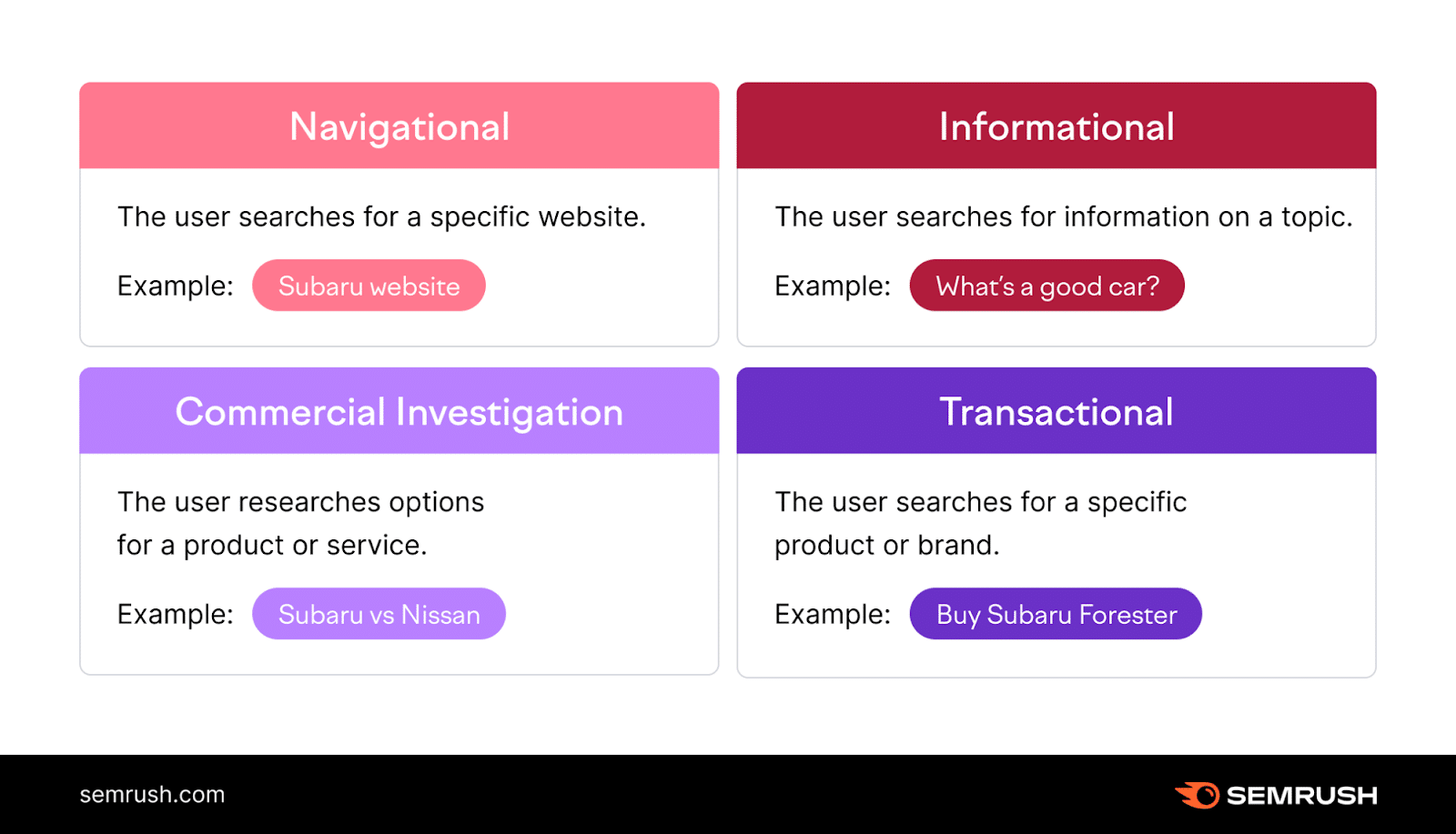
For example, let’s say you’re planning to write about how to create a content strategy. Are searchers typing in that topic looking for a walkthrough? Examples? Someone to consult with? A product to buy?
Think about everything that the user actually needs your content to cover. Include:
- Answers to related questions
- Actionable advice or clear next steps
- Expert insights or unique perspectives
- Supporting data
Formatting
Even the most valuable and well-written content won’t perform well if it’s difficult to read. Users want to skim your content to find their answers quickly. If they can’t, they might bounce to another site pretty quickly.
You can make sure you don’t have this problem by formatting your content well.
That means:
- Write in short paragraphs (2-3 sentences max)
- Use bullet points and numbered lists
- Strategically deploy bold and italics for emphasis
- Make sure there’s plenty of white space
- Use descriptive subheadings that break up long sections
- Add transition words that guide readers through your content
- Incorporate original visuals, media, and data to add context and uniqueness to your content
The best content provides value quickly and keeps users engaged. This increases dwell time, reduces bounce rate, and sends positive content quality signals to search engines.
Dive deeper: Mastering content quality: The ultimate guide
Image optimization
Image optimization is about making your images work for you, not against you.
When used correctly, well-optimized images help make your website more accessible. They also improve your overall user experience by making your site more unique and engaging.
Here’s how to optimize images according to on-page SEO best practices:
- Use descriptive, keyword-rich file names
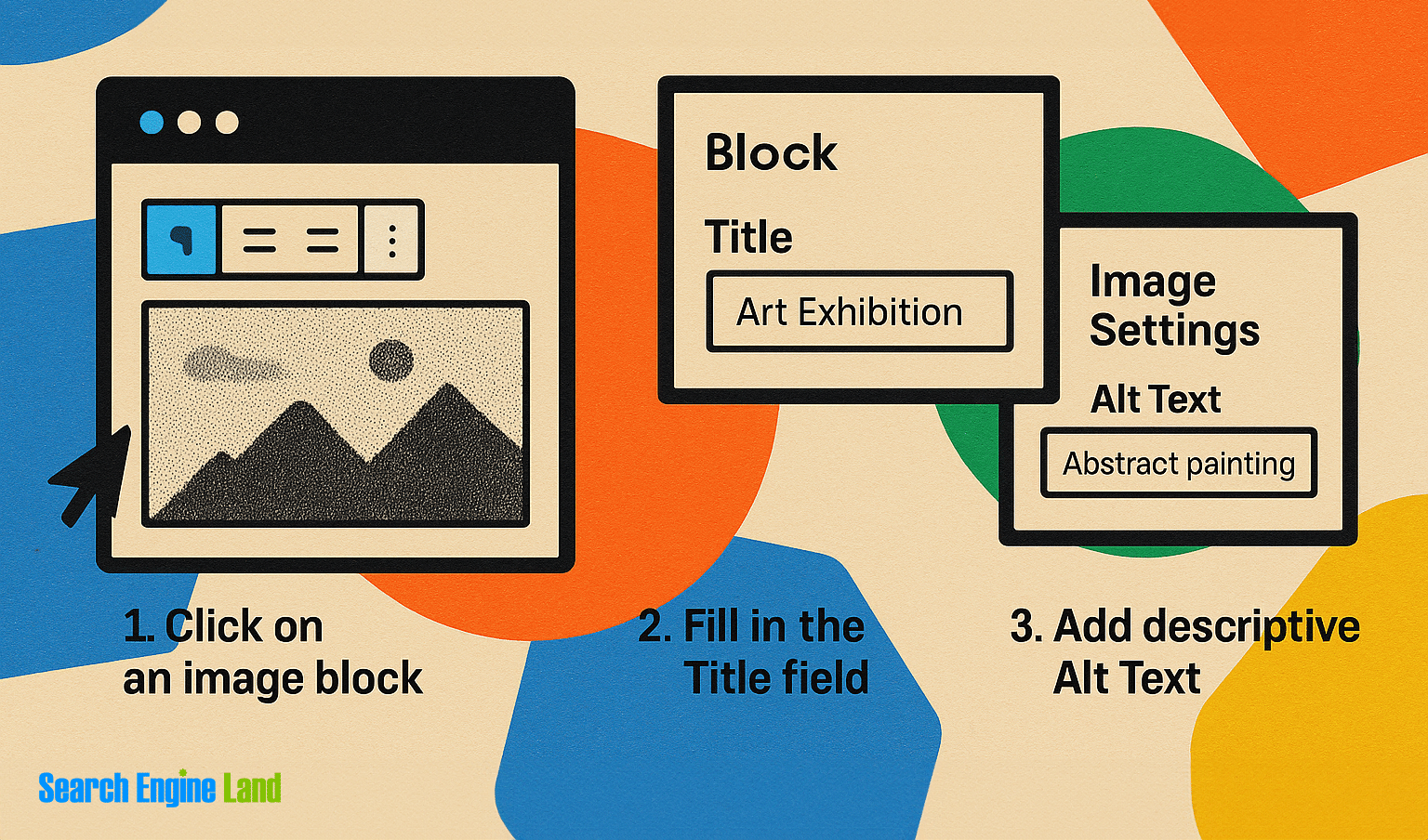
- Add alt text (aka alt tags) that accurately describes the image and includes relevant keywords when appropriate
- Keep alt text concise but descriptive (aim for under 125 characters)
- Make sure alt text provides context for visually impaired users and others using screen readers
- Compress images to reduce file size without sacrificing quality
- Use web-friendly file formats like WebP, JPEG, or PNG (WebP is preferred for best compression-quality ratio, JPEGs for photographs, and PNGs for images requiring transparency)
- Consider implementing lazy loading for images below the fold
Mobile-friendliness and page experience
While actually part of technical SEO, mobile-friendliness and page experience are so closely tied to on-page factors that they deserve to be mentioned here as the last item on our on-page SEO checklist.
Google wants to send its users to websites that work well and fast. To help website owners with that, it created Core Web Vitals.
Core Web Vitals

Core Web Vitals are a set of specific site speed factors that Google considers important for user experience:
- Largest Contentful Paint (LCP): Measures loading performance. Aim for LCP to occur within 2.5 seconds of page load.
- Interaction to Next Paint (INP): Measures interactivity. Pages should have an INP of less than 200 milliseconds.
- Cumulative Layout Shift (CLS): Measures visual stability. Pages should maintain a CLS of less than 0.1.
These metrics, combined with mobile-friendliness, safe browsing, HTTPS, and intrusive interstitial guidelines make up Google’s page experience signals.
While these factors might seem more technical, they directly impact how users experience your on-page content.
Here’s how:
- Fast-loading pages keep users engaged with your content
- Stable layouts prevent frustration and accidental clicks
- Mobile-friendly designs ensure your content is accessible across devices
- Secure connections build trust with both users and search engines
Google has made it clear that page experience signals are ranking factors, so they should definitely be included in your on-page SEO strategy.
Common on-page SEO mistakes (and how to fix them)
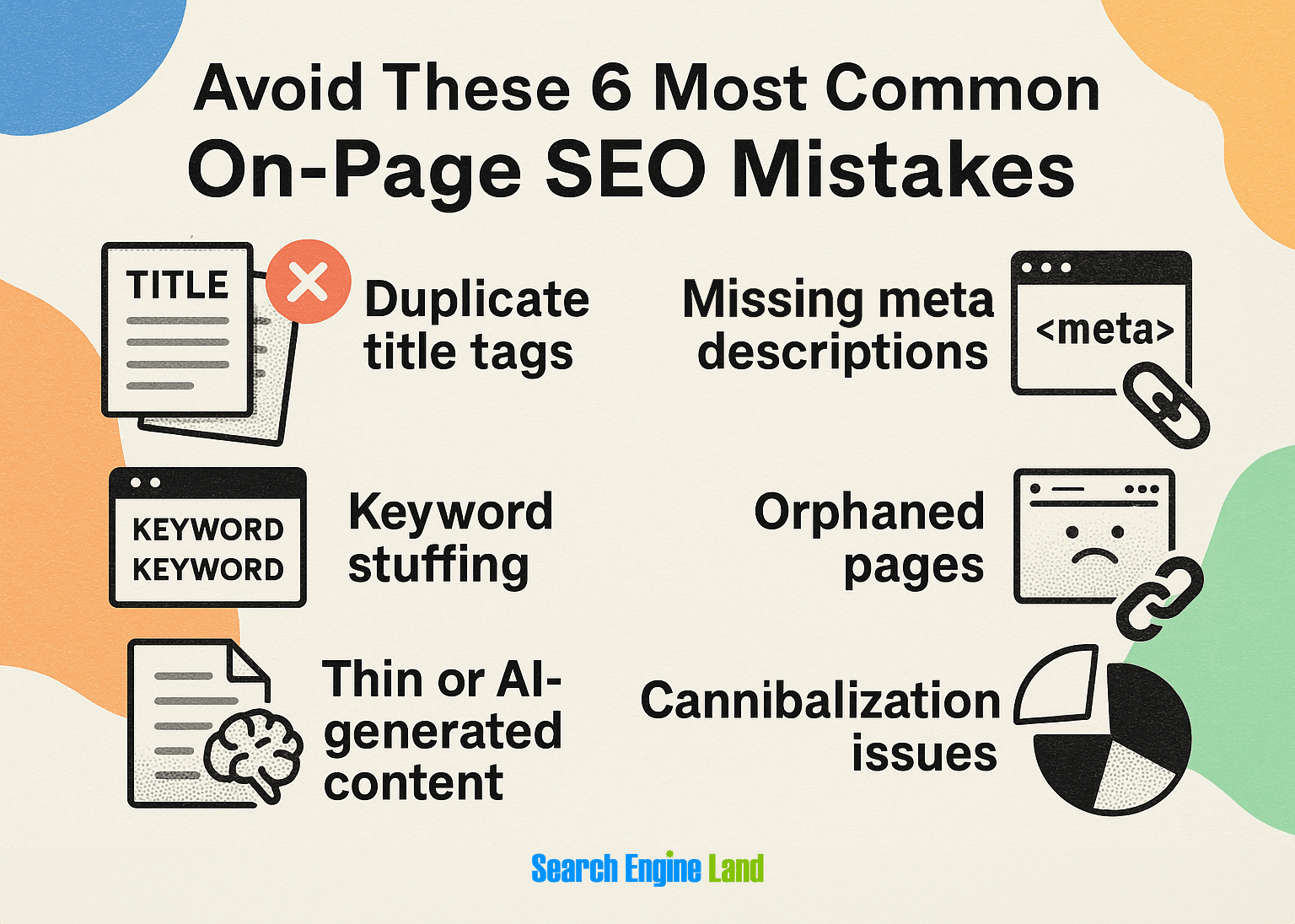
Even experienced SEO professionals can make mistakes with on-page optimization. Here are some common snags to avoid:
Duplicate title tags
Having multiple pages with identical title tags confuses search engines.
Make sure to write unique, descriptive title tags for each page that accurately reflect the content.
Missing meta descriptions
Without meta descriptions, search engines will pull random text from your page to display in search results every time the page is shown. Plus, social media sites will have a blank space where a page description would otherwise be when your page is shared.
Make sure to write optimized meta descriptions for all important pages, focusing on value propositions and including a call to action.
Keyword stuffing
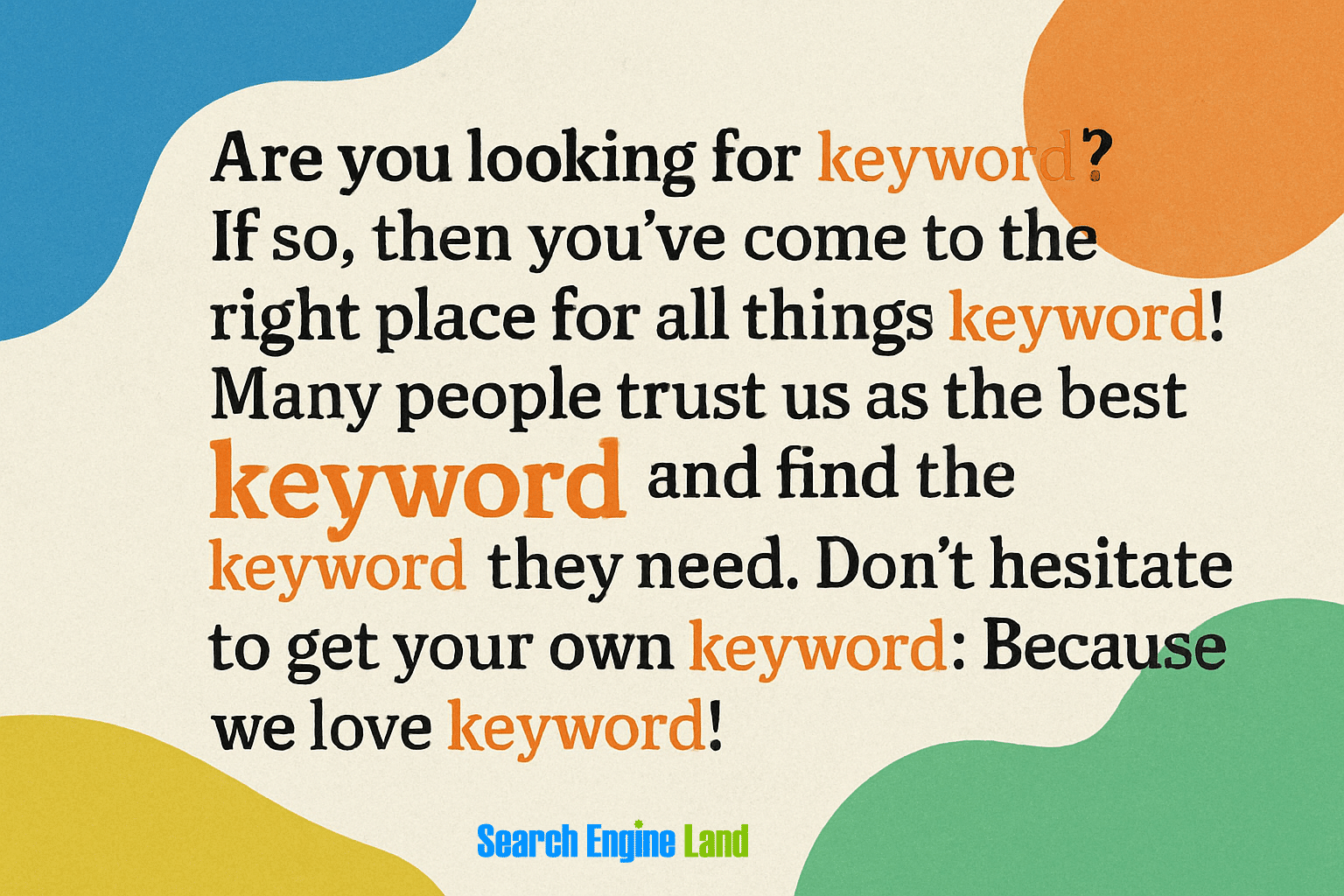
Unnaturally forcing keywords into your content doesn’t fool search engines like it used to and creates a poor user experience.
Instead, focus on creating valuable, well-written content that naturally incorporates relevant keywords and related terms.
Orphaned pages
Pages without internal links pointing to them are called “orphaned pages.” They’re difficult for both users and search engines to discover and index.
To avoid orphaned pages, add internal links to your new page or post right after you publish it.
Thin or AI-generated content
Pages with minimal content or generic AI-generated text that doesn’t provide unique value will struggle to gain visibility in search engines.
That means no organic traffic.
Create substantial, original content that addresses user intent and provides value.
Cannibalization issues
Creating multiple pages that target the same keywords may force your own content to compete against itself in search results.
To avoid cannibalization issues, edit your content for overlapping focus keywords and either merge similar content, use canonical tags, or reoptimize content for different keywords.
On-page SEO vs off-page and technical SEO
There are three main types of SEO: on-page, off-page, and technical. Understanding how these different types of SEO work together will help you optimize your site like an expert.
Here’s how they compare:
| Factor | On-page SEO | Off-page SEO | Technical SEO |
| Focus | Content quality, keyword optimization, user experience | External signals of authority and relevance | Site infrastructure and crawlability |
| Key elements | Title tags, meta descriptions, content, internal links, images | Backlinks, brand mentions, social signals | Site speed, indexability, mobile-friendliness, schema markup |
| Control level | High (you directly control) | Low-medium (you influence rather than control) | High (with technical expertise) |
| Who handles it | Content creators, marketers | PR, outreach specialists | Developers, technical SEO specialists |
| Results timeframe | Shorter-term | Longer-term | Medium-term |
The three types of SEO all work together to give your website the best possible chance of ranking and bringing in valuable search traffic.
- On-page SEO works to make your content and entire website super relevant and valuable for both users and search engines
- Off-page SEO builds your site’s authority and reputation across the web
- Technical SEO makes sure search engines can access, crawl, and understand your content
For the best results, your SEO strategy should include all three SEO types.
For example, great on-page content won’t rank well if your site has serious technical issues preventing proper indexing, and even perfectly optimized pages struggle without quality backlinks from relevant sites.
How to measure on-page SEO success
Figuring out whether your on-page SEO strategy is working or not requires tracking the right metrics and using accurate measurement tools.
Key on-page SEO metrics to track

- Organic traffic: The number of visitors clicking to your site from unpaid results in search engines
- Keyword rankings: Your website’s position in search results for target keywords
- Click-through rate (CTR): The percentage of people who click on your result after seeing it in search results
- Engagement rate: The percentage of visitors who spend 10 or more seconds reading with your content, visit a second page, and/or trigger an event (such as clicking a button or submitting a form)
- Bounce rate: The percentage of visitors who left your website quickly, without completing an event
- Average engagement time: How long visitors typically spend on your website in a session
- Conversion rate: The percentage of visitors who complete desired actions like submitting a form or making a purchase
- Page speed metrics: Core Web Vitals
Essential tools to measure SEO strategy
Now that you know which metrics to track, here are a few helpful tools you can use to track them (and a lot more):
Google Search Console
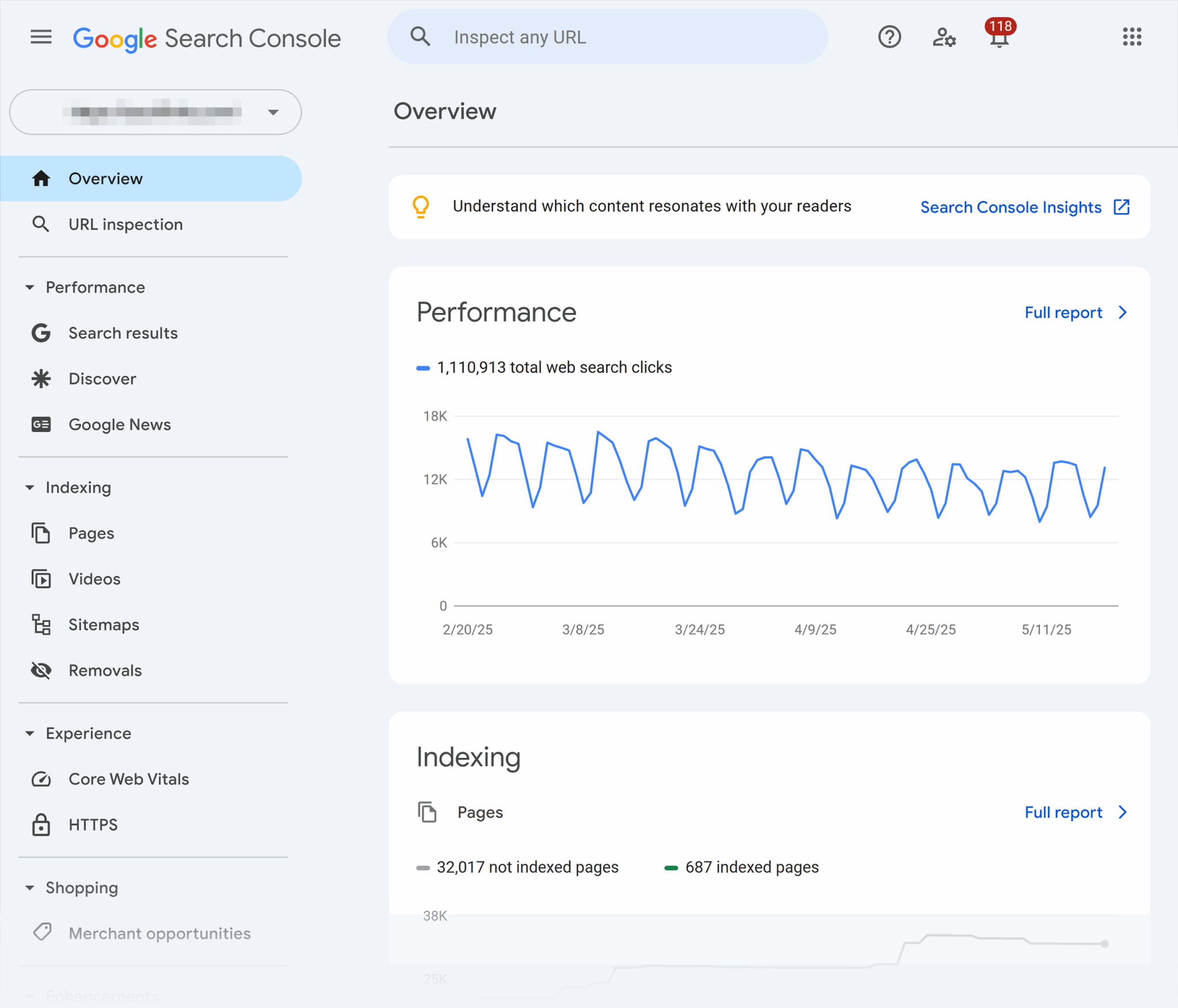
Google Search Console is a free tool that you can use to track how your website is performing in search results. It was created by Google to help website owners keep track of different website metrics and troubleshoot any website ranking issues.
It also includes a Core Web Vitals report, a tool to submit your sitemap to Google, links reports, and more.
Search Console is a fantastic tool to use to monitor your on-page SEO wins and challenges.
Metrics you can track in Search Console include:
- Impressions
- Clicks
- Click-through rate (CTR)
- Average keyword ranking positions
- Core Web Vitals
Google Analytics

Google Analytics is a very popular, free website analytics tool. Once you install the Google Analytics code on your website, you can monitor all different sorts of traffic, user behavior, and conversion metrics.
A few important on-page SEO metrics you can keep an eye on with Google Analytics are:
- Organic traffic
- Engagement rate
- Bounce rate
- Average engagement time
- Conversion rate
Semrush

Semrush is a full-featured SEO tool that can help you find new keywords and topics in your niche, identify and research your top competitors, track keyword rankings, analyze your backlinks, and more.
A powerful SEO tool like Semrush is an asset for tracking the impact of your on-page SEO strategy.
Set benchmarks and keep improving
If you want to see continuous improvement, it’s important to set some benchmarks and keep measuring.
Keep these best practices in mind as your on-page SEO evolves and improves:
- Establish baseline metrics before making changes
- Set realistic goals based on your industry and competition
- Create a regular schedule for auditing and updating content
- Test one major change at a time to accurately measure the impact
- Document successful tactics to replicate across your site
Remember that SEO is an ongoing process, not a one-time fix. The most successful website owners continuously refine their on-page optimization based on performance data and best practices.
FAQs about on-page SEO
Do you need to optimize every page on your website?
Not necessarily. Each page should have a unique title and meta description, but beyond that, focus your efforts on your most high-value pages, content that targets your most important keywords, and content that’s attracting links and shares.
Some utility pages like privacy policies and terms of service don’t need much optimization.
Track, optimize, and win in Google and AI search from one platform.
How often should I update my on-page SEO?
Regular reviews of your on-page SEO strategy and performance are important. Aim to review your performance metrics monthly, update important articles quarterly, and do more thorough audits every 12 months or so.
Does Google read alt text?
Yes, Google does read and use alt text to understand image content. Alt text helps search engines determine image relevance and can help your images appear in Google Image Search. It’s also essential for accessibility.
Can you over-optimize a page?
You can absolutely over-optimize a page. Over-optimization typically involves:
- Keyword stuffing
- Unnatural anchor text
- Excessive internal linking
- Manipulative tactics that prioritize search engines over users
Focus on creating genuinely helpful content that naturally incorporates relevant keywords rather than trying to game the system.
Is word count a ranking factor?
Word count is not a direct ranking factor in Google’s algorithm, but longer content often performs better because it provides more comprehensive information, improving relevance and user satisfaction. Pages that fully answer search intent tend to rank higher, regardless of exact word count.
Focus on completeness rather than hitting a specific word count target.
On-page SEO is foundational, not optional
On-page SEO might seem like a lot of work (and it is!), but it’s absolutely foundational to your search engine success. Without proper on-page optimization, even the best off-page strategies and technical implementations won’t work as well as they could.
The good news is that unlike many off-page factors, on-page SEO elements are (usually) entirely within your control. You can make small improvements today that start positively impacting your search visibility tomorrow.
For the best results:
- Start with a comprehensive on-page SEO audit
- Prioritize fixes and updates based on potential impact and effort required
- Create a content improvement schedule for older pages
- Develop on-page optimization guidelines for all new content
- Regularly test and refine your approach based on performance stats
Want to dive further into creating a pro-level content strategy? Check out why content strategy matters most.
Explore more on
Editorial disclosure
Search Engine Land is owned by Semrush. We remain committed to providing high-quality coverage of marketing topics. Unless otherwise noted, this page’s content was written by either an employee or a paid contractor of Semrush Inc.
About the author