How To Convert Website Visitors To Tweeters
The official tweet button from Twitter is easy to implement, aggregates direct tweets and retweets in its counter, and includes a mechanism to encourage following (discussed below). These features almost certainly outweigh the slender benefits of employing third-party tweeting tools (the main benefit being more flexibility in styling the tweet button’s appearance). There are a […]
The official tweet button from Twitter is easy to implement, aggregates direct tweets and retweets in its counter, and includes a mechanism to encourage following (discussed below). These features almost certainly outweigh the slender benefits of employing third-party tweeting tools (the main benefit being more flexibility in styling the tweet button’s appearance).
There are a number of things that can be tested in order to improve the number of Tweets a page receives.
Display Type
The Tweet button is available in three versions, all versions sharing the same color, size and label (“Tweet”). You can choose a button that does not display tweet counts, one that displays the tweet count next to the button horizontally, and one that displays the tweet count above the tweet button.
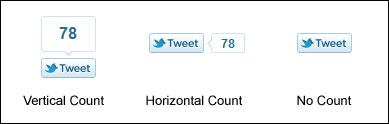
Tweet Button Styles
For sites where pages receive a lot of Tweets, the vertical option puts the highest emphasis on the Tweet count and is probably your best bet (because of the “bandwagon effect,” whereby something demonstrated to be desirable is more likely to be perceived as desirable).
For sites with little traffic, or things like product detail pages where a low Tweet count might potentially discourage tweeting (or give a product or resource the appearance of being “unpopular”) a button without a count might be the way to go.
Positioning
What works best: a Tweet button at the top of the page? The bottom of a page? Multiple locations?
Obviously, for very long pages like in-depth articles, a bottom placement (or top-and-bottom placement) seems logical, as visitor may not return to the top of the page to click on a tweet button that they’ve long ago scrolled past.
For a page where all or most of the content is above the fold, such as a video or product page, multiple buttons may clutter up the page and dissuade the visitor from taking other actions. Another possibility for the technically-proficient is a fixed twitter button or share block, that stays in the same position on the page as a user scrolls.
Twitter Reactions
A stream of tweets being made about a page, or even tweets topically related to the page, may encourage visitors to click on the tweet button themselves in order to join in on the conversation (although for content-based sites the most obvious real estate to house Twitter reactions is usually taken up by comments).
Unlike the relative simplicity of adding a tweet button, a certain amount of heavy lifting is involved to include Twitter reactions: manual scripting, a custom script or a third-party tool is required.
Read on for other tips in this series:
Contributing authors are invited to create content for Search Engine Land and are chosen for their expertise and contribution to the search community. Our contributors work under the oversight of the editorial staff and contributions are checked for quality and relevance to our readers. The opinions they express are their own.

Related stories
New on Search Engine Land
About the author