Easier Access To Negatives And Search Terms Now In AdWords

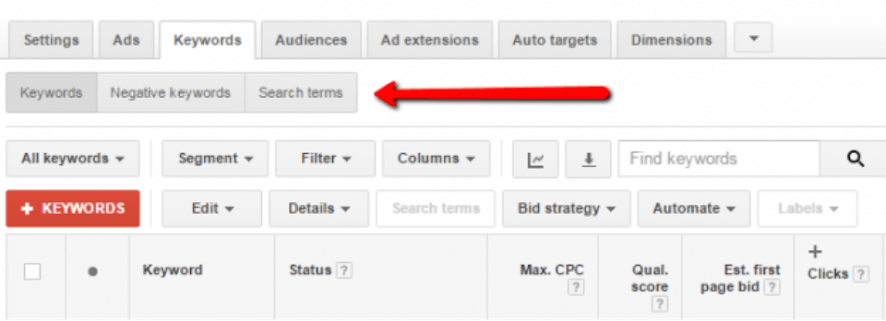
It’s the little things that count sometimes. Google has added easy access to negative keywords and search terms reports in the AdWords UI.
Remember when you had to dig into Details to find Search Terms data? And negative keywords? They were oddly buried in a link at the bottom of the keywords page. Blech, so last week. Now both are at-the-ready with new buttons at the top of the keywords tab.
Just click on the buttons to load the respective reports. (There still is no option to show Google Analytics performance data in the Search terms report, but that’s a topic for another day.) To get back to the main keywords report, just click the Keywords button. It’s that simple.
Auction insights and Keyword diagnosis are still located under the Details drop-down on the Keywords report.
The update went live late last week, so you should be seeing it in your accounts now.
Explore more on
Add Search Engine Land as a preferred source on GoogleEditorial disclosure
Contributing authors are chosen for their expertise and work under the oversight of the editorial staff. Search Engine Land is owned by Semrush. The contributor was not asked to mention Semrush; the opinions expressed are their own.
About the author