How much of your Google Ads conversions come from AI Max?


AI Max adoption is growing, and Google is pushing advertisers to use it across Search campaigns.
A simple way to think about AI Max is that it gives Google more freedom to go beyond the advertiser’s existing keyword structure and find additional search queries. In some ways, it feels like a more aggressive version of broad match, but it also goes beyond keywords by using landing pages and other campaign signals.
That makes it important to understand how much of your campaign performance is being driven by AI Max. The challenge is that Google’s reporting doesn’t make that number easy to see.
How AI Max expands beyond your keywords
Google separates AI Max matching into two main categories.
- AI Max expanded matches are additional searches Google finds by expanding beyond your existing keywords.
- AI Max landing page matches are searches Google finds based on your landing pages and assets, even when those searches are outside your normal keyword targeting.
Together, these two categories show how much traffic AI Max is generating outside of your standard keyword matches.
This combined contribution is the number I care about most because it shows how much of the campaign is being driven by Google’s AI Max expansion rather than the keyword structure I originally built.
Dig deeper: Google says AI Max unlocks billions of new monetizable searches
The Search Terms report doesn’t show the full picture
The obvious place to start is the Search Terms report.
Google now gives us better visibility into AI Max search queries, and this report is useful when we want to understand what types of searches AI Max is finding.
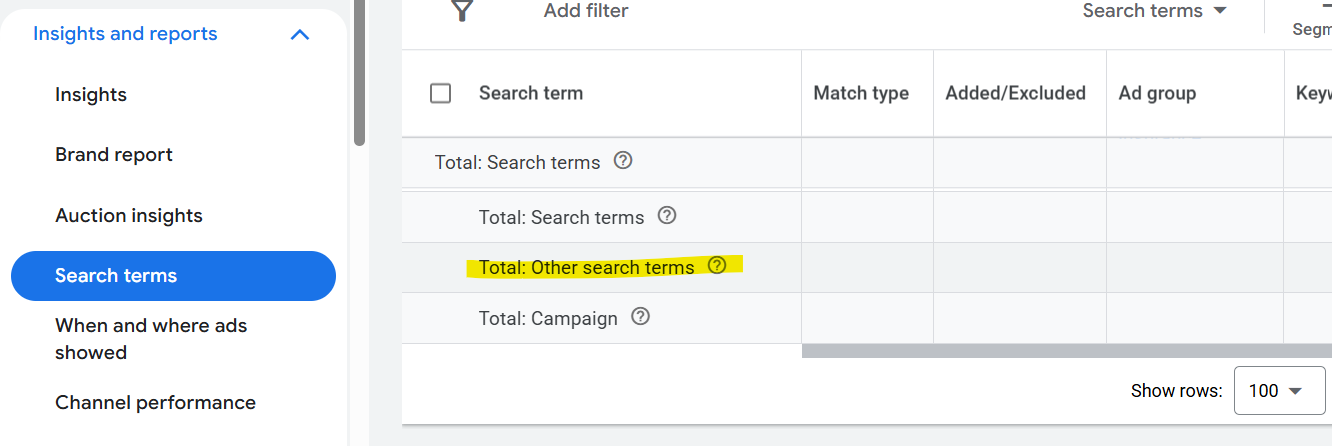
The issue is that Search Terms still doesn’t show the complete picture. A portion of search activity is grouped under Other search terms, and I’ve seen it represent 40% or even 50% of total search activity in some accounts. That makes it difficult to calculate AI Max’s total contribution using only visible search queries.
The Search Terms report can’t tell you exactly what percentage of total conversions came from AI Max. It’s still the right report for query analysis. It’s just not the right report for calculating AI Max % of total.
Dig deeper: Is your account ready for Google AI Max? A pre-test checklist
The Keywords report has the data you need
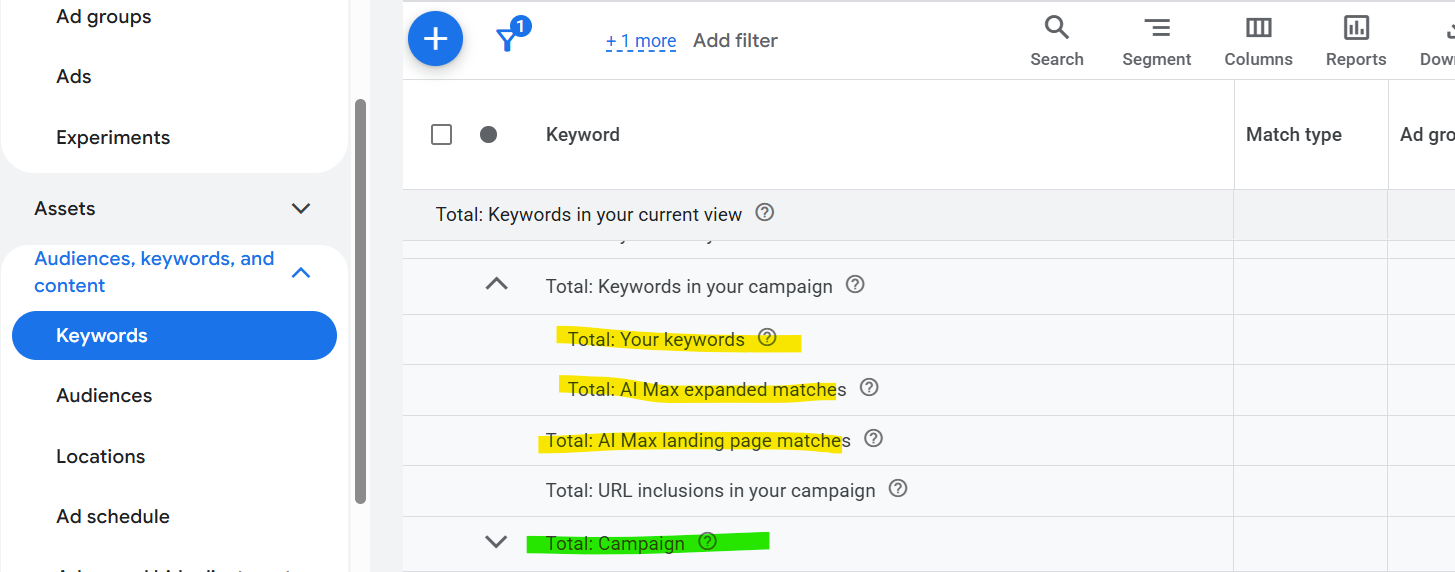
There’s another place in Google Ads that gives you a much better picture. If you select a campaign, go to the Keywords tab, and scroll to the bottom of the table, Google shows several summary rows.
The important ones are:
- Total: Your keywords.
- Total: AI Max expanded matches.
- Total: AI Max landing page matches.
These rows roll up into Total: Campaign.
This gives you exactly what you need. You can take AI Max expanded matches and AI Max landing page matches, combine them, and compare that number with total campaign conversions.
The formula is:
- Total AI Max conversions = AI Max expanded matches + AI Max landing page matches
Then:
- AI Max % of total = Total AI Max conversions / Total campaign conversions
For example, if a campaign generated 100 conversions and 24 of them came from AI Max expanded matches and AI Max landing page matches combined, then AI Max represents 24% of total conversions.
The industry’s trusted source for essential news and analysis.
Sign up for our newsletter to receive exclusive insights and updates directly to your inbox.
- Daily breaking news
- Expert analysis from industry veterans
- Join over 200k subscribers
- Covering SEO, PPC and AIO
The campaign-level reporting problem
The data is already there. The problem is that Google doesn’t make it easy to pull this information from all campaigns into a single useful report.
You can open a campaign, go to the Keywords tab, scroll to the bottom, and see the AI Max totals. But if you manage 20, 50, or 100 campaigns, you’re not going to do that one by one and manually copy the numbers into a spreadsheet.
What we really need is a simple campaign-level report that shows:
- Campaign name.
- Total conversions.
- AI Max expanded matches.
- AI Max landing page matches.
- Total AI Max conversions.
- AI Max % of total.
It sounds basic, but Google Ads doesn’t make it easy to build this report.
Creating a campaign-level AI Max report
To solve this for our own campaigns, we created a Google Ads script that automatically builds the report at the campaign level.
function main() {

  const SPREADSHEET_URL = ''; // Paste Sheet URL, or leave blank
  const SHEET_NAME = 'AI Max Campaign Report';

  const START_DATE = '2026-07-19';
  const END_DATE   = '2026-08-23';

  const API_VERSION = 'v25';


  // ============================================================
  // OPEN / CREATE SHEET
  // ============================================================

  let spreadsheet;

  if (SPREADSHEET_URL && SPREADSHEET_URL.trim() !== '') {
    spreadsheet = SpreadsheetApp.openByUrl(SPREADSHEET_URL);
  } else {
    spreadsheet = SpreadsheetApp.create('AI Max Campaign Report');
    Logger.log('Created spreadsheet: ' + spreadsheet.getUrl());
  }

  let sheet = spreadsheet.getSheetByName(SHEET_NAME);

  if (!sheet) {
    sheet = spreadsheet.insertSheet(SHEET_NAME);
  }

  sheet.clear();


  // ============================================================
  // STORAGE
  // ============================================================

  const campaigns = {};


  // ============================================================
  // QUERY 1
  // TRUE CAMPAIGN TOTAL CONVERSIONS
  //
  // This should match:
  // "Total: Campaign" in Google Ads
  // ============================================================

  const campaignQuery = `
    SELECT
      campaign.id,
      campaign.name,
      metrics.conversions
    FROM campaign
    WHERE
      campaign.advertising_channel_type = 'SEARCH'
      AND campaign.status != 'REMOVED'
      AND segments.date BETWEEN '${START_DATE}' AND '${END_DATE}'
  `;


  const campaignRows = AdsApp.search(
    campaignQuery,
    { apiVersion: API_VERSION }
  );


  while (campaignRows.hasNext()) {

    const row = campaignRows.next();

    const campaignId = String(row.campaign.id);
    const conversions = Number(row.metrics.conversions || 0);

    campaigns[campaignId] = {
      name: row.campaign.name,

      // IMPORTANT:
      // This comes directly from campaign metrics.
      totalConversions: conversions,

      expandedMatches: 0,
      landingPageMatches: 0
    };


    Logger.log(
      'CAMPAIGN TOTAL | ' +
      row.campaign.name +
      ' | ' +
      conversions
    );
  }


  // ============================================================
  // QUERY 2
  // AI MAX CONVERSIONS
  // ============================================================

  const aiMaxQuery = `
    SELECT
      campaign.id,
      campaign.name,
      segments.search_term_match_source,
      metrics.conversions
    FROM search_term_view
    WHERE
      campaign.advertising_channel_type = 'SEARCH'
      AND segments.date BETWEEN '${START_DATE}' AND '${END_DATE}'
      AND segments.search_term_match_source IN (
        'AI_MAX_BROAD_MATCH',
        'AI_MAX_KEYWORDLESS'
      )
  `;


  const aiRows = AdsApp.search(
    aiMaxQuery,
    { apiVersion: API_VERSION }
  );


  while (aiRows.hasNext()) {

    const row = aiRows.next();

    const campaignId = String(row.campaign.id);
    const conversions = Number(row.metrics.conversions || 0);
    const source = row.segments.searchTermMatchSource;


    if (!campaigns[campaignId]) {

      campaigns[campaignId] = {
        name: row.campaign.name,
        totalConversions: 0,
        expandedMatches: 0,
        landingPageMatches: 0
      };
    }


    if (source === 'AI_MAX_BROAD_MATCH') {

      campaigns[campaignId].expandedMatches += conversions;

    } else if (source === 'AI_MAX_KEYWORDLESS') {

      campaigns[campaignId].landingPageMatches += conversions;
    }
  }


  // ============================================================
  // BUILD REPORT
  // ============================================================

  const report = [];

  report.push([
    'Campaign',
    'Total Campaign Conversions',
    'AI Max Expanded Matches',
    'AI Max Landing Page Matches',
    'Total AI Max',
    'AI Max % of Total'
  ]);


  let totalConversions = 0;
  let totalExpanded = 0;
  let totalLanding = 0;


  Object.keys(campaigns).forEach(function(id) {

    const c = campaigns[id];

    const totalAiMax =
      c.expandedMatches +
      c.landingPageMatches;


    // Only show campaigns with AI Max conversions
    if (totalAiMax <= 0) {
      return;
    }


    const aiMaxPercent =
      c.totalConversions > 0
        ? totalAiMax / c.totalConversions
        : 0;


    report.push([
      c.name,
      c.totalConversions,
      c.expandedMatches,
      c.landingPageMatches,
      totalAiMax,
      aiMaxPercent
    ]);


    totalConversions += c.totalConversions;
    totalExpanded += c.expandedMatches;
    totalLanding += c.landingPageMatches;
  });


  // ============================================================
  // SORT BY AI MAX %
  // ============================================================

  const header = report.shift();

  report.sort(function(a, b) {
    return b[5] - a[5];
  });

  report.unshift(header);


  // ============================================================
  // TOTAL ROW
  // ============================================================

  const totalAiMax =
    totalExpanded +
    totalLanding;


  const totalAiMaxPercent =
    totalConversions > 0
      ? totalAiMax / totalConversions
      : 0;


  report.push([
    'TOTAL',
    totalConversions,
    totalExpanded,
    totalLanding,
    totalAiMax,
    totalAiMaxPercent
  ]);


  // ============================================================
  // WRITE REPORT
  // ============================================================

  sheet.getRange(
    1,
    1,
    report.length,
    report[0].length
  ).setValues(report);


  // ============================================================
  // FORMATTING
  // ============================================================

  sheet.getRange(1, 1, 1, 6)
    .setFontWeight('bold');


  if (report.length > 1) {

    sheet.getRange(
      2,
      2,
      report.length - 1,
      4
    ).setNumberFormat('0.00');


    sheet.getRange(
      2,
      6,
      report.length - 1,
      1
    ).setNumberFormat('0.00%');
  }


  sheet.getRange(
    report.length,
    1,
    1,
    6
  ).setFontWeight('bold');


  sheet.setFrozenRows(1);
  sheet.autoResizeColumns(1, 6);


  // ============================================================
  // CREATED BY
  // ============================================================

  sheet.getRange(report.length + 2, 1)
    .setValue('Script created by [email protected]')
    .setFontStyle('italic');


  Logger.log('Report complete: ' + spreadsheet.getUrl());
}
The script creates a spreadsheet in Google Drive and populates it with the AI Max campaign-level report. Here’s what the output looks like:
| Campaign | Total campaign conversions | AI Max expanded matches | AI Max landing page matches | Total AI Max conversions | AI Max % of total |
| Campaign 1 | 17 | 0 | 4 | 4 | 23.53% |
| Campaign 2 | 24 | 3 | 4 | 7 | 29.17% |
| Campaign 3 | 84 | 5 | 2 | 7 | 8.33% |
| Campaign 4 | 54 | 6 | 1 | 7 | 12.96% |
| Campaign 5 | 42 | 7 | 4 | 11 | 26.19% |
| Total | 221 | 21 | 15 | 36 | 16.29% |
Now we have one report showing where AI Max is contributing across the account.
The value isn’t simply knowing how many conversions AI Max generated. It’s understanding how much of each campaign it’s driving and how that contribution changes over time.
How to use AI Max % of total
I would monitor AI Max % of total weekly and compare it at the campaign level. The goal isn’t to review every AI Max query in every campaign every week. That quickly becomes a lot of noise.
A better approach is to use the metric to identify where AI Max is materially changing the makeup of a campaign. If one campaign shows a meaningful increase in AI Max contribution, that’s where I’d investigate first.
I’d then go into the AI Max Search Terms report and look at what type of incremental traffic Google is finding.
- Is it relevant?
- Is it converting at an acceptable CPA?
- Is Google finding useful query themes that we weren’t targeting before?
- Or is the expansion getting too aggressive?
That gives us a much more focused optimization process. Instead of reviewing thousands of search queries, the AI Max % metric tells us where to look.
It can also help explain campaign changes. If performance changes significantly and AI Max contribution has also increased, that gives us another angle to investigate.
Maybe AI Max is finding valuable incremental volume. Maybe it’s entering broader auctions and creating less efficient traffic. Maybe nothing is wrong at all, but at least now we know where the change is coming from.
Dig deeper: What 23 tests reveal about Google AI Max performance
A clearer way to measure AI Max expansion
The Search Terms report helps you understand the queries AI Max is finding, but it doesn’t show the complete picture. The campaign-level Keywords report gives you the AI Max expanded matches and AI Max landing page matches totals needed to calculate AI Max % of total conversions.
Monitor that metric weekly, compare it by campaign, and use meaningful changes to decide where deeper query analysis is needed. It gives you a focused way to understand where AI Max is expanding and whether that expansion is helping the account.
Explore more on
Editorial disclosure
Contributing authors are chosen for their expertise and work under the oversight of the editorial staff. Search Engine Land is owned by Semrush. The contributor was not asked to mention Semrush; the opinions expressed are their own.
About the author