Google Search Console now lets you unsubscribe from some email notifications
Finally, webmasters can now unsubscribe and mute email notifications from the Google search console.
Barry Schwartz on April 26, 2016 at 3:13 pm | Reading time: 1 minute

Google has added a new feature to allow webmasters to unsubscribe from certain email notifications they get from the Google Search Console.
Google announced the new feature on Google+, saying, “We’ve added a new feature to help you tailor the type of messages you receive.”
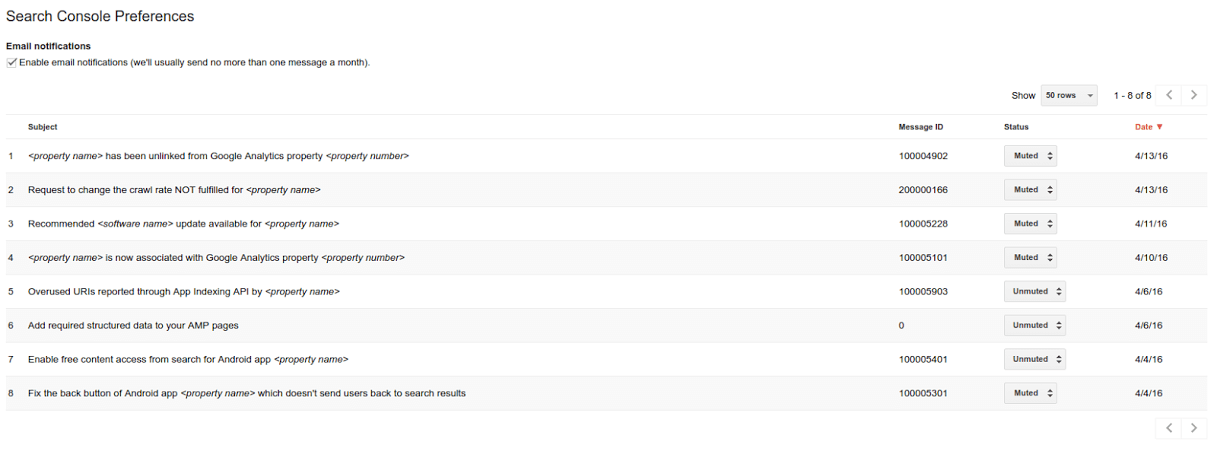
Here is a screen shot of the check box for “enable email notifications,” and then the option to “mute” or “unmute” specific notifications:
Google said:
- When you receive a message you’d like to disable, click “Unsubscribe from this type of message” in the footer of the email.
- Messages you’ve disabled will be listed in your Search Console preferences page — just like on the screenshot.
- You can re-enable messages from there, as well.
More details can be found in the Google help documents.

Related stories
New on Search Engine Land
About the author

Staff
Barry Schwartz is a technologist and a Contributing Editor to Search Engine Land and a member of the programming team for SMX events. He owns RustyBrick, a NY based web consulting firm. He also runs Search Engine Roundtable, a popular search blog on very advanced SEM topics.
In 2019, Barry was awarded the Outstanding Community Services Award from Search Engine Land, in 2018 he was awarded the US Search Awards the "US Search Personality Of The Year," you can learn more over here and in 2023 he was listed as a top 50 most influential PPCer by Marketing O'Clock.
Barry can be followed on X here and you can learn more about Barry Schwartz over here or on his personal site.
In 2019, Barry was awarded the Outstanding Community Services Award from Search Engine Land, in 2018 he was awarded the US Search Awards the "US Search Personality Of The Year," you can learn more over here and in 2023 he was listed as a top 50 most influential PPCer by Marketing O'Clock.
Barry can be followed on X here and you can learn more about Barry Schwartz over here or on his personal site.