How to identify and fix AI hallucinations about your brand


AI hallucinations about a brand come in many types: A generative AI system might show a person who isn’t the actual founder, display the wrong address for the headquarters, or describe an old product as if it’s still current.
In fact, a recent comparison of 29 Large Language Models (LLMs) found hallucination rates ranging from 15-52%, even in top systems like GPT-5, Gemini, and Claude.
These hallucinations can spread across the web and into AI-generated responses, often becoming a user’s first exposure to your brand. When that information is inaccurate or conflicts with what appears on your website, it confuses readers and steadily erodes trust and authority across both sources.
In this guide, you’ll learn how to identify and fix AI hallucinations about your brand, and how to keep them from coming back. You’ll also learn how to find errors in AI outputs, understand why they happen, and rebuild your data so these systems represent your brand accurately.
The SEO toolkit you know, plus the AI visibility data you need.

When AI gets your brand wrong
AI hallucinations happen when a generative AI system confidently produces distorted or incorrect information about your brand. Inaccuracies can include wrong facts, people, products, or affiliations.
That happens because artificial intelligence models infer your brand from available signals—high-quality training data such as web pages, schema, knowledge graph data (massive databases that store facts about people, organizations, and things), and public profiles.
Generative engines don’t exactly understand your brand; they approximate it based on available data, such as their machine learning training data and any current sources they can access.
LLMs like ChatGPT, Gemini, Claude, and Perplexity all share similar underlying machine learning architectures. Ask them, “Who is [Brand]?” and they’ll generate an answer based on data they learned from the internet.
But if an AI pulls that answer from incomplete or outdated info, the result can sound convincing but be completely wrong.
Let’s look at a few examples of AI hallucinations:
We asked ChatGPT: “What institutions come under the Dhaka Group of Schools?”
It produced a list of four schools, specifying where each institutional branch is located:

But upon cross-checking the information from the official link it gave, we found the address for St. Gregory’s High School was wrong.
The real website shows “E-48, Block-4, Gulshan-e-Iqbal,” and not Karimabad (as mentioned in one version of the AI output):

To test the AI a little more, we asked, “Who is the founder of the Zellbury brand?” and this is what it gave:
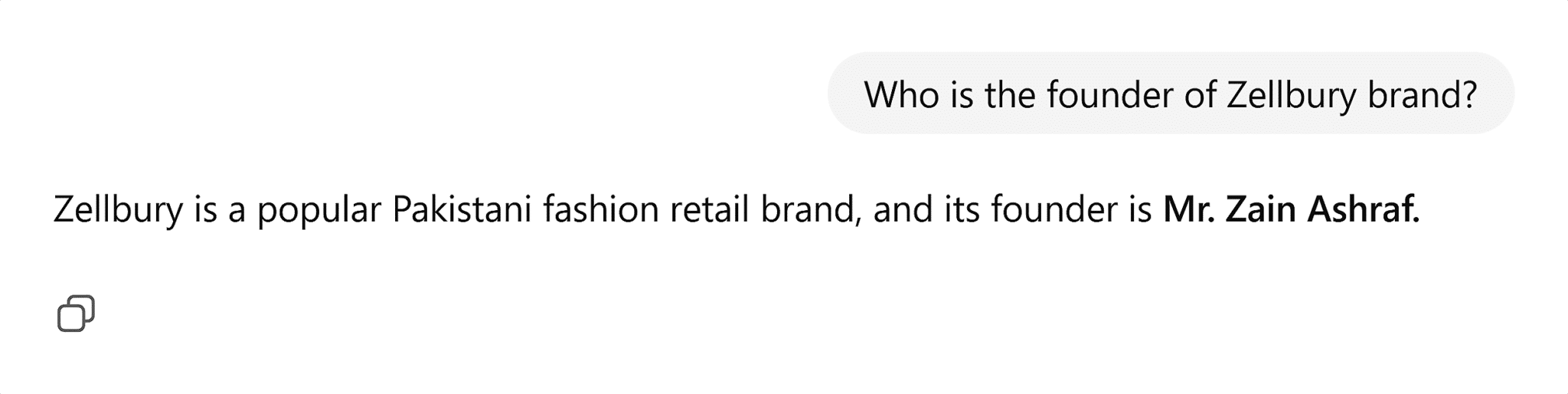
However, the original founder turned out to be someone else when searching on LinkedIn:

Because AI answers are used by other companies, these mistakes can spread fast. Writers might cite them in blogs, bots might redistribute them on social platforms, or brands might repeat them in reports, which are then seen by thousands of users on other platforms.
Let’s see how to combat AI hallucinations.
Step 1: Identify AI hallucinations about your brand
Let’s break down this process for both beginners and advanced SEOs.
For beginners
Start with a simple discovery sweep across well-known generative AI engines like ChatGPT, Gemini, Claude, and Perplexity.
Ask straightforward questions that reflect how users might look you up:
- “Who is [Brand]?”
- “What does [Brand] do?”
- “Where is [Brand] based?”
- “Who founded [Brand]?”
- “What are [Brand]’s top products or services?”
Then, compare those answers to your official details and make sure AI shows the correct data.
If it doesn’t, you’ve found a hallucination.
For advanced SEOs
If you’re an advanced SEO, you can skip the manual testing and go deeper.
Conduct a structured prompt audit
With this systematic test, you will apply the same set of questions across multiple AI platforms to measure consistency and accuracy.
Here’s how to execute your prompt audit and document its results:
- Create a spreadsheet or document with columns for:
- Prompts
- Model name (e.g., GPT-4o, Claude 3.5, Gemini 1.5 Pro, etc.)
- Run each prompt across every model you want to test.
- Record all responses and paste them into the spreadsheet for reference.
- Highlight inconsistencies or false claims and note which models produce them most often.
This will give you an idea of how different AI engines are representing your brand and where they’re getting things wrong.

Use entity extraction and semantic comparison tools to analyze your results
Once you’ve documented all responses, analyze the results in detail.
Doing this manually would work for a few examples, but when you’re comparing outputs from several AI models, you need a scalable way to pinpoint precisely which facts are wrong and how far they drift from actual data.
Entity extraction tools allow you to automatically pull out named items like people, products, brands, or locations from text. Simply put, they show you what the AI believes belongs to your brand, making it easy to find mismatches or missing details.
For example, if an AI lists a product you don’t sell or connects your company to the wrong founder, the tool flags it immediately.
Some common tools to do this are:
- spaCy: An open-source NLP library that tags and classifies entities in text.
- Diffbot Knowledge Graph API: A tool that extracts structured entities such as organizations, people, and products from web pages or AI responses.
Semantic comparison tools measure how closely an AI’s description matches your verified brand copy by meaning, not by words.
To do so, they use vector embeddings (more below) and compare the context of two texts.
If the similarity score is low, it means the model’s description has drifted—a sign that the AI is hallucinating your brand attributes.
Two common semantic comparison tools include:
- Sentence-BERT (SBERT): A pre-trained model optimized for generating embeddings of sentences and paragraphs. It turns entire pieces of text into numerical vectors that capture their meaning, making it easy to measure how closely AI outputs match your verified brand statements.
- Universal Sentence Encoder (USE): A Google AI model that captures complete sentence meaning instead of individual words, which is ideal for comparing more extended AI-generated summaries with your official descriptions.

By combining these two mitigation methods, you can detect both specific errors (falsehoods like wrong names or products) and contextual drift (how AI’s understanding of your brand’s meaning shifts).
Step 2: Diagnose why hallucinations exist
AI models build their picture of a brand through patterns. They connect pieces of data across the web, assign weight to certain sources, and form relationships between entities such as people, companies, and products.
When those data relationships are weak or inconsistent, the model fills in gaps with its best guess. It does this because it’s trained to produce a complete response even when the evidence is incomplete.
And that’s when hallucinations can occur.
How AI forms an understanding of a brand
Generative engines build meaning through entity relationships and citation weighting.
Entity relationships
These are the connections between names, products, people, and places. For example, “Apple > Tim Cook > iPhone.”
Imagine a small company, “Lyb Watches,” sells handmade watches online and has a few press mentions, a website, and a local business listing.
When an AI model tries to describe this brand, it maps entities first—the people, products, and places connected to the brand:
- Organization: Lyb Watches
- Founder: Ms. Laurel
- Products: ChronoOne, SeaLight
- Location: Austin, Texas
Each of these connections forms an entity relationship. For example, if “Founder > Laurel” is missing from the website or schema, the model may guess or pull a random name from an old article mentioning a watchmaker. That’s how wrong details can slip through.
Citation weighting
An AI trusts some sites more than others. A Wikipedia page or a government database carries more weight than an old blog post or scraped directory because they’re structured, verifiable, and interconnected.
With citation weighting, the AI looks at every source it has seen that mentions Lyb Watches—the brand’s website, Google Business profile, a Reddit thread, and a local article. It assigns more trust to the sources that appear authoritative, structured, and widely cited.
For example:
- The official website and LinkedIn page might each get a high weight.
- A scraped product directory from 2019 might receive a low weight.
- A third-party blog with mixed-up product names would be somewhere in between.
If outdated or weak sources outweigh the correct ones, the model’s final summary might say something like:
“Lyb Watches, founded by Lauren in 2017, is a luxury smartwatch brand based in Dallas.”
You can see every word sounds plausible, but three out of four facts are wrong—it wasn’t founded by Lauren, nor is it a luxury smartwatch brand, nor is it based in Dallas.
Common causes of hallucinations
When you understand how AI pieces together a brand’s story through entity relationships and weighted citations, it’s easy to see where things go wrong.
The most frequent reasons include:
- Missing structured data: Schema markup or JSON-LD tags are absent or incomplete—the model lacks clear facts about your brand, and it guesses details or pulls random information from unverified pages.
- Weak entity linking: The brand’s web content doesn’t consistently connect to official profiles such as LinkedIn, Crunchbase, or Wikidata. As a result, the AI might link to the wrong organization.
- Outdated Knowledge Graph data: Old information in Google’s Knowledge Graph or other databases continues to surface because it hasn’t been refreshed or corrected.
- Inconsistent third-party profiles: Conflicting facts on review sites, directories, or press releases cause noise that the AI struggles to resolve.
- Low-quality sources: Content from unverified, outdated, or unreliable websites can repeat incorrect information. When the model encounters these sources, it may incorporate or prioritize these inaccurate facts in its responses.

Data voids and data noise
AI hallucinations usually stem from one of two conditions:
- Data voids appear when key facts don’t exist or can’t be found. In this condition, the AI model has no verified input, so it predicts an answer that sounds believable but may be false.
- Data noise occurs when too many versions of a fact appear online. In such situations, the AI model tries to merge them into one “average” result, which often ends up wrong.

Suppose you search “When was Lyb Watches founded?” in ChatGPT, and it replies: “Lyb Watches was founded in 2020 (estimated).”
But the problem is your website doesn’t mention a founding year anywhere. So the model filled the blank with a guess (2020), which it stitched together from unrelated pages—that’s a data void.
Now, if your website says “Founded in 2018” and Crunchbase lists “Founded in 2020,” the AI will try to merge both and produce something like: “Lyb Watches was founded around 2019.” That’s data noise—the model blends inconsistent inputs instead of choosing one.
Here’s how you can prevent both:
- Add missing facts in your structured data and key profiles to avoid data voids.
- Update or align existing facts across your major sources (your website and social profiles) to make sure there’s no data noise.
Step 3: Reinforce accurate brand facts
Once the causes of hallucinations are clear, the goal is to strengthen your data so it can’t be misrepresented.
For this, you need to reinforce the correct facts about your brand everywhere so that generative engines describe you the way you want.
You can do this in a number of ways, depending on your expertise level.
For beginners
Make your brand’s core facts—its name, location, and key details—align across the web. When that information is consistent, generative engines recognize your site as one stable source of truth.
Keep your core details uniform
Use the same brand name, address, and phone/key contact (NAP) information across your website, social media accounts, business directories, press releases, and any other place your brand appears online.
If “Lyb Watches Co.” appears on the homepage but “Lyb Watches Ltd.” appears on Facebook, the model may treat them as separate entities.
Write a clear, factual About page
Your About page is like an anchor for AI crawlers because it gives AI systems a central, reliable source of factual information about your brand—things like who you are, what you do, when you were founded, and where you’re based.
So when you create an about page, list key facts in a clear and simple style without adding fluff or marketing taglines that might hide essential data.
Here’s what to include:
- Founder
- Founding year
- Location
- Main products/services
Add basic schema markup
Schema markup is a way to describe your content to machines using structured data. It tells search engines and generative engines what each piece of information on your website means.
For example, a human can read “Lyb Watches was founded by Laurel in 2015” and understand who did what, but an AI system may struggle at times.
Schema gives it that understanding by labeling each element: “organization,” “founder,” “date founded.”
There are many schema types, but the following three help build accurate brand data:
- Organization schema defines your company—its name, logo, founding date, location, and official links.
- Person schema connects individuals like founders or executives to your organization, showing who they are and what role they hold.
- Product schema describes what you sell, so models can link your products correctly with your brand and avoid confusing them with similar ones.
Dig deeper: How to implement schema markup
Google has said that structured data isn’t a direct ranking factor, and some SEOs argue it has a limited short-term impact because it doesn’t directly push rankings.
But it still has substantial indirect value. Why?
Because schema helps AI systems understand how your information fits together, it increases eligibility for rich results and makes your brand data easier to extract for Knowledge Panels and generative search summaries.
Even if schema doesn’t lift rankings overnight, it provides structure and clarity—the two factors that generative AI tools depend on most.
For advanced SEOs
Once your basic brand information is consistent and structured, connect those facts across trusted sources.
Strengthen entity markup with sameAs links
Entity markup is how you tell search and generative engines, “All of these mentions and links belong to the same organization.”
To maximize this ability, add sameAs links in your organization schema to connect your website with your verified profiles, such as LinkedIn, Crunchbase, and Wikipedia.
These cross-links show AI systems that all those profiles represent the same entity, helping them merge fragmented mentions into one unified identity.
This reduces duplication and confusion in generative results.
To add sameAs links, open the JSON-LD block (the code that holds your schema) in your organization schema. You’ll find this block either in your website’s header, footer, or a dedicated SEO plugin.
If you’re using a content management system like WordPress, you can access it through plugins such as Yoast, Rank Math, or Schema Pro—they generate and manage structured data automatically.
Next, insert URLs to your official brand profiles like this:
{
"@context": "https://schema.org",
"@type": "Organization",
"name": "Lyb Watches",
"url": "https://lybwatches.com",
"sameAs": [
"https://www.linkedin.com/company/lyb-watches/",
"https://www.crunchbase.com/organization/lyb-watches",
"https://en.wikipedia.org/wiki/Lyb_Watches"
]
}
Once added, go to the Schema Markup Validator and insert your website link to validate your schema and confirm the links are recognized correctly.
Create or update Wikidata entries
Wikidata is one of the largest structured databases used by Google and LLMs. If you already have your profile there, make sure it’s updated frequently.
But if not, here’s how you can create one:

- Create your account or log in if you already have one.
- Search for an existing item related to yourself, or, if none exist, create a new item.
- Add a language, label, description, and aliases.
Note: Creating a Wikidata entry is generally easier than creating a Wikipedia article, but it still requires meeting specific notability guidelines. Wikidata says: “If the data you’re trying to add falls outside of these notability guidelines, your data unfortunately won’t be accepted on Wikidata.”
Once you have a Wikidata link created for your brand, you can add it to the sameAs schema just like we did in the examples above with social media links. This creates a verification loop that strengthens alignment between your brand data and the knowledge graph.
Optimize schema quality and relationships
Basic schema gives generative engines your core facts, and advanced schema tells them how those facts connect. You can do this by adding unique identifiers and nested relationships inside your JSON-LD markup.
Unique identifiers such as @id, identifier, or product SKUs are permanent reference points for your brand’s entities. They tell AI systems that two mentions of “Lyb Watches” across different pages or datasets refer to the same organization.
This minimizes duplication as much as possible, so generative engines and knowledge graphs unify data instead of treating each page as a separate entity.
For example, you might assign your organization a unique @id that looks like this:
"@id": "https://lybwatches.com/#organization"
This identifier becomes your brand’s anchor in structured data. Every other mention, like your products, founders, or locations, can link back to it, creating another layer of reinforcement.
Nested relationships show how your entities relate to each other inside the same schema block. Instead of listing your organization, people, and products separately, you connect them directly using embedded JSON objects like this:
{
"@context": "https://schema.org",
"@type": "Organization",
"@id": "https://lybwatches.com/#organization",
"name": "Lyb Watches",
"founder": {
"@type": "Person",
"name": "Laurel",
"@id": "https://lybwatches.com/#laurel"
},
"brand": {
"@type": "Product",
"name": "ChronoOne"
}
}
By nesting these relationships, you help AI systems form a clear map of how your brand is structured: who founded it, what it produces, and which facts belong together. That clarity reduces the chance of misattributed facts or brand mix-ups in hallucinations.
Publish a brand fact dataset
A brand fact sheet works like a machine-readable press kit. It’s a single JSON-LD or dataset file that lists your verified company details—name, founding year, leadership, headquarters, product lines, and official URLs—all in one place.
You can host this file on your website (for example, https://lybwatches.com/brand-facts.json). It gives generative systems a central point of truth to reference so they can source accurate data directly from your website.
Here’s how to publish it:
- Create a new file named
brand-facts.jsonin your root directory or/data/ folder. The root directory is the main folder that holds all the files for your website. If you use a content management system like WordPress, you can access the root directory through your hosting provider’s File Manager. If you work with a developer, ask them to upload the JSON file directly into that directory. - Add your verified details in JSON-LD format, following the Schema.org Dataset type.
- Include canonical facts such as company name, founder, founding date, headquarters, and official links.
- Link the dataset from your About page, footer, or sitemap.xml so search engines can find it easily.
Here’s an example of how that could look:
{
"@context": "https://schema.org",
"@type": "Dataset",
"@id": "https://lybwatches.com/brand-facts.json",
"name": "Lyb Watches Brand Facts",
"description": "Machine-readable brand fact sheet for Lyb Watches",
"creator": {
"@type": "Organization",
"name": "Lyb Watches",
"url": "https://lybwatches.com"
},
"isAccessibleForFree": true,
"distribution": {
"@type": "DataDownload",
"contentUrl": "https://lybwatches.com/brand-facts.json",
"encodingFormat": "application/ld+json"
},
"about": {
"@type": "Organization",
"@id": "https://lybwatches.com/#organization",
"name": "Lyb Watches",
"alternateName": "{{brandShortName}}",
"founder": {
"@type": "Person",
"name": "Laurel"
},
"foundingDate": "{{YYYY-MM-DD}}",
"foundingLocation": {
"@type": "Place",
"name": "{{foundingCity}}, {{foundingRegion}}, {{foundingCountry}}"
},
"address": {
"@type": "PostalAddress",
"streetAddress": "{{streetAddress}}",
"addressLocality": "{{city}}",
"addressRegion": "{{state}}",
"postalCode": "{{zipCode}}",
"addressCountry": "{{country}}"
},
"brand": {
"@type": "Brand",
"name": "Lyb Watches"
},
"url": "https://lybwatches.com",
"sameAs": [
"https://www.linkedin.com/company/lyb-watches/",
"https://www.crunchbase.com/organization/lyb-watches",
"https://en.wikipedia.org/wiki/Lyb_Watches",
"{{xUrl}}",
"{{instagramUrl}}"
]
},
"@graph": [
{
"@type": "Product",
"@id": "https://lybwatches.com/products/chronoone",
"name": "ChronoOne",
"brand": {
"@id": "https://lybwatches.com/#organization"
}
},
{
"@type": "Product",
"@id": "https://lybwatches.com/products/sealight",
"name": "SeaLight",
"brand": {
"@id": "https://lybwatches.com/#organization"
}
}
]
}
Step 4: Rebuild trust in knowledge graphs
Once your brand data is consistent and well-structured, make sure generative systems trust it. To do this, you have to understand how they work.
Generative AI models rely on knowledge graphs to organize information. A knowledge graph is a network of connected facts that describes relationships between entities—people, organizations, products, and places. Both search and AI engines use these graphs to understand context and verify details.
Each node in the graph represents an entity (like a person, company, or product), and each edge represents the relationship between those entities.
For example: Lyb Watches (node) > founded by (edge) > Laurel (node)
Together, these links form a structured web of facts. That’s why knowledge graphs act like the “memory” of the web.
And when your brand appears as clear, connected nodes linked to accurate entities, like your founder, products, and location, it becomes easier for AI systems to retrieve and trust that information.

When answering questions, a model like ChatGPT primarily relies on its understanding of language and meaning (semantic layer), and can incorporate structured data (facts) if they are provided through external sources or RAG (Retrieval-Augmented Generation) systems.
- If your structured data says “Ms. Laurel is the founder of Lyb Watches” and the embeddings link “Lyb Watches” and “founder” closely in meaning, the model retrieves the correct fact.
- If your structured data is missing or inconsistent, the model relies only on semantic similarity, and that’s when it may guess or pull something unrelated (a hallucination).
To overcome this, you’ve got to reestablish your brand as a verified, authoritative node in those interconnected systems across Google’s knowledge graph, LLM embeddings, and other retrieval networks.
Let’s see how to do this.
Use Google’s knowledge graph search API to check entity accuracy
The Google Knowledge Graph Search API lets you see how Google currently interprets your brand entity. It returns structured data about your organization’s knowledge graph ID, type, and linked attributes (like name, description, and official site).
If Google’s knowledge graph lists old leadership, missing URLs, or wrong descriptions, that information can cascade into AI answers and hallucinations. So check your entity and confirm that the system still represents your brand correctly.
Here’s how to check this:
- Get an API key from Google Cloud Console.
- Once you have the key, enter this URL into your browser by replacing
YOUR_BRAND_NAMEandYOUR_API_KEY:https://kgsearch.googleapis.com/v1/entities:search?query=YOUR_BRAND_NAME&key=YOUR_API_KEY&limit=1&indent=True
For example:https://kgsearch.googleapis.com/v1/entities:search?query=Lyb+Watches&key=ABCD1234XYZ&limit=1&indent=True - The browser will return a JSON output that looks something like this:

- Review the key fields:
- “
@type“: the entity type Google recognizes (e.g., Organization, Person, Product). - “
description“: the short text Google displays in panels and summaries. - “
url“: your official website. - “
@id“: your knowledge graph entity ID (used for linking and citations).
- “
If you find old or incorrect details like outdated leadership or the wrong location, you can’t edit the knowledge graph directly. Instead, update your verified sources (your website schema, Wikidata entry, and official profiles).
Google’s knowledge graph automatically refreshes from these structured and authoritative sources over time.
Apply entity reconciliation tools to monitor drift or fragmentation
Over time, minor inconsistencies in names, URLs, or schema IDs may cause knowledge graphs to fragment your brand into separate entities. And when this happens, AI models treat your brand as multiple unrelated organizations, diluting authority and introducing hallucinated facts.
You can use entity reconciliation tools like OpenRefine or Diffbot to detect and fix this. They compare how your brand appears across datasets and identify mismatches or duplicates.
Here’s a high-level overview of how to approach this using OpenRefine:
- Make a CSV/Excel sheet with columns like: Entity Name, URL, @id, sameAs.
- Download the software from openrefine.org.
- “Create Project” > select “This Computer” > upload your file.
- In the “Entity Name” column, go to “Reconcile” > “Start reconciling.”
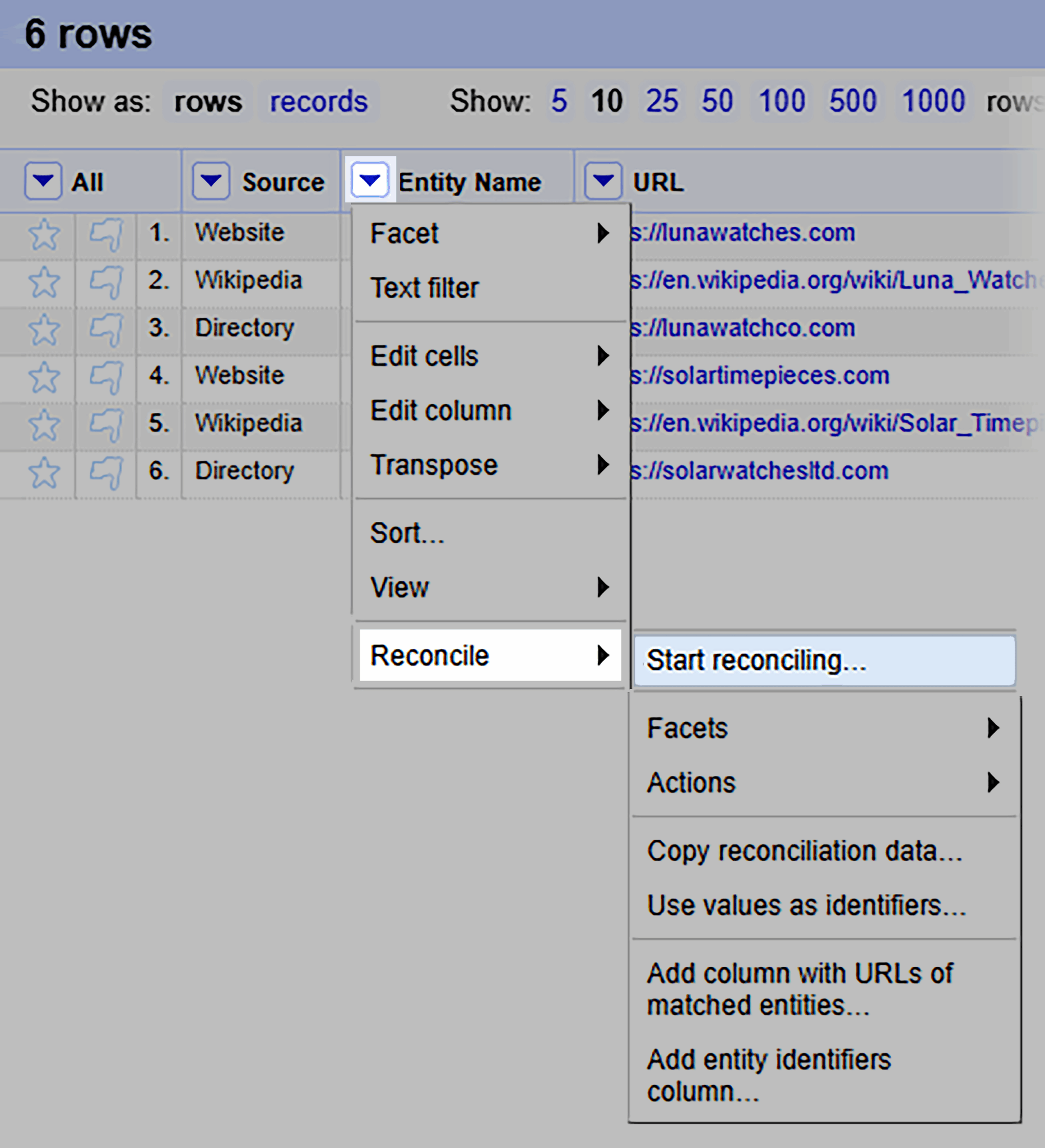
- A new window will pop up. From here, select “Wikidata” > “Next.”

- Then, again, select “Start reconciling. ” Now OpenRefine will fetch matches and show a match/confidence next to each row.
- Now go to the “Entity Name” column > “Edit cells” > “Cluster and edit.”

- A new window, “Cluster and edit column Entity Name,” will appear. Now to merge near-duplicates (misspellings/variants), select “Merge selected & Close.”

- Now head over to “Export” > “CSV (or JSON).” This will download your canonical entity list.

You can now use this data to correct your structured data sources (your website schema, Wikidata entry, and business listings). This ensures every platform points to the same, verified entity profile, helping knowledge graphs and AI systems recognize your brand as a single source.
Leverage digital PR and authoritative citations
Structured data is good, but third-party signals take your brand authority to the next level. Digital PR, including articles, interviews, or mentions on authoritative websites, reinforces your brand’s trustworthiness in both search and generative AI engines.
Since knowledge graphs weigh credibility through relationships, if reliable sources repeatedly mention your brand’s accurate information, those facts gain more weight in AI retrieval.
Here’s how to leverage PR for winning citations and to strengthen your brand authority:
- Create a list of top industry blogs, publications, and news websites in Excel or Google Sheets.
- Collect their emails from the contact page (or they may have a separate form for accepting pitches on their website) and pitch content ideas that fit each website:
- For blogs, offer thought-leadership pieces or behind-the-scenes stories.
- For publications, pitch case studies, reports, or expert commentary.
- For news outlets, share press releases.
If a pitched idea gets approved, start creating your first draft and make sure every external mention to your brand uses the same details mentioned in your schema and brand fact sheet. This consistency helps knowledge graphs connect external mentions back to your verified entity.
When structured data, brand fact sheets, and trusted third-party mentions all align, AI engines no longer have to guess what’s true—they see the same verified data from multiple directions.
Maintain a central brand data layer for enterprises
For larger organizations, managing dozens of data sources can become overwhelming since different teams might handle them. For example, the marketing team might update the CEO’s name on the website, but the PR page, LinkedIn profile, and regional websites still show the old one.
That’s how minor inconsistencies can spread fast across search platforms.
But a central brand data layer solves this problem: It’s a single, organized system (often a shared database or internal hub) where all verified brand information lives. It brings together structured data (like schema, product feeds, and datasets) and unstructured data (like press releases, PDFs, and internal docs) in one place.
This way, every team, tool, and external platform pulls facts from the same source of truth. It keeps your brand information consistent, no matter where people or machines encounter it.
Here’s how you can maintain a central data layer:
- Store key brand facts in a shared repository, such as a CMS like Contentful, Storyblok, or Sanity.
- Use a knowledge graph or database layer (for example, Neo4j, TerminusDB, or Stardog) to connect relationships between entities within your brand’s ecosystem.
- Try tools like Notion, Airtable, or Trello for enterprise-level coordination to keep PR, SEO, and communications teams aligned on current brand facts.
- Make sure your website, PR pages, and other data sources always align with the data layer through automation or scheduled updates.
- Assign clear ownership—one team or role responsible for reviewing and approving edits to core brand facts.
Step 5: Monitor and audit regularly
Everything you’ve built so far—clean schema, consistent citations, a trusted knowledge graph profile—would stay accurate on its own but can be interpreted differently over time.
Why? Because generative engines change constantly as models retrain, and with each advancement, they may produce different responses to user queries.
That’s why monitoring brand accuracy is an ongoing process, not a one-time fix. Let’s see how you can build a consistent monitoring standard.
Establish a recurring AI brand accuracy audit
An AI brand accuracy audit is a routine fact-checking process to verify how search engines and AI platforms describe your company. It works like a health check: Compare what the models say about your brand against your verified facts.

Because models update frequently, every new training cycle can reintroduce outdated, inaccurate information. Regular audits help you catch errors before they spread.
Here’s how you can do it:
- Create a simple audit template with columns for platform, prompt, output, issue type, and fix.
- Every quarter (or after major AI updates), test prompts such as:
- “Who is [Brand]?”
- “Where is [Brand] headquartered?”
- “Who founded [Brand]?”
- Record the responses from platforms like ChatGPT, Gemini, Claude, and Perplexity.
- Highlight discrepancies between their answers and your official data.
- Prioritize fixes according to the previous steps we shared, such as updating missing facts, outdated info, or conflicting relationships.
This should become your baseline for tracking how your brand performs in generative AI search.
Track AI platform outputs after major search or model updates
Every time a generative model or search engine releases an update or changes its algorithms, it may change how your brand data is retrieved or summarized. Make sure to track outputs right after these updates to see if something has drifted.
Here’s how you can do it:
- Subscribe to official update channels like OpenAI Developer Updates and follow generative engines’ official pages on X.
- Within a week of each major release, re-run your top brand prompts and capture new answers.
- Compare the wording, entity associations, and cited sources with your previous audit results.
- Document any change that alters how your brand is described, even slightly, and then act accordingly.
Use vector search or embedding comparisons to detect semantic drift
Semantic drift happens when the way AI systems “understand” your brand gradually shifts—usually because new, noisy data changes its context. The meaning attached to your brand may drift over time.
Suppose Lyb Watches is known for handmade watches. Over time, AI models start seeing more online mentions of Lyb’s new smartwatch line.
Even though the company still makes both products, the model’s “understanding” may shift from a traditional watchmaker to a tech brand. The facts haven’t changed, but the meaning around the brand has drifted.
Vector search
A vector is a numerical representation of text. Each word, phrase, or document is turned into a series of numbers that capture its meaning. The closer two vectors are in this numeric space, the more similar their meanings are.
Vector search helps you find content or references that are semantically similar to your brand. When two pieces of text are semantically similar, it means they have the same meaning, even if they use different words.
For example:
- “Lyb Watches creates handmade timepieces.”
- “Lyb Watches specializes in crafting handmade wristwatches.”
The wording is different, but both sentences express the same idea—that’s semantic similarity.
Instead of matching keywords, it looks for meaning—so you can see which new mentions or documents are most aligned (or misaligned) with your intended brand identity.
You can use any of the following AI tools for this:
- Pinecone: A popular vector database where you can store and compare brand text embeddings over time.
- Weaviate: An open-source vector search engine with built-in semantic search.
- Vespa.ai: An enterprise-grade search platform that supports vector search.
Embedding comparisons
An embedding is another numerical representation of text. When you generate an embedding, your text is converted into a vector. So, texts with similar meanings produce vectors that are close together in this numerical space.
Here’s how you can use them:
Take your official brand description (e.g., AI response about your brand) and generate an embedding for it using tools like OpenAI Embeddings, Cohere, or the EmbeddingGemma model.
Here’s how to create an embedding using the EmbeddingGemma model:
- Go to Google Colab and paste this code in a workbook (replace text with any AI model’s response about your brand):
text = ["Lyb Watches sells handmade watches online and has a few press mentions, a website, and a local business listing."]embeddings = model.encode(text)print(embeddings)print(f"Embedding shape: {embeddings[0].shape}") - You’ll get a result like this:
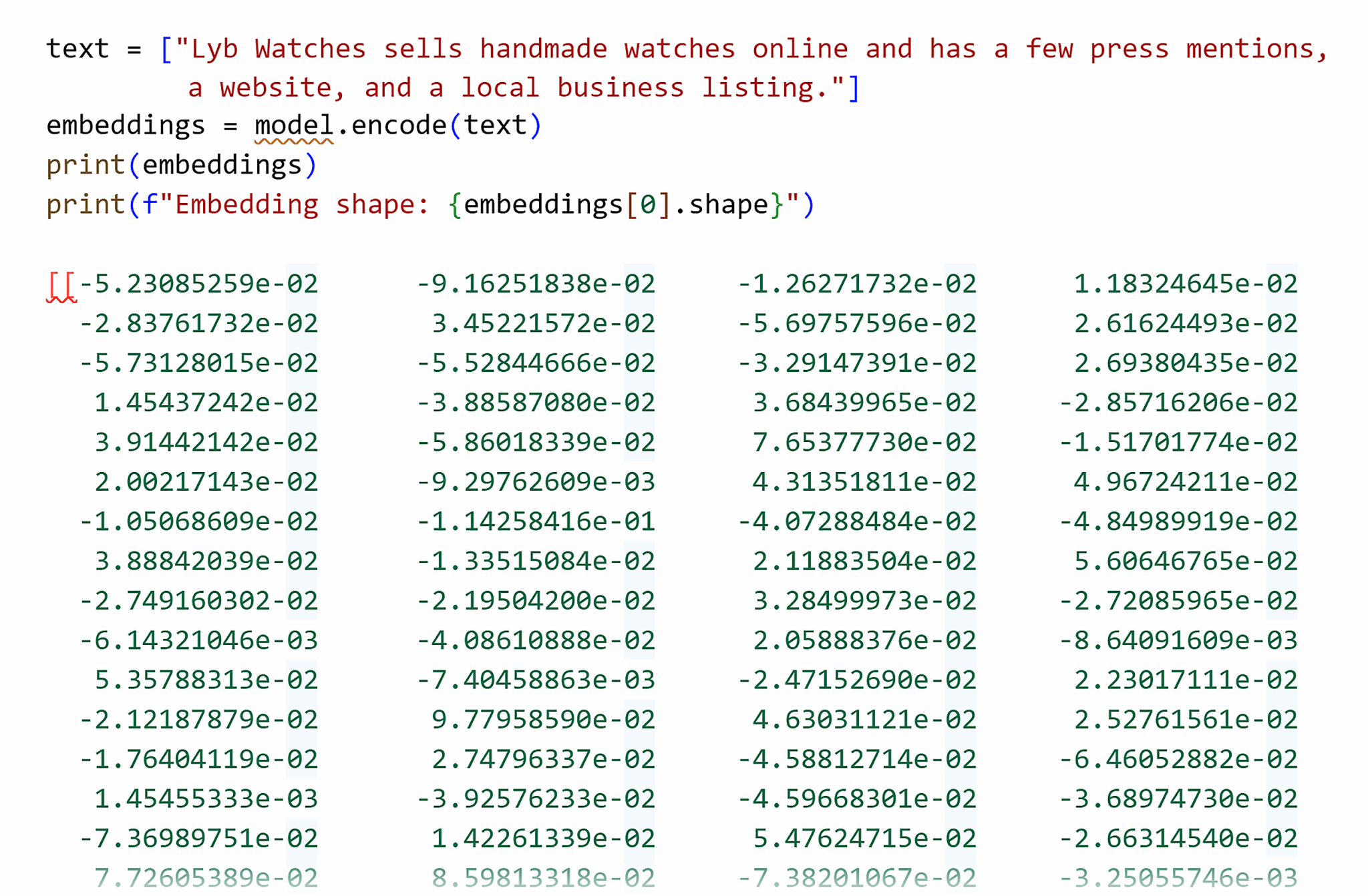
This first embedding gives you a baseline vector (your brand’s meaning at that point in time).
After a few months, take new AI-generated summaries or search snippets about your brand and generate embeddings for those, too.
Compare the new vectors to your baseline using cosine similarity (a value between 0 and 1 indicating how similar their meanings are). You don’t calculate this manually—most embedding tools give you the score automatically.
- A score close to 1.0 means the meaning hasn’t changed.
- A noticeable drop (say, 0.75-0.95) means your brand’s perceived meaning has shifted (a sign of semantic drift).
Involve SEO, PR, and communications teams
Brand accuracy is a shared responsibility. And when SEO, PR, and Comms work in silos, updates may get missed, and outdated facts spread online. Cross-team collaboration prevents this by keeping every data point—schema, press releases, social bios—aligned and verified.
Here’s how you can create a collaboration-focused environment across your organization:
- Set up a recurring brand data sync meeting once per month or quarter.
- Share a single dashboard, audit sheet, or knowledge base showing current brand facts and their sources. Think of these as guardrails for facts about your brand.
- When leadership, location, or products change, PR updates the story, SEO updates schema, and comms updates social bios, all at the same time.
- Document each change in your brand data layer to keep a clear update trail.
That coordination keeps your public narrative consistent everywhere. So when AI engines scrape the web, they find one clear, unified version of your brand story.
That’s how you maintain long-term visibility and prevent new hallucinations from creeping back in.
Track, optimize, and win in Google and AI search from one platform.
Be proactive in how AI sees your brand
You can’t fight AI hallucinations by being passive because they thrive on gaps: missing schema, outdated knowledge graph data, or inconsistent facts.
To overcome hallucinations, you have to be proactive:
- Run five prompts (“Who is…”, “Founded when…”, etc.) in ChatGPT, Gemini, Claude, and Perplexity. Log the outputs and highlight anything inaccurate.
- Fix your top five errors. Update your About page, repair Organization/Person/Product schema, and add sameAs links to LinkedIn, Crunchbase, and Wikipedia.
- Publish a /brand-facts.json dataset, update your sitemap, and check your entity in Google’s knowledge graph search API.
- Re-run a brand audit after every major AI or search update to track shifts, refresh data, and close new gaps fast.
Make this maintenance an ongoing routine so you treat your brand data as living infrastructure, not a one-time SEO task.
Now, if you want to go a step further after overcoming AI hallucinations about your brand, check out our guide on measuring AI visibility before you disappear from generative engines.
Explore more on
Editorial disclosure
Search Engine Land is owned by Semrush. We remain committed to providing high-quality coverage of marketing topics. Unless otherwise noted, this page’s content was written by either an employee or a paid contractor of Semrush Inc.
About the author


