Unlock the power of organization schema: A simple step-by-step guide

Organization schema often gets a bad rap in our industry, with many dismissing it as too complex and more trouble than it’s worth. As a result, many marketers skip it altogether, relying on other strategies to spread the word about their business. We’re here today to set the record straight: That’s a mistake.
Contrary to popular belief, organization schema is actually very straightforward. If you can answer a few questions about your business and follow a simple template, you can generate organization schema in just a few minutes.
And you really should. Organization schema is one of the few opportunities where you can directly influence what appears in the search engine results pages (SERPs). By providing accurate, detailed information about your business, you’ll build authority with customers and search engines alike. Over time, this translates into greater visibility, better brand awareness, and yes—more traffic to your website.
In this guide, we’ll show you how to create organization schema using fill-in-the-blank templates, intuitive generation tools, and even artificial intelligence. Unlock the power of organization schema, and start improving your online presence today!
What is organization schema?
Organization schema is a type of structured data (information easily parsable by machines) that lives “behind the scenes” within your website’s code. It contains key details about your business, such as its name, its contact information, and the services it provides.
Search engines use this structured data to build a profile or knowledge graph entry about your business, strengthening their understanding of who you are and what you offer. They also display these details to users, ensuring accurate, up-to-date information appears in the SERPs.

How is organization schema structured, exactly? At its core, it’s structured like a simple two-column spreadsheet. One column contains a set of labels (called properties), and the other contains values based on the specifics of your business.
In some cases, especially for more complex businesses, some of these properties and values may nest within each other, similar to Russian stacking dolls. But the basic architecture remains the same: properties paired with corresponding values.
Who sets the standards for organization schema?
Back in the day, there was no “universal” organization schema. Different search engines required different elements, leading to confusion and inconsistency across the web.
To solve this problem, major search giants—including Google, Bing, Yahoo, and later Yandex—got together and decided on a universal standard for structured data.
The website schema.org launched in 2011 and continues to serve as a central resource for using structured data across the web.
The SEO toolkit you know, plus the AI visibility data you need.

What are the different types of organization schema?
Organization schema is both a specific type of schema and a parent category for various subtypes. In other words, Organization schema can apply to any business or entity, while its subtypes can only apply to more specific kinds of organizations.
For instance, the following are all subtypes of organization schema. They inherit the same properties as Organization and can be used in its stead to provide more specific information to search engines:

Pro tip: Unsure which category your business falls under? Read carefully through all of the organization schema subtypes or simply use generic “organization schema.”
In addition to its many subtypes, there are also several formats you can use to implement organization schema: Microdata, RDFa, and JSON-LD.
JSON-LD is considered the gold standard for adding structured data, including organization schema, and search engines like Google prefer it for its simplicity and reliability. Moving forward, all examples and instructions in this guide will use JSON-LD schema.
Where does organization schema go?
You’ll typically find organization schema markup inside a website’s <head> tag. That’s because web crawlers like Googlebot and Bingbot know to look there for important structured data.
Now, which pages on your site benefit most from using organization schema?
Technically, you can include organization schema on any page of your website. However, that’s not necessary and can clutter your website and workflow. The best pages to add organization schema to include your:
- Homepage: The most visited page on your website. With few exceptions, most businesses should include organization schema on the homepage.
- About page: The second most important place to include organization schema; your about page defines your business and is a natural location for your schema.
- Contact page: Another good place to include organization schema. The contact info in your structured data should match the contact info on this page, providing a cohesive signal to web crawlers.
Depending on your website’s layout and marketing strategy, you may also consider adding organization schema to your articles and blog posts.
Why is organization schema important for SEO?
Organization schema teaches search engines about your business, providing accurate information to users and boosting your authority. Let’s take a closer look at some of the major benefits you can expect from implementing valid schema.
Improving search engine understanding
SEO is a complex web of interconnected parts, all of which work together to increase your online visibility.
Schema markup for business is just one part of this web—but it’s a critical one. Schema helps search engines better understand your business so they can present your website to the right visitors for the right search queries.
This is particularly important in the age of entity SEO and AI. The more you present your business as a bonafide brand with a well-documented and unified presence across the web, the more Google will recognize your site’s authority and the more organic visibility you’ll receive.
Can contribute to rich results and knowledge panels
What are rich results, exactly? Simply put, rich results are additional visual elements that appear within the SERPs next to your website. Some well-known examples of rich results include FAQ dropdown menus and star ratings for product pages.
Within the context of organization schema, rich results might display your company logo, contact information, company structure, or other elements—helping to strengthen your brand presence directly in search results.

Exactly how impactful are rich results? Very. For instance, Nestlé reported an 82% increase in click-through rate after introducing rich results to certain pages across company websites.
Equally impressive, Rakuten noticed a 50% increase in session duration on pages that had implemented structured data—suggesting that elements within the SERPs had an impact even after users had clicked into the site!
Beyond rich results, organization schema also contributes to the creation of detailed knowledge panels—those information boxes you see at the top or side of search results for notable brands.
By adding structured data for SEO to your website, you’re building credibility and providing searchers with convenient at-a-glance details about your business.
Enhancing brand visibility in SERPs
Organization schema is considered crucial for local SEO. And for good reason. Providing search engines with easy access to your location and contact details is essential for driving locals to your business.
With that said, it’s not just local businesses that can benefit from SEO structured data like organization schema. It’s also very important for branded SEO; after all, you want your company information to take as much of the SERP real estate as possible.
Provide search engines like Google with the information they need to build a detailed knowledge graph entry about your business, and they will reward you with greater visibility.
Increasing trust and authority
When you search for a business online and only find a single website link with a simple meta description, what crosses your mind? You’re probably thinking that it’s a small operation, one that hasn’t put much effort into developing a professional online presence.
Naturally, the opposite also holds true. When you see a detailed listing, complete with rich snippets featuring transparent contact details and a knowledge panel with additional information, you take that business more seriously. It’s clear that the company has put time and effort into creating a positive experience for search engines and customers, and those details matter.
How to implement organization schema on your website
We’ve touched on the technical details behind organization schema, as well as some of the tangible benefits you can expect from implementing it on your website. Now, let’s discuss how you can add structured data and begin reaping all the perks it has to offer.
Step 1: Identify key information about your business
The first step in creating organization schema is identifying and gathering the information you want to include.

Fun fact: there are over 75 different properties you can include in your organization schema. Of course, you don’t have to use all of them. Some are required, some are highly recommended, and some may be more or less important depending on the type of business you operate.
Essential properties
Technically, the only properties required within organization schema are context and type. However, there are a few other essential properties you’ll want to include no matter what type of organization you run:
| Property Name | Value |
| context | Consists of a link to schema.org |
| type | Organization or subtype of Organization like LocalBusiness |
| id | Your homepage URL followed by /#organization |
| name | The name of your business |
| url | Your homepage URL |
Here is an example of what these properties might look like as JSON-LD organization schema for a local web designer:
<script type="application/ld+json">{ "@context": "https://schema.org", "@type": "Organization", "@id": "https://www.schemawebdesign.com/#organization", "name": "Schema Web Design", "url": "https://www.schemawebdesign.com/"}</script>
Of course, on its own, this information does little to provide a meaningful signal to search engines. In most cases, you’ll also want to include the recommended properties below.
Recommended properties
Including the following properties in your organization schema is not required, but most businesses will want to adopt some variation of them:
| Property Name | Value |
| description | A synopsis of your business |
| sameAs | Links to social profiles associated with your business |
| telephone | Your telephone number |
| Your email | |
| foundingDate | Date the company was founded |
| logo | The location of an image file containing your logo |
| founder | The person who founded your company |
| address | Your postal address |
Now, let’s combine these recommended properties with the JSON-LD we already wrote. Here’s a complete organization schema example:
<script type="application/ld+json">{ "@context": "https://schema.org", "@type": "Organization", "@id": "https://www.schemawebdesign.com/#organization", "name": "Schema Web Design", "url": "https://www.schemawebdesign.com/", "description": "Schema Web Design builds stunning, responsive websites for small businesses in the San Francisco Bay Area.", "sameAs": [
"https://facebook.com/schemawebdesign",
"https://twitter.com/schemawebdesign" ], "telephone": "+1-555-555-5555", "email": "mailto:[email protected]", "foundingDate": "2020-01-01", "logo": { "@type": "ImageObject", "url": "https://www.schemawebdesign.com/schema-web-design-logo.png" }, "founder": { "@type": "Person", "name": "Jane Doe" }, "address": { "@type": "PostalAddress", "streetAddress": "335 McAllister St", "addressLocality": "San Francisco", "addressRegion": "CA", "postalCode": "94102", "addressCountry": "US" }}</script>
As a reminder, all of the properties found on the schema.org organization page can be useful in different situations. Feel free to add any of them to your own schema by following the same formatting guidelines shown above.
Step 2: Generate your schema
Now that you’ve chosen the information you want to include in your markup, it’s time to generate your schema.
You have a number of options for generating your schema: You can use a template, generator tools, AI, plugins, or adapt another completed schema:
Use a template and DIY
Generating organization schema is pretty simple, especially now that you’ve gathered all the information you want to include.
When generating organization schema yourself, think about it like this: Each property name is the question, and each value is the answer.
Make sense?
Here is a boilerplate template to get you started. It includes organization schema for a generic business. Feel free to customize the properties and values by adding, removing, or changing them as you see fit:
<script type="application/ld+json">{ "@context": "https://schema.org", "@type": "Organization", "@id": "https://yourwebsite.com/#organization", "name": "Your Organization Name", "url": "https://yourwebsite.com/", "description": "Brief description of your organization.", "sameAs":[ "https://facebook.com/yourpage", "https://twitter.com/yourhandle" ], "telephone": "+1-000-000-0000", "email": "[email protected]", "foundingDate": "YYYY-MM-DD", "logo": { "@type": "ImageObject", "url": "https://yourwebsite.com/path-to-your-logo.png" }, "founder": { "@type": "Person", "name": "Founder's Name" }, "address": { "@type": "PostalAddress", "streetAddress": "Your Street Address", "addressLocality": "City", "addressRegion": "State/Province", "postalCode": "Postal/ZIP Code", "addressCountry": "Country Code (e.g., US)" }}</script>
Use a schema generation tool

If writing schema yourself feels too overwhelming, that’s okay. These organization schema generators can get you started:
- Structured Data Markup Helper by Google
- Schema Markup Generator by Merkle
Do understand that neither of these schema generators is perfect. They both have limited customizability, with only a handful of editable fields. However, they can help you generate basic organization schema or provide a foundation for further customization.
Use artificial intelligence
AI can also help you create JSON-LD schema and other SEO structured data for your website. Here’s a prompt you can use to kickstart the process using large language models like ChatGPT or Google Gemini:
Help me create JSON-LD schema.org markup from scratch for my organization.
Ask me questions about all the most important properties, including id, name, url, description, social profiles, contact info, founding date, logo, founder, address, and any other properties you think would be useful.
Once you have the information, build a clean, properly formatted <script type=”application/ld+json”> that matches best practices for SEO and schema.org.
Use a plugin
If you’re using WordPress, you may want to consider an SEO plugin that generates and implements schema for you. There are many free and paid options available.
Some of our favorite plugins for adding schema include:
- Rank Math (free)
- Yoast SEO (requires paid add-on)
- SmartCrawl (free)
- The SEO Framework (requires paid add-on)
Use these organization schema examples as inspiration
Before we move on, let’s check out a couple examples of completed organization schemas. You can see what finished schema looks like and use it as inspiration or adapt it to your liking.
For starters, let’s view organization schema for a freelance copywriter operating remotely. You’ll notice a couple of new properties as well as a unique nesting structure for these properties, differentiating the brand from the person:
<script type="application/ld+json">{ "@context": "https://schema.org", "@type": "Organization", "name": "John Smith", "url": "https://www.example.com", "@id": "https://www.example.com/#organization", "description": "Freelance copywriter helping brands craft compelling content, build strong messaging, and connect with their audiences worldwide.", "areaServed": "Worldwide", "foundingDate": "2012", "email": "[email protected]", "telephone": "+1-555-555-5555", "logo": { "@type": "ImageObject", "url": "https://www.example.com/images/logo.png" }, "founder": { "@type": "Person", "name": "John Smith", "sameAs": [ "https://linkedin.com/in/johnsmithexample" ], "knowsAbout": [ "Advertising", "Brand Strategy", "Copywriting", "Marketing" ], "image": { "@type": "ImageObject", "url": "https://www.example.com/images/john-smith-headshot.png" } }}</script>
Next, here’s organization schema for a corporation with multiple departments. Again, you’ll notice some new properties and a different nesting structure:
<script type="application/ld+json">{ "@context": "https://schema.org", "@type": "Organization", "name": "Schema Corp", "url": "https://www.example.com", "@id": "https://www.example.com/#organization", "description": "Schema Corp is a leading enterprise providing innovative solutions across the technology and healthcare sectors.", "areaServed": "US", "foundingDate": "1995", "sameAs": [ "https://linkedin.com/company/schemacorp", "https://facebook.com/schemacorp", "https://twitter.com/schemacorp" ], "logo": { "@type": "ImageObject", "url": "https://www.example.com/images/logo.png" }, "address": { "@type": "PostalAddress", "streetAddress": "200 Central Prk W", "addressLocality": "New York", "addressRegion": "NY", "postalCode": "10024", "addressCountry": "US" }, "contactPoint": [ { "@type": "ContactPoint", "contactType": "Customer Support", "telephone": "+1-800-555-1212", "email": "[email protected]", "areaServed": "US", "availableLanguage": ["English"] }, { "@type": "ContactPoint", "contactType": "Sales", "telephone": "+1-800-234-5678", "email": "[email protected]", "areaServed": "US", "availableLanguage": ["English"] }, { "@type": "ContactPoint", "contactType": "General Inquiries", "telephone": "+1-800-345-6789", "email": "[email protected]", "areaServed": "US", "availableLanguage": ["English"] } ], "founder": { "@type": "Person", "name": "Alex Johnson" }}</script>
The sky is truly the limit when it comes to organization schema. In addition to adding new properties like these, you can also change the @type from “Organization” to a more specific subtype, such as “LocalBusiness”. This unlocks additional properties, including hours of operation, accepted payment methods, pricing information, and more.
Step 3: Add the organization schema to your website
Once you’ve generated your markup, it’s time to add it to your website.
At this point, you can either pass the markup over to your developer or implement it on your own.
In most cases, we recommend the first option: passing it off to your developer. That’s because implementation requirements change depending on whether other schema already exists on your website.
Still want to go the DIY route and learn how to add organization schema yourself? We have good news. We developed a special workaround that lets you drop in your schema without having to consider whether other structured data already exists. You simply have to add a single JSON-LD snippet to the end of your completed schema:
"mainEntityOfPage": { "@type": "WebPage", "@id": "https://www.example.com/" }
Here’s what it looks like appended to the example schema we used earlier (new markup in bold):
…
  "address":
{ "@type": "PostalAddress", "streetAddress": "335 McAllister St", "addressLocality": "San Francisco", "addressRegion": "CA", "postalCode": "94102", "addressCountry": "US" }, "mainEntityOfPage": { "@type": "WebPage", "@id": "https://www.example.com/" }}</script>
Easy, right?
You’ll also want to run one final check of your markup before going live. Copy your schema and paste it into the official schema.org validator. Make sure you’re on the “Code Snippet” tab and then Click “Run Test.”
If the test comes back without warnings or errors, you’re good to go! If there are any issues, this tool will catch them and provide instructions for fixing them before you add the schema to your website.
Speaking of which, there are three easy ways to add schema to your website by yourself. You can add it via manual insertion, a WordPress plugin, or Google Tag Manager.
Add organization schema manually
Are you running a static website? Do you have easy access to the source code? Manual insertion may be the way to go.
Simply navigate to the corresponding page files (e.g., your homepage, about page, and contact page), and copy and paste your markup into the <head> section near the very top of the document.
Once you’ve done so, consider adding a comment so others who enter the file will understand this snippet’s purpose.
To add a comment, simply paste the following code just above the start of your schema markup:
<!-- Organization schema for SEO --><script type="application/ld+json">{ "@context": "https://schema.org", "@type": "Organization",…
Add organization schema to WordPress using a plugin
WordPress powers over 40% of the web. If you fall under this massive minority, you’re in luck. There are hundreds of free plugins you can use to add organization schema to your website in seconds.
Some of our favorite plugins for adding schema include:
- WPCode by Syed Balkhi
- Code Snippets by Shea Bunge
- Header Footer Code Manager by DraftPress Team
You can also go to the “Plugins” tab from within your WordPress dashboard and click “Add Plugin.” Search for “code snippets” within the search box and you’ll see dozens of other reliable options.

Add organization schema using Google Tag Manager
Our final recommendation for adding organization schema to your website is using Google Tag Manager. We saved this one for last because it requires that you go through the same steps outlined above. That is, adding Google Tag Manager’s code snippet to your site requires one of the two processes above: manually inserting it into your website’s <head> or using a plugin.
Why use Google Tag Manager at all? With Google Tag Manager, you’ll never have to worry about going through this process again. Any time you want to make a change to your schema or add additional markup to your <head>, you can do so using this tool.
To start using Google Tag Manager for organization schema, consider reviewing the official documentation or reading this step-by-step Google Tag Manager guide.

Step 4: Validate your schema
Once you’ve added organization schema to your website, it’s time to run some tests and make sure that everything is working as expected.
In general, the most effective way to validate your schema is to run your website through a few different tools and consider the advice each one provides. That’s because some tools are better than others at catching certain types of errors.
Let’s go over the top three tools you can use, starting with Google’s Rich Results Test.
Google Rich Results Test
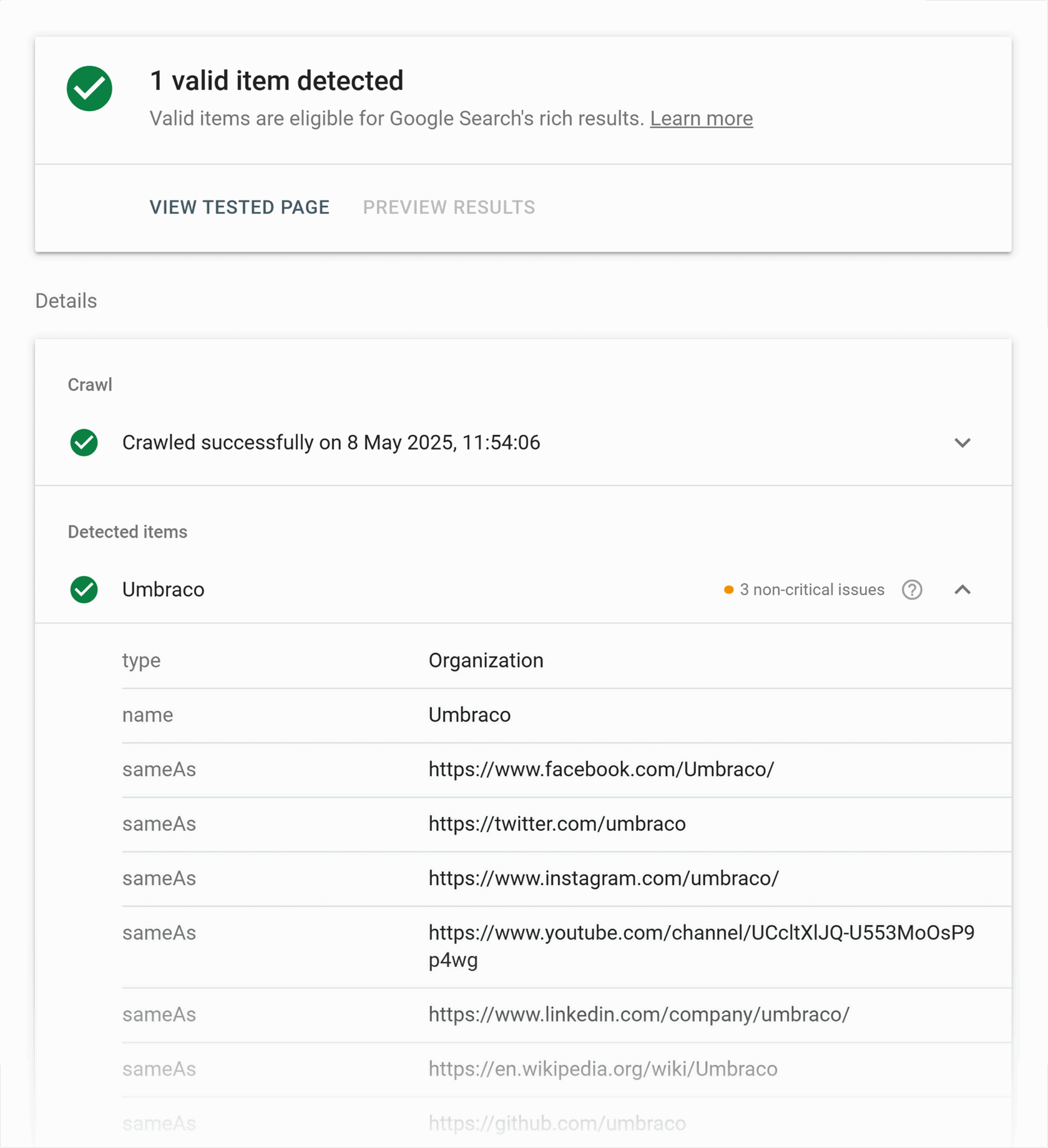
The Google Rich Results Test is quick, easy, and provides a ton of great insight into your structured data. Head over to the testing webpage, add your URL to the search box (start with your homepage), and then run the test.
What can you expect to see?
If your schema is valid, you’ll see green check marks across the board. Congratulations!
If the test returns a red exclamation point, that means something went wrong. Click the “Details” link and see how Google recommends fixing the issue. Don’t worry—most fixes are easy, usually the result of a minor misspelling or syntax error.
Pro Tip: You may notice that Google automatically added another schema type to your website, such as LocalBusiness schema. This is normal, and there is no action you need to take.
Schema Markup Validator

The Schema Markup Validator is similar to Google’s Rich Results Tool but even easier to use. Go to the website, add your URL, and run the test.
Almost instantly, you should see your schema pop up on the page, alongside any warning or error messages the tool uncovered. Click the individual messages for more details, and you’ll see exactly what changes the Schema Markup Validator recommends (if any).
Semrush Site Audit
Our final recommendation—and the most powerful among these schema validators—is the Semrush Site Audit tool. This tool conducts a comprehensive analysis of your entire website, including potential flaws in your schema.
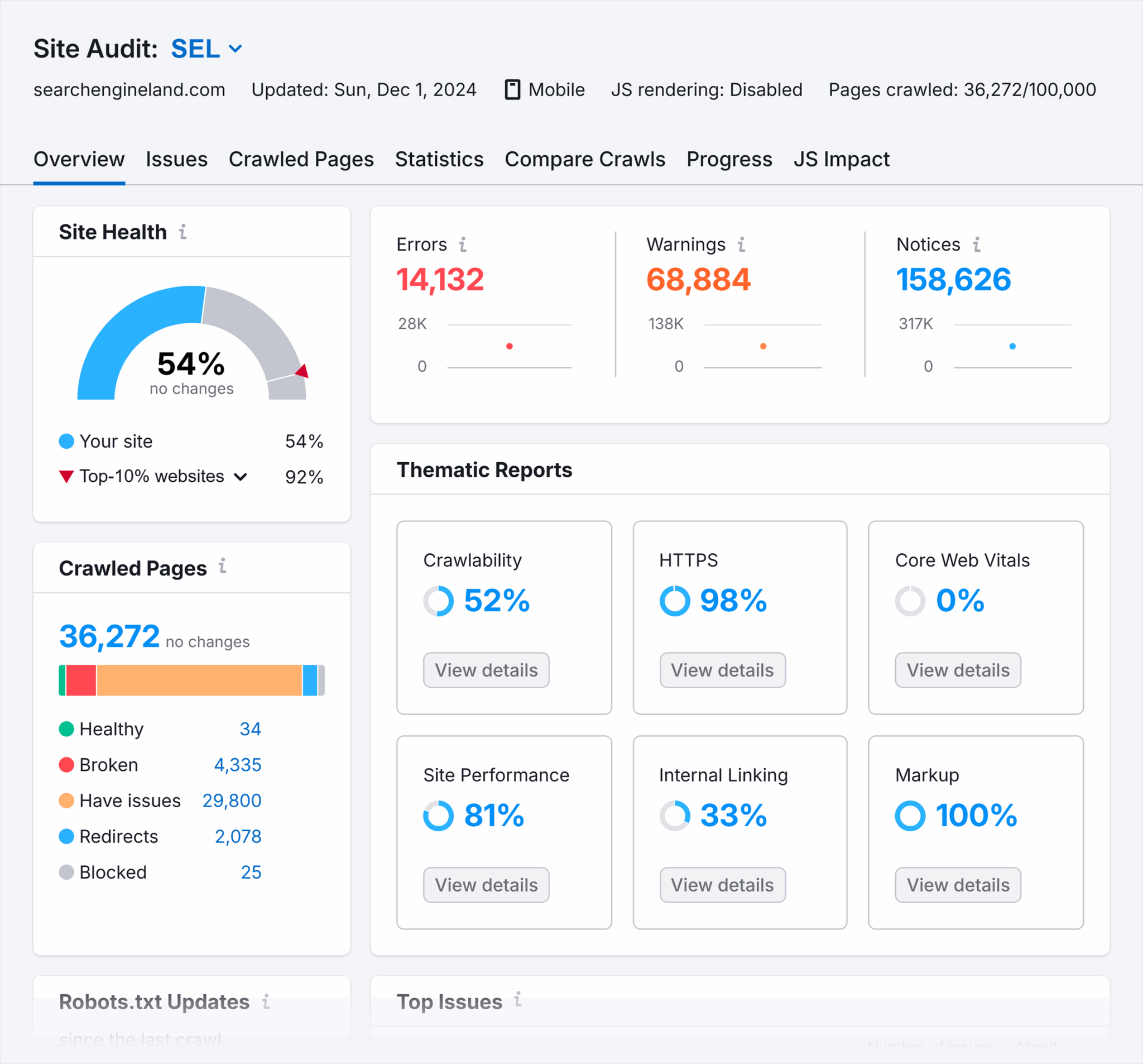
Using the Site Audit tool is easy:
- Sign in to or create your Semrush account (take advantage of the seven-day free trial if you haven’t already).
- Navigate to the “Site Audit” tab in the left-side menu bar.
- Create a new project featuring your website and configure the basic settings for your site audit (the default settings are fine).
- Run your site audit.
- Once the results come in, view the details in the markup section. Here, you’ll see schema types, as well as any invalid schemas, with clear details on what’s wrong and what actionable steps you can take to fix any issues.
For more details on working with schema using the Site Audit tool, consider this complete guide.
Step 5: Monitor the impact
One of the major benefits of organization schema is that it doesn’t require constant tweaking.
Set it once, make sure it’s working correctly, and then you’ll only have to make adjustments when something changes or when you wish to add or remove information.
Now, you’re probably thinking: If the process is so hands-off, how are you supposed to monitor the impact of your schema?
It’s actually quite easy!
First, you’ll want to keep an eye on Google Search Console and Bing Webmaster Tools. These platforms provide insight into key performance metrics and will often alert you if something goes awry.
The downside to these tools is that they don’t allow you to dig very deep into the specifics.
That’s where you’ll want to turn to a platform like Semrush.
Semrush is an all-in-one search marketing tool that provides key insights into your website’s SEO and SEM performance over time. Some of the most helpful tools in Semrush’s expansive tool chest include:
- Domain Overview: Get comprehensive insights into your website’s rankings within organic and paid search metrics. Gauge how your organization schema may be impacting traffic.
- Organic Traffic Insights: Gain deep insight into traffic patterns, including users, sessions, bounce rate, and more across various keywords and pages.
- Position Tracking: Monitor the position of your pages within the SERPs and see how your organization schema and other SEO efforts impact your position over time.
This tool is free to try and offers value-packed bundles with all the tools you need to manage your website. It’s the ideal way to monitor the impact of your organization schema and continue optimizing your site for growth!
Common pitfalls and best practices in organization schema
We’ve covered the basics of organization schema and the process behind adding it to your website. However, you should also be aware of important pitfalls and best practices as you add and monitor the impact of these changes.
Avoiding over-optimization
With over 75 different organization schema properties you can use, it’s easy to get carried away. The thing is, less is more when it comes to structured data like schema.
There are a handful of reasons why you should avoid over-optimizing your schema:
- It’s more to keep track of and update. The great thing about organization schema is that you can set it and forget it. However, you will have to go in and update things on occasion. The more properties you include, the more you have to keep track of and change.
- You may inadvertently create conflicting data. You want all of your information to match across your schema, website content, and third-party profiles like Google Business Profile and Bing Places. The narrower the scope of information, the fewer chances your information sources will conflict.
- It can snowball out of control. Organization schema has so many properties, and you may be tempted to include information that’s exaggerated or inaccurate in order to fill in all the missing pieces. This can attract unwanted attention from search engines and get your website flagged as spam.
Stick to the core properties and the ones that best suit your business. That’s plenty enough detail to provide the SEO boost you’re seeking.
Keeping schema information updated
Have you ever moved, changed your number, or created a new email account? When changes like these occur, you have to go in and update a bunch of accounts and data stores that rely on the timeliness and accuracy of these details.

The same is true for your organization schema. Yes, it can feel like a hassle. But in reality, updating only takes a few minutes. And, it’s absolutely essential for your continued success.
What happens if you don’t update your details? Search engines may show conflicting information to visitors, and visitors may be confused about what you do and how to reach you. Don’t chance it. Avoid these problems by keeping your schema up to date!
Using accurate data sources
The first step in implementing organization schema on your website is compiling your data. Naturally, you’ll want to ensure you’re using accurate information.
Links, contact details, social profiles, and even URLs change. Be sure you’re using the right data sources, especially if you’re setting up the organization schema for a client or company you work for.
When in doubt? Double check the details or run things by a manager before making any changes.
Using wrong property names or syntax errors
Structured data uses a precise format. If your spelling or syntax is off, your schema will not register properly with search engines.
This can be a big issue if you use AI to help generate your schema. Large language models like ChatGPT and Gemini may provide a value that isn’t compatible with a particular property or even make up a property altogether.
As a general rule of thumb, always proofread your schema and cross-reference it against the properties and applicable values on the official schema.org organization page.
Including multiple organization schemas on a single page
While there are instances where it’s okay to include multiple organization schemas on the same page, you’ll want to be careful of including duplicates. It’s unnecessary and just makes things more confusing for you and search engines.
You may also run into a problem where your organizations have the same name and ID but different information! This will affect search engines and result in inaccurate information being shown in the SERPs.
Track, optimize, and win in Google and AI search from one platform.
What are the instances where it’s okay to add multiple organizations to the same page? The first is if they’re properly nested with unique identifiers. The other is if you’re using Organization and a subtype of Organization (such as LocalBusiness).
These are more advanced cases, however, and unnecessary for the majority of users. As a general rule, don’t manually add multiple organizations to the same page.
Failing to test your markup before going live
Always validate your markup before you go live. It’s incredibly easy and ensures you don’t run into any trouble or break something on your site. Copy and paste your schema into the Schema Markup Validator on schema.org or use Google’s Rich Results Tool. They only take a moment and can save you a massive headache down the line.
Don’t make this rookie mistake. Test your markup before going live.
Going beyond organization schema
In this article, we’ve covered the basics of organization schema and how you can use it to improve your SEO and grow your business. But we’ve only touched the tip of the iceberg!
If you want to dive deeper into the wonderful world of schema and structured data, consider reading through this excellent guide from the team here at Search Engine Land.
Explore more on
Editorial disclosure
Search Engine Land is owned by Semrush. We remain committed to providing high-quality coverage of marketing topics. Unless otherwise noted, this page’s content was written by either an employee or a paid contractor of Semrush Inc.
About the author


