How to dominate video-driven SERPs


If you’re serious about ranking content and brand visibility, then video—and video SEO—can’t be ignored.
Creating great video content takes considerable effort. You have to plan, record, edit, and upload it, then engage with communities in comments. It’s time-consuming, costly, and demands creative commitment.
Without an SEO component, videos go live and are shared for a campaign or a purpose, but that’s about it. Video assets become distant memories, buried deep on category pages or left to decay on video-sharing platforms like YouTube or Vimeo.
Video SEO helps you get the most out of your investment. If you optimize your videos, you’ll reap long-term benefits. As people search for video topics on Google or social media, your videos are much, much more likely to come up at the top of the search engine results page (SERPs) if you’ve properly optimized them.
But what does good video SEO look like? Especially when people are watching videos on various social media channels? You’ll find out in this article.
We cover the history of video, how it earned its place in Google’s SERPs and the best platforms for visibility (with data to prove it). Plus, you’ll find the tips you need so that you can optimize videos for optimal cross-channel performance.
The rise of video-first SERPs
By now, most of us are familiar with three traditional video SERP features that put video front and center of Google’s search results, if not by name, certainly by sight.
Built for how people search today. Track your brand across Google rankings and AI search in one place.

But with the rise of AI, the explosion of short-form video, and new social platforms like TikTok, and TikTok-inspired Instagram and Facebook Reels, video SERPs have evolved to meet changing user preferences.
Traditional video SERPs
First, let’s remind ourselves of the traditional features:
- Video SERP features
- Video carousels
- Featured videos
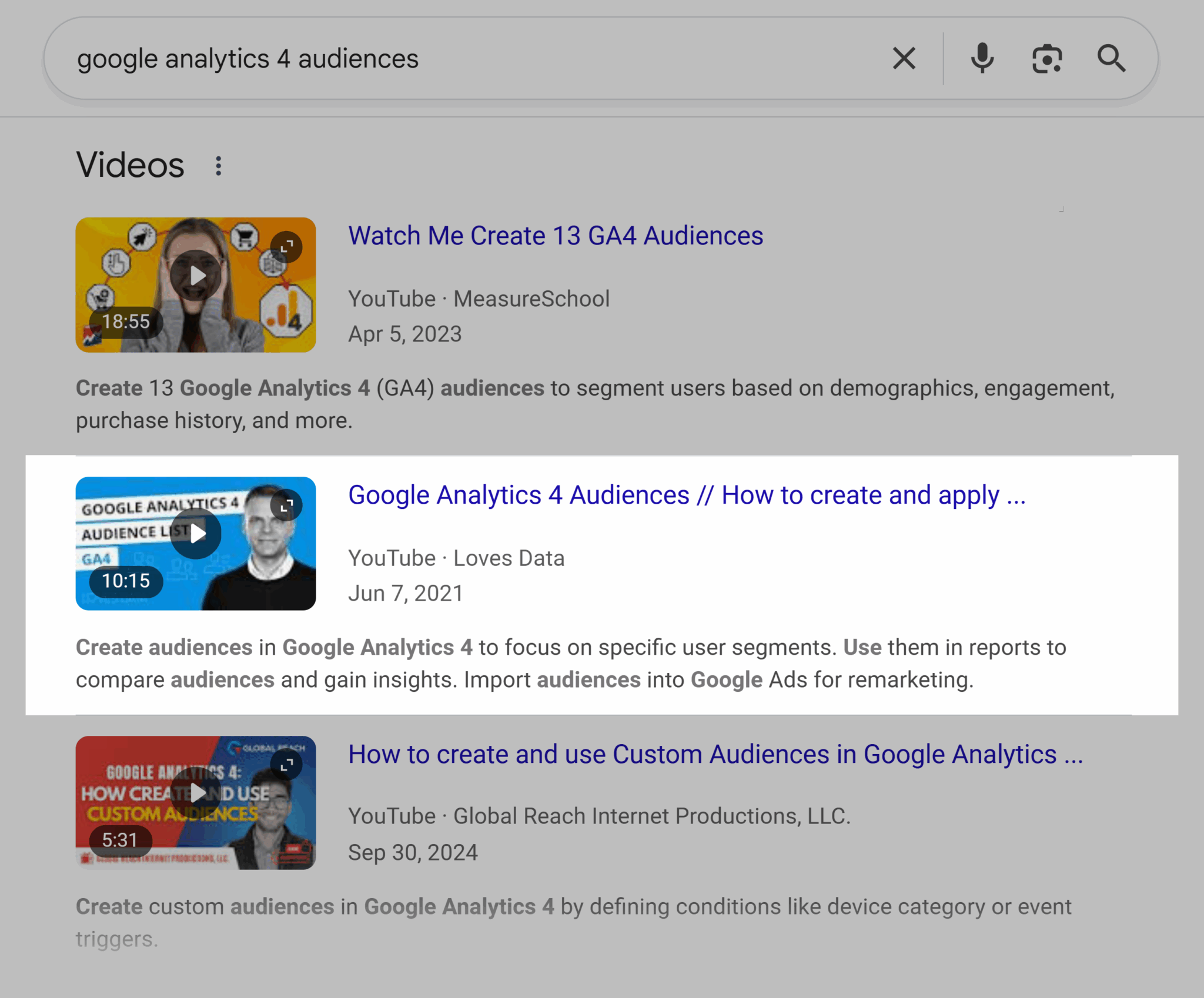
Video SERP features appear next to the traditional blue link listings:
Video carousels display multiple videos within a single interface:

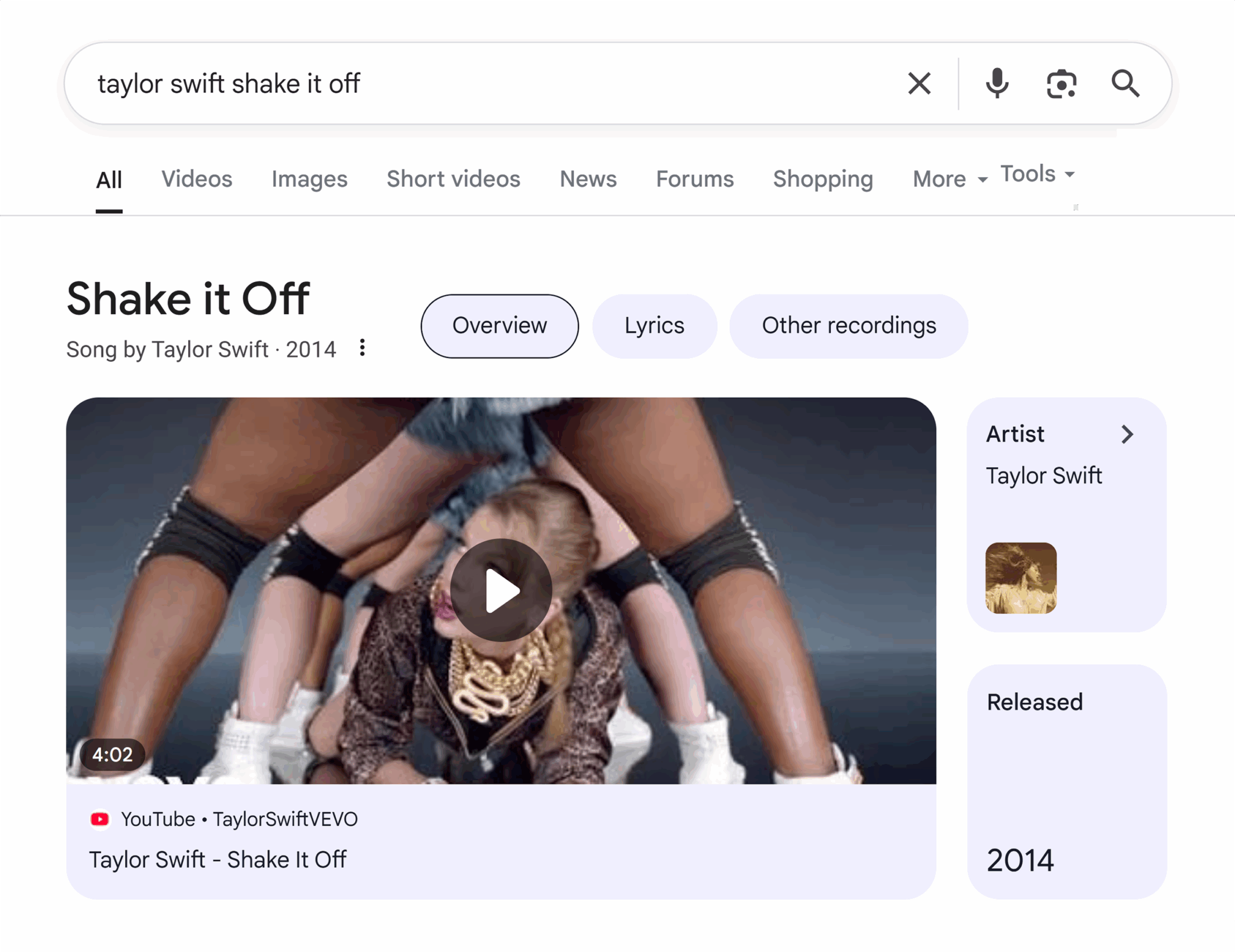
Featured videos show one video at the very top of SERPs:
Evolving video SERPs
Video SERPs have evolved with new SERP features.
For example, we now have:
- Videos displayed in People Also Ask
- Short video carousels
- Search functions for “Videos” and “Short Videos” next to “Image” search and “News”
- Videos displayed in AI Overviews
There was a time when Google’s video results were only YouTube results.
Even when TikTok had already more than taken off in popularity, when searching “recipes TikTok” on Google, the search results would only return TikTok compilation videos on YouTube. The results didn’t match what people actually wanted: TikTok itself.
Things have changed.
Today, video SERP features can return TikTok videos directly and exclusively.
Let’s review some more recent video SERPs:
People Also Ask displays videos when the video directly answers a question. In the screenshot below, People Also Ask includes the question: “How do you explain SEO to dummies?” The video “What is SEO” by For Dummies is what’s included in the search results.

Short video carousels show short videos and can often show TikTok only:
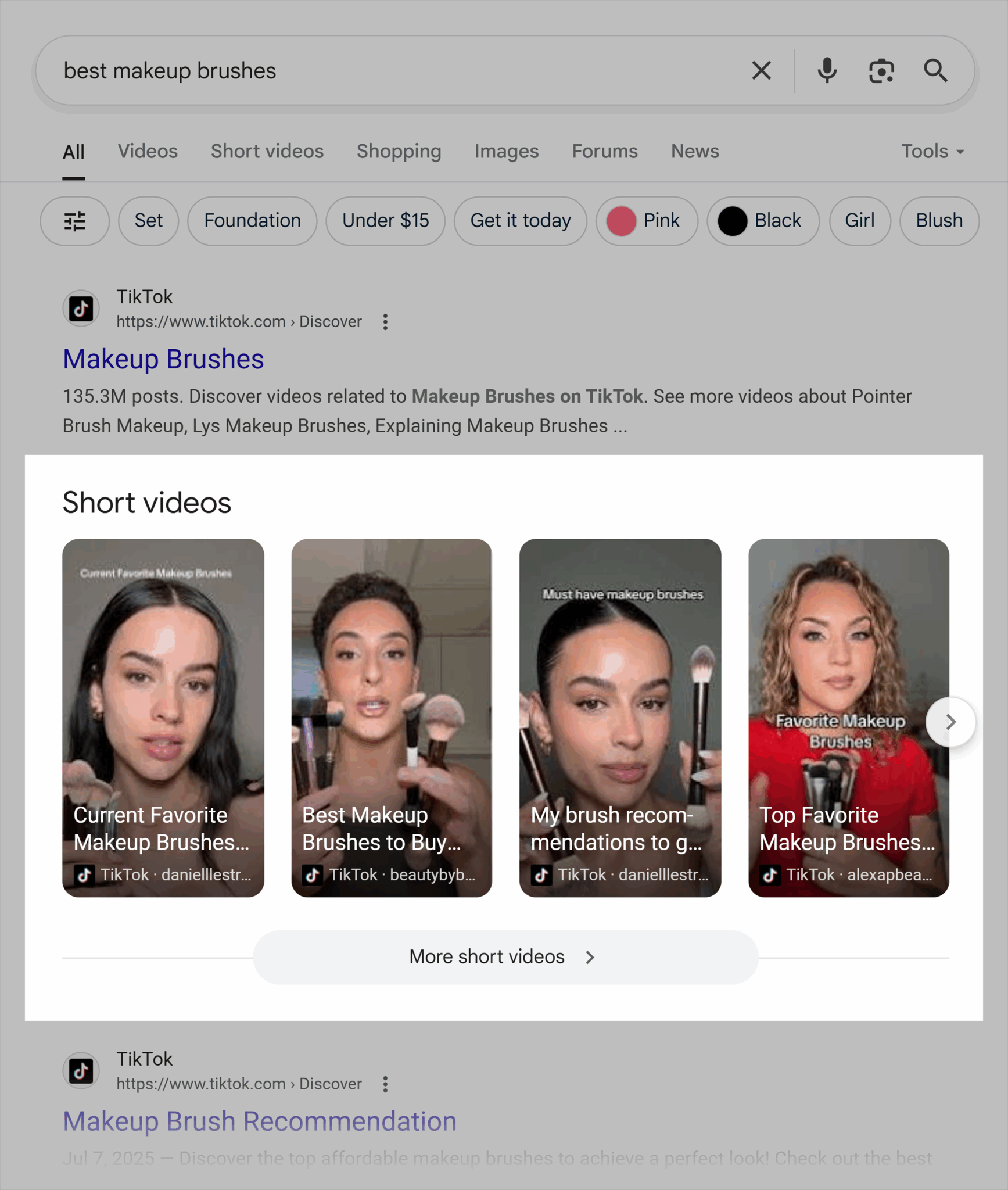
Search functions for “Video” and “Short Videos” allow users to search within Google for video content only.

AI overviews are Google’s new AI-generated summaries that appear at the top of some search results. They also feature videos where it’s appropriate:

And AI overviews aren’t the only AI search function that’s bringing video into its results.
AI Mode is Google’s search experience that lets users chat directly with an AI to refine or expand their queries. It also recommends videos:

And so do some AI-powered search engines like, Perplexity:

So why does all this matter?
Well, video search has changed dramatically.
Google’s search bots aren’t just crawling its own video platform, pulling keywords, and ranking YouTube videos that meet SEO criteria with things like title tags and meta descriptions.
Instead, Google bots crawl videos from a wide range of sources and present the ones that best match search intent. AI search tools are doing the same.
We’re beyond achieving video SEO success with just foundational SEO, like keywords included in video titles, to appease Google’s algorithm.
Modern day video SEO demands more.
To rank videos, you need semantic optimization and technical precision.
Semantic optimization is the process of improving content so that search engines can understand its meaning, context, and relationships between ideas. The goal is to help Google understand the meaning and context of a video—not just the keywords. This is achieved through transcripts, rich metadata, and clear topical clustering; search engines are prioritizing videos that meet search intent, no matter where they’re hosted.
Technical precision refers to the accuracy and completeness of the behind-the-scenes elements that help search engines crawl, index, and understand your videos. In practice, this means using clean code, correct schema markup, and structured data, and linking entities (like your brand, website, and creator profiles) so search engines can clearly identify who created the video and what it relates to. Tips on video SEO, including schema, coming later.
The anatomy of a video-driven SERP
Before optimizing video for visibility, you need to understand what Google presents in its SERPs. We covered the video SERP features above, but let’s dig a bit deeper into the details, including key moments, featured clips, and AI summaries
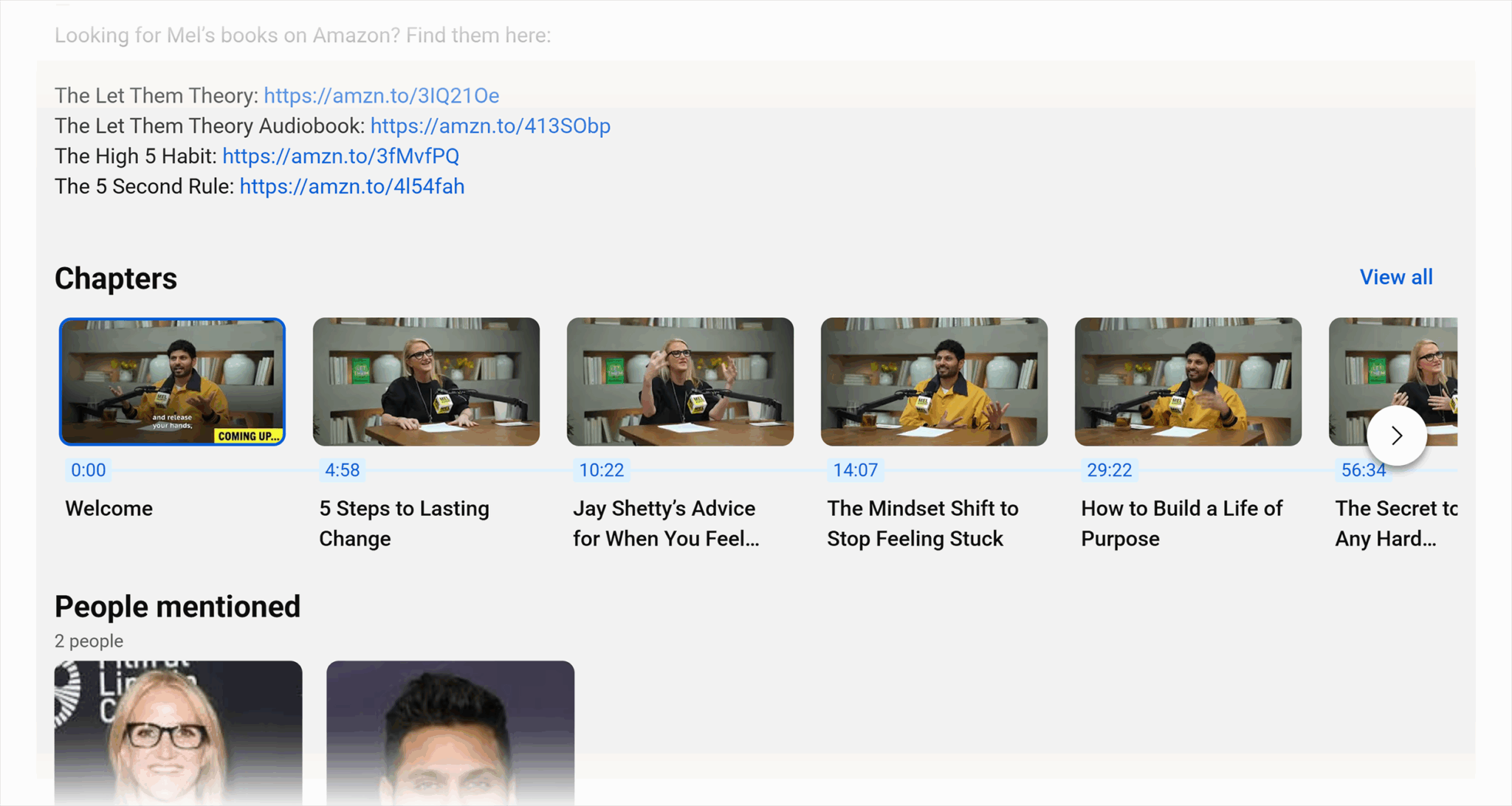
Key moments
These show up within search results with time stamps. Often, these are populated from your YouTube video’s chapters.
Tip: Adding chapters for key moments is a recommendation (Metadata optimizations (titles, chapters, transcripts) in this article, but if you want to dig deeper, there’s more detail in our YouTube for SEO article.
Featured clips
Featured clips appear in AI summaries and within Google SERPs. If a video is recommended, it often won’t play from the start. For example, the video cited below from a search on “how to do competitor analysis” starts playing from 02:22.
Why?
It’s the most relevant clip within the video that meets search intent.
The future of search isn’t about providing users with streams of content that they need to click through and read to find their answers; it’s about presenting the answer to them in the most efficient way possible.

It seems that the new video ranking factors are about:
- Engagement signals such as watch time, likes, comments, and retention rates. More engaged sections could be a sign of their value.
- Context and how well your video aligns with search intent may influence the likelihood of ranking in search.
- Authority, built through consistent, high-quality publishing, entity SEO and brand recognition, helps your videos earn trust and visibility across platforms.
What’s best for video SEO? YouTube, TikTok, or other social channels?
There was a time when YouTube was the most important platform for ranking videos in SERPs. Google showed YouTube and YouTube only.
But today, things look quite different.
To explore which video platforms Google prioritizes across different types of searches, we ran a small-scale experiment using 15 search terms that reflected a mix of audiences (B2B and B2C) and user search intents, including:
- Informational: Searches made to learn something or find an answer to a question
- Commercial: Searches comparing options before making a purchase decision
- Transactional: Searches with the intent to complete an action, like buying or booking
- Navigational: Searches made to find a specific brand, website, or page
Here’s what we found.
- YouTube is displayed the most of all video platforms, and that includes within the main, traditional SERP, within the “short videos” and “videos” search tab.
- Google shows videos from a range of channels, including Vimeo, YouTube, Facebook, Reddit, Instagram, and directly from websites (like a video on a product page).
- Long-form videos are nearly always hosted on YouTube.
- Short-form videos draw from the widest range of sources and channels.
More than half of ranking videos overall are hosted on YouTube.
After YouTube, it’s Instagram, then TikTok.

YouTube dominates video search for:
- Informational queries such as “how to use chatGPT for marketing” or “what is zero-trust security”
- Commercial queries such as “macbook air vs macbook pro 2025” or “best CRM software for small business”
- Navigational queries such as “HubSpot Academy SEO course” or “Nike Air Max campaign video”

The key difference in video SEO is transactional search.
Transactional or product searches like “buy standing desk online” or “book spa day in London” are dominated by Instagram, then TikTok, then YouTube.

It seems that publishing videos to YouTube is a must, and publishing on Vimeo offers little to no SEO benefit. Vimeo ranked only 2.4% of the time overall, and the only rank it had was in reaction to a navigation search. The search was “Nike Air Max campaign video.”
Any videos meeting transactional search intent should happen across channels for the best chance of earning visibility.
A hypothesis: Why YouTube dominates video SEO
Looking at the three top players in video SEO (that’s YouTube, Instagram and TikTok), YouTube provides the most opportunities to semantically and technically optimize videos.
There are foundational pieces that exist across all channels, such as:
- Adding keywords to titles, descriptions, hashtags, and captions
- Including spoken keywords in your script or voice-over
- Using hashtags to add keywords, or topics and categories
- Encouraging engagement in for form of likes, comments, and subscriptions
YouTube has additional SEO enhancements, such as:
- Longer descriptions: These allow for more data to be fed to Google and then to users.
- Thumbnails: These creative image elements sometimes get video URLs into the image pack with a link to the video.
- Timestamps: Breaking the video content to create chapters with their own headings is perfect for AI to pull and to understand. These become your key moments.
- Tags: Tags allow you to parse down what the video content is for potential views, but these are considered less impactful now than they once were.
- Playlists: Playlists allow you to group semantically related videos and strengthen your topical authority.
- Closed captions and translated subtitles: These features improve accessibility and coverage across languages, allowing more access to your content.
Dig deeper: YouTube for SEO: Boost rankings with video content
These enhancements allow more data to be passed to both AI and traditional search engines, and help Google understand not just what the video is about, but how it relates to broader topics, queries, and entities.
Of course, YouTube is also Google’s own platform which may contribute to its competitive edge.
But there’s more at play: technical precision and entity SEO.
Generally, when videos are included on a web page, they’re added using YouTube’s embed code, as opposed to other video embed options such as Vimeo’s embed function, or self-hosting, which means uploading and storing video files directly on your own website’s server, rather than using an external platform like YouTube or Vimeo.
The benefits of embedding YouTube for video SEO are significant:
- The page the video is being embedded into offers more context about the video itself.
- Embedded videos benefit from schema and structure data which provides even more information into what the video is about and what’s included.
- Connecting entities such as a website or author to a piece of content and by association, the video.
Together, these factors make YouTube not just a video platform but a search engine ready data source, one that’s already integrated into Google’s algorithm.
8 tips to do video SEO
Optimizing videos on YouTube isn’t enough anymore. Search results now prioritize videos from any and all sources that best match search intent and demonstrate strong semantic SEO. And they often highlight the most relevant sections, clips, or chapters within those videos.
The tips below will help you expand your video visibility across multiple channels.
1. How to structure your videos for discovery
No matter where you’re publishing your video, you must include keywords within the title and description.
You can level up your keyword placements by putting them in filenames, too.
You can further optimize videos in the form of semantic clusters by linking video content within related blog posts and landing pages. This is typically done with YouTube videos, but you can embed posts from social media channels like Instagram, too.
Level up YouTube by using an optimized file name on your thumbnail. As we talked about above, thumbnails help YouTube videos rank in the image pack—sometimes within SERPs—or in the image search.
Here’s an example of how videos appear in image search:

On YouTube, you can also use playlists to build consistent video taxonomies and strengthen topical authority. Name and structure playlists around core topics. Use keyword-rich titles where it makes sense and group related videos together to signal expertise, and help algorithms connect your videos semantically.
2. Metadata optimizations (titles, chapters, transcripts)
Metadata is what tells search engines what your video is about, and it plays a major role in discoverability and ranking.
Titles, chapters, and transcripts aren’t just “nice-to-haves,” they’re how your videos get surfaced, understood, and measured.
The screenshot below shows how a YouTube video title takes the top position for an exact match keyword.
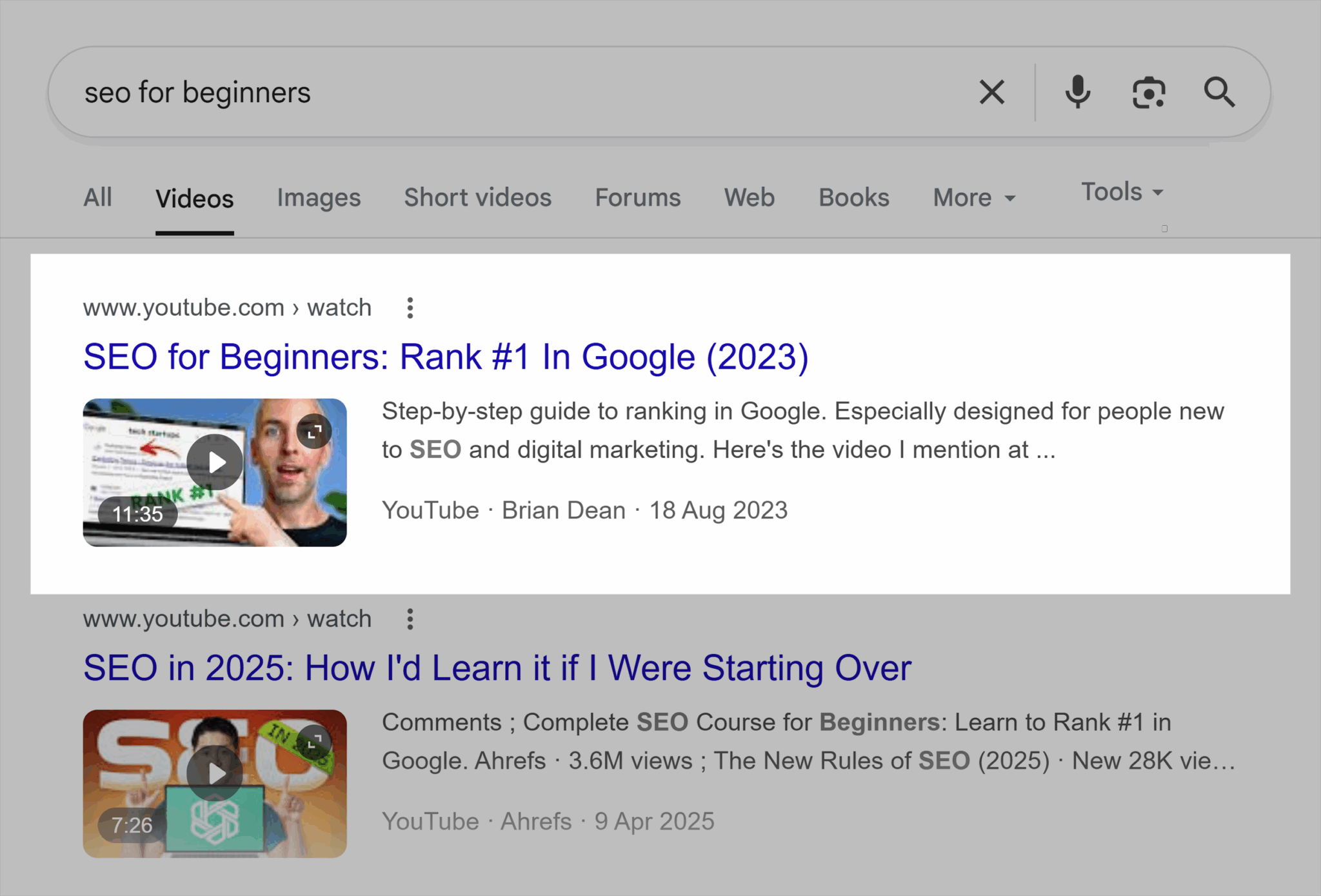
All channels allow for some metadata, such as a title or description, but you can do a lot more on YouTube.
Chapters are YouTube specific and they are of utmost importance if you want the best chances of appearing in video SERPs, like the key moments, or if you want AI to direct users straight to the most relevant chapter of your video in relation to the query. Chapters are added to videos by using timestamps in a video description.
It looks like this:
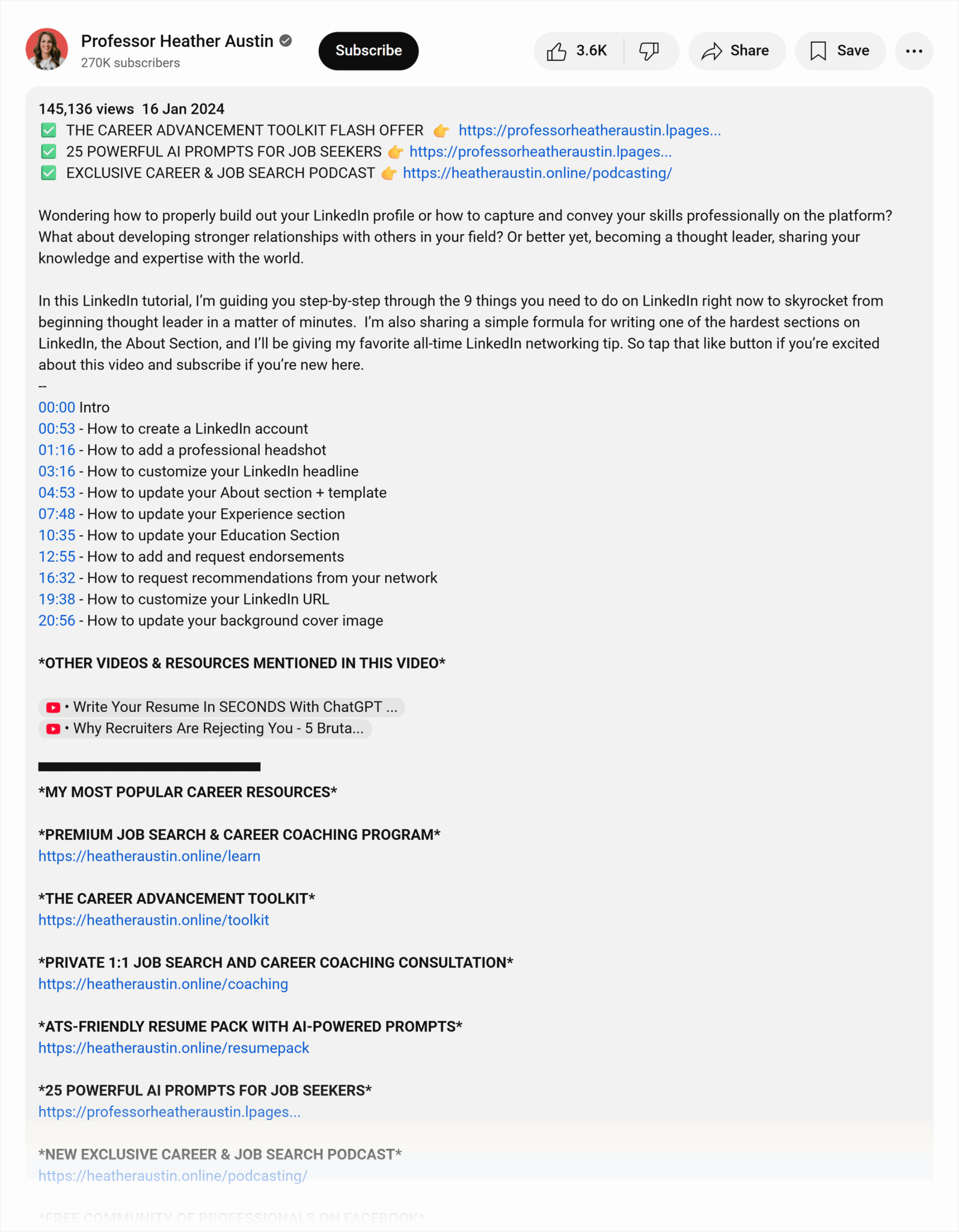
See how the timestamps are links? Click that and you’ll go to the relevant section. Add schema and you can reinforce the chapters and key moments to Google. More on that later.
Transcripts make your content accessible but they’re also a hidden SEO asset, full of natural language—as well as your keywords as you must include them—and related terms that reinforce topical authority.
These final layers of video SEO, especially organizing videos into chapters can feel like a needless task that’s an investment of time (and therefore money), but these extra elements serve as data to the search engines, increasing your chances of visibility and clicks.
3. Enhancing user engagement and video performance
The rise of video clips ranking and key moments available within SERPs, video engagement seems to be a strong signal of video quality. Watch time, retention, and interaction may feed into how prominently your videos appear in SERPs.
You can improve your engagement by:
- Encouraging viewer interaction through calls to action (like, comment, subscribe, share, save)
- Increasing watch time and session duration by front-loading content, giving the value early (important for clips), pacing videos well with cuts and on-screen elements, or advertising the next great video so users click through and watch more.
- Promoting videos across social media and other channels
Engagement isn’t a vanity metric, it’s feedback given directly to search engines and AI, and it tells you exactly what your users are most interested in. More about engagement analytics and measuring video success later.
Engaged videos are critical, whether a short video on social media, or a long-form video hosted on YouTube.
4. Mastering video schema markup
When you embed a video on your site, give search engines extra context with structured data. The core type you’ll use is VideoObject schema.
Marking up your video helps Google understand (and showcase) key details such as:
- Title
- Description
- Thumbnail
- Duration
- Upload date
- And more
Structured data makes the video more likely to appear across SERPs.
You can take your schema and structured data further with:
- Chapters and key moments: Use schema types like Clip, then add schema properties like hasPart, name, startOffset, endOffset)
- Seek within results: Add potentialAction with SeekToAction to help Google deep-link to timestamps.
Dig deeper: Google’s Documentation on VideoObject schema and clips
There are thousands of schema properties, and the above outlines a few essential items. You don’t need to use them all. Instead, start simple, check they’re working, and expand on the schema over time.
Generally, adding schema and structured data is an advanced tip. It’s a task for developers and SEO specialists to figure out together.
A lean, accurate implementation can improve discoverability and eligibility for rich features. And considering all the ways schema can go wrong, lean and accurate is a great goal to shoot for.
To help navigate video schema, avoid these three common mistakes:
- Missing fields: This happens when you leave out required properties like name, description, or thumbnailUrl. Without these, Google can’t understand or display your video properly. Populate schema in full—even a minimal implementation should include all essential fields to ensure your video is eligible for indexing and rich results.
- Inconsistent data: These inconsistencies can happen when details in your schema, such as the title, duration, or upload date, don’t match what’s on the visible page or in the video player. This inconsistency can cause Google to ignore your markup. Keep schema data accurate and aligned with on-page content.
- Invalid timestamp formats: Invalid formatting can prevent Google from reading your video’s duration or key moments. Times are recorded in numerical seconds, not minutes or spelled out words.
Tip: Video schema is usually associated with YouTube embeds. If you want examples or more information about schema and YouTube, check the structured data and video schema on our YouTube SEO article.
5. Writing keyword-rich transcripts and captions
Transcripts and captions aren’t just accessibility tools, although they obviously play a key role in making certain that all users have access to your content. They’re also hidden SEO assets. They include every word spoken in the video, and that includes your keywords. Often social media, like TikTok, or video channels, like YouTube, will create captions automatically.
YouTube has the added benefits of transcripts which give search engines full text to crawl, helping your video rank for related topics, entities, and long-tail queries (search terms that contain multiple words).
When turned on within the video description, the transcript appears on the top right. It’s a great accessibility feature because anyone can follow along with what’s being said. You can also use the transcript interface to search for words or phrases. See the screenshot below as an example:

If you end up using your transcript on your blog, here’s how you can format the transcript:
- Break sections into short, digestible segments
- Avoid keyword stuffing, just speak your keywords naturally
- Focus on clarity
Pro tip: Take your video transcript, paste it into your favorite AI tool, and prompt it to generate ideas for blog posts or social media posts. Since the transcript already includes your key ideas, you can ask AI to write them, too. Make sure to check and edit everything. Turning video transcripts into written assets is a great way to capitalize on that video investment.
Finally, use timestamps to mark key sections. Accurate timing helps Google extract “key moments” in SERPs, improving both visibility and click-through rates. You can make timestamps a link and have them open specific moments in your video.
6. Optimizing for AI Overviews and multimodal search
AI Overviews are reshaping how video content is surfaced. AI models don’t just index videos from keywords and metadata, they take a multimodal approach, analyzing context, extracting summaries, and citing sources to provide instant, conversational answers.
This means your video’s metadata, transcripts, and surrounding content directly influence whether it’s referenced or featured in AI-driven results.
Discover how you appear across LLMs like ChatGPT, Perplexity, and Google AI, and get AI-powered strategy recommendations.
To increase inclusion, focus on entity-rich transcripts and structured metadata. When your videos clearly define people, brands, topics, and related concepts, AI models can better understand their meaning and relevance. Combine this with accurate schema markup (VideoObject, Clip, and SeekToAction) to help search engines connect your video to broader queries and knowledge graphs.
Ultimately, your goal is to position your brand as the “source” for AI summaries. The more contextually complete and authoritative your video data, the more likely AI systems are to quote, link, or visually surface your content in answers, putting your brand front and center.
Dig deeper: What the AI Visibility Index tells us about LLMs & search
7. Leveraging YouTube SEO vs. on-site video SEO
A lot of your video SEO takes place on the video channel itself in the form of the video content, the title, the descriptions, hashtags, and more. This is especially true on YouTube which offers enhanced SEO options (as listed above).
However, your on-site signals also add video SEO signals, such as context, entity connections (so there’s a connection between your YouTube video and your domain), authority, structured data, and more.
All the SEO tactics from the video and the website are helpful and work together.
Generally, it’s best to host videos on YouTube. The platform automatically applies structured data like VideoObject schema, making your videos easier for Google to index and display in rich results. Plus, because YouTube is owned by Google, there’re likely direct algorithmic benefits there. It’s probable that your videos will be crawled, understood, and surfaced faster.
There are also technical considerations. Hosting large video files directly on your website can:
- Slow down page load speeds
- Affect Core Web Vitals
- Strain your hosting resources
Embedding from YouTube keeps your site lightweight while still giving you the SEO and UX benefits of having video content visible on-page.
Further benefits of hosting on YouTube include enhanced analytics.
YouTube Studio is YouTube’s built-in dashboard for creators. It’s where you can upload and manage videos, edit details like titles and descriptions, respond to comments, and access in-depth analytics. It provides detailed engagement metrics, including watch time, audience retention, traffic sources, and viewer demographics. Even when the video is viewed through an embedded player on your site, YouTube still counts the engagement.
Then you can use analytics within Google Analytics (GA4) to complement this data. You can see how a video impacts on-site behavior. For example, you can measure metrics like session duration, scroll depth, and conversions triggered before compared to after you’ve embedded a video.
Dig Deeper: Get started with YouTube Analytics
8. Measuring and scaling video-driven visibility
Measuring your video content’s performance is a must.
A good video content strategy is serious work, and it costs a lot, too. Businesses need to know that video is working and driving business and marketing goals. Without proof of impact, it’s difficult to justify continued investment in production, editing, and promotion.
Tracking performance not only helps you secure buy-in from stakeholders but also shows which topics, formats, and channels deliver the best ROI.
When you can tie engagement metrics and conversions back to your videos, you turn creative output into measurable business value, and that’s what secures continued budgets and desire for video marketing.
You can combine data sources from Google Search Console (GSC), G4, YouTube, or third-party tools for video analytics for optimal tracking.
In GSC, keep an eye on pages with video embedded and see how they perform. You want increased clicks and impressions. Increased click-through rates (CTR) are always a good sign, too, but this may not occur unless you mention the video in your title tag.
In GA4, you can measure page engagement as well as video metrics like video start, video progress and video complete to see how far people are watching a video from your website’s page.
Tip: This YouTube SEO article provides a simple, step-by-step guide on how to set up your analytics.
In YouTube, you can measure video engagement across all views. Things like comments, likes, and shares all build a picture of how your video performs.
Third party tools like Semrush or BrightEdge help you to see how well your video ranks for various video SERPs. For example, you can track keywords in Position Tracker and filter by features to see where videos are ranking.
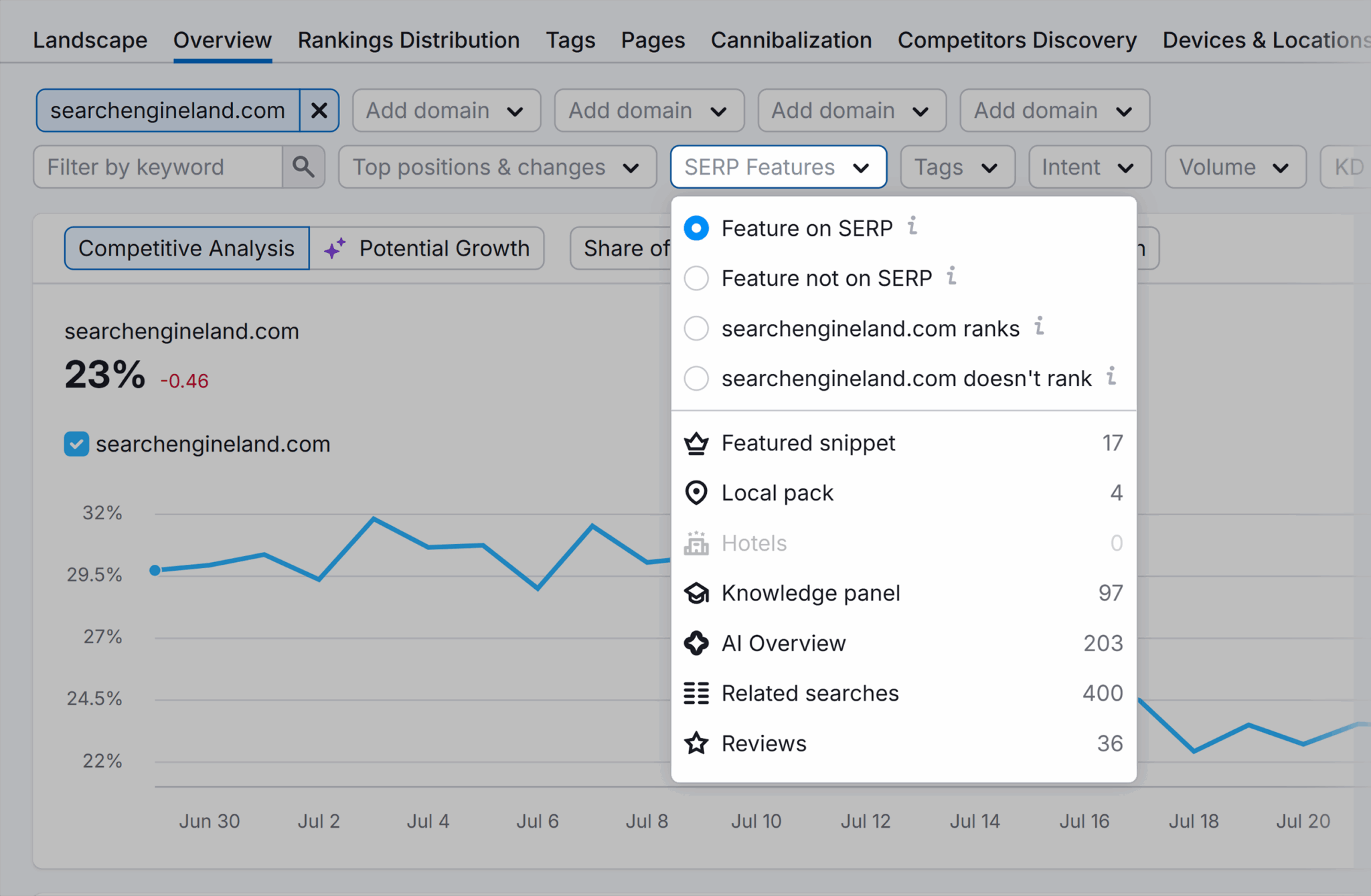
These metrics reveal how often your videos are surfaced, how effectively thumbnails and titles attract clicks, and whether Google is recognizing and showcasing your chapters or timestamps. In other words, they tell you how well your videos are working with search.
Tracking metrics across four places sounds like a lot, and it is, but you can pull it all together in a dashboard that unifies YouTube Analytics, Search Console, and GA4 data. Try Looker Studio to do this.
Stay ahead of trends in video search optimization
Video content is no longer a supplement to your content strategy; it’s a search asset, and brands that combine technical markup, semantic transcripts, and cohesive storytelling will dominate the next generation of SERPs.
Staying ahead of video SEO means paying attention to updates and adapting your strategy. Of course, video SERPs and video indexing are changing a lot, and fast. It’s not just YouTube anymore, it’s videos ranked from multiple channels and video is way past the simple keywords of yore.
And, as AI and voice search rises, AI models will likely need to interpret meaning, context, and authority even more as voice search relies on concise, conversational answers. Video that’s semantically rich, accessible, and clearly structured will have a better chance of being discovered across all of these modalities.
Ultimately, sustained dominance in video SEO comes down to continuous learning and experimentation. Monitor performance, test new formats, and refine based on what works. The brands that treat every video as a discoverable, data-rich search asset—rather than a one-off campaign piece—will be the ones that own visibility in the years ahead.
What’s next?
- Read our comprehensive guide on YouTube SEO for more details and YouTube-specific SEO tips.
- Learn how video fits into wider content plans and dig deeper into repurposing with our practical guide to content strategy.
Explore more on
Editorial disclosure
Search Engine Land is owned by Semrush. We remain committed to providing high-quality coverage of marketing topics. Unless otherwise noted, this page’s content was written by either an employee or a paid contractor of Semrush Inc.
About the author