Google Search Console messages can now be viewed without leaving reports

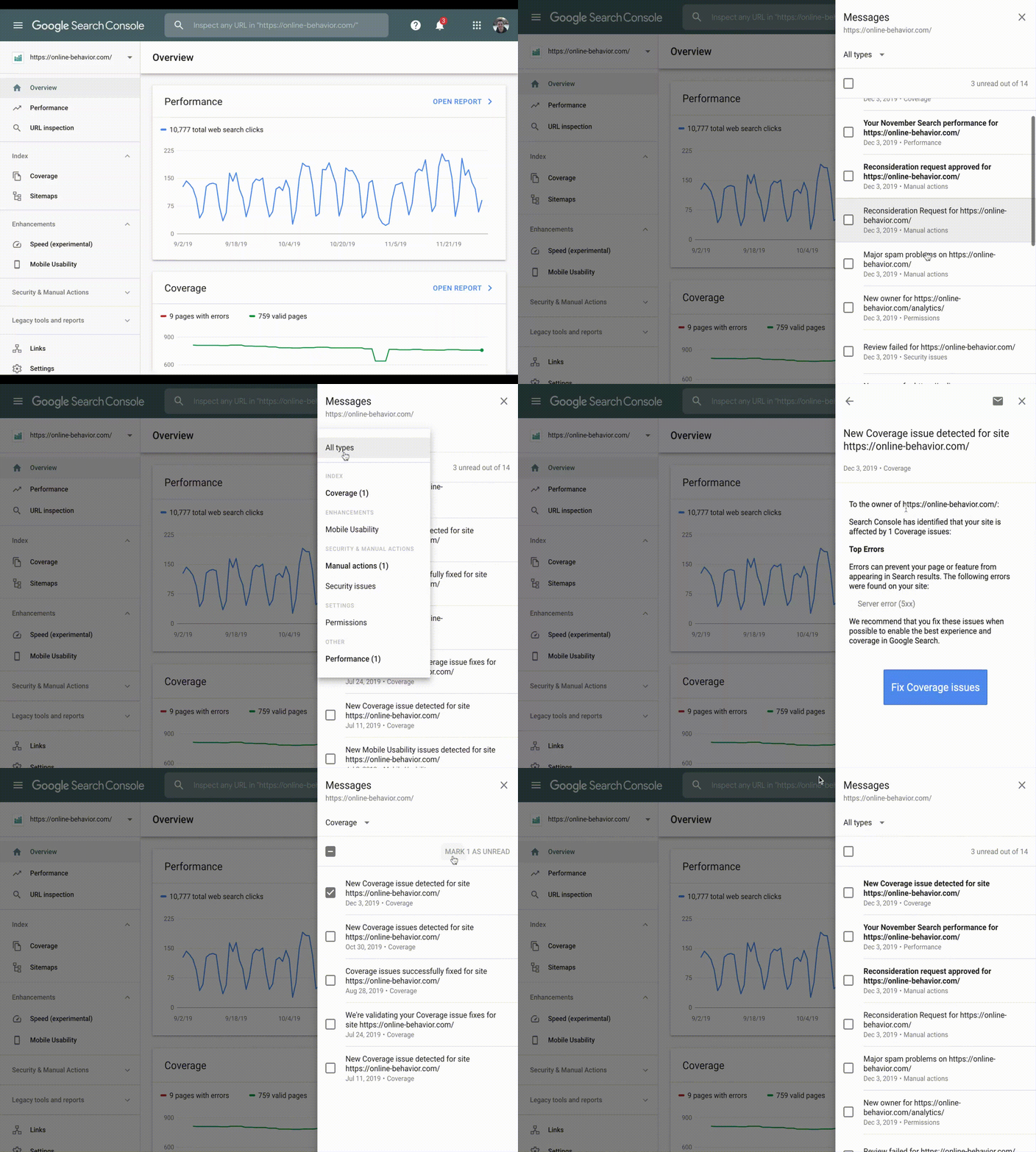
Messages within Google Search Console are now accessible through the bell icon at the top of any page within Search Console, the company announced Wednesday. The updated interface now allows site owners to view their messages from anywhere within the tool, without leaving reports.
Why we care
Being able to reference messages without having to leave the report you’re viewing makes information more accessible and improves our workflow, which can facilitate better decision making.
The categorized messages (as seen in the example above) will also make it easier to locate communications pertaining to a specific issue.
More on the announcement
- Messages are now categorized into types, such as Performance, Coverage, Enhancement types and so on.
- When a user gains access to a new site in Search Console, they will be able to view all messages the site has previously received, dating back to May 23, 2019. Messages sent prior to that date can only be viewed in the legacy message list or in your personal inbox.
- For the time being, old messages are still available in the “Legacy tools & reports” section of the sidebar.
Explore more on
Add Search Engine Land as a preferred source on GoogleEditorial disclosure
Search Engine Land is owned by Semrush. We remain committed to providing high-quality coverage of marketing topics. Unless otherwise noted, this page’s content was written by either an employee or a paid contractor of Semrush Inc.
About the author