How to improve Google Ads lead quality with CRM data


After years of auditing Google Ads accounts, one thing continues to surprise me. So many customer relationship management (CRM) tools still aren’t talking to Google Ads.
Somewhere between the form submission and the sales pipeline, lead quality data just disappears. Yet that data is one of the most valuable signals Google Ads could learn from.
But what happens to those leads once they reach the CRM is also, at least partly, our responsibility as Google Ads managers. In addition to generating leads, we need to measure lead quality and track whether they turn into business.
Why lead volume isn’t enough anymore
For years, getting more leads has been treated as a sign of good campaign performance. It’s an easy trap to fall into, especially when you start measuring your own performance by more conversions, graphs moving in the right direction, and even that reassuring Excellent ad strength rating from Google Ads.
But a lead isn’t a sale. And two leads can be worth wildly different amounts to a business.
This is why we should prioritize qualified leads. But how do we define that?
More budget? The right location? A specific service? Someone ready to buy now? It can mean completely different things from one business to another.
If you can’t define and measure what a qualified lead is, you can’t optimize for it. And if Google Ads only sees the form submission, it’ll optimize for more of the same.
Instead, Google Ads needs to know what happens afterward.
How to measure lead quality for Google Ads
In three steps, you can connect your data, define what a qualified lead means, and optimize Google Ads for lead value.
1. Connect your CRM back to Google Ads
The first step is connecting your CRM data to Google Ads. This tells Google which leads became qualified, which turned into customers, and which went nowhere.
- Capture the lead: When someone submits a form, capture the information Google will need to identify that lead later, such as the GCLID, email, or phone number.
- Track what happens next: Monitor how the lead moves through your CRM from new lead to qualified lead to customer.
- Confirm the outcome: Tell Google Ads whether that lead became qualified, turned into a customer, or went nowhere, so it can connect that outcome with the original ad click.
This is where offline conversions and enhanced conversions for leads come in:
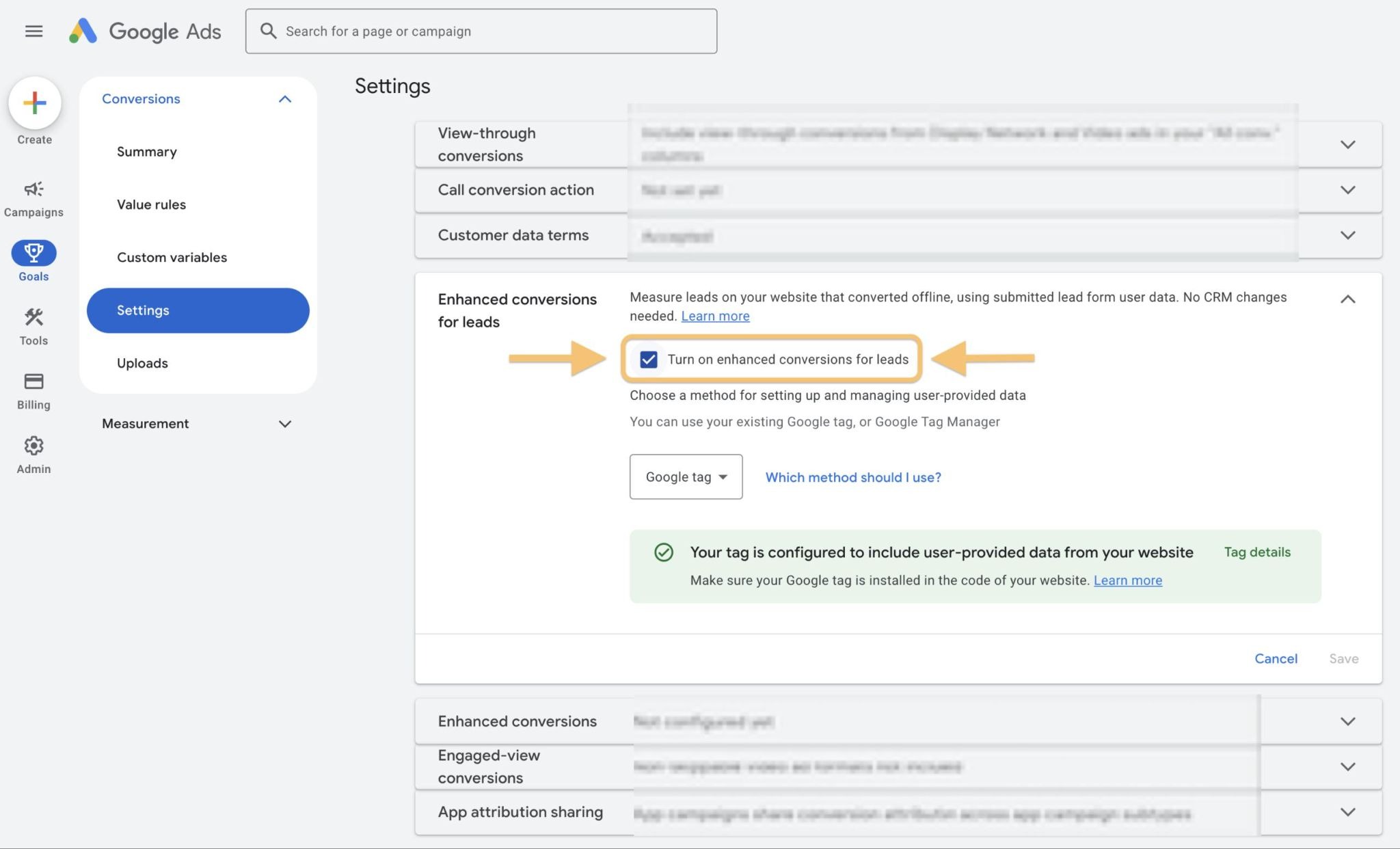
Google recommends uploading offline conversion data regularly, ideally daily.
There are also time limits. GCLID-based offline conversions generally need to be uploaded within 90 days of the ad click, while enhanced conversions for leads using first-party data have a 63-day window.
If your data doesn’t match correctly, check the basics first:
- Is the GCLID being stored?
- Is the first-party data being captured correctly?
- Are any parameters getting lost between the ad, form, and CRM?
Enhanced conversions for leads can also improve campaign outcomes. According to Google, advertisers using it see a median 10% increase in conversions over those with standard offline conversion imports.
Dig deeper: Google Ads launches built-in lead management dashboard
The industry’s trusted source for essential news and analysis.
Sign up for our newsletter to receive exclusive insights and updates directly to your inbox.
- Daily breaking news
- Expert analysis from industry veterans
- Join over 200k subscribers
- Covering SEO, PPC and AIO
2. Define what a qualified lead is
Once your CRM and Google Ads are talking to each other, you need to decide what counts as a qualified lead. Before you can teach Google Ads what a good lead looks like, you need to define it yourself.
Talk to the sales team about what makes a lead worth pursuing. For a real estate business, for example, you might look at:
- Budget: Can they realistically afford the properties you’re selling?
- Location: Are they looking in an area where you have properties available?
- Timeline: Are they looking to buy soon or just exploring?
I would keep the scoring as simple as possible to start. You don’t necessarily need a complicated model. For example:
- 0 – Not qualified: Doesn’t meet the basic criteria.
- 1 – Qualified lead: Meets your criteria and is worth pursuing.
- 2 – Customer: The lead has turned into business.
Your criteria will look different depending on the type of business you’re representing.
You can always make the scoring more sophisticated later. What matters is that marketing and sales agree on what each stage means and use the scoring consistently.
3. Optimize Google Ads for lead value
Once Google Ads knows which leads are qualified, you can go one step further and tell the platform that not every conversion has the same value.
In a real estate campaign, for example, a qualified lead could be assigned a value of $50. And a customer who buys a property could be assigned the value generated for the business.
The numbers will be different for every business. The point is to give Google Ads another signal about which outcomes matter most.
Once you’re consistently sending conversion values back to Google Ads, you can use value-based bidding, such as Maximize conversion value or Target return on ad spend (ROAS).
But first, you need sufficient data.
A customer is more valuable than a qualified lead. But if the business only closes a few sales each month, Google may not have enough sales data to optimize effectively. In that case, optimizing toward qualified leads may make more sense.
The goal isn’t necessarily to optimize for the deepest possible conversion. It’s to find the most meaningful conversion that gives Google enough data to learn from.
Dig deeper: How to reduce low-quality leads from Performance Max campaigns
From measuring leads to reporting on real business value
With this system in place, you can provide more in-depth Google Ads reporting. Instead of reporting on leads, you can share the number of qualified leads and the value of the pipeline they generated.
That gives you a much clearer picture of what your campaigns are doing for the business.
It also gives you more confidence when making recommendations, asking for additional budget, or preparing your next proposal. And for a consultant or agency, demonstrating that value can make conversations around renewals, expanding campaigns, or even upselling additional services much more straightforward.
Lead quality isn’t clear at the moment of the click. It’s determined by everything that happens afterward. And that’s exactly the information you should be feeding back into Google Ads.
Explore more on
Editorial disclosure
Contributing authors are chosen for their expertise and work under the oversight of the editorial staff. Search Engine Land is owned by Semrush. The contributor was not asked to mention Semrush; the opinions expressed are their own.
About the author