Proxies for prompts: Emulate how your audience may be looking for you

In this new era of generative AI technology, searchers have begun to swap keywords with prompts. Shorter and long-tail queries are being replaced by more conversational prompts, which tend to be longer and more in-depth. These days, searchers are expecting more complete answers than a paginated list of results.
Until we get an AI-specific equivalent of Google Search Console or Bing Webmaster Tools, we can’t really see for certain what or how our audience is behaving on AI search platforms as they look for our content, brands or products.
However, we can still look for proxies to emulate how this journey works. Here are multiple ways to use other data points as proxies to find prompts used by your audience. You can then use your AI Tracking Tool of choice to track how these prompts are performing.
People Also Ask
Hidden in plain sight, you can use a very popular SERP feature to move from keywords to prompts/questions. People Also Ask (PAA) was introduced in 2014 and suggests multiple related questions to your query. You can easily go from a keyword to a list of questions. When clicking on any PAA result, the list expands and gives you more terms.
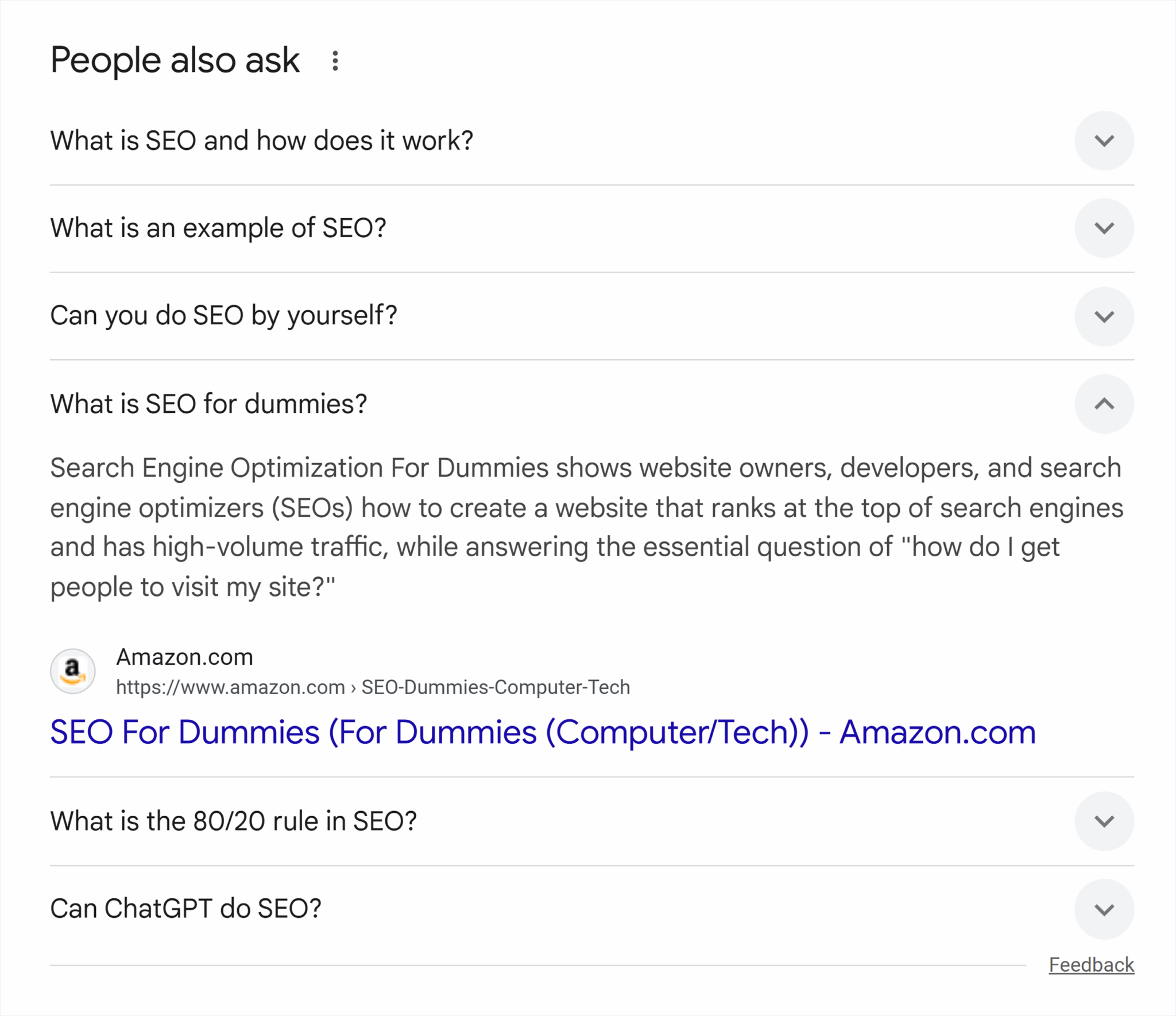
Go query by query to find relevant PAAs, or you can use AlsoAsked to extract the exact questions at scale. PAAs are long questions that attempt to answer the next questions asked in the search journey, so they’re a step closer to prompts written in AI Search platforms.
Userbots
Userbots like ChatGPT-User and Perplexity‑User are powerful ways to see how your pages are being used in AI Search. It doesn’t give you the prompts they use, but it’ll help you assess which pages are being cited without trying to guess by tracking prompts that may or may not be relevant at all.
These bots ping the URLs on your website when they’re used to formulate an answer to a user. The process is called RAG (Retrieval-Augmented Generation).
The SEO toolkit you know, plus the AI visibility data you need.

To paraphrase Mike King, one of the most trusted sources in SEO & AI, RAG is a mechanism by which a language model can be “grounded” in facts or learn from existing content to produce a more relevant output with a lower likelihood of hallucination.
Translation: Your page was used as an answer and, in some shape or form, your content helped a user. This may give you clues about what type of content is most used by your audience on these platforms, even if the answer hasn’t turned into a click.
Historically, log files have been difficult for SEOs to get, despite every website having them in its servers (yet another reason why SEOs should have access to them!).
You could use a combination of pages with userbot visits, search for their main keywords (as seen on Semrush or GSC), and then see which PAAs Google displayed.
Long queries on GSC/BWT
Despite not giving a breakdown of AI Mode or AI Overview queries on GSC, smart SEOs are finding proxies that can be used to find queries that resemble the behavior we expect in these platforms. One of them is Ziggy Shtrosberg, who came up with a huge regex you can copy and paste to your GSC.
His guidelines are to:
- Filter by Search Appearance: Desktop
- Add a page filter with your root domain (e.g., “https://www[dot]example[dot]com/”) and add this massive regex under the Query filter:
^(generate|create|write|make|build|design|develop|use|produce|help|assist|guide|show|teach|explain|tell|list|summarize|analyze|compare|give me|you have|you can|where|review|research|find|draft|compose|extract|process|convert|transform|plan|strategy|approach|method|framework|structure|overview|summary|breakdown|rundown|digest|perspectives|viewpoints|opinions|approaches|angles|pros and cons|advantages and disadvantages|benefits and drawbacks|assuming|suppose|imagine|consider|step by step|procedure|workflow|act as|adapt|prepare|advise|appraise|instruct|prompt|amend|change|advocate|aid|assess|criticise|modify|examine|your|assign|appoint|delegate|nominate|improve|expand|calculate|classify|rank|challenge|check|categorize|order|tag|scan|study|conduct|contradict|update|copy|paste|please|can you|could you|would you|help me|i need|i want|i'm looking for|im looking for|how do i|how can i|what's the|whats the|walk me through|break down|pretend you're|pretend youre|you are a|as a|from the perspective of|in the style of|format this as|write this in|make it|rewrite|i'm trying to|im trying to|i'm struggling with|im struggling with|i have a problem|i'm working on|im working on|what's better|whats better|which|pros and cons of|recommend|suggest|show me how|guide me through|what are the steps|how do i start|whats the process|take me through|outline the procedure|brainstorm|come up with|think of|invent|what if|lets explore|let's explore|help me think|i'm a beginner|im a beginner|as someone who|given that i|in my situation|for my project|i'm currently|im currently|my goal is|depending on|based on|taking into account|considering|given the constraints|with the limitation|improve this|make this better|optimize|refine|polish|enhance|revise|teach me|i want to learn|i don't understand|i dont understand|can you clarify|what does this mean|eli5|i'm confused about|im confused about|also|additionally|furthermore|by the way|who's|whos|find|more|next|also|another|thanks|thank you|please)( [^" "]*){9,}$
Take this strategy with a pinch of salt, as some of these queries might be generated by LLM trackers.
For instance, I found a pattern of prompts starting with “evaluate,” which have a high number of impressions by zero clicks (not a small number of clicks, exactly zero clicks). If longer prompts have a high number of impressions and no clicks, beware that it might not be humans using these prompts.

Perplexity follow-up questions
One of the main AI Search platforms, Perplexity has a feature called “Related” where it displays up to five follow-up prompts. While the initial prompt is still yours and may not be how others are prompting, the related follow-ups are still a good indicator of how humans prompt—or at least how the platform expects humans would.

These answers are country-specific, so run your research locally.
Semrush AI Visibility Tool
Considering we don’t have the search volume metric per single keyword and that prompts are a lot more unique than keywords, it’s not realistic to track every single prompt relevant to our companies. A way to mitigate this is to combine these prompts into topics and use AI to summarize what they mean.
The new Semrush AI Visibility Tool has a feature called “Prompt Research” that matches your keyword to a topic and gives you a list of prompts alongside brands mentioned, intent, and sources.

You might decide not to track single prompts, which can grow fast and become overwhelming to measure. Rather, use the Semrush prompt database for optimization and measure the results by looking at the whole topic performance.
Without grounding, your chances are low
Keep in mind that not every prompt requires RAG, meaning that if the answer is already on the AI Search platform training data, no pages will appear as sources. For some brands, just getting a mention is fine. If, say, someone is looking for a museum or restaurant to visit, the mention might be enough to convince them to reach the destination and convert offline (e.g., buy a ticket or a meal).
In most cases, however, SEOs are still looking for traffic, so the prompt must list pages in their answers to give you a chance to be visible. Ironically, while the results you get from ChatGPT are one answer instead of a SERP, the LLM is actually doing searches for you in the background.
Luckily, you can find:
- The searches ChatGPT is doing in the background
- The probability of this search requiring a RAG
You can find these by looking for “queries,” “search_queries,” and “search_prob” inside Chrome Dev Tools (Inspect > Network > Conversation > Response).

Or, to simplify, you can add this script as a bookmark on Chrome and click on it after prompting a question on ChatGPT. This is an improved version of Ziggy Shtrosberg’s script.
While these searches look more like traditional searchers as opposed to prompts, your strategy may be to optimize for them and win on AI search as a secondary benefit.

When it comes to search_prob (also on the script above), it’s the probability that an answer requires grounding (RAG). This answer ranges between 0 (low) and 1 (high). Every answer is unique (even if you and I search for the same prompt, we’ll have different answers), so this can act as a proxy for the opportunity of pages being listed as a source.
As with every new technology, things change fast. How people use AI tools and which tools are being used are constantly changing. New models (like ChatGPT5) change how RAG is used, and the increase in adoption across different industries also affects what prompts you should track, so you must also evolve and reevaluate what and how to track AI searches.
Track, optimize, and win in Google and AI search from one platform.
Explore more on
Editorial disclosure
Contributing authors are chosen for their expertise and work under the oversight of the editorial staff. Search Engine Land is owned by Semrush. The contributor was not asked to mention Semrush; the opinions expressed are their own.
About the author