What is technical SEO? The definitive guide


Most people think SEO starts with keywords and ends with backlinks. But here’s the hard truth: none of that matters if search engines can’t find, understand, or access your content.
That’s where technical SEO steps in. Not as a supporting player, but as the quiet force behind every crawl, every index, and every ranking gain or loss.
Think of your website like a subway system:
- Content is the train: it gets people to where they want to go.
- Backlinks are the stations: they determine reach and reputation.
- But technical SEO? It’s the rails, tunnels, and control room. If that system is broken, nothing moves.
And yet, technical SEO is often treated like an afterthought. Pushed to the bottom of the roadmap. Relegated to developers who aren’t trained in SEO or SEOs who don’t speak code.
This technical SEO guide is here to change that and delivers what others don’t:
- We explain not just what to fix, but why it matters to both search engines and users
- Every recommendation comes from analysis of real-world technical issues that have impacted website performance
- Rather than theoretical advice, we provide practical workflows to integrate technical SEO into your existing processes
- Our recommendations adapt to the complexity of your site, whether you manage a small blog or an enterprise platform
- The guide stays current with Google’s technical requirements and algorithm changes
We’ll go deep into:
- How search engines crawl, render, and index modern websites
- Why Core Web Vitals, structured data, and site architecture directly impact rankings
- Exactly what to audit and how to fix it, whether you’re running a small blog or a 500,000 URL enterprise platform
- How to scale technical SEO using automation, serverless tech, and AI
Whether you’re a marketer, developer, or SEO strategist, this is a practical, strategic, and brutally honest master class in technical SEO for beginners, perfectly aligned with the depth and clarity of our in-depth SEO guide.
Let’s begin where it all starts: with a simple question…
What is technical SEO?
Imagine this: you’ve just published a brilliant piece of content. It’s well-written, keyword-targeted, and optimized to convert. But days go by and… nothing. It’s not showing up in Google. It’s not getting clicks. It might as well not exist.
That can be a case of a technical SEO failure.
The short definition:
Technical SEO is the process of optimizing your website’s infrastructure so search engines can crawl, render, index, and serve your content correctly and efficiently.
But that definition, while true, is just the surface.
Let’s break it down through the lens of how Google actually sees your site:
- Crawling: Can Googlebot access your pages by following internal links and sitemap instructions?
- Rendering: Can Googlebot fully load your content, including JavaScript, images, and dynamic elements?
- Indexing: Does Googlebot store and organize your content correctly in its massive database?
- Ranking: Does your site’s technical setup enhance or limit your chances of showing up?
Technical SEO is about controlling these steps, on your terms.
The SEO toolkit you know, plus the AI visibility data you need.

How technical SEO differs from on-page and off-page SEO
You might be wondering: how is technical SEO different from the other “types” of SEO we hear about?
Let’s break this down:
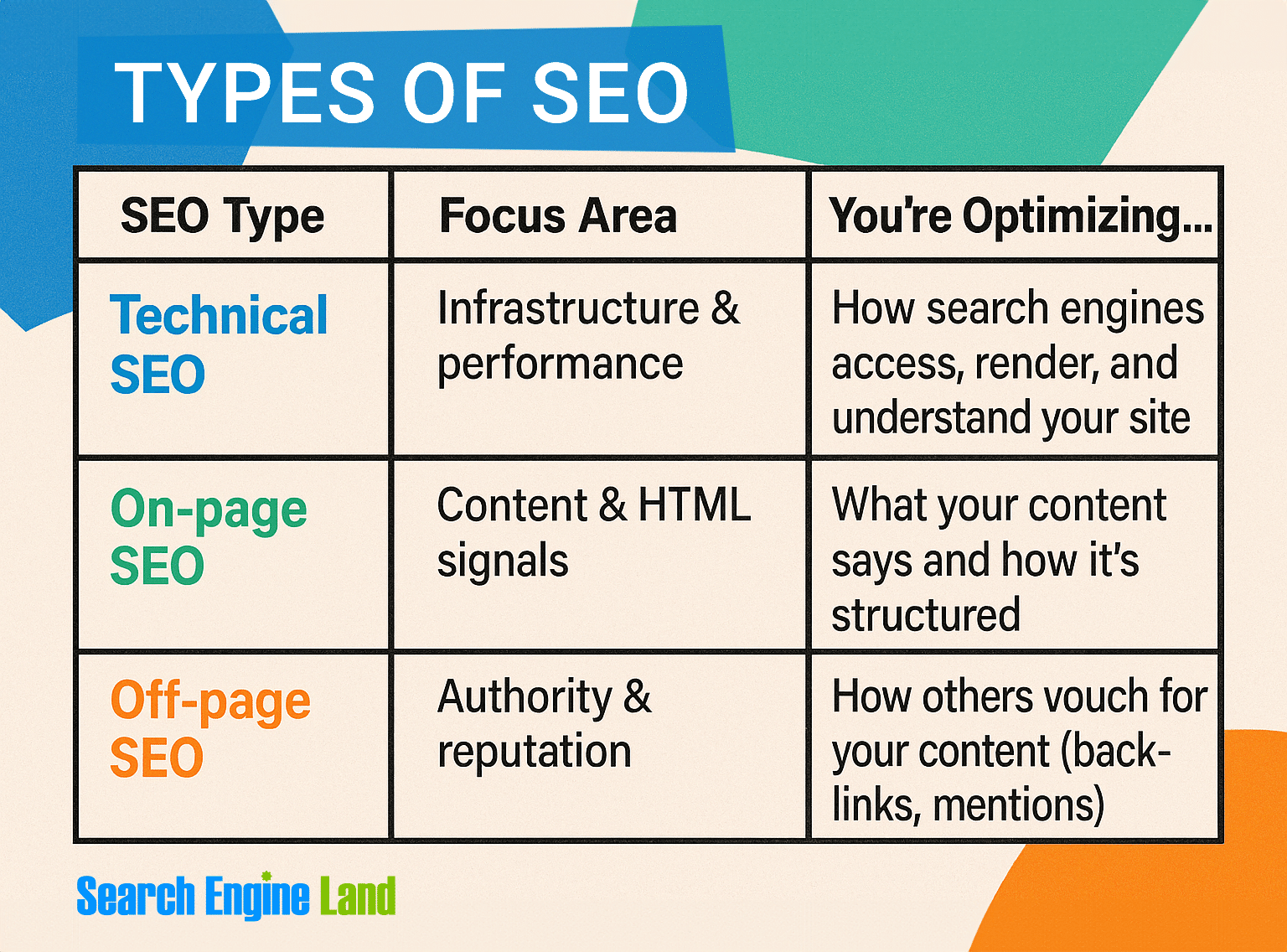
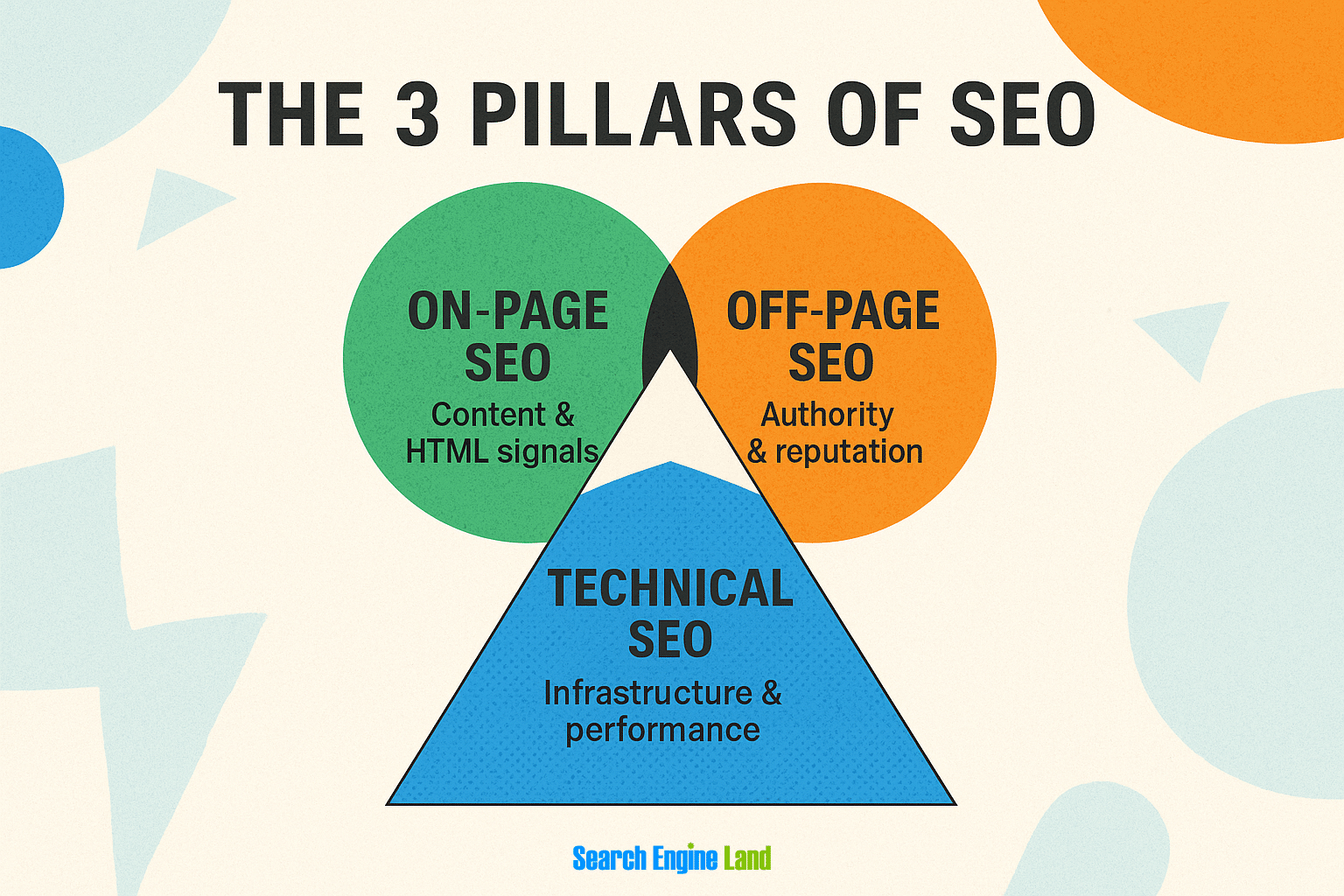
Think of these like the pillars of a well-built website. You need all three to thrive, but technical SEO is the only one that controls whether your content gets seen in the first place.
Many major publishers invest tens of thousands in amazing content without addressing their technical foundation. These companies are essentially building luxury trains while neglecting the rails they run on. Without proper tracks, even the most impressive train will derail.
Why technical SEO matters more than ever now
SEO has changed drastically and it keeps changing rapidly. What worked five years ago barely moves the needle today. As search engines grow more sophisticated, they’ve also become more demanding of websites that want prime visibility.
Several critical shifts have reshaped the technical SEO landscape:
AI-powered ranking systems change everything
Google’s algorithm relies increasingly on machine learning to understand and evaluate content. This evolution creates both challenges and opportunities for technical SEO:
- AI systems need structured data to understand your content’s context and meaning
- Clean information architecture helps machine learning systems categorize your content correctly
- Search intent matching requires proper indexing and rendering to be evaluated. Without proper indexing, your content never enters the race. Without proper rendering, search engines can’t see what users see. Both are essential before your content can even be considered for matching search intent.
- Entity recognition depends on proper technical implementation of schema
Algorithm updates like BERT, MUM, and their successors don’t simply analyze content; they evaluate how well your technical implementation supports content delivery and understanding.
JavaScript dependency creates new barriers
Modern websites depend heavily on JavaScript for functionality and rendering:
- JavaScript-heavy sites break more often than they rank
- Single Page Application (SPA) frameworks create indexing challenges
- Client-side rendering often produces empty initial HTML for crawlers
- Dynamic content loading requires special handling for search visibility
Mobile-first is now mobile-only
The days of desktop-first design are long gone. Google’s mobile-first indexing has evolved into an essentially mobile-only approach:
- Sites with poor mobile experience face severe ranking penalties
- Mobile page speed directly impacts rankings across all devices
- Touch-target size, viewport configuration, and text readability are now ranking factors
- Intrusive interstitials (pop-ups) can trigger ranking drops
Sites still designing for desktop first with mobile as an afterthought consistently underperform their competition. Google primarily uses the mobile version of a site for indexing and ranking decisions. With good reason, too, according to a report by Sistrix, over 60% of searches now come from mobile devices.
How Google actually processes your website
Before a page can rank, it has to survive four distinct stages in Google’s processing pipeline:
- Discovery: Google finds the URL through sitemaps, internal links, backlinks, or manual submissions
- Crawling: Googlebot requests the page and reads the initial HTML
- Rendering: JavaScript is executed; Google builds a full visual version of the page
- Indexing: The page’s content and signals are stored in Google’s index
- Ranking: Google evaluates the indexed page against other results for a query
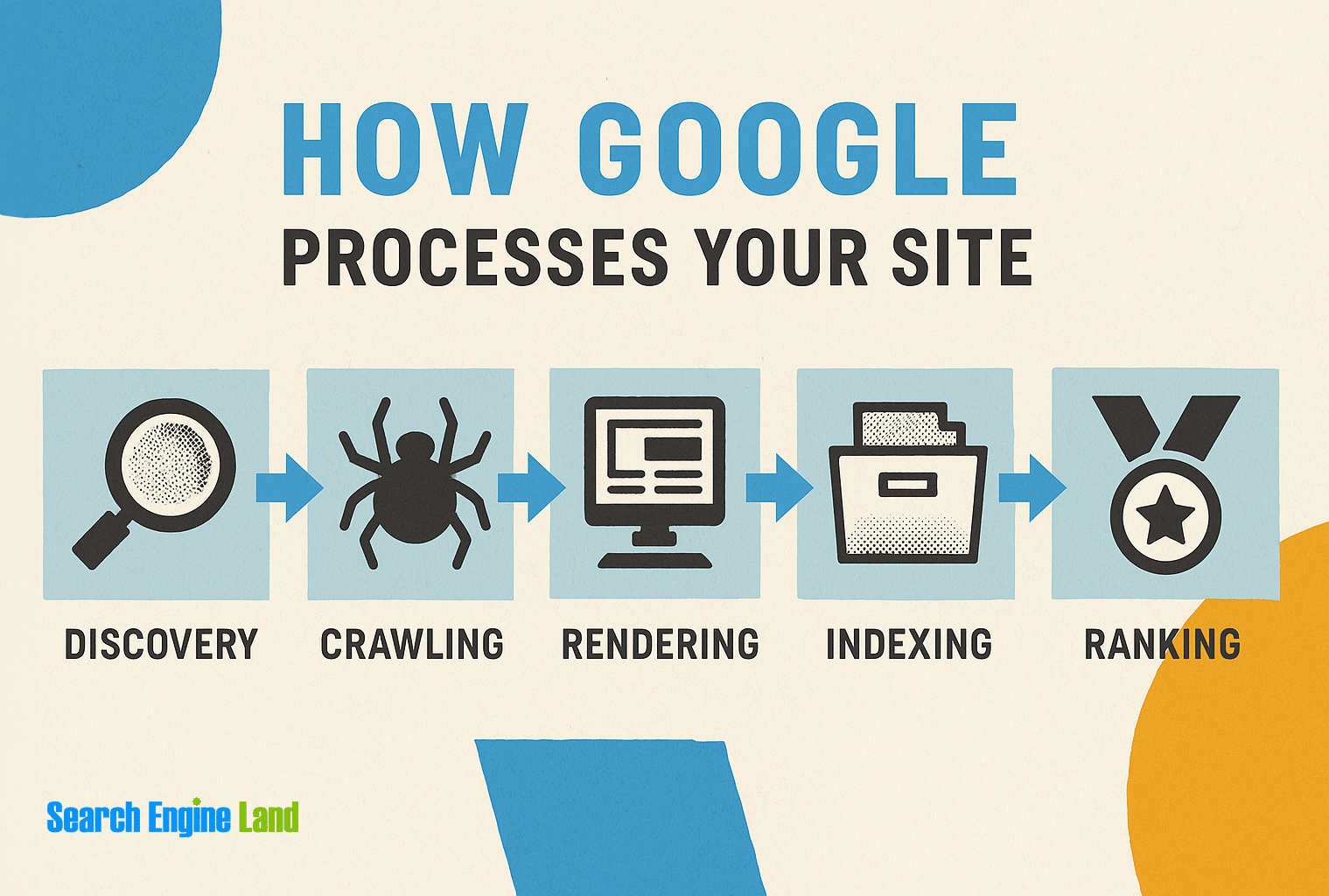
If your site fails at any of these stages—due to slow performance, blocked scripts, incorrect canonicals, or noindex tags—it won’t matter how good your content is. Your content won’t show up at all.
This is where technical SEO makes or breaks your visibility. Technical SEO ensures Google can reach, understand, and store your content efficiently and accurately.
A crucial thing to understand: Google doesn’t process your website the way a human does. Googlebot works with limited resources, strict timeouts, and follows different rules than a conventional browser. This difference creates gaps between what users see and what search engines index.
The core elements of technical SEO (and why they matter)
Let’s be clear: technical SEO isn’t a collection of random fixes. It’s a framework that allows your content to be discovered, understood, and trusted.
Each of the following areas works like a gear in a well-oiled machine. Neglect one, and the others strain or fail.
1. Crawlability: The foundation of visibility
Crawlability determines whether search engines can find your pages at all. Without it, nothing else matters.
To continue with our subway metaphor, imagine Googlebot as the subway operator. If your rails are broken, signals are malfunctioning, or stations are inaccessible, it doesn’t matter how luxurious your trains are: passengers (users) will never board them. For your content trains to run, your technical SEO rails must be properly maintained and connected.
Common crawlability failures:
- Orphaned pages with no internal links pointing to them
- Robots.txt directives accidentally blocking critical resources
- JavaScript-based navigation that hides links from crawlers
- Crawl traps created by faceted navigation, infinite scroll, or calendar generators
- Parameter-based URLs creating endless permutations of the same content
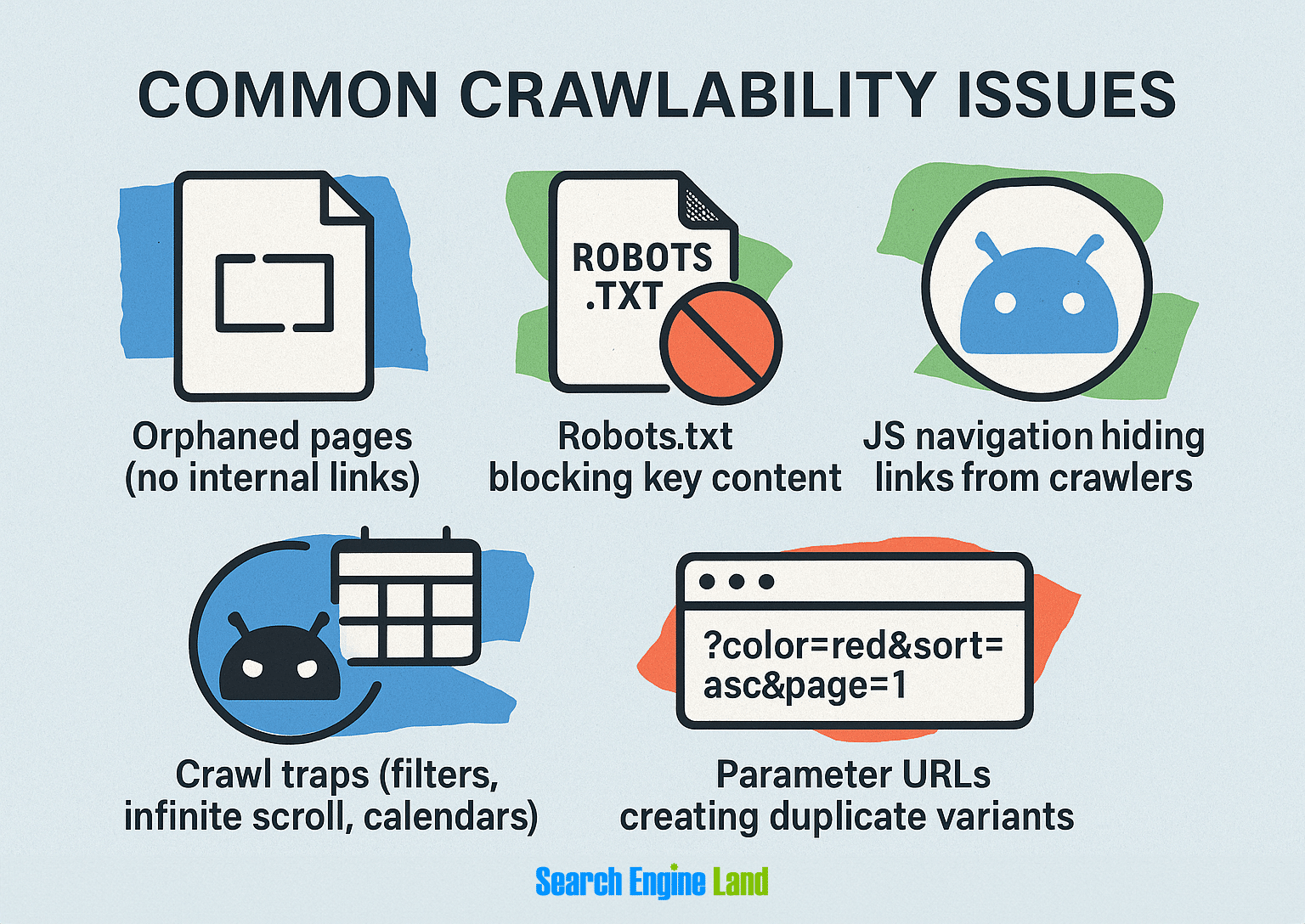
Crawl error diagnosis and solutions:
- Run a comprehensive crawl using the Site Audit tool to help you discover crawlability and indexability issues
- Analyze Google Search Console’s (GSC) Crawl Stats to identify what bots are actually accessing
- Ensure critical pages have multiple crawl paths:
- Direct links from homepage or main navigation
- Inclusion in XML sitemaps (with correct priority settings)
- Clean URL structures without excessive parameters
- No conflicting robots directives
2. Indexability: What gets stored (and what gets ignored)
A page can be crawlable but still not indexed. That means Google sees it but decides not to store it in its search database.
The technical distinction is important: crawling is about discovery, indexing is about selection. Not every page deserves a spot in Google’s index, and understanding which signals influence this decision is critical.
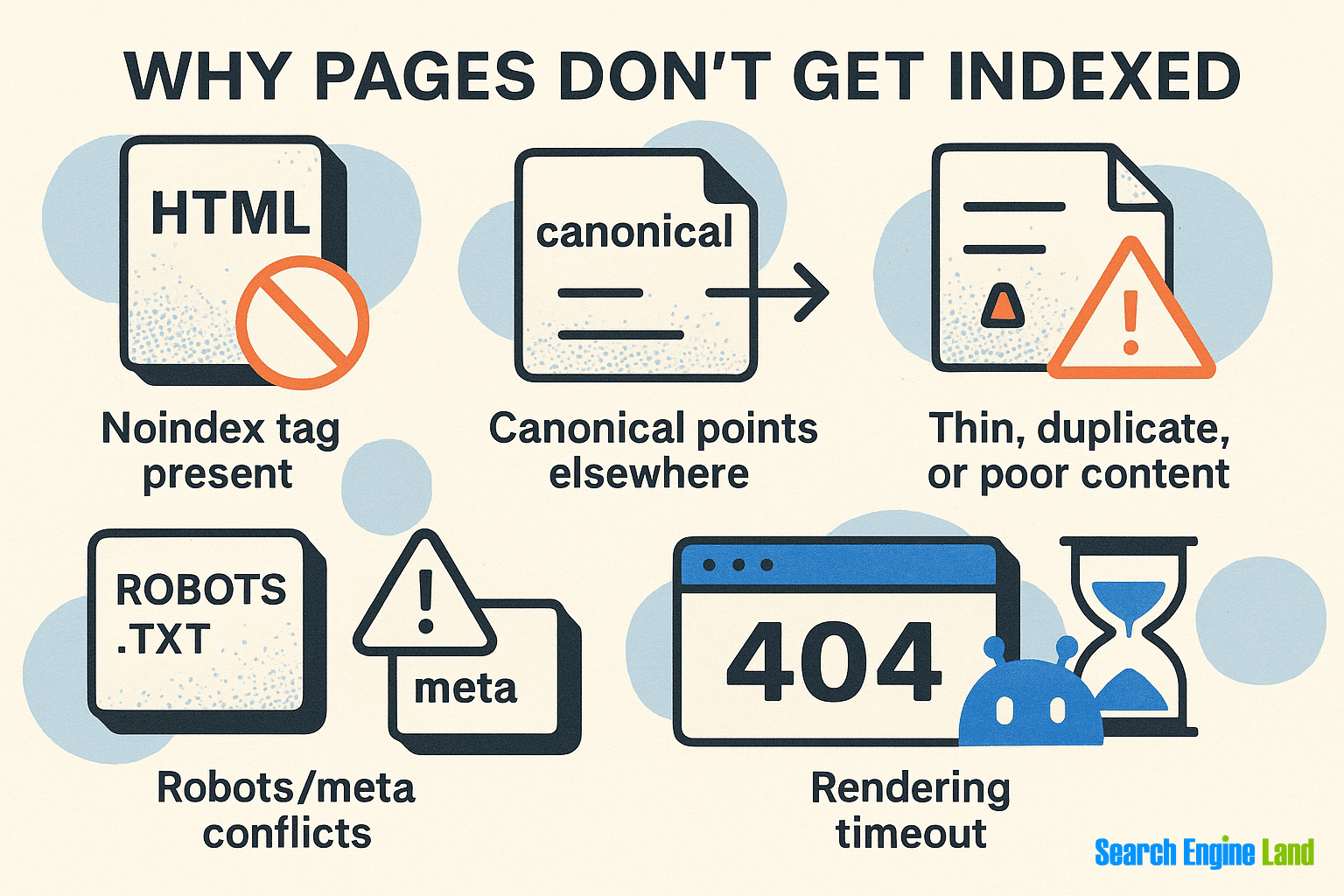
Why pages don’t get indexed:
Noindextag present (via meta tag or HTTP header)Canonicaltag points to another page- The content is thin, duplicate, or low-quality
- Conflicts exist between robots directives and metadata
- Server returns non-200 status codes
- Page fails to render within Googlebot’s time frame (learn more about rendering timeouts)
How to diagnose index issues:
- Use Google Search Console > “Pages Report” > Filter “Excluded”
- Run a Site Audit in Semrush to get a comprehensive overview of indexing issues and other technical problems
- Check canonical tags using Screaming Frog
- Run URL Inspection in GSC to see last crawl and index status
- Compare indexed counts with submitted URLs in sitemaps
How to fix indexing problems:
- Remove
noindextag from valuable pages - Don’t canonicalize everything to page one of a category (a common CMS mistake)
- Improve content or consolidate thin pages
- Make sure canonicals aren’t pointing to redirects, 404s, or blocked pagesEnsure critical content is available without waiting for JavaScript to execute
A common scenario occurs when developers accidentally mark entire content directories (like /blog/) as noindex during staging migrations. Marketing teams often continue publishing content for months without realizing nothing is getting indexed. Always double-check your directives after any site update.
Watch out for “Discovered – currently not indexed.” It means Google found the URL but hasn’t crawled it yet. This is often a crawl budget signal.
3. Site architecture: The blueprint for everything else
Your architecture controls how users and bots navigate your site—and how you distribute ranking power.
Think of your site structure as both a roadmap and a power grid. Site structure determines how search engines discover your content and how link equity flows through your domain.
Site architecture goals:
- Keep important pages within three clicks of the homepage
- Group content logically by topic and intent
- Avoid deep, isolated paths that rarely get crawled
- Create clear hierarchies that signal content relationships
- Distribute link equity to pages that need ranking power

Site architecture optimization tactics:
- Use hub-and-spoke models (e.g.,
/blog/seo-guide/linking to related posts—we’ll explore content hubs in more detail immediately below) - Flatten directory structures:
/topic/page-nameis better than/folder/subfolder/year/page - Build internal links between related pages
- Use breadcrumb navigation and semantic HTML
- Implement siloed structures for different product/service categories
A highly effective technique is to build “content hubs” around key topics. For instance, a main SEO guide that links to specialized pieces on technical SEO, on-page, etc. This helps users navigate content, and also signals to Google what the most important pages are.
Googlebot follows internal links. Your internal linking structure is your site’s SEO roadmap: design it with intent.
4. Page speed & Core Web Vitals: Where performance meets user experience
Google’s Core Web Vitals have transformed from recommendations to requirements. As of 2025, Interaction to Next Paint (INP) has replaced First Input Delay (FID) as the primary responsiveness metric, creating new optimization challenges. This change reflects Google’s commitment to providing a more comprehensive assessment of user experience by focusing on the overall responsiveness of web pages throughout their lifecycle.
Unlike FID, which measures only the delay of the first user interaction, INP evaluates the latency of all interactions—such as clicks, taps, and key presses—from the moment of input until the next frame is painted. This holistic approach offers a more accurate representation of a page’s responsiveness, highlighting areas that may require optimization beyond the initial load.
The transition to INP introduces new challenges for developers and SEO professionals, as it necessitates a broader focus on performance optimization strategies.
The three critical metrics that determine website performance success:
Beyond these core metrics, the Total Blocking Time (TBT) remains important for developer testing, though it doesn’t directly affect your public Core Web Vitals score.
Essential measurement tools:
- PageSpeed Insights: Combines lab and field data with specific improvement recommendations
- WebPageTest: Detailed waterfall analysis for identifying specific resource loading problems
- Chrome DevTools > Performance panel: Main thread blocking identification and JavaScript execution analysis
High-impact optimization techniques:
- Replace raster images (like JPG and PNG) with WebP/AVIF formats for 40-80% smaller file sizes
- Implement proper lazy-loading for below-fold images and iframes
- Move non-critical JavaScript to the footer and add defer/async attributes
- Extract and inline critical CSS for above-fold content rendering
- Break up long JavaScript tasks into smaller chunks (< 50ms each)
- Reserve space for dynamic elements to prevent layout shifts
- Optimize font loading with font-display: swap and preconnect
A Cloudflare case study with weather platform Meteored showed that improving Core Web Vitals enhanced site performance and also led to a notable increase in organic traffic and ad revenue.
5. Mobile optimization: Where most SEO lives
Google indexes mobile-first. If your mobile experience is broken, your entire SEO strategy is broken.
Mobile optimization isn’t just about responsive design. It’s about delivering a complete experience optimized for the constraints and opportunities of mobile devices.
Critical mobile optimization areas:
- Responsive design that adapts to any screen size
- Touch-friendly navigation with adequate spacing between clickable elements
- Font sizes that remain readable without zooming (minimum 16px body text)
- Viewport configuration that prevents horizontal scrolling
- Elimination of intrusive interstitials that block main content
What to fix when optimizing for mobile:
- Ensure all pages are responsive (use fluid CSS, not fixed-width layouts)
- Avoid intrusive interstitials
- Test on real devices, not just emulators
- Use GSC > “Mobile Usability” to flag tap target, viewport, and layout issues
6. HTTPS & site security: More than a ranking signal
Security builds trust—with users and with Google. Site security has evolved from a nice-to-have into a fundamental requirement. Insecure sites face both direct ranking penalties and indirect performance issues as browsers restrict functionality.
Must-haves for site security:
- Sitewide HTTPS (including canonical URLs and image sources)
- No mixed content errors (e.g., HTTPS page loading HTTP scripts)
- Proper redirect chains from HTTP to HTTPS
While most SEOs focus on implementing HTTPS, extending security measures to include comprehensive security headers like Content-Security-Policy, Strict-Transport-Security, X-Frame-Options is a best practice for safeguarding your website and its users. Although these headers do not directly boost search rankings, they contribute to a secure and trustworthy user experience, which can have positive indirect effects on SEO.
7. Structured data: Teaching Google what your content means
Structured data (schema markup) helps Google understand and enhance your content with rich results.
Schema markup has moved from being a competitive advantage to being a necessity in many niches. It transforms unstructured content into organized data that search engines can parse, understand, and present in enhanced forms.
Here are a few examples to illustrate how schema markup transforms content into organized data for search engines:
- Recipe schema: Transforms a regular recipe post into structured data that allows Google to display rich results with cooking time, ingredients, calories, and star ratings directly in search results.
- Product schema: Converts product information into structured data so search engines can display price, availability, reviews, and ratings in search results, making your products stand out.
- FAQ schema: Organizes frequently asked questions on your page so Google can display them as expandable sections directly in search results, increasing your SERP real estate.
- Local business schema: Structures your business information so search engines can display your address, hours, phone number, and reviews in knowledge panels and map results.
- Event schema: Formats event details so search engines can display dates, times, locations, and ticket information directly in search results, even allowing users to add events to their calendars.
Structured data tool:
Important: Only mark up content that exists visibly on the page. Fake or “over-optimized” schema can get your site penalized.
8. Canonicalization: Solving the duplicate content puzzle
Canonical tags tell search engines which version of a page is the “true” or preferred one.
Canonicalization is one of the most powerful and frequently misunderstood technical SEO concepts. At its core, it’s about consolidating ranking signals when multiple URLs contain the same or similar content.
Common canonicalization mistakes:
- Pointing all paginated or filtered pages to the root
- Canonical tags referencing a 404 or redirect
- Missing self-canonicals (especially on dynamic CMSs)
- Contradictory canonical signals across different mechanisms
- Using relative instead of absolute URLs in canonical tags
Canonical signal hierarchy of importance:
- 301 redirects (strongest)
- Canonical tags
- Internal linking patterns
- XML sitemap inclusion
- Parameter handling in GSC

How to improve canonicalization:
- Add
<link rel="canonical" href="..." />on every page - Don’t canonicalize paginated pages unless you’re consolidating for a reason
- Avoid conflicting signals (e.g., canonical says one thing, sitemap another)
- Use absolute URLs with proper protocol (https://) in canonical tags
- Audit canonical implementation after CMS updates or migrations
Without canonicalization, your content’s ranking signals get diluted across multiple URLs. This splitting effect makes it harder to rank any single version, even if the content itself is excellent.
The complete technical SEO checklist (2025 edition)

This isn’t just another SEO to-do list you’ll scan and forget. It’s a structured system for maintaining technical SEO health, built from hundreds of real-world audits across different industries and platforms.
Use these technical SEO tips as your roadmap, not just a collection of random fixes.
Foundation: Crawlability & indexability
- Crawl your site with a tool like Screaming Frog or Semrush Site Audit
- Verify your robots.txt file isn’t blocking important content
- Ensure your XML sitemap only contains indexable, canonical URLs
- Check for and fix noindex tags on pages that should be discoverable
- Identify and fix crawl traps (infinite URLs, calendar widgets, faceted navigation)
- Verify proper HTTP status codes across your site
Site structure & internal linking
- Map your site architecture to ensure logical organization
- Find and add internal links to orphaned pages
- Use descriptive anchor text for internal links
- Keep important pages within three clicks of your homepage
- Implement breadcrumb navigation with schema markup
- Create hub pages for key topic clusters
Performance & Core Web Vitals
- Test Core Web Vitals using PageSpeed Insights and Treo.sh
- Optimize Largest Contentful Paint (LCP) to load in under 2.5 seconds
- Improve Interaction to Next Paint (INP) to under 200ms
- Fix Cumulative Layout Shift (CLS) issues to maintain a score below 0.1, as recommended by Google’s Core Web Vitals standards
- Compress and convert images to modern formats (WebP/AVIF)
- Minify and optimize CSS and JavaScript
- Defer non-critical JavaScript
- Implement proper browser caching
Mobile optimization
- Test responsive design across multiple device sizes
- Ensure tap targets are at least 44x44px
- Test on actual mobile devices, not just emulators
- Check Google Search Console for mobile usability issues
- Optimize font sizes for mobile readability (minimum 16px)
- Eliminate horizontal scrolling with proper viewport configuration
- Remove intrusive interstitials that block content
HTTPS & security
- Implement HTTPS across your entire site
- Resolve mixed content issues (HTTP resources on HTTPS pages)
- Create direct 301 redirects from HTTP to HTTPS versions
- Implement security headers (CSP, HSTS, X-Content-Type-Options)
- Scan for security vulnerabilities regularly
Structured data & schema
- Identify applicable schema types for your content
- Implement schema markup with all required properties
- Test using Schema Markup Validator and Rich Results Test
- Monitor rich result performance in Google Search Console
- Keep schema implementation up to date with Google’s guidelines
Canonicalization & URL structure
- Add self-referential canonical tags to all pages
- Fix canonical conflicts and contradictory signals
- Eliminate duplicate content across the site
- Clean up parameter-based URLs
- Check that canonical tags use absolute (not relative) URLs
- Ensure consistent URL formatting (trailing slashes, lowercase)
Internationalization (if applicable)
- Implement proper hreflang tags for language/regional variants
- Ensure hreflang tags are bidirectional between versions
- Select appropriate domain structure (ccTLD, subdomain, or subfolder)
- Set geotargeting in Google Search Console
- Avoid duplicate content issues across language versions
Monitoring & maintenance
- Set up regular crawl monitoring (weekly or monthly)
- Track Core Web Vitals changes
- Monitor indexation status in Google Search Console
- Analyze server logs for bot behavior insights
- Check for new technical issues after site updates
- Track crawl stats for crucial site sections
- Verify schema implementation regularly
Common technical SEO issues (and how to fix them properly)
Every SEO expert has horror stories of a traffic drop caused by a single missed redirect, a rogue noindex tag, or a misconfigured staging environment getting indexed.
This section unpacks the real problems technical SEOs face in the wild, with tactical fixes, root causes, and how to future-proof your stack.
1. Pages are not getting indexed
You publish great content, but it never shows up in Google. This is perhaps the most common and frustrating technical SEO issue. You’ve invested in content creation, but if Google doesn’t index it, that investment brings no return.
Common causes:
- The page is blocked by robots.txt or has a noindex tag
- The page is orphaned (has no internal links pointing to it)
- The content is duplicate or thin, and Google chose not to index it
- A canonical tag points to a different page
- The page depends heavily on JavaScript for content rendering
- The content doesn’t meet Google’s quality thresholds
- Crawl budget limitations prevent discovery

How to diagnose:
- Run the URL Inspection Tool in Google Search Console
- Check Google Search Console > “Pages” > “Excluded” > “Discovered – currently not indexed” or “Crawled – not indexed”
- Use Screaming Frog to find noindex, canonical conflicts, and crawl depth
- Compare rendered vs. source HTML to identify JavaScript dependency issues
How to fix:
- Make sure the page is in your sitemap
- Add internal links from high-authority, crawlable pages
- Remove
noindexif set by mistake - Consolidate thin content into a single, more valuable resource
- Check for canonicalization errors: don’t point to irrelevant or broken URLs
- Implement server-side rendering for JavaScript-dependent content
- Improve content quality and uniqueness if it appears to be filtered by quality algorithms
Many businesses struggle with blog posts not getting indexed despite excellent content. Often, this happens because their CMS auto-generates similar tag pages that Google sees as duplicates of the main blog posts. By noindexing the tag pages and adding internal links to each new post from the homepage, indexation problems can typically be resolved within a week.
Prevention tip: Create a “Recently Published” hub page that automatically links to your 10 most recent posts. This keeps new content within crawl reach.
2. Broken redirects & redirect chains
Link equity doesn’t pass through multiple hops, and users hate clicking through three URLs to reach one destination.
Redirect issues often emerge after domain migrations, site redesigns, or CMS changes. What starts as a simple URL structure change can quickly devolve into a tangled mess of redirects pointing to other redirects.
Common causes:
- Migrations where URLs were changed but not updated everywhere
- Multiple CMS layers adding automated redirects
- Redirects pointing to other redirects (chains)
- HTTP to HTTPS migrations implemented incorrectly
- Temporary redirects (302s) used for permanent changes
- Different redirect logic at server vs. CMS level
How to diagnose:
- Check for broken redirects and minimize redirect chains to improve user experience and preserve search equity. You can identify redirect issues using the command
curl -I https://example.com/pageto inspect the status codes and location headers. Google’s Mobile-Friendly Test sometimes fails on chained redirects - Use Chrome Network tab to visualize redirect sequences
- Check Semrush > “Site Audit > “Issues” > “Redirect Chains”
How to fix:
- Replace internal links to redirected URLs with direct links to the final destination
- Flatten all chains to a single 301 hop
- Audit .htaccess, NGINX, and CMS-level rules to remove legacy redirects
- Convert 302 (temporary) redirects to 301 (permanent) where appropriate
- Create direct redirects from original source to final destination
Edge case: Watch for mixed protocol issues, redirects that bounce from HTTP to HTTPS back to HTTP or www to non-www and back again.
3. Crawl budget wastage
Googlebot is spending time on useless URLs instead of your best content.
Crawl budget, Google’s allocation of resources to crawl your site, is a finite resource. Wasting it on low-value pages means your important content gets crawled less frequently.
Common causes:
- Infinite URLs from faceted navigation or calendar widgets
- Search result pages exposed to bots (
?q=) - Tag archives with minimal value are surfaced
- Duplicate pagination logic (e.g.,
/page/2, /page/2/) - Session IDs appended to URLs
- Development, staging, or test environments exposed to search engines
- Bloated WordPress installations with unnecessary taxonomies
How to diagnose:
- Go to Google Search Console > “Crawl Stats” > Check what URLs are being crawled most often.
- Use log file analysis (examining your server’s access logs to understand how search engines crawl your site) to identify crawl budget wastage. Check out Google’s guide on managing crawl budget to learn how to implement this technique. Use site crawlers like Screaming Frog to find infinite or parameter-generated paths.
- Monitor crawl frequency of important pages vs. unimportant ones using Semrush Log File Analyzer, or Google Search Console’s crawl stats report to identify crawl priority issues.
How to fix:
- Disallow low-value folders and parameters in robots.txt.
- Use canonical tags on filtered pages.
- Block crawl paths to search result pages with robots.txt and noindex.
- Manage URL parameters in Google Search Console (with caution) to prevent crawling of duplicate content.
- Consolidate or eliminate thin taxonomy pages.
- Password-protect development environments.
- Implement pagination properly with
rel="next"andrel="prev."
Google itself acknowledges this problem, with Gary Illyes stating that “Wasting server resources on unnecessary pages can reduce crawl activity from pages that are important to you, which may cause a significant delay in discovering great new or updated content on a site.”
Tip for large sites: Use sitemap segmentation (e.g., /sitemaps/posts.xml, /sitemaps/products.xml) to monitor which sections are actually getting crawled.
4. JavaScript rendering issues
Googlebot sees a blank page but the user sees a beautiful, JS-powered layout. This disconnect between user experience and search engine accessibility represents one of the most challenging technical SEO problems in web development.
Common causes:
- Content loads via client-side JS (React, Angular, Vue)
- Meta tags (title, description, canonical) are injected after page load
- Google Search Console “Live Test” shows empty rendered HTML
- Pages are in the index, but not ranking (due to invisible content)
The technical reality
When a browser loads a JavaScript-heavy page, it goes through several phases:
- Initial HTML download
- JavaScript file downloads
- JavaScript execution
- Document Object Model (DOM) manipulation and content rendering—ensure search engines can properly interpret JavaScript-rendered page elements by using server-side rendering or dynamic rendering solutions. The problem? Googlebot doesn’t always wait for all these steps to complete. This creates a fundamental disconnect between what users see and what Google indexes.
How to diagnose:
- Google Search Console > “URL Inspection” > “View Rendered HTML” (compare with what you see in browser)
- Use tools like Rendertron or Prerender.io to visualize bot rendering
- Compare source vs. rendered code in Chrome DevTools
- Look for ranking disparities between simple HTML pages and JS-dependent pages
How to fix:
- Move to Server-Side Rendering (SSR) using Next.js, Nuxt.js, etc.
- For partial fixes, use dynamic rendering only for bots
- Ensure critical content and schema load before JavaScript execution
- Cache and serve rendered HTML snapshots for key pages
JavaScript frameworks present some of the biggest technical SEO challenges in recent years. Single Page Applications (SPAs) often look perfect to users but can be essentially invisible to Google. When server-side rendering is implemented for critical landing pages, rankings can jump dramatically from nowhere to page one in weeks. If you’re building in React, Angular, or Vue, always consider the SEO implications from day one.
The web development community has recognized this challenge. Frameworks like Next.js and Gatsby have emerged specifically to address the rendering gap between modern JavaScript and search engine accessibility. Their approach combines the interactivity of client-side JavaScript with the crawlability of server-rendered HTML—the best of both worlds.
Future-proof tip: Server-side rendering (SSR) or static site generation (SSG) should be your long-term strategy. Dynamic rendering is a patch, not a solution. Google has explicitly stated they prefer sites that don’t require special treatment for their crawler.
5. Poor Core Web Vitals (especially INP)
Your page technically loads but it feels broken. Core Web Vitals problems directly impact both rankings and user experience. They’re unique in that they represent one of the few explicitly confirmed ranking factors from Google, even if their impact is relatively modest compared to other factors.
Common causes:
- JavaScript blocking interaction (especially on mobile)
- Layout shifts from ads, fonts, or images without dimensions
- Large content elements taking too long to render
- Excessive third-party scripts blocking the main thread
- Unoptimized images bloating page weight
- Web fonts causing flash of invisible text (FOIT)
- Server response times exceeding 200ms
How to diagnose:
- Check PageSpeed Insights > “Field Data + Diagnostics”
- Use Lighthouse in Chrome DevTools (look at “Main Thread” and long tasks)
- Go to WebPageTest to identify render-blocking resources
How to fix:
- Prioritize main-thread performance: break up long JS tasks
- Defer or lazy-load third-party scripts (chat, social widgets, etc.)
- Reserve space for dynamic content with fixed aspect ratios
- Use font-display: swap to avoid flash of unstyled text (FOUT) delays: this prevents the browser from hiding text until custom fonts are loaded, improving perceived page speed.
- Optimize image delivery with WebP/AVIF formats and proper dimensions
- Implement resource hints (preconnect, preload) for critical assets
- Move to a faster hosting environment or implement edge caching
- Use browser caching with appropriate cache-control headers
Tip to fix INP: If you’re struggling with INP, look at interaction handlers (menu clicks, tabs, buttons). Are they responsive under stress? Record a performance profile while interacting with these elements to identify optimization opportunities.
6. Duplicate content & canonical conflicts
Your site competes with itself… and loses.
Duplicate content issues fragment your ranking signals across multiple URLs, diluting your ability to rank for target terms.
Common causes:
- Same content under multiple URLs (
/page, /page/, /page?ref=x) - Non-canonical paginated or filtered category pages
- Improper or missing canonical tags
- WWW vs. non-WWW versions accessible simultaneously
- HTTP vs. HTTPS versions indexed concurrently
- Staging or development sites indexed alongside production
- Print-friendly versions of pages indexed separately
How to diagnose:
- Go to Semrush > Site Audit > search for “Duplicate Content” and “Canonical Tags”
- Check Google Search Console > Pages > Excluded > “Duplicate, submitted URL not selected as canonical”
- Search variations using site:yourdomain.com + inurl: to test
- Use
Google's site:operator to check which URL variants are indexed
How to fix:
- Normalize URLs with trailing slash rules, lowercase enforcement
- Use canonical tags consistently; self-canonical for original content
- Consolidate or redirect duplicate pages
- Don’t canonicalize all product variants to the main listing (unless they’re identical)
- Implement proper hreflang for international content
- Password-protect staging environments
- Set consistent URL parameters in server configuration
Analytics tip: Duplicates dilute SEO, but also confuse attribution. UTM abuse without canonical clarity ruins your reporting too.
7. Mobile-only failures (that slip through desktop testing)
Everything looks perfect, until you check your phone.
Mobile-specific failures are particularly dangerous because they’re often invisible during standard desktop testing. With Google’s mobile-first indexing, these issues directly impact rankings.
Common causes:
- Fonts are too small or unreadable
- Buttons overlap or are too small to tap
- Interstitials block the main content
- Pages take 10s+ to become interactive
- Navigation elements work differently on touch devices
- Content hidden in accordions doesn’t expand on mobile
- Forms that are impossible to complete on small screens
How to diagnose:
- Go to Google Search Console > “Mobile Usability”
- Use manual testing on slow Android devices and iPhones
- Use Chrome DevTools: “Emulate devices + network throttling”
- Go to Lighthouse mobile audits with CPU throttling enabled
- Test with multiple screen sizes, not just standard breakpoints
How to fix:
- Use fluid responsive units (%, em, vw—not fixed px)
- Check Google’s guidelines for interstitials (penalties still apply)
- Add ample spacing for buttons and form elements
- Optimize for touch: mobile UX is not just a smaller desktop
- Ensure all interactive elements have at least 44x44px touch targets
- Test form completion on actual mobile devices
- Verify that accordion content is accessible to search engines
UX is SEO: Google’s ranking systems now factor in real-user signals. A frustrating mobile experience is no longer just a UX issue: it’s a visibility issue.
Advanced technical SEO techniques
For experienced practitioners looking to gain a competitive edge, these advanced techniques can transform a technically sound site into an organic traffic powerhouse.
Crawl budget optimization
For large sites with millions of URLs, crawl budget becomes a crucial limiting factor. Strategic optimization ensures search engines focus on your most valuable content.
Advanced tactics:
- Implement log-based crawl monitoring to identify patterns
- Create crawl priority pathways through strategic internal linking
- Use dynamic XML sitemaps that prioritize high-value, frequently updated content
- Deploy serverless functions to generate real-time priority sitemaps
- Implement crawl-specific caching strategies
Edge SEO & CDN-level manipulations
Modern CDN platforms offer powerful capabilities for implementing SEO changes without touching the origin server, perfect for rigid CMS platforms or enterprise environments with lengthy development cycles.
Implementation approaches:
- Use Cloudflare Workers to modify HTML responses
- Implement edge-side rendering for JavaScript SPAs
- Create dynamic canonical logic at the edge
- Deploy automatic hreflang insertion for international content
- Generate structured data from API responses
Edge SEO allows non-developers to implement complex technical changes through configuration rather than code, democratizing technical SEO implementation.
Pagination and faceted navigation optimization
Ecommerce and large content sites often struggle with complex navigation structures. Optimizing these systems is technically challenging but highly rewarding.
Advanced strategies:
- Implement view-all pages with proper canonicalization
- Create intelligent indexing strategies for filtered result pages
- Use AJAX for filter loading while maintaining crawlable paths
- Implement proper
rel="next"andrel="prev"to improve user navigation and help other search engines that still support these tags (like Bing), even though Google announced in 2019 they no longer use these as indexing signals - Build hybrid approaches mixing client and server-side rendering for faceted navigation
AI and ML-powered technical auditing
The scale and complexity of modern websites demand automated, intelligent monitoring systems.
Emerging approaches:
- Implement machine learning for pattern recognition in server logs
- Use predictive analytics to forecast technical issues before they impact rankings
- Deploy continuous monitoring systems with anomaly detection
- Create automated testing workflows for pre-deployment technical validation
- Build custom neural networks trained on your specific site patterns
Forward-thinking SEO teams are developing proprietary systems that adapt to their unique technical environments, providing early warning of issues that generic tools might miss.
JavaScript SEO at scale
JavaScript frameworks dominate modern web development, creating unique technical SEO challenges that require specialized strategies.
Advanced JavaScript SEO techniques:
- Implement hybrid rendering strategies (static for SEO, dynamic for users)
- Create rendering fallbacks for different crawler types
- Use dynamic resource loading based on user/bot detection
- Deploy partial hydration techniques
- Implement intelligent component-level caching
- Create crawler-specific service workers
Learn more: For comprehensive implementation guides on these advanced techniques, see Google’s rendering on the Web resource, Next.js SEO rendering strategies documentation, and Google’s guide on dynamic rendering.
The technical gap between JavaScript-heavy sites and search engine crawler capabilities remains significant in 2025. Organizations that bridge this gap gain substantial competitive advantage in organic visibility.
How technical SEO ties into content and authority

Ask any SEO who’s lost rankings after a redesign, or watched a top blog post fall off page one without explanation: technical SEO failures kill content performance. Quietly and quickly.
But it’s not just about avoiding disaster. Technical SEO also amplifies everything you invest in content, brand, and links. Here’s how.
1. Discoverability: The best content can’t rank if it can’t be found
The problem: You’ve just published a 3,000-word, well-researched blog post. It’s got internal links, it’s optimized for a high-volume keyword, and the design is beautiful.
But Google never indexes it.
Why?
- The page is orphaned (no internal links)
- The URL isn’t in the sitemap
- It was marked
noindexby accident - Googlebot is wasting time crawling 50 versions of your category filters
Technical SEO fix:
- Make sure every new content asset is internally linked within 1–2 clicks from a crawlable page
- Update your XML sitemap automatically via CMS or deployment hooks
- Monitor Google Search Console for “Crawled – not indexed” flags
- Ensure canonical tags and robots directives are properly set
This lesson has been learned the hard way by countless companies who have spent months building out comprehensive guides. They hire top writers, designers, everything—but forget the technical foundation. Good content without crawlability is invisible. And invisible content earns zero traffic, zero links, and zero conversions.
2. Structured data: Giving content context in a machine world
Google is increasingly entity- and intent-driven. Structured data (schema markup) acts as a translator between your content and search engine algorithms.
What schema can do:
- Qualify your pages for rich results (stars, images, accordions)
- Clarify content relationships (Product > Review > Author)
- Help AI systems understand topical authority and site focus
Schema isn’t a ranking factor, but it influences how you’re represented in search. That changes everything.
3. Speed & UX: Content only converts when it loads
Real-world issue: A product comparison page loads in five seconds on mobile. The bounce rate is 75%. Rankings slide from position three to 10. You fix the LCP with image compression and lazy loading, and bounce drops by 22%. Rankings and conversions follow.
Takeaway:
- Technical SEO ensures content is usable in real-world scenarios
- INP, LCP, CLS aren’t dev metrics. They’re user experience metrics
- Google’s Helpful Content System evaluates how people engage with your content not just what’s written
Fast-loading, stable, mobile-optimized content performs better across every KPI: rankings, clicks, conversions, and retention.
4. Authority is earned, but technical SEO makes it stick
A backlink from The New York Times to your research page is gold. But what if that page:
- Is it canonicalized to a different URL?
- Loads so slowly it gets abandoned?
- Returns a 404 due to a CMS migration?
You’ve just lost a priceless SEO asset.
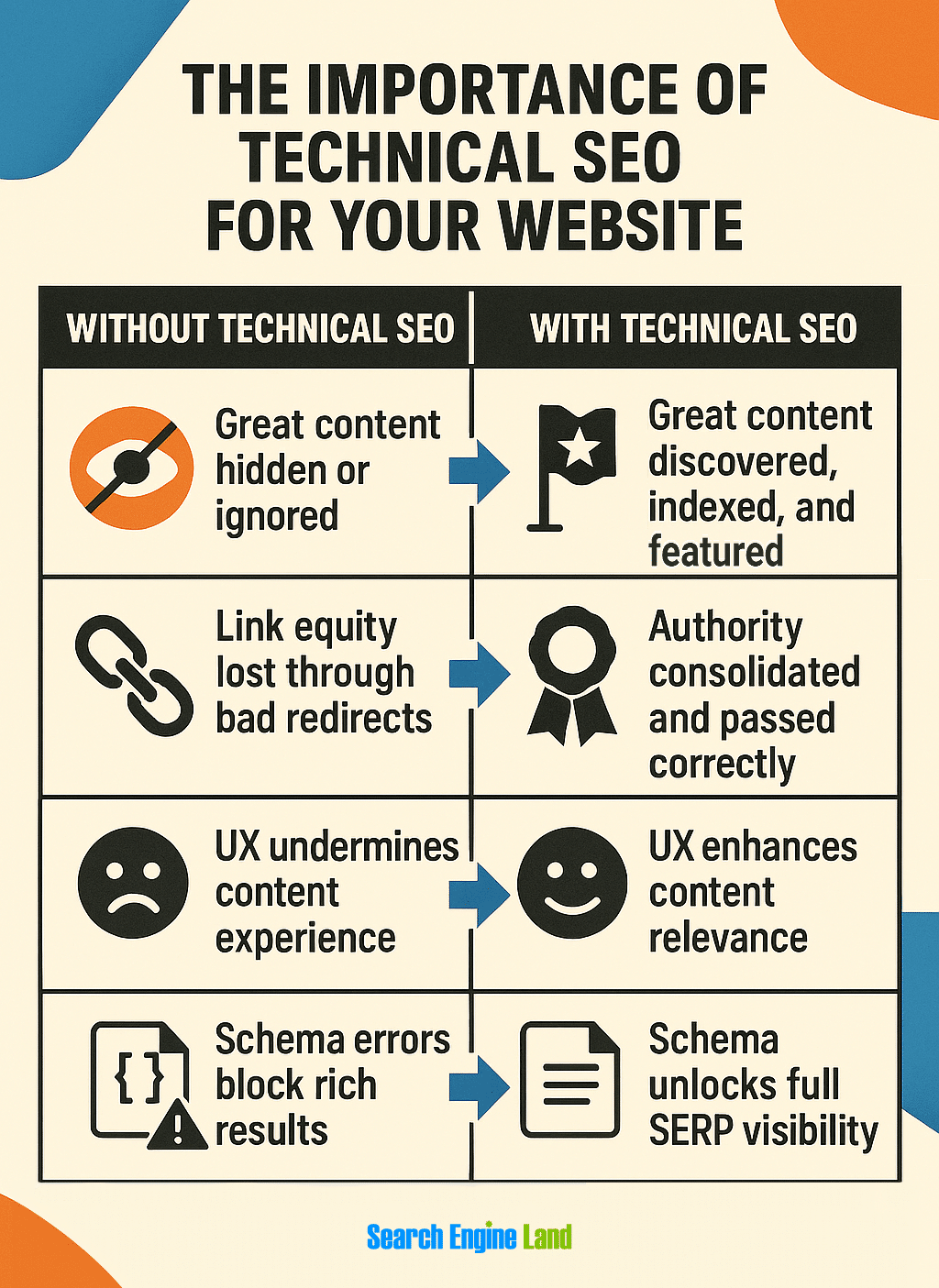
Technical SEO preserves link equity:
- 301 redirects retain authority during migrations and replatforming
- Canonical tags consolidate signals when multiple pages target the same intent
- Status code audits prevent crawl loops and soft 404s
- Log file analysis ensures bots can actually access high-value pages
Link building is hard. Don’t waste the links you’ve earned on broken technical foundations.
5. Technical health boosts E-E-A-T
Google’s quality raters (and increasingly, its algorithms) evaluate signals like:
- Is this content trustworthy and well-presented?
- Does the site feel secure and authoritative?
- Is the layout stable and usable?
This isn’t just UX fluff. It affects:
- Featured snippet eligibility
- AI Overview eligibility
- Performance in generative search
- Content discoverability across surfaces (News, Discover, etc.)
Technical SEO is the infrastructure behind E-E-A-T. It enables trust by removing friction, risk, and ambiguity.
You can’t outsource authority, and you can’t shortcut relevance. But you can absolutely sabotage both if your technical SEO is broken.
Measuring technical SEO success: From fixes to impact
One of the biggest challenges in technical SEO is proving value. Fixing 300 redirect chains or cleaning up schema errors is invisible to stakeholders, unless you connect it to performance.
This section breaks down how to track, monitor, and communicate technical SEO wins using KPIs that matter to SEO leads, product managers, and executives alike.
1. Track the health of the crawl & index lifecycle
If Google can’t crawl it, it can’t index it. If it can’t index it, it can’t rank.
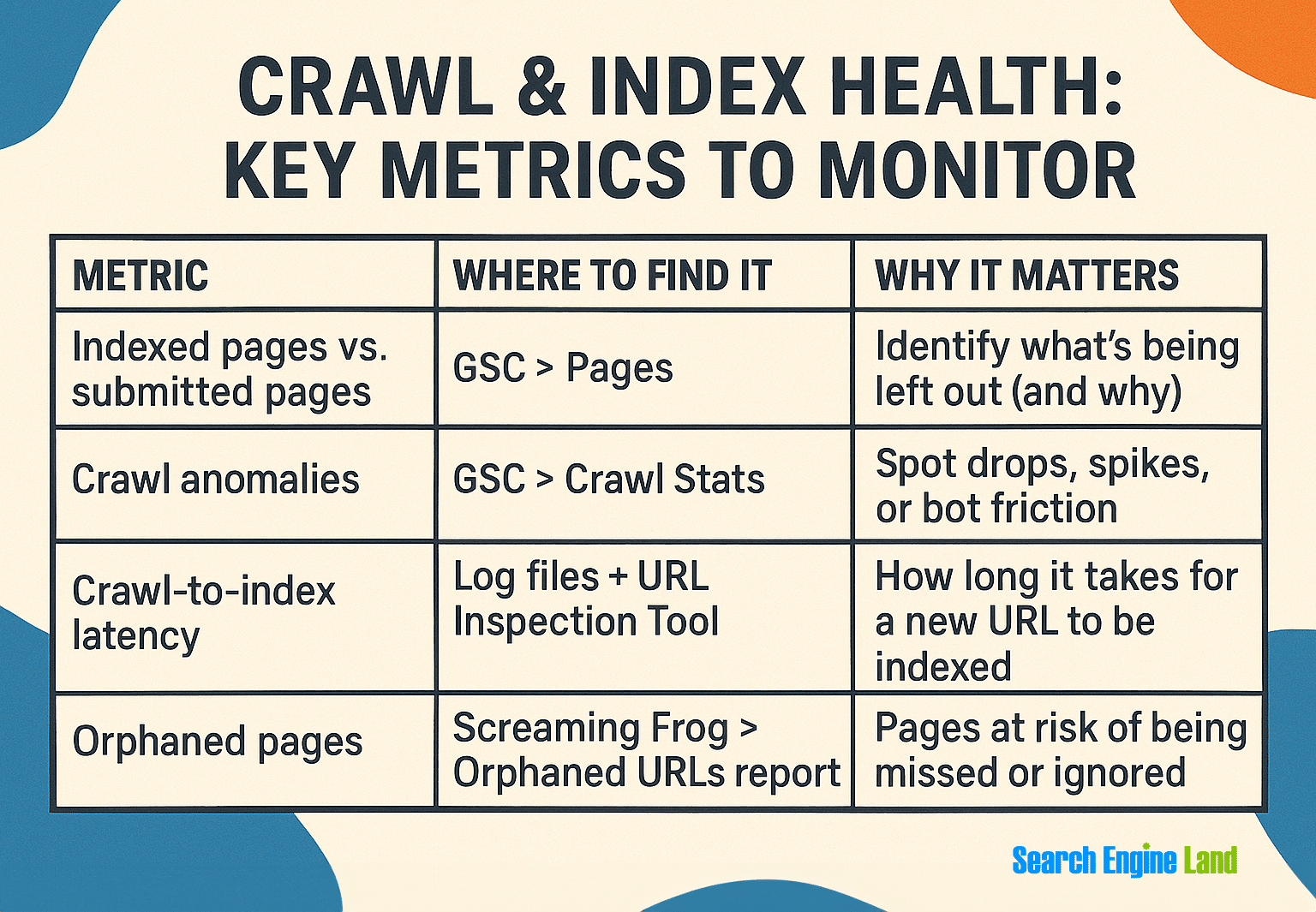
What to measure:
Success signal: Steady crawl coverage, low exclusion rate, and fast crawl > index flow.
2. Monitor Core Web Vitals (and tie to real business impact)
Core Web Vitals (CWV) metrics are ranking signals, yes—but they’re also experience signals that affect engagement and conversion.
Core metrics:

What to report:
- Percent of pages passing CWV sitewide
- Pages with the highest traffic + poor INP
- CWV trends over time by page type or template
3. Track structured data health & rich result coverage
You can’t earn rich results if your schema is broken—or missing altogether.
Tools:
- Rich Results Test > Validate per-page
- GSC > “Enhancements” > “Sitewide tracking”
- Schema.org Validator > Check custom implementations
KPIs:
- Percent of indexable pages with schema
- Errors and warnings trend over time
- Click-through rate (CTR) improvement from new snippet types
Rich snippets increase visibility but only when the schema is valid, relevant, and consistent.
4. Log file analysis: Real bot behavior > crawl simulations
Simulated crawls are great. But real server logs tell you:
- Which bots are hitting your site
- Which URLs they visit (or skip)
- How often key pages are crawled
Tools:
- Semrush’s Site Audit tool
- JetOctopus
- Your server’s raw logs + command
What to look for:
- Top URLs by crawl frequency
- Pages never crawled
- Bot frequency dips (signal of disinterest or roadblock)
Use logs to validate improvements. Did your most profitable URLs gain crawl priority after a sitemap and internal linking revamp? That’s measurable success.
5. Monitor redirect chains, status codes & canonical health
These are the silent killers of technical SEO. They don’t crash your site but they dilute trust, link equity, and crawl efficiency.
What to track:
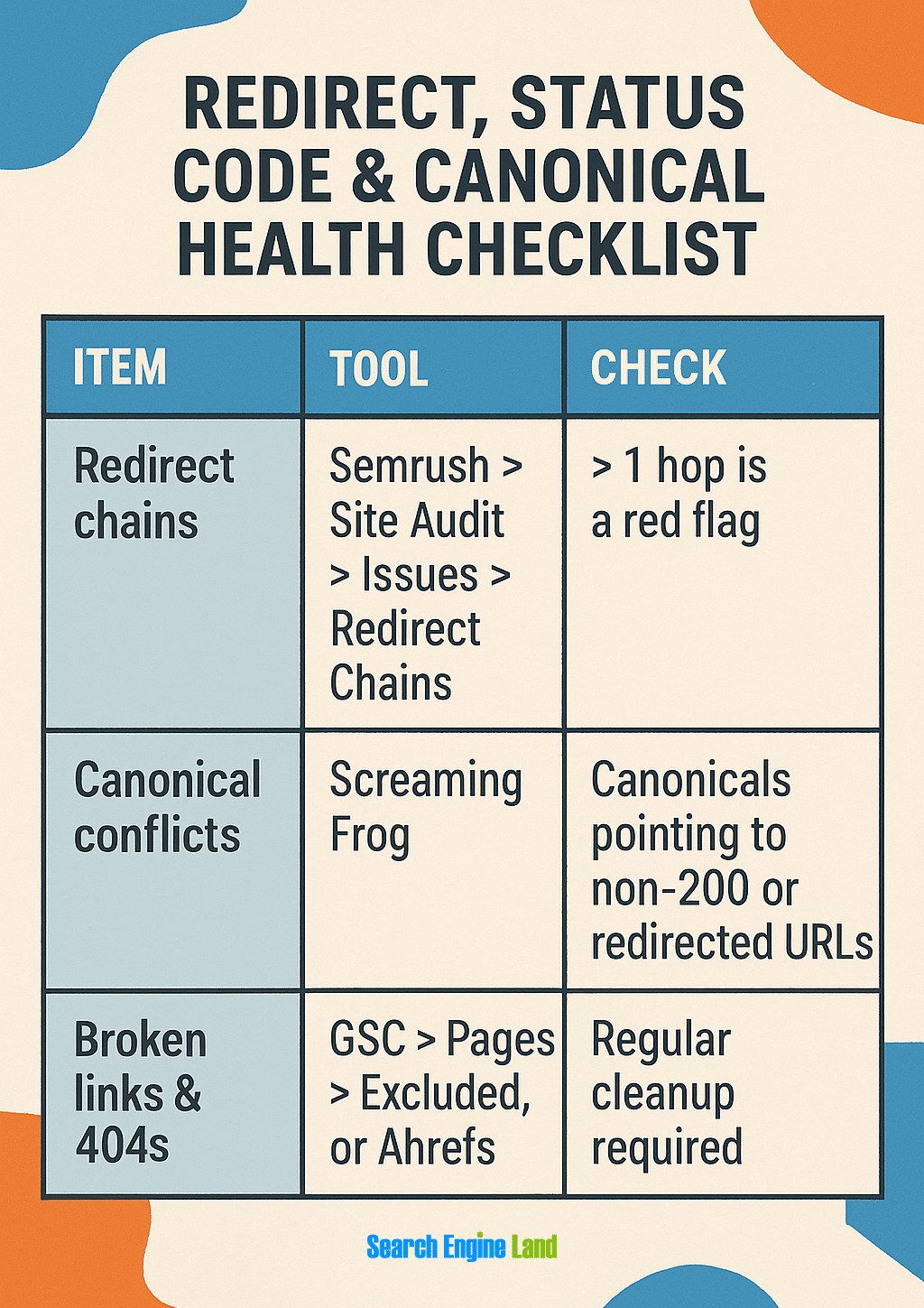
A clean redirect and canonical environment = trust + speed + equity consolidation.
6. Dashboard & reporting framework
Once you’re tracking, you need to communicate.
Recommended setup:
- Looker Studio + GSC + GA4 → Visual SEO dashboard
- BigQuery + CrUX + CWV API → Advanced performance tracking
KPIs to build into dashboards:
- Indexed vs. non-indexed content by type
- Rich snippet eligibility over time
- Percent of site passing Core Web Vitals
- Log-based crawl priority of top content
- Schema implementation rate by template
- Redirect/canonical error rate
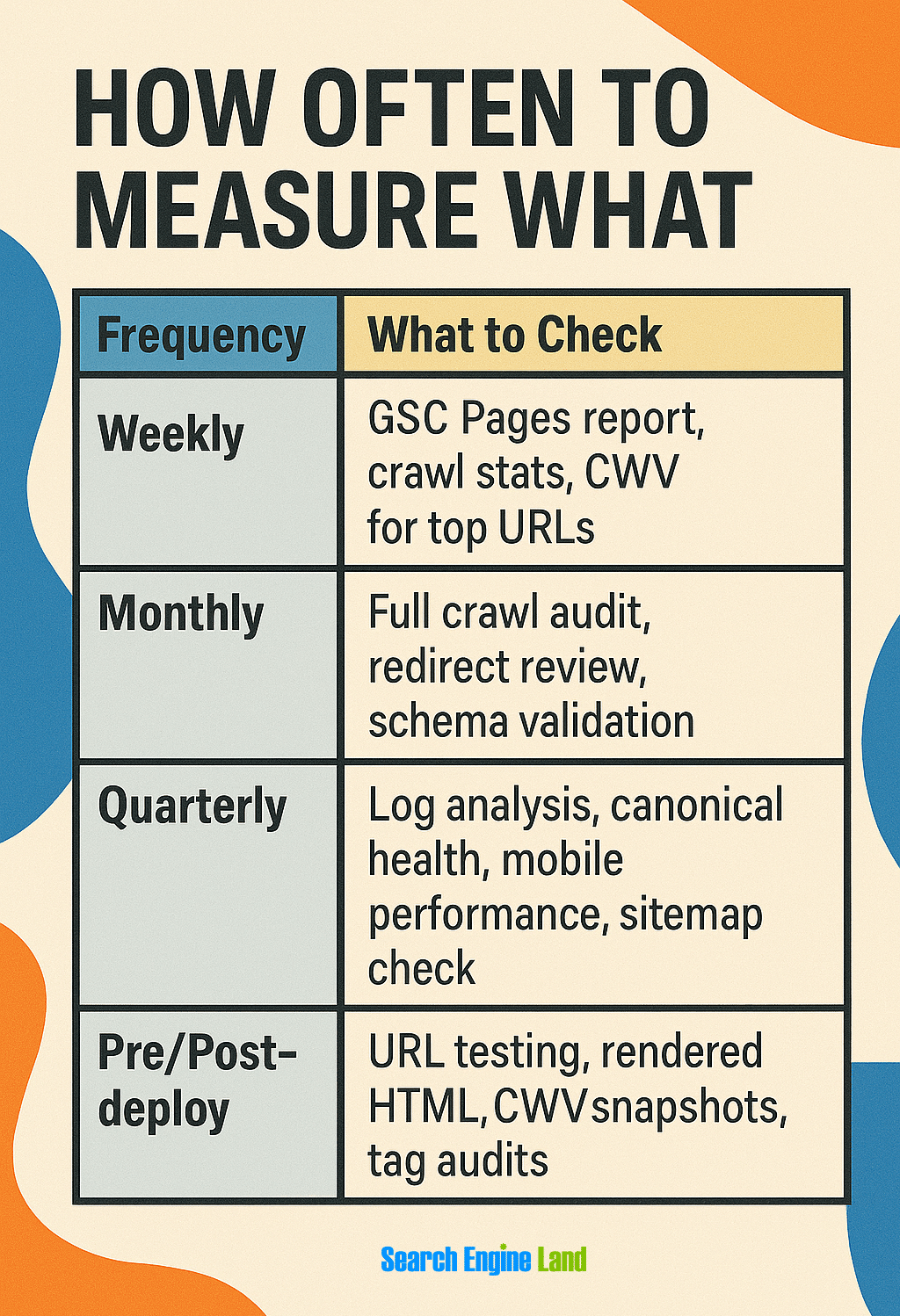
Cadence: How often to measure what
Comprehensive Platform Monitoring
While specialized tools excel at specific technical SEO tasks, a unified monitoring approach often provides better visibility and reporting efficiency.
Semrush stands out as an all-in-one platform for monitoring overall technical health across multiple dimensions:
Key features for technical SEO monitoring:
- Site Audit: Comprehensive crawl with 130+ technical checks and issue prioritization
- Position Tracking: Monitor ranking impact of technical fixes
- Log File Analyzer: Analyze actual bot behavior and crawl patterns
- On-Page SEO Checker: Identify technical opportunities on specific pages
- Backlink Audit: Ensure redirects aren’t diluting link authority
This integrated approach solves one of the most common challenges in technical SEO monitoring: connecting the dots between technical changes and business outcomes. When performance improvements coincide with ranking increases and traffic growth, you build a compelling case for continued technical investment.
Build your SEO house on a strong foundation
There are two types of websites in organic search:
- Sites that perform because they’re technically sound
- Sites that survive in spite of technical debt
If you’ve made it this far, you already understand: technical SEO isn’t just a department’s job. It’s not just pre-launch QA. It’s not “set it and forget it.”
Track, optimize, and win in Google and AI search from one platform.
Technical SEO is the operating system of sustainable organic growth.
Technical SEO is strategy, not just cleanup
Too many businesses treat technical SEO as plumbing: fixing leaks only after traffic drops or rankings disappear. But real growth comes from treating it as infrastructure:
- You build crawlability into your content strategy
- You measure rendering and INP as part of your UX pipeline
- You tie structured data into your CMS product development
- You monitor canonicalization, redirects, and bot behavior like uptime
This is how you win. This is how you scale.
Technical SEO amplifies every dollar you spend
- Paid ads get a better landing experience
- Content marketing gets higher indexation and reach
- Link building gets preserved and consolidated authority
- Your site becomes faster, more stable, and easier to use for both users and bots
No other SEO investment has this kind of multiplier effect.
Your SEO wins start here

Technical SEO doesn’t age: it evolves. So should your approach.
Further resources
Stay sharp, stay updated, and go deeper:
- Google Search Central
- PageSpeed Insights
- Schema.org Markup Validator
- Treo.sh—Real-World INP Data
- Semrush Site Audit
- All things SEO on Search Engine Land
Technical SEO FAQs
What is technical SEO in simple terms?
Technical SEO is making sure search engines can find, understand, and display your website properly. Think of it like maintaining the engine of a car—users don’t see it directly, but without it working properly, the car won’t run. It includes making your site load quickly, ensuring Google can access all your pages, fixing broken links, and making your site mobile-friendly. In essence, technical SEO creates the foundation that allows everything else in SEO to work.
How is technical SEO different from on-page SEO?
Technical SEO focuses on your website’s backend infrastructure (how search engines access and interpret your site), while on-page SEO deals with the content itself (what users see and read).
Technical SEO handles elements like site speed, mobile-friendliness, security (HTTPS), crawlability, and proper code structure. On-page SEO covers keyword optimization, high-quality content, meta tags, headings, and internal linking.
You need both: technical SEO ensures search engines can find and process your pages, while on-page SEO helps those pages rank for relevant searches.
How do I know if my site has technical SEO issues?
Your website likely has technical SEO issues if:
- Pages load slowly (over three seconds)
- New content doesn’t appear in Google after several weeks
- You see crawl errors in Google Search Console
- Mobile users complain about usability problems
- Your rankings suddenly drop after a website update
- You’re not getting rich results (stars, images, etc.) in search results
Most businesses discover technical issues only after running a formal SEO audit with specialized tools.
What tools help with technical SEO audits?
Essential technical SEO tools include:
- Google Search Console: Track indexing, errors, and performance
- Semrush: All-in-one SEO platform with site audit, position tracking, and technical analysis features
- PageSpeed Insights: Measure loading speed and Core Web Vitals
- Screaming Frog: Crawl your site to find technical issues
- Sitebulb: Visualize site architecture and technical problems
- Chrome DevTools: Inspect how pages render and load
- Schema Markup Validator: Test structured data implementation
- Mobile-Friendly Test: Check how Google sees your site on mobile
Using multiple tools provides a more complete picture of your site’s technical health than relying on any single tool.
Is technical SEO hard to learn?
Technical SEO can be learned by anyone willing to take a systematic approach, even without a technical background. Start with fundamentals like site structure and page speed before moving to more complex areas like JavaScript SEO and structured data.
The most effective strategy is mastering one concept at a time:
- Begin with basic concepts like crawlability and sitemaps
- Progress to page speed and mobile optimization
- Learn structured data implementation
- Finally tackle advanced topics like JavaScript rendering
While there’s a learning curve, many excellent resources and tools are available to help beginners build these valuable skills step by step. Once you’ve mastered technical SEO, you’re ready to fully optimize your on-page SEO.
Explore more on
Editorial disclosure
Search Engine Land is owned by Semrush. We remain committed to providing high-quality coverage of marketing topics. Unless otherwise noted, this page’s content was written by either an employee or a paid contractor of Semrush Inc.
About the author


