Bing Ads To Launch Ad Diagnostics Tool: Learn Why Your Ad Isn’t Running And How to Fix It

Bing Ads has made several announcements about upcoming feature updates over the past few weeks (see below in Related Articles), and they’ve made another today.  Soon, the Ad Preview Tool will get a new name and added functionality.
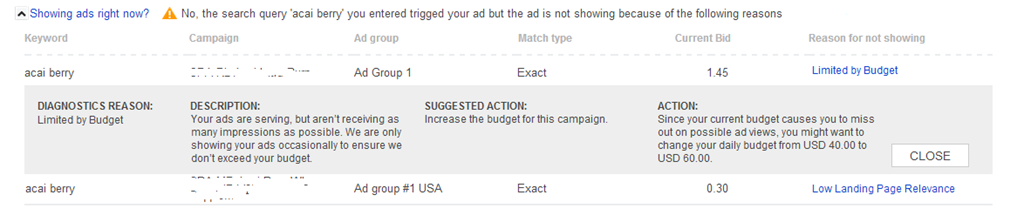
In its current form, you can use the Ad Preview Tool to validate whether your ads are showing for specific keywords. That functionality will remain, but the newly named Ad Preview and Diagnostics Tool will also show you why your ads are not showing on the first page of Bing Ads results for a specific keyword.
According to the post, the new diagnostics features will allow you to:
- Identify which keywords within your account could be delivered in response to a search term but being disqualified due to issues with:
- Campaign quality (such as a low quality score)
- Campaign settings (such as bid, budget, targeting, or negative keywords)
- Receive actionable feedback to address those no-show reasons
Here is an example of what the diagnostics feedback will look like:
The new version will still be located in the Tools section, which is a bit hidden away in the upper-right corner near Help.
Explore more on
Add Search Engine Land as a preferred source on GoogleEditorial disclosure
Contributing authors are chosen for their expertise and work under the oversight of the editorial staff. Search Engine Land is owned by Semrush. The contributor was not asked to mention Semrush; the opinions expressed are their own.
About the author