Crawlability 101: Fix SEO to get seen by search engines


Crawlability is the ability for search engines to access and navigate your website’s pages. It’s what allows your content to be discovered, indexed, and shown in search results.
Without crawlability, even your best content may be invisible to search engines. While people can still access web pages directly through links, bookmarks, or typing the URL, search engines will not find or rank them unless they’re crawlable. This means you miss out on search visibility and the organic traffic that comes with it.
In this guide, we cover how search engines “crawl” or explore websites, what blocks them from reaching your content, and how to fix those blockers. We also cover tools and tips to make your most important pages found and ranked by crawlers.
How search engines crawl your site
Search engines use bots, or “crawlers,” to discover content on the web. These bots visit your site and follow internal links from one page to another to find and understand your content, then gather information to determine what gets indexed and displayed in search results.
This process is called crawling. It’s the first step in making your content searchable. Why? Because if a page isn’t crawled, it can’t be indexed, meaning it won’t show up on search engines like Google.
What helps Googlebot crawl your site effectively

To help search engine bots crawl your site efficiently, you need three things working together:
- An XML sitemap lists the important pages on your site—like your homepage, blog posts, product pages, or service listings—so search engines can find and prioritize them. Most CMS platforms like WordPress generate one automatically. You can also manually submit a sitemap in Google Search Console.
- Internal links connect your pages and guide Googlebot as it navigates the site, just like a person would click through. Pages with no internal links are harder for search engines to find and may not be indexed.
- A clear site structure makes sure important content is easy to reach, ideally within two or three clicks from the homepage. If pages are too deeply buried, Googlebot may crawl them less often (or not at all).
Search engines also use crawl queues to determine which pages to visit and how often. And they apply a crawl budget, which limits the number of pages crawled during each visit.
The SEO toolkit you know, plus the AI visibility data you need.

Small, well-structured sites are typically crawled in full. Larger sites or ones with broken links or duplicate pages can waste crawl budget on low-value content and risk missing key pages.
Small, well-structured sites are typically crawled in full without issues. However, larger sites with broken links, duplicate content, or low-value pages such as outdated tag archives, thin location pages, or nearly identical product listings can waste their crawl budget. This may cause search engines to miss or deprioritize more important content.
Pro tip: Help Googlebot crawl smarter by submitting an XML sitemap, linking your pages together, and keeping important content within a few clicks of your homepage. Regular site audits can uncover crawl issues.
Common crawlability issues

Even well-designed websites can run into crawlability problems. These issues often stem from technical settings or site structure problems that block Googlebot from finding important pages.
Broken internal links
Broken links are hyperlinks that lead to a page that no longer exists or cannot be found. When a user or search engine clicks the link, they’re redirected to an error page (404 Not Found).
Example: A blog post links to yourwebsite.com/ebook, but the page was deleted or renamed.
Fix: Use a crawler tool to regularly check for broken links and update or remove them as needed.
Orphan pages
These are pages that have no internal links pointing to them. If nothing leads to the page, Googlebot may not be able to find it (unless it’s listed in your sitemap).
Example: You create a landing page for an event but forget to link to it from your homepage, blog, or navigation. As a result, search engines may miss it entirely and visitors won’t find it, which may mean fewer sign-ups for your event.
Fix: Link orphan pages from relevant content or navigation areas to make sure they’re found and crawled.
Blocked by robots.txt
The robots.txt file tells search engines which parts of your site they can or can’t crawl. It’s often used to block pages that don’t need to appear in search, like staging environments, internal tools, or duplicate versions of the site.
However, blocking important sections by mistake, like your blog or product pages, can prevent those pages from ever being crawled or indexed.
Example: During testing, the robots.txt file includes ‘Disallow: /blog/’ to block unfinished content. However, the directive is never removed, which blocks the entire blog section from being crawled.
Fix: Collaborate with your developer or SEO lead to review the robots.txt file and ensure it doesn’t block important sections of your site.
Misused noindex or canonical tags
A noindex tells search engines like Google not to include a page in search results. Marketers often use it to block thank-you pages, internal dashboards, or duplicate versions of a page. While the robots.txt file blocks crawling, a noindex tag allows crawling but tells search engines not to include the page in search results.
A canonical tag tells Google and other search engines which version of similar content to treat as the original. It helps consolidate ranking signals across pages with similar content, such as multiple product pages that display the same item in different colors or with tracking parameters in the URL.
Both tags are helpful, but if applied incorrectly, they can hide pages that you want in search results.
Example: Your product page has a noindex tag left over from testing, and now it’s invisible in search engines like Google.
Fix: Just like with your robots.txt file, work with your SEO lead or developer to review these tags regularly and make sure they’re only used on pages you intentionally want excluded or consolidated.
Pages buried too deep
If a page takes four or more clicks to reach from the homepage, it may be harder for both users and search engines to find. This is known as click depth.
A shallow site structure keeps important content closer to the homepage, ideally within two or three clicks of the homepage. Pages that are buried too deep may be crawled less often or missed entirely because Googlebot follows links starting from your homepage. The more steps it takes to reach them, the less likely they’re to be seen as important during a crawl.
Example: A resource page is five clicks away from the homepage and not linked from the main menu, making it harder for Googlebot to reach.
Fix: Keep important content within two to three clicks and link it from key navigation areas.

Technical factors that block crawlers
Even if your site is well-structured and linked correctly, technical issues can still prevent search engines from crawling your pages. These problems often appear to be related to server settings, code behavior, or load speed, and aren’t always apparent by simply viewing the site.
Here are a few of the most common technical blockers.
Server errors (5xx codes)
When your site is down or overloaded, it may return a server error. If Googlebot encounters these errors too often, it may reduce the frequency of its crawls.
Example: A page returns a 503 (service unavailable) error during a product launch when traffic is high.
Fix: Work with your developer or IT team to ensure you’re using reliable hosting and monitoring tools to avoid downtime during high-traffic events.
Slow page speed
Pages that take too long to load may be skipped or crawled less often. Slow load times waste crawl budget and can also hurt user experience. Common causes include large image files, uncompressed JavaScript or CSS, excessive third-party scripts, and poor server performance.
Example: Large images and unoptimized scripts on the homepage cause it to load in 10 seconds or more.
Fix: Compress images using tools like TinyPNG, streamline your code by removing unused scripts or plugins, and monitor performance with tools like PageSpeed Insights.
JavaScript rendering issues
Some websites use JavaScript to dynamically load content, such as showing product filters, expanding menus, or displaying content without requiring a page refresh. However, if key information only appears after JavaScript has run and Googlebot can’t render it properly, that content may be missed during crawling.
Example: A blog page loads the article body with JavaScript, but Googlebot sees only a blank template.
<div id="blog-post"></div>
<script src="load-blog-content.js"></script>
Fix: Use server-side rendering so that important content loads in the initial HTML, allowing bots to access it.
<div id="blog-post">
  <h1>5 Ways to Improve Your Site’s Crawlability</h1>
  <p>Search engines need to find your pages to rank them. Here's how to help...</p>
</div>
Redirect chains or loops
A redirect chain is when one URL redirects to another, which then redirects again. A loop occurs when redirects form a circular pattern. These patterns can confuse search engines and block access to content.
Example: Page A redirects to Page B, which then redirects to Page C. Page C eventually redirects back to Page A, creating a loop. This confuses search engines and can stop them from reaching your content.
Fix: Keep redirects direct and to a minimum. Use a crawl or site audit tool to check for redirect chains or loops, and update them so each redirect points to a final destination.
Pro tip: Create a quick checklist for every new page. Is it internally linked, added to your sitemap, and free of any blocks, such as noindex or disallow?
How to test and monitor crawlability
You don’t need to guess whether your site is crawlable. With the right tools, you can see exactly how search engines interact with your pages. These tools make it easier to run regular checks, catch issues early, and ensure your content is being found.
Google Search Console
Google Search Console is a free tool that shows which pages are indexed and which aren’t. Use the Pages report to see URLs that are excluded from search and the reasons why.
Example: If a key page says “Crawled – currently not indexed,” it might be too similar to another page or missing internal links.

URL Inspection tool (within Google Search Console)
You can enter any URL to see if it’s being crawled and indexed. This tool also indicates whether the page is blocked, marked as noindex, or experiencing technical issues.
Example: A landing page returns “Discovered – currently not indexed” because it wasn’t linked from anywhere.

Server log analysis
Server logs show exactly which pages Googlebot has visited and how often. While this method is more technical, it’s useful for large sites or when trying to diagnose crawling patterns and missed pages. You can usually access server logs through your hosting provider, content delivery network (CDN), or website operations team.
Example: A product category page was not crawled at all last month, possibly due to a redirect error. While reviewing your server logs, you spot that Googlebot hasn’t crawled your /products/shoes/ page in weeks. A broken redirect is causing the bot to drop off before reaching it, preventing the page from being indexed or updated in search.
Semrush Site Audit
Semrush’s Site Audit tool offers a crawlability report that detects broken links, noindex tags, and sitemap issues. It also provides recommendations to fix them.

Example: A crawlability warning shows your robots.txt is blocking the /products/ section, preventing Googlebot from reaching those pages.
Crawl reporting tools
Tools like Screaming Frog can simulate how search engines crawl your site and flag crawlability issues like broken links, redirect chains, missing metadata, and orphan pages. These reports help you understand how bots navigate your site and where they may encounter issues.
Example: A crawl report indicates that several pages on your blog lack internal links, making them more difficult for search engines to discover.
Optimizing crawl paths and internal linking
Even if your content is great, search engines still need help finding the right paths through your site. The way you link your pages together directly affects crawlability, indexing, and rankings.
Here are four ways to improve internal linking so crawlers (and users) can easily move through your site.
Use a flat site structure
A flat site structure is a strategic way to organize your pages so that most are only a few clicks from your homepage. This helps search engines crawl more content efficiently and prevents important pages from getting buried.
Example: A blog homepage links directly to key categories, and each post links back to those categories.
Add contextual links inside content
Internal links placed naturally within blog posts, product pages, or landing pages help search engines understand how content relates to each other. They also keep users engaged longer.
Example: A blog post about social media strategy links to your email marketing guide in the paragraph where it’s mentioned.
Link to high-value pages often
Pages that receive more internal links tend to be crawled more frequently and viewed as more important. Give extra attention to your most valuable pages, like product, pricing, or lead generation pages, by linking to them regularly.
A good rule of thumb is to include at least 3–10 internal links pointing to each high-priority page, spread across relevant blog posts, navigation menus, and other cornerstone pages.
Example: Your “pricing” page is linked from the homepage, footer, and relevant product pages.
Avoid linking to low-priority pages
Too many links or outdated pages can dilute your crawl budget and confuse search engines about which pages are worth indexing.
Example: A blog has dozens of links to empty tag archives, which may get crawled instead of your top-performing evergreen content.
Pro tip: Regularly audit your internal links and prioritize pointing to high-impact pages that drive traffic, conversions, or authority.
Crawlability vs. indexability: understanding the difference
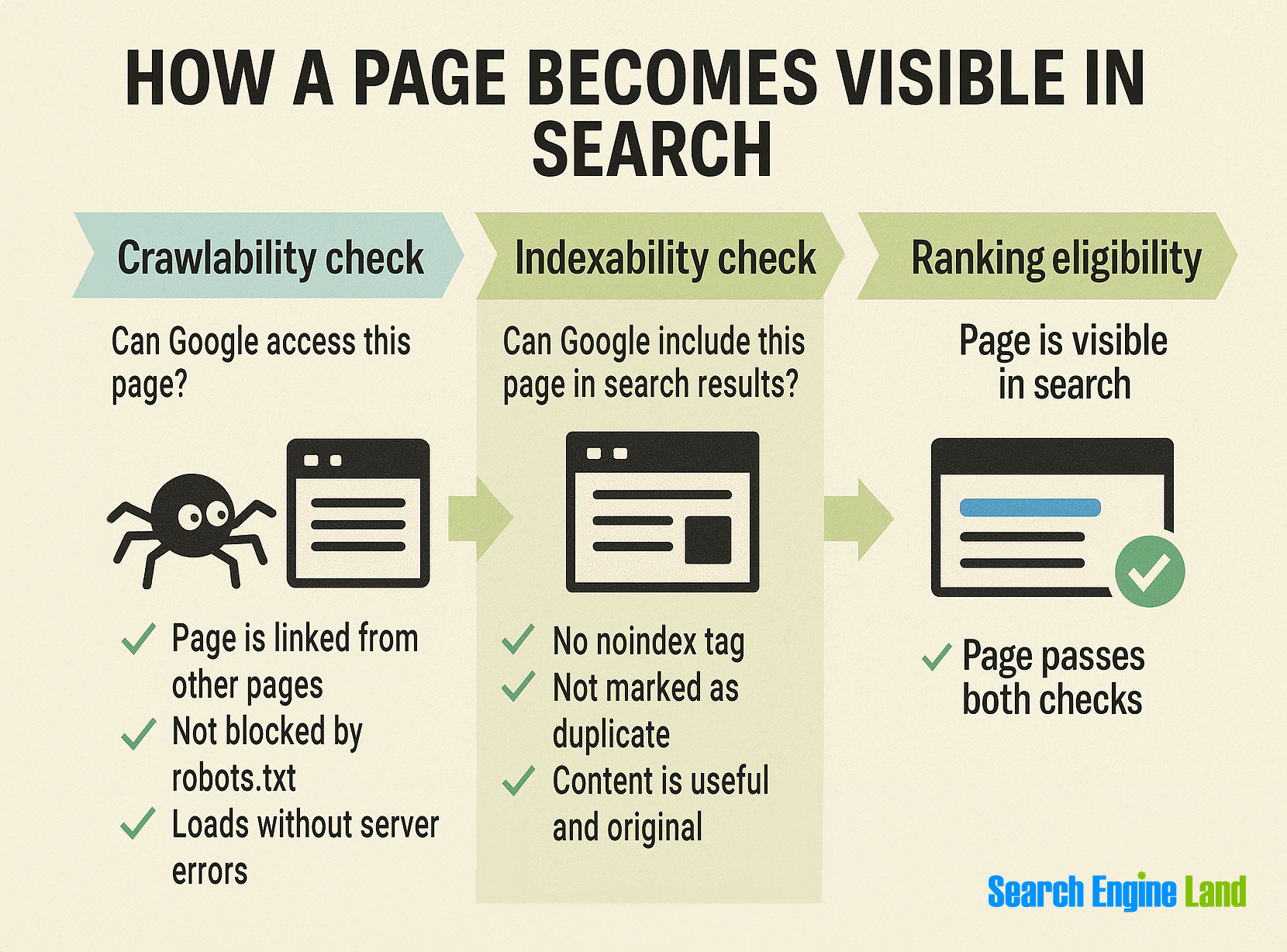
By now, you know that crawlability is about whether search engines can access a page. But access alone isn’t enough. For a page to appear in search results, it also needs to be indexable, meaning search engines are allowed to store and include it in their index.
- Crawlability = discovery (Can Googlebot find the page?)
- Indexability = inclusion (Can the page be shown in search results?)
A page can be crawlable but still not indexed if certain signals tell search engines like Google to skip it.
What makes a page non-indexable?
Even if a page is discovered and crawled, it won’t be indexed if:
- It includes a noindex tag. This tag tells search engines, “Don’t index this page.” It’s useful for private pages, thank-you pages, or staging environments.
- A canonical tag points elsewhere. If the page includes a rel=”canonical” tag that references another URL, Google and other search engines may treat it as a duplicate and choose not to index it.
- The content is low-quality or duplicate. Pages with thin, repetitive, or auto-generated content often don’t meet search engines like Google’s quality standards for indexing.
- It’s blocked via meta tags or HTTP headers. Technical directives—like X-Robots-Tag: noindex—can prevent indexing even if the page is accessible.
How to troubleshoot crawlability and indexability
Check crawlability by using tools like Google Search Console’s URL Inspection Tool or Screaming Frog to see if the page can be accessed and isn’t blocked by robots.txt.
To check indexability, look for noindex tags, canonical links pointing elsewhere, or low-quality content. You can also use the URL Inspection Tool to confirm whether the page is indexed and, if not, why.
Track, optimize, and win in Google and AI search from one platform.
Let’s say you publish a new blog post and link to it from your homepage. Googlebot follows the link and crawls the page. But if the post includes a noindex meta tag in the HTML, Google and other search engines won’t add it to search results.
That tag might be there on purpose (like for thank-you pages or drafts) or added by mistake. Either way, search engines like Google are told not to index it.
If the page should be indexed, check for the noindex tag using Google Search Console’s URL Inspection Tool. Remove the tag and request indexing to get it back in search.
Make crawlability the first part of your publishing checklist
If your content can’t be crawled or indexed, it won’t appear in search, no matter how helpful or well-written it is. That’s why crawlability should be your top priority in the SEO process.
Ask yourself these questions to assess how well search engines can crawl your site:
Is the page linked from at least one other page?
Internal links help Googlebot discover new content. If no other page points to it, there’s a chance it won’t be found.
Is it included in your sitemap?
Adding important pages to your sitemap ensures they’re submitted directly to search engines and not missed during a crawl.
Does it load quickly and return a valid response?
Pages that are slow or return server errors may be skipped. A healthy page should load fast and return a status code like 200 (OK).
Is it free of any noindex or canonical mistakes?
Verify that your page isn’t unintentionally excluded by a noindex tag or redirected to another version via a canonical tag.
For more ways to improve your site’s performance, check out our guide to technical SEO.
Explore more on
Editorial disclosure
Search Engine Land is owned by Semrush. We remain committed to providing high-quality coverage of marketing topics. Unless otherwise noted, this page’s content was written by either an employee or a paid contractor of Semrush Inc.
About the author