Evergreen content: The only guide you’ll ever need

Evergreen content is like that unicorn blog post that you wrote back in 2015 that people still go back to because they absolutely must know “how to write a meta description.” It’s the content that keeps going, supplying seemingly endless organic traffic, conversions, and backlinks—so long as you make the right updates with the right tweaks.
For marketers around the world, evergreen content is the type of copy you dream of hitting “publish” on. It’s key for building and maintaining organic rankings so you remain visible in the search result pages, attracting high-quality links from other sites, and even getting attention from AI-powered search like AI Overviews.
But how exactly do you get your hands on this content goldmine? Read on to learn exactly why evergreen content is so important for any marketing strategy, how to identify and create it, and how to prune things on a regular basis to keep the traffic coming.
What is evergreen content—really?
Evergreen content is online content that remains relevant, useful, and discoverable over time. It’s a page that readers will return to again and again—sometimes years after publication. It often covers timeless, always relevant topics like how-to guides, best practices, and even free tools like Speedtest’s Global Index or Typing.com’s free typing tests.
Other examples of evergreen content include:
- In-depth guides
- Glossaries
- Case studies
- Product or service reviews
- “What is” explanation content

The opposite of evergreen content is trending content or newsjacking. Think of news coverage about a recent event or TikTok meme. You can see the peaks and dives on those sorts of searches as interest builds and builds, and then people will move onto the next thing, leaving any dedicated page(s) to collect dust. Of course, with the right strategy, you could turn this trend into long-term revenue. But without that, you’re just chasing content with a short shelf life.
Other examples of writing that is not considered evergreen includes:
- News articles
- Articles following viral memes or celebrity moments
- Clothing and fashion trends
- Statistics that quickly go out of date
- Social media posts
Take a real life example. Say you’re a pet care company. That guide you wrote explaining how owners can handle a sudden flea infestation? Evergreen content. Pet owners will—unfortunately—be fighting the war against fleas until time. On the other hand, that series of videos you just released of cats dancing to the most recent TikTok sensation? Though it might have gotten you thousands of views, it’ll be old news by next week.
Evergreen content might be the type of content that keeps giving, but that doesn’t mean you can expect your flea bane blog to keep performing without a few adjustments every once in a while.
Before we move on, let’s clear up a few common misconceptions.
Evergreen content is not:
- Content you publish and leave, never touching again as its performance continues to soar through the years
- Only blog posts
- Free from any and all SEO upkeep
The SEO toolkit you know, plus the AI visibility data you need.

Why evergreen content is essential for modern SEO and brand strategy
Evergreen content is a cornerstone of SEO and brand strategy. It’s any page that keeps drawing in traffic, even years after creation.
When you create the right piece of content, you can expect to reap these rewards:
- Sustainable organic traffic
- Regular backlinks
- Alignment with Google’s Helpful Content system
- Reinforcement of your brand’s topical authority
- Lowered customer acquisition cost over time
- Durable assets made for repurposing and internal linking
Let’s take a closer look at each of these benefits to see why you should be focusing so much of your attention on your evergreen content opportunities as you build out your content strategy.
Drives sustainable organic traffic
Because evergreen content is made to address timeless user needs, you can expect it to attract a steady stream of organic traffic long after its publication date.
Let’s take an SEO example. This evergreen content article is evergreen content itself. Too meta for you? Any guide on “how to do SEO” or “how to get backlinks” is also considered evergreen content. Because you’ve created a piece of writing that will bring value to users for a while to come, you’ll keep capturing valuable traffic.
Supports compounding backlinks
And with that organic traffic, comes regular backlinks—aka, when an external site links back to your page.
Search engines love to see backlinks, especially backlinks from authoritative brands, because they show how useful your content is. And done-right evergreen content is an endless well of backlink opportunities.
Remember, you’ve created something of value. That means other people will want to link back to it. The more traffic your page draws in, especially over time, the more your backlinks will continue to compound, which will in turn buoy your rankings and—you guessed it—draw in even more traffic. It’s a system that supports itself.
Common examples of content that act as backlink magnets include:
- Free tools you keep coming back to again and again, like this mortgage calculator
- Well-researched case studies, like a SEO case study on recovering from an algorithm update
- Comprehensive tutorials, like a step by step guide on how to change your car’s oil
Aligns with Google’s Helpful Content System
Google created its Helpful Content System to reward content that thoroughly satisfies user intent. Evergreen content, especially well-structured and regularly groomed evergreen content, aligns perfectly with that criteria. That means you can expect continual high-rankings as your reward for delivering lasting value.
Some common examples of evergreen content that pleases Google’s Helpful Content System include:
- Glossary pages that help you identity certain types of fleas
- Complete tutorial on how to bathe your dog with flea shampoo
- Video series on identifying common symptoms caused by fleas
Reinforces topical authority
Evergreen content should always relate back to your brand. That means you’re capturing the right kind of traffic—and it also means that you’re showing your users and search engines that you’re an expert in your field.
Take our pet store example. As more people read your flea cure and dog harness articles, they’ll begin to associate your brand name with a company that really knows what they’re doing when it comes to pets, priming those people to buy when they see your logo. The same thing could be said for a SaaS company creating a series of tutorials on how to use their most recent product, or a law firm with a legal terms glossary.
Lowers CAC by converting over time
CAC, or customer acquisition cost, is how much you pay to get that one customer. This number varies enormously depending on your industry. A B2B brand might pay thousands of dollars to get even one new lead, whereas a B2C company like your pet store could get away with a much lower $64 per purchase.
A strong evergreen piece of content will keep bringing in new users long after publication—often paying for itself many times over. That longevity means you don’t have to rely on expensive, short-lived campaigns, which in turn helps you lower your CAC.
A B2B SaaS company might publish a detailed guide on cutting cloud costs that brings in continual demo signups over the years. Or a pet store might rank highly for their blog on “best dog food for allergies,” consistently capturing sales. Even a medical clinic can cut CAC by creating a guide on common illness symptoms. Each one of these tactics reduces reliance on costly, one-off campaigns, lowering your CAC with each conversion.
Durable assets for repurposing and internal linking
Evergreen content is versatile and almost always relevant. That means it’s the ideal source for internal linking.
Keep your evergreen content in mind when you’re building out your internal linking strategy—basically when you’re thinking about “what’s a good set of links I should add to this new page.” Internal links make it easier for users to move from one related piece of content to the next, and also help search engines better understand the relationship between pages. Since your evergreen content remains useful for a long period of time, you can keep linking back to it.
Let’s go back to our pet store example. Even after you’re written your new article on dog harnesses, you can still link to your how-to end your flea takeover. Why? People who have dogs should always know how to handle fleas.
And you can always repurpose your guide on “how to stop your dog’s flea infestation” into:
- An actionable blog post that lists tips and over the counter treatments.
- A downloadable checklist for managing fleas seasonally.
- A step-by-step video tutorial on how to bathe your dog into flea-free bliss.
- An interactive quiz to understand if your dog actually has fleas or is scratching for another reason.
Pro tip: Repurpose evergreen content across channels. Try turning key stats into LinkedIn posts, snappy copy into email sequences, and downloadable checklists into long-form guides.
How to identify evergreen content opportunities
Okay, so you understand now what evergreen content is and know how important it is to incorporate into your strategy… but how exactly are you supposed to identify evergreen opportunities when you brainstorm new content?
Here’s your TLDR if you don’t have time to dig into each step.
Ask yourself each question below when vetting evergreen content opportunities:
- Is this topic something that remains relevant year-round and beyond? (Check Google Trends for consistency).
- Is there enough search volume to warrant investment? And is this topic searched regularly, not just during seasonal spikes?
- Does this content support business goals? Will it appeal to your target persona, support your products or services, or answer any customer questions?
- Have you seen success targeting this kind of topic before? Do similar content types (e.g., FAQs, guides) perform well on your site?

If you see a resounding yes for all of these questions, you should dig into the content creation step.
If you’re still a little unsure, read on to get a more in-depth explanation of how exactly you should pinpoint these topics.
Keyword research
Keywords are the words or phrases people use to find your site. Someone landing on your flea blog might have typed in “how to get rid of fleas,” for example. And the best way to keep those people finding your flea content? A strong keyword research strategy.
To do this, you’ll want to use a keyword research tool. Semrush has a free keyword tool you can use to check out how often people are searching for certain terms or phrases. You can also use Google’s keyword planner if you want to get more specific data on certain locations—you can even zoom in down to the zip code.
And don’t go too broad here. Remember, you want a topic that’s still relevant to your brand. A pet store doesn’t have anything to gain by writing an in-depth article about replacing car brakes, no matter how many people are looking that up every month.
As a pet store who has already written about dog harnesses and flea guides, you might want to focus a bit more on your cat content. When you use Semrush’s free keyword research tool, you see that there’s a lot of search volume for terms like “how much does it cost to adopt a cat,” which seems promising.

But before you get attached to a topic, there’s another thing you’ll need to check: search intent.
Search intent
What kind of content are you creating? Where will this content sit in the marketing funnel? Basically, what is the search intent behind your target query?
For your “how to get rid of flea” blog, for example, you’re looking at an informational intent search, or someone who had just started looking into something. Any keywords that include “what is,” “how to,” “guide to,” or “best practices,” mean you’re looking at a likely long-winded blog that explains every possible thing someone would need to know about a topic.
Evergreen content examples that fall into the information intent area of the funnel also include:
- How-to guides (“how to get rid of fleas”)
- Beginner’s guide (“beginner’s guide to dog harnesses”)
- FAQ pages (“dog harness FAQ”)
- Explainer articles (“what are fleas”)
- Glossaries (“dog harness terms to know”)
- Troubleshooting articles (“how to get my dog in a harness”)
- Checklists (“complete checklist to keep your home flea-free”)
Evergreen content also exists for more than just blogs and glossaries. You can also create content that goes deeper into the funnel, like for:
- Commercial searches, or when someone is evaluate what product or solution works best for them
- Transactional searches, or when someone is ready to take action and buy your product, sign up for your demo, etc.
- Navigational searches, or when someone is looking for a specific brand, product, or service
Here are some examples of commercial searches you might spot in the wild:
- Best practice lists (“best practices for preventing fleas”)
- Comparison guides (“back-clip vs front-clip dog harnesses”)
- Case studies (“how you remove 100% of fleas with this approach”)
Transactional evergreen examples look more like this:
- Customer testimonials
- Service or product reviews
- Pricing pages
And navigational examples are the most limited, with the most common example here about a company About Us page.
Each area of the funnel has its own pros and cons. Informational content is broad, so it brings in more users, but very few of those are people ready to buy. Conversely, commercial and transactional content is more niche but tends to lead to more purchases.
What’s the overall most effective format, no matter where it lives in the funnel, out of all of these examples? Unfortunately, it depends. You’ll find different wins for different content types:
- Comprehensive guides are best for high-volume, info-intent topics
- FAQs are best for ranking for long-tail queries
- Glossaries are ideal for building topical authority and ranking for more niche or technical terms
- Checklists are useful tools for other people to share
Take your “how much is it to adopt a cat” example. This is a piece of informational content, but it’s highly relevant to your pet store brand, and it also lets you link out to the many products someone has to buy after a kitty purchase (think cat food, cat litter, litter box). Since you want to write about broader, less commercial pieces of content, you stick with this topic for now.
Search volume
So, you know now what area of the funnel you want to build out your new piece of content for. Next thing to look at is not just how many people are looking for this topic, but how often the topic is being searched for.
What exactly does that mean?
Well, evergreen topics should be something people are looking at on a regular basis. So even though you see that there’s a lot of search volume for topics like “how much does it cost to adopt a cat,” you can’t be certain that this isn’t a recent trend.
The best way to check? Google trends.
Google trends shows you how often keywords have been searched over the last 24 hours up to 2004. Yes, you can go back that far.
What you’re looking for here is a consistent trend of searches, not random spikes of intent.
Here’s the trendline looks like for “how much does it cost to adopt a cat”:

What does this tell you?
People have been consistently searching for “how much does it cost to adopt a cat” somewhat consistently over the last five years. But, it doesn’t look like there’s been any sort of upward trend, and there are long periods when very few people are searching.
Let’s compare this to a much broader, but still related term, like “cat costs”:

Comparatively, you can see that people have been consistently searching for “cat costs” over the last five years, and in fact, those searches have only started to increase.
Does that mean you should write about “cat costs” instead?
The first query has solid search volume, but Google trends shows it spike irregularly and sometimes flatlines. “Cat costs,” on the other hand, is much broader and steadily gaining traction, but likely will be much harder to rank for.
So, which is the best choice?
The answer here depends on your goals. For our pet store example, the narrower, more specific query works better. You’re appealing to a more niche audience, you likely already have most of the products related to that topic in stock, and you’re much more likely to see results faster, since this is an easier topic to rank for.
However, if you had the resources to build out a high-traffic anchor page that might need regular updates, “cat costs” would make more sense.
Review historic site performance
So, you’ve settled on “how much does it cost to adopt a cat.” But before it’s time to invest writing, editing, designing, and developing resources into producing this content, you’ll want to confirm that this type of information has performed well on your site in the past.
Even if you haven’t written anything similar before, you can still look at historical performance for other similar blogs targeting long-tail keywords, or keywords that use three or more words. Use tools like Google Search Console (GSC) or Google Analytics (GA4) to look at page performance, or use tools like Semrush or Ahrefs to look at organic rankings.
Say you want to put a value on all of the guides you’ve created in the past. You can do this by logging into your GSC account.
You’ll be met with a dashboard that shows your site’s organic performance over the last three months:

Navigate to “Full report” so you can really dig into this information.
Now you have a dashboard that shows your sites clicks, impressions, average click-through rate, and average position over the last three months.

Navigate to “Add a filter.” Select “Page.”

Since you’re only looking at guides, you can filter down to only include pages that have “guide” in their URL structure:
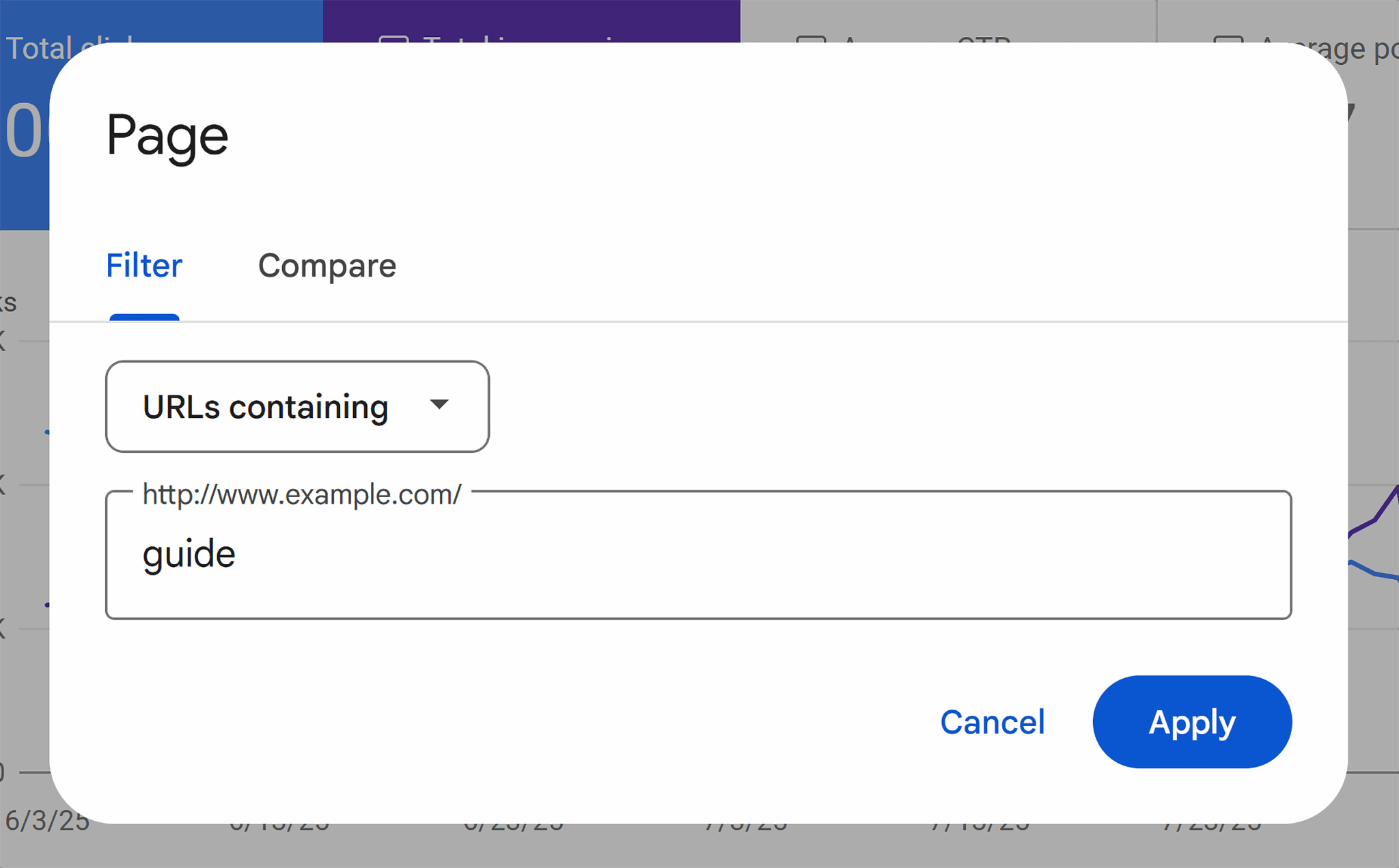
Hit apply. Take a look at your results. Have your clicks gone up? Down? How many clicks have you gotten in the last three months?
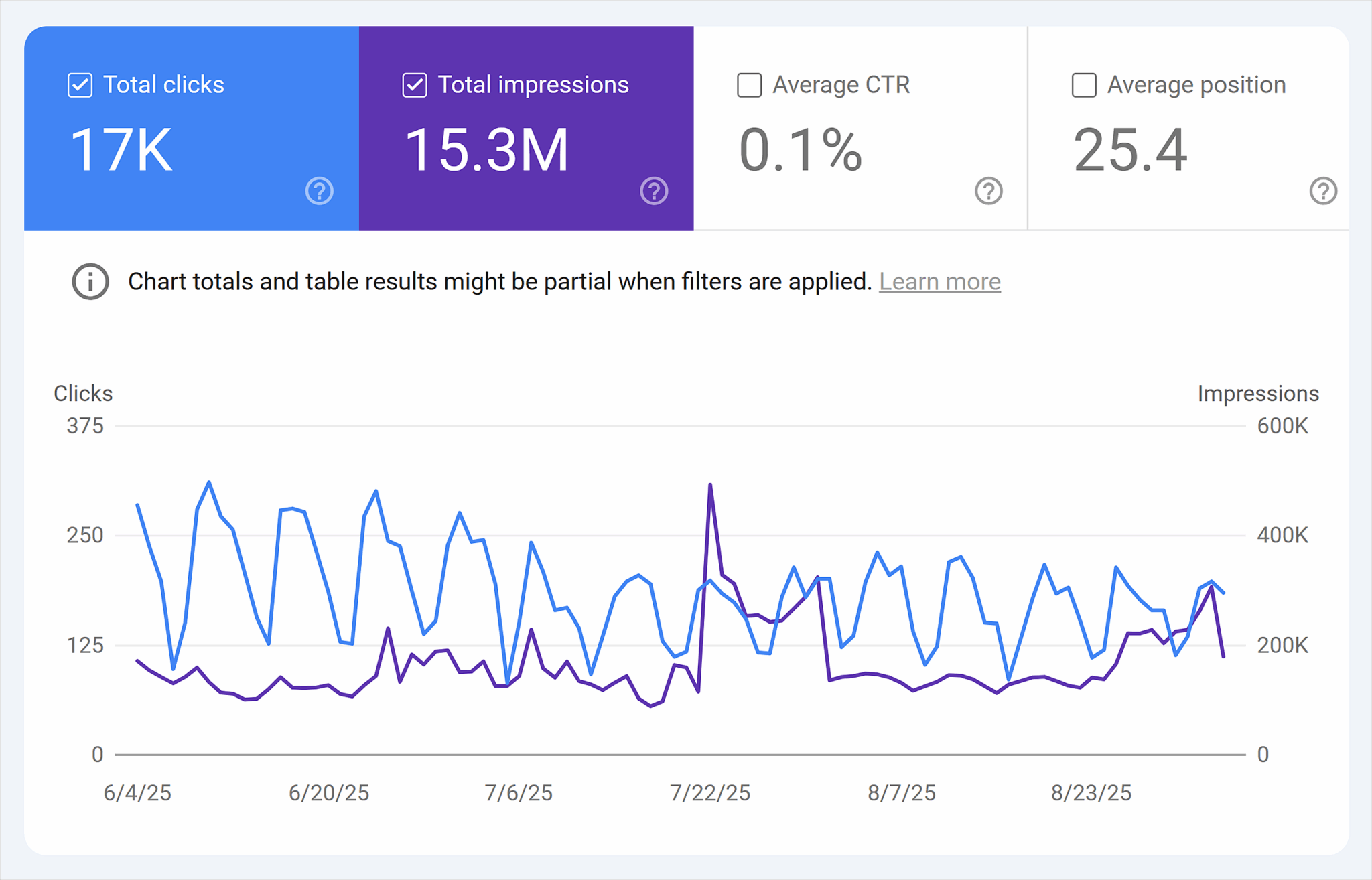
To estimate the value of your preexisting evergreen guide content, you can calculate the number of conversions each page is driving. Say your guide pages got 1,000 clicks over the last three months, and your average conversion rate is 2% (as is the case with most B2C organizations). That means you’ve generated roughly 20 sales from this content.
Even without perfect attribution, this exercise demonstrates the ROI for these pages—and helps you make a stronger case for prioritizing evergreen content in your editorial schedule.
Pro tip: For a more accurate view, consider layering assisted conversions from GA4 or creating a custom goal to track newsletter signups, downloads, or micro-conversions tied to your evergreen pages.
Analyze competitors
Now you know that this type of evergreen content performs well on your site, you can sneak a peak at your competitors as well for extra inspiration. Use a tool like Semrush or Ahrefs to see what kinds of evergreen content is performing well for your competitors.
Do this by first picking out your top competitor.
Take the homepage URL for your competitor and log in to your SEO tool of choice. We’ll just Semrush for this example.
Enter your competitor’s domain name into the search bar and hit the magnifying tool to search.

You’ll see a lot of information about this brand in the full dashboard, but you don’t need to look at any of that right now. We’re just looking to see how your competitor’s evergreen content is performing.
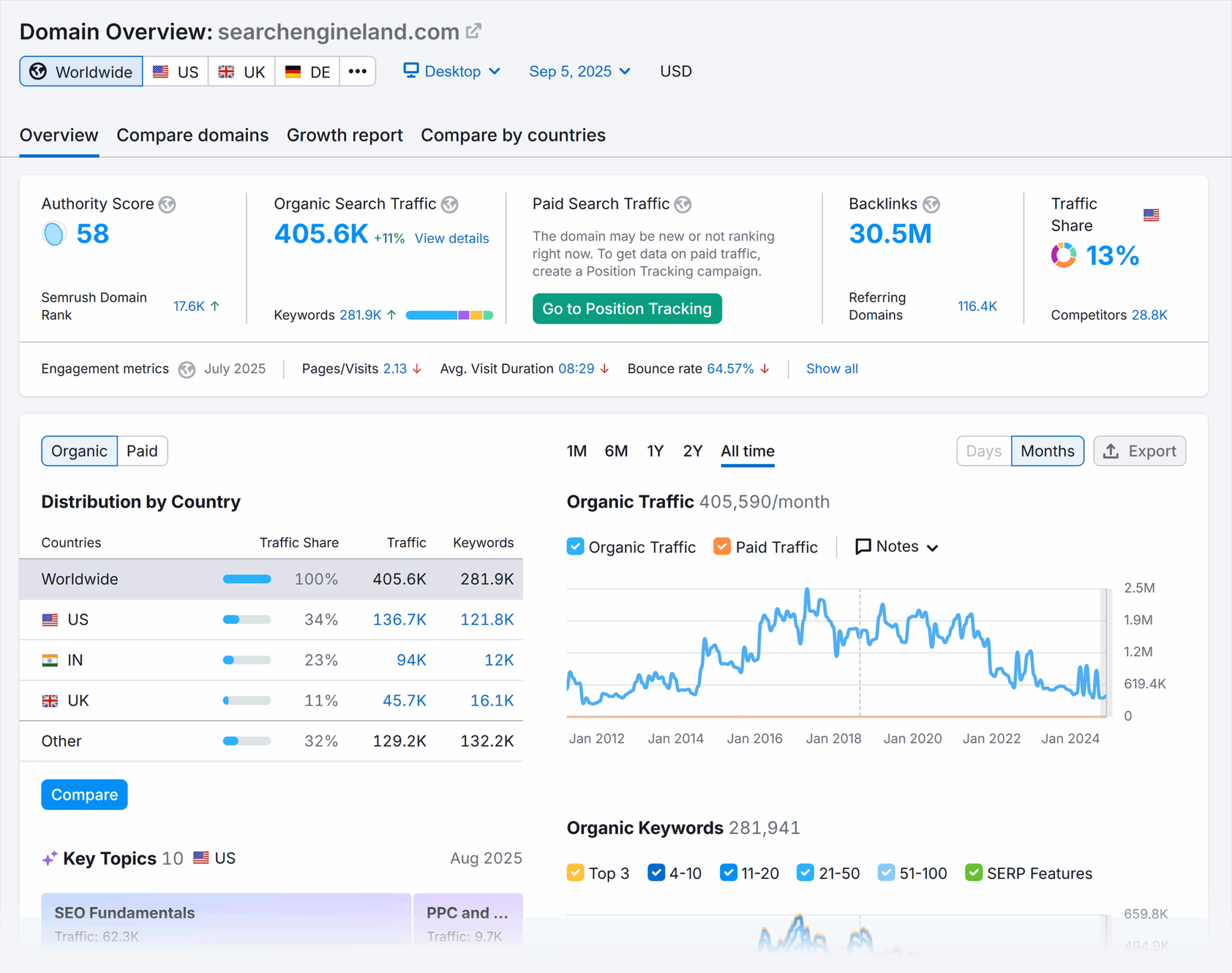
Since we just looked at how guide content is performing on your own site, we can get some inspiration from this competitor as well.
Do this by clicking on that blue number just below “Organic Search Traffic.” This will show you what keywords are driving the most traffic to your competitor’s site.

Now you can see all this information about your competitor’s top keywords. But we’re focusing on evergreen guide content here, so we’ll want to filter this down.
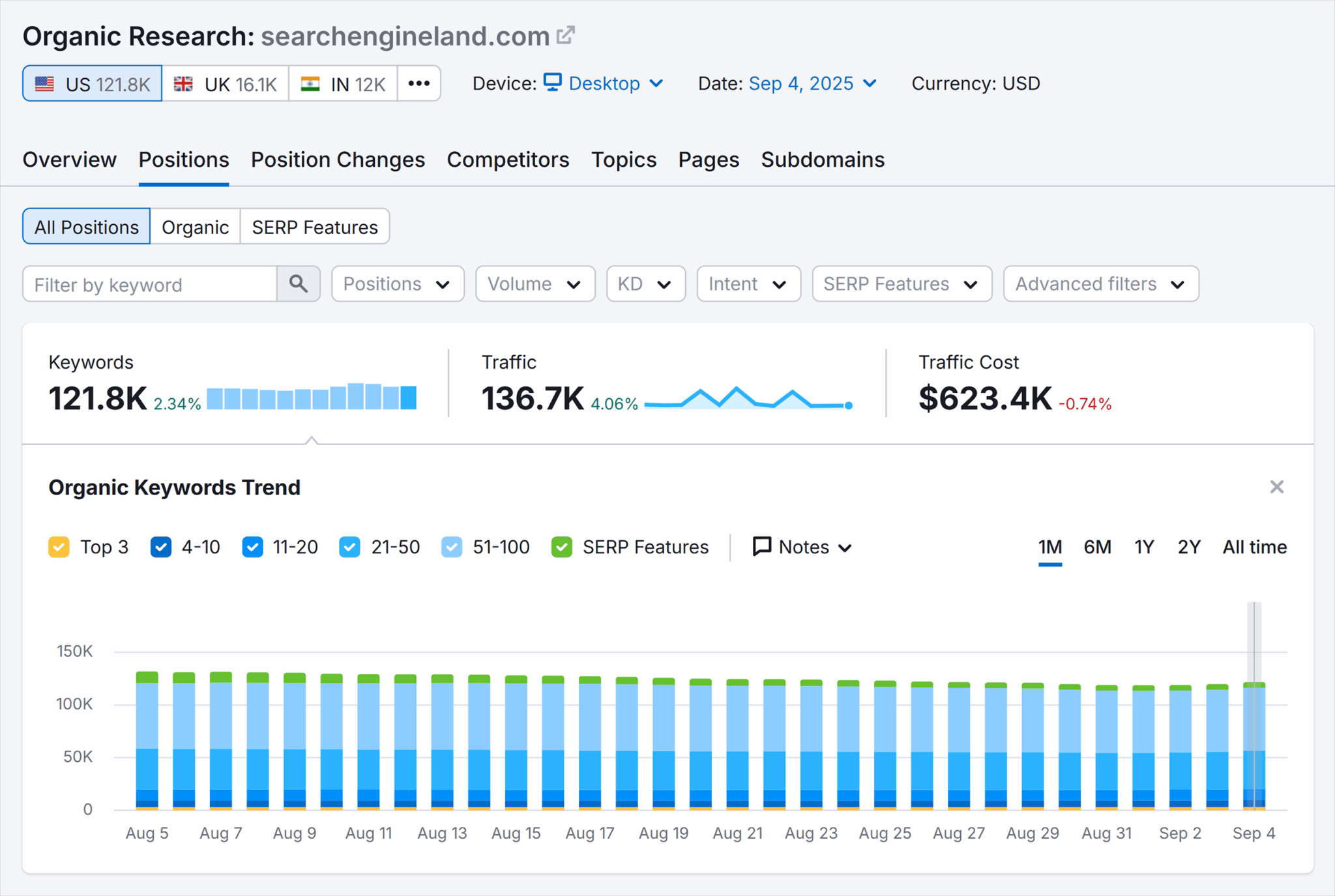
To do this, you’ll first want to click on the “Advanced filters” dropdown.

Open this dropdown. Change the section that says “Keyword” to “URL” instead.

Enter “guide” into the box on the far right. Then hit “Apply.”

Now you can see all of your competitor’s evergreen guide content—and best of all? You can get rough estimates on how everything is performing.
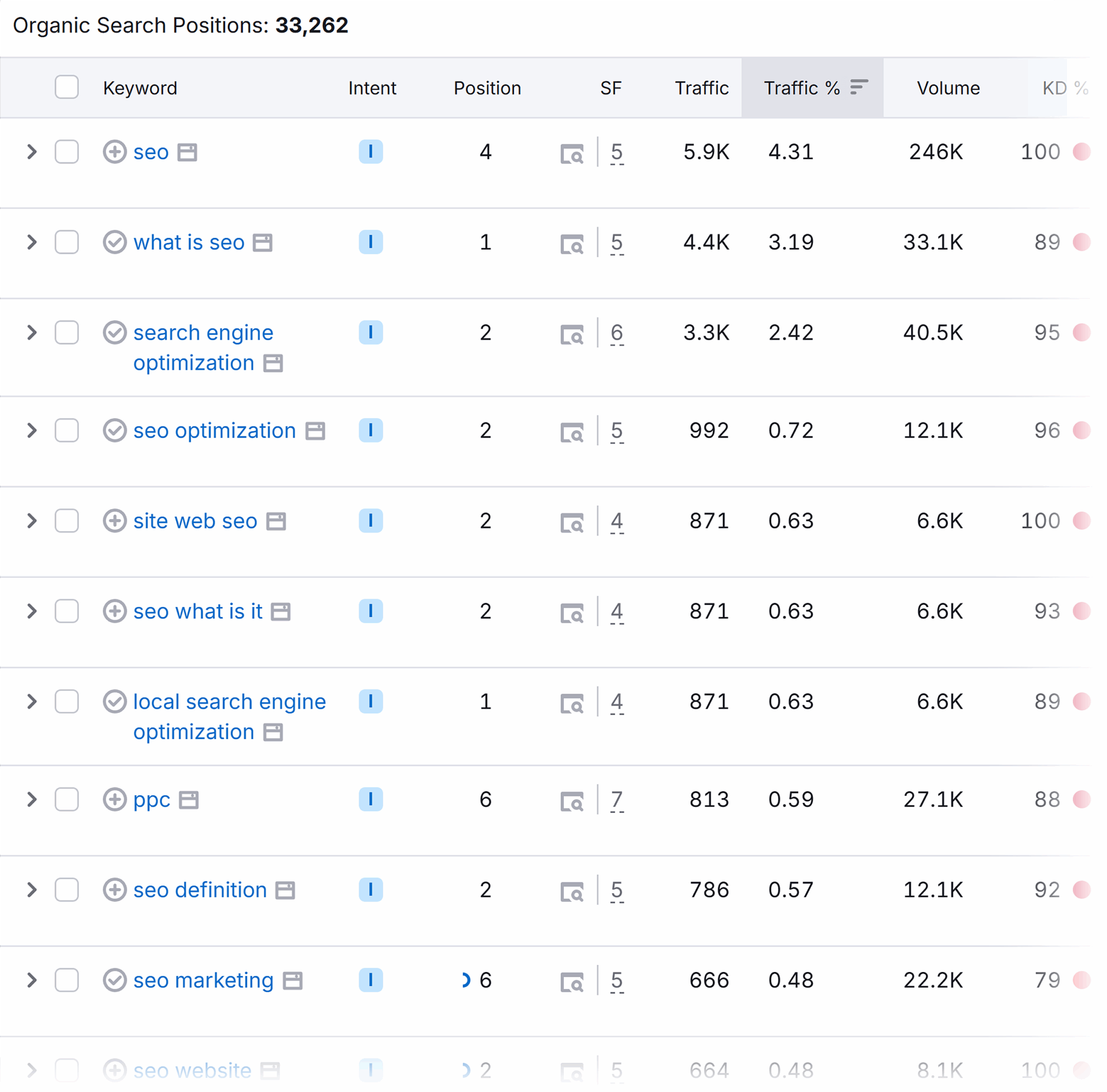
Use this information as inspiration for future evergreen topics, and to better understand how, if created correctly, well your future evergreen content will perform.
Confirm with internal content
Okay, you might be ready to pull the trigger on your newest page, but before you jump in, there’s one last thing you should check:
Your own company.
Look at your sales content. Cross-reference with your own customer support FAQs.
Ask yourself:
- Is there a customer need for this new evergreen content?
- Does my site contain this information, or am I creating duplicate content?
- Will my sales team be able to help customers who have questions about this content?
The sweet spot for evergreen content is where consistent search volume meets business impact. Use the tools like Google trends to confirm year-round interest, and then layer in your additional internal insights like customer questions and support FAQs. That’s the key to finding a topic that drives qualified traffic, not just random visits.
If you see a true gap for this content—and know your sales team will be able to field any questions—it’s time to get creating.
The evergreen content creation playbook
You know how to look for evergreen content. Now it’s time to get to the fun part: creation.
Tread cautiously here. Remember that evergreen content needs to be high-quality and useful to capture that long-term traffic. Follow each step carefully to create the best result.

Step 1: Start with a content moat mindset
Before you get started, look at your content ideas. Ask yourself:
- Will this topic still matter in 12 to 24 months?
- Does it reflect my brand’s values and expertise?
- Can it anchor internal links and conversion opportunities?
- How easy will it be to update?
Remember to look at places like Google Trends, your competitors, and even your own site. You’re going to invest a lot of time and resources here, so choose wisely.
One place you can never go wrong? The fundamentals. People always need to start from somewhere, and the basics are a perfect way to educate a new audience and grow your experience.
Step 2: Do deep, original research
You know how to find your topics, and you know how to confirm that they fit well with your brand. Now you’re staring at a blank document with a blinking cursor. There’s no worse situation. How do you even begin to outline such a mammoth task?
Research.
Your evergreen content needs to be “bookmark-worthy.” People should want to tell their friends about it. Post it on LinkedIn. That means you’ll want to back up everything you say with facts, statistics, data, and subject matter expert input.
Review experts. Research industry experts. Reach out for quotes. And make sure you source everything.
Because you know who else likes to see a well-cited piece of evergreen content? Search engines.
Original data, expert quotes, and actionable frameworks make your content harder to outrank, and more likely to earn backlinks. And the more stats you cite with authoritative sources, the more you prove to search engines that you’ve done your homework, and you’re providing that high-quality piece of content everyone wants to read.
Step 3: Create content worth returning to
As they always say: a picture is worth a thousand words. Now that you have an outline and research to back you up, you can’t just throw your copy into the internet and be done with it. You need a way to get people’s attention—and with Google’s image search result box now showing up for a third of all searches, what better way to do that than with a killer graphic?
Graphics are the ideal way to break up mountains of text. People don’t want to just skim through paragraph after paragraph. Give weary eyes a break by rewarding them with relevant pictures, like this:

See, this picture is relevant because we’ve been talking about our pet store example. And don’t you feel rejuvenated and rewarded for reading this far? You get to learn about evergreen content and look at cute kittens. It’s a win/win.
Graphics help with more than just skimmability. They also push people deeper into your article, improving your scroll depth.
The more users that scroll through your article and the more time they spend on your page signals to Google that you’ve created an interesting, engaging piece of content that deserves to rank higher.
Don’t just stop with graphics either.
Another way to get people’s attention? Free tools.
The best evergreen content is a page people want to keep coming back to because they want to use your free pet insurance calculator or download an email marketing template.
Step 4: Optimize for long-term discoverability
Once you’ve drafted your content and designed your graphics and free tools, you need to pay close attention to how you optimize things. You’ve invested this much time and resources. Now is not the time to make rookie mistakes that could damage this page’s longevity.
Here are the things you should always remember to do when optimizing your page:
- Create a timeless URL by avoiding using dates or any other signifying factors that show when the page was published
- Target stable keywords that won’t just bring in a lot of organic traffic because of a trend, but are always relevant
- Use structured headings to make your content easy to skim and understand for both readers and search engines
Another pro tip: add schema.
Schema, or structured data markup, might sound scary, but it’s really pretty simple to create and apply. It’s basically just a piece of code you add to your new page that tells search engines what the page is about. If you’ve created a how-to guide, you add a how-to schema. If you’re creating an FAQ section, FAQ schema will help you get seen.
You can either create your new schema using a generative AI tool, or a schema markup generated like this. Just make sure to always test your schema before adding it to the <head> section of your evergreen content to make sure everything’s working properly.
Step 5: Include internal links and conversion paths
Your content is almost ready to go live. You have one more step left: it’s time to bulk up your internal links.
We’ve already touched on how useful evergreen content can be for being a hub for internal links. This goes both ways. Make sure you link out to other relevant pieces of content from your new evergreen page so it’s easy for both users and search engines to move around your site.
The most important thing to link to here?
Your conversion path.
Depending on where your new page sits in the marketing funnel, this path will look a bit different.
Say you ended up making that guide that talks about the cost of a new cat. Your conversion path might look like pushing people toward the products you’ve listed, or more middle of funnel content like a cat litter comparison guide.
For most pieces of content that sit toward the top of the funnel, you’re better off linking to more transactional content, pushing people deeper into your site by offering up relevant use cases or case studies. Or you can just ask someone to sign up for your newsletter.
As for evergreen content deeper in the marketing funnel, you can get away with more blatant calls to action (CTAs), pushing them toward buying your product or services, or signing up for a call.
Whatever conversion paths you do include, make sure it’s something built to last. Avoid including dates or time-relevant CTAs so your lead magnet can age with your content.
Step 6: Monitor performance and continue to optimize
Okay, we lied, you have one more step. But this is a step that comes after you’ve already pushed your content live. Now you’ll want to make sure everything is performing well.
And no, that doesn’t mean you should check the GSC report for your new page every single day after you’ve launched. Organic traffic takes time, and that means patience. Depending on the size of your site and how often search engines view your content, you’ll likely want to wait a few months to get a feel for how well your new page is performing. Then you’ll want to evaluate next steps.
Success will look different depending on your content’s goals. In general, you’ll want to look at the following metrics:
- Organic traffic
- Organic rankings
- User time on page
- User scroll depth
- Backlinks gained
- Conversions
- Social mentions
- PR mentions
Conversions here don’t always mean a purchase. That can also look like someone signing up for your newsletter or adding your cat food to their wishlist. Keep in mind what area of the funnel your new piece of content is in.
Success for informational content will be more weighted toward higher traffic, stronger rankings, and increased backlinks. On the other hand, success for middle to lower funnel of content like transactions or commercial content will usually look like more conversions.
Look at these numbers for your new page after it’s had time to grow. Compare them to your competitor content with an SEO tool. How are you performing? Where can you improve?
These little tweaks are the changes you’ll need to make to keep your evergreen content truly evergreen.
How to keep evergreen content evergreen
As we discussed above: evergreen content does need occasional pruning, so make sure to check on your data on a semi-regular basis to keep everything in top shape by updating or removing outdated information.
Here’s your checklist to keep your evergreen content actually evergreen:
- Refresh your content every six to 12 months
- Add a revision history or “last updated” date for transparency
- Make updates easier by breaking content into reusable blocks
- Auto-monitor performance with SEO tools
Refresh your content every six to 12 months
Keep on top of updates by scheduling content refreshes every six to 12 months. You don’t need to rewrite the whole thing. Instead review, and look for:
- Any broken or redirecting links you should replace
- Statistics that need updating
- Examples that should be refreshed
Pro tip: For every content refresh, review your evergreen content against brand guidelines. No matter how old your evergreen content is, it should still match with the aesthetic of the rest of your site.
Add revision history or “Last updated” date for transparency
When you make these changes, don’t be afraid to let your users and search engines know.
Add either a revision history to show what changes were made and when, or add a “last updated” date so everyone can see the content has been refreshed.
Here’s an example of what this should look like:

This change isn’t just to show that you’re being a good content steward. It also demonstrates to users that this content is still relevant to them—even if they’re reading something that was published in 2023, it’s been updated with 2025 facts.
Use modular content blocks to streamline updates
Modular content blocks are reusable sections like FAQs, definitions, or feature tables that appear throughout your page.
By standardizing these elements, you can easily go in and refresh data without needing to rewrite the entire piece—the ideal setup for scaling updates across multiple assets.
Track, optimize, and win in Google and AI search from one platform.
Auto-monitor with tools like Semrush, GSC, or ContentKing
The second biggest challenge after creating an effective piece of evergreen content? Keeping track of its performance and addressing any issues. Doing this manually is a nightmare. As much as any SEO loves spreadsheets, automating this process with a tool like Semrush, GSC, or ContentKing is a much better alternative.
You can set up position tracking for your domain using Semrush to track rankings for your evergreen page’s target terms. This lets you monitor how these rankings change over time—and you can even measure yourself against the competition.
Get started by navigating to the “Position Tracking” report beneath “Keyword Research.”

From there, you can enter your site’s domain:

Choose the country you wish to monitor. Position tracking auto-selects Google, but you can pick something different.

Navigate to “Keywords.” This is where you’ll enter the target terms for your evergreen content.

Make sure to note the box at the bottom of this page. Check it if you want weekly ranking updates.

Now you’ll get weekly updates on your keyword performance, and you don’t have to worry about reminders and updating your content calendar spreadsheet.
Creating and maintaining evergreen content
Just like any SEO task, creating and maintaining evergreen content is no easy feat, but the reward for your hard work is high. And even after you’ve found the best topics, optimized ‘til the cows came home, and are now raking in the benefits, there’s still more SEO work to do.
Evergreen content is just part of the battle. Even the most helpful evergreen content won’t perform if your site has crawl issues, poor UX, or an out of shape content marketing strategy. Make sure your site is ready for search engines and Google’s never ending updates by reviewing the technical side of things. And don’t forget to stay on top of your search result page monitoring so you always know where you stand with your competitors.
Explore more on
Editorial disclosure
Search Engine Land is owned by Semrush. We remain committed to providing high-quality coverage of marketing topics. Unless otherwise noted, this page’s content was written by either an employee or a paid contractor of Semrush Inc.
About the author