Organic search impressions: How to track & improve

Organic impressions show you how often your website appears in search results as people seek relevant information or answers.
Why should you care?
Organic impressions help you understand your:
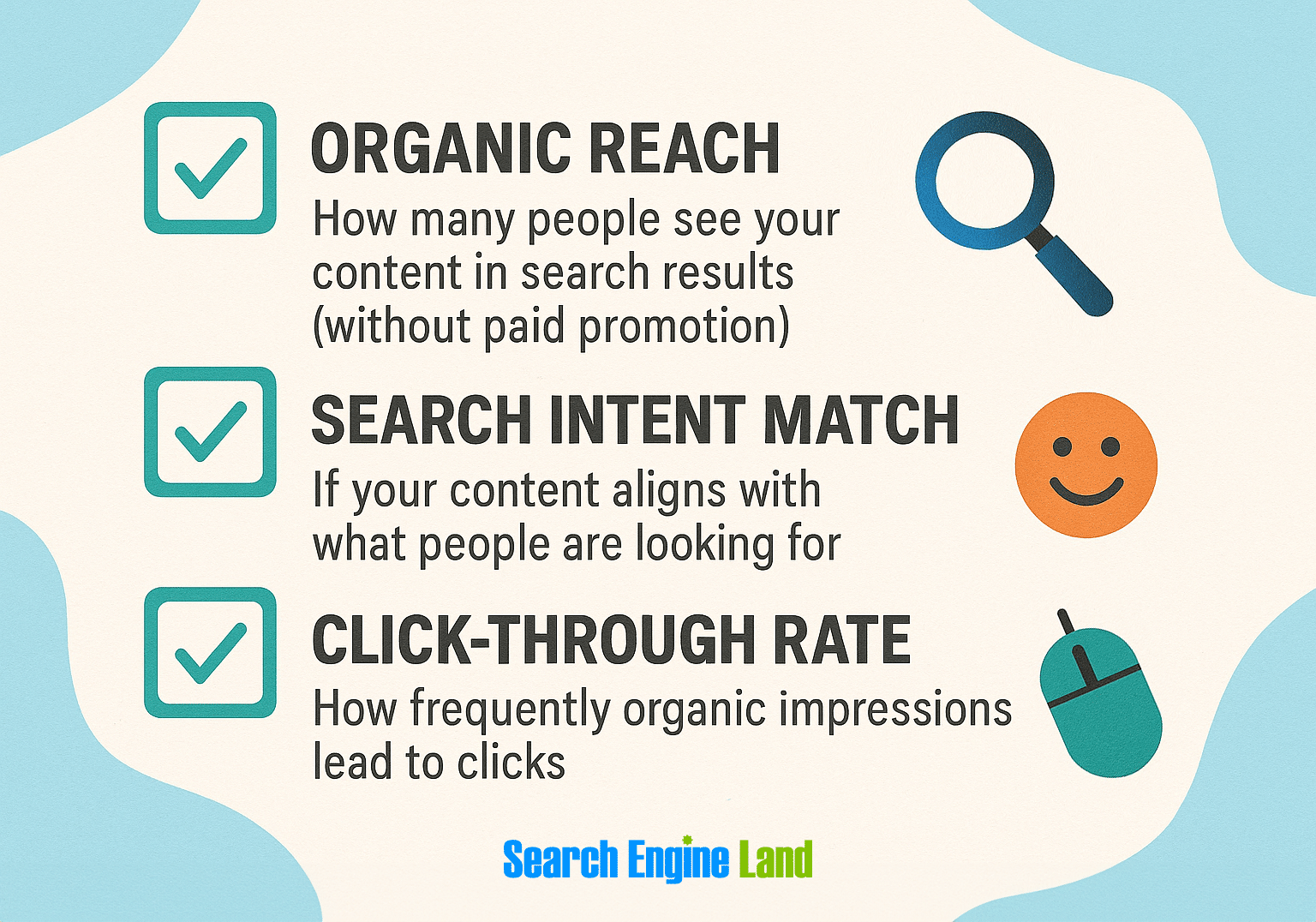
- Organic reach: How many people see your content in organic search results (without paid promotion)
- Search intent match: If your content aligns with what people are looking for
- Click-through rate: How frequently organic impressions lead to clicks
Fluctuating impressions can be a cause for celebration or a warning sign. This post walks you through how to tell if impressions signal real SEO progress or more zero-click searches—and what both scenarios mean for your SEO strategy.
What are organic search impressions?
Organic search impressions measure how many times your webpages surface on search engine results pages (SERPs) or in the Google Discover or News feeds.
Google counts an impression every time a user sees your content in their search results. Typically, this means when it displays on the current results page, even if the content isn’t fully in view.
But with Discover, carousels, and pages with infinite scrolling, Google counts impressions when a user scrolls the content into view or clicks to expand it.
Say a user searches for “where to buy birdseed.”
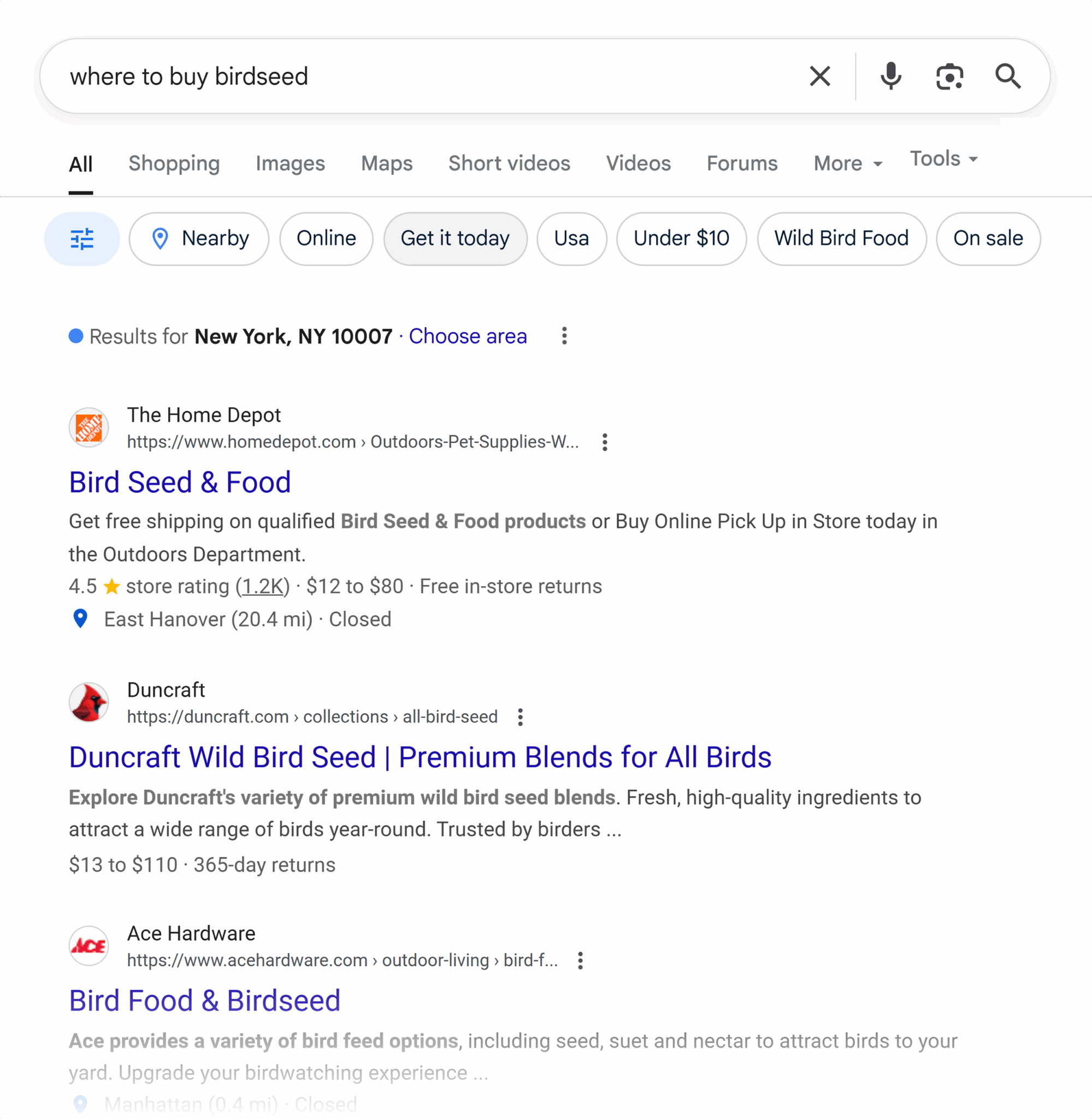
In these search results, both the Home Depot and Duncraft pages would get an impression. And so would the rest of the results on this SERP.
In this example, both the Home Depot and Duncraft pages generate organic impressions. This happens when content appears in unpaid search results.
In contrast, paid impressions occur when a user sees an ad in the search results. Like the ads at the top of this branded search for “home depot bird seed:”
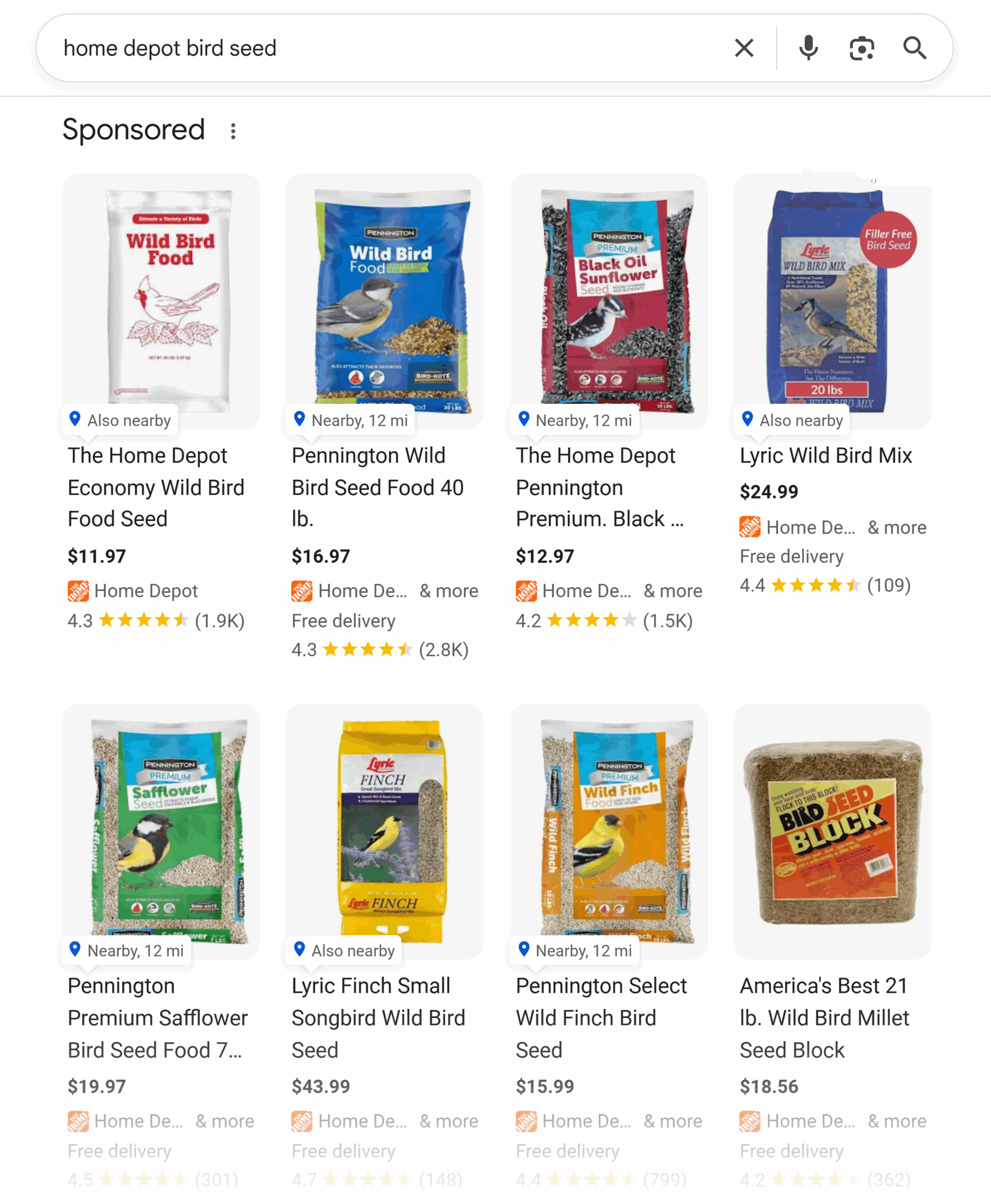
For every user who sees these ads, each listing receives a paid ad impression.
If you create organic content and paid campaigns, you’ll need to track both types of impressions. But they appear in different places—Google Search Console for organic and Google Ads for paid.
The SEO toolkit you know, plus the AI visibility data you need.

What’s the difference between impressions vs. other SEO metrics?
To understand what impressions mean, you need to learn how they relate to other key metrics like clicks, reach, and rankings. Recognizing those relationships gives you a fuller picture of how your content is performing in search.
Impressions vs. reach
Impressions and reach are closely related, but they aren’t exactly the same.
Reach is the number of unique users who saw your content in search results. If one person sees your page multiple times, it equals one person reached with multiple impressions.
Basically:
- Impressions refer to the number of appearances
- Reach refers to the total number of unique people
Impressions vs. clicks
Clicks indicate how often people click on your content in search results and visit your website. This metric reflects how compelling your content is.
Why should you care how impressions relate to clicks?
While impressions tell you about the reach of your content, clicks indicate that your content appears relevant and compelling enough for someone to engage.
Together, the two reveal your organic click-through rate (CTR). Which is the percentage of users who see and then click on your page in the search results.
What’s a good CTR?
That depends on your industry—and if you’re looking at organic search or paid search.
Say you work in B2B SaaS. A good CTR for a page ranking in position one would be 39.8%. Comparatively, a good CTR for a paid search result in that same industry would be 2.1%.
On the other hand, if you work in biotech, a good CTR would be 42.2% for a page ranking in the first spot.
Impressions vs. rankings
Ranking is the position where your page appears in search results for a certain query.
Here’s an example:
Backlinko is in the first position for “seo click through rate,” and Search Engine Land ranks fourth.
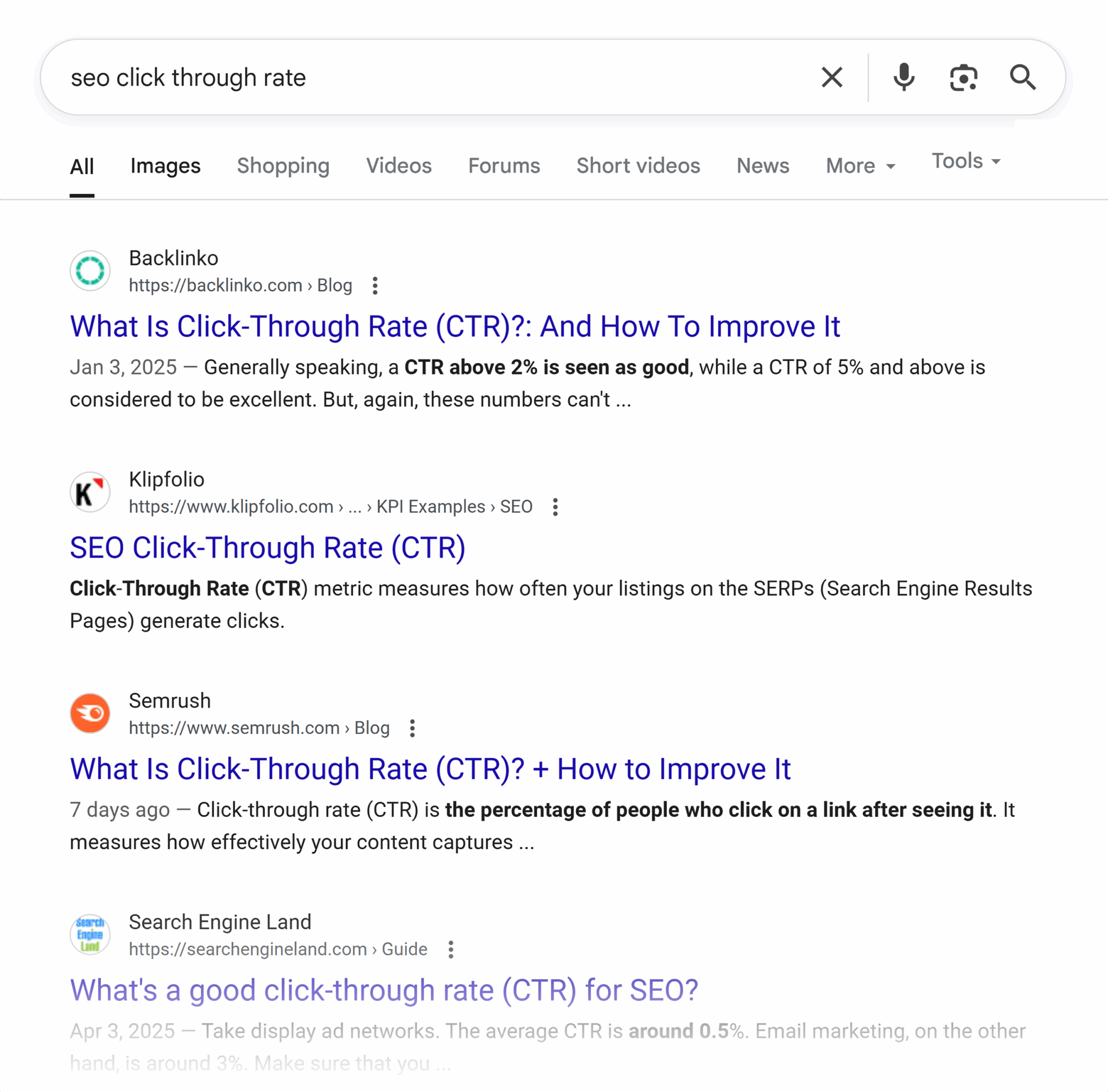
The higher a page ranks, the higher the number of impressions it tends to earn. If that page also has a strong CTR, it can signal to Google that the content is helpful or relevant.
While Google doesn’t use impressions or CTR as ranking factors, strong engagement can result in better long-term performance.
Impressions vs. visibility score
Your visibility score reflects how likely it is for users to see and click on your page. The keywords you rank for, the search volume of those keywords, and your ranking position for those keywords all affect your visibility score.
While impressions reflect how often your site appears in search results, visibility score reflects how prominently it appears. Generally, the higher your visibility score, the more impressions your site gets.
Focusing on both can give you a fuller picture of your site’s organic performance—and help drive more traffic over time.
What can impressions tell you about SEO performance?
Think of impressions as your SERP thermometer. Use them as a real-time gauge of how well your SEO strategy is working and how search is changing.
They offer insight into everything from content visibility to cannibalization issues.
Diagnosing content visibility
Tracking impressions can help you identify and address content with low visibility.
Here are a few common signs of content visibility issues:
- If you have zero or low impressions, your page may not be indexed, may be struggling to rank in a very competitive space, or may be lacking topical relevance.
- If you’re getting a lot of impressions but no clicks, your page may be showing up for irrelevant or zero-click queries.
- If your page is experiencing a sudden spike or dip in impressions, you might be experiencing an algorithm update or some recent changes in competitor or user behavior.
Keeping a close eye on impressions is key to spotting these problems early and adjusting your SEO and content strategy accordingly.
Identifying rising or falling topics
Rising topics indicate a growing user interest in a subject. This could reflect seasonal trends, news cycles, or new emerging conversations. You’ll see an increase in impressions as the searches grow.
On the other hand, if you see a page with a steady decline in impressions, you’re losing organic ground. Handle this by:
- Reviewing the subset of pages that have experienced impression declines
- Looking for any recent changes to the content or the search landscape
- Testing new content updates for the affected pages
Signaling SERP changes
A change in impressions can also be an early warning sign of a shift in the nature of a SERP.
You might see a page suddenly drop in impressions when the search intent for a SERP changes from informational to commercial. Which would make your informational content less relevant to search intent.
Here’s an example:
Say the SERP for “best running shoes” once had an informational intent. And most top-ranking pages were long-form content describing the best running shoes.
But as search intent evolves, so would the search results.
Say people who use the same search query are less interested in general information and more interested in prices and product comparisons. The SERP would start to include more commercial results, such as product roundups with shopping links.
Another common search page result change you might see a sudden spike in impressions when your page starts ranking for AI Overviews—a newer Google search feature that summarizes answers directly in the search results.
This change in how Google presents information can mean a visibility boost, but also a drop in clicks.
You should expect a similar click drop if your content starts ranking for new no- or low-click SERP features like the people also ask box or featured snippets.
These features are designed to surface quick answers directly in search results. Users can get all the information they need without ever having to visit your site. That’s why ranking for these searches can lead to an impression spike without a corresponding increase in clicks.
Spotting seasonal patterns
Impressions are also indicators of seasonal changes.
As fewer users search for seasonal terms, it leads to a decline in impressions, clicks, and often revenue.
For example:
Say you run a beach house rental agency. In the months leading up to summer, you might see a sudden spike in impressions for queries like “beachfront property rentals” or “beach houses for rent.”
This can lead to a subsequent increase in clicks and organic traffic as more people research summer vacation plans.
As summer comes to an end, however, you’re likely to see a decrease in impressions for these seasonal search terms.
Cannibalization issues
Keyword cannibalization occurs when two or more pages on your site rank for the same search term.
The pages compete against each other for a position on the same SERP. Which can confuse search engines and people, leading to fewer impressions than one, solid page.
Keep an eye out for these indicators to prevent cannibalization:
- Sudden drop in impressions for a certain page or keyword
- Inconsistent impressions for a certain page or keyword
- Multiple pages getting impressions for the same keyword
One way to address cannibalization is content consolidation. Which involves merging similar or thin content pages into a single, stronger page of high-quality content.
This helps eliminate cannibalization and keeps your pages from competing with each other. Consolidating your content and backlinks into a single, more comprehensive piece helps improve organic rankings and search impressions.
Common misconceptions about organic impressions in SEO
Here are a few common misunderstandings to keep in mind when analyzing your search impression data.
High impressions don’t equal success without clicks
High impressions without corresponding clicks can mean there’s a mismatch between your content and searchers’ engagement levels.
Say you own a bookstore located in a warehouse district. The store is more likely to get visits (i.e., impressions) from people looking to ship a package than casual shoppers browsing for their next beach read. Content mismatch.
Another common reason you might see high impressions but few clicks is when your content ranks for the wrong search intent. For example, your page is a how-to guide but people searching for relevant keywords are looking to purchase.
How can you fix these problems?
Try these solutions:
- Test new pieces of content by either creating a new page or updating a pre-existing page that better resonates with search intent.
- Make sure your content aligns with your target audience by analyzing engagement metrics like time on page and bounce rate.
In some cases, high impressions but low clicks might not signal a problem.
Instead, this could indicate that your content ranks for a featured snippet. Which may lead to a spike in impressions as users read your helpful content and get the answers they need without clicking to read more.
The key is to establish benchmarks for both impressions and clicks. Then, review content that falls outside of this range.
Low impressions don’t mean failure
Low impressions aren’t always a negative sign. Especially if you’re targeting long-tail keywords for a niche topic.
Long-tail keywords typically have lower search volume and lower impressions to match. But they’re often worth pursuing because they tend to have:
- Higher conversion rates because the content more accurately fits the user
- Less competition and easier rankings because they refer to more specific topics
When targeting long-tail keywords, focus on quality over quantity. A page with 50 highly relevant impressions is more valuable than one with 500 irrelevant ones.
How can you be certain that your long-tail content is actually succeeding?
Look for metrics like:
- High click-through rate compared to your other pages
- High time on page and low bounce rate
- Steady impression numbers, with minimal spikes or drops
Impression drops don’t always indicate ranking drops
Smoke doesn’t always signal a fire. Impression drops don’t always mean ranking problems.
First, take a look at your clicks.
If your clicks are also dropping but your rankings aren’t, check Google Trends.
Enter your target keyword and look at the trendline at least over the last year so you can see the period of time before and during the drops.
Say you own a local bookstore. You’ve seen a decline in clicks and impressions for “bookstore” over the last 30 days, but no drop in keyword ranking.
When you enter “bookstore” and set the time period to the past 30 days, you’ll see something like this:
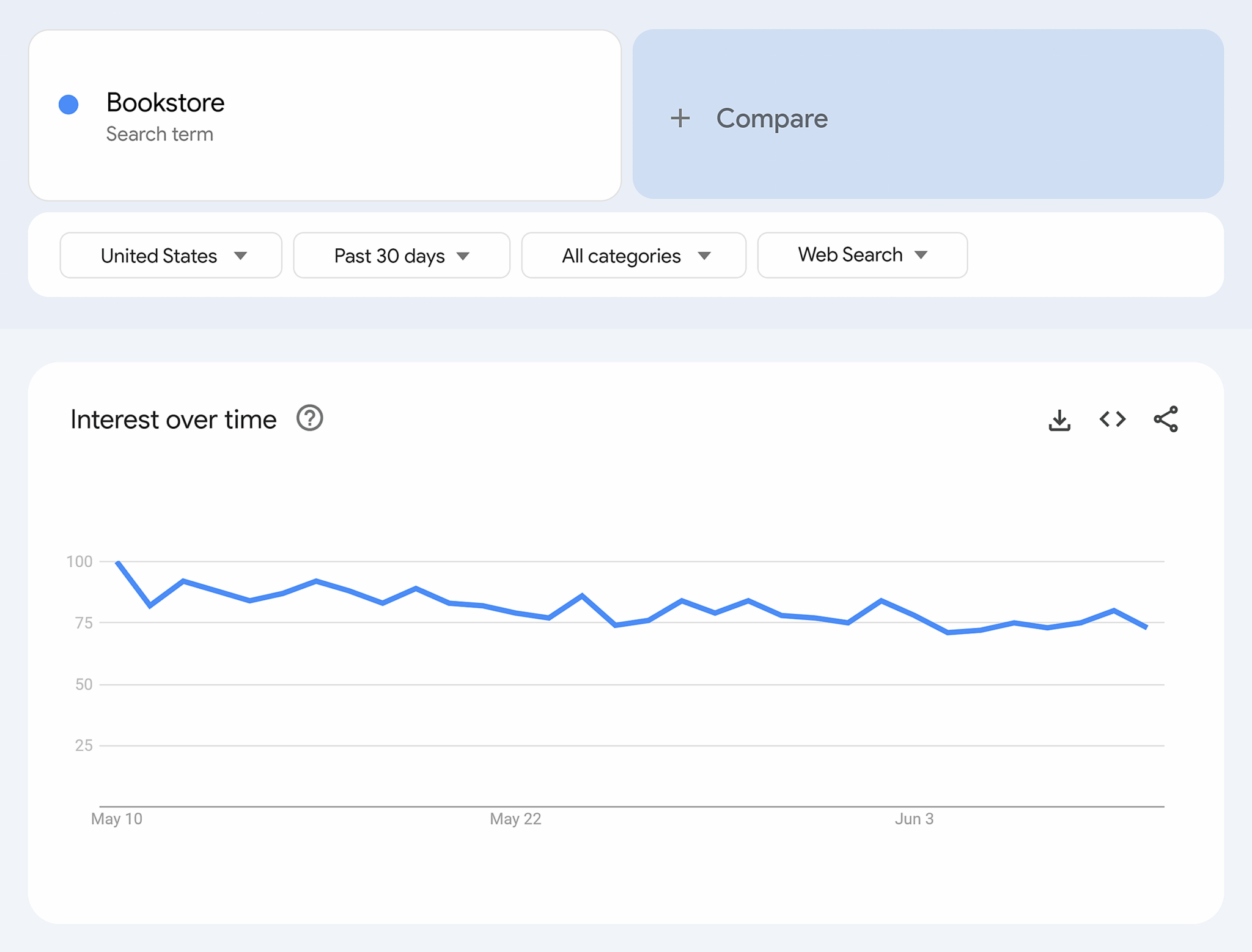
If you see a downward trend in searches, you’ll find your answer:
It’s not that you’ve done anything wrong. It’s just that fewer people are searching for the topic.
This is a frustrating answer, but it isn’t uncommon.
Drops in search volume often happen due to seasonality, trend changes, or shifts in user interest. Understanding those natural fluctuations helps you better interpret your own traffic data and plan your content.
Where to find search impression data
You can track impression data with Google Search Console (GSC). This free Google tool provides data on impressions, clicks, search queries, and other insights into your online presence.
Once you link your website to your GSC account, you can access a dashboard like this:

Navigate to “Full report” to get a look at your site’s impressions.

This dashboard displays:
- Sitewide data on clicks, impressions, average CTR, and position
- Page-specific data on clicks and impressions
- Data from the last 24 hours to up to 16 months ago
- Comparison data by day, month, year, or your own custom time periods
- What terms people search to find your site
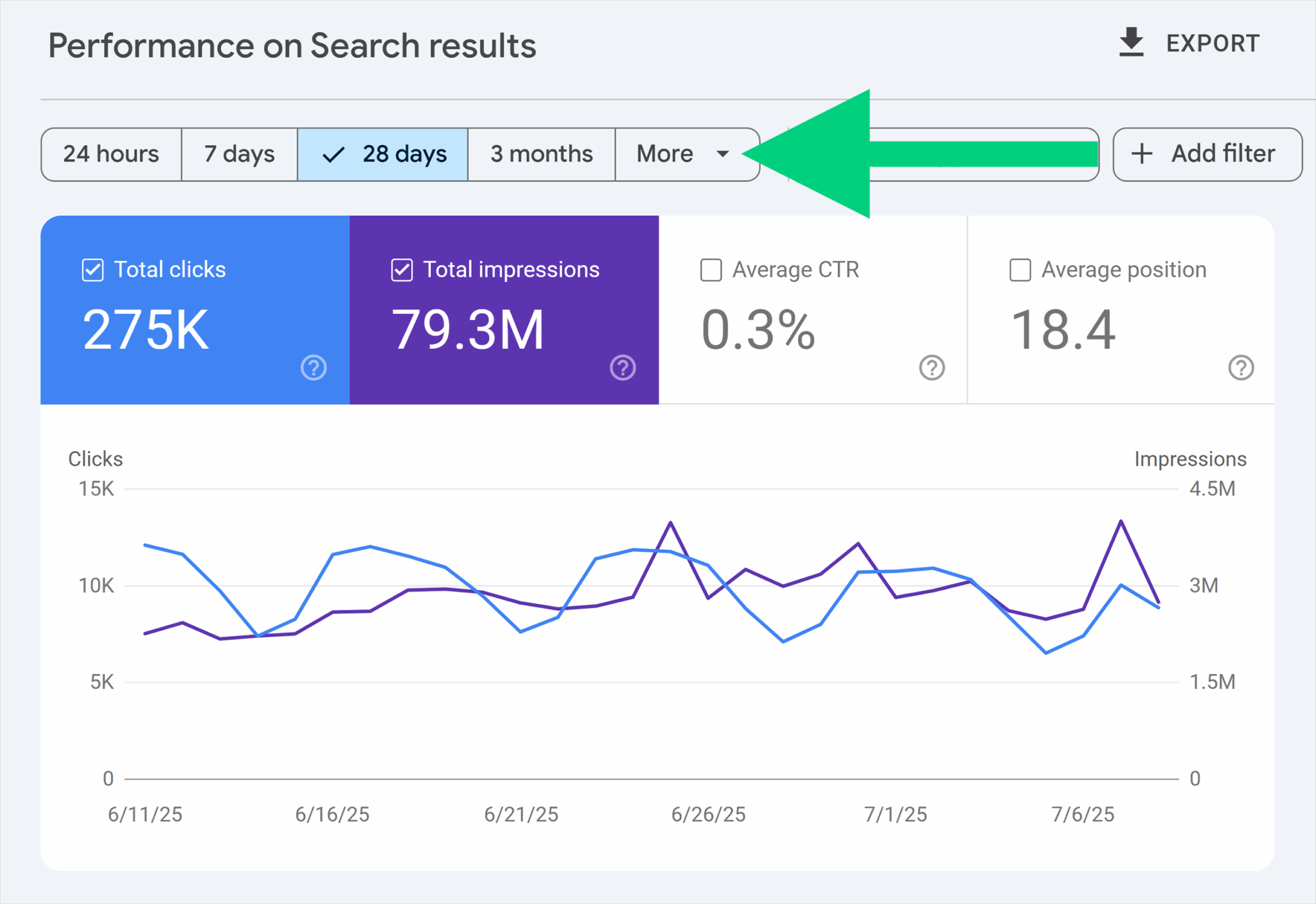
Say you want to take a look at your site’s impression performance for the last 16 months.
Click on the “More” dropdown.
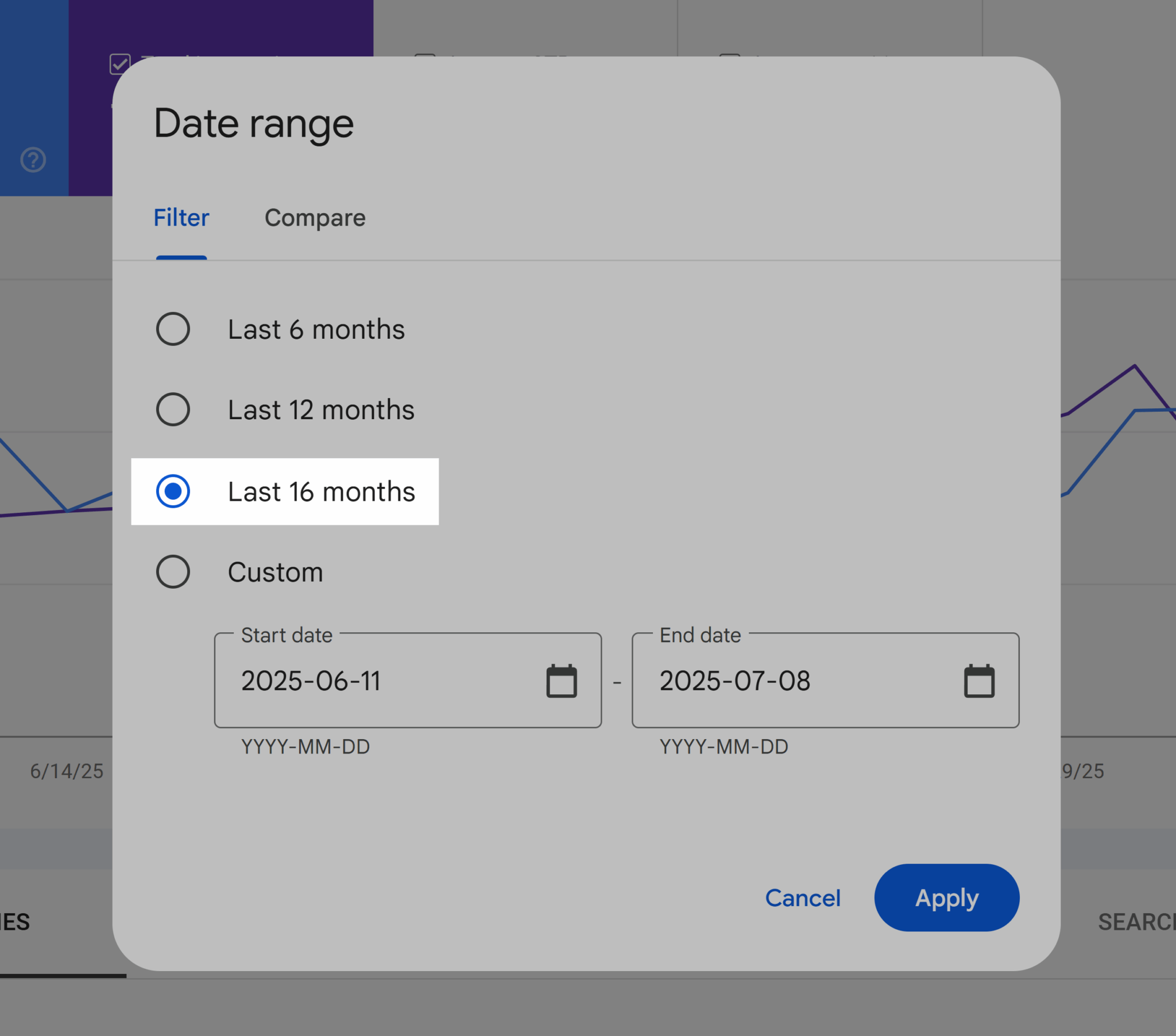
Select “Last 16 months.” Then hit “Apply.”
By default, both clicks and impressions display. Click on “Total clicks” to remove clicks from view so you can focus on impressions.
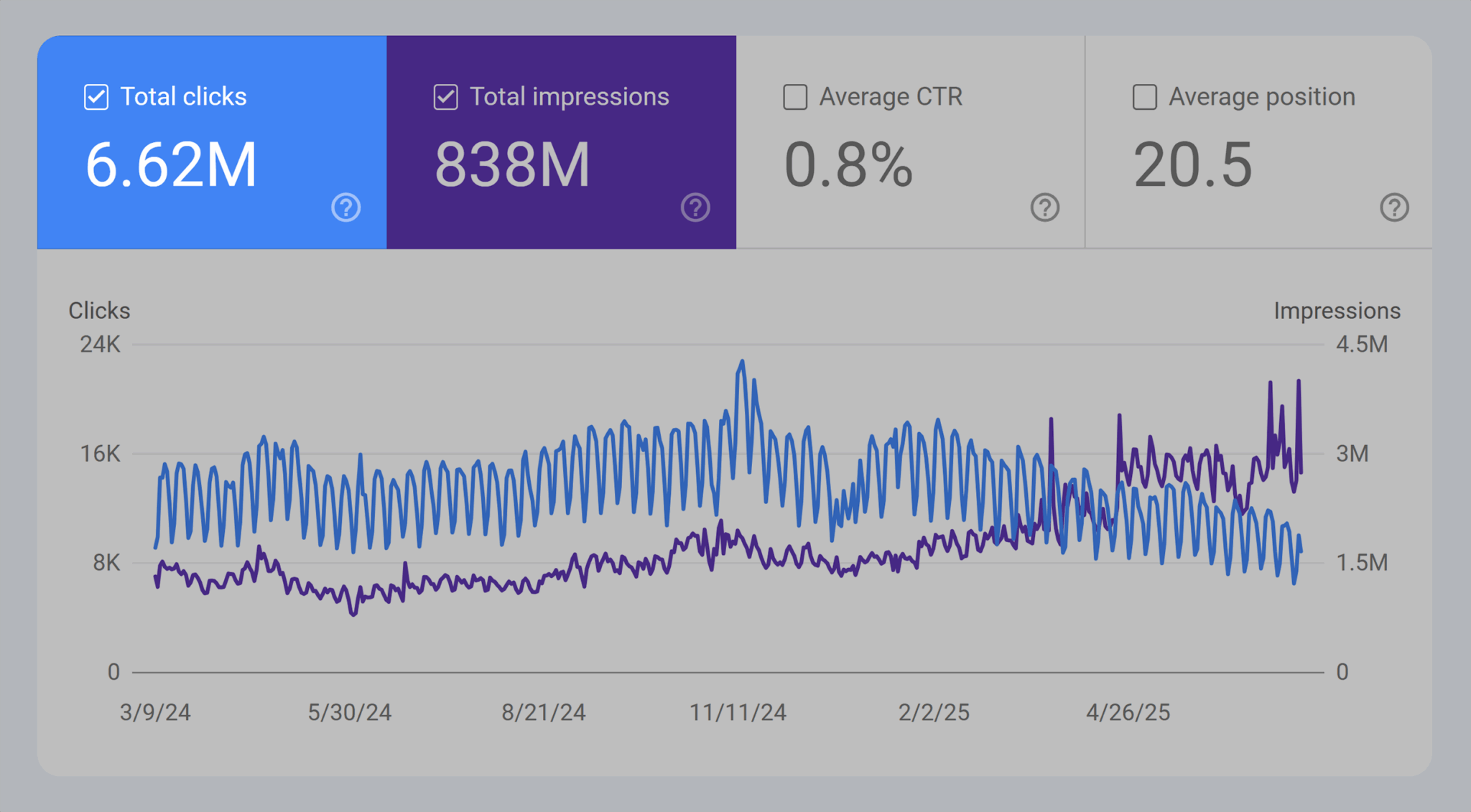
Now, you can review your website’s impressions over the last 16 months.
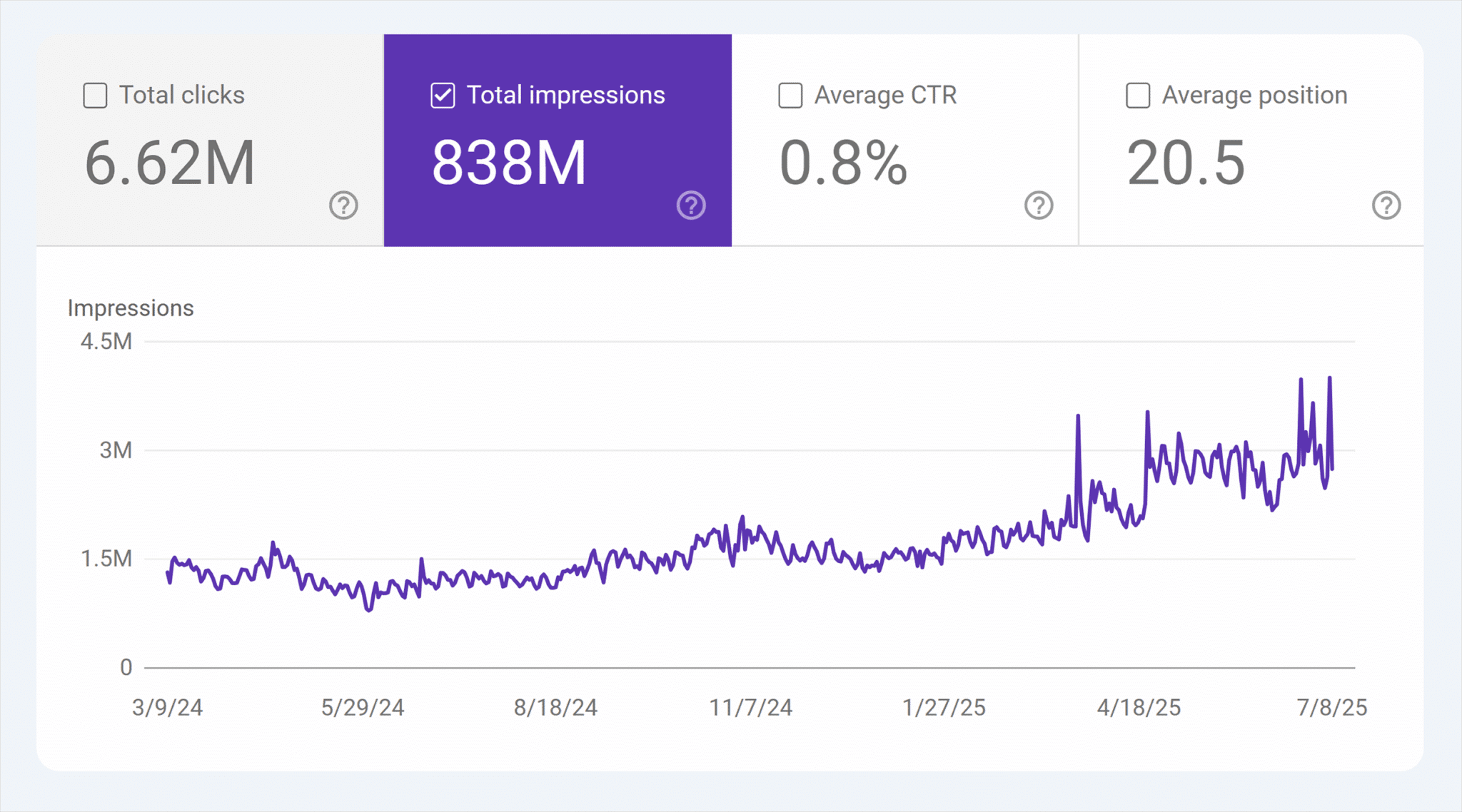
Use this view to:
- Identify any changes in seasonal performance.
- Establish a trendline for impressions.
- Understand how effective your previous SEO efforts have been.
Say you typically expect to see seasonal changes in traffic every six months for your services pages. You’ll want to take a look at a six month comparison for every page nested beneath /services.
Do this deeper dive by clicking on “16 months.”
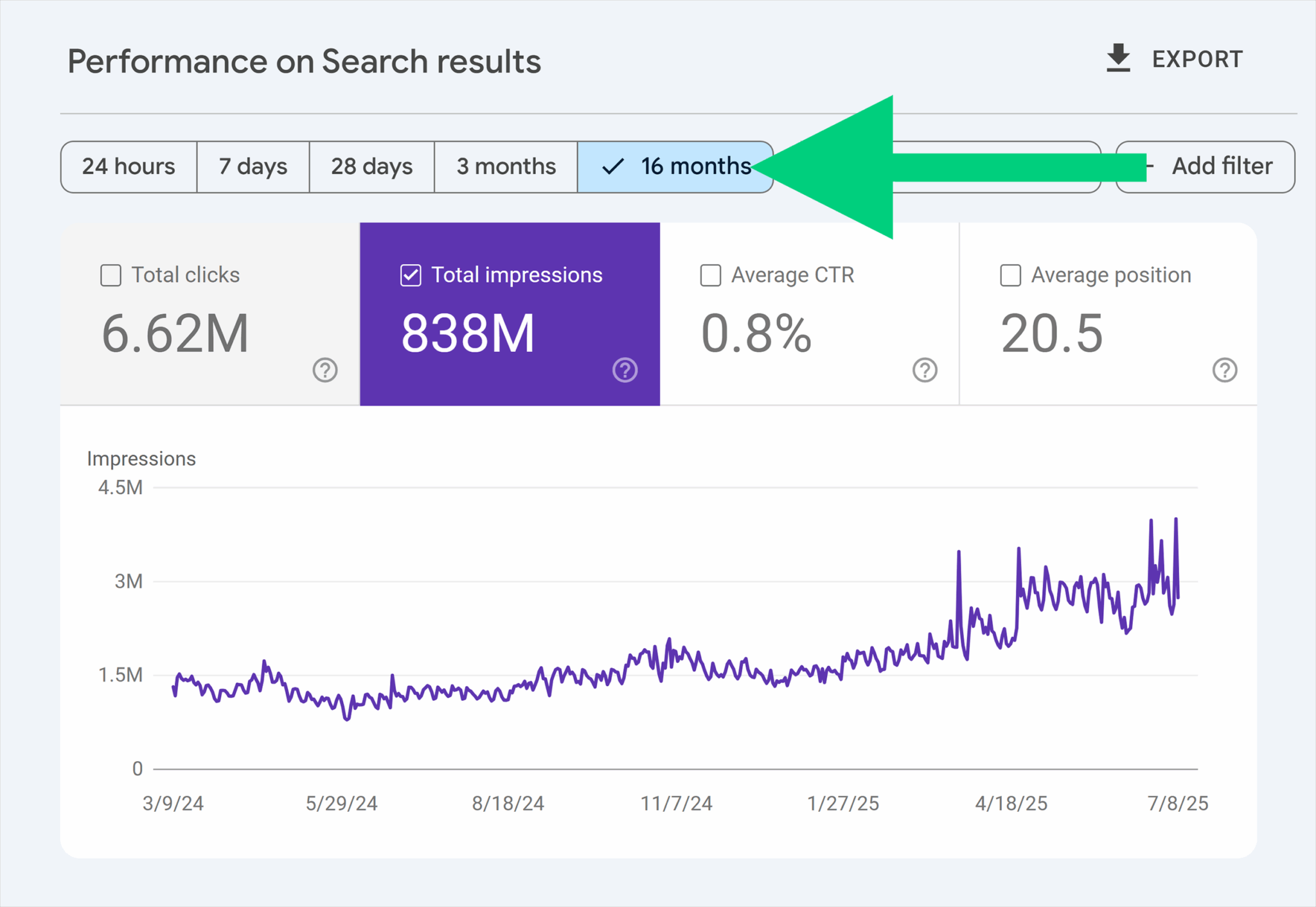
Go to the “Compare” tab.
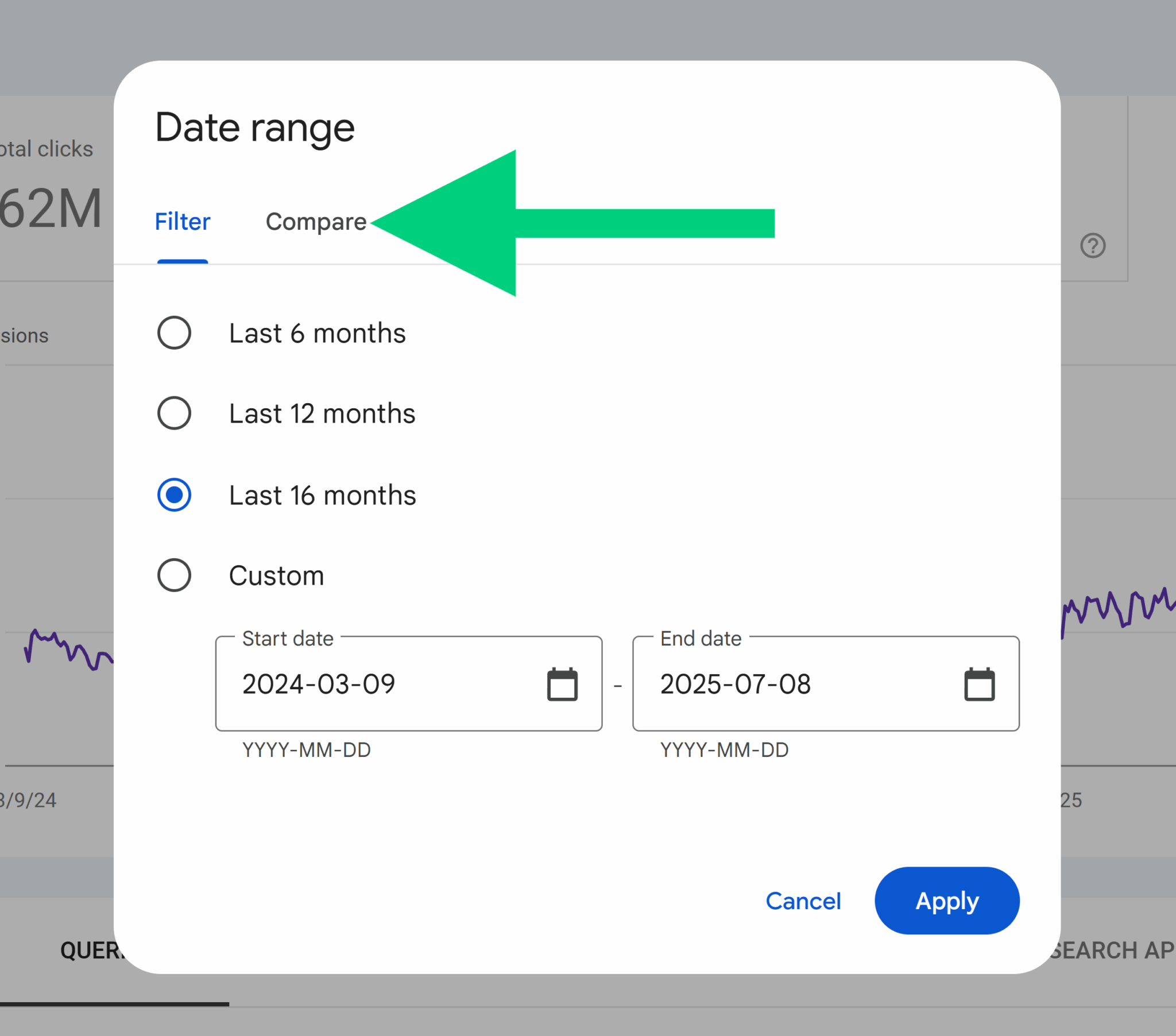
Select “Compare last 6 months to previous period,” and then hit “Apply.”
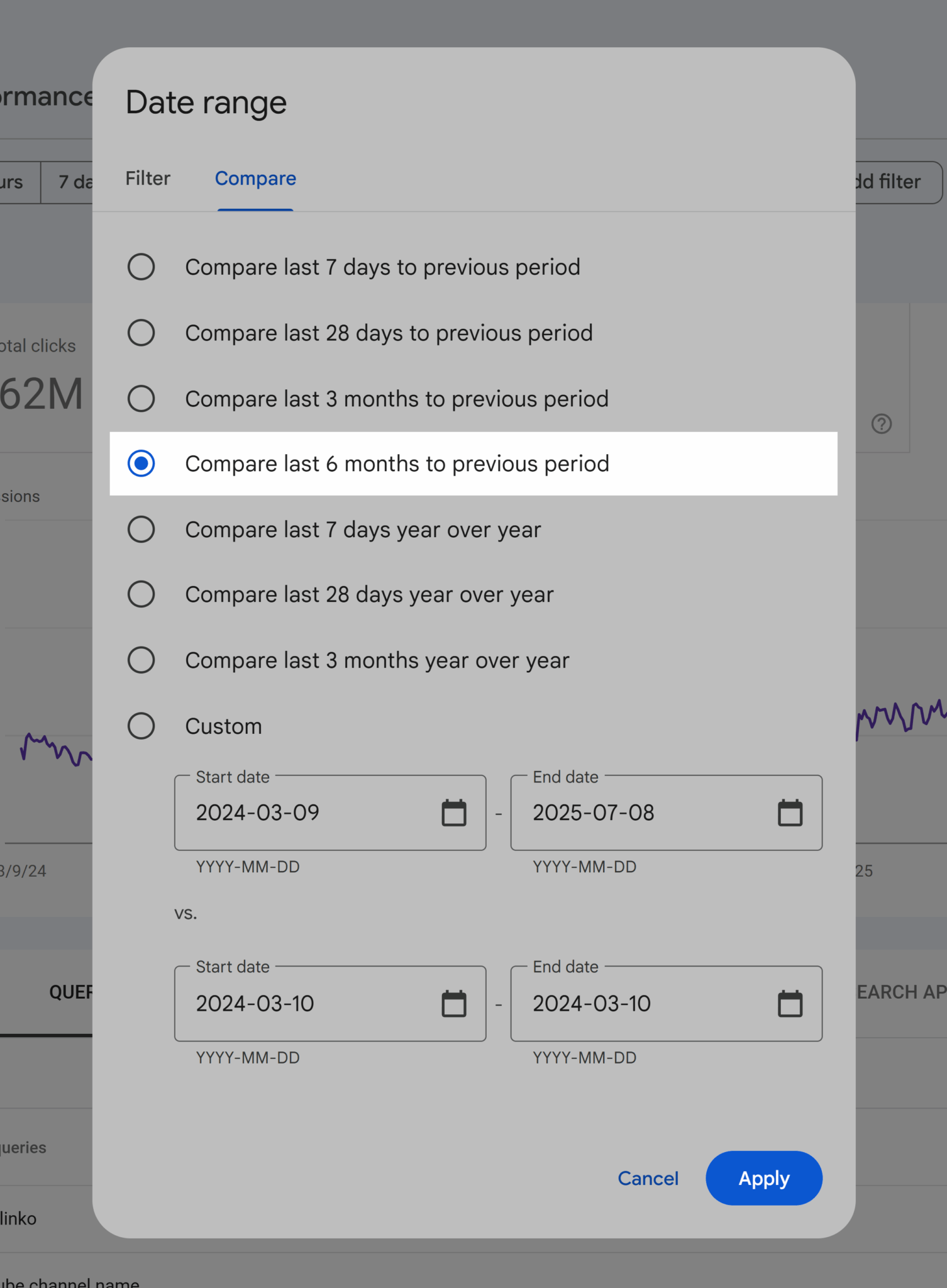
Next, set up page segmentation. Click on “Add filter” in the upper right.
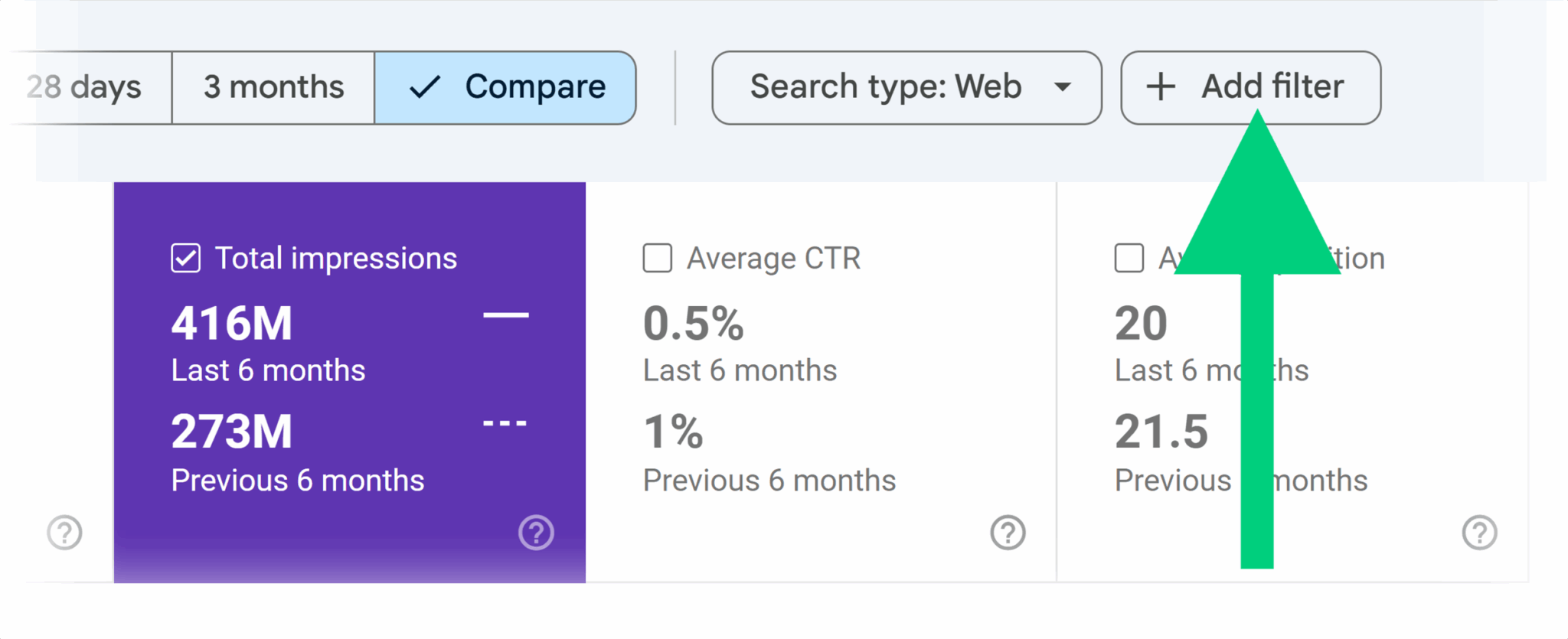
Select “Page”. Notice how you can also filter by query, country, device, and search appearance.
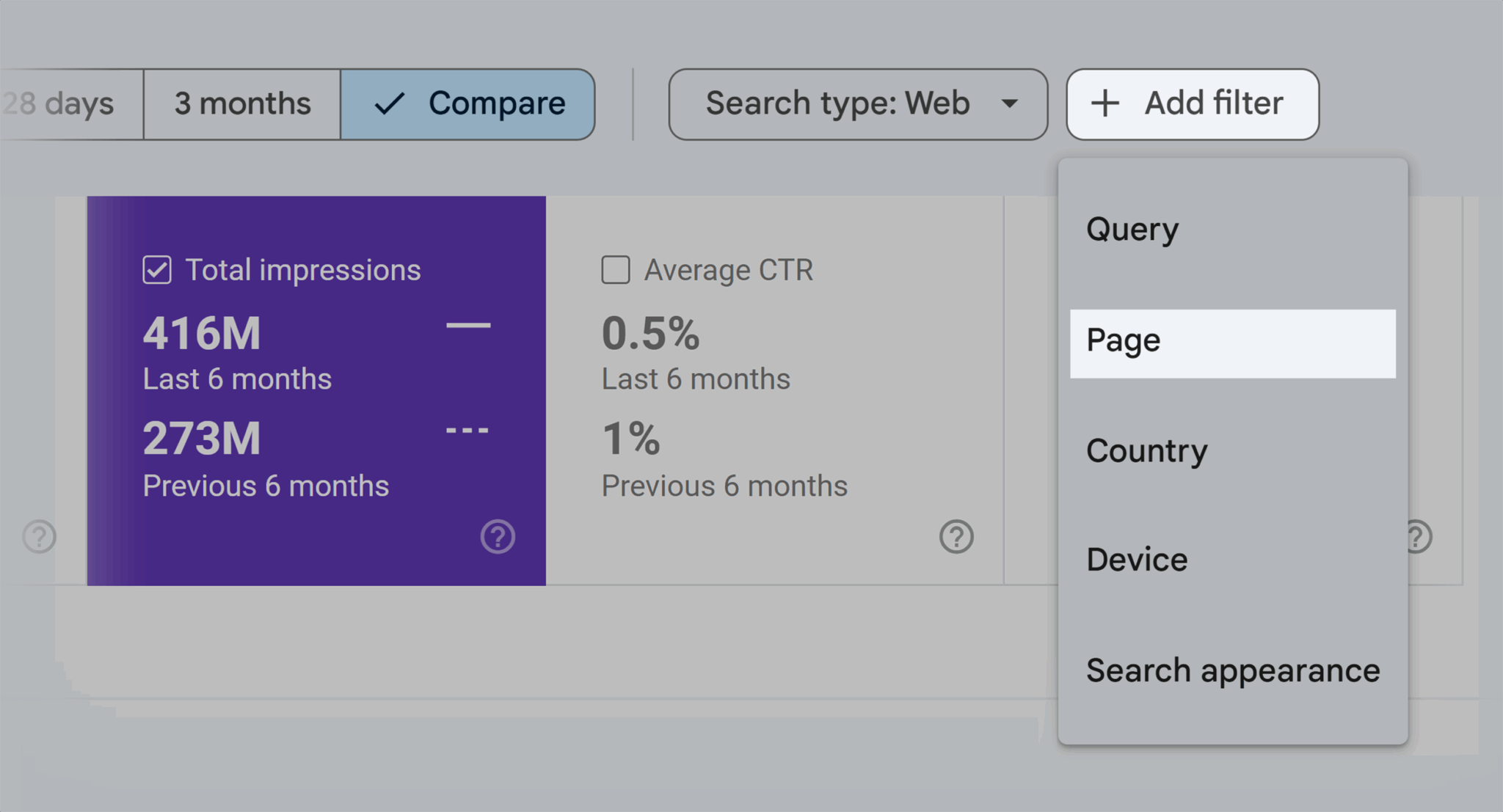
To analyze service pages, enter “/services.” Then, hit “Apply”.

Review how impressions have changed for your service pages over the last six months.

“Last 6 months” means the past six months. “Previous 6 months” refers to the six months before that.
So if you pulled this data on July 1, “last 6 months” would cover everything from January through June. “Previous 6 months” would include everything from July to December before that.
Scroll down on this page to view impressions for specific:
- Search queries: What people were looking for when you got that impression
- Pages: What pages drove the most impressions
- Countries: Where your pages appear on SERPs most across the world
- Devices: What devices people used when you got that impression (e.g., mobile, desktop, or tablet)
- Search appearance: The different ways you can drive impressions through organic search (e.g., rich results, product snippets, translated results, etc.)
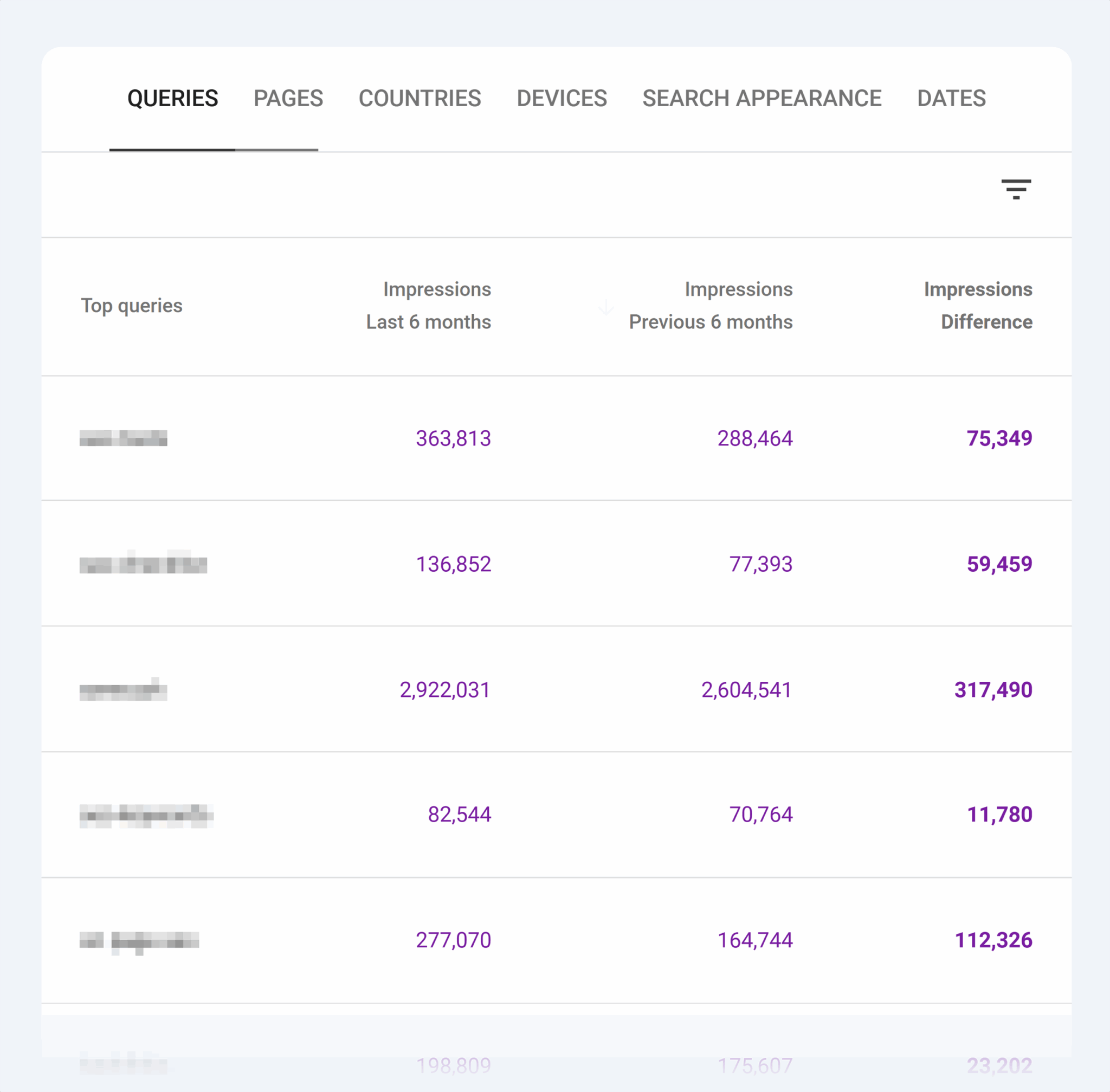
Go to the “Queries” tab to see which search terms drove the most impressions over the last six months.
This tab also shows how impressions either increased, decreased, or stayed the same compared to the six months before that.
You can filter this data so you can see which queries increased and decreased.
Now you have a graph. And you have a lot of data.
But it’s not necessarily easy to work with. And it might not be the ideal final form for you to slap onto a presentation deck.
You can dig deeper into the data and customize the layout by exporting this into an Excel or Google Sheet.
Exporting this data is easy:
Navigate to the upper right and click on “Export.”
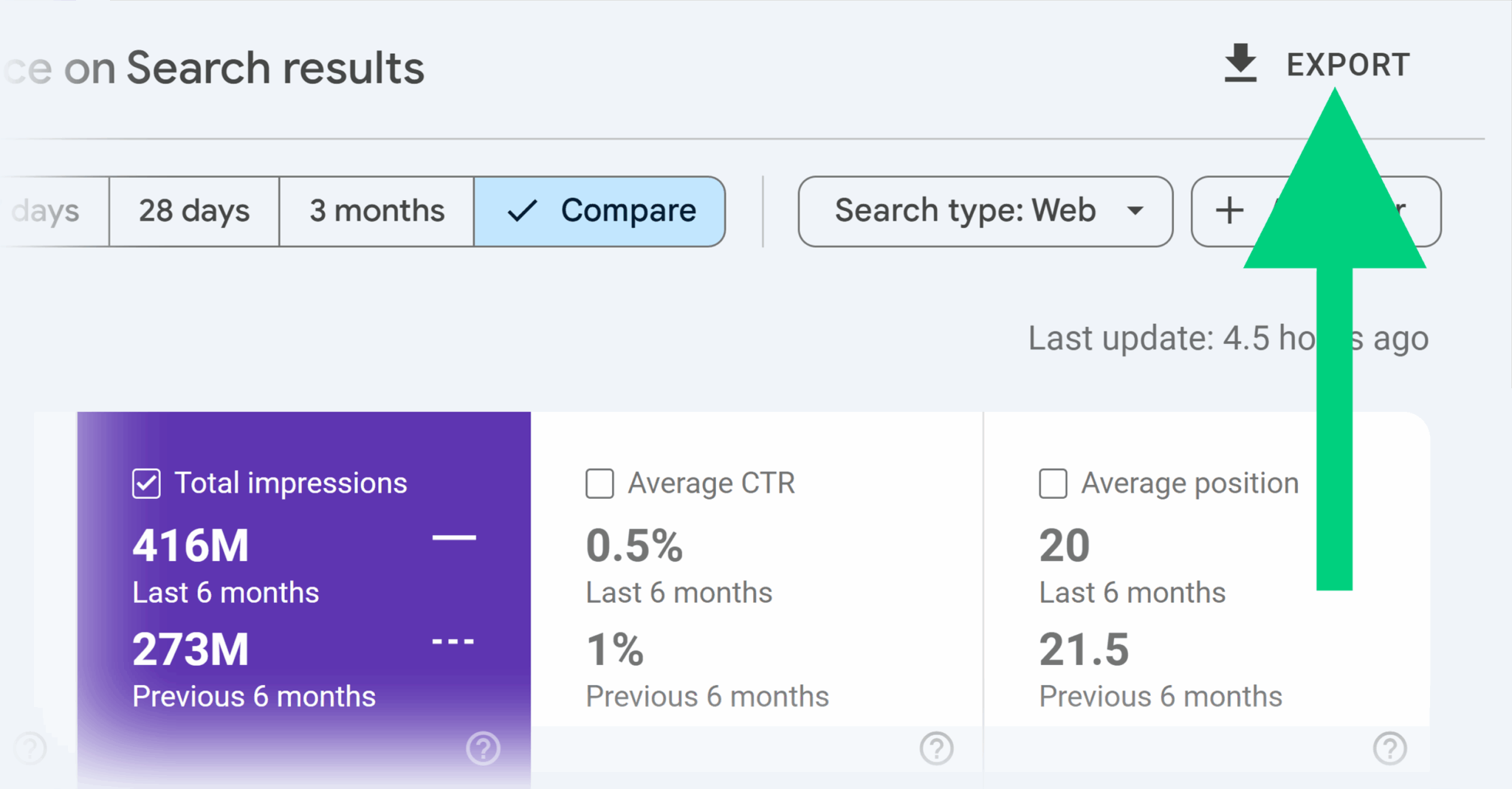
Pick between Google Sheets, Excel, and a CSV.
Once you export the data, you’ll have a spreadsheet that contains impression data for:
- Queries
- Pages
- Countries
- Devices
- Search appearance
Use this information to get deeper insights into:
- What queries and pages drive the most impressions
- What devices your target audience typically uses
- What countries your target audience is from
- How trends have changed in the last six months
However, GSC isn’t the only tool for analyzing search impression data.
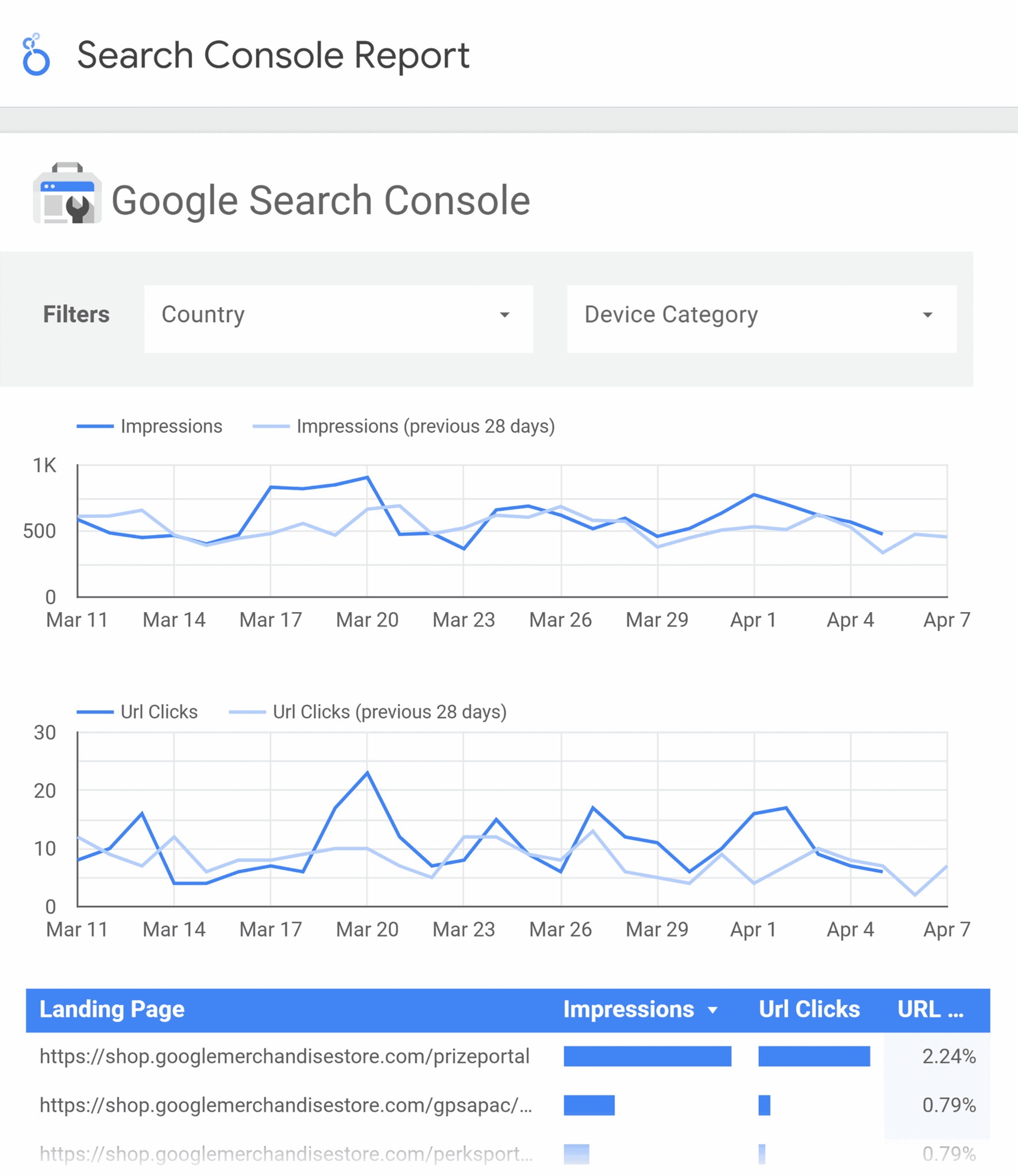
Use tools like Looker Studio to set up C-suite-ready dashboards.
Looker Studio can pull data directly from Google Sheets or other third-party sources. It can turn raw data into custom visualizations that highlight trends.
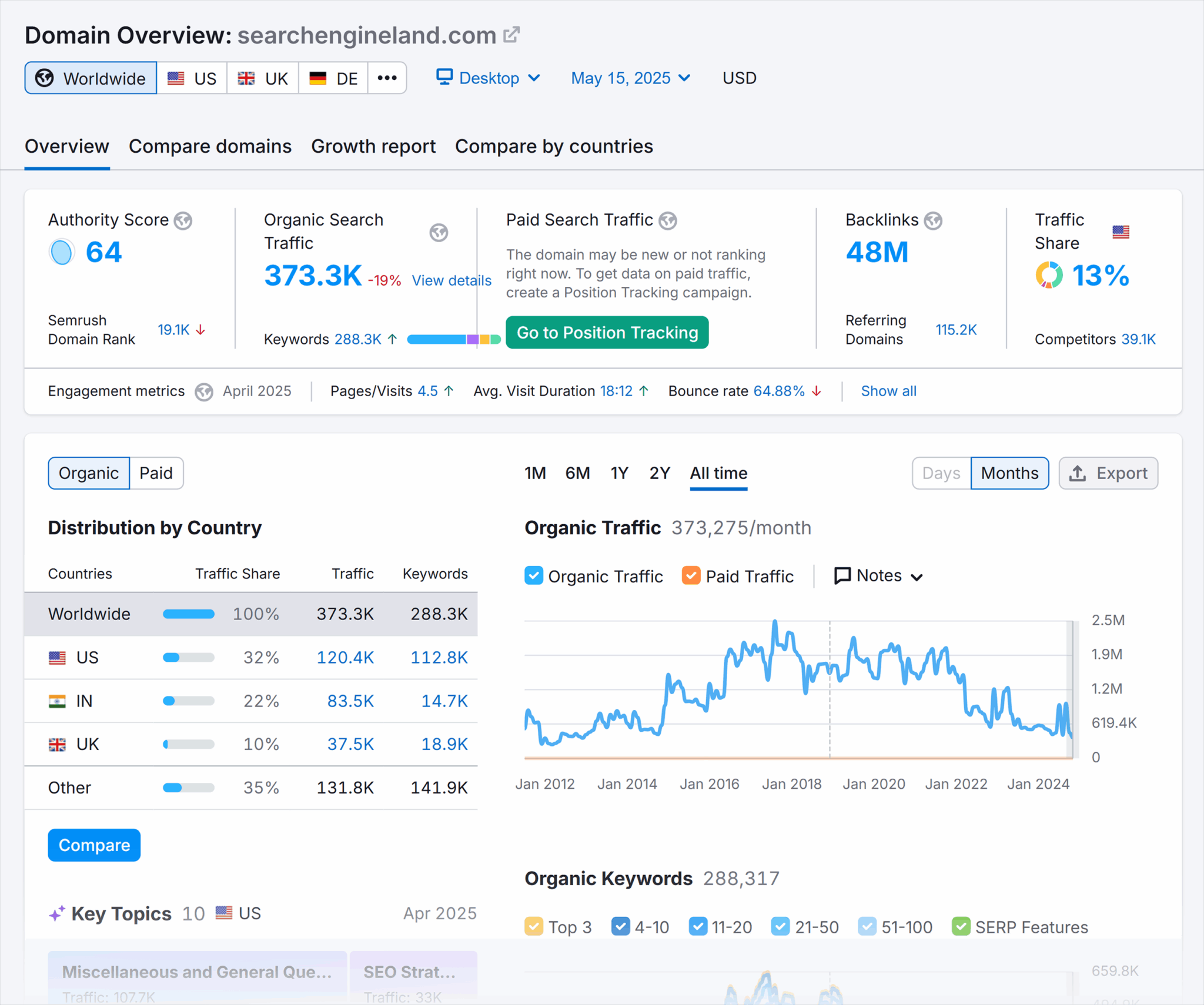
SEO tools like Semrush help you find information about search rankings, traffic, backlinks, and more for your site and the competition.
Semrush can estimate your search visibility through metrics like keyword rankings, estimated traffic, and search volume.
This data helps you understand how often your pages appear for your target terms, and gives you a broader view of your search presence over time.
How to start using impression data in your SEO strategy
Now you know what organic impressions in SEO are, including how to find and analyze them. Here’s how you can start optimizing for impressions.
Regularly update your content
Refreshing your content on a regular basis can help you earn more impressions.
When you update a page by improving copy or adding new sections, you tell Google that content is current, relevant, and ready for re-crawling. Once re-crawled, your page has another opportunity to improve rankings—and impressions.
Create a strong internal linking strategy
Internal linking can lead to more impressions and influence rankings.
Why?
It helps search engines understand your site structure and the relationship between pages.
By linking from high-authority or high-traffic pages to newer or lower-performing pages, you pass along link authority. Which can help the linked page rank better in search results.
A strong internal linking strategy can also improve crawlability. Which makes important pages easier to find and can get you more impressions by increasing your search visibility.
But that doesn’t mean you should overdo internal linking. You can go too far linking to other pages within your own site.
Think of your website visitors. Ask yourself, “Is this linking to helpful, relevant content that will improve my target audience’s journey?”
Use this strategy for internal linking:
- Link to and from pages about similar topics.
- Optimize anchor text (the hyperlinked text) for the page you’re linking to.
- Link high-ranking pages back to lower-ranking pages to distribute link equity.
Research keyword expansion opportunities
Keyword expansion means growing your target keyword list. Finding new keywords that are relevant to your business and target audience can create more ranking opportunities. Which can lead to an impressive boost in impressions.
Get started on keyword expansion by looking for:
- New long-tail keywords to target. If you’re looking to offer telecommunication solutions to small businesses, it’s worth keeping an eye on new regulatory terms like “Ray Baums regulation for SMB” to target something hyper-specific to your users.
- Keywords your competitors are targeting. If competing sites rank for terms like “sneakers,” and you sell running shoes, it might be worth targeting those keywords, too.
- Related topics and categories. A running shoe store might write about “best workout socks” even if it doesn’t sell socks because the topic is relevant to their user base.
Target SERP features
One of the best ways to improve your organic impressions?
Securing citations in SERP features.
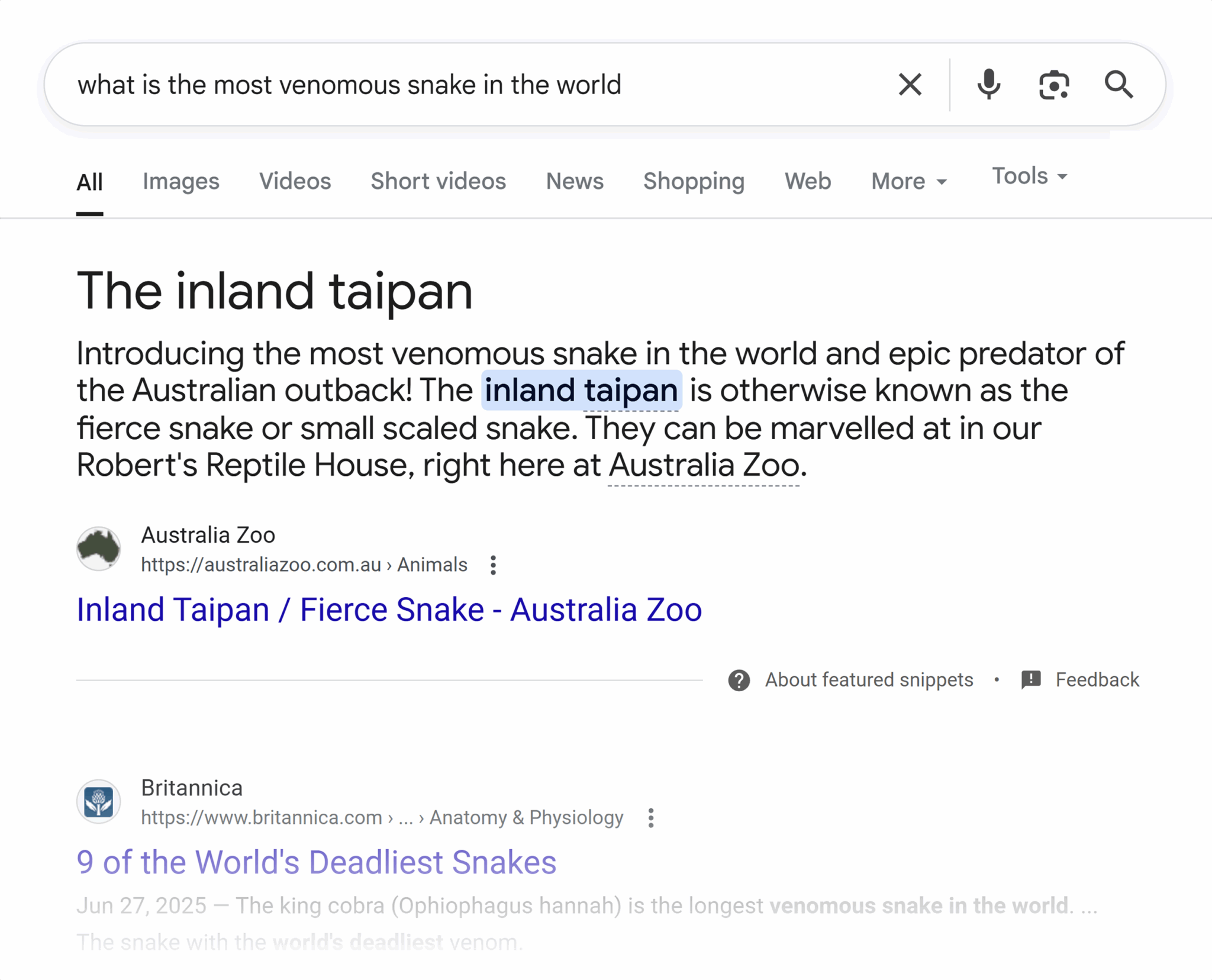
Like featured snippets:
And people also ask boxes:
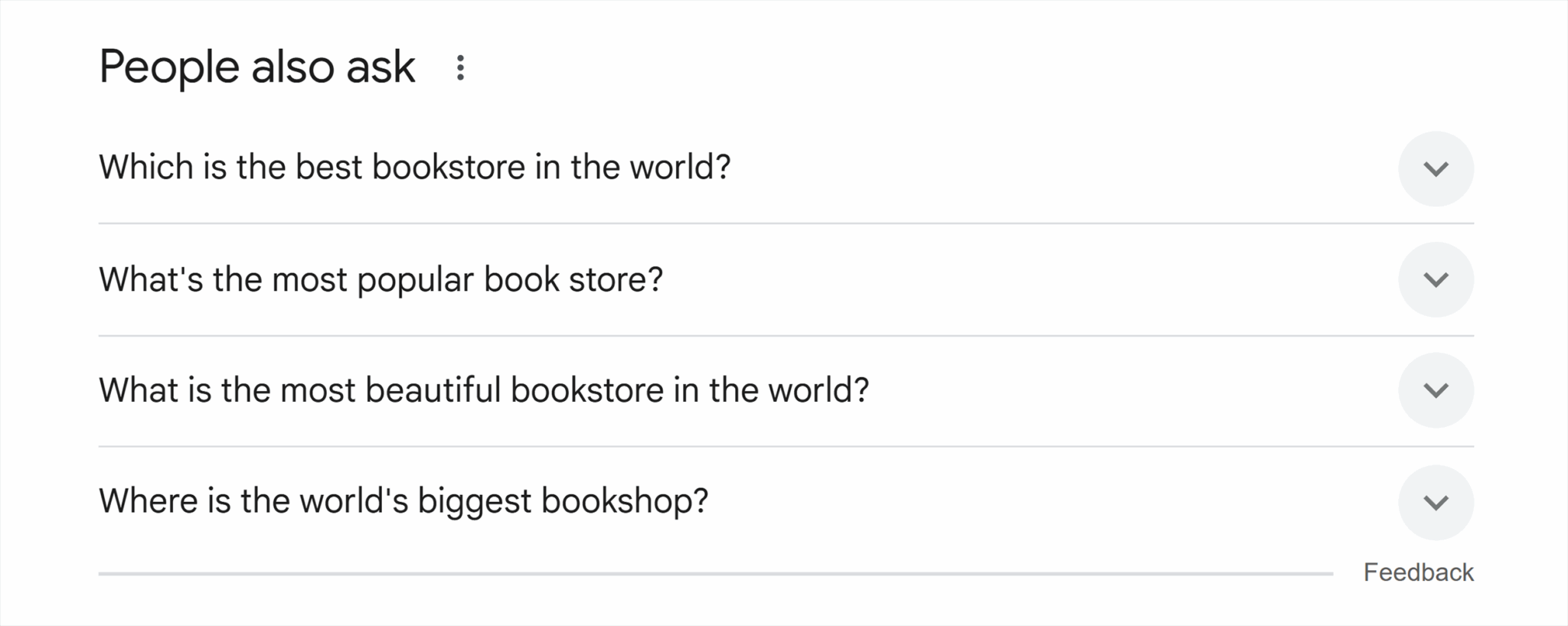
When you rank for these SERP features, you’re often providing zero-click content. Which refers to answers that users can read directly in the search results without needing to visit your site.
Zero-click content can boost your visibility. But it doesn’t lead to a corresponding increase in clicks.
Ranking for these SERP features can give you a boost in brand awareness and visibility. And in some cases it can still drive clicks.
The best way to target SERP features and increase impressions is to:
- Format your content so search engines can easily extract and display it (e.g., use lists, tables, short sentences, and paragraphs).
- Use relevant images and videos, especially for featured snippets.
- Add schema markup—a piece of code that helps search engines understand and enhance your content in the search results—to better signal to search engines what your page is about.
Test for the future SERP
SERP features and layouts are constantly moving and evolving. To keep improving impressions, you need to future-proof your strategy.
Here’s how:
AI-powered search is already changing how impressions work. When your content ranks for AI Overviews, you’ll typically see a telltale spike in impressions and drop in clicks.
This comes with pros and cons.
You gain more brand visibility. But clicks tend to decline.
Optimize for AI-powered search by:
- Structuring content with clear, authoritative, easy-to-reference headings and answers
- Allow AI crawlers in your robots.txt file and your firewall rules
- Create an llms.txt file
- Using schema to help search engines understand your content
- Focusing on creating authoritative content relevant to your niche
Track, optimize, and win in Google and AI search from one platform.
Another option is to split your attention between Google and alternative search platforms.
Consider your target audience. Where are they shopping and researching? If you’re not present when they turn to TikTok and other platforms for answers, you could miss out on a potential purchase.
Optimize for alternative platforms like social media and other search engines by:
- Optimizing for voice search queries by targeting more long-tail keywords
- Creating content that performs well in visual search
- Tracking impressions across multiple search platforms, not just Google
Why impressions matter for the future of SEO
Organic impressions are more than just a vanity metric. They offer powerful insights into how your content is performing and evolving with the SERP.
Want to learn more about how to improve your organic impressions in SEO?
Stay ahead of SEO trends. Check out our guide to optimizing for AI-powered search to future-proof your strategy.
Explore more on
Editorial disclosure
Search Engine Land is owned by Semrush. We remain committed to providing high-quality coverage of marketing topics. Unless otherwise noted, this page’s content was written by either an employee or a paid contractor of Semrush Inc.
About the author