Free Keyword Density Checker
Ranking for the right keywords starts with knowing how your content is actually using them. Most writers guess. They repeat a phrase a few times and assume that is enough. It rarely is, and it is often too much. Keyword density analysis removes the guesswork by showing you exactly how your content measures up before it goes live.
This article covers how keyword density works, why the ratio matters, and how to use a free checker to audit any page in seconds. Whether you are optimizing existing content or building a new page from scratch, the same principles apply.
What is keyword density?
Keyword density helps you measure if you have the right balance of keywords on a page.
Specifically, keyword density is the percentage of times a keyword appears on a page relative to the total word count. The formula is simple:
( Keyword Count / Total Words ) × 100 = Keyword Density %
So if a keyword appears 10 times in a 500-word article, the density is 2%.
What is the ideal keyword density?
There is no universally “perfect” keyword density to aim for, which is why SEO professionals tend to approach it in different ways. Some recommend using your primary keyword once per 100 to 200 words, while certain tools suggest staying somewhere between 0.5% and 3% range.
At the same time, Google experts have repeatedly explained that rankings are not based on perfectly matching a specific percentage of keywords. Rather than treating these numbers like strict rules, think of them as guidelines.
The real goal is making sure your content clearly communicates what it’s about without sounding repetitive, forced, or overly optimized.
How keyword density is related to SEO
Since keywords are such a central part of SEO, it’s natural to assume keyword density plays a huge role in rankings. While it does matter, it’s less about “hitting the right number” and more about helping search engines naturally understand your content.
Keyword density gives search engines context. It helps them understand what your page is about, how relevant it is to a search query, and whether the content aligns with what someone is looking for. You’re looking to satisfy:
- Relevance and semantic understanding: Keywords help search engines understand the topic of your content and how it connects to what someone is searching for. That doesn’t mean repeating the same phrase over and over. Modern SEO is more flexible; it leans more into natural phrasing, related terms, and clear topic coverage.
- User experience: Keyword density also affects how connected your content feels to the reader’s needs. Too low and your content can feel disconnected from the topic someone searched for. Too much? Starts sounding repetitive or robotic. The goal is balance — your content should feel natural while still making the topic clear.
Avoid keyword stuffing. This is when keywords are repeated excessively in an attempt to rank higher. Not only does it make the content unpleasant to read, but search engines can also recognize it as manipulative behavior and penalize your page.
How to check keyword density
Checking keyword density used to mean writing a script, parsing HTML, and counting word frequencies by hand. That approach still works, and it gives you flexibility for bulk analysis across large page sets. For most use cases, though, it is slower than it needs to be.
The faster option is a dedicated tool. The Keyword Density Checker handles the counting for you. Paste in a URL, run the analysis, and you get a full breakdown of how your keywords are distributed across the page. No code required.
How to use the Keyword Density Checker
The Keyword Density Checker gives you two ways to analyze content. If the page is live, you can run the analysis directly from a URL. If the content exists but has not been published yet, you can paste the text in directly and get the same breakdown without needing a live page.
Both methods follow the same steps. The screenshots below walk you through each one.
Check keyword density for a live page
To analyze a page that’s already been published, select the “Analyze URL” tab, then enter the URL you want to check in the URL box.

Under “Options,” you can configure the following:
- Exclude keywords: Remove words or phrases you don’t want included in the analysis
- Exclude common stop words: Ignore common words like “the,” “and,” or “of” so the results focus on more meaningful terms
- Minimum word length: Filter out very short words that don’t add much value
- Max results per tab: Control how many keyword results you want the tool to display
Once you’re happy with your options, hit “Analyze.”
From there, the tool will scan your page and break down how your keywords are being used across the content.
Semrush domain analytics
The first thing you’ll see on your report (before any keyword data), is a snapshot of your domain’s overall health using the following metrics:
- Authority Score: An estimate of your site’s overall credibility and SEO strength based on factors like backlink quality, trust, and overall performance. A stronger authority score usually signals that search engines see your site as more trustworthy.
- Ranking Keywords: The number of keywords your website currently appears for in search results. This gives you a sense of how discoverable your content already is.
- Referring Domains: The number of external websites linking back to your site. Generally, the more high-quality sites linking to you, the stronger your authority becomes.
- Organic Traffic: The estimated traffic coming from unpaid search results. In other words, people finding your site naturally through search engines rather than ads.
- Paid Traffic: Traffic coming from paid campaigns such as Google Ads. This helps separate what visibility is being earned organically versus what’s being supported through advertising.
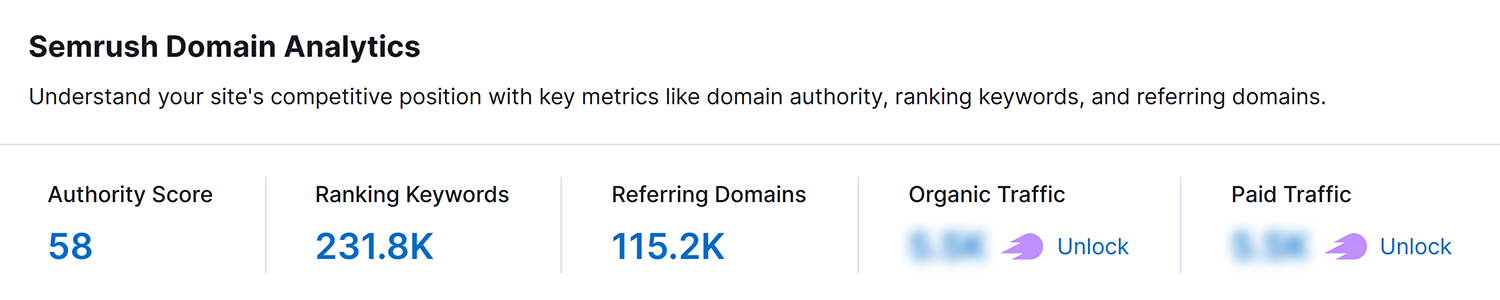
These metrics give context to your overall SEO presence. If you have a healthy domain, it’s going to be easier to rank for keywords. If your domain needs work, you might want to start there before optimizing individual pages for keywords.
Keyword density results
Now for the part you’ve been waiting for. At the top of the results, you’ll see a quick summary:
- Total words: Total number of words found on the page.
- 2-word phrases: How many two-word phrases recur in the text.
- 3-word phrases: The number of three-word phrases. Longer phrases are something to consider as you optimize for longtail keywords.
- 4-word phrases: You guessed it! The count of four-word phrases.

Below that, a table breaks everything down:
- Word: The term found on the page, excluding anything you filtered out in the previous step
- Repeats: How many times it is repeated on the page
- Density: The density of the keyword analyzed
- KW Options: Use this dropdown for quick links to the right tools to perform additional research on the specified keyword
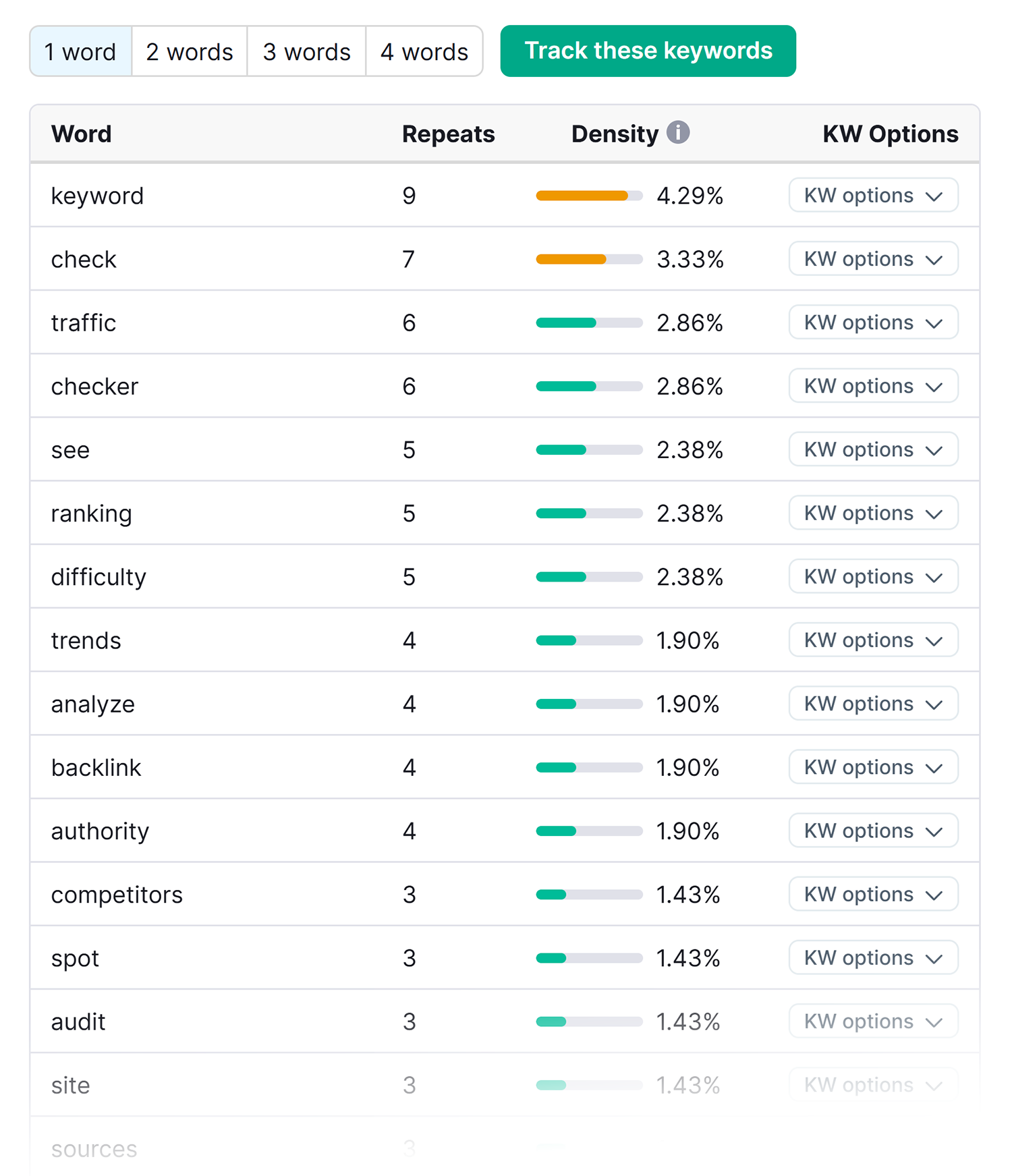
You’ll also notice four tabs across the table : “1 Word,” “2 Words,” “3 Words,” and “4 Words.”
Use these to switch between single keywords and longer phrases to get a fuller picture of how your content is distributed.
Check keyword density for unpublished content
Working on something that isn’t live yet? No problem.
Select the “Paste Text” tab and paste your content directly into the box.

Configure your options the same way, hit “Analyze,” and the tool will generate the same keyword density breakdown and analysis discussed above. Everything from here works exactly as described above.
What to do with your keyword density results
Once you have your data, here’s how you make the most out of it:
- Optimize underused keywords: If an important keyword barely shows up on the page, search engines struggle to understand the focus of your content. This is a sign that the topic needs to be reinforced naturally across headings, image alt tags, and body text.
- Fix keyword stuffing: Having the same keyword repeatedly can make your content sound robotic and unnatural, and overly optimized to both readers and search engines. To address this, use your keyword density results to identify where exact-match keywords are overused and rebalance the content. This will keep topics clear while helping the content sound more natural (and interesting).
- Discover unintended keywords: While auditing, you might see your content is unintentionally leaning more into a different topic or phrase than you originally planned. That can be an opportunity to fill that gap or explore it further in other content.
- Improve content relevance: Looking at keyword density helps you check whether your content clearly aligns with the topic and intent you’re actually trying to target.
- Benchmark against competitors: Learn from competing pages within your niche by comparing your keyword usage with theirs to understand how they’re covering the topic and where your content should have more depth and clarity.
- Support content audits: During content audits, keyword density helps you quickly spot pages that might be under-optimized, over-optimized, or slightly unfocused.
These tips help you get the most out of the keyword density results. But remember keyword density should guide you during the writing process, not control every single word you use. The goal is to spot areas worth improving while still making sure your content feels useful, engaging, and helpful.
Ready to check keyword density?
You’ve seen how the Keyword Density Checker can analyze any live or unpublished page, surface overused and underused keywords, and give you the clarity to optimize with confidence.
The next step? Putting it to work.
Whether you’re auditing a page that’s already live or fine-tuning content before it goes live, the answers are just a few clicks away. Try the Keyword Density Checker, because all your finely-crafted content deserves to be found (and shared).
Explore more on
Editorial disclosure
Search Engine Land is owned by Semrush. We remain committed to providing high-quality coverage of marketing topics. Unless otherwise noted, this page’s content was written by either an employee or a paid contractor of Semrush Inc.
About the author