How to tell which Google Ads controls actually control anything

The account’s target CPA (cost per acquisition) was $200, while its actual CPA was $182. As a bidding directive, that’s about as unalarming as it gets.
That same campaign recorded just six impressions over the month.
This was a referral software platform whose account had simply gone dark in November 2025. I ran the usual checks: billing, policy, conversion tracking, conflicting negatives, device, location, schedule settings, and everything else that typically causes delivery issues.
Everything checked out. The preview tool showed the ad wasn’t serving for the query, yet nothing in the account explained why.
The answer was in the change history, but only after I expanded the date range to the campaign’s full lifetime instead of the default 30-day or 12-month window.
In October 2024, the founder switched to Maximize Conversions and set a $200 target CPA. That wasn’t a careless decision. It was about 12% above the CPA he’d achieved the previous year, based on his own account data.
The problem?
Competition in his category had more than doubled over that period, driving CPC (cost per click) up 51.96%. CPA climbed from $138.53 before the October 2024 change to $316.76. By the time he set the target, $200 was about 37% below what the market was actually charging him per lead.
I think the founder made the best decision he could with the information he had. The problem was that the target accurately reflected a market that no longer existed. The market moved on, and he didn’t realize it.
I don’t share this story to argue that automation is bad. It’s about how bidding strategies like target CPA actually work.
We set a target expecting a ceiling, but the system treats it as a binding constraint. Those are different things, and nothing in the interface tells you which one you’ve just set.
The two loud positions both skip the question
One camp wants the manual controls back. The other says to stop fighting the system and let it run. Both avoid the only question that matters: when the system disagrees with you, what happens next?
And before picking a side, it’s worth talking about what we’ve already left behind.
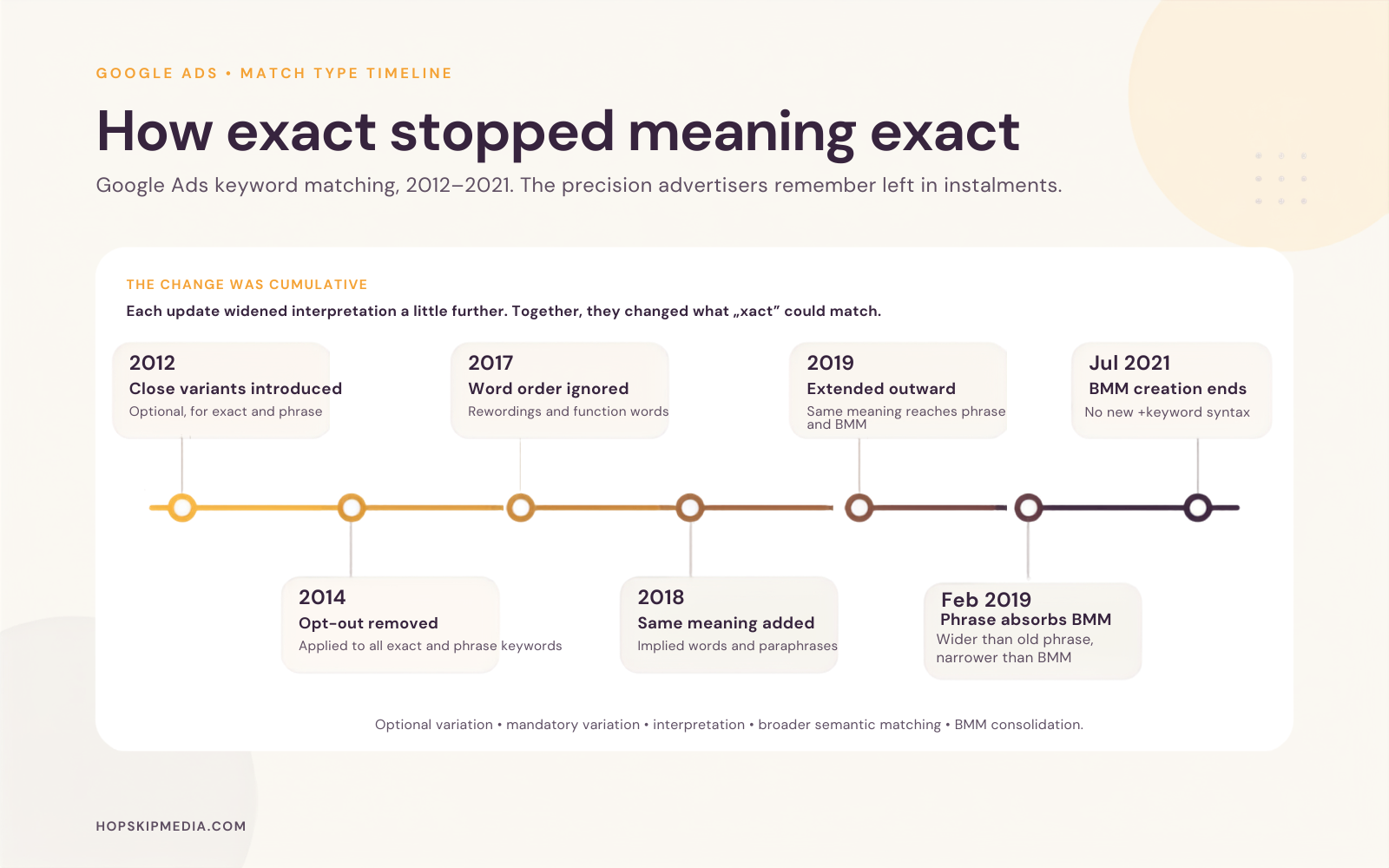
- Google introduced close variants for phrase and exact match as an optional setting in 2012.
- In 2014, it applied them to all exact and phrase keywords and removed the opt-out.
- In 2017, it expanded exact match to ignore word order and function words.
- In September 2018, it added same-meaning variations, including implied words and paraphrases, so [yosemite camping] could serve on “campsites in yosemite.”
- In 2019, it extended same-meaning matching to phrase match and broad match modifier.
- In February 2021, phrase absorbed BMM’s behavior, and by late July 2021 advertisers could no longer create new BMM keywords at all.
- Google’s current definition of a close variant is the end state of it all.
Even that last step isn’t a clean broadening: new phrase was wider than old phrase, but narrower than the BMM it replaced.
So when someone says, “exact used to mean exact,” they’re describing a period that ended more than a decade ago. The erosion is real, but the clean break people remember isn’t.
The useful skill was never holding onto manual settings. It was understanding how much authority a setting actually carries.
Five things the interface calls a setting
They don’t behave alike, and the distance between them is where money goes.
Hard restrictions
Negative keywords block matched queries, and brand exclusions and URL exclusions constrain what can serve: Google’s own word for this class is “firm boundaries”. But firm isn’t infinite: negative keywords won’t match to close variants or other expansions. Casing and misspellings are handled for you; synonyms and singular or plural forms are not. And on searches longer than 16 words, a negative sitting past that threshold won’t block the ad. A negative is a precise promise about the string you wrote, not about the idea behind it.
Opt-outs
You can disable AI Max, and you can toggle search-term matching at the ad group level. Two things to know: some hosted controls stop applying when it’s off, so turning it off isn’t a clean return to the previous state, and after Google’s migration of Dynamic Search Ads into AI Max, you can’t assume these surfaces are off until you switch them on.
Priority rules
An identical, eligible exact-match keyword gets first priority; subject to eligibility, budget, inventory and advanced search experience exceptions. That’s a queue position, not a guarantee, and it assumes you’re eligible to be in the queue in the first place. “Limited by budget” is an eligibility state.
Targets
A target doesn’t request an outcome; it defines the band the system may operate in. A target CPA set materially below your historical CPA may not be attainable while maintaining traffic (just like we saw with the story at the beginning). If your band doesn’t intersect the market, the system can’t overspend to reach your ideal customer; It delivers less.
Contextual signals
Search themes guide Performance Max, and AI Max expands from your keywords, creative and URLs. These inform the system but don’t bind it.
And then there’s the AI Brief’s matching guidelines, which, as you’ve noticed, aren’t included in the explicit list. These guidelines are meant to be boundaries and guidance with previews, but Google has not published any enforcement rate or a deterministic guarantee. Because of that, I can’t tell you they’re a control, but I also can’t say they’re merely a suggestion.
The industry’s trusted source for essential news and analysis.
Sign up for our newsletter to receive exclusive insights and updates directly to your inbox.
- Daily breaking news
- Expert analysis from industry veterans
- Join over 200k subscribers
- Covering SEO, PPC and AIO
The layers move
On Aug. 17, Google began changing how target-based bid strategies behave for campaigns limited by budget: Target CPA and Target ROAS, plus Target CPC for Demand Gen, with the global rollout completed on Aug. 27. Google’s own example: a $10 target that had been delivering $5 will now trend closer to $10. The same FAQ says the change will not directly increase spend, that daily and monthly budget limits are always respected, and that auction mechanisms are unchanged.
Read that for what it is: a classification change.
For those campaigns, the target became more directive. So, if yours was a ceiling you never expected to touch, it’s now closer to a destination, and you should review your targets sooner rather than later.
No account frustratingly broke down on that Monday when the change began. But anyone whose mental model of “target” predates Aug. 17 is carrying a slightly wrong map, and the interface looks identical.
How to find out which layer you’re on
Google’s documentation tells you what a control is supposed to do. Your account is either holding, or it isn’t, and none of this requires experimenting with a client’s spend.
- Read the search terms report against your own negative list. Look for queries that served despite a negative you assumed covered them. Because negatives don’t expand to close variants, singular and plural gaps are common: “running shoes” on the list, “running shoe” still serving. The report shows you where the edge of a hard restriction actually is.
- Check your eligibility state before you trust a priority rule. Exact-match priority assumes the keyword is eligible, and “Limited by budget” is an eligibility state. If a campaign has been budget-limited for six weeks, the prioritization you’ve been relying on may not have applied during that time. The status column answers that before you start theorizing about match types.
- Use the ad group toggle as a measurement, not a gamble. To see what search-term matching is actually contributing, switch it off in a single ad group, not the entire account, then compare the search terms before and after. One control, one place, and the reporting gives you the answer.
- Read change history across the account’s full lifetime, not the reporting window. The account I opened revealed nothing at 30 days or 12 months. When something is wrong, and nothing is flagged, the question is usually, “What changed, and when?” The answer may be older than the window you’re viewing.
- Reconcile the platform’s count against your CRM, and your CRM against the bank. Import offline conversion events, including those that didn’t originate in Google Ads. Do this not because the dashboard lies, but because three disagreeing systems tell you where to look. Attribution windows, deduplication, lead qualification, consent loss, and reporting lag all create gaps. So do refunds and bookkeeping. A gap doesn’t prove anything, but it points you to the part of the account nobody has examined.
None of this is an argument against automation, and none of it requires going back to manual bidding. It requires knowing, before you enter a number, whether you’re setting a boundary, expressing a preference, or issuing an instruction the system may not be able to follow.
The founder in that account did everything a careful person would do. He used his own data, set a defensible target, and monitored it. It still took 13 months and an outside review to uncover the problem because the number looked reasonable and the control wasn’t the kind he thought it was.
Explore more on
Editorial disclosure
Contributing authors are chosen for their expertise and work under the oversight of the editorial staff. Search Engine Land is owned by Semrush. The contributor was not asked to mention Semrush; the opinions expressed are their own.
About the author