Google’s clutterScore: The hidden SEO risk bloggers can’t afford to ignore


Intrusive pop-ups, excessive ads, and other website clutter can make content harder to access — potentially hurting your SEO performance.
Google has warned publishers about intrusive experiences for years. The clutterScore attribute revealed in leaked Google documentation and new Chrome ad metrics give website owners another reason to examine whether they’re putting too many obstacles between visitors and their content.
How website clutter gets between readers and your content
Imagine searching Google for a quick weeknight dinner recipe.
You click a promising result. A newsletter pop-up covers the screen before you can read a word. You close it, only to encounter a floating video, stacked ads, a sticky banner, and another subscription prompt.
Somewhere behind all that clutter is the recipe you came for. Sound familiar?
For food bloggers trying to maximize ad revenue and email signups, these interruptions may seem like the cost of doing business.
After auditing thousands of food and lifestyle blogs, I’ve repeatedly recommended removing intrusive pop-ups and unnecessary distractions. I’ve also seen gains in engagement, search rankings, and website traffic after making broader site improvements, including reducing clutter.
In May 2024, leaked Google Content Warehouse documentation revealed a little-known attribute called clutterScore. Google described this as a site-level signal intended to penalize websites that load too many distracting or annoying resources.
In September, Chrome introduced four experimental advertising metrics, subsequently added to Google’s Search page experience documentation.
Neither development proves that clutterScore is active in Search or that the new ad metrics are ranking factors.
What is Google’s clutterScore, and why should bloggers care?
The Content Warehouse leak revealed details about internal Google data structures, including QualityNsrNsrData, a model containing site-level quality information.
Within that model, Google’s documentation identifies a field named clutterScore.
According to the leaked documentation, Google describes it as:
- “Delta site-level signal in Q* penalizing sites with a large number of distracting/annoying resources loaded by the site.”
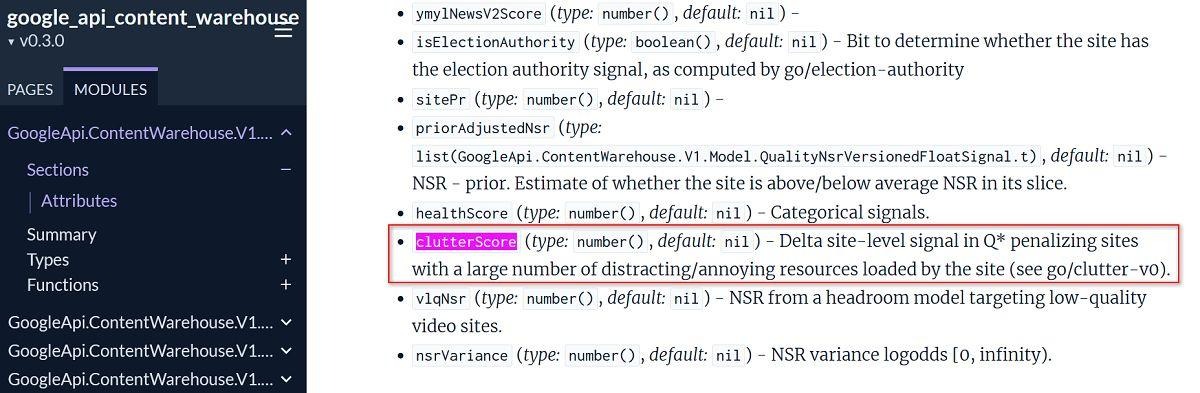
That wording is significant because it refers to more than visible ads. It also mentions distracting or annoying resources loaded by the site.
For food bloggers, that raises questions about advertising technology, intrusive pop-ups, floating videos, and third-party widgets. These are plausible clutter candidates, not confirmed inputs.
Crucially, Google describes clutterScore as a site-level signal.
Most bloggers focus on optimizing individual recipes. However, a site-level assessment suggests that recurring clutter across hundreds of posts could matter beyond one page.
That doesn’t establish that every URL receives the same adjustment, or even that the signal is deployed today. We don’t know the formula, thresholds, or ranking weight. And the leaked field alone cannot prove its use in live Search.
Further, Google cautioned against drawing definitive conclusions from the documentation without more context.
But what good is a perfectly optimized recipe if readers must dismiss five distractions to use it? And that’s what makes the possibility of clutterScore influencing rankings so compelling.
Dig deeper: The new SEO rules for bloggers in 2026: Why clarity matters in AI search
Google has been warning publishers about clutter for years
Google’s concern with intrusive experiences is not new. Unlike clutterScore, earlier interventions involved confirmed ranking changes.
In January 2012, Google introduced its Page Layout Algorithm (the Top Heavy update), warning that excessive above-the-fold ads could push pages lower in Search.
It wasn’t a ban on ads. It was a warning against hiding the content beneath them.
In August 2016, Google announced a mobile intrusive-interstitial ranking change, which took effect in January 2017.
Examples included pop-ups covering content, standalone interruptions, and layouts forcing visitors past an ad-like screen before reaching the article.
Google distinguished reasonably sized banners and certain necessary dialogs from intrusive experiences.
The principle was straightforward: Let people reach what they searched for.
Nearly a decade later, I still encounter food blogs using the very types of intrusive pop-ups Google warned publishers to avoid.
Google’s page experience guidance continues to ask whether excessive ads distract from main content and intrusive interstitials interfere with access.
That history doesn’t prove that Google uses a single page-experience score, or establish a connection to clutterScore. But it does demonstrate a longstanding concern.
How could clutterScore actually be calculated?
The leaked API doesn’t reveal the formula, the penalty threshold, or the weight of any individual element.
The wording “distracting/annoying resources loaded by the site” goes beyond simple ad counts. A system might consider how resources behave or affect the page, but that’s a hypothesis, not a verified calculation.
Consider a typical food blog. It may include display ads, a floating video, social widgets, and jump-to-recipe and print-recipe buttons. Add to all those new Trusted Google Source buttons, email prompts, and scripts supplied by several vendors, and possible “clutter” adds up quickly.
Each serves a purpose. Together, though, they can make the recipe difficult to access.

When reviewing a website for clutter, consider the following:
- Excessive ads: Placements that obscure content or occupy too much mobile screen space.
- Intrusive interstitials: Pop-ups that interrupt access to the main content.
- Floating and sticky elements: Videos and stacked banners that follow visitors as they scroll.
- Third-party resources: Scripts or widgets adding disruption and resource cost.
- Repeated templates: The same intrusive experience appearing across hundreds of pages.
Caveat: These are audit priorities, not confirmed clutterScore inputs.
Other leaked fields, including violatesMobileInterstitialPolicy and adsDensityInterstitialViolationStrength, describe mobile interstitial policy and ad density violations.
They show that Google has documented different ways to characterize intrusive experiences. However, they don’t establish whether either feeds clutterScore.
Advertising networks, email platforms, and WordPress plugins may supply these elements, but publishers remain responsible for the combined experience.
Dig deeper: Blogging, AI, and the SEO road ahead: Why clarity now decides who survives
The industry’s trusted source for essential news and analysis.
Sign up for our newsletter to receive exclusive insights and updates directly to your inbox.
- Daily breaking news
- Expert analysis from industry veterans
- Join over 200k subscribers
- Covering SEO, PPC and AIO
Google’s new CrUX ad metrics make clutter measurable
On September 15, Chrome introduced four experimental ad measurements in its real-user Chrome User Experience Report (CrUX).
As Search Engine Land first reported, they assess advertising exposure and resource usage:
- Ad count: Average number of ads visible within the viewport.
- Ad density: Average share of visible screen space occupied by ads.
- Ad weight – network: Data consumed by ad resources.
- Ad weight – CPU: Processing time consumed by ad resources.
A few large ad placements can produce high density even when the ad count is low (especially on mobile).
On September 22, Google added these metrics to its Search page experience documentation.
As Search Engine Land reported, Google’s John Mueller cautioned against assuming that makes them ranking factors:
- “Not everything is a direct search ranking factor!”
The metrics are experimental. They aren’t part of Core Web Vitals, and they have no official good/poor thresholds. Google has also not confirmed a link to clutterScore.
Publishers shouldn’t confuse “not a confirmed ranking factor” with “not worth measuring.”
CrUX ad measurements don’t capture every pop-up or sticky widget, but they do give eligible publishers another way to evaluate whether advertising overwhelms mobile content.
Dig deeper: Google Chrome launches new metrics to measure ad-heavy websites
Google’s guidance on intrusive pop-ups
Great content is harder to appreciate when visitors are fighting their way through the interface.
Google’s official interstitial guidance warns that intrusive overlays can make content harder for search engines to understand, potentially hurting search performance.
Here’s how I explain the user experience to clients.
Imagine walking down the hall when your toddler suddenly charges into you and knocks you sideways into a wall. If you’re a parent, you likely understand.
That’s what a full-screen newsletter pop-up can feel like to someone reading a recipe: BAM. The content disappears behind another demand for attention.
Googlebot doesn’t respond like a frustrated parent, of course. The comparison is about the human experience, not crawler behavior.
One persistent misconception in my audits: A delayed pop-up isn’t automatically acceptable to Google.
Google’s mobile interstitial guidance also described pop-ups that obscure content while someone is reading the page.
A 10- or 30-second delay isn’t a blanket exemption when the overlay covers most of the screen.
Replace full-screen entry prompts with inline subscription forms or small, easily dismissed banners. Check what appears when the first page loads and as visitors scroll, rather than looking at just the first screen.
Beyond SEO, frustrated visitors may leave without subscribing, sharing, or returning. GA4 engagement metrics are useful diagnostics, but not proof of a direct ranking factor.
What auditing thousands of blogs has taught me about clutter
Across thousands of audits, I’ve seen oversized headers, sticky ads, video players, and subscription prompts consume much of the first mobile screen. Clearing that space is a recurring recommendation.
Two food blogs audited in summer implemented broader technical improvements that included removing intrusive pop-ups and decluttering the top of their mobile pages.
In subsequent 28-day Google Search Console comparisons, clicks increased 18% at one site and 15% at the other.


These weren’t controlled tests. Other audit changes, seasonality, or shifts in search demand could also have contributed. We can’t attribute the gains to pop-up and barrier removal alone.
Nor do the charts prove clutterScore affected either site’s rankings.
But they do illustrate why I treat easier access to content as a priority, not an afterthought.
Monetization doesn’t have to frustrate readers
I’m not suggesting publishers abandon advertising or email marketing. They need both, but not at the expense of accessibility.
Consider Raptive’s Gated Print and Mediavine’s Grow Print Pass. These tools have been very effective (and controversial) ways for bloggers to dramatically increase their email lists.
Both allow visitors to view the recipe without restrictions, but request an email address when someone wants to print that recipe card.
Raptive’s option can collect an email without requiring newsletter signup. Print Pass generally requires a subscription to unlock printing.
The advantage is timing: Ask when readers request something additional, rather than interrupting them on arrival.
Inline signup forms and modest, dismissible banners offer other options.
Still, gated printing can frustrate users, too. Measure conversion quality, consent, print usability, reader feedback, and revenue before declaring victory.
The goal is to monetize without putting marketing barriers between readers and the recipe.
A practical clutter audit every blogger should perform
You don’t need access to Google’s internal ranking systems to spot obvious clutter. Open several important articles on your own phone as a first-time visitor.
Ask yourself: How hard have I made it to reach the content?
- Check the first screen. Is the actual article visible, or buried beneath headers, ads, and promotions?
- Wait, then scroll. Check for pop-ups, video players, or sticky elements that activate after 10-30 seconds.
- Assess the combined footprint. Individually tolerable widgets can collectively dominate a small viewport.
- Use available data and measurements. Review Core Web Vitals in Search Console and available CrUX ad metrics in CrUX Vis. Remember the ad metrics lack official pass/fail thresholds.
- Work with providers. Reduce intrusive placements, unnecessary overlays, and competing sticky elements.
- Measure outcomes. Compare Search Console, GA4, ad revenue, and email conversions before and after. Account for other SEO work, query shifts, and seasonality.
Don’t mistake familiarity with your own website for a good visitor experience.
Sometimes better SEO means removing, not adding
We still don’t know whether clutterScore is used in live rankings. But we can see the experience we’re delivering.
Google has warned about intrusive experiences for years, and its new CrUX metrics offer more ways to evaluate advertising exposure.
I’ve long advised bloggers to optimize for toddlers, drunk adults, and LLMs. Make content easy to find, understand, and use.
If your visitors are constantly dismissing pop-ups, closing video players, and navigating around advertisements just to find a recipe, you’re doing something wrong.
Sometimes the most effective SEO improvement isn’t adding another plugin, widget, or monetization opportunity.
It’s getting the unnecessary “clutter” out of the way.
Explore more on
Editorial disclosure
Contributing authors are chosen for their expertise and work under the oversight of the editorial staff. Search Engine Land is owned by Semrush. The contributor was not asked to mention Semrush; the opinions expressed are their own.
About the author