Google Discover pushing users into AI Mode

Google is pushing AI Mode in Google Discover, giving you options to summarize, follow up, or dive deeper once you open a story from the feed. It’s yet another way Google is steering users into AI Mode.
To clarify, this isn’t limited to Google Discover. It’s in the Google app on Android and works on any webpage you’re viewing.
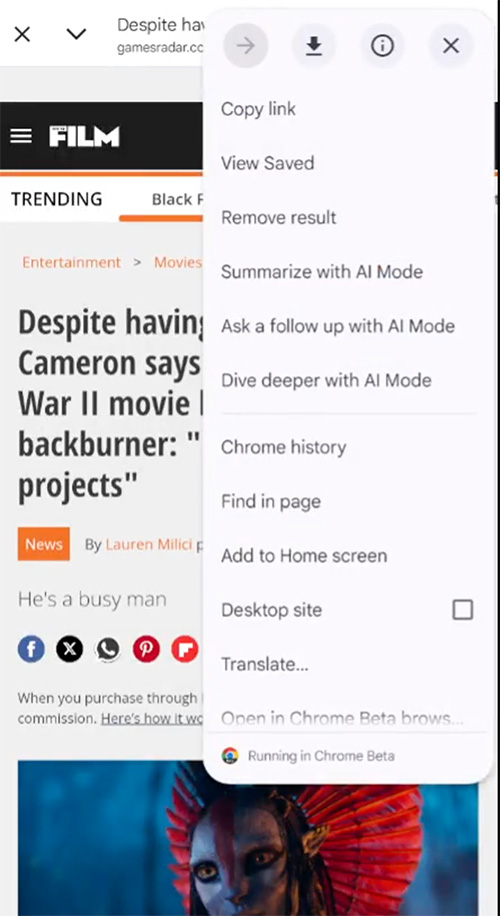
How it works. After you open an article from the Google Discover feed and tap the three dots in the top-right corner, you’ll see options to:
- Summarize with Al Mode
- Ask a follow up with Al Mode
- Dive deeper with Al Mode
Damien (adell) on X posted a video. Here is a screenshot from that video, followed by the video embed:
Why we care. Google continues to find new ways to push people into AI Mode. Google is doing it from Search, AI Overviews, the People also ask SERP feature, Chrome, the new search bar, and more. In this case, Google already sent the user to your site, but after that, Google is giving users the ability to use AI Mode to get an AI version of your story.
Explore more on
Editorial disclosure
Search Engine Land is owned by Semrush. We remain committed to providing high-quality coverage of marketing topics. Unless otherwise noted, this page’s content was written by either an employee or a paid contractor of Semrush Inc.
About the author