Bounce rate: How to identify and fix issues

Bounce rate is a simple concept but a notoriously challenging metric to master.
If you’re here for a checklist, go ahead and skip down to the most effective ways to reduce your bounce rate.
Or read on if you want to explore what makes bounce rate such an interesting—and even controversial—metric.
What is bounce rate, and how is it calculated?
Bounce rate is the percentage of visitors who leave your website without visiting more than one page.
A more qualitative definition is that bounce rate measures how well a website encourages people to stick around. This is sometimes referred to as engagement, but not everyone agrees with that definition.
More on that in a bit.
First, let’s take a look at how the numbers work.
Bounce rate formula: A basic calculation
To find the average bounce rate for your website, divide the number of single-page sessions by the total number of sessions.
The resulting percentage is the bounce rate.

For example, if your website has 50,000 monthly visitors, and 22,000 of them visit only one page during their session:

This formula can be used to calculate bounce rate across a whole site, a segment of a site (e.g., subfolder or subdomain), or even a single page.
How Google Analytics 4 (GA4) calculates bounce rate
GA4 provides bounce rate as a reporting metric. However, it calculates things differently than the formula above.
Rather than bounces, Google quantifies engaged sessions.
An engaged session is one where a visitor interacts with the website by:
- Viewing more than one page
- Staying on the page for at least 10 seconds
- Triggering a “key event,” such as submitting a form or scrolling to a particular section of the page
GA4 then calculates an engagement rate using the following formula:

If this looks familiar, that’s because it is. In GA4, engagement rate is essentially the inverse of bounce rate.
In fact, GA4 calculates bounce rate by subtracting the engagement rate from 100%.
Using the example above:
- Engagement Rate = 66%
- Bounce Rate = 44%
The math is simple. Even so, many web analytics platforms will provide bounce rate as a metric, so you won’t have to calculate it manually very often.
However, understanding how to find bounce rate is critical for interpreting the metric.
The SEO toolkit you know, plus the AI visibility data you need.

What does bounce rate mean?
As a general rule:
| High bounce rate means: | Low bounce rate means: |
| Visitors are leaving your website quickly. | Visitors are sticking around and interacting with your website. |
| Your content is not engaging. | People find your content interesting, informative, and useful. |
| Your content isn’t aligned with search intent. | Your content matches user intent.You’re getting more conversion opportunities. |
| You’re losing conversion opportunities. |
The problem with general rules, of course, is that they tend to have exceptions.
For example, it’s possible for someone to visit your site, find exactly what they need right away, and then bounce. That’s a happy visitor!
It’s also possible that someone might intend to stick around and engage with your content. But then life intervenes, they get distracted, and their session times out several hours later.
The more you understand your users’ behavior, the better you can interpret your website’s bounce rate.
With that in mind, here are some common errors people believe regarding bounce rate.
Error 1: Bounce rate is a ranking signal (No)
Google staffers have said time and again that bounce rate is not a ranking factor.
Whether you believe them is up to you.
Either way, here are some considerations with respect to bounce rate and search results:
- Lower bounce rates tend to correlate with higher rankings, likely due to more relevant and engaging content.
- Bounce rate is useful for signalling the presence of user experience (UX) issues, which can impact ranking.
- While bounce rate is not a ranking factor, improving the page for users in other ways can be. (See the tips on fixing bounce rate issues below.)
At the end of the day, if your users leave immediately, it doesn’t matter how well your pages rank. Improving bounce rate can help you make the most of the traffic you’re already getting.
And if those improvements also lead to higher rankings, consider it a bonus!
Error 2: Bounce rate is all you need (Nope!)
Consider a motion sensor: It can see when something’s moving and turn on a light or open a door.
But a simple motion detector can’t tell you what’s moving, where it’s going, or why it’s headed there. At least, not without more data.
Likewise, bounce rate may indicate your website has a problem. But to learn what the problem is, you’ll need more information.
Some page-level metrics that pair nicely with bounce rate include:
- Time on Page: How long visitors spend on the page
- Internal Click-Through Rate (CTR): How often users click on links to other pages on the same website
- Scroll Depth: How far down users scroll on the page
- Heatmap Data: Where users are clicking, hovering with their mouse, and otherwise engaging with the page
Some sitewide metrics you might want to look at include:
- Average Session Duration: How long, on average, each visitor remains on your website before leaving (sometimes called “average time on site”)
- Pages per Session: How many pages users typically visit while they’re on your site (to lower bounce rate, aim for at least two pages per session)
- Conversions: How many users reach one of your website’s goals
The above is by no means an exhaustive list. There are a ton of website metrics you can track.
Bounce rate is often a good place to start. But make sure you’re not ignoring other metrics that can better pinpoint user problems.
Error 3: Bounce rate and exit rate are the same (Not quite)
Bounce rate and exit rate are often used interchangeably. But they’re a bit different:
- Exit rate indicates what percentage of visitors leave your website from a given page.
- Bounce rate shows what percentage of visitors only visit one page.
Exits do not take into account where someone enters your website.
- If someone enters your website on one page, clicks through to another, then leaves, that’s an exit.
- If someone enters your website and then leaves from the same page (without engaging), that’s both a bounce and an exit.
In other words, all bounces are exits, but not all exits are bounces.
Consider the following example:
You have a cooking-related site with an “Apple Pie Recipe” page. Three users visit your site, whom we’ll call Avery, Bobby, and Charlie.
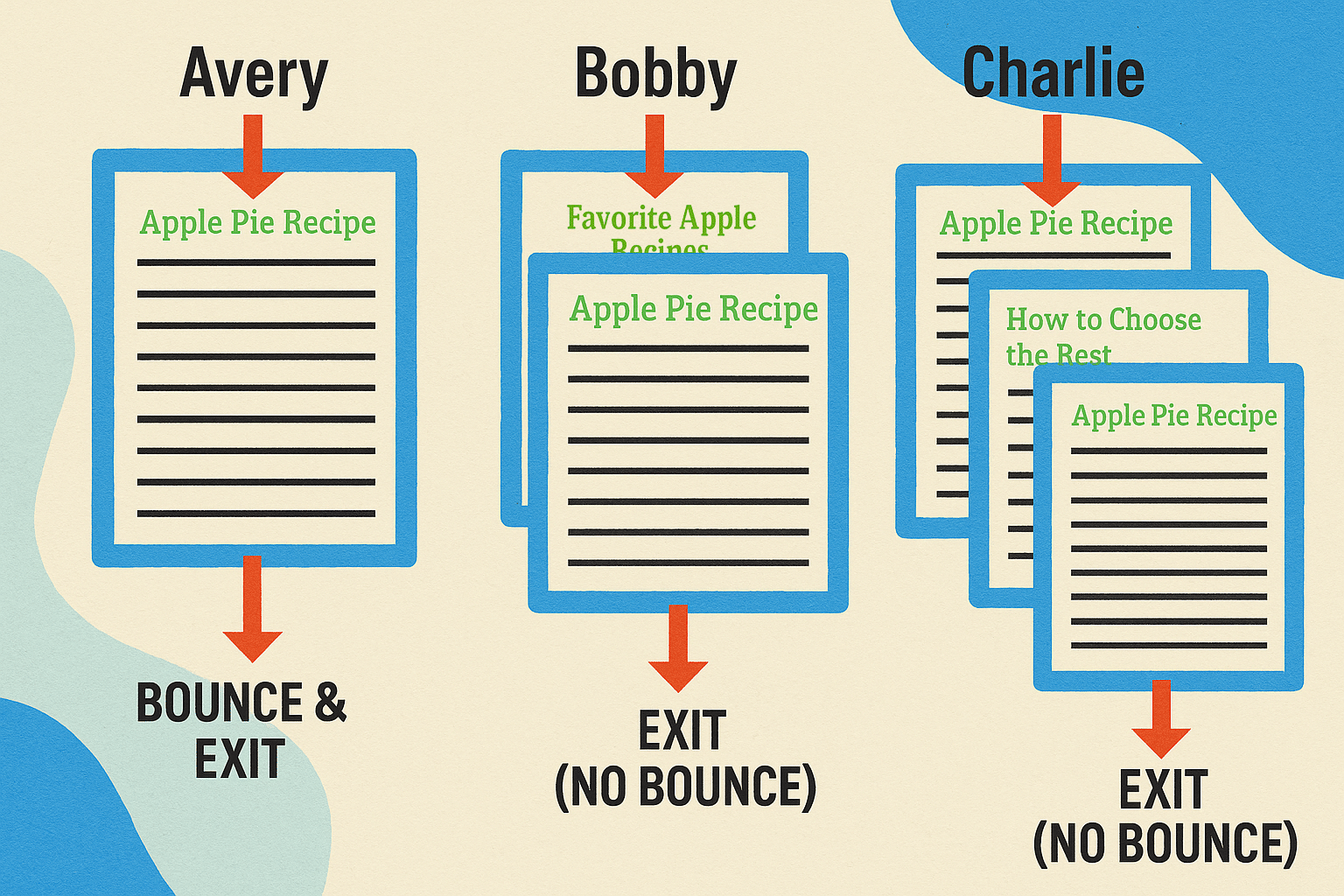
Avery enters on the “Apple Pie Recipe” page. They see the recipe has cinnamon (ew!) and leave immediately. That’s a bounce and an exit.
Bobby enters on a “Favorite Apple Recipes” category page. They click through to the “Apple Pie Recipe” page, read the recipe, and then leave. That’s an exit but not a bounce.
Charlie enters on the “Apple Pie Recipe” page. They click a link to another page about “How to Choose the Best Apples,” read about different apples, then go back to the recipe before leaving. That’s also an exit but not a bounce.
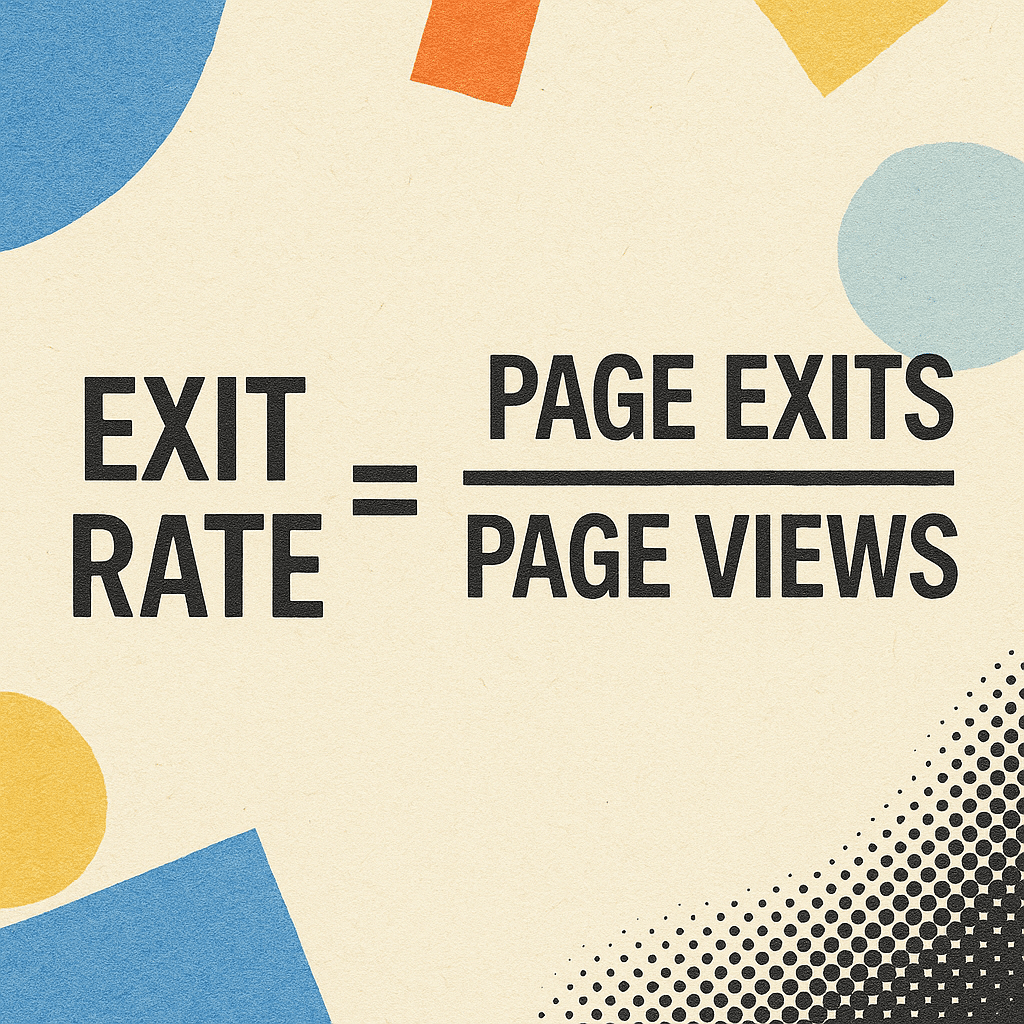
To calculate the exit rate for a given page, divide the number of exits (including bounces) by the total number of page views.
What you can learn from each metric is also slightly different:
- Exit rate helps you identify pages that might be problematic regardless of how a visitor reaches them.
- Bounce rate helps you identify pages that struggle to keep new visitors.
Because bounce rate is related to exit rate, improving your bounce rate can often improve exit rate for the same page.
Error 4: High bounce rate indicates poor content, bad design, or other issues (Not always!)
It’s easy to get discouraged by a high bounce rate. But people leaving your site right away doesn’t necessarily mean it’s bad.
In some cases, people may get exactly what they need from your site. Even if they don’t visit multiple pages in one session, they could be returning frequently and sharing links with family, friends, and followers.
That’s a great thing!
Try to avoid thinking negatively when you see a high bounce rate in your analytics data. Rather, consider it an opportunity to iterate on the content, design, and other aspects of your website.
What is a good bounce rate?
A Databox study from August 2023 indicated that the median bounce rate across all industries was just under 45%.
When they broke the numbers down, however, it was clear that each industry has its own bounce rate expectations.
For example:
- Almost half of visitors to Consulting & Professional Services websites bounced
- Meanwhile, the Apparel & Footwear industry had an enviously low 27.92% bounce rate
Finding a consensus on what constitutes a “good” bounce rate is only slightly more likely than spotting a leprechaun riding a unicorn.
This is partly because bounce rates can shift significantly over time. What was considered decent a few months ago might now be unattainable.
Rather than trying to hit a specific target, look at the direction in which bounce rate changes as you update your site.

For example, if your bounce rate decreases after updating content or making technical changes, it seems likely those were good changes.
On the other hand, if the bounce rate rises after an update, you might want to consider reverting your change to see if it goes down again.
Is bounce rate controversial?
The “controversy” around bounce rate stems from how people understand the metric.
As noted above, some people take issue with it as a measure of engagement. This is partly why GA4 prefers engagement rate over bounce rate.
But engagement rate doesn’t tell you how a user engages with your content, either. It just shows you the other side of the same coin.
You still need to parse the data to see what’s going on.
Bounce rate doesn’t need to be controversial. Just recognize that it’s a starting point and that you need other metrics to root out the problems causing it.
How to identify bounce rate issues
So how exactly do you track down bounce rate issues before they become bigger problems?
There are many good analytics tools out there—too many to cover in detail here.
For now, let’s look at a couple good starting points.
Adding bounce rate to GA4 reports
Before you can view bounce rate in GA4, you need to add it to a report.
To do so, log in and click on the “Reports” icon. It looks like a little chart and is under the “Home” icon.
Then, choose the report you want to add the metric to, such as “Pages and screens.”

Within the report, at the top right is a row of icons. Choose the pencil on the far right (“Customize report”).
Next, choose “Metrics.”

From the combination box, search or scroll to find “Bounce rate.” Click on it to add it to your report.

While you’re there, add other metrics you want to see in your report, such as engagement rate. You can rearrange them by dragging the tab to the left of each metric.
When you’re done, don’t forget to hit the blue “Apply” and “Save” buttons (in that order).
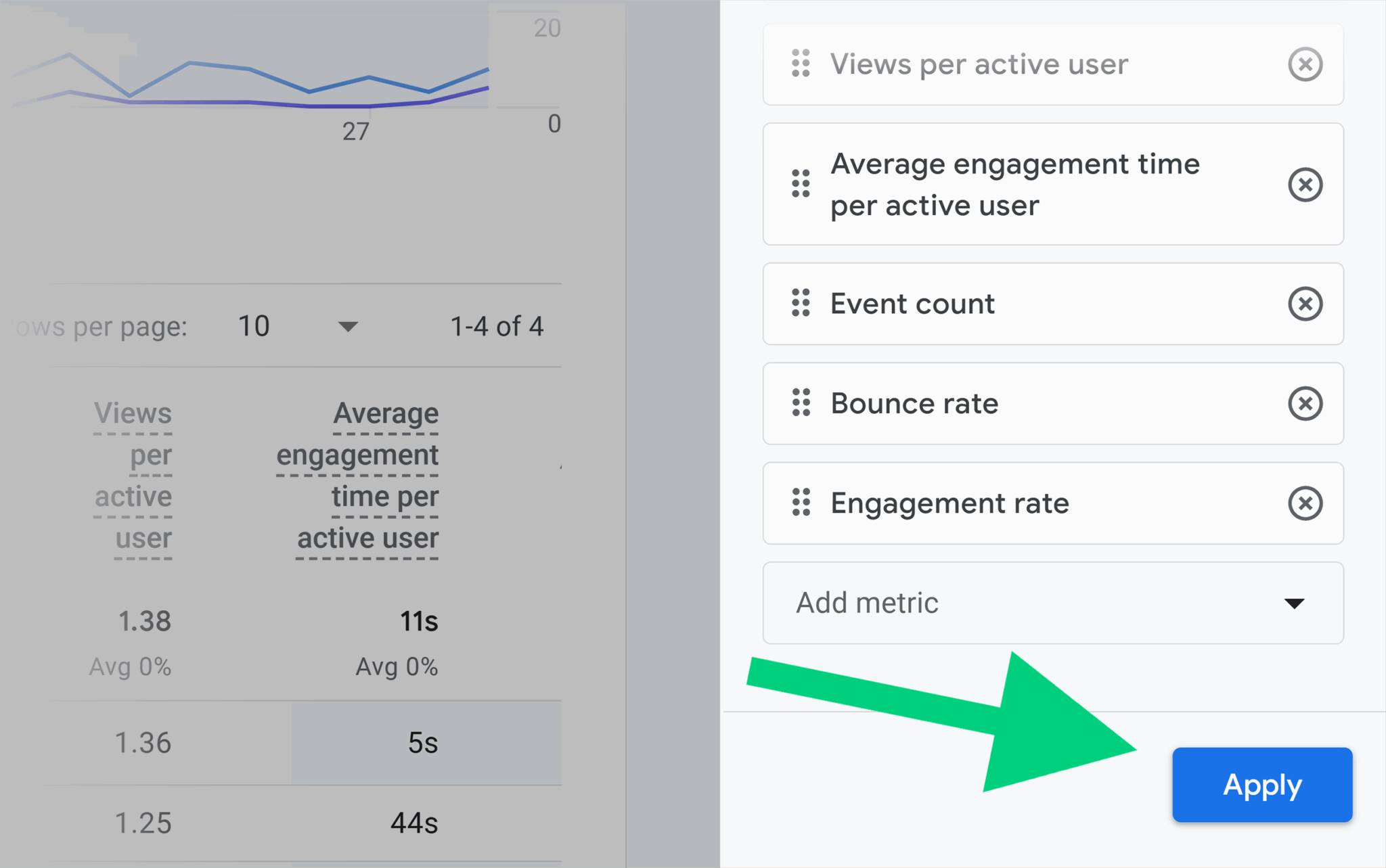
You can follow these same steps to add bounce rate to any detail report in GA4.
Doing so lets you see how your higher bounce rates might correlate with factors like:
- Traffic source
- Landing page
- Demographic details
- Device and browser
Estimated bounce rate with Traffic Analytics
The Semrush Traffic Analytics tool uses clickstream data to provide competitive research. Included in the data is an estimated bounce rate for a given domain.
Reviewing the bounce rates of websites in your industry can give you an idea of how to gauge your own efforts.
Go to the “Traffic Analytics” page and add up to five domains to view, then click “Analyze.”
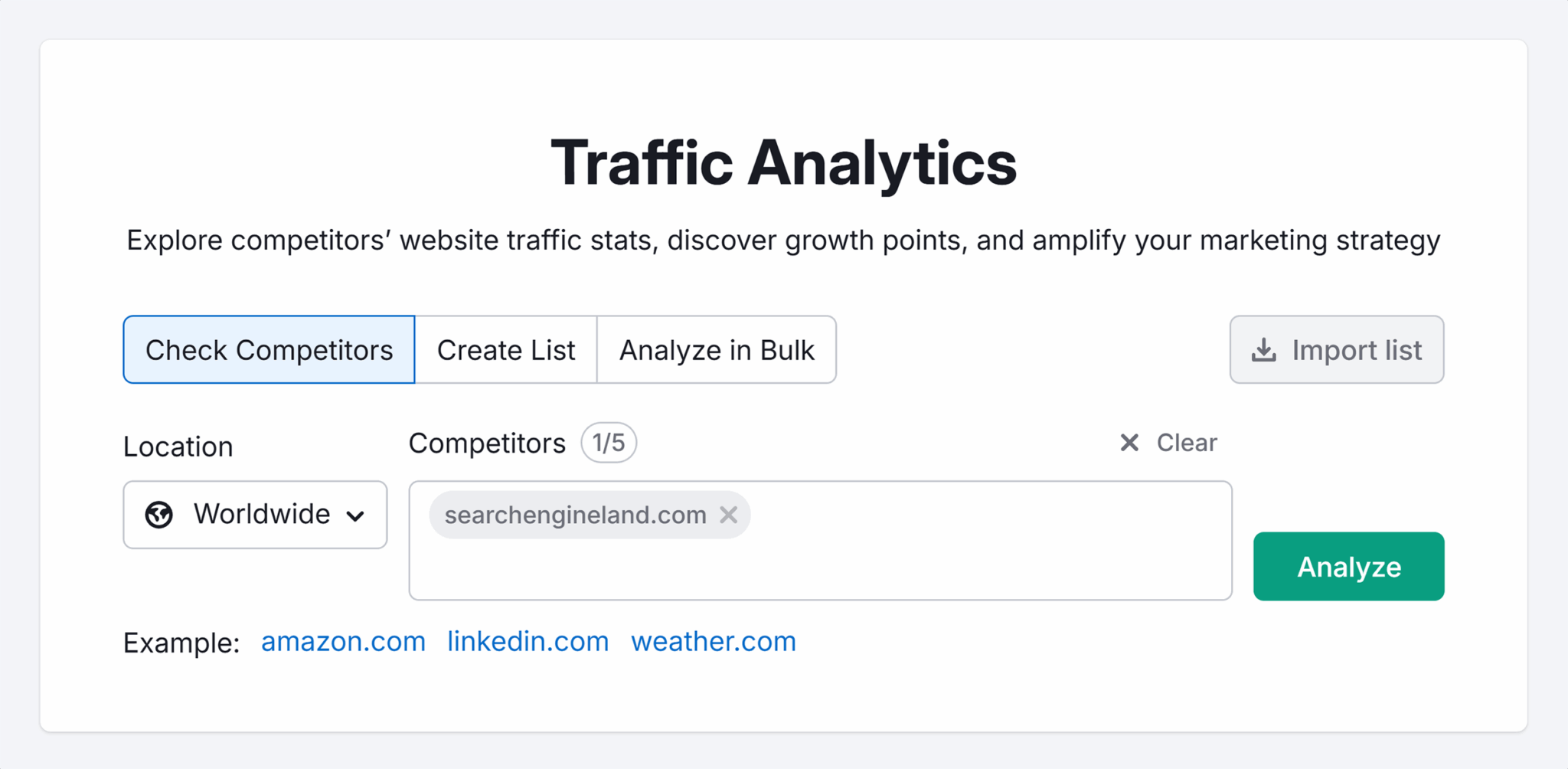
Estimated bounce rate is located at the far right of the “Overview” report.

You can also view bounce rate trends over time.

The report provides plenty of other data, as well. Don’t be afraid to explore other potential insights.
12 effective ways to reduce high bounce rates now
There’s no one-size-fits-all solution to lowering your bounce rate. The steps you choose should mirror your analysis and address the specific problems you find.
From benchmarking and data dashboards to monitoring your website’s performance and optimizing your site content, there’s plenty you can do.
Let’s go ahead and tackle high bounce rates.
1. Revisit your internal linking strategy
The most straightforward way to decrease bounce rate is to get users to visit a second page. To do that, they have to click on a link.
Ask yourself these questions to see if you need to update your internal linking plan:
- Do you have relevant links above the fold?
- Are you practicing good conversion rate optimization (CRO)?
- Are your navigation menus easy to use?
- Have you set up breadcrumbs?
- Do you suggest related content?
Effective internal linking is good for users, bounce rate, and SEO!
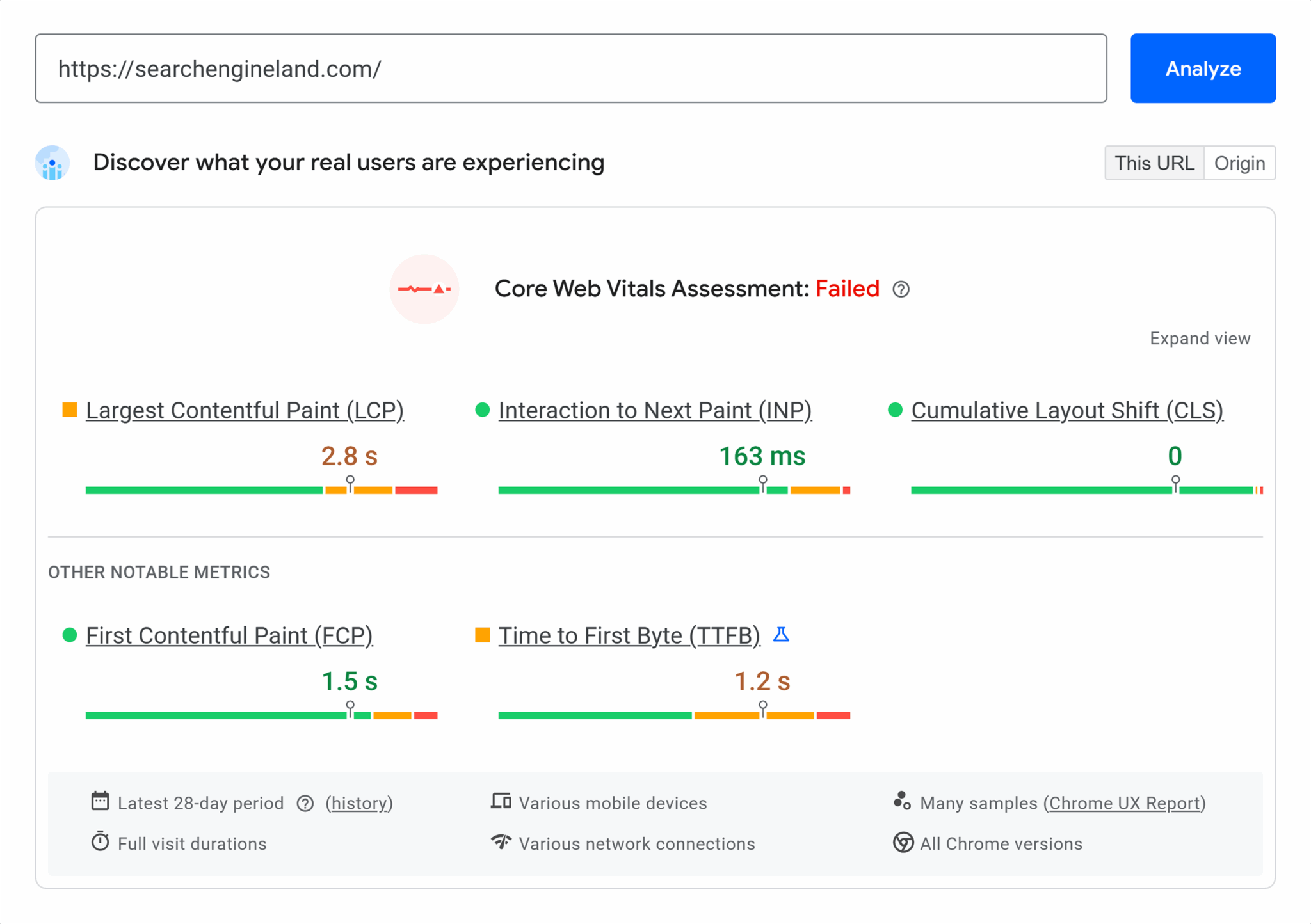
2. Make your pages faster
Slow pages are likely impacting your bounce rate and your search rankings. Spending time on page speed optimization is a good way to improve both.
Look at system-wide and page-specific issues. Things like code minification can be done across an entire site, while image optimization may require a page-by-page approach.
If you’re not sure where to begin, try Google’s PageSpeed Insights.
3. Match your content to search intent
If your pages rank for the wrong keywords, people may be bouncing due to mismatched search intent.
Use Google Search Console to see what queries are driving unqualified traffic to your site.
Then, re-optimize your content for the search terms that will bring in your desired audience.
4. Set up key events
It’s possible you’re getting more engagement than you realize!
If you haven’t already set up key events in GA4, you should do so. These could help you identify more engaged sessions—thus lowering your bounce rate.
Google has a list of recommended events you can add. Not all of them will be key events, but you should consider adding those you want to track.
5. Rewrite misleading titles and descriptions
A page’s title tag, headline (H1), and meta description should reflect its content. Otherwise, users may leave as soon as they notice the discrepancy.
This also goes for protocols like OpenGraph or X Cards, which are used by social media sites. Make sure titles, descriptions, and other details match the current content on the page.
6. Prioritize your best traffic sources
A CXL study of bounce rates by channel showed that traffic source can impact bounce rate.
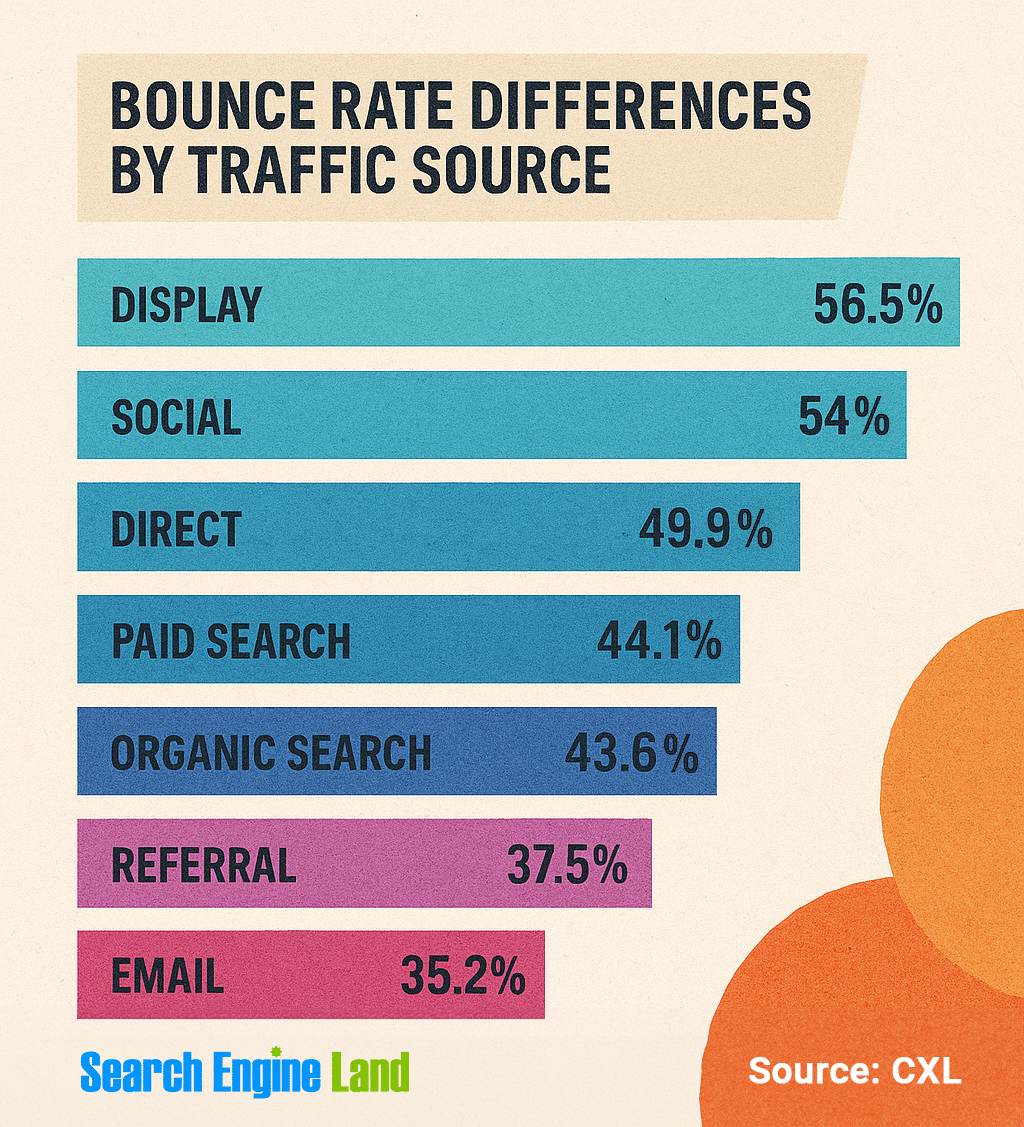
Check the “Traffic acquisition” report in GA4 to see how your site compares to the study data. Remember to add bounce rate as a metric using the method above.
Focus your efforts on channels that bring in the most engaged traffic to see your bounce rate decline.
7. Get a handle on pesky URLs
Every website eventually finds itself hosting missing, deleted, moved, merged, or otherwise abandoned pages.
Rather than relying solely on redirects, you should always update internal links to directly point to the correct pages.
But if visitors are reaching those URLs from off-site, here are some additional things you can do:
- Reach out to backlinking domains and ask them to update their links
- Implement redirects to ensure users don’t land on a missing page
- When visitors do reach an outdated URL, make sure the 404 page is helpful
8. Follow people-first content principles
Is your content written for people or search engines?
Creating helpful, people-first content is another thing that can improve both overall bounce rate and SEO.
If you put your visitors first, there’s a good chance they’ll reward you by sticking around and exploring your website.
9. Embrace mobile-friendly design
Mobile-first indexing has been around for a while now, meaning Google indexes and analyzes the mobile version of a website ahead of the desktop version.
And since more than 63% of web traffic comes from mobile devices (as of September 2024), focusing on mobile is a good thing for your actual users, too. (Spoiler alert: the rapidly growing number of mobile users was a key reason why Google pivoted to mobile-first indexing in the first place!)
Unfortunately, a lot of websites still consider mobile functionality as an afterthought. They risk losing both their search rankings and their engaged visitors.
Track, optimize, and win in Google and AI search from one platform.
10. Nix the pop-ups and interstitials
Interrupting users can have an extremely negative effect on both SEO and bounce rate.
If you really, really need that pop-up, try waiting a while before launching it. You may see better results with that page’s bounce rate.
You can also try showing it as visitors are about to leave the site. This may give them a chance to stay and engage with the site a little longer.
Finding the right balance between being annoying and prompting engagement requires some testing and patience. But the results will be worth it in the long run.
11. Give visitors something to do
Interaction can take many forms:
- An embedded video
- An image carousel
- A simple calculator
- A puzzle or word game
- A form asking for feedback
Even something as simple as adding “Share” buttons can increase user engagement.
Give users something to do—and let them know about it! Use active verbs to ask for participation.
12. Improve the user experience (UX)
In a way, all the fixes before this one are related to UX. That’s because UX isn’t just about design, page copy, or any other specific thing on your website.
Consider implementing A/B testing to verify your hypotheses about how people interact with individual pages. Maybe you want to change the layout of your product pages, test a particular call-to-action, or perhaps you want to test a new type of content within your overall content marketing strategy; whatever it is, you can create a test.
User experience encompasses the entirety of a person’s visit to your site. Everything you do to increase site usability and make their visit better will encourage them to stay.
Which means they’re not going to bounce.
And hey, UX is good for SEO, too.
Boost your engagement with bounce rate prowess
Bounce rate isn’t going away anytime soon. Understanding this primary metric is just one way to start improving your site so users can find what they want.
Be curious. Explore the data. Ask yourself hard questions about how your website can become even better than it already is.
To investigate how bounce rate impacts you and your competitors, dig into Traffic Analytics today.
Explore more on
Editorial disclosure
Search Engine Land is owned by Semrush. We remain committed to providing high-quality coverage of marketing topics. Unless otherwise noted, this page’s content was written by either an employee or a paid contractor of Semrush Inc.
About the author