PPC monitoring: What to check between audits


The email arrived on a Tuesday morning. A client asked why we’d already spent this quarter’s budget with a month still to go. I was focused on hitting their CPA target, which I did, and hadn’t paid enough attention to budget pacing.
That email cost me twice: in client trust and account performance. The client wondered what else I wasn’t watching, and the account was starved of budget for a third of the quarter.
An audit should have caught the problem. But an audit is a snapshot, and the account keeps changing. The real challenge is what happens between audits.
The checklist can’t keep up
I had a routine that should’ve prevented these costly, unpleasant surprises:
- Audit every account thoroughly at onboarding.
- Re-audit once a quarter, or whenever a client gets nervous, preferably done by a colleague for a fresh perspective.
- In between, try to run a weekly checklist, glance at dashboards, and trust a handful of scripts to alert me when needed.
- Repeat.
The weakness in that routine is what happens between snapshots: the weekly checklist.
Not because there’s anything wrong with checklists. On the contrary, they’re fantastic, life-saving tools. There’s a reason Atul Gawande’s “The Checklist Manifesto” is such a bestseller (read it!). But it’s not humanly possible, nor humane, to go through a full checklist for every account every week.
Take two of the best PPC checklists out there, from God Tier Ads and PPC Mastery, both members-only. Between them, they average:
- 36 weekly checks.
- 19 biweekly checks.
- 78 monthly checks.
- 52 quarterly checks.
Nearly 200 recurring checks. Multiply that by the number of accounts you’re managing, and you quickly realize the math doesn’t work. Per account, that’s roughly 290 checks a month. With 15 accounts, that’s about 200 every working day.
Nobody does that by hand, so the daily checks quietly become weekly, and the weekly ones monthly.
“Isn’t that what scripts are for?” More on that later, but the State of PPC 2026 report found that 93% of Google Ads accounts have 10 or fewer scripts running. Not nearly enough to catch everything the checklists recommend.
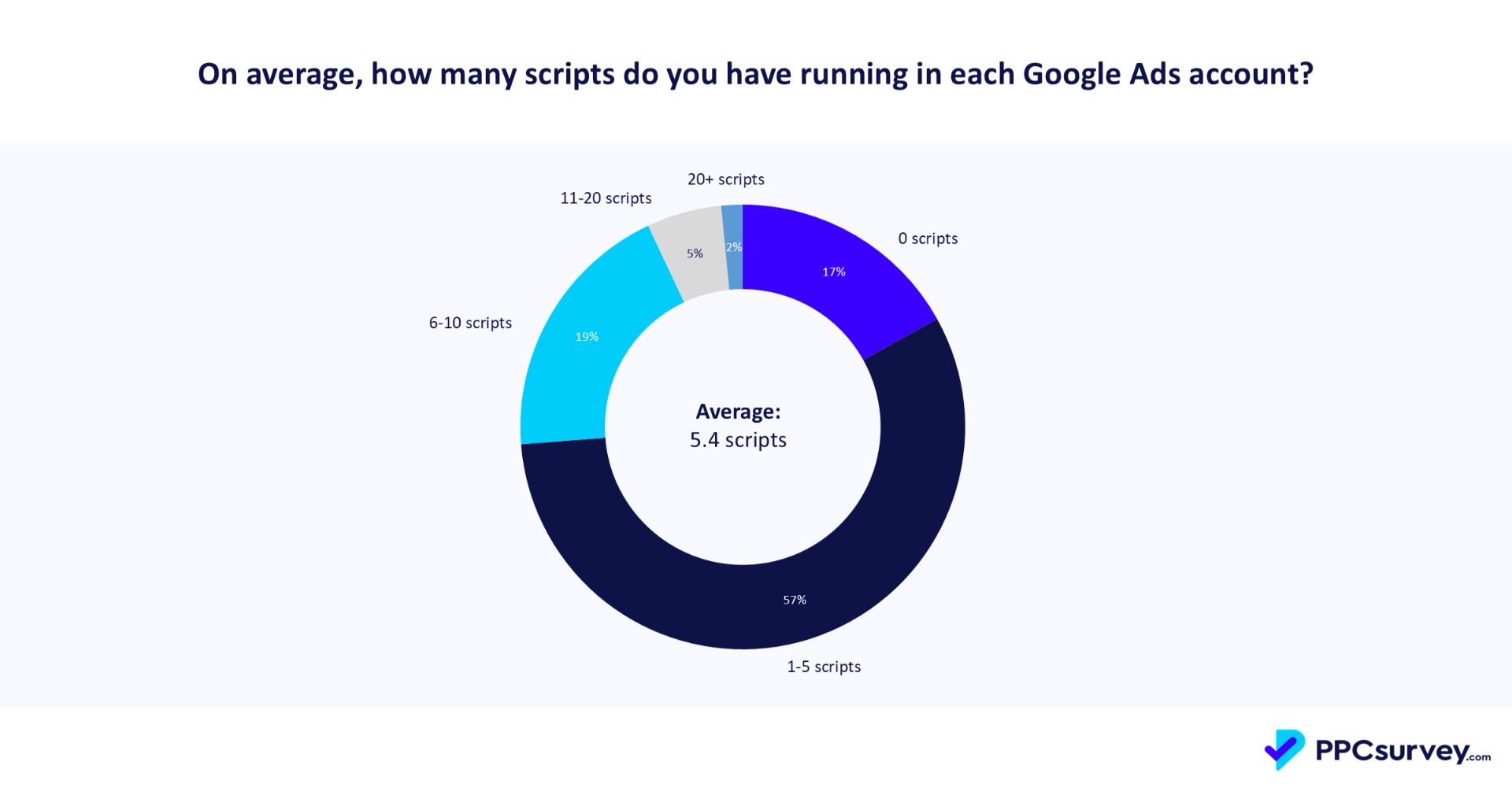
So, with a handful of scripts and a checklist nobody has time for, how do you make sure the right person hears about the right problem at the right time, without false alarms and without hearing it from the client first?
What should you monitor
Every check compares a value against something, and there are only four somethings.
State checks
State checks produce a pass or fail. An alert is a fact.
1. Against a standard
Search Partners is off. Campaigns have sitelinks. The landing page returns a 200. No ad mentions “2025.” Spend is pacing within the budget. CPA sits at the agreed target. The standard determines whether the check fires, and the size of the miss determines how loud it is. Being 50% under target isn’t the same as being 5% under target.
2. Against the previous snapshot
Something changed. A user outside the team edited the account. A recommendation was auto-applied. A new domain showed up in Auction Insights. Someone accidentally paused a campaign.
So you compare today with yesterday and ask this question first: Was it supposed to happen? If it wasn’t, the next question is who did it.
Metric checks
Metric checks are about numbers that go up and down anyway. An alert means the difference is bigger than normal variation can explain.
3. Against its own history
Conversions, spend, revenue, CTR, impression share and page speed, each compared to its own normal variation.
4. Against its siblings or benchmarks
Mobile versus the account average. This n-gram’s CPA versus the account CPA. One age group versus another. Your CPA versus similar accounts. This type finds opportunities rather than issues, so it belongs in a backlog, not an alert channel. When comparing to benchmarks, make sure it’s based on similar accounts.

Where are your gaps?
Put the four types across the top and the parts of an account down the side, and you have a coverage grid like the one below. The left half is your state checks, and the right half your metric checks. One example per cell. A few cells are intentionally left empty where the type rarely applies.
| State: Against a standard | State: Against last snapshot | Metric: Against own history | Metric: Against siblings or benchmarks | |
| Account settings and access | Auto-tagging on, access levels per policy | New user added | ||
| Structure | Brand and non-brand separated, naming convention | Campaign created or paused | Budget distribution | Campaign vs. campaign efficiency |
| Keywords and targeting | Negative lists attached, no conflicts | Keywords or locations changed | Search term volume, impression share | Match type vs. match type |
| Ads and assets | Spelling, dates, brand terms, sitelinks present | Ad disapproved, asset removed | CTR per ad | Asset vs. asset |
| Bidding and budgets | Strategy per policy, target as agreed, pacing | Target or budget changed | Spend, CPC | Campaign vs. portfolio, CPA vs. similar accounts |
| Tracking and conversion data | Primary and secondary set per standard | Conversion action changed | Conversions, value, lag | Action vs. action |
| Feed and Merchant Center | Required attributes present | Feed processed, strike | Approved products, price competitiveness | Product group vs. group |
| Landing pages and site | 200 status, HTTPS, Core Web Vitals in Google’s bands | URL or redirect changed | Page speed over time | Page vs. page conversion rate |
| Auction and competitors | Top-of-page rate above agreed floor | New domain in Auction Insights | Impression share over time | Competitor vs. competitor |
Now mark the cells where your team actually has a check running. Not “we look at it sometimes.” A check that runs on its own and tells someone. The empty cells are your monitoring backlog.
Everything fluctuates: Know when to investigate
Teams that monitor metrics for anomalies mostly do it with percentage rules, such as: “Alert me when conversions last week were at least 30% lower than the week before.” Automated rules, most scripts, and most tools work this way.
The problem is that a 30% swing can be a signal or normal behavior. An account doing 40 conversions a day will swing 30% on noise alone a few times a month. An account doing 400 rarely will.
The percentage doesn’t know which account it’s in, so it either fires constantly (and gets muted within a month) or gets set so loose it misses the drops that matter. Comparing to “the previous period” adds a second problem: You inherit whatever happened in the previous period.
Setting a minimum volume filter helps get rid of some of the noise, for example: “Alert me when cost is 30% above the previous week, but only for campaigns spending at least $100 a week.” But that still doesn’t tell you what’s normal for those campaigns.
Now scale it to 25 accounts with 10 metrics each. That’s 250 potential alerts a day. Before you know it, you’ve built a false-alarm factory that the team can’t trust.
Even if you don’t have monitors running, you can bet your client or stakeholder will ask questions like: “Why were conversions last week lower than usual?” Most teams open the account and start explaining. The honest first step is a different question: Is this worth investigating in the first place?
I learned the answer from Daniel Barrett of AdWords Nerds in Ed Leake’s God Tier Ads webinars a few years ago, and I wish I’d known it in my agency days. I would have loved a five-minute check before spending hours explaining normal variance to a client who, in fairness, had no way of knowing it was normal either.
The method is the XmR chart, X for the metric and mR for the moving range between consecutive points. Statisticians call it separating routine variation from exceptional variation. Enter your data points in the free tool, and in a minute, you’ll know if the variation is worth investigating.
It applies three rules:
- A point outside the limit lines. Something unusual is going on. Investigate.
- Three of four consecutive points are closer to a limit than to the center line. A moderate signal. Investigate.
- Eight consecutive points on one side of the center line. A weak signal, and evidence that the process itself has shifted. Recalculate the limits, then decide whether the new normal is one you like.
Everything else is routine variation, and the right answer to the client is “nothing happened,” with the chart to prove it.
Large deviations are almost always signals. Small deviations are almost always noise. The chart tells you which is which before you open the account.
Two practical numbers from xmrit’s documentation:
- You need six data points as an absolute minimum, and 15 to 20 before the limits are trustworthy enough to lock. Beyond 20, more data adds little.
- On false positives, xmrit is candid: “For the vast majority of real-world distributions, XmR charts will have a ~3% false positive rate. This is more than good enough for business experimentation.” In other words, on 97 routine days out of 100, the chart stays quiet. Not perfect, but a percentage-based rule doesn’t come close.

Take the chart above, which tracks daily conversions. If a stakeholder asks why there were only 10 conversions on Aug. 24, the answer is that 10 is within routine variation for this account. The 105 on Aug. 20, though, sits outside the limits and is worth a look.
Watch out for the following when you try this with PPC data:
- Seasonality: Daily data has a strong day-of-week pattern, so either run the chart on weekly deseasonalized values (xmrit has a button for it), or compare same weekdays. Otherwise, the limits widen and miss real drops.
- Volume: Low-volume accounts, the ones doing three conversions a week, need weekly points, not daily, because daily counts near zero produce limits below zero and no signal.
- Freshness: Check each metric’s data freshness first, or you’ll get alerts about data that hasn’t arrived yet. Most metrics settle within an hour, conversions take three to 15 hours depending on your attribution model, and Auction Insights can take up to five days.
Get those right, and XmR helps you answer “Is this worth investigating?” in minutes.
The percentage rule asked, “How much did it move?” The XmR rule asks, “Did it move more than this account normally moves?” Only the second question deserves an alert.
The worked stack: Building a PPC monitoring system
Here’s what this looks like for a small PPC team. One lead, two account managers, Google plus Microsoft Ads, a mix of ecommerce and lead gen clients. Every account has an owner and a named backup.
This is a starter stack with example thresholds. Adjust them as you see fit. The grid above is how you find what your accounts need beyond it. When several checks share the same type and route, they appear as a single row.
State checks fire on any violation.
| # | Check | Type | Trigger | Band | Impact | Goes to |
| 1 | Site or landing page down | 1 | The site’s root domain plus the five final URLs with the most clicks return 4xx, 5xx, or time out on two consecutive checks, 15 minutes apart | Hourly | High | Text: owner plus lead |
| 2 | Account stopped: suspension, policy strike, payment failure | 2 | Any new account-level suspension, Merchant Center strike, or billing failure | Hourly | High | Text: owner plus lead |
| 3 | Conversion action status | 2 | Google or Microsoft flags a primary action as inactive or “no recent conversions” | Daily | High | Channel, @owner |
| 4 | Enabled campaign at zero impressions | 1 | Zero impressions yesterday for a campaign that served on each of the previous 14 days | Daily | High | Channel, @owner |
| 5 | Feed not processed | 1 | Merchant Center feed not fetched or processed in 24 hours | Daily | High (ecommerce) | Channel, @owner |
| 6 | Pacing vs plan | 1 | Month-to-date spend outside the client’s budget. 5% off is a digest line, 25% off is an @owner | Daily | Graded | By deviation |
| 7 | Status changes: bid strategies, disapprovals, keywords, audiences | 2 | Strategy learning, limited, or misconfigured. New disapproval in a top-10 spending campaign or a product disapproval jump. Keyword rarely shown or below first-page bid. Audience list under the Search minimum | Daily | Medium | Daily digest |
| 8 | Unexpected changes | 2 | Changes by a user outside the team or any auto-applied recommendation | Daily | Medium | Daily digest |
| 9 | Budget-limited while hitting target | 1 | Campaign limited by budget and at or better than its agreed target | Daily | Medium | Daily digest |
| 10 | Smart Bidding data floor | 1 | Conversion-based strategy with fewer than roughly 30 to 50 conversions in 30 days | Weekly | Medium | Weekly digest |
| 11 | Hygiene: ad copy, URLs, negatives | 1 | Spelling errors, past years, banned or missing brand terms. Any final URL returning 3xx or 4xx. Any negative blocking an active keyword | Weekly | Low to medium | Weekly digest |
| 12 | Settings drift | 2 | Search Partners or Display expansion switched on since last snapshot where the standard says off | Weekly | Medium | Weekly digest |
| 13 | New competitor in the auction | 2 | New domain in Auction Insights above 10% impression share | Weekly | Medium | Weekly digest |
Metric checks fire on an XmR rule (type 3, limits per account from its own last 15 to 20 points) or on a significant gap versus siblings or benchmarks (type 4).
| # | Metric | Type | Period | Band | Strong signal | Moderate signal | Shift or opportunity |
| 14 | Spend | 3 | Daily, weekly deseasonalized. Hourly points only during known peaks such as Black Friday week | Daily | Channel, @owner | Daily digest | Weekly review |
| 15 | Primary conversions | 3 | Daily, weekly deseasonalized. Weekly points for low-volume accounts | Daily | Channel, @owner | Daily digest | Weekly review, recalculate limits |
| 16 | Conversion value or average order value | 3 | Daily | Daily | Channel, @owner | Daily digest | Weekly review |
| 17 | Conversions on top-20 keywords, products, URLs, placements. PMax spend allocation | 3 | Weekly | Weekly | Weekly digest | Weekly digest | Monthly review |
| 18 | Impression share and overlap vs top competitors. Invalid click rate | 3 | Weekly | Weekly | Weekly digest | Weekly digest | Monthly review |
| 19 | Page speed per top URL | 3 | Weekly | Weekly | Weekly digest | Weekly digest | Monthly review |
| 20 | Quality Score, top-20 keywords | 3 | Weekly | Weekly | Weekly digest | Weekly digest | Monthly review |
| 21 | Search term n-grams vs account CPA/ROAS | 4 | 30-day window | Weekly | Backlog | Backlog | Monthly review |
| 22 | Device, network, location, demographic vs account average | 4 | 30-day window, significance-tested | Monthly | Backlog | Backlog | Monthly review |
| 23 | Targets vs actuals, brand and non-brand leakage, structure | 1 and 4 | Monthly | Monthly | Monthly review | Monthly review | Audit trigger |
One thing is deliberately missing from both tables: strategy, target-setting, structure, and incrementality. Judgment. That’s the audit, and we’ll come back to it.
The industry’s trusted source for essential news and analysis.
Sign up for our newsletter to receive exclusive insights and updates directly to your inbox.
- Daily breaking news
- Expert analysis from industry veterans
- Join over 200k subscribers
- Covering SEO, PPC and AIO
The routing layer: Where monitoring goes to die
Every row above can be built. Detection is the solved half. The unsolved half is what happens after a check fires, and it’s where most monitoring efforts end. The script writes its findings to a Google Sheet nobody has opened since the week it was built. The alert channel fills up, and someone mutes it. And three weeks later, the client emails.
Three things make the routing work.
- The channel tells people how urgent it is
- Text messages go to the hourly, high-impact rows only: the site is down, or the account stopped serving. That’s two checks. Keep the list very short, because the first time a low-impact alert arrives by text, people stop reading texts.
- Daily high-impact checks and XmR rule 1 go to a Microsoft Teams or Slack channel with an @mention of the owner.
- Medium-impact and rule 2 go into one daily digest post or email, no mention.
- Weekly checks go into a weekly email digest or a Monday review.
- Owner plus backup
- Every account has one owner and one named backup, and both are on the distribution for that account.
- Holidays, sick days, and the one week a year when someone’s phone is at the bottom of a lake change nothing.
- Hourly alerts also reach the lead. And there’s an escalation gate: a high-impact alert that nobody acknowledges within two hours automatically goes to the lead.
- Every alert carries four fields:
- Which account or campaign.
- What broke, or which rule fired.
- Since when.
- A suggested first action.
Without a suggested action, an alert is just a notification. With one, it’s a task. Add mute windows for planned launches and migrations so the channel isn’t shouting about a change you made on purpose.
Here’s a normal week for the three-person team once this runs. Two or three text messages a month across 25 accounts, most of them outages. A handful of @mentions a week. One daily digest post the owner skims in five minutes. A 45-minute Monday review of the weekly digest and the backlog.
And a new reflex: when a client asks about yesterday, the first reply is the chart. The two hours of digging through the data only happen if the chart says so. The rest of the time, silence. And silence means fine.
Who or what does the monitoring
None of this requires buying anything, and none of it is free.
External uptime monitor
This handles Row 1. Cheap or free and minutes to set up, an external uptime monitor is a great way to check URLs hourly. Better Stack, Pulsetic, and UptimeRobot are just a few of many solutions available for website monitoring.
Scripts
They can carry a lot of the rest. They’re free, run on a schedule, and you can make them do exactly what you (or your client) want. But they have limits that an API-based solution doesn’t.
A script gets 30 minutes per run before Google cancels it (60 minutes if it processes accounts in parallel from an MCC), which isn’t always enough for large accounts or heavy reports. A parallel run stops at 50 accounts.
Someone has to own each script: They break quietly when Google changes something, and nobody notices until the check that should have fired didn’t. As I like to say, scripts are free like a free puppy.
Automated rules and platform notifications
These cover the simple state checks with zero maintenance, but they’re mostly daily, mostly single-account, and can’t express “compared to this account’s own history.”
Workflow platforms
Platforms such as Make, n8n, and Zapier fit one half of this article very well. They’re built for what happens after a check fires: sending to Slack or Teams, texting the owner, building the daily digest, waiting two hours, and escalating to the lead. They also connect the uptime monitor, Merchant Center, the CRM, and the ads account into a single flow, and because they call the Google Ads API directly, the 30-minute script limit doesn’t apply.
What they don’t give you is the check itself. Their Google Ads connectors are built for leads and customer lists, not for reading performance data, so the XmR limit or the pacing rule still has to be written by you, in a code step.
On their Cloud plans, you pay per operation, so 25 accounts checked daily adds up. Think of them as the routing layer around your scripts or your tool, not a replacement for either.
Third-party software
These give you most of the checks out of the box, including the detection logic that the workflow platforms leave to you, without the maintenance and limits of scripts. You pay for that, you have to get your team on board, and someone still has to set up the rules and decide who gets notified.
Build or buy your monitoring stack
I’m biased, since I run one of those third-party tools, but I agree with Mike Rhodes when he said, “Off the shelf will get you 80% of the way there. Building (might) give you exactly what you want. But it takes resources.”
Most of what you’d want to monitor isn’t unique to your accounts. A dead conversion tag, a spend spike, a feed that didn’t process: These problems show up across accounts, which is exactly why software companies can afford to build proper checks and keep them working.
Scripts, workflow platforms, or other custom solutions are best for the other 20%, the checks that are so specific to your needs that no tool will ever ship them.
If you want to take the bias out of it, put real numbers into Baremetrics’ build-vs-buy calculator: what the tool costs per year, how many weeks it takes your team to build the equivalent, and how many days a month go to maintenance. Be honest on that last one. It’s the number everyone underestimates, and it decides the answer.
I’ll cover the role of AI in all this in my next article. Spoiler: AI can help interpret monitoring alerts, but it shouldn’t handle most of the monitoring itself. A monitor has to run the same way every day on every account, and that’s not what AI is good at. AI is better suited to reading what fired, explaining what it probably means, and handling checks you can’t turn into a rule, like whether an ad is on-brand.
What the audit still owns
Monitoring doesn’t replace the audit. It catches breakage and real shifts in numbers, but it doesn’t catch bad strategy. That still requires judgment and a periodic deep look.
- Is your account structure starving Smart Bidding of data?
- Was the ROAS target derived from the business economics?
- Is brand and retargeting inflating the blended ROAS inside PMax?
- Are the queries you’re matching the ones you meant?
Those are audit questions. Run the audit at onboarding, once a quarter, and whenever a client gets nervous.
The relationship is simple. Monitoring keeps the account honest between audits, so the audit can spend its hours on judgment rather than rediscovering a broken tag.
A team that adds monitoring will feel like it’s doing less auditing. It should be fine with that. The audit didn’t get less important. It got its time back.
Dig deeper: The 4-step health check for your target ROAS and CPA
Know before the client does
Remember the email? Look at Row 6 in the state table. Month-to-date spend outside the client’s budget, checked daily. 5% off is a digest line, 25% off is an @mention. My overspend would have shown up as a digest line in week one and an @mention in week two, a month and a half before the client noticed. Not because I’d have been paying more attention, but because a system was doing the boring part while I was busy hitting the CPA target.
Thirteen state checks, 10 metric checks, three rules for when a number deserves a look, one owner and one backup per account, and a channel for every level of urgency.
Build that, and the next email from a client is one you’ve already answered before they finish typing it.
Explore more on
Editorial disclosure
Contributing authors are chosen for their expertise and work under the oversight of the editorial staff. Search Engine Land is owned by Semrush. The contributor was not asked to mention Semrush; the opinions expressed are their own.
About the author