10 things Semrush One lets you do that you couldn’t do before

Your SERP rankings look fine. But your brand appears less when people ask ChatGPT, Gemini, or AI Overviews for answers in your industry.
Competitors show up instead. You see their names inside AI responses, but you can’t tell which prompts trigger them or why you don’t appear.
At the same time, your workflow hasn’t changed. You do research in one tool, content planning in another, and optimization comes later, if it happens at all.
So, every update takes more time than it should.
Semrush One closes these gaps. It brings AI visibility and SEO workflows into one place so you can measure, diagnose, and act without stitching tools together.
The SEO toolkit you know, plus the AI visibility data you need.

In this guide, we’ll show 10 things Semrush One lets you do that weren’t possible before.
What is Semrush One?
AI visibility measures how often your brand appears as a mention or citation inside AI answers. SERP rankings show where your pages appear as blue links in traditional search results.
Semrush One brings together both classic SEO tools and AI visibility tools so that you can track your brand performance across Google, ChatGPT, Gemini, Google’s AI Mode and AI Overviews. Instead of checking rankings in one tool and guessing how AI systems treat your content elsewhere, you see both from the same environment.
Here’s what the CMO, Andrew Warden, at Semrush says:
“By combining SEO and AI into one intelligence layer, Semrush One gives marketers the power to influence every moment of discovery and turn insights into performance. It’s the advantage modern marketing was missing.”

Who should use Semrush One?
Semrush One is built for SEO leads, content leads, brand marketers, and agencies who want to review the following in one place without juggling multiple reports:
- Where rankings and AI mentions diverge
- Which topics and prompts drive visibility
- How their brand appears in AI answers
What’s new that Semrush One can do?
You now get access to capabilities that didn’t exist in the older setup:
- Track brand visibility across AI platforms
- Find prompts your brand ranks for
- Monitor daily performance inside AI answers
- Analyze AI-attributed brand sentiment
- Run AI site audits
- Compare competitor presence in AI answers
- Measure AI’s share of voice
- Create and optimize content in one workspace
- Get AI-driven optimization signals
- View combined SEO and AI performance insights
These features are organized into three connected areas: AI visibility, AI-ready site auditing, and content workflows, so you can measure what’s happening, diagnose gaps, and act from a single place.
Let’s see how to do all this.
1. Track brand visibility across major AI platforms
Previously, you could only see your presence in Google/Bing/Yahoo SERPs using the SEO toolkit. Now, Semrush One shows how often and in what way your brand appears in answers on Google AI Overviews, ChatGPT, Gemini, and AI Mode.
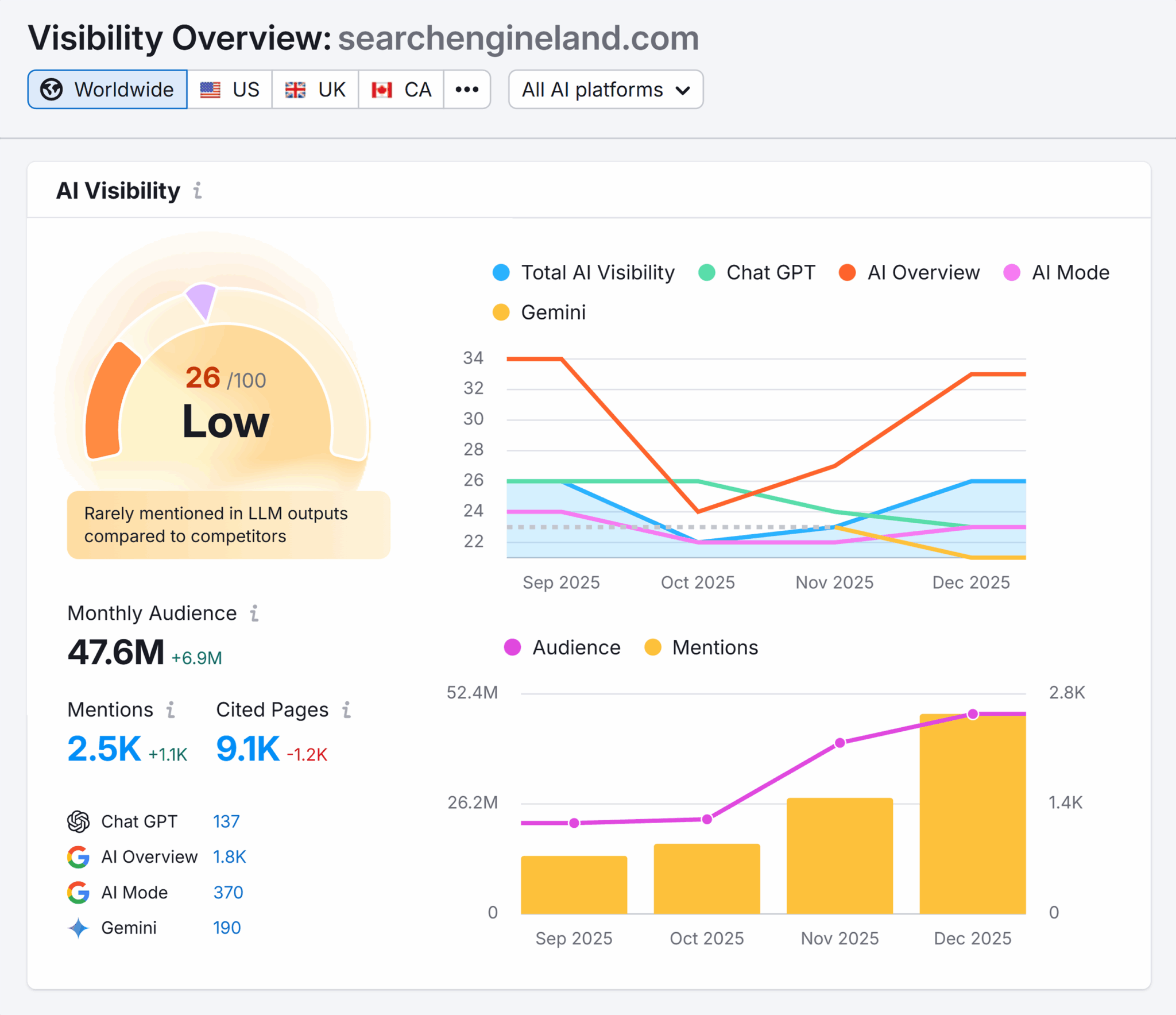
Suppose your SERP rankings are the same, but unlike you, competitors start appearing in AI answers for the same topics. In that case, you should track AI visibility to see where you stand and what’s causing the difference.
Here’s how to do this:
- Go to “AI” > “AI Visibility” > “Visibility Overview.”
- Enter your domain and click “Check AI Visibility.”
- Your website report will appear. From here, click the “All AI Platforms” bar on the top menu to choose a platform:
- ChatGPT
- AI Overview
- AI Mode
- Gemini
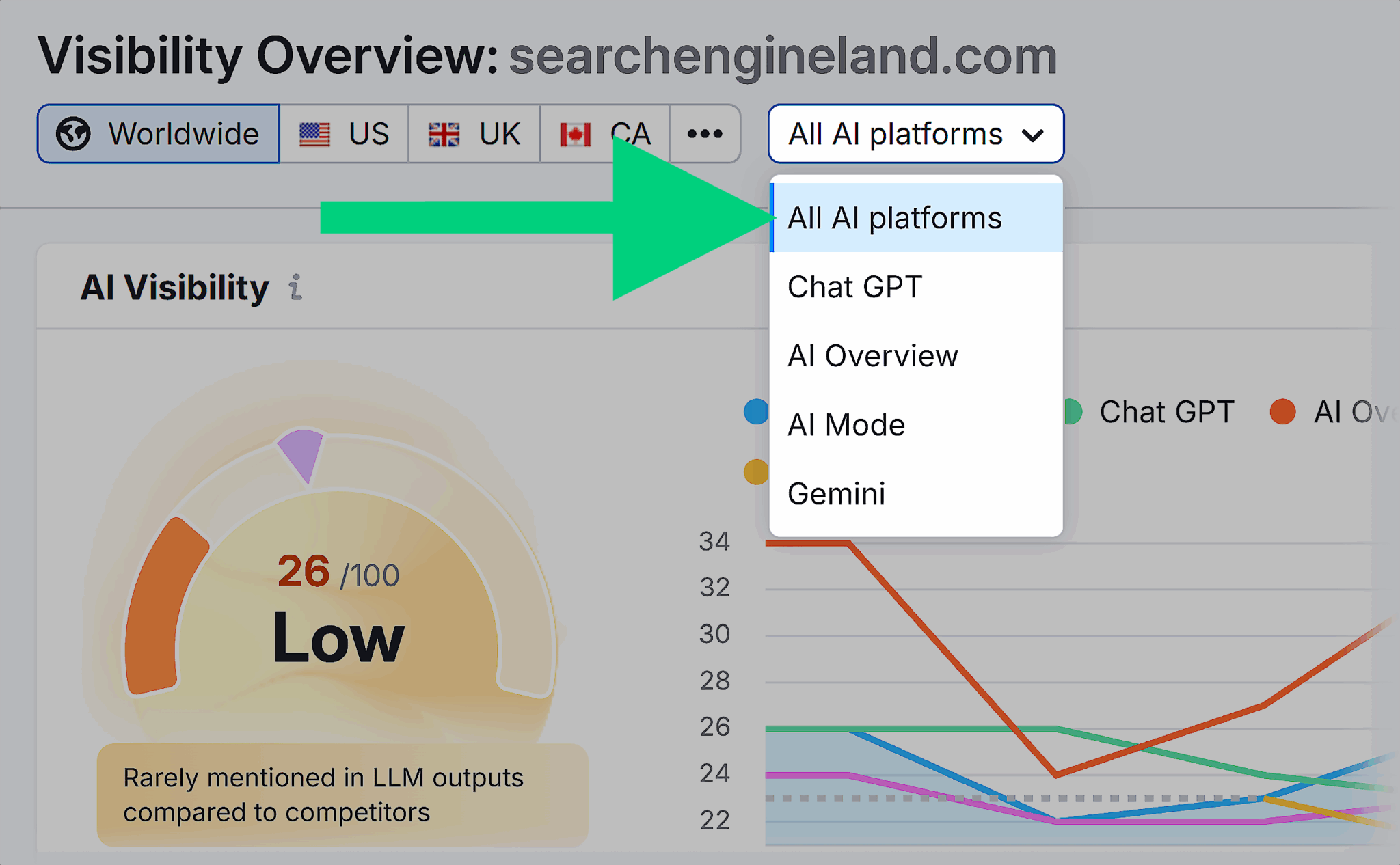
Note: You can filter by all platforms or by each platform separately.
For example, if you click “Gemini 171” near the bottom left as shown in the above image, it will redirect you to the list of “Your Performing Topics.” This list shows the exact “Topics” or “Prompts” that cite your website inside AI answers.

You can also see the following:
- Topic Opportunities: Topics and prompts where your competitors are being cited but you aren’t
- Cited Sources: List of websites that are sourced frequently by LLMs
- Source Opportunities: Shows where your competitors’ websites are cited, but yours isn’t
- Cited Pages: List of your web pages that are cited in the LLM response

Turn AI visibility insights into tasks
Once you have the data, do the following:
- Make a list of topics where competitors are cited, and you aren’t
- Review which pages AI already trusts from your website
- Update or create pages to answer those prompts better
2. Monitor prompts as new keywords
When you optimize for traditional SERPs, you aim to find keywords that your audience uses. But since people have shifted to AI Overviews, AI Mode, or LLMs to find their answers, AI prompts now act as a new layer of “keywords” within AI platforms.
People no longer rely on short search queries. They ask full questions, describe situations, request comparisons, or ask for expert advice.
The older Semrush setup only tracked traditional keywords across Google, Bing, and Yahoo. However, Semrush One gives you a direct view of the prompts where you appear, and the prompts where your competitors dominate.
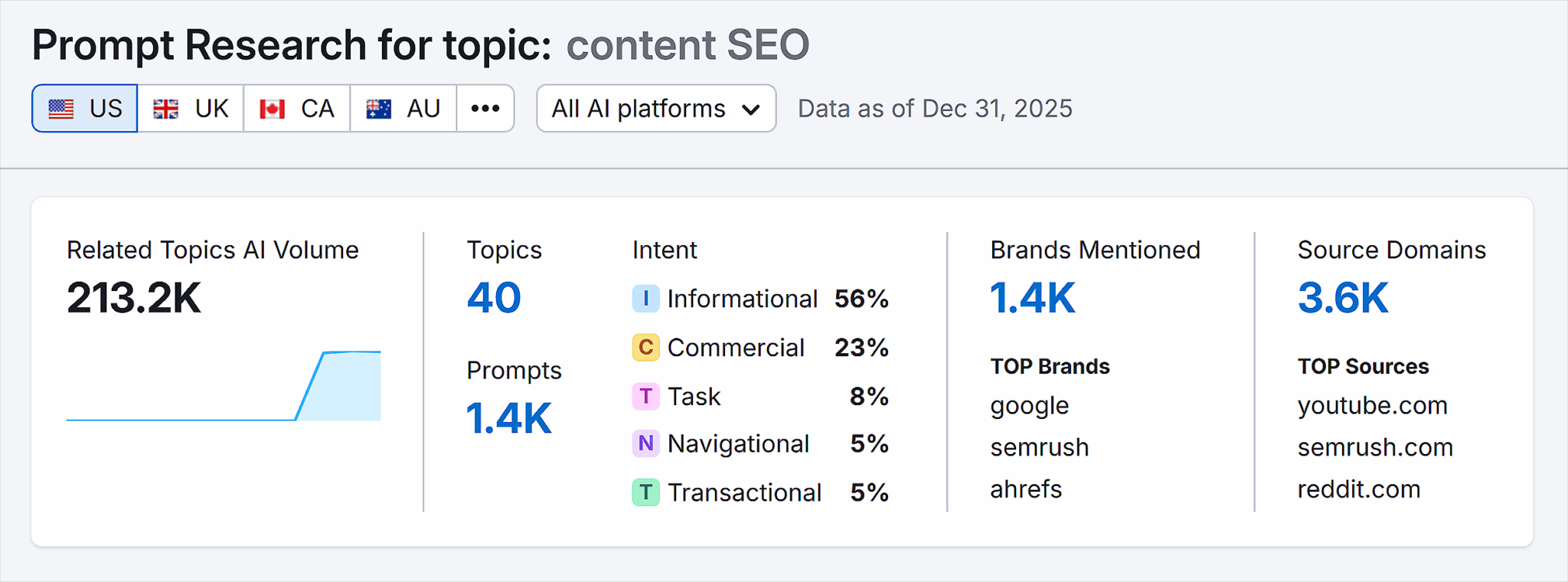
If your brand appears in some AI answers, but you don’t know which prompts trigger those mentions or which ones consistently favor competitors instead, use Prompt Research to see exactly where the brand appears and where it doesn’t.
Here’s how to monitor this:
- Go to “AI” > “AI Visibility” > “Prompt Research.”
- Enter a topic and click “Analyze.”
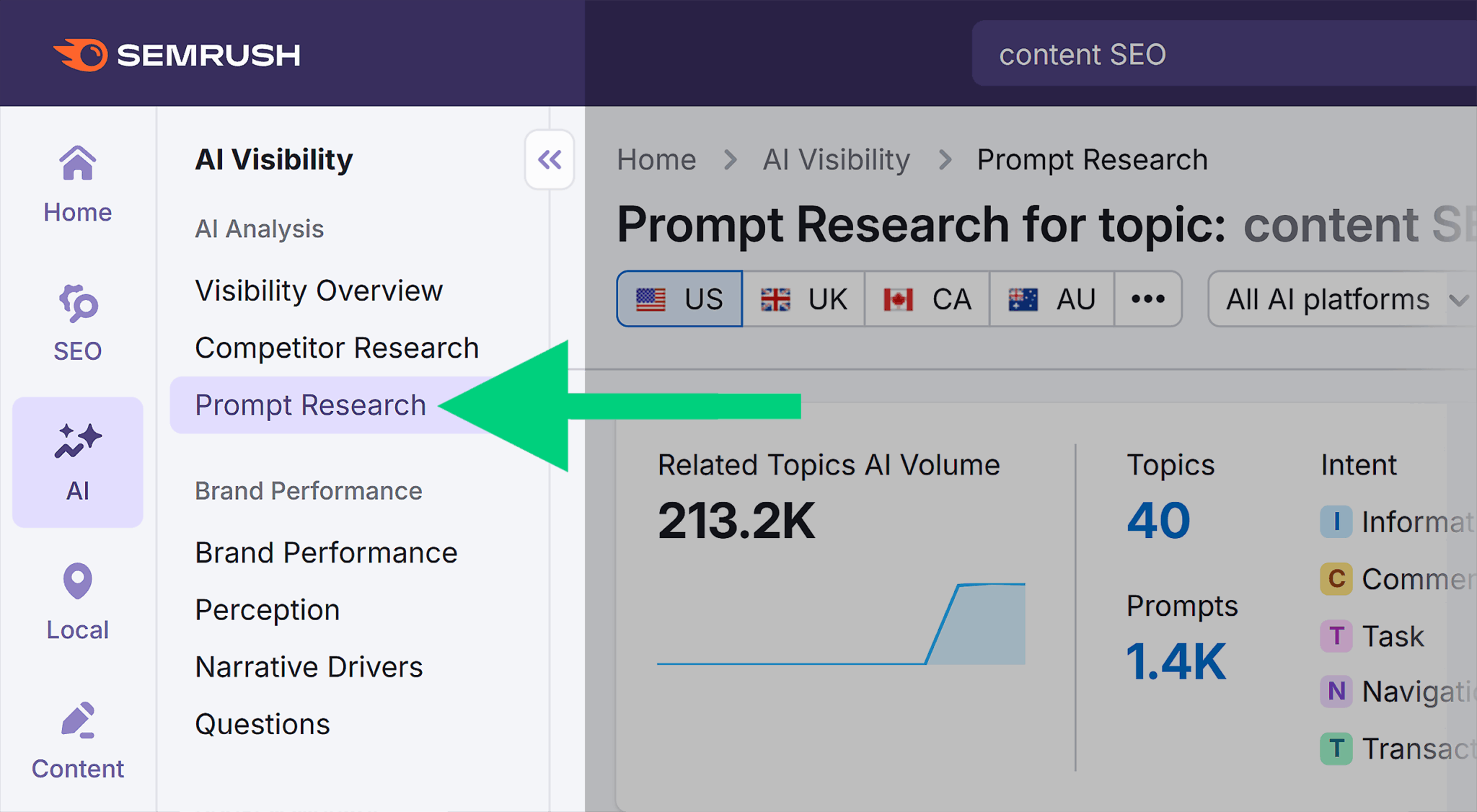
You can now filter by any of the following tabs:
Topics
Shows you broader subjects that group-related prompts like this:
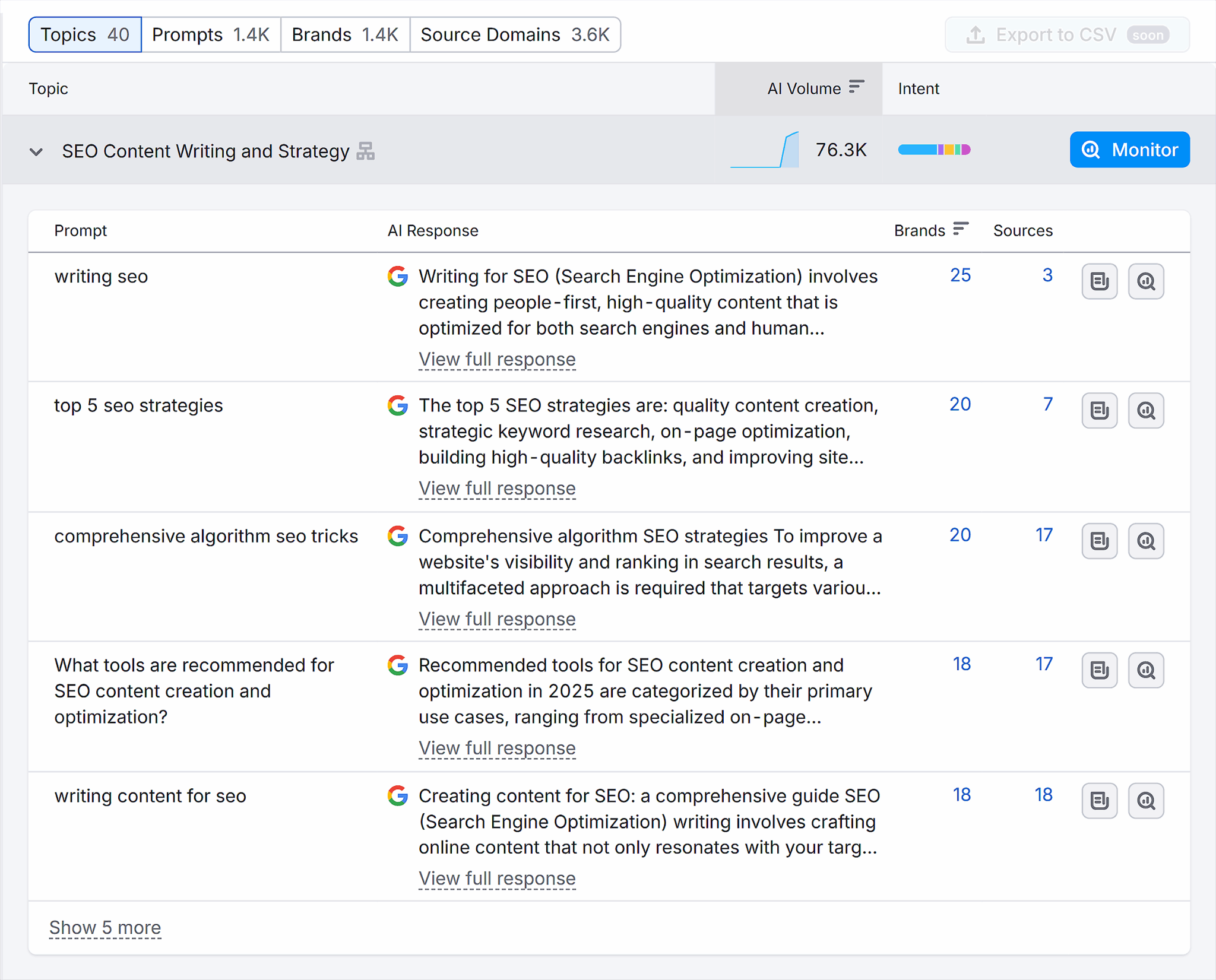
Here:
- “Prompt” is the query the user gives to LLMs
- “AI Response” is what the LLM gives readers in response to their queries
- “AI Volume” is the approximate traffic the prompt/topic drives
- “Intent” specifies which stage of the search journey the prompt belongs to
Prompts
Shows the list of user queries that trigger an LLM response like this:

Here:
- “Brands” show the number of brands mentioned in the AI Response
- “Sources” show the number of URLs the LLM used to collect its answer
Brands
Shows the list of brands that are mentioned in the LLM response for your searched topic.
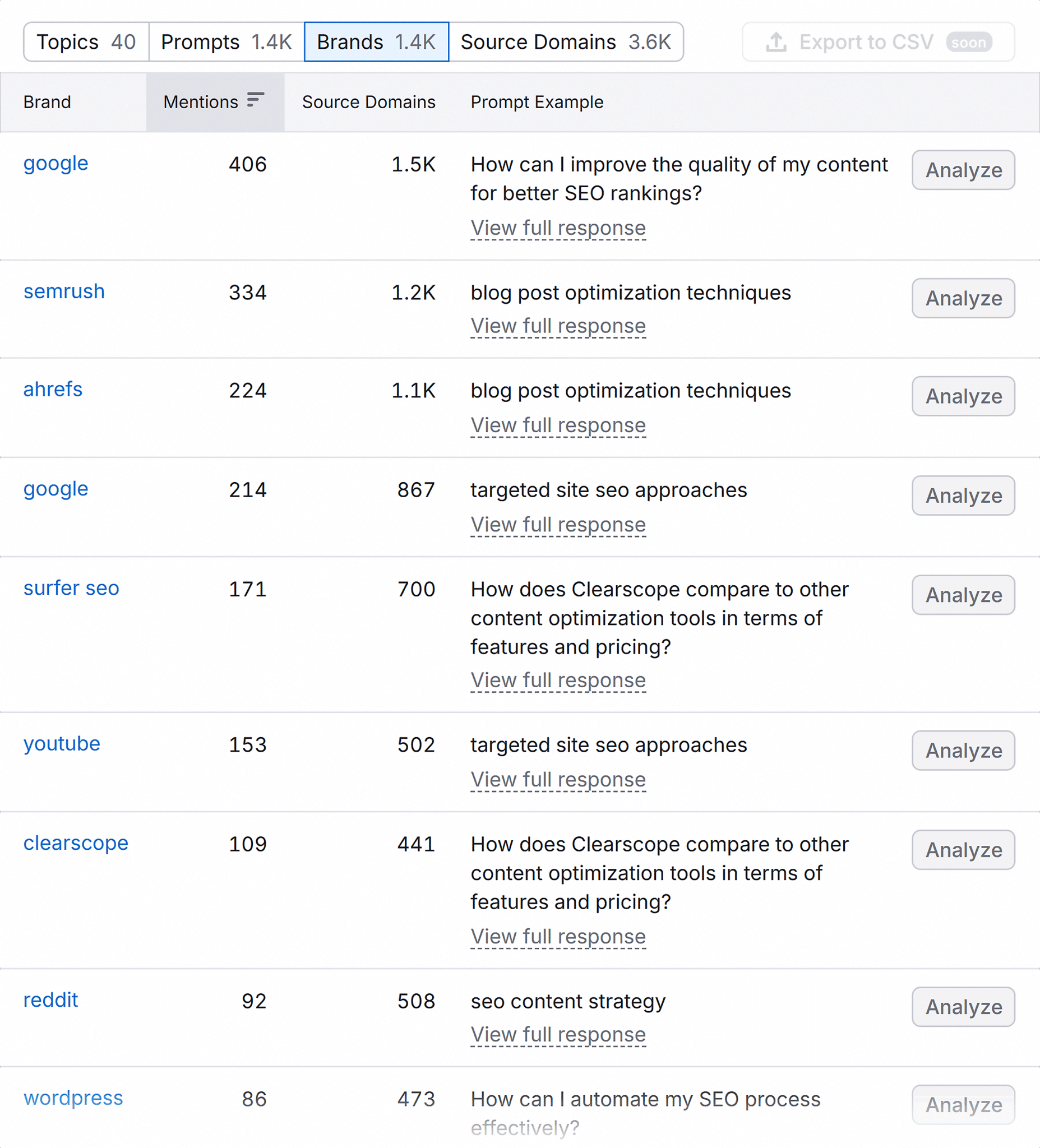
Here:
- “Mentions” is the number of times the brand appeared in the LLM response
- “Source Domains” shows the number of URLs the LLM analyzed that mention that brand
- “Prompt Example” is an example prompt that triggered the response mentioning that brand on the topic you searched
Source domains
Shows details of the source domains AI used to collect information about the user query.

Prompts to pay attention to
Most people ask the same types of questions repeatedly. And some of those questions trigger brand mentions far more often than others.
So, these three patterns are worth watching first, as they’re pretty common:
- Best X for Y: When people want recommendations
- X vs. Y: When they want to compare options
- How to fix X: When they need step-by-step help to solve a problem
Turn prompts into content ideas
Once you know which prompts your brand appears in, the content choice becomes clear:
- Recommendation prompts → create comparison or “best of” pages
- “How to” prompts → publish guides with clear steps and FAQs
- “Is X better than Y” prompts → focus on pricing or value pages with proof
You can use these prompt insights to plan pages for new content angles or strengthen existing ones.
3. Track daily performance for custom prompts
The older setup tracked daily positions only for traditional keywords. Semrush One extends that to AI prompts, so you can monitor how brand mentions shift over time in AI answers.
If a specific prompt matters to your business and you want to track whether your brand continues to appear for it or starts losing visibility, set it up for tracking with the Prompt Tracking feature.
Here’s how:
- Go to “AI” > “AI Visibility” > “Prompt Research.”
- Enter a topic and click “Analyze.”
- Head to the “Prompts” tab. Here you’ll see a list of prompts related to your topic.
- Click the “Monitor” button in the right corner of each prompt.
- A new pop-up “Set up Prompt Tracking” appears.
- You’ll see the selected prompt in the text box. If you want to track only one prompt, click the “Start Tracking” button. Otherwise, you can also insert other prompts in the text box and schedule them for tracking.
- You’ll now be directed to the “Prompt Tracking” page.

Note: The tool may take some time to gather and analyze data.
Use daily tracking to stay ahead of changes
Once data starts coming in, use it to:
- Watch for drops in mentions: If your brand disappears for a tracked prompt, review the pages AI previously cited and check what changed.
- Compare against competitors: When another brand starts appearing more often, open the prompt to see which pages AI now prefers and what those pages do differently.
- Spot early trends: If a prompt gains visibility across several platforms, prioritize it for deeper coverage or create supporting content.
4. Analyze AI-attributed brand sentiment
AI-attributed brand sentiment shows how AI platforms describe your brand in their answers. It analyzes the language used in AI-generated responses and classifies mentions as:
- Favorable: Highlights strengths or positive attributes associated with your brand
- General: References your brand without clear positive or negative framing
Earlier Semrush tools tracked visibility and mentions, but they did not analyze the tone of AI responses. Semrush One adds that context so you can see whether AI platforms consistently position your brand as a strong option or treat it as background noise.
Use this report when your brand appears in AI answers, but the language is vague, inconsistent, or not aligned with how you want to be positioned.
- Go to “AI” > “AI Visibility” > “Brand Performance.”
- Enter your domain and click “Analyze.” This opens the “Brand Performance” reports area.
- Choose the AI platform of your choice to track brand sentiment.
- Add your main competitors using the “+” field shown beside your brand name.
- Use the “AI Platform” filter to choose where you want to focus. For example, select “ChatGPT,” “Google AI Mode,” “Perplexity,” or “Gemini.”
- Next, click the “Go to Perception” button under the “Lock In Independence Narrative” heading.
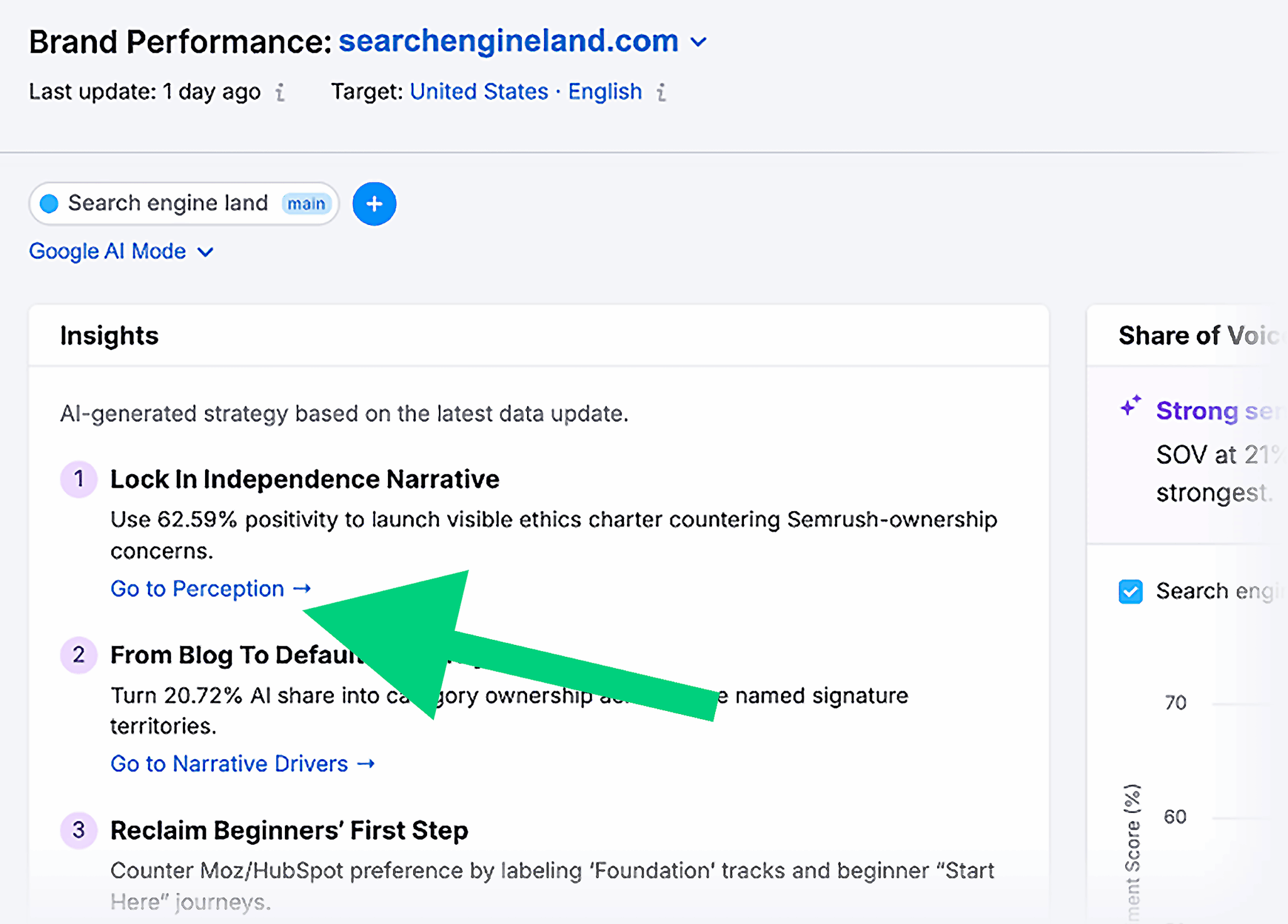
- In the Perception report, review the following metrics:
- Overall Sentiment: Provides the split between favorable and general mentions, so you know whether AI describes your brand in a positive tone or keeps things generic.
- Favorable Sentiment Over Time: Shows whether your positive sentiment grows, drops, or stays flat
- Key Sentiment Drivers: Shows what AI consistently praises (your strengths) and what it frames as pain points (areas to fix or clarify)
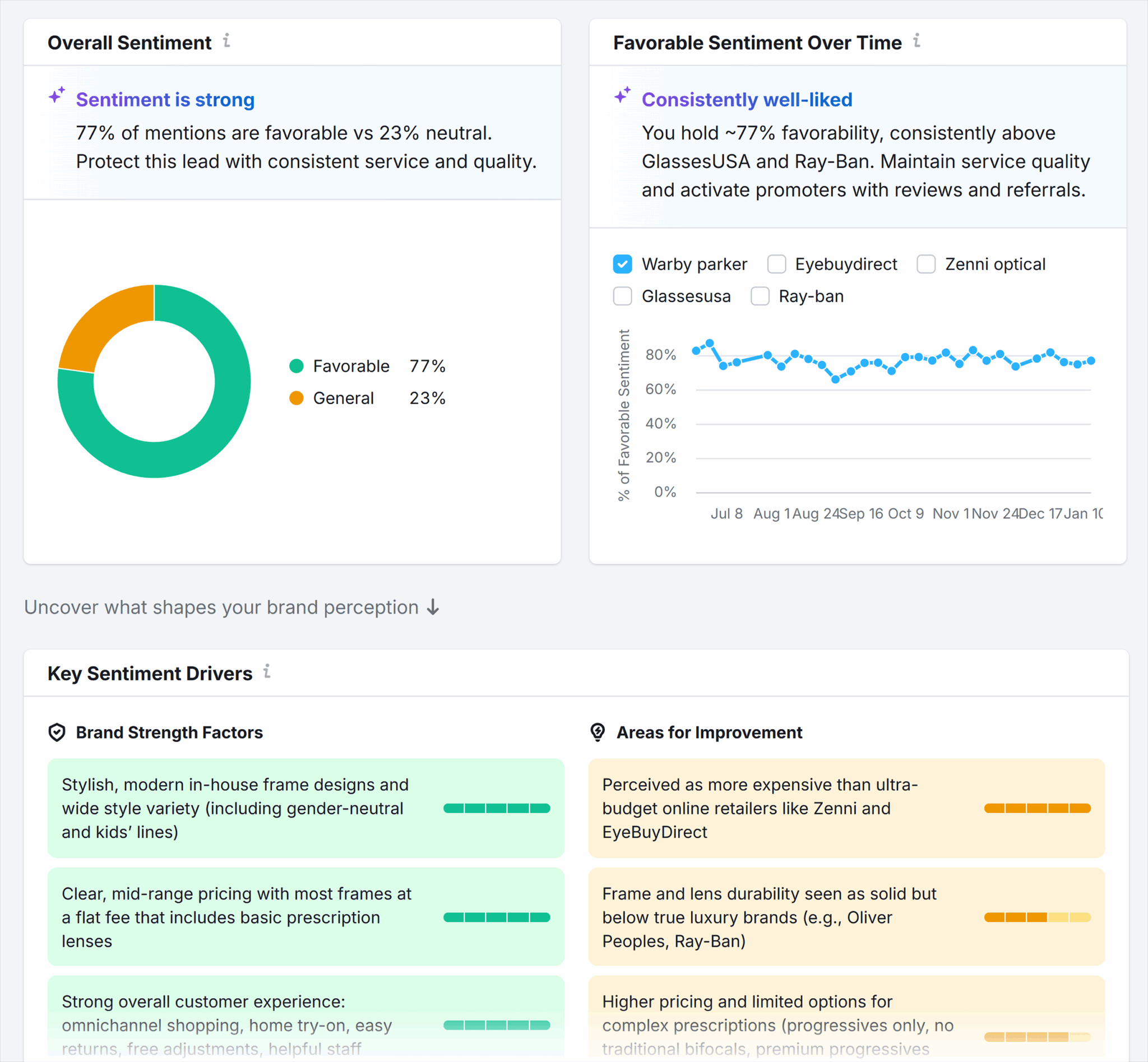
Respond to how AI describes your brand
Here’s how to act on those drivers:
- If AI repeatedly frames your product as “too expensive,” add clearer pricing context, reinforce value with proof points, and publish direct comparisons that explain the cost difference.
- If AI mentions “limited integrations,” create or update an integrations page and make supported tools easier to find.
- If AI highlights a specific strength, like ease of use or support quality, reinforce it with examples, customer quotes, and product pages that support it.
5. Perform AI-ready site audits
An AI-ready audit checks whether AI platforms can crawl, read, and process your website.
Traditional SEO audits focus on issues such as broken links, metadata, and slow pages. In addition to these, Semrush One adds AI Search Health checks that reveal what prevents AI crawlers from understanding your website.
So, if your website ranks well in Google’s organic results but still fails to appear in AI Overviews, run a site audit to see the “AI Search Health” and “Blocked from AI Search” reports.
Why?
It will show whether crawl restrictions, blocked files, or unsupported formats prevent AI systems from accessing the website.
Here’s how to find this:
- Go to “AI” > “AI Visibility” > “Site Audit.” You’ll see a list of existing projects (if any).
- Choose your project or create a new one by clicking the “+ Create SEO project” button in the top right corner.
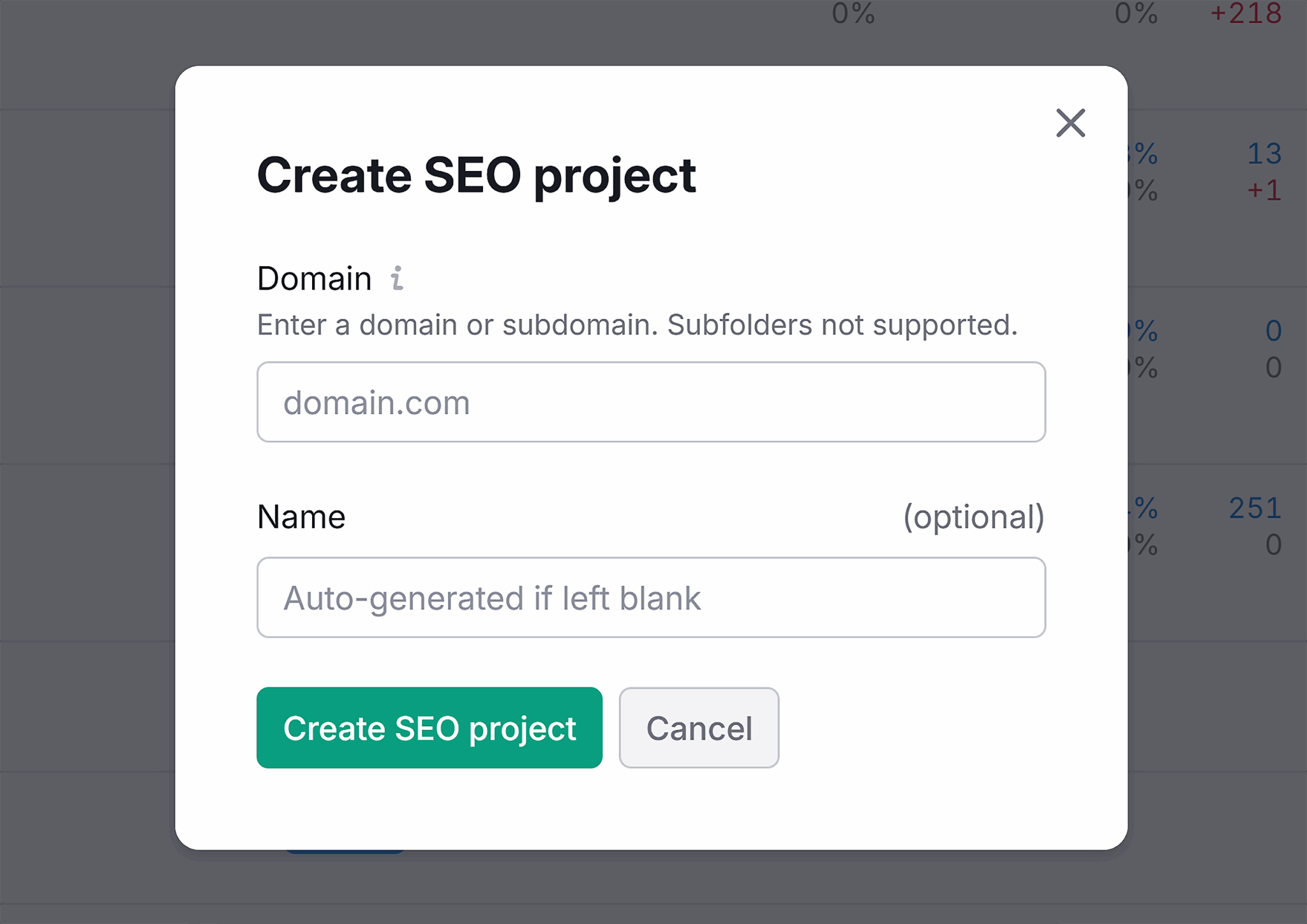
- A “Create SEO project” window appears. Enter your domain and click “Create SEO project.”
- You’ll now be directed to the “Site Audit” report.
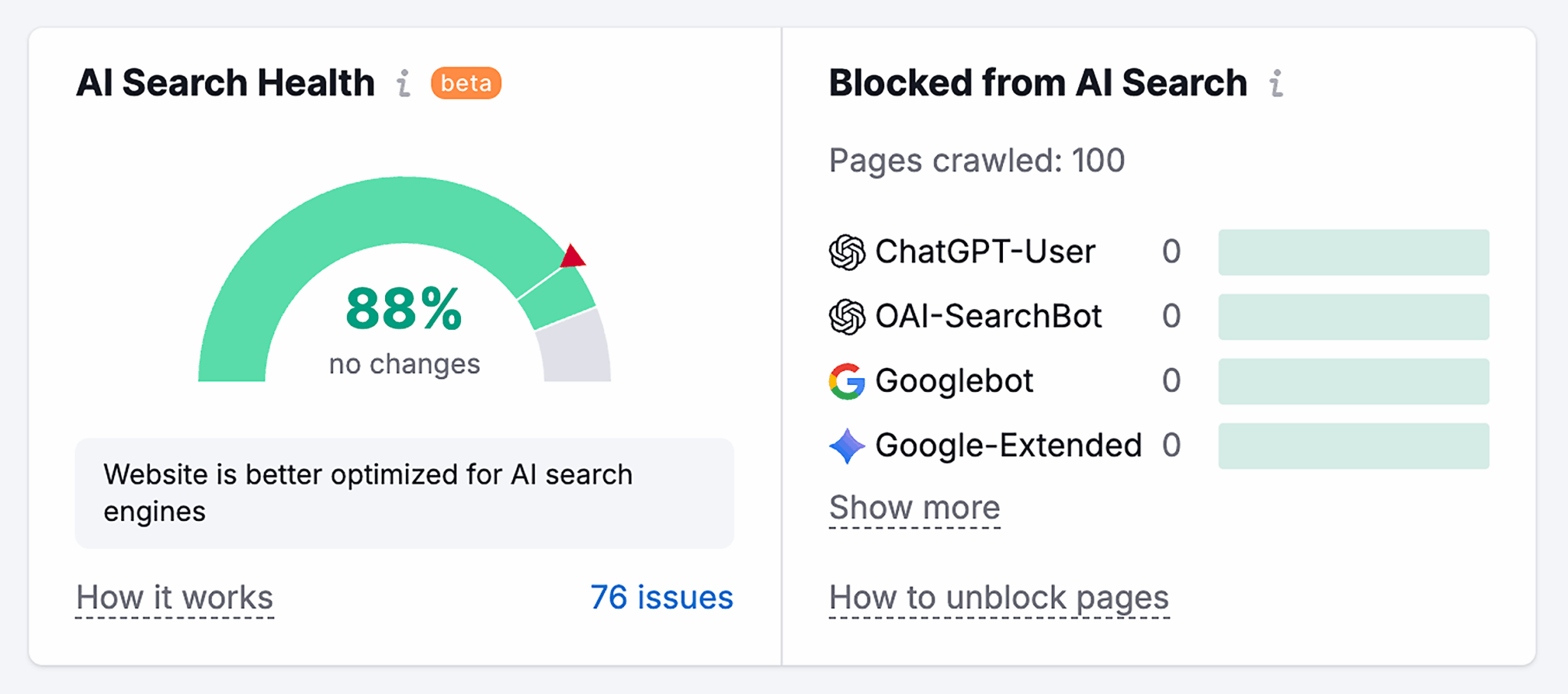
- In the “Overview” tab, you can see “AI Search Health” and “Blocked from AI Search” blocks. These show you if your website is optimized for AI search engines and bots.
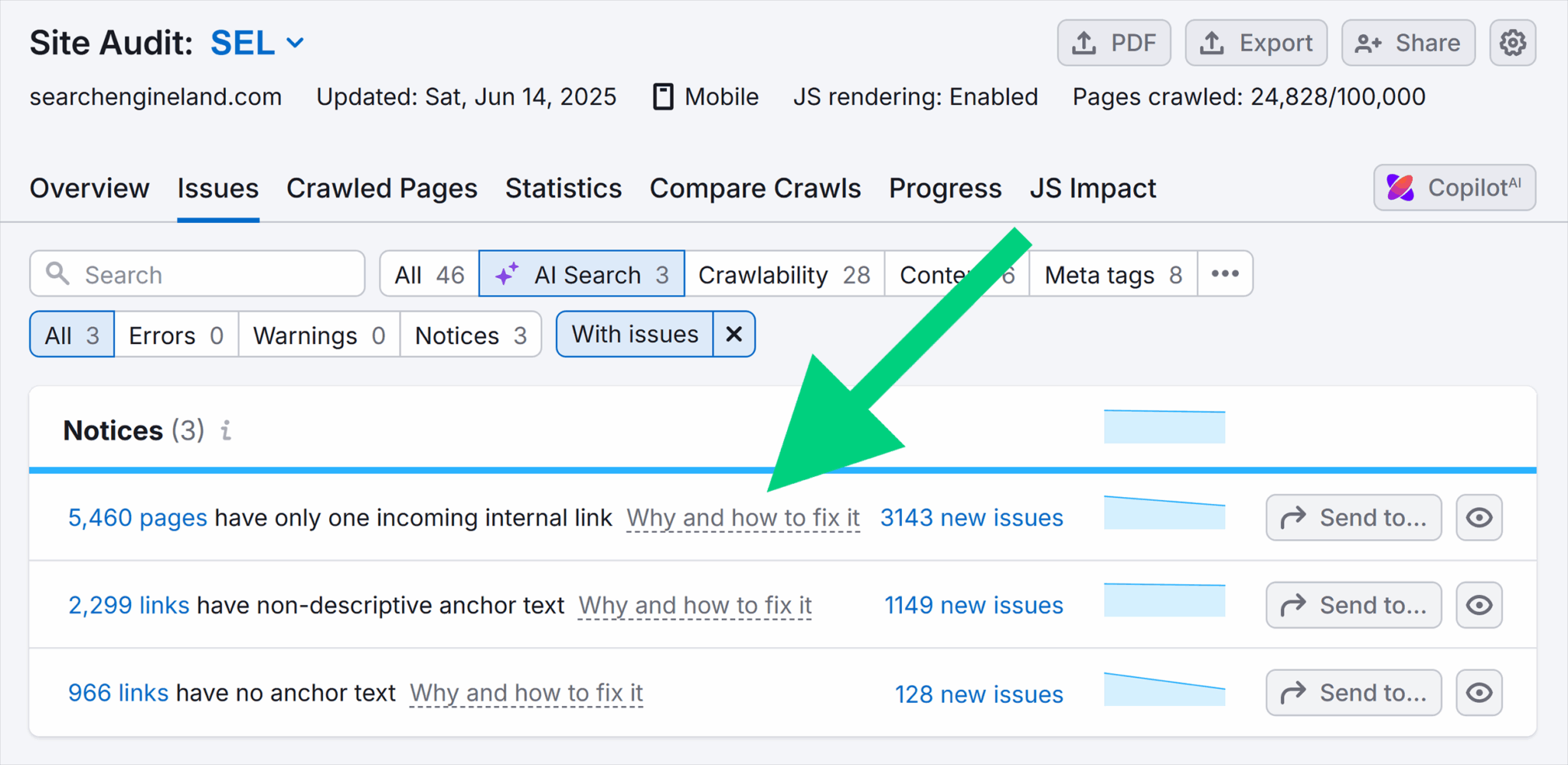
- Click the number of issues shown at the button (“76 issues” in our case). And it will direct you to “Issues” > “AI Search” group. This section highlights the problems that may block AI platforms from reading your pages.
- Click on “Why and how to fix it” for more information about each issue.
Fix issues that block AI access
After the audit, use the issues list to prioritize fixes that affect AI access first:
- Remove unnecessary noindex rules, robots.txt blocks, or authentication barriers on pages you want AI systems to read and cite.
- Convert important content locked in PDFs or other formats into crawlable HTML pages.
- Adjust internal linking so key pages are reachable without deep navigation or JavaScript dependencies.
- Confirm that AI Search Health improves, and previously blocked pages become accessible.
- After technical fixes, review AI Visibility reports to see whether those pages begin appearing in AI answers.
6. Benchmark competitor AI visibility
Competitor AI visibility shows where other brands appear inside AI answers and where you don’t. It goes beyond keyword rankings and backlinks, focusing on how AI platforms cite or recommend competitors in response to real user prompts.
This view helps you spot two common issues:
- Citation gaps, where competitors appear in AI answers, and you don’t.
- Competitive messaging drift, where AI describes competitors differently or more clearly than it describes your brand.
In the older Semrush setup, competitor research stopped at SERPs, ads, and links. Semrush One adds AI-specific benchmarking, so you can compare how AI engines treat your brand versus others.
Here’s how to benchmark competitors:
- Go to “AI” > “AI Visibility” > “Competitor Research.”
- Enter your and your competitors’ domains and click “Run competitor analysis.”
- Use the “All AI Platforms” filter to focus on a specific platform. Select “Google AI Overviews,” “ChatGPT,” “AI Mode,” or “Gemini.”
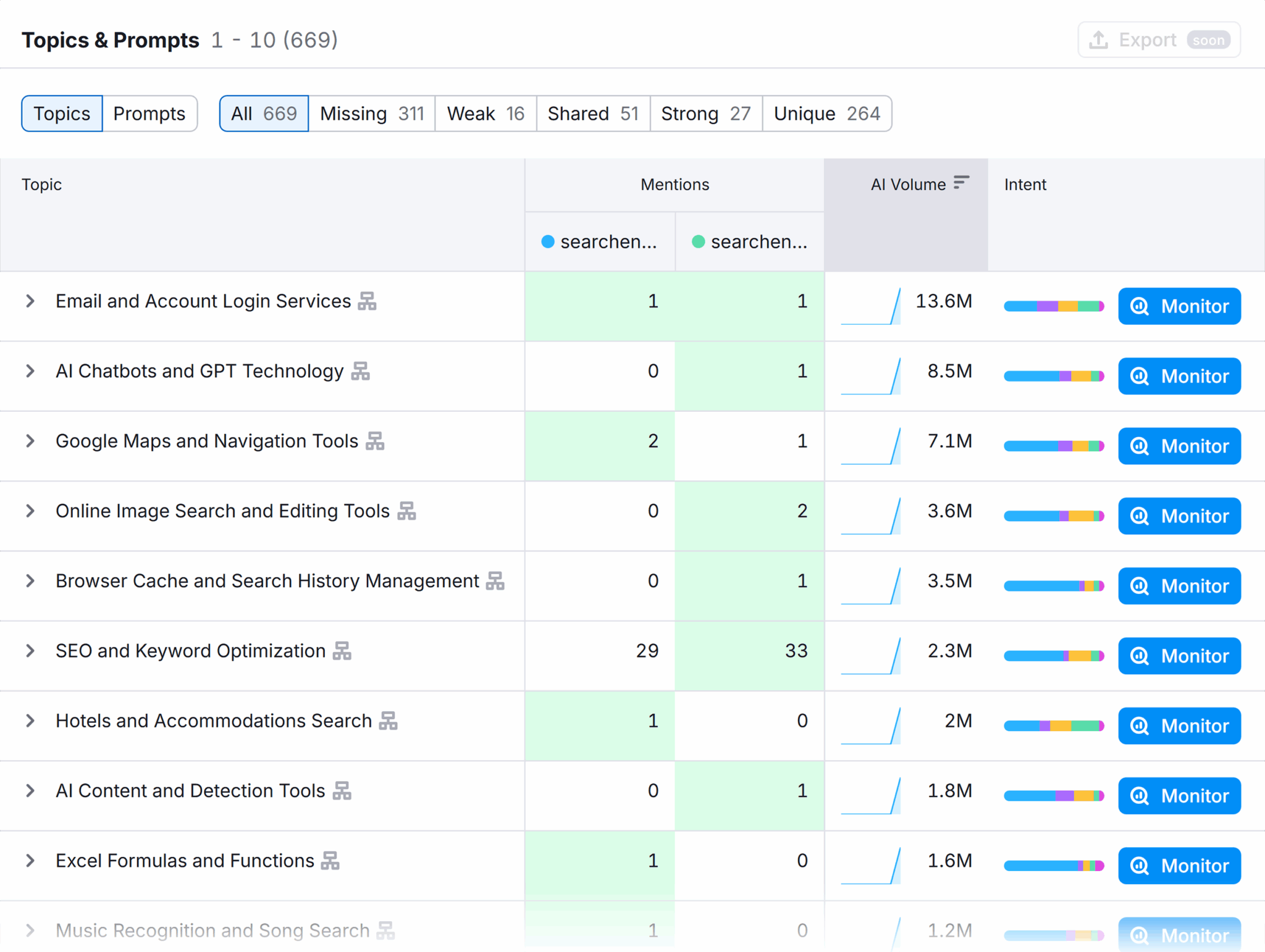
- Scroll down to the “Topics & Prompts” or “Sources” section.
Use competitor data to close gaps
Now that you have the list of topics and prompts, do this:
- Export the prompts where competitors appear, and your brand doesn’t
- Review the competitor pages AI cites for those prompts
- Build a stronger page by:
- Covering missing subtopics
- Adding proof points or examples
- Strengthening internal links
- Including expert quotes or original insights
- Tightening the structure so AI can parse it easily
- And don’t forget to track these prompts by clicking on the “Monitor all Prompts” button. That way you can measure your results.
7. Identify AI share of voice
AI Share of Voice (AI SoV) shows your brand’s visibility in AI-generated answers to non-branded questions compared to competitors, also broken down by platform.
When users search for solutions without naming a brand, AI platforms still decide which companies to mention.
If you want to understand whether your brand is being cited more or less compared to your competitors, AI share of voice shows where you stand.
Here’s how to find this:
- Go to “AI” > “AI Visibility” > “Narrative Drivers.”
- Enter your domain and click “Analyze.” (Add competitors if you want to.)
- Head to the “Share of Voice by Platform” section. This view compares your brand against selected competitors.
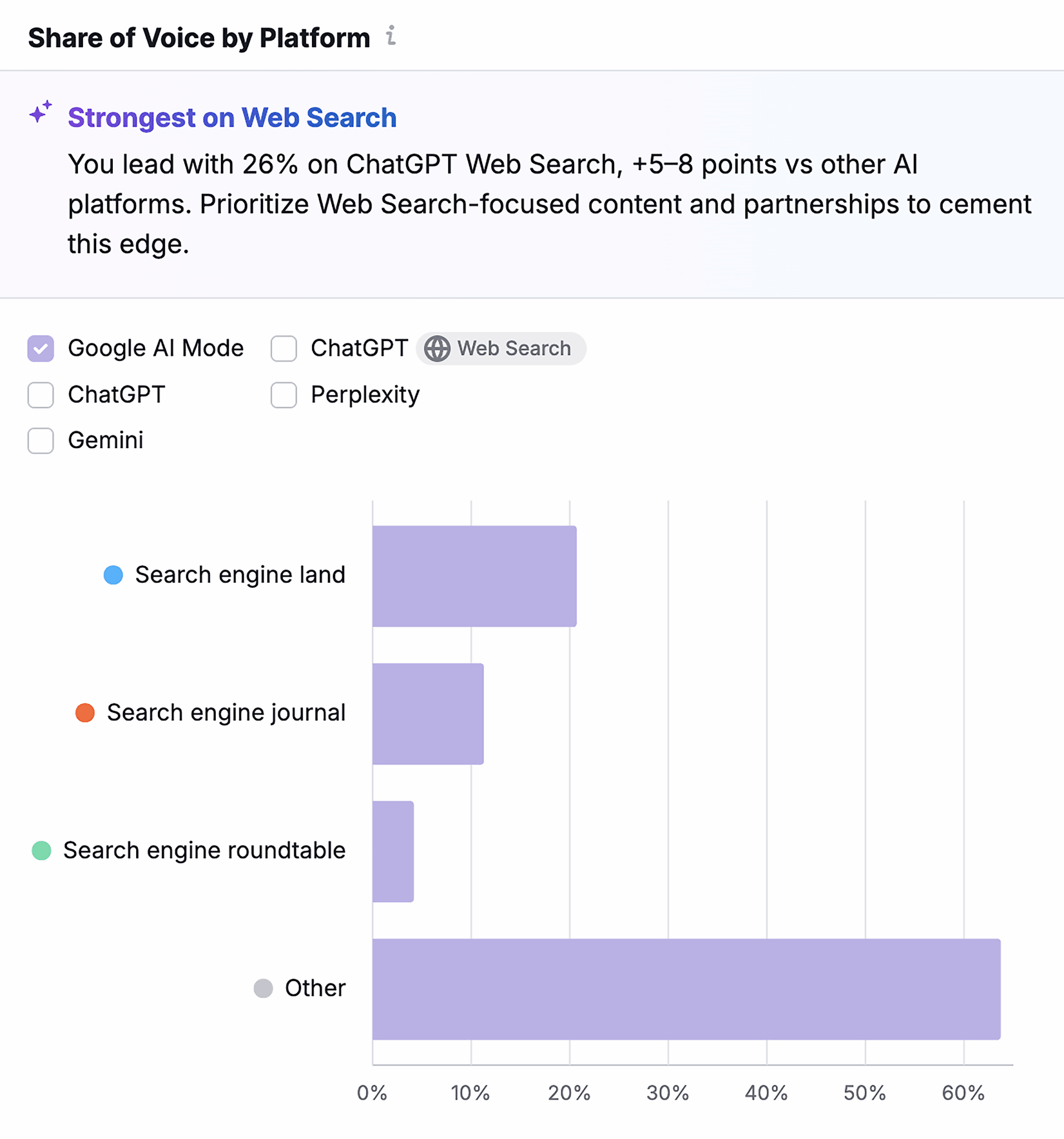
Use share of voice to guide focus areas
Treat this percentage as a directional metric, not an exact count of AI visibility. Answer these three questions to understand who AI platforms rely on most for a set of topics and whether that balance is shifting in your favor or against you:
- Are you gaining or losing ground? Track changes over time to see whether your brand appears more or less often in AI answers than competitors.
- Where does that change happen? Review the share of voice by each platform, since ChatGPT, Google AI Mode, Gemini, and Perplexity may not mention brands the same way.
- What caused the change? When the share of voice changes, analyze the prompts, topics, and cited pages to see which competitors gained visibility and why.
8. Create and optimize content in one workflow
Content creation used to happen across separate tools. You researched topics in one place, planned a structure somewhere else, and optimized drafts later.
Semrush One brings all of it into a single flow. This means you get access to Topic Research, SEO Content Template, and SEO Writing Assistant in one place.
Here’s how to use these tools to streamline your content workflow:
Do topic research
To find the best topic opportunities:
- Go to “SEO” > “Topic Research”
- Enter a broad topic and click “Get content ideas”
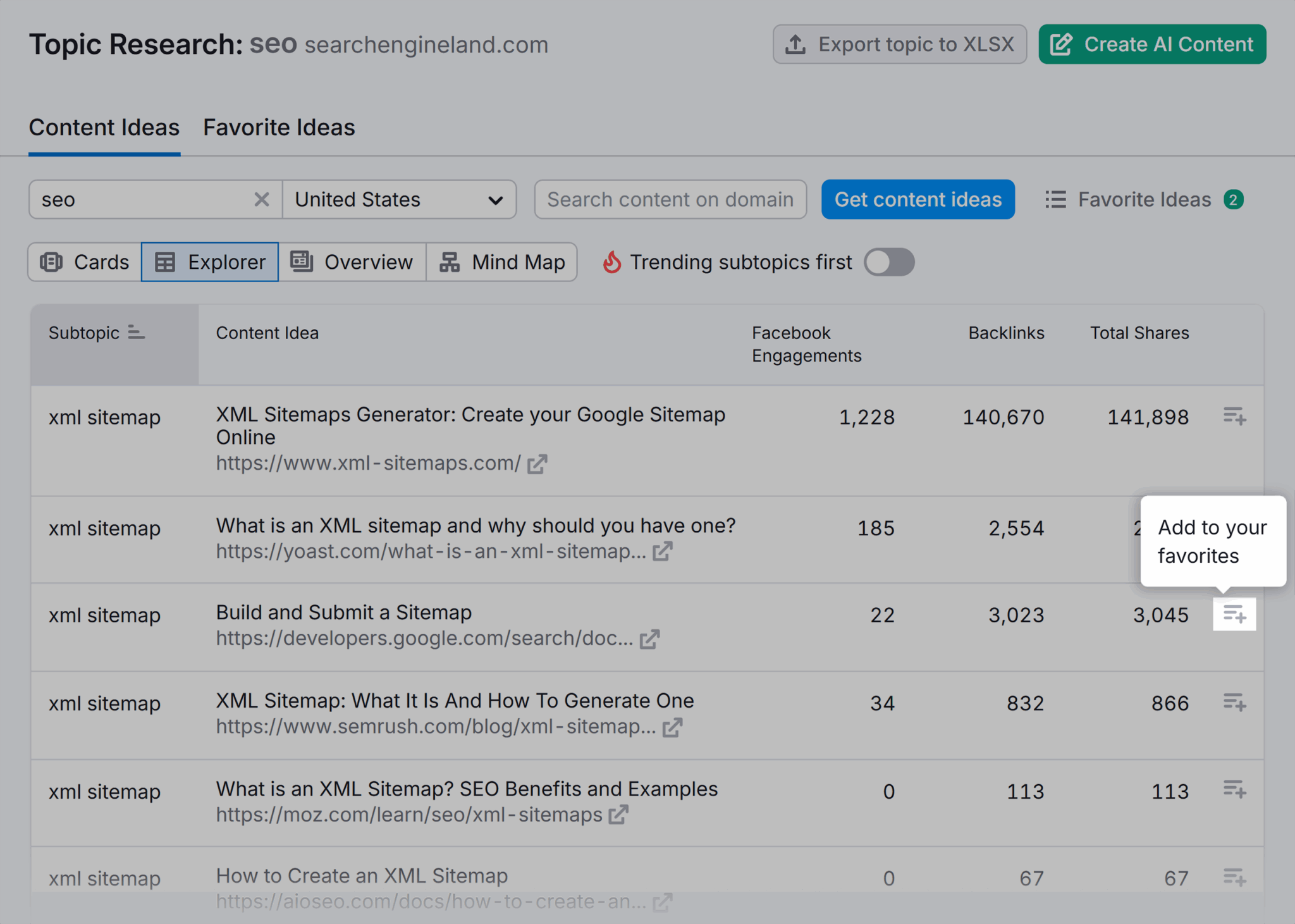
- In the “Topic Research” report, review the “Cards” tab to see the list of headlines, common questions, and intent related to your topic
- Head to the “Explorer” tab to see what topics you haven’t covered yet and add them to your favorites by clicking the “Add to your favorites” button
Build the article structure with an SEO content template
Now, once you have the favorite topics, create an SEO Content Template to get started. To do so:
- Go to “Topic Research” > “Favorite Ideas” tab and click the “Create SEO template” button

- You will now be sent to the “SEO Content Template” page
- Enter your target keyword and location
- Click the “Create content template” button
- In the “SEO Recommendations” tab, review the recommended structure, key terms, readability targets, and backlink suggestions
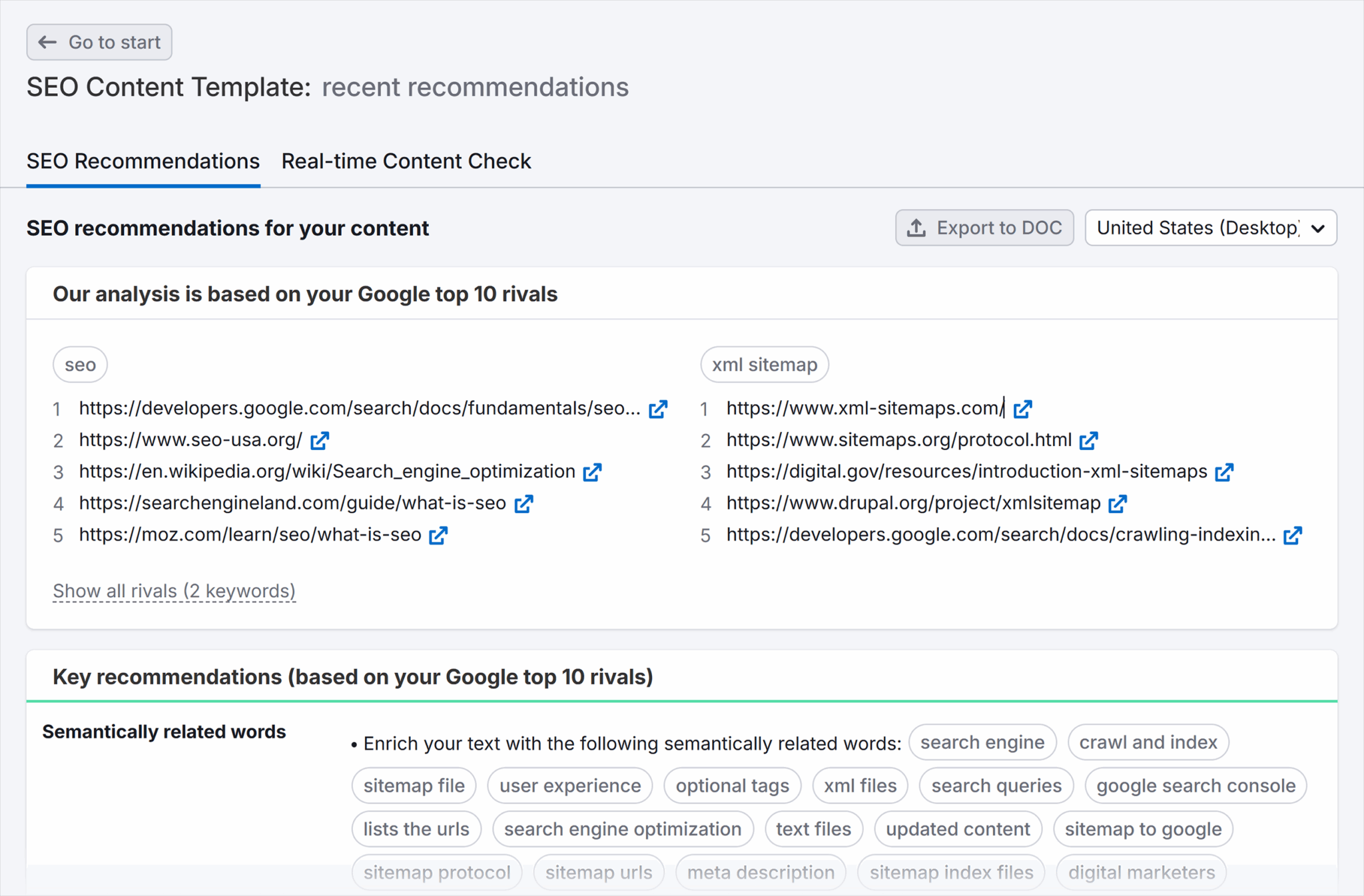
- Export this by clicking the “Export to Doc” button if you want to have it in a Word file
Write and optimize with SEO Writing Assistant
Now that the template is ready, use the SEO Writing Assistant to turn your draft into a publish-ready article.
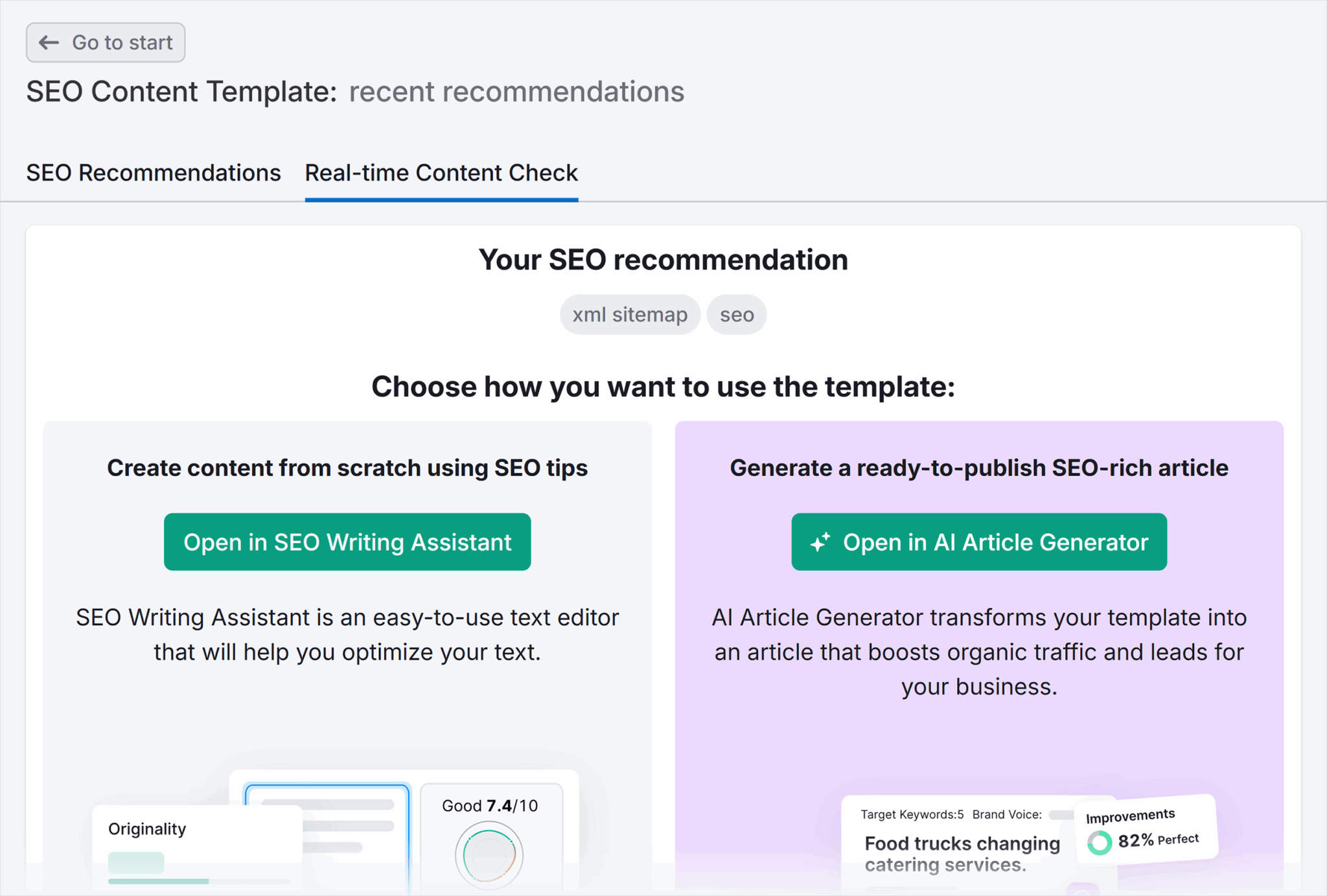
Use “Open in SEO Writing Assistant” if you plan on writing the content yourself and would like some guidance on what to mention, and where. Or if you’d rather have AI write the content for you, use “Open in AI Article Generator”.
Pro tip: Learn about the benefits and risks of using AI-generated content.
In the example below, you’ll see how to use the “Open in SEO Writing Assistant” option.
To use this feature:
- Head to the “Real-time Content Check” tab beside the “SEO Recommendations tab”
- Click the “Open in SEO Writing Assistant.” You can also open this directly through the “SEO” > “SEO Writing Assistant”
- Write or paste your draft into the editor so the tool starts scoring your content immediately. It reviews your content in real time and scores it across four areas:
- SEO
- Readability
- Tone of voice
- Originality
This score clarifies where your draft falls short and what to fix before you publish.
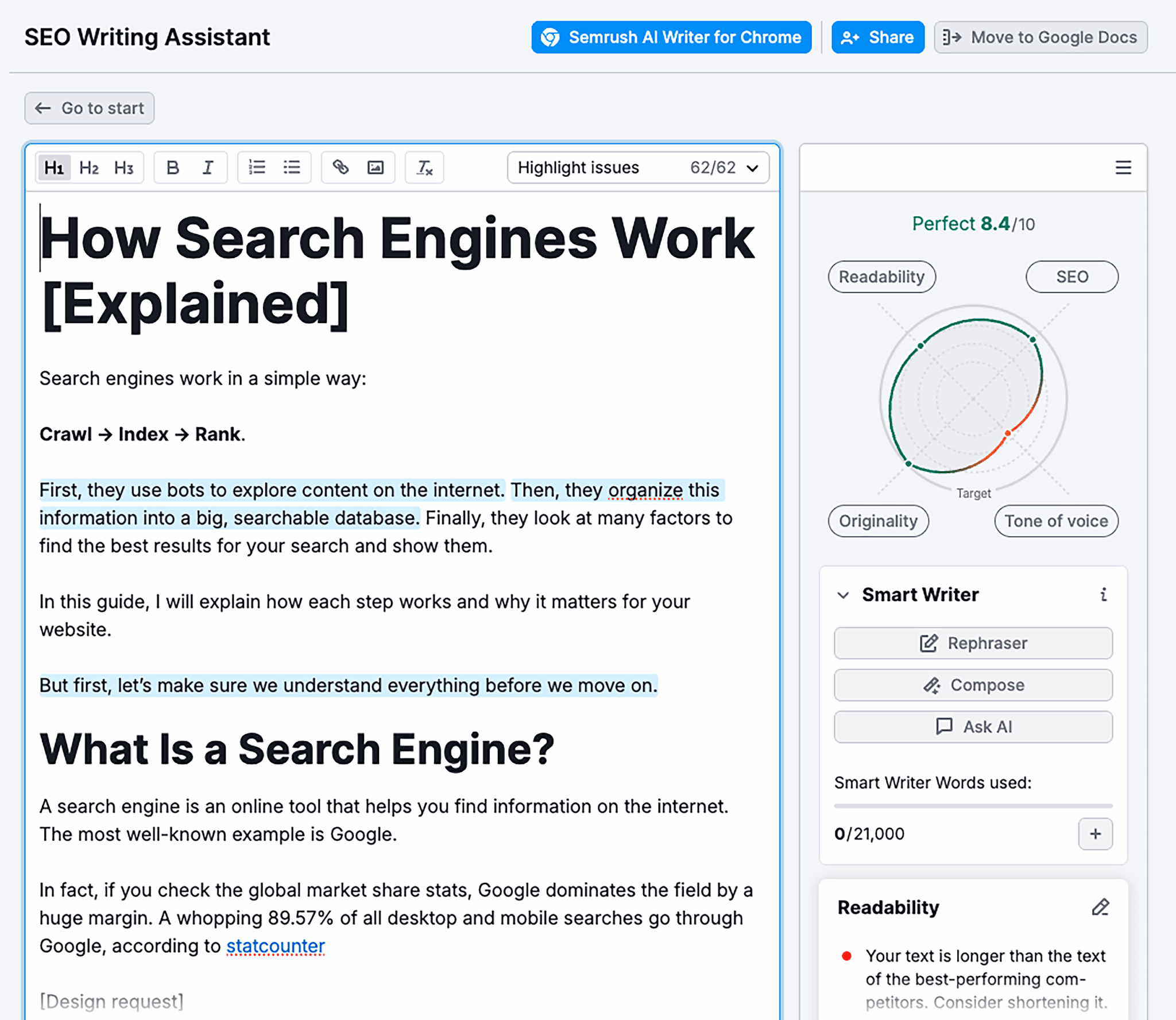
It will also highlight hard-to-read sentences, missing keywords, tone mismatches, title issues, and originality risks. Click any issue to see what to change.
When you finish, you have an article that follows a clear structure, meets SEO requirements, matches your brand’s tone, and avoids originality issues without switching tools or guessing what to fix next.
You can also use the “Open in AI Article Generator” option to have AI write the content for you.
Pro tip: Learn how to create content that AI systems are more likely to cite and surface in their responses.
9. Get AI-powered optimization recommendations
You now get access to AI-powered recommendations inside the “Brand Performance” reports. Each report examines your brand from a different angle and suggests actions based on how AI platforms describe, compare, and interpret it.
So, use these recommendations when it’s unclear how to improve your current positioning inside AI answers.

Here’s what you can do using each report:
- Brand Performance: See where competitors appear more often than you. Review the pages AI cites for them, then update or create pages that cover the same topics with clearer structure, stronger proof, and better internal links.
- Perception report: Reinforce the strengths AI already mentions and correct weaknesses by updating messaging and adding context on existing pages.
- Narrative Drivers report: Notice which themes AI consistently connects to your brand. Then, strengthen the topics you want to own and address gaps where competitors define the narrative.
- Questions report: Find where users ask for explanations or comparisons. Turn those questions into FAQ sections on existing pages and create guides or comparison pages if relevant pages do not already exist.
Turn recommendations into tasks
Once you’ve reviewed all four reports, turn the patterns you see into a short action list:
- Update pages tied to priority prompts: Expand the sections that AI answers summarize, add missing subtopics, and strengthen proof (examples, data, citations).
- Publish a comparison or “best of” page: Target prompts where competitors show up, and you don’t.
- Add FAQs where questions repeat: Use the Questions report to prioritize clarifications, objections, and “vs.” questions.
- Earn citations from trusted sources: Pitch original insights or data to the sites and publishers that show up most often in Source Domains.
10. View unified SEO and AI performance dashboards
A unified dashboard lets you see traditional SEO performance and AI visibility side by side. It shows how your rankings, traffic signals, and technical health line up with how AI platforms cite and surface your brand.

Semrush One brings both into a single view, so you don’t have to connect the dots yourself.
If you see strong rankings and stable traffic, but notice that AI answers rarely cite your pages or the opposite, you will need a single view to understand where performance diverges. And that’s exactly what the unified dashboard shows.
Here’s how to use it:
- Go to “SEO” > “Dashboard.” Your website report will appear.
- Review the following:
- AI Search: Shows “AI Visibility,” “Mentions,” and “Cited pages.”
- SEO: Shows classic signals like “Authority Score,” “Organic Traffic,” “Organic keywords,” “Paid Keywords,” and “Ref. Domains.”
- Click any widget to open the detailed report behind it. For example, open “Organic keywords” performance to explore rankings, or open “AI visibility” to see prompts and platforms.
Track, optimize, and win in Google and AI search from one platform.
Decide priorities from combined signals
Act based on what you see in the dashboard:
- If rankings are up and AI visibility is down, update the content AI should cite and work on earning mentions from sources AI already trusts.
- If AI visibility is up but traffic is flat, improve titles and snippets, add more internal links, and align cited pages with a clear conversion path.
- If both rankings and AI visibility are down, start with the basics: run an AI-ready site audit and fix the issues. Refresh outdated content and review prompt gaps where competitors now appear instead of you to create more targeted content.
Start tracking your AI visibility with Semrush One
If AI platforms already influence how people discover brands in your space, your next move should be to see where you stand. Semrush One lets you do that with a seven-day free trial, so you can review prompts, competitor presence, sentiment, and site readiness without committing upfront.
Once you see the gaps, check our guide on AI SEO to learn how to act on those insights and improve your visibility.
Explore more on
Editorial disclosure
Search Engine Land is owned by Semrush. We remain committed to providing high-quality coverage of marketing topics. Unless otherwise noted, this page’s content was written by either an employee or a paid contractor of Semrush Inc.
About the author


