Use content chunking to structure information for better UX, rankings, and AI visibility


Content chunking is a technique for breaking down information into smaller, focused sections that make content more scannable, comprehensible, and actionable for both human readers and AI systems.
And because AI Overviews now appear in over 50% of search results, AI is an important segment of your audience—parsing chunks, extracting entities, and determining which specific segments answer user queries most accurately—to decide whether to surface you at all.
Unlike all those recipe blogs that drone on and on before you can even see a list of ingredients, well-structured content chunks satisfy your audience immediately. This will directly improve your dwell time, reduce bounce rates, and increase the likelihood your content gets extracted for featured snippets or AI-generated answers.
Read on to learn how to create content with clear, actionable sections your readers can scan, understand, and implement.
What content chunking is (and why it matters)
Content chunking is the practice of organizing information into smaller, digestible sections that allow both human readers and search engines to better process and understand your content.
Think about the last time you landed on a page with a massive wall of text. You probably bounced, right? That’s your brain’s natural response to being fed too much information all at once (i.e., cognitive overload). Chunking fixes that problem by breaking information into logical, scannable segments that align with how people naturally consume content online.

From a crawlability perspective, well-chunked content helps search engines understand your page structure and identify the most relevant sections for different queries. This becomes especially critical as AI-powered search experiences continue to dominate SERPs, where algorithms need to quickly extract precise answers from your content.
Modern search engines use passage-based retrieval, meaning they don’t just look at your entire page—they analyze individual chunks to determine which specific sections best answer a user’s query. When you chunk effectively, you’re essentially creating multiple opportunities for different sections of your content to appear in search results, AI Overviews, and featured snippets.
Creating content chunks will also improve how accurately you are represented in AI systems. According to research from NVIDIA, page-level chunking provides the highest average accuracy for AI retrieval systems across 3,000+ documents.
The SEO toolkit you know, plus the AI visibility data you need.

The science behind chunking (cognitive load + pattern recognition)
Your brain can only hold about seven pieces of information at once, according to research by George Miller. By breaking your content down into chunks, you’re providing your audience with digestible amounts of information at once rather than trying to shove the whole meal in their face. This improves readability, reduces cognitive load, and allows people to process and retain information more efficiently.
Think about it like this: when you scan a wall of text, your brain has to work overtime just to figure out where one idea ends and another begins. But when content is broken into clear, logical chunks? You can focus on understanding rather than deciphering. That’s why this paragraph is only a few sentences long.
The psychology behind chunking runs deeper than simple formatting. When readers encounter organized information, their brains automatically start looking for patterns and relationships between chunks. This pattern recognition process helps create mental scaffolding that makes complex topics easier to follow and remember.

The skimmability factor can’t be ignored either. Most readers don’t actually read—they scan. When your content is properly chunked, you’re creating multiple entry points for different types of readers. Some will dive deep into every section, others will bounce between chunks that match their specific interests.
From a cognitive load perspective, chunking works because it aligns with how our short-term memory operates. Instead of overwhelming readers with a continuous stream of information, you’re giving their brains natural rest stops to process and consolidate what they’ve learned before moving on.
This processing advantage becomes even more critical when you consider that online reading is inherently more taxing than print. The combination of screen glare, distractions, and the urge to multitask means readers have less mental bandwidth available.
Chunking helps preserve that bandwidth for actual comprehension rather than wasting it on navigation and organization.
How content chunking supports SEO
Content chunking directly improves your site’s search engine optimization by making both search engines and users better able to process and engage with your content. When you break information into logical, scannable sections, you’re creating the exact conditions that boost key SEO performance metrics.
Drop your bounce rate
First of all, chunking reduces pogo-sticking—that frustrating bounce-back behavior where users immediately return to search results. When your content feels overwhelming or hard to navigate, people bail fast. But when they can quickly find the specific information they’re looking for through clear headings and structured sections, they stick around and often dig deeper into your site.
Increase your dwell time
Chunked content keeps people on your pages longer. When readers can easily scan headings, digest bite-sized paragraphs, and jump between relevant sections, their dwell time increases significantly. That extended engagement signals to Google that your content is valuable and relevant to the search query.
Build topical authority
Don’t forget the internal linking benefits. Each content chunk becomes a natural anchor point for internal links, letting you connect related topics across your site more effectively. You can link to specific sections, creating a web of topical authority that Google loves to see.
Google’s understanding of your content improves dramatically with proper chunking. The search engine can better identify what each section covers, which helps with entity recognition and semantic understanding. When you use descriptive headings (H2, H3, etc.) to organize chunks, you’re essentially creating a content outline that Google can parse and understand.
Think about it—Google’s algorithms are designed to extract specific answers from web pages. Well-chunked content with a clear heading hierarchy makes this extraction process much more efficient.
Capture SERP features
Featured snippets and AI Overviews absolutely love chunked content. These SERP features pull concise, well-structured information directly from web pages. When your content is organized into clear sections with descriptive headings, you’re giving Google exactly what it needs to feature your content prominently.
Improve AI visibility
The semantic structure that chunking provides also helps with AI-powered search experiences. As language models become more sophisticated at understanding context and relationships between concepts, properly organized content performs better in AI-driven search results. Your chunks become the building blocks that AI systems use to construct comprehensive answers to user queries.
The content chunking hierarchy
Content chunking operates on three distinct levels, creating a logical hierarchy that readers and search engines can navigate effortlessly. Each level serves a specific purpose in making your content digestible, searchable, and actionable for both human visitors and AI systems processing information.

Think of this hierarchy like a well-organized city. Macro chunks are your neighborhoods, micro chunks are the streets, and atomic chunks are individual buildings—each one purposeful and connected to the whole.
Macro chunks: Your major content sections
Macro chunks represent your H2 sections—the big conceptual territories that answer distinct aspects of your topic. These sections typically run 300-800 words and tackle one major subtopic or user question.
For example, in a guide about B2B SEO strategy, your macro chunks might cover keyword research, on-page optimization, link building, and measurement. Each macro chunk should be substantial enough to stand alone while contributing to your overall narrative.
Google’s AI systems use these macro boundaries to understand topical coverage and determine whether your content comprehensively addresses a query. When someone searches for “how to improve B2B SEO,” Google scans your macro chunks to see if you’ve covered the essential components.
Micro chunks: Your supporting subsections
Micro chunks live within macro sections as H3 subsections, breaking down complex topics into manageable 100-200 word segments. These chunks focus on specific tactics, examples, or sub-concepts that support your macro theme.
Let’s say your macro chunk covers “keyword research for B2B.” Your micro chunks might address competitor analysis, search volume evaluation, and intent classification. Each micro chunk delivers actionable information readers can immediately use.
This level particularly helps with featured snippets, because Google often pulls 40-60 word excerpts from well-structured micro chunks that directly answer specific questions.
Atomic chunks: Your building blocks
Atomic chunks are your smallest information units—individual paragraphs, bullet points, data callouts, or single-concept explanations. These typically contain 20-50 words and serve one clear purpose.
Think:
- Single-sentence paragraphs that make a point
- Three- to five-item bullet lists that enumerate steps
- Or data blocks like “Organic traffic increased 127% within six months”
Atomic chunks excel at creating scannable content that users, especially on mobile, can quickly consume. They also help AI systems like those powering AI Overviews extract precise information without surrounding context getting in the way.
How each level serves Google and readers
This three-tier system creates multiple entry points for both search crawlers and human readers.
Just like your teacher used to scan your outline to make sure your research paper was on track, Google’s algorithms quickly assess topical depth by scanning your macro structure, extract specific answers from micro chunks for SERP features, and pull precise data points from atomic elements for AI Overviews.
For readers, the hierarchy provides choice in engagement depth. Some scan macro headings to understand scope, others dive into micro sections for specific tactics, while detail-oriented users consume every atomic element.
The hierarchy also supports different reading contexts—desktop users might read linearly through macro chunks, while mobile users often jump between atomic elements based on immediate needs.
How to chunk content effectively
Now you’re ready to practice organizing information into meaningful, digestible sections using headings, paragraphs, lists, and visual separators to improve readability and comprehension.
The key is to group by concept, not arbitrary length.
Chunking isn’t about hitting some magic word count per section. It’s about grouping related ideas together so readers (and search engines) can quickly scan and extract what they need. Here’s how:
Use headings to create logical information hierarchies
Your heading structure becomes the roadmap readers use to navigate your content. Start with your main H2 sections covering major concepts, then use H3s for supporting points within each section.
Don’t skip heading levels. Going from H2 straight to H4 breaks the logical flow and confuses screen readers.
Each heading should clearly preview what’s coming next. Instead of “Advanced tips,” try “How to optimize chunks for featured snippets.” Specific headings help readers decide whether to keep reading or jump to the next section.
Keep paragraphs short and single-purpose
One paragraph = one idea. That’s the rule.
Most paragraphs should be one to three sentences max. Yeah, that feels short at first, but it’s way easier to scan. Long paragraphs create cognitive overload, especially on mobile devices where they become intimidating walls of text.
Single-sentence paragraphs work great for emphasis.
Like this.
Use numbered steps for sequential processes
Numbered lists create clear progression when you’re explaining how to do something. They show readers exactly where they are in the process and what comes next.
Just like following a recipe, steps work best when each one represents a distinct action. Don’t cram multiple sub-tasks into a single step—break them out.
For complex processes, consider using H3 subheadings for major phases, then numbered steps within each phase.
Deploy bulleted lists for related but non-sequential items
Bullets are perfect for features, benefits, examples, or any collection of related points that don’t need to happen in order.
Keep bullet points parallel in structure. If your first bullet starts with a verb, they all should. If the first one’s a complete sentence, make them all complete sentences.
Aim for three to seven bullets per list. More than that becomes overwhelming to process.
Add pull quotes and data blocks for emphasis
Pull quotes break up text visually while highlighting key insights. They’re especially effective for statistics, expert quotes, or counterintuitive findings that readers should remember.
Data blocks work similarly but focus on numbers and metrics. Instead of burying “17% improvement” in a paragraph, give important stats their own visual space.
Use visual separators strategically
Line breaks, horizontal rules, and white space aren’t just design elements—they’re chunking tools.
Extra white space between sections gives readers’ brains a moment to process what they just read before moving on. This improves comprehension and reduces cognitive fatigue.
Visual separators work especially well before transitioning to new concepts or when shifting from explanation to example.
Group by semantic relationship, not word count
The biggest chunking mistake is breaking up content based on arbitrary length limits. You might have a concept that needs 400 words to explain properly, while another needs just 50 words.
That’s fine.
Group related ideas together, even if it makes some chunks longer than others. Readers prefer comprehensive coverage of a concept over artificially shortened sections that leave gaps in understanding.
Look for natural transition points between ideas. That’s where your chunk boundaries should fall.
The goal isn’t perfectly balanced sections—it’s perfectly logical information flow that helps readers understand and retain what you’re teaching them.
Chunking for AI Overviews and LLM extraction
Content chunking serves as the foundation for how AI systems parse, understand, and extract information from web content. When your content is properly chunked into semantic units, AI systems can more efficiently identify the specific passages that best answer user queries, while maintaining accuracy and reducing the risk of generating misleading information.
Think about it this way: LLMs process content through retrieval-augmented generation (RAG) pipelines that break webpages into smaller segments.
Here’s what’s happening behind the scenes. When an AI system encounters your content, it doesn’t read it like humans do—from top to bottom in linear fashion. Instead, it scans for discrete information units that map to the query’s intent. Well-chunked content makes this process dramatically more efficient.
And, as mentioned above, page-level chunking improves the accuracy of your representation, too.
How AI systems identify and extract answers
AI models work by breaking your content into passages, typically ranging from 100-300 words per chunk. Each chunk gets embedded into vector space, where semantic meaning determines proximity to user queries.
Here’s where chunking becomes critical: If your answer spans multiple paragraphs without clear semantic boundaries, AI systems struggle to extract clean, accurate responses. They might grab partial information or, worse, combine unrelated segments that create misleading associations.
Let’s say you’re explaining “how to optimize Core Web Vitals.” A poorly chunked version might bury the actual steps within a wall of background context. But when you chunk it properly—introduction, three distinct optimization methods, implementation timeline—AI systems can confidently extract specific procedures without contamination from irrelevant details.

Entity recognition and semantic clarity
One of the biggest wins from strategic chunking? Enhanced entity recognition. AI systems excel at identifying people, places, products, and concepts when they’re presented in focused, contextually complete chunks.
When you mention “AI tools for marketing” within a dedicated section about automation, the AI system can establish clear relationships between the tool, its function, and its domain. But if that same mention appears scattered across multiple topics, the entity associations become muddy.
This connects directly to how Google’s E-E-A-T signals get evaluated. Clear chunking helps AI systems identify your expertise markers, experience indicators, and authoritative claims within their proper context.
Reducing hallucinated associations
Did you know that poorly structured content actually trains AI systems to make wrong connections? When related concepts appear too far apart, or when unrelated ideas get crammed into the same paragraph, AI models start associating things that shouldn’t be linked.
We’ve seen this play out in AI Overviews where brands get incorrectly associated with competitors’ products or services. The root cause? Content that doesn’t respect semantic boundaries.
Strategic chunking acts as a firewall against these issues. By keeping related concepts together and separating distinct ideas into their own sections, you’re essentially providing the AI with a cleaner data structure to work with.
Alignment with LLM training patterns
Here’s something most people don’t realize: LLMs were trained on content that follows specific structural patterns. Academic papers, reference materials, well-structured articles—all of these use hierarchical chunking naturally.
When your content mirrors these training patterns, AI systems process it more accurately. They expect headings to introduce concepts, paragraphs to contain complete thoughts, and lists to present related items. Fighting against these patterns reduces your content’s compatibility with AI extraction.
Amazon’s Bedrock documentation notes that semantic chunking using natural language processing preserves sentence boundaries while honoring conceptual unity. This approach aligns perfectly with how transformer models expect to encounter information.
The practical impact? Content that follows these structural conventions gets selected for AI Overviews more frequently and generates more accurate extracted answers.
Chunking for featured snippets & rich results
Chunked content creates structured pathways that search engines can easily extract and display as featured snippets, list snippets, table snippets, and definition boxes.
Here’s why this matters: Google’s algorithms scan for well-organized information patterns when deciding which content deserves prominent SERP real estate.
When you chunk information properly, you’re essentially creating pre-formatted answers that align with how Google wants to serve information to users. Every chunk becomes a potential answer unit.
When someone searches “what is content chunking,” Google scans for definition-style paragraphs that start with clear explanations. When they search “how to chunk content,” it looks for numbered steps or bullet-pointed processes. You can optimize for these patterns:
- Paragraph snippets love chunks that start with direct answers. If you’re targeting “why does chunking improve SEO,” structure your content with standalone paragraphs that immediately address the query. Don’t bury the answer three sentences deep—lead with it.
- List snippets favor numbered sequences and bullet points that follow logical order. Chunk step-by-step processes and structure your how-to sections with clear step indicators and action-oriented language.
- Table snippets emerge from content that presents comparisons, pricing, or data in chunk-friendly formats. Even if you don’t use HTML tables, creating consistent comparison structures with clear categories helps Google extract and tabulate your information.
- Definition-based SERP features target the atomic chunks we discussed earlier—single-purpose paragraphs that define concepts without fluff. When targeting “what is X” queries, your first chunk should provide a complete, standalone definition that makes sense in isolation.
The secret sauce? Each chunk needs semantic completeness. Google’s systems evaluate whether extracted content can stand alone and provide value to users. Chunks that require context from surrounding paragraphs rarely get featured. Build chunks that work independently while supporting your overall narrative.
Chunking templates for common content types
Content chunking templates are pre-structured frameworks for organizing information into digestible, search-friendly sections that boost both user comprehension and AI extraction accuracy. These templates act as blueprints for breaking content into logical micro-sections that serve specific reader needs while maintaining topical coherence.
Think about it—you wouldn’t build a house without blueprints, right? Same principle applies here. Each content type has its own optimal chunking pattern based on how readers consume that information and what search engines expect to find.

Let’s walk through proven chunking templates that consistently improve engagement metrics and search visibility across different content formats.
How-to guides template
Here’s your go-to structure for guides that actually get results:
Hook chunk (100-150 words)
Lead with a one-sentence definition of what you’re teaching. Follow with a pain point or desired outcome that hooks readers immediately.
What you’ll need chunk (50-75 words)
List prerequisites, tools, or materials upfront. No surprises halfway through.
Step-by-step chunks (150-200 words each)
Each step gets its own chunk with:
- Action-oriented H3 (“Set up your Google Analytics account”)
- Brief explanation (two to three sentences)
- Specific instructions (numbered sub-steps)
- Common pitfall warning
- Visual confirmation of success
Troubleshooting chunk (100-150 words)
Address the top three issues readers encounter. Format as “If X happens, do Y” for quick scanning.
This template works because readers often jump around in how-to content. They might need step three today and step seven next week. Clean chunking makes that B2B content marketing approach much more effective.
Product page template
Ecommerce pages need chunks that guide purchase decisions:
Hero chunk (75-100 words)
Product name, key benefit, and social proof element. Keep it scannable for mobile users who make quick decisions.
Feature-benefit chunks (100-125 words each)
Each major feature gets its own chunk structured as:
- Feature name as H3
- What it does (functional description)
- Why it matters (benefit to user)
- Supporting detail or specification
Use case chunks (125-150 words each)
Show the product solving real problems. Structure as mini-stories with character, challenge, and resolution.
Technical specs chunk (varies)
Organize specifications in scannable lists or comparison tables rather than paragraph form.
The chunking here prevents cognitive overload while building purchase confidence. Each chunk serves a different stage of the buying journey.
Comparison post template
Comparison content needs chunks that help readers make informed decisions:
Context chunk (100-150 words)
Define what you’re comparing and why it matters. Include your evaluation criteria upfront so readers know your methodology.
Overview chunks (150-200 words each)
Give each option its own overview chunk covering:
- What it is and who it’s for
- Primary strengths and weaknesses
- Pricing structure or key considerations
Head-to-head comparison chunks (200-250 words each)
Compare specific aspects like features, pricing, or usability. Use consistent structure across all comparison points.
Verdict chunk (150-200 words)
Summarize your recommendations based on different user scenarios. Avoid generic “it depends” conclusions.
This approach helps readers jump to relevant comparisons without reading everything. Click-through rates improve when users can quickly find decision-relevant information.
FAQ template
FAQ content performs best when chunked by user intent rather than arbitrary categories:
Question chunk structure (75-150 words each)
- Question as H3 (using natural language)
- Direct answer in first sentence
- Supporting context or examples
- Related questions link at bottom
Group related questions into logical sections like “Getting Started,” “Pricing,” or “Technical Issues.” Each section should flow from basic to advanced questions.
Answer depth varies by complexity:
- Simple yes/no questions: 25-50 words
- Procedural questions: 100-150 words
- Complex concept questions: 150-250 words
The key? Answer the question completely within each chunk. Don’t make readers hunt through multiple sections for a complete answer.
Long-form evergreen content template
Long-form content needs the most sophisticated chunking approach:
Introduction macro-chunk (200-300 words)
- Definition chunk (one sentence + context)
- Stakes chunk (why this matters now)
- Preview chunk (what readers will learn)
Main section macro-chunks (500-800 words each)
Break each major topic into three to four micro-chunks:
- Concept explanation (150-200 words)
- Examples or applications (150-200 words)
- Implementation steps (150-200 words)
- Common mistakes (100-150 words)
Supporting element chunks
- Data blocks (statistics with context)
- Quote blocks (expert insights)
- Case study boxes (real-world applications)
This multi-layer approach prevents the dreaded wall of text while maintaining depth. Search engines can better understand your content hierarchy, and readers can consume information at their preferred pace.
Remember that you may have multiple main sections, and you’re interspersing the supporting elements into the main sections as appropriate.
B2B SaaS landing page template
SaaS pages need chunks optimized for different buyer committee members:
Value proposition chunk (100-125 words)
Problem statement, solution overview, and primary benefit. Make it executive-friendly for quick scanning.
Benefits macro-chunks organized by persona:
- IT decision-maker chunk (security, integration, support)
- End-user chunk (ease of use, productivity gains)
- Finance chunk (ROI, pricing transparency, implementation costs)
Social proof chunks (100-150 words each)
- Customer success stories
- Industry recognition
- Usage statistics or adoption metrics
Product demo chunk (150-200 words)
Clear explanation of how the product works without overwhelming technical details.
This template acknowledges that B2B purchases involve multiple stakeholders. Each chunk serves different information needs while building toward the same conversion goal.
The best B2B SEO strategies leverage this approach because it aligns with how enterprise buying committees actually consume information.
Tools to help with content chunking
AI-powered content assistants are transforming how we break down complex information into digestible sections. Tools like Jasper, Claude, and ChatGPT excel at analyzing long-form content and suggesting logical break points based on topic shifts and cognitive load theory.
Most modern AI editors can analyze your content flow and highlight where readers typically lose attention. Vetting AI tools becomes crucial when evaluating these assistants, especially for their accuracy in maintaining semantic coherence across chunks.
Readability analysis tools give you concrete metrics on how well your chunks work together:
- Hemingway Editor shows sentence complexity and reading grade level for each section
- Readable provides chunk-specific feedback on clarity and engagement potential
Outlining tools like Notion, Roam Research, and Obsidian reveal content structure patterns that translate directly into chunking strategies. These tools visualize information hierarchies, making it easier to identify where natural breakpoints should occur.
What’s particularly useful is how these platforms handle bi-directional linking between content chunks. You can see which sections reference similar concepts, helping you group related information more effectively.
SERP analysis tools reveal exactly how your competitors structure their content for maximum visibility. Tools like Semrush and Ahrefs let you analyze the chunking patterns of top-ranking articles in your space.
Here’s what to look for:
- Average paragraph length
- Heading frequency
- Use of bullets and numbered lists
- How often successful pages break up text with visual elements
The most revealing insight comes from studying featured snippet winners—these pages almost always demonstrate perfect chunking for their target queries.
Specialized content structure tools like MarketMuse and Clearscope now include chunking recommendations based on user intent analysis. They examine search patterns and suggest how to break down topics to match how people actually consume information online.
The B2B content marketing landscape particularly benefits from these insights, as enterprise buyers typically scan content in predictable patterns before diving deep into specific sections.
Browser extensions like Web Developer and SEO Meta in 1 Click help you quickly audit heading structure across competitor pages. You’ll spot patterns in how successful sites use H2s and H3s to create scannable content hierarchies.
The key insight here is frequency—top-performing pages typically use a heading every 200-300 words, creating natural chunk boundaries that align with how search engines parse content for featured snippets and AI Overviews.
Common chunking mistakes to avoid
Content chunking mistakes can derail your SEO gains and frustrate readers—even when you’re putting in serious effort to structure your content properly.
Walls of text
The most damaging mistake we see is creating overly long sections that defeat the purpose of chunking. You’ll find pages with 800-word blocks under a single heading, massive paragraphs that span entire screens, and sections that cover multiple unrelated concepts. This forces readers to hunt for the information they need and makes it nearly impossible for Google to identify which part of your content answers specific queries.
Dicing up everything
Another common pitfall? Going too granular with tiny, fragmented chunks that create choppy reading experiences.
We’ve seen sites break every single sentence into its own paragraph or create H3 headings for points that should be bullet items. This approach makes content feel disjointed and actually increases cognitive load rather than reducing it. The goal is meaningful chunks, not arbitrary fragmentation.
Messy hierarchy
Inconsistent heading hierarchy wreaks havoc on both user experience and search engine understanding. When you skip from H2 to H4, use multiple H1 tags, or apply heading tags for styling instead of structure, you’re essentially giving Google a scrambled roadmap to your content. Our internal linking guide emphasizes how proper heading structure supports both navigation and SEO performance.
The most subtle but destructive mistake involves chunks that lack semantic unity—grouping unrelated concepts under a single heading or splitting related information across multiple sections. Each chunk should have a clear, single purpose that readers can identify within seconds of scanning.
Style over substance
Finally, many teams try to solve clarity issues with design flourishes instead of structural improvements. Just like you can’t make a cake delicious with decoration, adding more white space, colorful boxes, or fancy typography won’t fix poorly organized information. If your content needs visual tricks to be understandable, the underlying structure probably needs work first.
Before-and-after chunking examples
Content chunking transforms dense, intimidating blocks of text into digestible, scannable sections that both human readers and AI systems can process more effectively.
Let’s look at examples that show the dramatic difference chunking makes for clarity, engagement, and SEO performance.

The difference is night and day. The chunked version processes faster, scans easier, and gives readers clear mental anchors. Here’s another:
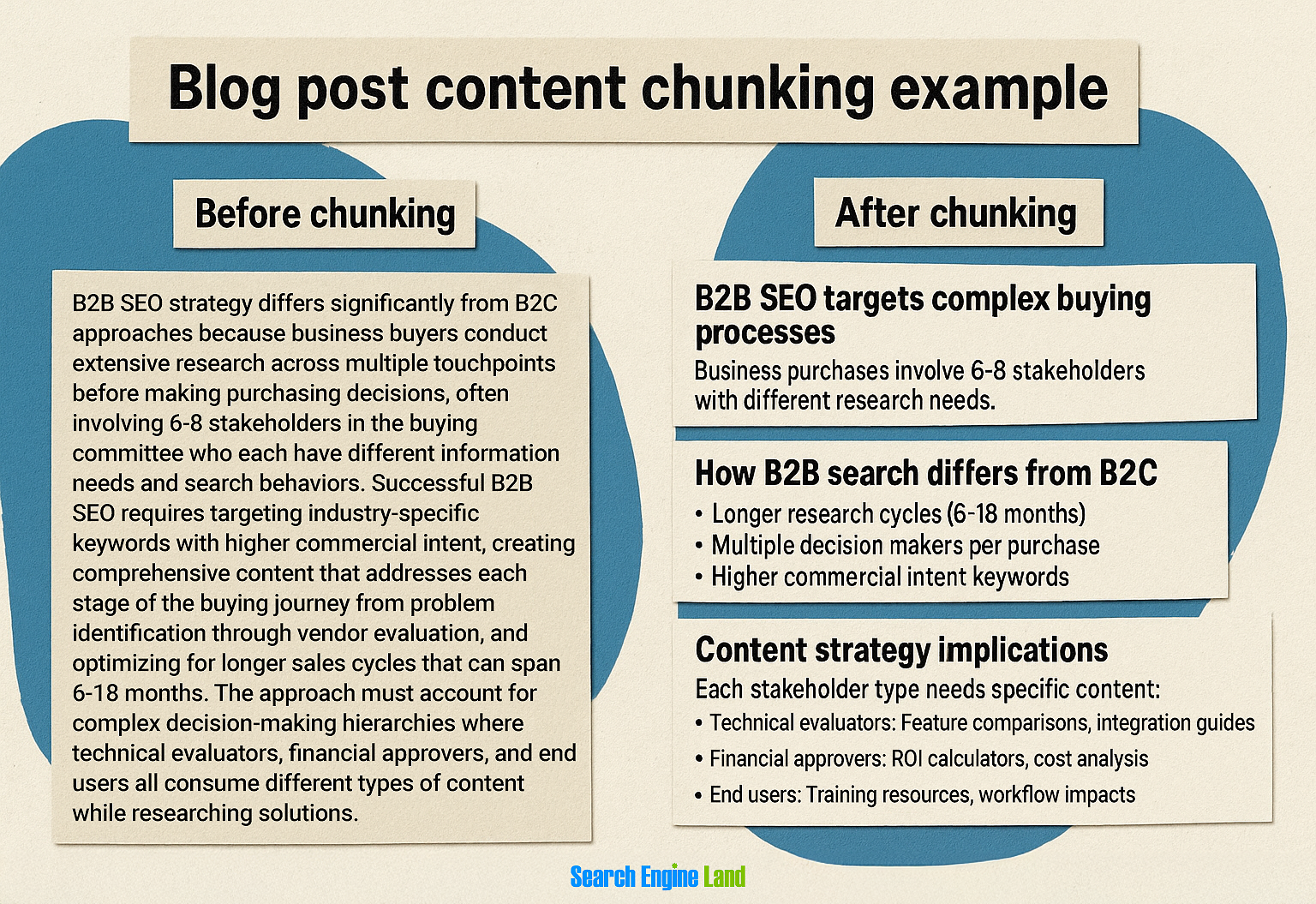
See how the chunked version guides readers through the concept systematically? It’s easier to digest and creates natural stopping points for comprehension.
This next example shows how chunking can turn overwhelming instructions into actionable steps.

The chunked version transforms an overwhelming paragraph into a clear roadmap. Each step builds logically, and readers can easily track their progress.
How to build chunking into your content workflow
Building content chunking into your workflow means creating systematic processes that ensure every piece of content gets structured for maximum readability, engagement, and search visibility before it ever goes live.
We’ve spent all this time talking about how to chunk content—but if you’re not baking it into your actual production process, you’ll end up with the same walls of text that make readers bounce. The trick is making chunking automatic, not an afterthought.
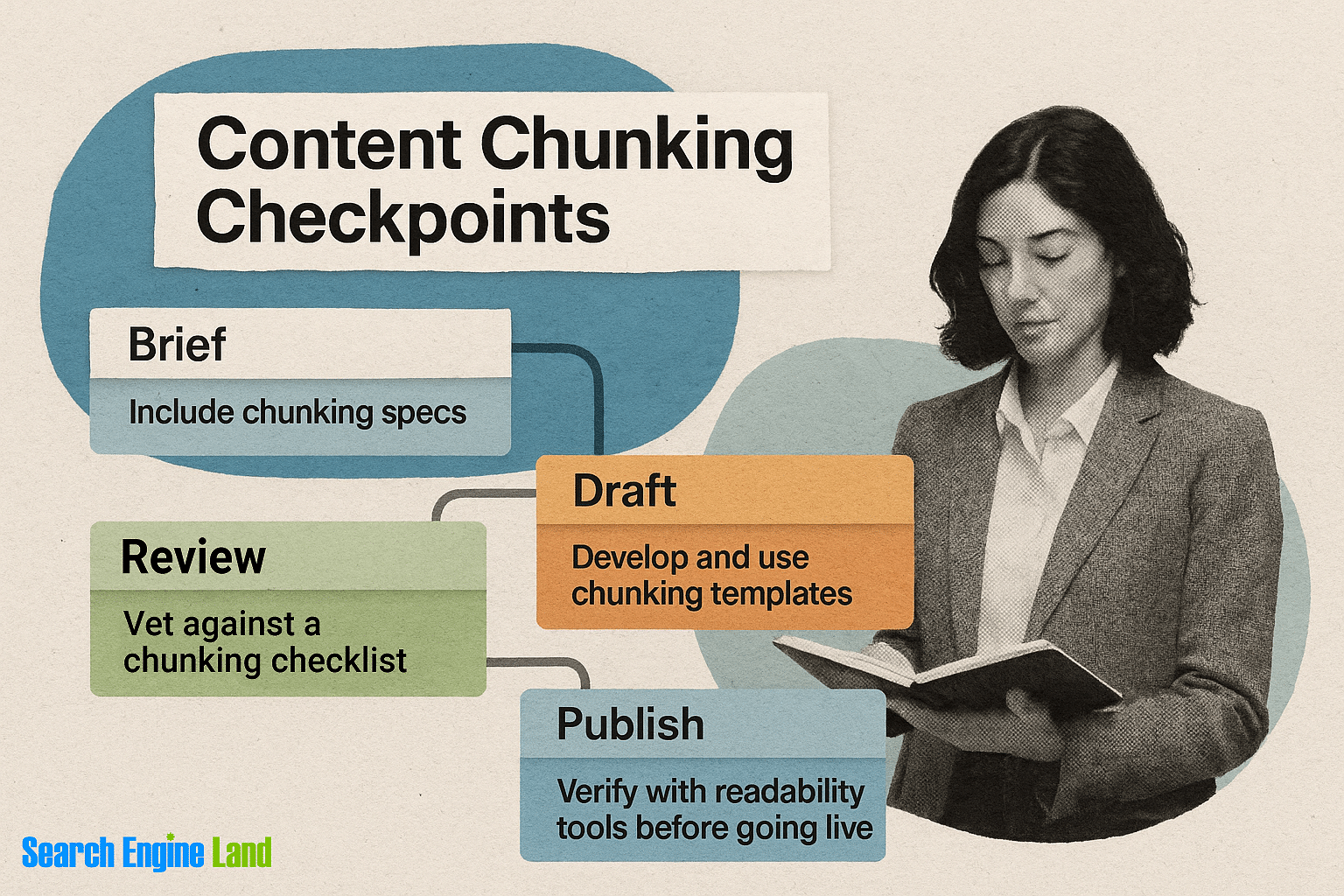
Most teams treat content structure like a “nice to have” instead of a requirement. But when you systematize chunking, you get consistency across all your content, better SEO performance, and way less back-and-forth in revisions.
Make chunking part of your content briefs
Your content brief should specify chunking requirements upfront, not leave it to chance.
Include a “chunking specs” section in every brief that covers:
- Maximum paragraph length (two to three sentences for most topics)
- Required heading hierarchy (H2 every 300-400 words, H3s for subsections)
- Bullet point guidelines (when to use them, how many per section)
- Visual break requirements (quotes, data callouts, examples)
Smart agencies will include sample chunked sections right in their briefs. Instead of just saying “make it scannable,” they show writers exactly what good chunking looks like for their brand and topic type.
Create chunking templates for content types
Different content formats need different chunking approaches—and templates make this foolproof. See above for examples.
Your how-to guides need tight, sequential chunks with numbered steps. Product comparison posts work better with side-by-side data blocks and clear feature breakdowns. Long-form evergreen content requires more strategic paragraph breaks and deeper heading hierarchies.
Build templates that specify:
- Optimal section lengths for each content type
- Where to place visual breaks and data points
- How to structure introductions and conclusions
- Internal linking patterns that support the chunked flow
When writers start with a template that already has chunking built in, they naturally write in smaller, focused sections instead of stream-of-consciousness blocks.
Build chunking checks into editorial review
Your editing process should include specific chunking quality gates, not just grammar and fact-checking.
Create an editorial checklist that includes:
- Paragraph scan (flag anything over four sentences and any sentence with more than two clauses)
- Heading hierarchy review (proper H2/H3 nesting, no skipped levels)
- Visual break audit (enough white space, clear section divisions)
- Mobile readability check (how chunks display on mobile devices)
Editors aren’t just checking for accuracy—they’re ensuring the content actually follows the chunking strategy outlined in the brief.
Track, optimize, and win in Google and AI search from one platform.
Automate chunking analysis in your workflow
Use tools to catch chunking issues before content goes live, instead of relying on manual reviews.
Readability analyzers can flag overly long paragraphs and suggest break points. Content optimization tools often include paragraph length analysis alongside keyword density checks. Some teams even use custom scripts that analyze heading distribution and flag content that doesn’t meet their chunking standards.
The goal is to automate the structural review so your editors can focus on bigger-picture improvements instead of counting sentences and checking heading levels.
Train your team on chunking fundamentals
Everyone touching content should understand why chunking matters and how to do it well.
Your writers need to understand that chunking isn’t just about breaking up text—it’s about grouping related ideas, creating logical flow, and making content AI-friendly. Your designers should know how chunked content affects layout and visual hierarchy. Even your stakeholders should understand that good chunking improves both user experience and SEO performance.
Regular training sessions on chunking best practices keep everyone aligned. Share examples of well-chunked competitor content, analyze your own content’s performance based on chunking quality, and update guidelines as search engines evolve.
The teams that win with chunking treat it like any other core skill—something that gets practiced, measured, and improved over time.
Learn to build content brief tools that include chunking requirements as part of your standard QA workflow.
Explore more on
Editorial disclosure
Search Engine Land is owned by Semrush. We remain committed to providing high-quality coverage of marketing topics. Unless otherwise noted, this page’s content was written by either an employee or a paid contractor of Semrush Inc.
About the author